


Yinga Focus
Set the subject of an image once — every placement keeps it in view, on every screen size. Zero bytes of CSS or JavaScript for your visitors.

Solid choice
Yinga Focus is a solid plugin choice in 2026, with a few things worth checking first. Was last updated 4 weeks ago, and scores 64/100 on our health check.
- Actively developed — last update 4 weeks ago
- Tested with the latest WordPress (7.1)
- Small user base (<10 active installs)
- Very few reviews so far
- Needs PHP 8.1 or newer
How does it stack up?
Side-by-side on installs, updates, ratings & support


Daily downloads
Download spikes usually follow a new release — each site that auto-updates counts as a download.
Rankings
Where Yinga Focus stands todayWordPress.org search rankings
Live position in the plugin search, top 100| Keyword | Position |
|---|---|
| crop | >100 |
| focal-point | #34 |
| images | >100 |
| object-position | >100 |
| responsive images | >100 |
About Yinga Focus
From the official readme · v1.2.1Description
Responsive design crops images. By default the browser crops from the center — straight through faces, products, and everything else that made the photo worth using. Yinga Focus lets you click the subject of an image once, in the media library, and from that moment every placement on your site keeps it in view.
How it works
- Open any image in the media library and click the subject. A live preview shows exactly what stays visible at nine common aspect ratios, and you can compare with the default center crop before saving.
- The focal point is stored as native WordPress metadata on the attachment itself. Use the same photo in twenty places — hero, card, thumbnail — and all of them inherit it automatically.
- On the front end the plugin writes only an
object-positionvalue. That is 0 KB of CSS and 0 KB of JavaScript for your visitors, and it is safe by construction:object-positiononly has an effect where your theme already crops. An image that is fully visible today cannot shift.
What is covered automatically
- Featured images, galleries and everything rendered through
wp_get_attachment_image()— every block theme, GeneratePress, Astra, and friends. - Images in post content and in the image, cover and media-text blocks.
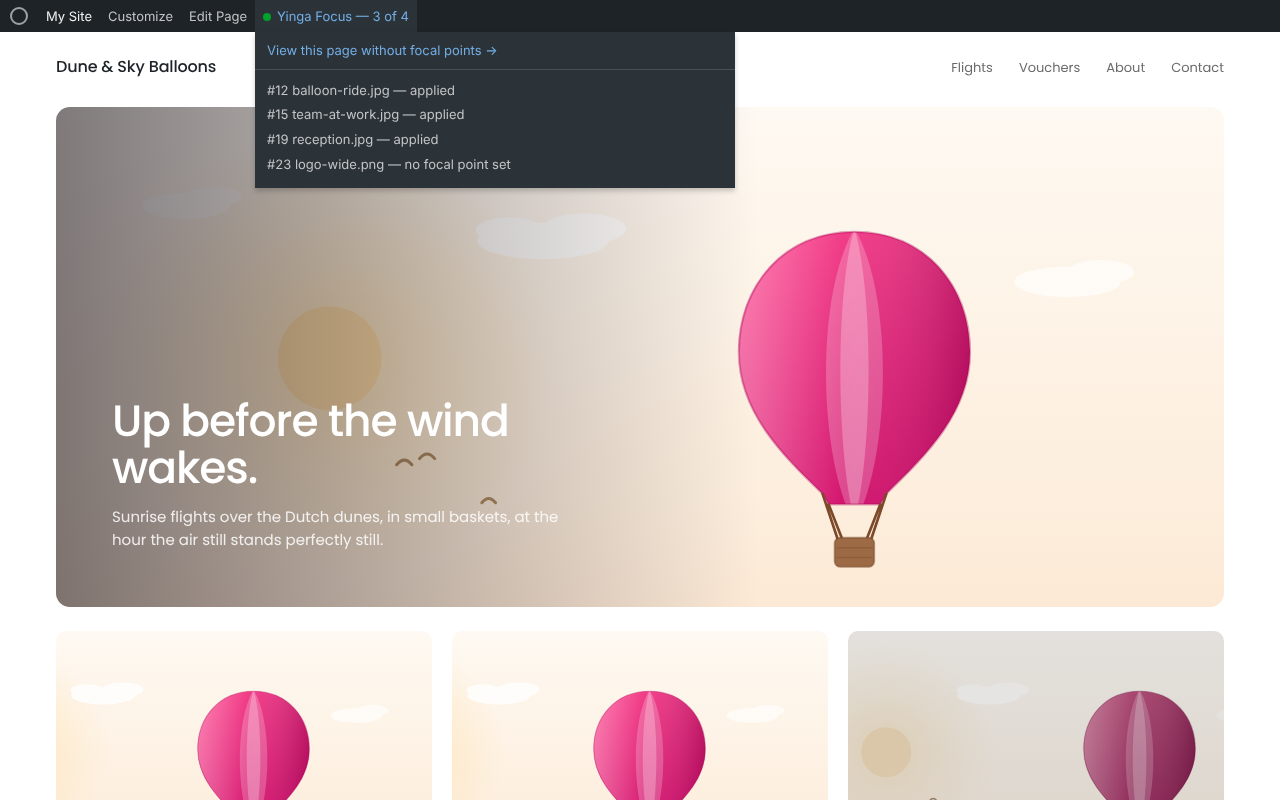
- A report in the admin bar tells you, per page, what happened to each image — and why nothing happened, when nothing did. One click shows the same page without the plugin, for an honest before/after.
Developer friendly
- Full REST API with partial updates and a resolve endpoint that returns the engine result for any aspect ratio.
- A public PHP API:
yinga_focus_get(),yinga_focus_css_position(),yinga_focus_resolve()and more. - The crop engine exists in PHP and JavaScript, tested against one shared fixture file — bit-identical results, verified on every release.
Languages
The interface is in English and fully translatable. A Dutch translation ships with the plugin; other languages can be contributed through translate.wordpress.org.
A paid add-on exists
Everything above is the free plugin, and it solves the focal-point problem for standard WordPress rendering on its own. A separate paid add-on, Yinga Focus Pro, covers the harder cases agencies run into: a safe area, a text zone, editing on the live page, re-cutting hard-cropped files, a page scanner, and Elementor backgrounds. You never need it to use this plugin.
Installation
- Install and activate the plugin.
- Open an image in the media library and click “Set focal point”.
- Click the subject, check the previews, and save. That is all — the front end follows automatically.
The behaviour can be tuned under Settings → Media.
Changelog
1.2.1
- The admin-bar styles are now added through
wp_add_inline_style()instead of being printed in the footer. - The output buffer the admin-bar report uses is now closed explicitly on shutdown, on its own level, instead of being left to PHP.
- Removed the
Update URIheader; it is meant for plugins hosted outside WordPress.org.
1.2.0
- The version constant now matches the plugin header. It is what browsers use to tell editor builds apart, so after an update you no longer get the previous version’s editor from cache.
- Focal data of an image attached to a draft or private post is no longer readable without logging in. An attachment status of
inheritwas being treated as public, which it is not. - The admin-bar report no longer breaks on images whose title contains a dollar sign.
- Deactivating the plugin no longer flushes the whole site’s object cache. It never cleared anything of ours.
- Uninstalling no longer removes a setting that belongs to the paid add-on.
breakpointsis now declared in the REST route schema; it was already accepted and sanitised.- Hook names are now written out in full (
yinga_focus/...) and every file guards against direct access in the standard form, so the plugin passes the WordPress.org Plugin Check without warnings on those points.
1.1.0
- The plugin is now fully translatable. Source strings are English, and a Dutch translation (nl_NL) ships with the plugin; other languages can be contributed through translate.wordpress.org.
- The editor translates itself through
wp.i18n, so its buttons and hints are translatable as well — they used to be hard-coded.
1.0.0
- First public release.
- Focal editor in the media library with live previews for nine aspect ratios and a compare mode.
- Automatic application through WordPress rendering (attachment functions, post content, image/cover/media-text blocks).
- Admin-bar report with per-image verdicts and a compare view.
- REST API (partial updates, resolve) and public PHP API.
- Zero front-end payload: no CSS, no JavaScript for visitors.
Screenshots



For developers
Is this your plugin? Show off the numbers.
Add a live badge to your site, docs or GitHub README. It updates on its own — no account needed.
Best Yinga Focus alternatives
All crop plugins →





FAQ
Yinga Focus: quick answers
Straight answers, pulled from live WordPress.org data.
Source: WordPress.org
Is Yinga Focus free?
Yes. Yinga Focus is free to download and use from the official WordPress.org plugin directory.
Is Yinga Focus safe to use in 2026?
Yinga Focus is a solid plugin choice in 2026, with a few things worth checking first. Was last updated 4 weeks ago, and scores 64/100 on our health check.
How many websites use Yinga Focus?
Yinga Focus is active on <10 WordPress websites and has been downloaded 367 times since it launched in November 2026. It was downloaded 371 times in the last 30 days.
Does Yinga Focus work with WordPress 7.1?
Yes. The developer has tested Yinga Focus up to WordPress 7.1.5, the latest release. It requires WordPress 6.5 or newer.
What PHP version does Yinga Focus need?
Yinga Focus requires PHP 8.1 or higher. Most hosts run PHP 8.x today, so it works on any modern WordPress hosting.
When was Yinga Focus last updated?
The latest version, 1.2.1, was released on November 3, 2026 (4 weeks ago).
Who makes Yinga Focus?
Yinga Focus is developed and maintained by yinga.
What are the best alternatives to Yinga Focus?
The most popular alternatives to Yinga Focus are Image Aspect Ratio Crop Fie… (20K+ installs), Manual Image Crop (7K+ installs) and Image Regenerate & Select C… (7K+ installs).
Powered by PageForge
One template and a spreadsheet. A real page for every search.
PageForge turns each row of a CSV into a WordPress page with its own title, URL, SEO fields and schema, built on the layout you already designed. Free on WordPress.org.
- CSV and XLSX, plus Google Sheets on Professional and Enterprise
- Its own title, URL, SEO fields and schema for every page
- Works with the block editor, Elementor, Divi and Avada
- Free on WordPress.org, no credit card