


Easy Events Calendar : All-in-One Events Calendar with Social Event, Eventbrite, Meetup, Google & iCal Import Support
A powerful, modern, and flexible WordPress event calendar with advanced recurring events, mini calendar, iCal sync, and real-time AJAX filtering.

Solid choice
Easy Events Calendar is a solid plugin choice in 2026, with a few things worth checking first. It runs on 100+ sites, is rated 5/5 and was last updated 2 months ago, and scores 75/100 on our health check.
- Tested with the latest WordPress (7.1)
- Small user base (100+ active installs)
- Very few reviews so far
How does it stack up?
Side-by-side on installs, updates, ratings & support



Daily downloads
Download spikes usually follow a new release — each site that auto-updates counts as a download.
Rankings
Where Easy Events Calendar stands todayWordPress.org search rankings
Live position in the plugin search, top 100| Keyword | Position |
|---|---|
| calendar | #67 |
| event calendar | #42 |
| eventbrite | #9 |
| >100 | |
| meetup | #6 |
Version adoption
Share of active sites per release.
Rating breakdown
★★★★★★★★★★ 5 from 2 reviews
About Easy Events Calendar
From the official readme · v1.1.4Description
✨ Easy Events Calendar is a powerful, modern, and flexible event management plugin for WordPress.
Create, manage, and display events with ease — whether they are internal events or imported from platforms like Eventbrite, Meetup, or Facebook.
⚡ Includes advanced recurring events, real-time AJAX event discovery, Mini Calendar widgets, and seamless “Add to Calendar” integration for a premium user experience.
📖 Documentation | 🔗 Plugin Website
🚀 Why Choose Easy Events Calendar?
✔ No coding required
⚡ Fast and performance optimized
🔗 Supports internal + external events
📱 Fully responsive design
🔍 Advanced AJAX filtering system
📆 Built-in Mini Calendar & “Add to Calendar” Sync
🚀 Core Features
🗂️ Internal Event Management
- Create and manage events using custom post type (eec_events)
- Clean and user-friendly admin interface
- No dependency on third-party tools
🔁 Advanced Recurring Events
- Supports Daily, Weekly, Monthly, and Yearly schedules
- Automatically generates future event instances
- Ideal for classes, webinars, and recurring events
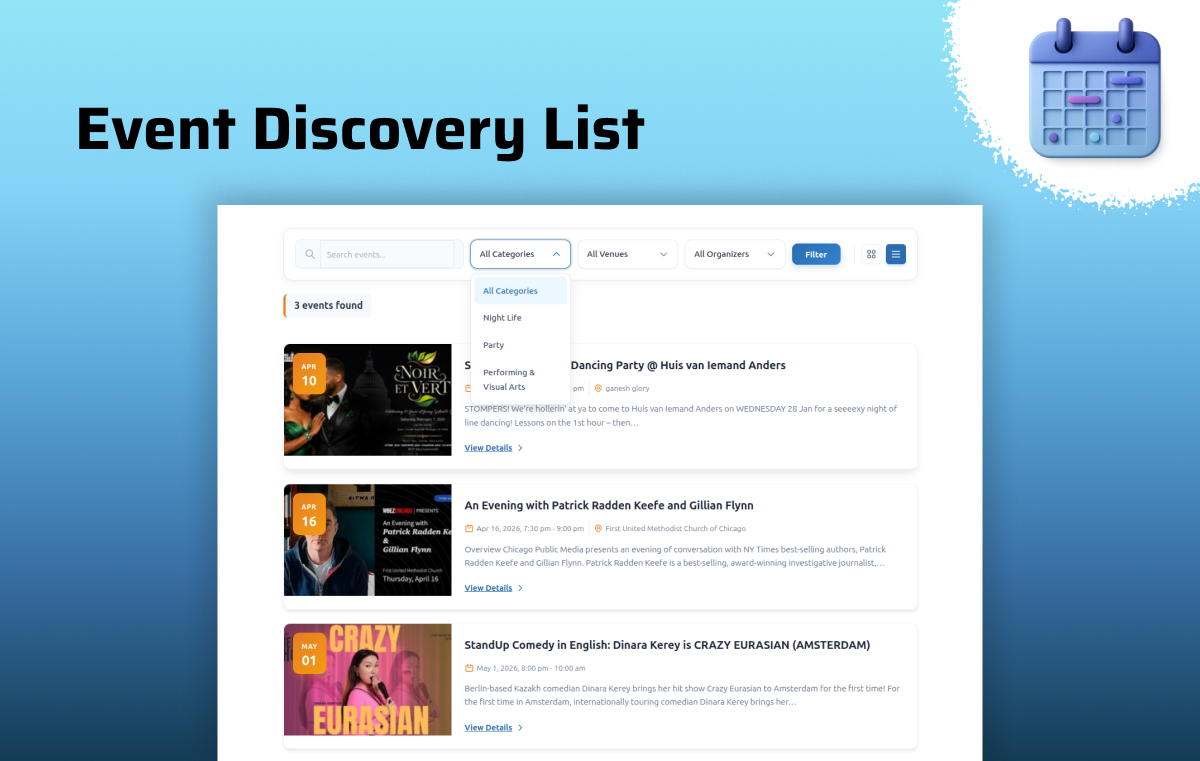
🔍 Smart Event Discovery (AJAX Powered)
- Real-time event filtering without page reload
- Filter by Category, Tag, Venue, Organizer, Date Range, Day, and Time
- Fast and smooth user experience
- Option to display past events when upcoming events are not available
👉 Shortcode:
[eec_events_discovery]
🏷️ Event Organization
- Categories and Tags support
- Venue management 📍
- Organizer management 👤
- Dedicated archive pages
📅 Calendar Export & Sync
- “Add to Calendar” buttons for individual events
- Support for Google Calendar, Yahoo Calendar, and iCalendar (.ics) downloads
- Global iCal feed link for syncing all upcoming events
🗓️ Mini Calendar & Tools
- Compact Mini Calendar view for sidebars
- Includes a dedicated Mini Calendar widget
- Built-in Feedback form for user engagement
👉 Shortcode:
[easy_event_calendar_mini]
🎨 Modern UI Design
- Clean and professional layouts
- Smooth animations and transitions
- Modern glass-style interface
⚡ High Performance
- Optimized SQL queries
- Handles large event data efficiently
- Fast pagination system
📱 Fully Responsive
- Mobile-friendly layouts
- Compact pagination for small screens
- Works perfectly on all devices
🎨 Available Views
📅 Calendar View – Full month layout
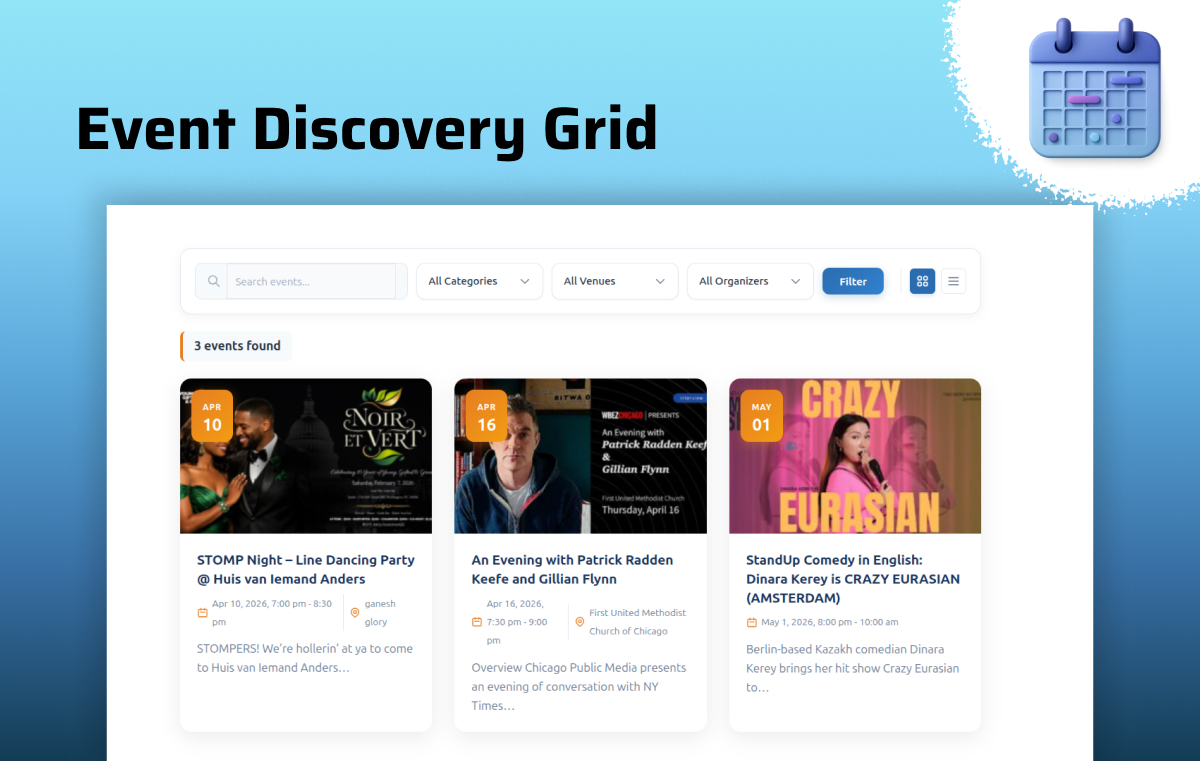
🧱 Grid View – Card-based modern layout
📋 List View – Clean listing format
🧩 Staggered (Masonry) – Dynamic layout
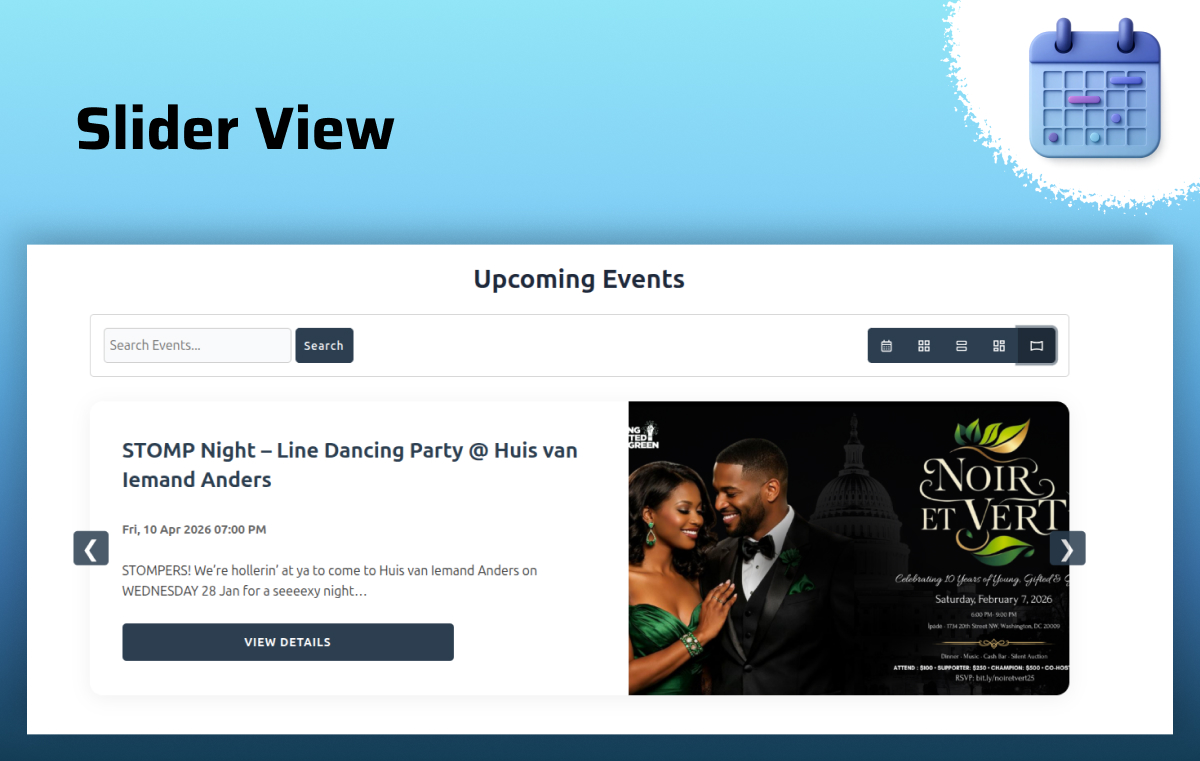
🎞️ Slider View – Interactive event slider
🗓️ Mini Calendar – Compact sidebar calendar view
🔗 Supported External Sources
Easy Events Calendar also works seamlessly with the following third-party plugins:
- Import Eventbrite Events
- Import Social Events
- Import Meetup Events
- WP Event Aggregator
- EventON
- Events Manager
⚙️ Installation
- Upload the plugin folder to /wp-content/plugins/ or install via dashboard
- Activate the plugin
- Go to Settings > Easy Events Calendar
- Start creating events from “Easy Events” menu
📌 Shortcodes:
Use the following shortcodes to display events on your website:
[eec_events_discovery] – Displays AJAX-powered event discovery with filters.
[easy_events_calendar] – Shows the classic events calendar view.
[easy_event_calendar_mini] – Displays the compact Mini Calendar.
📜 Changelog
1.1.4
- ADDED: Event location map on the event details page.
1.1.3
- FIXED: Grid, Row, Slider, and Masonry layouts switching to Month view on mobile.
- FIXED: Mini Calendar active date highlighting and event fetching.
- IMPROVED: Better support for EventON, MEC, Meetup, and Eventbrite in the Advanced Filters.
1.1.2
- FIXED: Issue with past events not displaying when navigating to previous months in the calendar view.
- FIXED: Mobile layout responsiveness and text overlapping issues in the Mini Calendar event list.
- FIXED: Empty description tooltip fallback text in the calendar view.
- IMPROVEMENTS: The event search bar now correctly filters by the selected event source.
- IMPROVEMENTS: Strengthened AJAX security with stricter data sanitization and nonce verification.
- IMPROVEMENTS: Resolved PHPCS warnings for better code quality and WordPress coding standards compliance.
1.1.1
- ADDED: Custom Recurring events Option.
- ADDED: “Add to Calendar” integration with Google Calendar, Yahoo Calendar, and iCalendar (.ics) file download.
- ADDED: iCal feed link for all upcoming events.
- ADDED: Mini Calendar view.
- ADDED: Mini Calendar widget for sidebars.
- ADDED: Feedback form.
- ADDED: Advanced event filters including Category, Tag, Location, Organizer, Date From, Date To, Day, and Time.
- ADDED: Option to display past events when no upcoming events are available.
- IMPROVEMENTS: Completely modernized and premium admin GUI, replacing basic design settings.
- IMPROVEMENTS: Enhanced security through improved data sanitization.
1.1.0
- ADDED: New “Related Events” support with term-based matching (Category, Tag, Venue, Organizer) to automatically display related events.
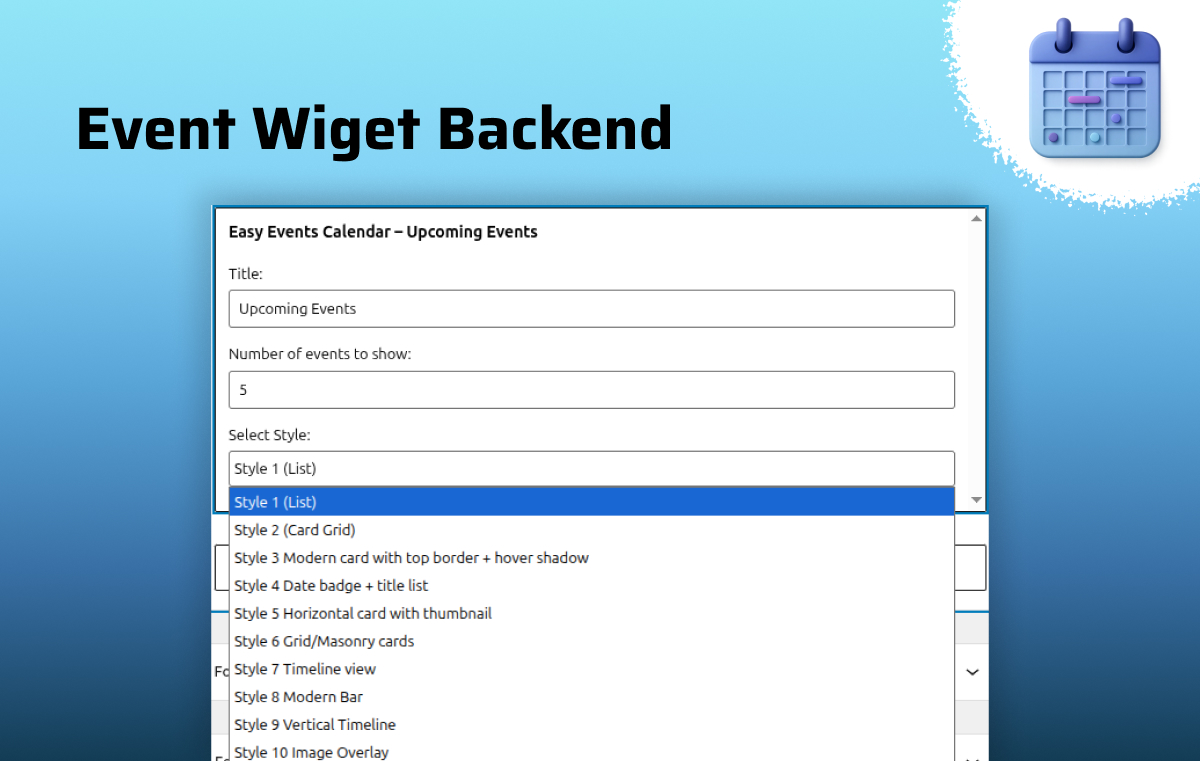
- ADDED: Advanced “Upcoming Events” widget with 10 unique styles (Timeline, Masonry, List, Card Grid, Badge, etc.), fully customizable from the admin panel.
- ADDED: AJAX filtering and layout toggle in [eec_events_discovery] shortcode with live search and Grid/List view switching.
- ADDED: Custom post type for internal events.
- ADDED: Custom taxonomies — Category, Tag, Organizer, and Venue.
- ADDED: Full support for recurring events with instance-based date handling.
- ADDED: Randomized professional placeholder images for events without featured images.
- ADDED: Design customization settings including Colors, Typography, and Header visibility controls.
- FIXED: Tooltip positioning and visibility issues.
- FIXED: Security and input sanitization improvements across all inputs.
- IMPROVEMENTS: Enhanced metadata support including venue addresses, Google Maps (latitude/longitude), and organizer contact details.
- IMPROVEMENTS: Organizer taxonomy changed to hierarchical for better admin experience.
- IMPROVEMENTS: Unified event data retrieval logic for improved performance.
- IMPROVEMENTS: Added compatibility support for WordPress 7.0.
1.0.3
- ADDED: New slider layout.
- ADDED: Support for multiple widgets.
- ADDED: Option to hide the header.
- ADDED: Category parameter support in the shortcode.
- IMPROVEMENTS: Security and code quality improvements.
1.0.2
- ADDED: Support for EventOn plugin.
- ADDED: Support for Events Manager plugin.
- FIXED: Issue with event ordering in Masonry(Staggered) layout.
1.0.1
- Updated plugin branding and improved overall presentation.
1.0.0
- Initial release
- Display support for Eventbrite, Meetup, Facebook Events, and WP Event Aggregator
- Includes 4 unique views: Calendar, Grid, Row, and Masonry
- Load More feature with pagination settings
- Button text and colour customisation options
🚀 Upgrade Notice
1.1.0
Major update with Internal Events, Recurring System, and AJAX Event Discovery.
Frequently asked questions
🔁 Does this support recurring events?
Yes. You can create events that repeat daily, weekly, monthly, or yearly. The system automatically generates future occurrences.
⚡ How does the discovery shortcode work?
The [eec_events_discovery] shortcode provides a real-time AJAX filtering interface. Users can filter events instantly without page reload.
📱 Is it mobile-friendly?
Yes. All layouts are fully responsive and optimized for mobile devices.
🧑💻 Can I create events manually inside WordPress?
Yes. You can create and manage events directly using the built-in “Easy Events” custom post type without relying on external sources.
🔌 Can I import events from other platforms?
Yes. The plugin supports integration with Eventbrite, Facebook Events, Meetup, and other popular event plugins.
🎨 Can I change the layout or design of events?
Yes. You can choose from multiple layouts like Calendar, Grid, List, Masonry, and Slider to match your website design.
⚡ Will it slow down my website?
No. The plugin is optimized with efficient SQL queries and AJAX loading to ensure fast performance even with a large number of events.
🏷️ Can I filter events by category or organizer?
Yes. Users can filter events by Category, Tag, Venue, and Organizer using the AJAX-powered discovery system.
🗓️ How do I add a Mini Calendar to my sidebar?
You can easily display a compact Mini Calendar in your sidebar, footer, or any widget area by using the [easy_event_calendar_mini] shortcode. This view is fully responsive and perfect for saving space.
Screenshots


For developers
Is this your plugin? Show off the numbers.
Add a live badge to your site, docs or GitHub README. It updates on its own — no account needed.
Best Easy Events Calendar alternatives
All calendar plugins →





FAQ
Easy Events Calendar: quick answers
Straight answers, pulled from live WordPress.org data.
Live data from WordPress.org · checked Oct 16, 2026
Is Easy Events Calendar free?
Yes. Easy Events Calendar is free to download and use from the official WordPress.org plugin directory.
Is Easy Events Calendar safe to use in 2026?
Easy Events Calendar is a solid plugin choice in 2026, with a few things worth checking first. It runs on 100+ sites, is rated 5/5 and was last updated 2 months ago, and scores 75/100 on our health check.
How many websites use Easy Events Calendar?
Easy Events Calendar is active on 100+ WordPress websites and has been downloaded 2,668 times since it launched in July 2025. It was downloaded 244 times in the last 30 days.
Does Easy Events Calendar work with WordPress 7.1?
Yes. The developer has tested Easy Events Calendar up to WordPress 7.1.3, the latest release. It requires WordPress 6.4 or newer.
What PHP version does Easy Events Calendar need?
Easy Events Calendar requires PHP 8.0 or higher. Most hosts run PHP 8.x today, so it works on any modern WordPress hosting.
When was Easy Events Calendar last updated?
The latest version, 1.1.4, was released on August 17, 2026 (2 months ago).
Who makes Easy Events Calendar?
Easy Events Calendar is developed and maintained by Xylus Themes.
What are the best alternatives to Easy Events Calendar?
The most popular alternatives to Easy Events Calendar are The Events Calendar (600K+ installs), Events Manager (60K+ installs) and Timetable and Event Schedul… (30K+ installs).
Powered by PageForge
Want thousands of pages that rank like these? Build them in an afternoon.
This directory runs on the same engine as PageForge. Turn any spreadsheet, CSV or API into thousands of fast, SEO-ready WordPress pages — with schema, internal links and AI-written copy baked in.
- CSV, Google Sheets & API data sources
- AI content, schema & internal links per page
- Works with Elementor, Gutenberg, Yoast & Rank Math
- Free on WordPress.org — no credit card


