



X3P0: Breadcrumbs
Add breadcrumb navigation to any site. Works with block and classic themes. Auto-detects site structure and custom post types. Improves SEO.

Use with caution
X3P0: Breadcrumbs works, but test it on a staging site before relying on it in 2026. It runs on 200+ sites, is rated 5/5 and was last updated 7 months ago, and scores 48/100 on our health check.
- Small user base (200+ active installs)
- Very few reviews so far
- Only tested up to WordPress 6.8 (latest is 7.1)
- Needs PHP 8.1 or newer
How does it stack up?
Side-by-side on installs, updates, ratings & support



Daily downloads
Download spikes usually follow a new release — each site that auto-updates counts as a download.
Rankings
Where X3P0: Breadcrumbs stands todayWordPress.org search rankings
Live position in the plugin search, top 100| Keyword | Position |
|---|---|
| block | >100 |
| breadcrumbs | #13 |
| navigation | >100 |
| seo | >100 |
| trail | #48 |
Version adoption
Share of active sites per release.
Rating breakdown
★★★★★★★★★★ 5 from 4 reviews
About X3P0: Breadcrumbs
From the official readme · v4.1.0Description
X3P0: Breadcrumbs is the most robust breadcrumb navigation system for WordPress. Built on 17+ years of development, it automatically detects your permalink structure and displays accurate breadcrumbs for every page on your site.
Perfect for improving site navigation and SEO, this breadcrumbs plugin works seamlessly with both block themes and classic themes. Simply insert the Breadcrumbs block via the WordPress Site Editor or add it to your theme templates.
Key Features
Automatic Site Structure Detection
The plugin automatically detects your permalink setup and builds breadcrumbs based on your site’s hierarchy. No configuration needed–it just works out of the box. But you can also customize if you need to change it.
Custom Post Type Support
Automatically recognizes custom post types and custom taxonomies created by other plugins or your theme. Whether you’re running an ecommerce solution, a portfolio site, or any custom setup, breadcrumbs will display correctly.
Block Theme and Classic Theme Compatible
Insert breadcrumbs using the WordPress block editor in any template, template part, or pattern. For classic themes, easily add breadcrumbs using a simple PHP function call.
Developer Customization
Built on a robust object-oriented PHP foundation with extensive hooks and filters. Developers can customize every aspect of breadcrumb generation and display.
Schema.org Structured Data Support
Choose from plain HTML, Schema.org microdata, or RDFa formats for optimal SEO and search engine visibility.
Flexible Display Options
Control which breadcrumb items display, customize separators, hide breadcrumbs on specific pages, and style breadcrumbs to match your theme.
How to Add Breadcrumbs to Your Site
For Block Themes:
- Go to Appearance → Editor
- Open your Header template part (or any template where you want breadcrumbs)
- Click the block inserter (+) and search for “Breadcrumbs”
- Insert the block and customize settings in the block sidebar
- Save your template
The breadcrumbs will automatically display site-wide based on your permalink structure.
For Classic Themes:
Add this code to your header.php or any template file where you want breadcrumbs to appear:
<?= do_blocks('<!-- wp:x3p0/breadcrumbs /-->') ?>
SEO Benefits
Breadcrumbs improve your site’s search engine optimization by:
- Providing clear site structure signals to search engines
- Reducing bounce rates by offering easy navigation
- Supporting Schema.org structured data markup
- Creating internal linking structure automatically
- Improving user experience and site usability
Search engines like Google display breadcrumbs in search results when properly formatted, giving your site more visibility and higher click-through rates.
Supported Content Types
The breadcrumbs plugin automatically handles:
- Pages and subpages (hierarchical structure)
- Blog posts with category breadcrumbs
- Custom post types (products, portfolios, etc.)
- Custom taxonomies (tags, genres, locations, etc.)
- Archive pages (date, author, taxonomy archives)
- Search results pages
- 404 error pages
- Attachment pages
Customization Options
Block Settings:
- Show/hide on the homepage
- Show/hide first crumb (home link)
- Show/hide last crumb (current page)
- Link the last crumb (current page)
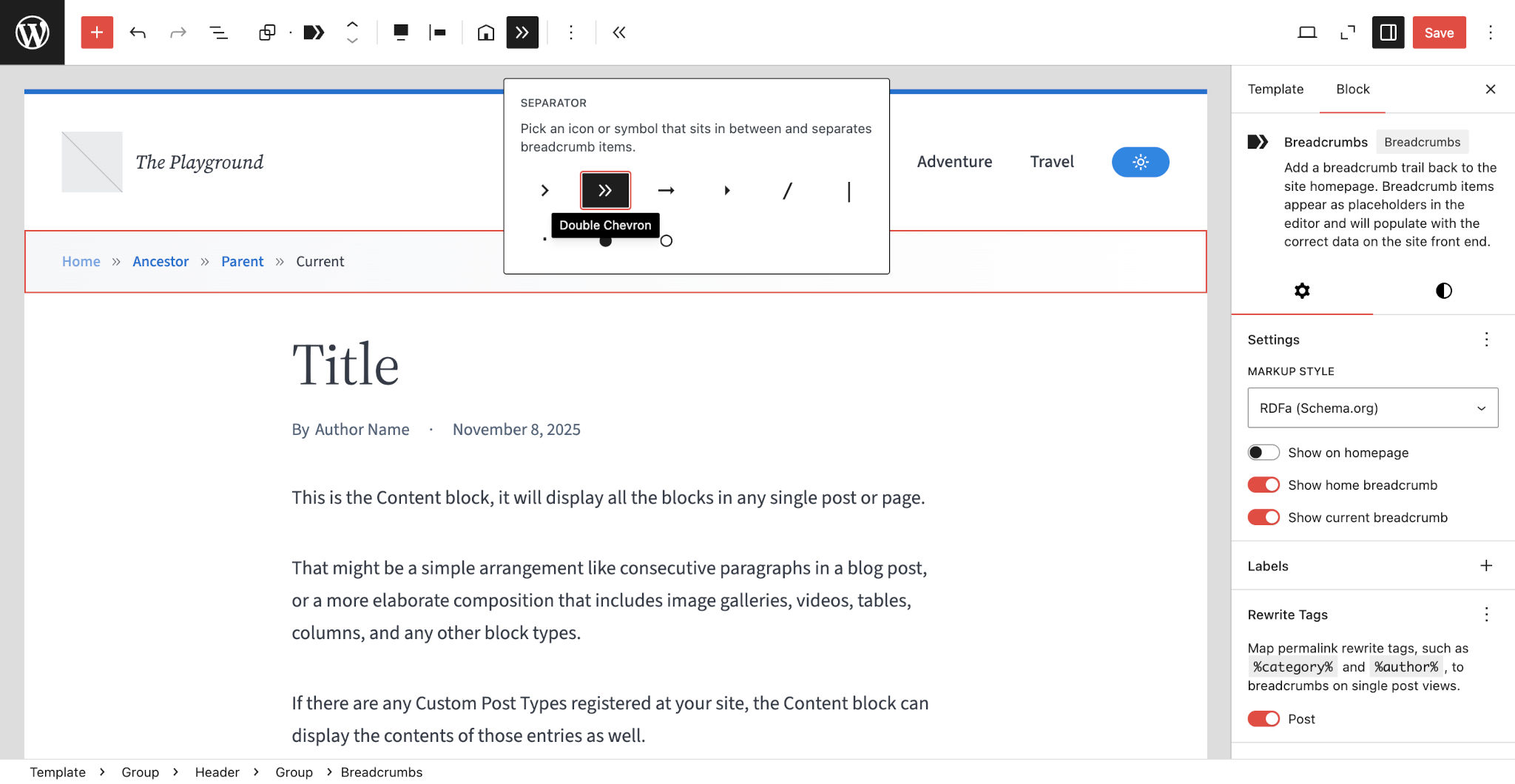
- Choose separator style (e.g., slash, arrow, greater-than, bullet, chevron)
- Customize labels and text
- Determine whether to automatically detect permalink structure
- Choose taxonomies to match post types
Developer Options:
- Custom query classes for unique breadcrumb logic
- Custom assembler classes for conditional breadcrumb display
- Custom crumb classes for specialized breadcrumb items
- Filter hooks for modifying which breadcrumbs are shown
How It Works
This breadcrumbs plugin analyzes the current WordPress query and generates breadcrumbs based on:
- Your permalink structure – Date-based, post name, category-based, or custom
- Content hierarchy – Parent pages, category relationships, custom taxonomies
- Post type configuration – Custom post type archives and relationships
- Taxonomy settings – Primary categories and taxonomy hierarchies
The plugin automatically detects these settings and builds the most accurate breadcrumb trail for each page, so you don’t need to configure complex rules.
Developer Documentation
For developers who want to customize breadcrumbs programmatically, the plugin provides extensive PHP classes and hooks. See the GitHub repository for full developer documentation.
Why Choose X3P0: Breadcrumbs?
Unlike simpler breadcrumb plugins, X3P0: Breadcrumbs handles complex site structures automatically:
- Hierarchical pages – Automatically shows parent → child relationships
- Category-based permalinks – Shows category structure in URLs
- Date-based archives – Displays year/month/day breadcrumb trails
- Custom post type archives – Links back to custom post type archive pages
- Taxonomy hierarchies – Displays parent/child category relationships
- Multisite networks – Can include network home in breadcrumb trail
The plugin has been refined since 2009, making it one of the most mature and reliable breadcrumb solutions for WordPress.
Frequently asked questions
How do I add breadcrumbs to my WordPress site?
For block themes, open the Site Editor (Appearance → Editor), edit your Header template part, and insert the Breadcrumbs block. For classic themes, add to your template files.
Do breadcrumbs help with SEO?
Yes. Breadcrumbs improve SEO by providing clear site structure to search engines, reducing bounce rates, and creating internal links. They also appear in Google search results when properly formatted, improving click-through rates.
Does this work with custom post types?
Yes. The plugin automatically detects all custom post types and taxonomies on your site and generates appropriate breadcrumbs for them without any configuration.
Can I customize the breadcrumb separator?
Yes. In the block settings panel, you can choose from several separator styles, including slash (/), arrow (→), bullet (•), chevron (›), and more.
How do I hide breadcrumbs on the homepage?
In the block settings panel, toggle off Show on homepage.
Can I show category breadcrumbs for blog posts?
Yes. In the block settings panel, select a taxonomy under the Post Taxonomies panel. You can choose the taxonomy for any post types registered on your site.
How do I add breadcrumbs to specific pages only?
Insert the Breadcrumbs block directly into individual page templates or use conditional logic in your theme templates to control where breadcrumbs appear.
Does the plugin support Schema.org markup?
Yes. The plugin includes three markup options: plain HTML, Schema.org microdata, and RDFa format. Developers can specify which format to use when implementing breadcrumbs via PHP.
How do I customize breadcrumb labels?
In the block settings panel, select the label you want to customize under the Labels panel. This provides a subset of common labels that you may want to modify.
Why don’t my breadcrumbs show parent pages?
Make sure your pages are actually set as parent/child in the page editor. The plugin reads the page hierarchy from WordPress and displays it automatically.
Does this work with page builders?
Yes. You can insert the Breadcrumbs block into any page builder that supports WordPress blocks, including patterns and reusable blocks.
How do I add custom breadcrumbs for specific pages?
Developers can use the x3p0/breadcrumbs/resolve/query-type filter hook to implement custom breadcrumb logic for specific conditions.
Can I hide the current page from breadcrumbs?
Yes. In the block settings, toggle off Show last breadcrumb.
Is the plugin translation-ready?
Yes. The plugin is fully internationalized and has been translated into multiple languages. All labels and text can be translated using standard WordPress translation tools.
Can I style the breadcrumbs with CSS?
Yes. The breadcrumbs output standard HTML with CSS classes you can target. You can customize it with the common design tools available in the Site Editor or manually via theme.json.
Does it work with date-based permalink structures?
Yes. If your site uses date-based permalinks (e.g., /2025/10/post-name/), the plugin automatically generates breadcrumbs showing Home → Year → Month → Day → Post.
How do I display taxonomy breadcrumbs for custom post types?
In the block settings panel, select a taxonomy under the Post Taxonomies panel. Choose your custom post type and its associated taxonomy.
How do I troubleshoot breadcrumbs not appearing?
Check that: The block is inserted in your template Show on homepage is enabled if testing on homepage Your theme doesn’t have CSS hiding breadcrumbs There are no PHP errors in your error log
How to use breadcrumbs for better navigation?
Step 1: Choose Your Template Decide where breadcrumbs should appear. Most sites display them in the header, just below the site title and navigation menu, or at the top of the content area. Step 2: Insert the Block Navigate to Appearance → Editor, open your chosen template part, and insert the Breadcrumbs block using the block inserter. Step 3: Configure Settings Customize the block appearance using the settings panel. Choose your separator style, decide whether to show breadcrumbs on the homepage, and adjust visibility of the first and last items. Step 4: Test Different Pages Visit different…
Changelog
The block now has Post Taxonomies and Map Rewrite Tags options. You may need to set these options to get the structure that you prefer. Developers: the public API has changed. See the GitHub README for more info.
4.0.0
Added
- Rewrite Tags block option, which lets you select which post types map to rewrite tags (e.g.,
%category%,%author%, etc.). Only post types with rewrite tags in their slugs appear as options. - Post Taxonomies block option, which lets you choose which taxonomy’s terms to display in the breadcrumb trail for single post views.
- Labels block option, which lets you customize a subset of labels that most commonly need to be changed:
- Home
- Search Results
- 404
- The Home label can also be edited directly from the content canvas.
- Content-only editing support for the block. When enabled, the toolbar controls no longer appear. However, users can edit the Home label directly in the editor canvas.
- Block supports:
ariaLabel: WordPress doesn’t display a UI control for this, but it’s possible to change the defaultBreadcrumbslabel via the Code Editor view.shadow: you can now add shadows—not sure how I missed adding this before.
- Time-based breadcrumbs:
- Hour, minute, and second archive breadcrumbs.
- Posts with hour, minute, and seconds in their permalink structure now show those crumbs (assuming rewrite mapping is enabled).
- A
JsonLinkedDatamarkup class for outputting JSON-LD breadcrumbs in the site head. This is not output by default, but developers can opt in. - Action hooks:
x3p0/breadcrumbs/init– Fires just before the plugin’s default service providers are registered.x3p0/breadcrumbs/register– Fires just after the plugin’s default service providers are registered.x3p0/breadcrumbs/boot– Fires just after the plugin’s default services providers have been booted.
- Filter hooks:
x3p0/breadcrumbs/resolve/query-type– Allows filtering the primary query type used to determine the breadcrumbs for the current page.
namespaceargument for the markup configuration, which allows controlling the HTML class prefixes or each element (defaults tobreadcrumbs).
Changed
- A complete overhaul of the public-facing developer API. The plugin is no longer compatible with classes/functions earlier than 4.0.0 for people who were extending it with PHP.
- Because the new Rewrite Tags and Post Taxonomies block options were added, the block no longer defaults to display a category for posts. This can be set manually by the user, within patterns, or within theme templates.
- Under the hood, for the same reason as above, the PHP code no longer auto-sets the category taxonomy for posts when the permalink structure is set to
%postname%. This was a relic from the code when users didn’t have direct control over the settings. - All block panels now use the Tools Panel component, which brings them up to date with the Core blocks in WordPress 6.9.
- The icon-based block attributes have been merged into single attributes. The block is still backwards compatible with the old attributes with no current plans for removing their support:
separatorandseparatorType→separatorIconhomePrefixandhomePrefixType→homeIcon
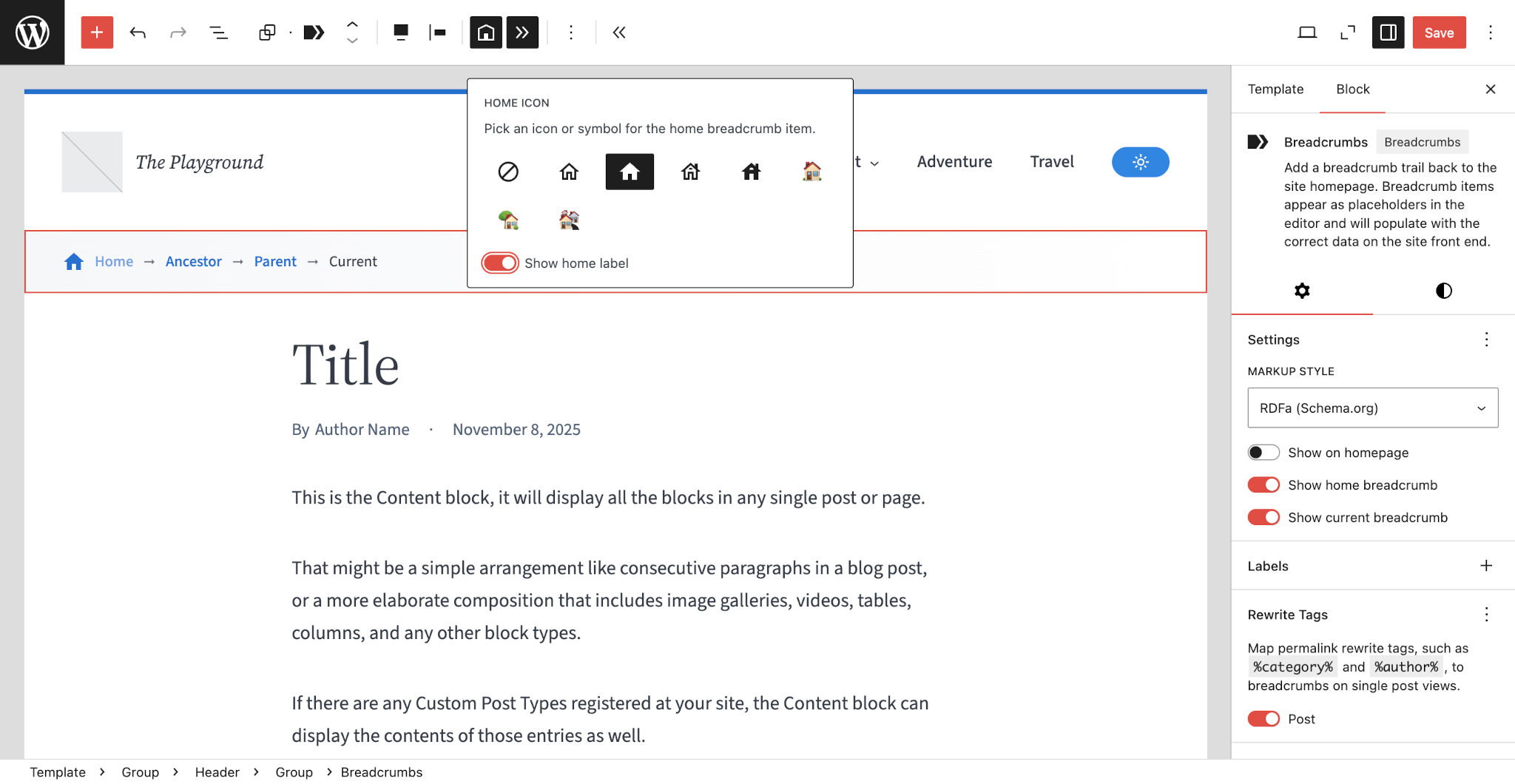
- The block preview in the content canvas now shows Home → Ancestor → Parent → Current. This change was implemented so that users can better see the effects of removing the first and/or last breadcrumbs in the editor.
- The
justifyContentattribute is strictly limited toleft,center, andright. These have always been the only options. It’s just defined inblock.jsonnow. - The
404 Not Foundlabel has been changed toPage not foundto match WordPress’s default output for 404 document titles. - The plugin now uses Composer for autoloading instead of the previous custom
Autoloadclass. - All nested elements for the block now use the
.wp-block-x3p0-breadcrumbs__prefix instead of.breadcrumbs__.
Fixed
- Post taxonomy terms on single post views are no longer sorted by the plugin. This allows third-party plugins to manage the sorting. This is particularly important for SEO plugins that allow you to set a “primary” term for a post.
- Correctly determine when a weekly archive is being displayed.
Removed
- Support for editing the Block layout. Previously, you could change how the block wrapped, but this was just UI clutter that served no practical purpose.
- Call to
wp_set_script_translations()for the block. WordPress already handles this through the normal block registration process.
For complete version history, see the changelog on GitHub.
Screenshots

For developers
Is this your plugin? Show off the numbers.
Add a live badge to your site, docs or GitHub README. It updates on its own — no account needed.
Best X3P0: Breadcrumbs alternatives
All block plugins →





FAQ
X3P0: Breadcrumbs: quick answers
Straight answers, pulled from live WordPress.org data.
Live data from WordPress.org · checked Sep 28, 2026
Is X3P0: Breadcrumbs free?
Yes. X3P0: Breadcrumbs is free to download and use from the official WordPress.org plugin directory.
Is X3P0: Breadcrumbs safe to use in 2026?
X3P0: Breadcrumbs works, but test it on a staging site before relying on it in 2026. It runs on 200+ sites, is rated 5/5 and was last updated 7 months ago, and scores 48/100 on our health check.
How many websites use X3P0: Breadcrumbs?
X3P0: Breadcrumbs is active on 200+ WordPress websites and has been downloaded 7,632 times since it launched in October 2023. It was downloaded 148 times in the last 30 days.
Does X3P0: Breadcrumbs work with WordPress 7.1?
X3P0: Breadcrumbs is officially tested up to WordPress 6.8.10, while the latest release is 7.1.2. It may still work, but try it on a staging site first.
What PHP version does X3P0: Breadcrumbs need?
X3P0: Breadcrumbs requires PHP 8.1 or higher. Most hosts run PHP 8.x today, so it works on any modern WordPress hosting.
When was X3P0: Breadcrumbs last updated?
The latest version, 4.1.0, was released on February 23, 2026 (7 months ago).
Who makes X3P0: Breadcrumbs?
X3P0: Breadcrumbs is developed and maintained by Justin Tadlock.
What are the best alternatives to X3P0: Breadcrumbs?
The most popular alternatives to X3P0: Breadcrumbs are Spectra Legacy (1M+ installs), Breadcrumb NavXT (800K+ installs) and PDF Embedder (300K+ installs).
Powered by PageForge
Want thousands of pages that rank like these? Build them in an afternoon.
This directory runs on the same engine as PageForge. Turn any spreadsheet, CSV or API into thousands of fast, SEO-ready WordPress pages — with schema, internal links and AI-written copy baked in.
- CSV, Google Sheets & API data sources
- AI content, schema & internal links per page
- Works with Elementor, Gutenberg, Yoast & Rank Math
- Free on WordPress.org — no credit card


