



WunderPaint – The Dynamic Design and Automation Studio
Design once, and your posts, products and prices fill the image in. A full image editor inside your media library.

Solid choice
WunderPaint is a solid plugin choice in 2026, with a few things worth checking first. Was last updated 2 weeks ago, and scores 64/100 on our health check.
- Actively developed — last update 2 weeks ago
- Tested with the latest WordPress (7.1)
- Small user base (<10 active installs)
- Very few reviews so far
How does it stack up?
Side-by-side on installs, updates, ratings & support



Daily downloads
Download spikes usually follow a new release — each site that auto-updates counts as a download.
Rankings
Where WunderPaint stands todayWordPress.org search rankings
Live position in the plugin search, top 100| Keyword | Position |
|---|---|
| Image editor | >100 |
| image generator | >100 |
| image optimization | >100 |
| media library | >100 |
| photo editor | >100 |
About WunderPaint
From the official readme · v1.430.0Description
WunderPaint puts a complete, layer-based editor into your media library – and then removes the border between your designs and your content. Text and image layers don’t have to hold fixed values: point them at your posts, products, prices or custom fields, and the same design renders itself for any piece of content you preview it with. A blog header, a price badge, a product card – designed once, filled by your website. Around the editor, a full media manager keeps your growing library organized, and everything you make stays fully editable, with versions and rollback.
See it live: Try the demo | Docs & FAQs | Website
A complete editor
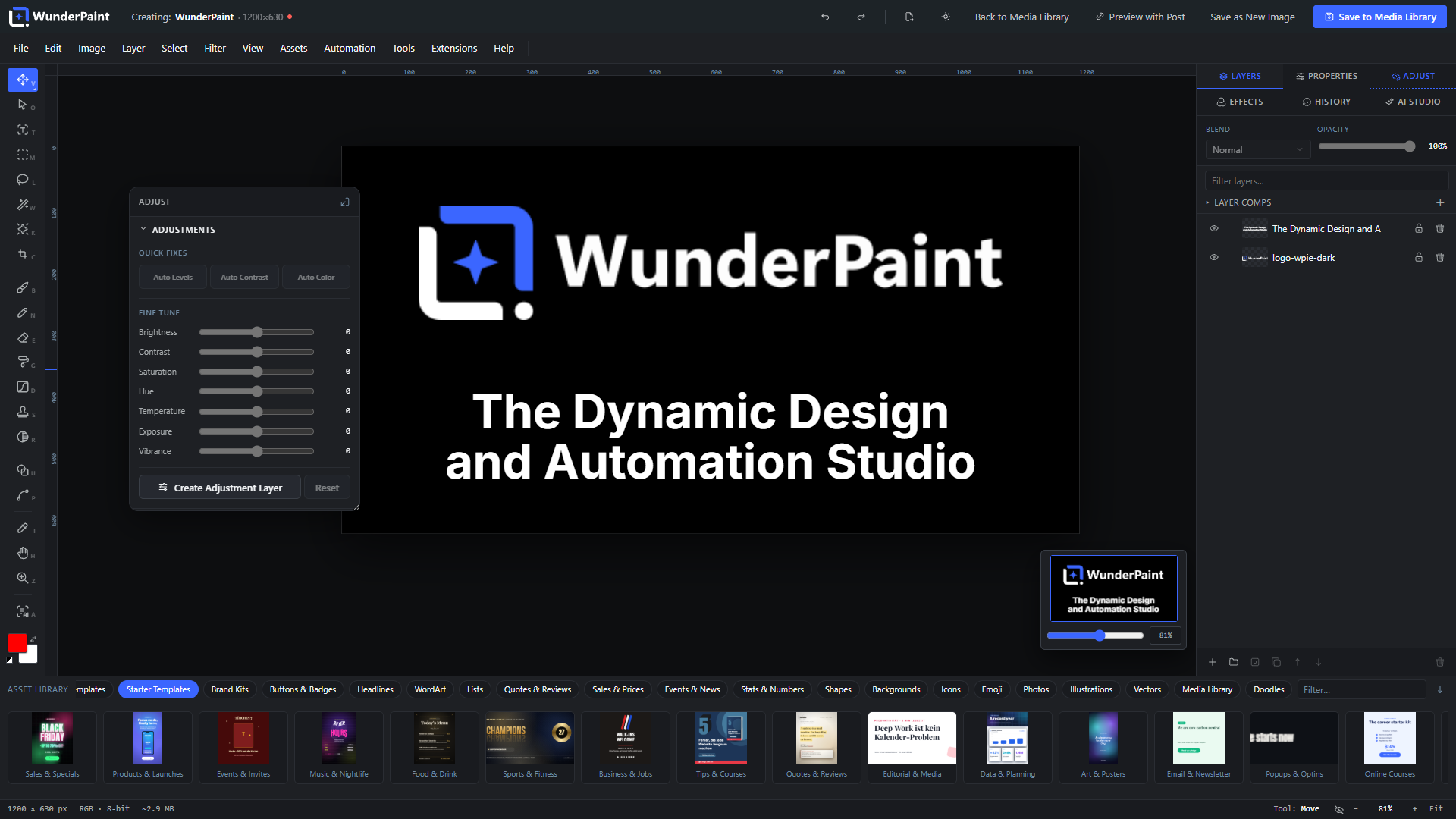
Open any image, or start on a blank canvas, and work the way you would in a professional desktop editor:
- Layers, groups and masks with blend modes, non-destructive layer styles (drop shadow, glows, bevel, overlays, stroke and more), adjustment layers, clipping masks and Smart Objects.
- Selections that understand your image: marquee, lasso and magic wand, plus subject selection and click-to-select powered by local models. Refine, feather, invert, save and reuse selections.
- Painting and retouching: brush, pencil and eraser with opacity, flow and hardness, custom brush tips, clone stamp, blur/sharpen brush, symmetry painting and content-aware object removal.
- Vectors: pen tool with full path editing, a shape studio where every shape has dials (a crown’s points, a ring’s slice, a speech bubble’s tail) plus fifty generator families that are pure maths – superformula, guilloche, Lissajous, harmonograph, Chladni, Sierpinski, Truchet, mazes, Voronoi, metaballs, flow lines, brush strokes – gradients with on-canvas handles, dashed strokes, rounded and soft corners.
- Filters and effects from Gaussian Blur, Curves and Levels to Duotone, Halftone, Glitch, Glow and Tilt-Shift, plus color LUTs (.cube), filter presets, smart filters and one-click enhance.
- Precision tools: free transform with distortion, align and distribute, magnetic guides, radial repeat, guide templates, Magic Resize, and a recorder that captures your steps as replayable actions.
- Multi-page documents, tabs and safety nets: work on several documents at once, autosave to the browser every 30 seconds with session restore, and per-image version history with one-click rollback.
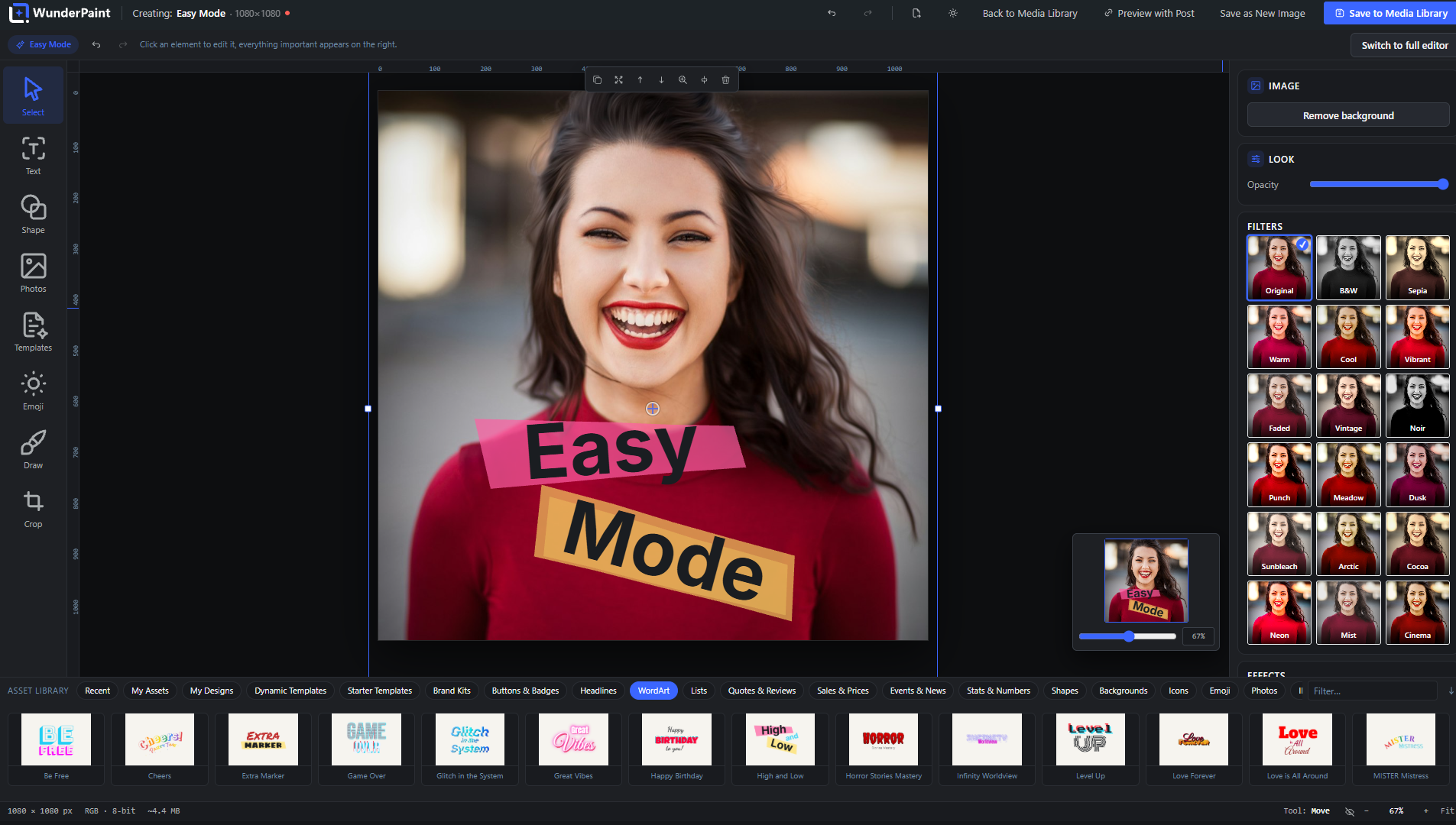
- Easy Mode keeps the surface calm and simple for occasional users; the full depth is one click away, on the very same document.
Design once – your content fills it in
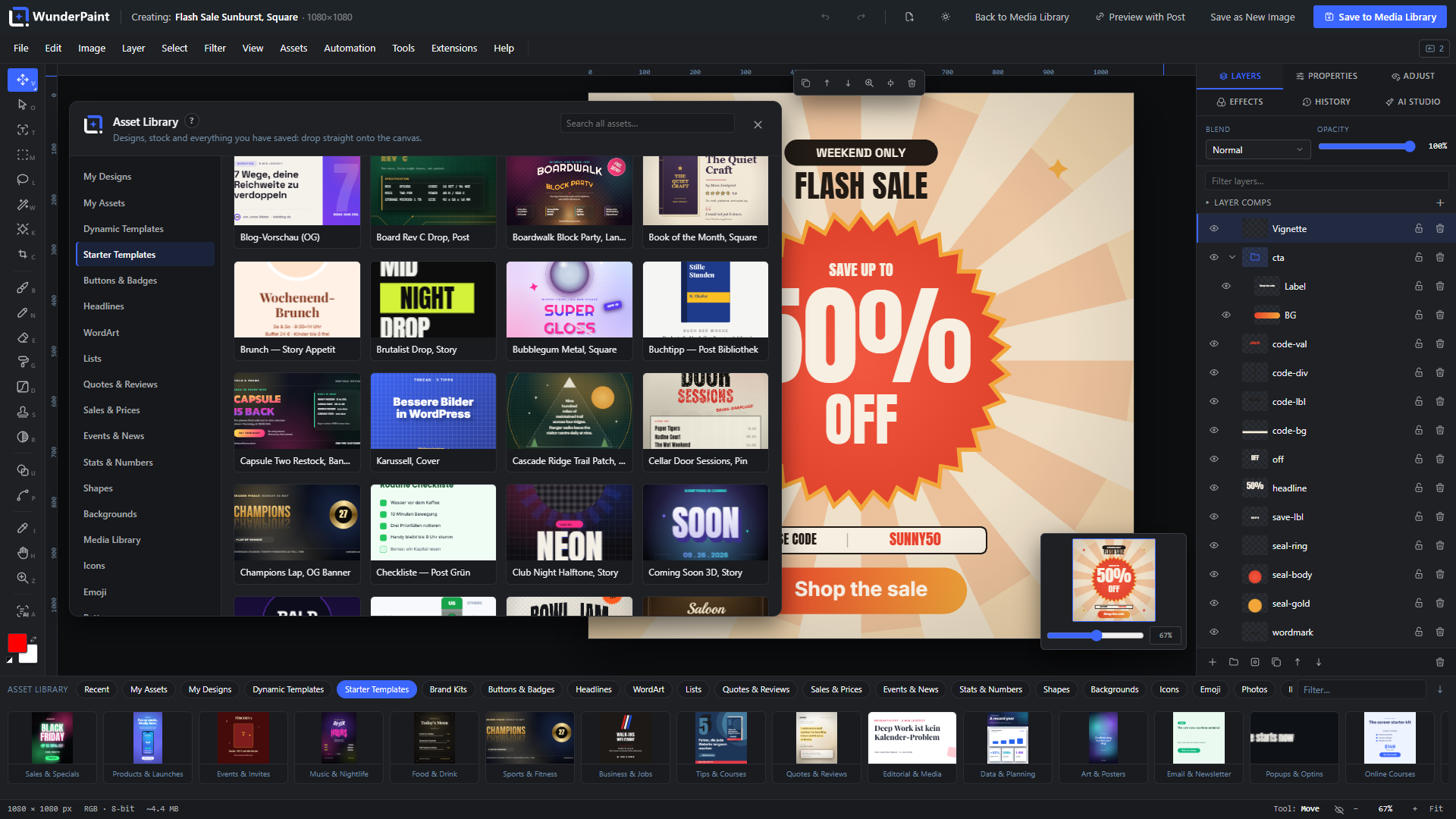
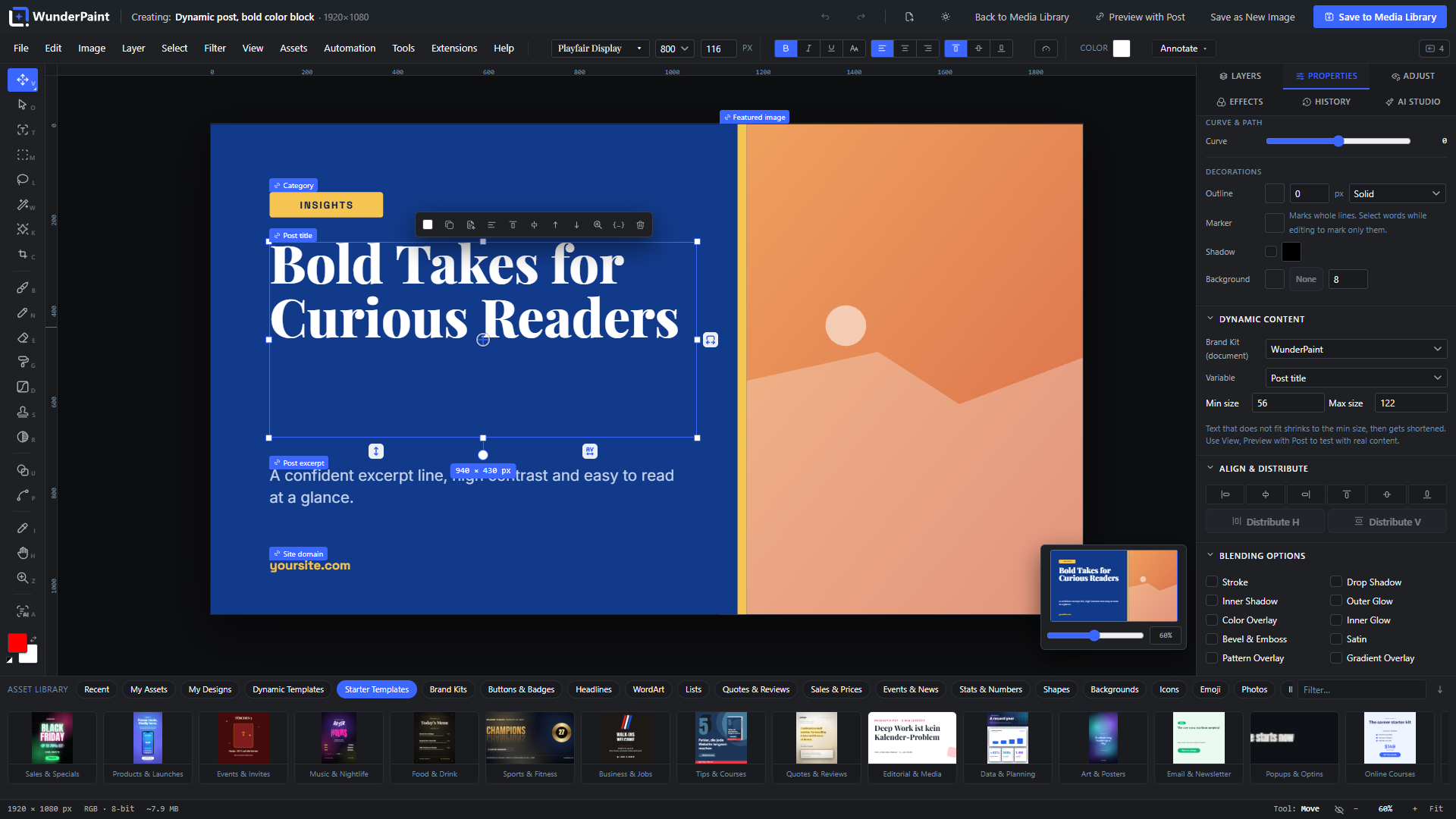
This is the heart of WunderPaint. Text and image layers can be bound to live WordPress data instead of fixed values:
- Bind layers to your content: post title, excerpt, body, permalink, category, tags, dates, reading time and featured image; author name, bio and avatar; site name, tagline and logo; your own custom fields; ACF image and text fields.
- WooCommerce built in: product name, price, sale price, discount percentage, SKU, stock status and quantity, low-stock hint, rating, review count, sale end date and product image – fields that are empty outside a sale simply hide their layer, so “SALE” badges appear and disappear on their own.
- Mix text and variables: write
{{post.title}}or{{product.price}}right inside a sentence. Bound text auto-fits its font size to the frame, bound images get cover/fit/fill rules with an anchor point. - More than text and images: QR codes rebuild themselves from variables, charts and tables pull rows straight from a WordPress query, and Smart Objects containing bound layers re-render per post.
- Preview with real content while you design: pick any post or product, watch every binding resolve live on the canvas, then export or save the resolved result – and set it as the featured image in the same flow.
- Reviews, comments and people: pull approved reviews with stars, avatars and excerpts, or your site’s users as team cards, into designed layouts.
- Save as Dynamic Template and reopen it any time; the stored template keeps its placeholders, so one design serves your entire archive.
Real typography
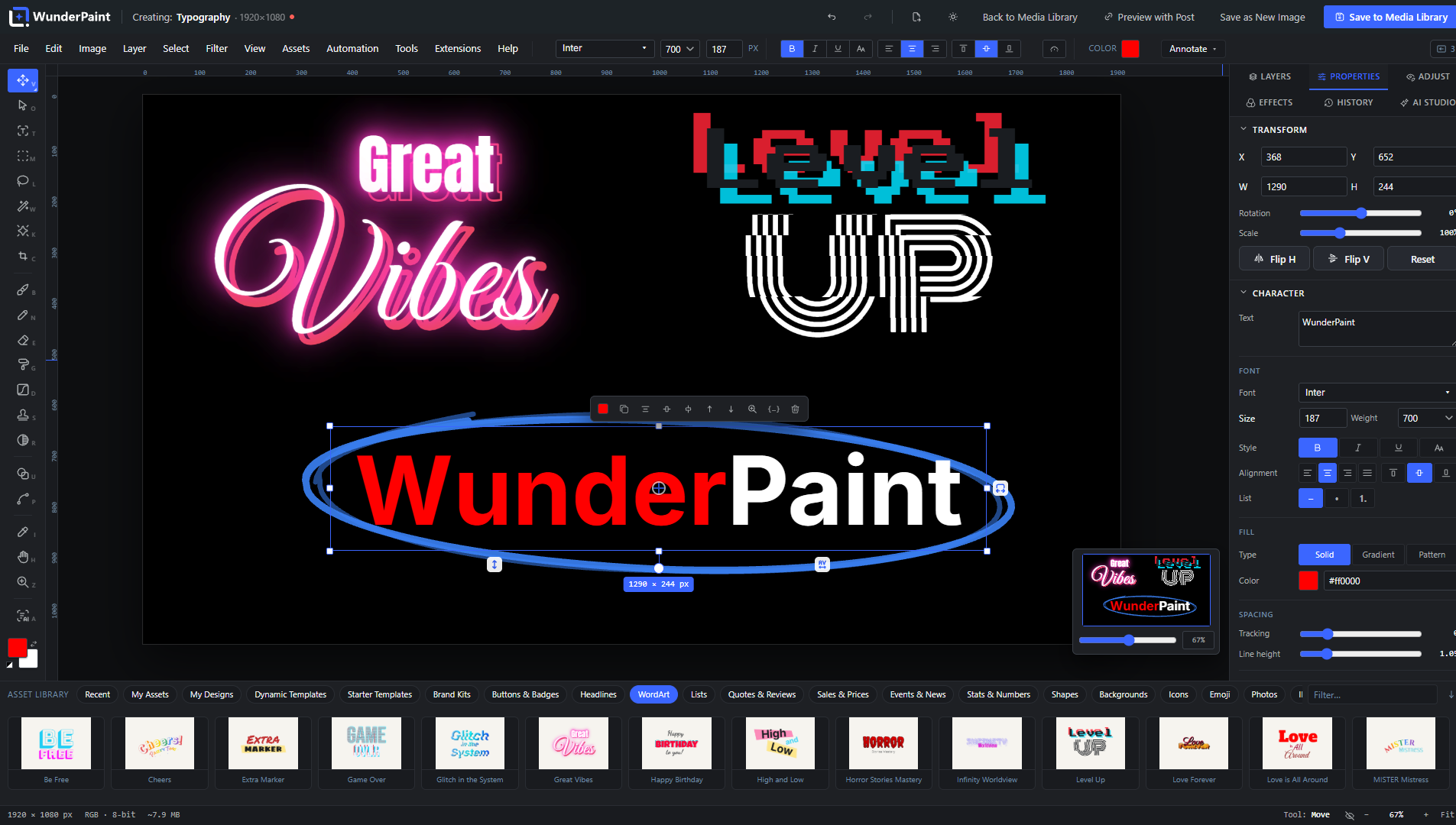
Style single letters inside one layer, choose from one-click text styles and combinable text effects, bend text with warp presets or a free arc, run it along any path, flow it into a shape, or place an editable headline behind the subject of a photo. Fluid Text lets the box set the type: every line grows to the width of the frame and the words spread over as many lines as the height allows, so a headline re-flows while you drag. Layouts put a look on top, from stacked poster capitals to an editorial lockup with kicker and detail line, and the look re-flows with the box too. Area text wraps automatically, marker-style hand-drawn highlights decorate single passages, drag handles adjust tracking and leading directly on the canvas, and a WCAG contrast check warns you before your caption becomes unreadable. Fonts come from bundled families, from a catalog your server downloads and self-hosts, from your own uploaded font files, from fonts your site already provides – and from Google’s CDN only if you explicitly opt in.
Charts, tables and data
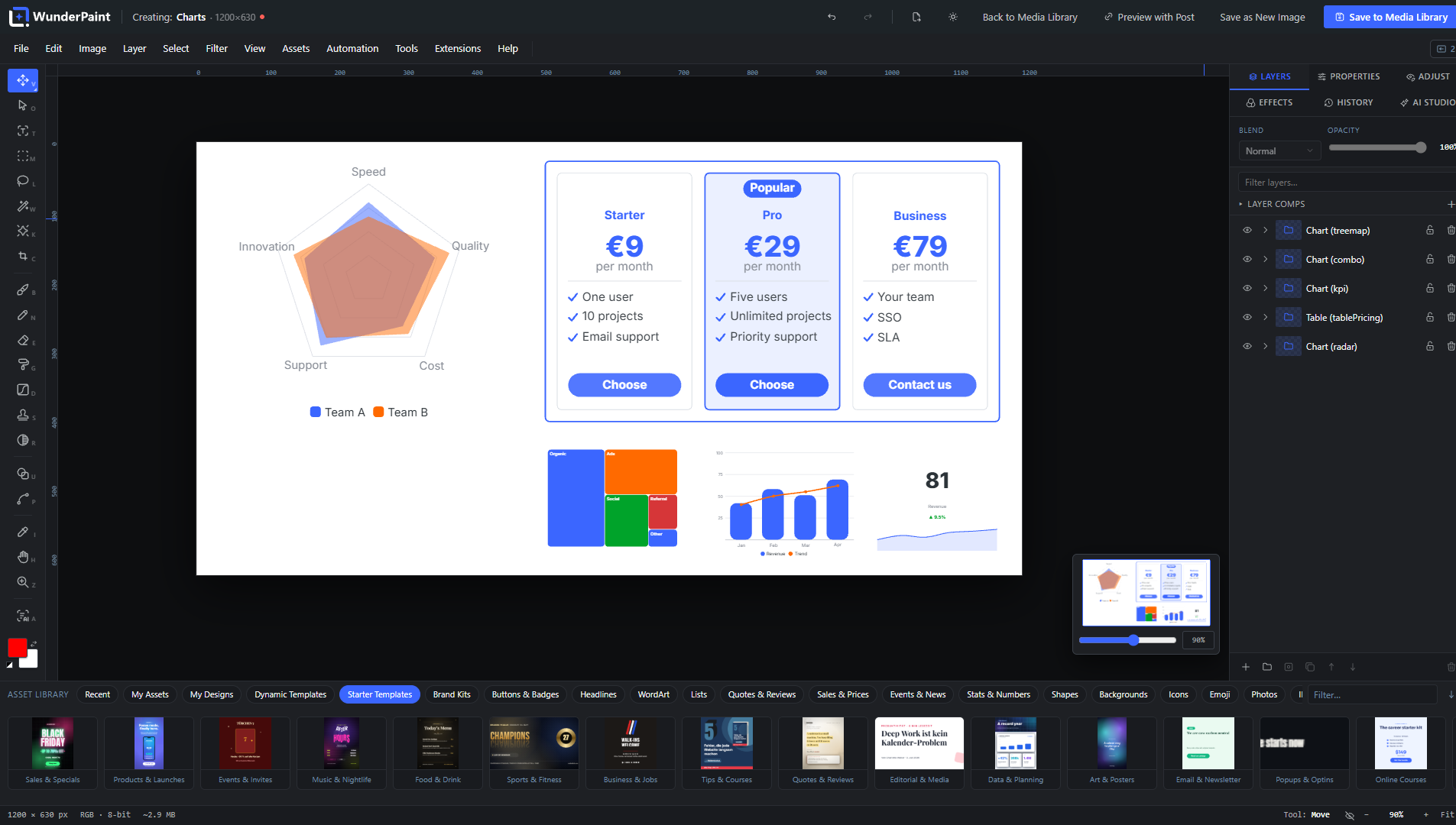
A dedicated studio builds chart types (bars, lines, areas, pie, ring, radar, waterfall, funnel, heatmap, treemap and more) and table types (comparison, pricing, ranking, schedule, checklist, menu, scorecard, calendar month, league table and more) – all as groups of real, editable shape and text layers, never flat images. Feed them by hand, paste CSV, or attach a WordPress query; cells and titles accept variables too.
Studios and generators built in
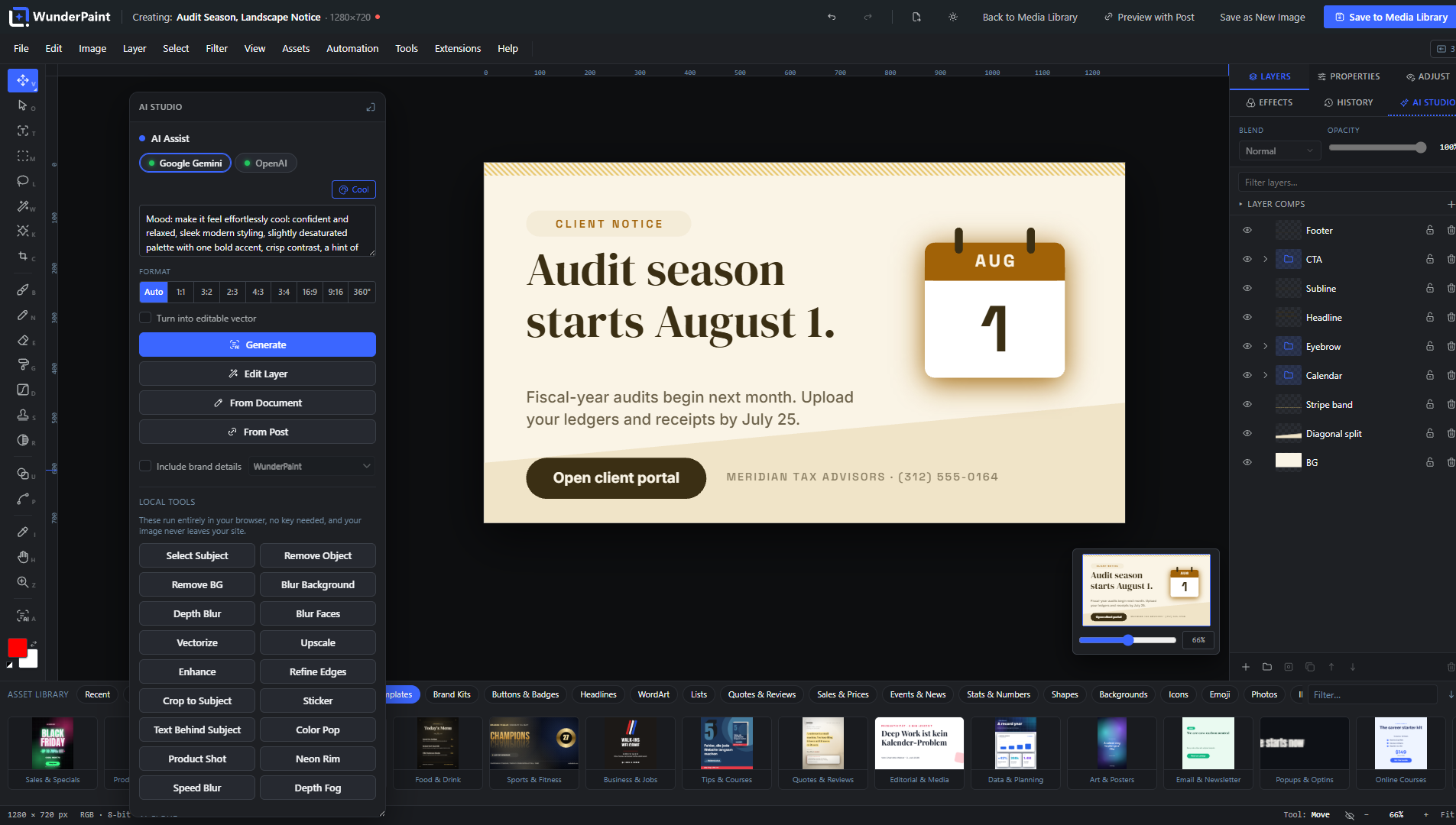
- Design Generator: describe what you need, get rendered layout variants with your brand colors, headline and logo, and insert the winner as editable layers – optionally already bound to post fields as a dynamic template. The image slot can use a stock photo, an AI image, or a placeholder.
- Background Studio: mesh gradients, organic blobs and waves, geometric lattices, low-poly, topographic contours, halftone rasters, concentric rings and confetti – all with grain and a random seed; tileable styles export as seamless patterns into your library.
- Screenshot Beautifier: frame any screenshot in a browser, phone or tablet mockup with shadow, radius and a generated background.
- Collage & Photo Grid: grids, mosaics, polaroids, filmstrips and contact sheets from your own photos – inserted as editable layers.
- Mockup Generator, QR codes with your logo (including a readability check), Vignette & Film looks, and stock photo search across Pexels, Unsplash and Pixabay with your own free API keys.
- 360° panoramas: view a photo as a walkable sphere, smooth the seam, cover the floor with your logo, add linked hotspots, and copy a self-contained HTML embed for your visitors. With an AI provider configured, describe a place to generate the full sphere or extend an existing photo into one.
A media library that stays tidy
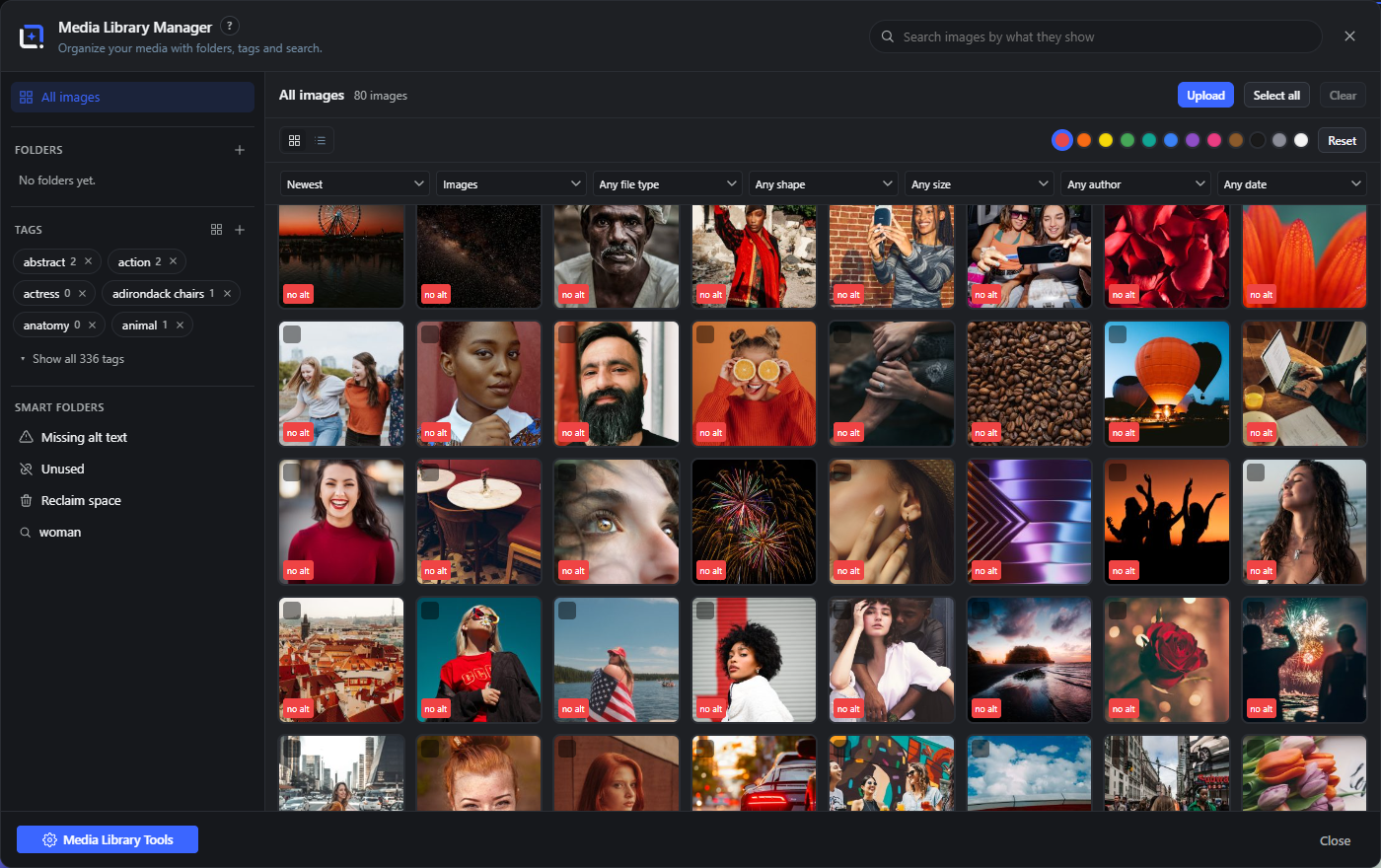
The built-in Media Library Manager can replace the standard media view and picker (opt-in):
- Real folders and tags as WordPress taxonomies, drag-and-drop organizing, bulk actions, saved searches and smart folders.
- Semantic search: find images by what they show, plus similar-image search, duplicate finder, color filters and folder suggestions – computed entirely in your browser against a locally hosted model.
- Know what you use: a usage analysis scans content, page-builder data, widgets, options and meta and answers “where is this image used?” with named sources and edit links. Find orphaned files, unused images and images missing alt text.
- Delete without fear: cleanup moves files into a holding area with a retention period and a daily release run instead of deleting instantly; restore anything with one click.
- Maintain at scale: replace an image and rewrite its references, recrop every thumbnail size with subject-aware auto-framing, spot oversized originals, keep IPTC credits and license info per image, rename titles by pattern, batch-watermark, and let the Metadata Assistant draft titles, alt texts and captions for the whole library (reviewed by you before anything is saved).
- See inside the file: a File data tab reads the camera, lens, software and location a photo carries, resolves coordinates to a place name on your own server, and removes either just the location or every embedded block, without re-encoding the picture.
- Optimized imports: bring files in through the manager and Smart Upload can scale them and convert them to WebP in your browser before they ever reach the server – no external service, no quota.
AI on your terms – or no AI at all
WunderPaint draws a hard line between two kinds of AI, and both are optional:
Local, no account, no key. These run in your browser against models hosted on your own server. Background removal works out of the box. Smart select, depth blur and depth fog, face blurring, image captions and alt text (with on-device translation), semantic image search and smarter text layouts each need a one-time model download (from a few dozen to a few hundred megabytes, depending on the model), fetched from Hugging Face only when an administrator requests it and served locally from then on. Alongside the models, purely algorithmic local tools need no download at all: upscaling, object removal, edge refinement, sticker and text-behind-subject cutouts, and the one-click looks Color Pop, Product Shot, Neon Rim, Speed Blur and Depth Fog.
Bring your own key. Connect Google Gemini, OpenAI or Anthropic with your own API key. Gemini and OpenAI handle images: generate from text, edit a layer by instruction, inpaint inside a selection, outpaint beyond the canvas, create variants, turn sketches into finished images, generate vector illustrations and 360° panoramas, or replace a background. All three providers handle text tasks: design and layout suggestions, metadata generation, text improvement, and an in-editor help assistant. Keys stay on the server (or in wp-config.php), every service has a connection test, a monthly budget cap can stop spending, and a usage log shows estimated cost per day, provider and action. Without a key, no request ever leaves your site.
Private by design
Everything runs on your own server: no telemetry, no tracking, self-hosted fonts by default. Cloud AI only runs when you trigger it, with a key you own, and every service a feature can reach is listed under External Services below.
Grows with extensions
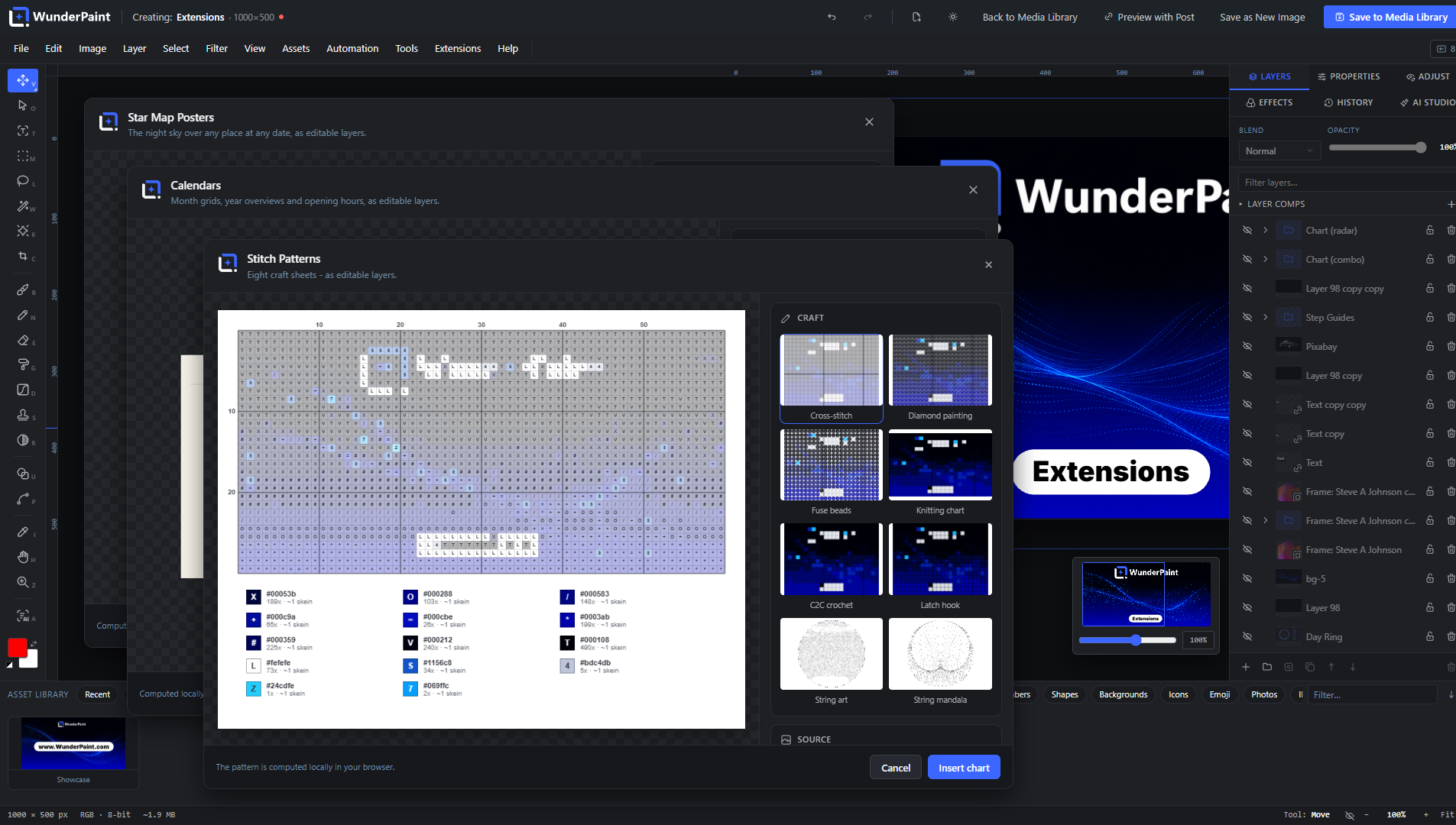
Studios that go beyond everyday editing come with the plugin and are simply there after installing: Chaos Art (a society of autonomous painters makes one-of-a-kind abstract art that can never be painted twice), Map Posters, Star Map Posters, Route Visualizer (a GPX track becomes a poster), Soundwave Art, Photo Mosaic, Text Art, Puzzle Sheets, Party Printables, Stitch Patterns, Drawing Templates, Origami, Day Ring, Papercut Art, Marble Bath, Mystic Studio, Seamless Patterns, Handwriting Fonts, Code Shot, Math Figures (formulas typeset as graphics), Sheet Music (notation from ABC or MusicXML) and Reformat (social formats with safe zones, in one pass). Each is a self-contained studio inside the editor, and new ones arrive with the next update.
WunderPaint Pro adds the extension manager – browse, install and update in one click – and the premium studios: 3D Mockup Studio with its library of product models, 3D Text, Motion Graphics, 3D Particle Studio, Cinematic Effects, Smart Diagrams, Calendars, Step Guides, Dynamic Showcases, Living Photos, Generative Art, AI Ad Banners and more. Extension packages are client-side only and can never ship server code.
Import, export and output
Import and export PSD including Smart Objects, edit SVGs as real vector layers, and export PNG, JPEG, WebP, SVG, multi-page PDF, animated GIF, APNG and WebM, favicon sets, carousel slices, and batches of multiple sizes as a ZIP. Exports can carry alt text, metadata, a watermark and an attached project file, so any saved image reopens later as a fully editable document. When you want to disclose AI involvement, the European Commission’s official labelling emblems are built in: pick one at save time and it goes into the picture where you place it, optionally alongside a matching entry in the file’s IPTC metadata. Nothing is ever labelled unless you ask for it.
WunderPaint Pro
The free editor is complete, and yours to use on as many sites as you like: every design tool, every binding, every local model above is free. WunderPaint Pro takes those same designs and runs them at scale, in the background and on your website: featured images generated across whole archives from one template (with per-category templates and generate-on-publish), WooCommerce catalog and product gallery graphics, image series from a CSV file, batch processing of your existing library (optimize, resize, watermark, apply recorded actions), dynamic images on the front end through blocks, shortcodes and native Elementor widgets that re-bake on a schedule, on shop events or via webhook, live badges, personalized per-visitor images, an AI content generator that drafts complete posts with matching graphics and SEO fields, multiple brand kits, one-click extension installs including all premium studios, and scheduled backups to S3-compatible storage.
Requirements
A current desktop browser (Chrome, Edge, Firefox or Safari); the editor runs inside the WordPress admin and shows a notice on phones. Works with Gutenberg, Elementor, Bricks, Divi and any plugin that uses the media picker. The interface, the built-in handbook, the guided tours and the help assistant are available in English, German, Spanish, French, Portuguese, Italian and Dutch.
External Services
This plugin can talk to a number of external services, each only when you use the feature it belongs to, and a service that needs an API key stays silent until you enter that key. There is no analytics, no tracking and no telemetry of its own, and it never sends your content anywhere by itself.
The complete list, with the exact data each service receives and when, is in the FAQ below: “Which external services does this plugin use?” The same list, in more detail, is at https://help.wp-image-editor.com/#services
Bundled Libraries
WunderPaint is licensed GPL-2.0-or-later (see license.txt). Every bundled component is under a GPL-compatible license; full attributions are in third-party-licenses.txt.
The complete list, with the license of each component, is in the FAQ below: “Which third-party libraries are bundled?”
Development
The free plugin is open source (GPL-2.0-or-later). The human-readable source
of everything it ships – the editor bundle, the bundled studios and the
translations – is published at https://github.com/tbitdesign/WunderPaint.
BUILD.md there lists every generated file next to its source and the command
that produces it; the FAQ entry “Where is the source code of the compiled
files?” is the short version.
Frequently asked questions
Do I need to be a designer?
No. You start from templates and drag things into place, and it already looks designed. The depth is there when you want it, not before.
Where do my images go?
They stay in your media library. The editor runs on your own server and the local tools work inside your browser, so nothing is uploaded for them. Cloud AI only runs when you trigger it, with your own key; the full list of services any feature can reach is under External Services below.
Do I need AI API keys?
No. The whole editor works without one, including background removal, subject selection, depth blur, face blurring, upscaling and semantic search. A key (Settings, WunderPaint) additionally enables text-to-image generation, prompt-based editing, inpainting and outpainting, panorama generation and AI-written alt text. If you run WordPress 7.0 or newer and have set up a provider in WordPress itself, the plugin uses that one for text and for plain image generation when you have entered no key of your own. Your own key always wins where you set one, because it also carries the model choice per…
What runs locally and what needs a key?
Background removal works out of the box: its model ships with the plugin. Smart select, depth estimation, image captioning, text importance and semantic search download their model once, through your own server, and run in your browser from then on; the in-browser runtime is configured never to fetch models remotely. Enlarging an image is plain high-quality resampling in a worker, so it needs neither a model nor a key. Everything that invents new pixels or writes text for you goes to the provider whose key you entered, and only when you ask for it.
Which layers can carry data?
Text, image and raster layers, plus QR codes, charts and tables, and Smart Objects whose embedded layers are bound. Shapes, gradients, groups and adjustment layers do not take a binding, and patterns do not either.
Where are my API keys stored?
Obfuscated in the WordPress database, or preferably as constants in wp-config.php (WPIE_GEMINI_KEY, WPIE_OPENAI_KEY, WPIE_ANTHROPIC_KEY, WPIE_PEXELS_KEY, WPIE_PIXABAY_KEY, WPIE_UNSPLASH_KEY, WPIE_MESHY_KEY). They are only ever read server-side and never sent to the browser.
Does it work with my page builder?
Gutenberg, Elementor, Bricks, Divi and any media picker: every image gets an Edit Image button that opens the full editor over your layout and drops the result straight back.
Can I open Photoshop files?
Yes. PSD files open as layered, editable documents (including Smart Objects), and you can export your work back to PSD. Round-tripping keeps the layer structure as far as the two formats allow.
Will it slow my site down?
No. The editor only loads in wp-admin when you open it. Your visitors just receive normal, optimized images.
What if I deactivate the plugin one day?
Nothing dramatic. Exported images are ordinary files in your Media Library and stay exactly where they are. Folders and tags are stored as regular WordPress taxonomies. Your layered projects wait in the uploads folder for the day you come back.
Is it available in my language?
English is built in. Other languages come from translate.wordpress.org as WordPress language packs and install themselves once your locale has been translated.
What are the system requirements?
A current desktop browser: Chrome or Edge 110+, Firefox 115+, Safari 16.4+. Some 3D extension studios additionally need WebGL2 with hardware graphics, which every current desktop browser on a normal machine provides; Help, System Status shows exactly what your device offers.
Where do I get help?
The handbook lives right inside the editor (press ?), the built-in help assistant answers questions and builds little guided tours, and https://help.wp-image-editor.com covers every feature down to the single control.
Where is the source code of the compiled files?
All of it is public, at https://github.com/tbitdesign/WunderPaint – the readable original of every generated file this plugin ships. Node.js 20 and npm are the only things needed to rebuild them. build/.js and build/.css are webpack output, built from src/ with “npm ci && npm run build”. The files named after a library (build/agpsd..js, build/jszip..js and so on) are those npm dependencies, bundled by the same run; each one is listed with its own source link under “Which third-party libraries are bundled?” below. bundled-extensions//extension.js is esbuild output, built from extensions//src/…
Which third-party libraries are bundled?
Each library below is bundled into its own file under build/, named after the library, so a file there can be traced back to its source at a glance. Full attributions and copyright notices are in third-party-licenses.txt. ag-psd — MIT License (PSD read/write). Source: https://github.com/Agamnentzar/ag-psd — build/agpsd..js Tabler Icons — MIT License (icon library). Source: https://github.com/tabler/tabler-icons — build/icons-lib..js and assets/ui-icons/ qrcode — MIT License (QR-code generation). Source: https://github.com/soldair/node-qrcode — build/qrcode..js polybooljs — MIT License…
Which assets does the optional 3D Solar System Studio use?
The separately installed 3D Solar System Studio extension includes planet and sky maps by Solar System Scope / INOVE (https://www.solarsystemscope.com/textures/, CC BY 4.0: https://creativecommons.org/licenses/by/4.0/), a reduced HYG star dataset by David Nash / Astronexus (https://github.com/astronexus/HYG-Database, CC BY-SA 4.0: https://creativecommons.org/licenses/by-sa/4.0/), and adapted constellation figures and conventional names by the Stellarium team and contributors (https://github.com/Stellarium/stellarium/tree/6176182b9fc861990dae1b5dba67d2024d2b4100/skycultures/modern, CC BY-SA…
Which external services does this plugin use?
This plugin can talk to the external services listed below. Each is contacted only when you use the feature it belongs to, and a service that needs an API key stays silent until you enter that key in Settings, WunderPaint, AI Providers. Unless an entry says otherwise, the request is made server-side by your WordPress site, so the service sees your server’s IP address and not your visitors’. The plugin has no analytics, tracking or telemetry of its own and never sends your content anywhere by itself. The three stock photo services below also work the same way: nothing is sent until you enter…
Changelog
1.430.0
- Design Generator: describe what you need and a language model writes each design in a design language; a compiler builds the layers, checks contrast, margins, overlaps and text sizes, repairs what it can and shows every design with its result. Three designs per run, presets for the usual jobs, format chips while the document is still empty, a history of every run, and dials for font pairing and palette that recompile a design without asking the model again. Pick the model the way the AI panel does. Everything lands as editable layers in one undo step.
- A photo from the Asset Library fills the document with one click, centered and proportional, as a normal image layer you can move, resize or reframe.
- The blend mode picker shows every mode as a small live render of the active layer, grouped by what it does, in the Layers panel and in the options bar.
- The Media Library Manager keeps its head under load: a new view, search or filter clears the selection so bulk actions only touch what you see, late responses no longer overwrite a newer view, similar-image and broken-file views keep their own state, duplicate removal drops only what the server confirmed, and the title search works without the local image model.
- Small things that add up: importing a file activates Move, the Export dialog remembers format and quality, Align stays open for the next action, a photo tile shows a spinner while it inserts, background AI jobs keep their error message, and Gemini says why it stopped.
- Fixed: restoring an image version reads the source first, writes through a temporary file and brings its layer project back; ungrouping inside a group keeps the children; quarantined images are protected on every delete path; the table import reports the rows it really returned; multi-page projects keep their pages when reopened or restored; Fluid Text measures its lines the way the renderer paints them.
- Security: replacing an image checks that you may edit and delete the source and refuses a rename when the places the image is used cannot be determined; table data of password-protected posts needs the password or edit rights; the versions folder keeps its deny-all rule; the SVG export writes numbers as numbers.
- Two hardening passes over editor and server: the usage check reports an incomplete result instead of an empty one, replacing a file leaves the original in place when the new one does not fit and rewrites the generated sizes too, downloads and key checks no longer follow a redirect, map tiles stay inside their budget on a broken response, the backup restore swaps its files before it writes the index, browser storage is kept per site, Remove Object runs off the main thread, and the language switch asks before it reloads when the snapshot could not be written.
- Complete translations in all six languages.
1.429.0
- Fluid Text: the box sets the type. Lines fill the frame’s width, the stack fills its height, and dragging a handle re-flows the text live. Layouts are looks on Fluid Text now, with roles, casing and tracking that stay editable.
- Shapes: Unite, Subtract, Intersect and Exclude, Outline Stroke, Offset Path, stroke position (inside, center, outside), joins and caps, per-corner rounding, and a Style picker with live tiles of the layer’s own shape.
- Working like a design tool: a grouped right-click menu, Bring to Front and Send to Back, Group and Ungroup, Hide, Lock, Paste in Place, Select Same, Grid Repeat, arithmetic in number fields, edits that reach every selected layer of a kind, and export of the selection alone.
- Text: strikethrough, non-destructive case, paragraph spacing, and per-line leading that survives editing.
- Tools: option bars for the marquee, lasso, eyedropper, clone stamp and pen; the effect brush smudges, dodges, burns and sponges; Select > Modify expands, contracts, smooths or borders a selection.
- Free studios on board: Math Figures and Sheet Music are new, Party Printables is rebuilt on real sheets.
- Imported SVG text keeps its baseline and its real weight and slant.
1.428.0
- A pass over what the editor promises against what it actually does, and everything below came out of it. The paint media are the clearest case: with “each stroke on its own layer” left on, a watercolor or charcoal stroke quietly landed as an ordinary one, with no message and no way to tell. It keeps its medium now.
- Recordings and exports say what they mean. An action recording counted a crop and a magic resize that it then skipped on playback, so both are recorded properly. A mockup inserted into a large document arrived enlarged and soft under a footer promising high resolution, and is now placed at its own resolution. A panorama on a document that is not two to one says so, rather than letting the export produce a file that is no longer a valid 360 image, and a machine whose graphics hardware cannot take the texture says that instead of showing an empty sphere.
- Living Photos records a whole turn. It used to record from the moment you pressed the button, which on a six second loop could mean half a second of video. The Solar System’s video now shows the background you picked instead of replacing it with dark blue, and Chaos Art no longer ends the film while you have it paused.
- Marble Bath and the 3D Particle Studio can record in Safari. Both carried their own recorder that only knew WebM, which that browser cannot write, so the button was there and could never work.
- Mystic Studio’s planets stood in the wrong places. Uranus was a full degree out and Neptune two thirds of one, because two reference tables had been mixed. The positions are corrected and pinned against published ephemeris values for a set of known dates, so they cannot drift again unnoticed.
- Printable sheets are legible and honest. Puzzle numbers and starting letters were drawn in the palette’s lead color, which on a pale palette left them invisible on paper. The gift box printed every line solid while its own legend promised dashed folds. Cupcake toppers offered a text field for a design that never drew the text.
- Smaller things across the studios: Papercut can punch a hole in any object it lets you place, City Diorama’s Variation really rolls the skyline and its status line no longer counts two different sets of buildings, Star Map’s foil color returns with the theme, Stitch Patterns’ thread weight reaches the planner, Generative Art’s five densest motifs got their density dial, a page in the Flip Studio opens from anywhere in its row, and the source list in Drawing Templates shows its grouping again.
- The handbook and the help assistant were describing things the code does not do, in eight places. Those are corrected at the source, so pages written from them later inherit the correction rather than the error.
Screenshots
For developers
Is this your plugin? Show off the numbers.
Add a live badge to your site, docs or GitHub README. It updates on its own — no account needed.
Best WunderPaint alternatives
All Image editor plugins →





FAQ
WunderPaint: quick answers
Straight answers, pulled from live WordPress.org data.
Live data from WordPress.org · checked Sep 28, 2026
Is WunderPaint free?
Yes. WunderPaint is free to download and use from the official WordPress.org plugin directory.
Is WunderPaint safe to use in 2026?
WunderPaint is a solid plugin choice in 2026, with a few things worth checking first. Was last updated 2 weeks ago, and scores 64/100 on our health check.
How many websites use WunderPaint?
WunderPaint is active on <10 WordPress websites and has been downloaded 501 times since it launched in August 2026. It was downloaded 298 times in the last 30 days.
Does WunderPaint work with WordPress 7.1?
Yes. The developer has tested WunderPaint up to WordPress 7.1.2, the latest release. It requires WordPress 6.4 or newer.
What PHP version does WunderPaint need?
WunderPaint requires PHP 7.4 or higher. Most hosts run PHP 8.x today, so it works on any modern WordPress hosting.
When was WunderPaint last updated?
The latest version, 1.430.0, was released on September 11, 2026 (2 weeks ago).
Who makes WunderPaint?
WunderPaint is developed and maintained by Thomas Breher.
What are the best alternatives to WunderPaint?
The most popular alternatives to WunderPaint are WP Paint (5K+ installs), Image Editor by Pixo (700+ installs) and PhotoGlue (200+ installs).
Powered by PageForge
Want thousands of pages that rank like these? Build them in an afternoon.
This directory runs on the same engine as PageForge. Turn any spreadsheet, CSV or API into thousands of fast, SEO-ready WordPress pages — with schema, internal links and AI-written copy baked in.
- CSV, Google Sheets & API data sources
- AI content, schema & internal links per page
- Works with Elementor, Gutenberg, Yoast & Rank Math
- Free on WordPress.org — no credit card


