



wpDataTables integration for Forminator Forms
Create responsive, sortable tables & charts from Forminator forms submissions with wpDataTables.

Solid choice
wpDataTables integration for Fo… is a solid plugin choice in 2026, with a few things worth checking first. It runs on 1K+ sites, is rated 5/5 and was last updated 1 month ago, and scores 68/100 on our health check.
- Very few reviews so far
How does it stack up?
Side-by-side on installs, updates, ratings & support


Daily downloads
Download spikes usually follow a new release — each site that auto-updates counts as a download.
Rankings
Where wpDataTables integration fo… stands todayWordPress.org search rankings
Live position in the plugin search, top 100| Keyword | Position |
|---|---|
| form | >100 |
| forminator | #2 |
| quiz | #51 |
| table | >100 |
| wpdatatables | #2 |
Version adoption
Share of active sites per release.
Rating breakdown
★★★★★★★★★★ 5 from 2 reviews
About wpDataTables integration for Forminator…
From the official readme · v1.3.11Description
wpDataTables integration for Forminator Forms is an add-on that connects the best WordPress table plugin wpDataTables and easy-to-use WordPress form builder Forminator.
A powerful tool that adds “Forminator Form” as a new table type in wpDataTables and allows you to create responsive, sortable tables & charts based on Forminator Forms submissions from your site frontend using intuitive wpDataTables table and chart wizard.
You will need to install wpDataTables and Forminator plugins to be able to use this integration.
This great integration is compatible with wpDataTables Premium version and Forminator PRO and their advanced features. You can use any combination of these two plugins. Isn’t that awesome?
When the form/quiz/poll is created and entries are ready, you can begin creating a wpDataTable based on it. First, go to wpDataTables -> Create a Table, choose “Create a table linked to an existing data source” option, and click “Next”.
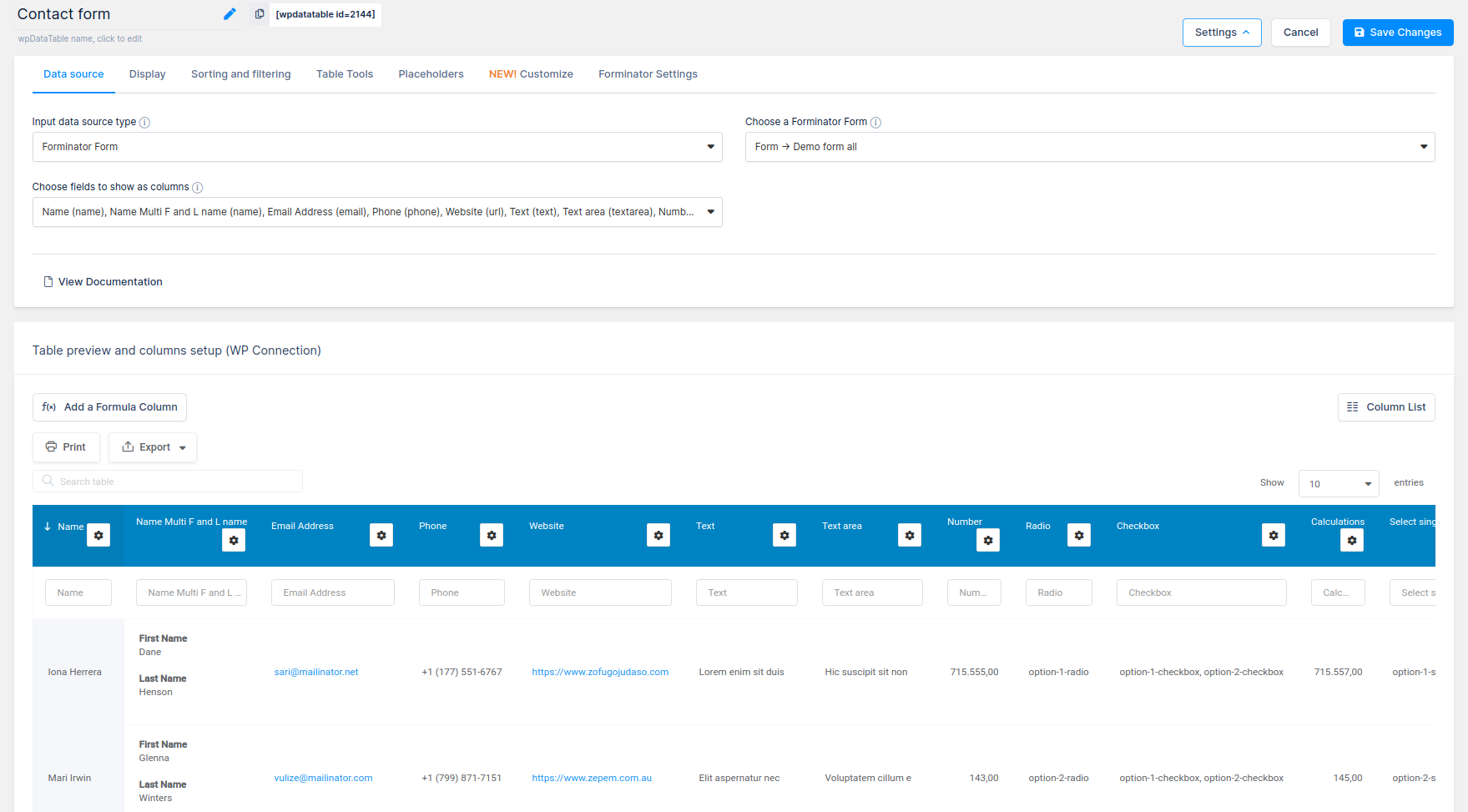
Then choose “Forminator Form” as the Input data source type. After you choose “Forminator Form” as a table type, a new select-box “Choose a Forminator Form” will appear. With this select-box, you can choose a form, quiz or poll, that will provide entries as data for your new table.
After this step you will see a select-box “Choose fields to show as columns” that allows you to choose the form/quiz/poll fields that you will use as columns. Using this select-box, you can choose form fields that will be used in the table.
Furthermore, you can choose which form fields will be shown in the table.
Here is the list of the supported form fields:
- NEW! Slider Field (Single and Range)
- NEW! Group Field
- Name (Single and Multiple)
- Phone
- Address
- Website
- Input
- Textarea
- Number
- Radio
- Checkbox
- Calculations
- Select (Single and Multiple)
- Datepicker (Calendar, Dropdowns, and Text input)
- Timepicker ( Dropdowns and Number input)
- File Upload (Single and Multiple)
- Post Data
- Hidden Field
- Currency
- PayPal
- Stripe
- E-Signature (only available in Forminator PRO)
Please note that fields like reCaptcha, HTML, Page break, Section, and GDPR Approval are excluded from tables.
Important: For all form types that you want to create tables (form, quiz, or poll) you will need to have submission data for those form types in the database. That means that you need to turn off the option “Disable store submissions in my database” on Data Storage settings in the Forminator plugin. You will be able to save submissions in the database and then create a table in wpDataTables.
Forms
When you create a table from Regular form, in table column headers will be used names of your fields, and each row will be shown as a separate submission. Common fields such as Entry data, Entry ID, and User IP are available for each form.
Fields like “Name (Multiple)” and “Address” will be formatted like on the Forminator forms Submissions page.
If you want to show those data in one line with space between without formatting, you can use hooks for “Name(Multiple)” like in the following example:
// Remove formatting from Name (Multiple) fields
// $removeForminatorFormatting- false by default - bool
// $formID - Id of the form - int
function remove_style_from_name_multiply_fields($removeForminatorFormatting, $formID){
   // Example for the form with id 1
   if ($formID == 1){
    // Provide true to remove formatting
       $removeForminatorFormatting= true;
   }
   return $removeForminatorFormatting;
}
add_filter('wdt_forminator_remove_style_from_name_multiply_fields', 'remove_style_from_name_multiply_fields', 10, 2);
and for the “Address” fields as well you can show the data in one line separated with a comma using this hook:
// Remove formatting from the Address fields
// $removeForminatorFormatting- it is false by default - bool
// $formID - Id of the form - int
function remove_style_form_address_fields($removeForminatorFormatting, $formID){
   // Example for form with id 1
   if ($formID == 1){
    // Provide true to remove formatting
       $removeForminatorFormatting= true;
   }
   return $removeForminatorFormatting;
}
add_filter('wdt_forminator_remove_style_form_address_fields','remove_style_form_address_fields', 10, 2);
For the upload fields, there are some formatting rules applied depending on file extension. For image extensions (jpg, jpeg, png, gif, webp) the output will be formatted like image links.
Files with the ‘mp3’ and ‘wav’ extensions will be formatted as audio HTML tags, and the files with ‘mp4’ and ‘webm’ extensions will be formatted as video HTML tags.
If you need some different formatting rules for those upload fields you can use the following hook:
// Filter formatted file URL
// $fileURLOutput - Already formatted file URL - string
// $fileURLExtension - File URL Extension (png,csv,pdf,mp4...) - string
// $file - Original file URL - string
function filter_file_upload_output($fileURLOutput, $fileURLExtension, $file, $formID){
   // Example for form with id 1
   if ($formID == 1){
    // Example only for the jpg extension
       if ($fileURLExtension == 'jpg'){
        // Set a custom image HTML tag with width of 400px
       $fileURLOutput = '<img width="400" alt="' . basename($file) . '" src=' . $file . '>';
       }
   }
   return $fileURLOutput;
}
add_filter('wdt_forminator_filter_file_upload_output', 'filter_file_upload_output', 10, 4);
All other uploaded files will be formatted as HTML links.
For the Website and email fields, there is no formatting rules applied from Forminator.
If you need formatting rules from Formiantor for those fields (to be shown as links) you can use the following hook
for Email field:
// Add formatting from Formiantor for Email field
// $removeForminatorFormatting- it is true by default - bool
// $formID - Id of the form - int
function remove_style_form_email_fields($removeForminatorFormatting, $formID){
   // Example for form with id 1
   if ($formID == 1){
    // Provide false to add Forminator formatting as link
       $removeForminatorFormatting = false;
   }
   return $removeForminatorFormatting;
}
add_filter('wdt_forminator_remove_style_form_email_fields','remove_style_form_email_fields', 10, 2);
and for Website field:
// Add formatting from Formiantor for Website (URL) field
// $removeForminatorFormatting- it is true by default - bool
// $formID - Id of the form - int
function remove_style_form_url_fields($removeForminatorFormatting, $formID){
   // Example for form with id 1
   if ($formID == 1){
    // Provide false to add Forminator formatting as link
       $removeForminatorFormatting = false;
   }
   return $removeForminatorFormatting;
}
add_filter('wdt_forminator_remove_style_form_url_fields','remove_style_form_url_fields', 10, 2);
New field support – Group field
Now, support for Group fields is avalible with our integration as well. Every Group field in form will be shown as separate column and all fields that are in group will be parsed as table layout (in each cell you will have separate table as is shown on Formiantor submissions). Each field in group will be represent in the head of that table and entries from those fileds will be in the body of that table. If Repeater is enabled then those entries will be populated in table body as well.
Additionally, there is a hook available for filtering all the formatted entries (only for forms and quizzes)
// Filter all the formatted entries
// $formattedEntry - Already formatted entry - string
// $field - Forminator_Form_Field_Model - object
// $entry - Forminator_Form_Entry_Model - object
function filter_formatted_entry($formattedEntry, $field, $entry){
    // Example for form with id 1
      if ($entry->form_id == 1){
       // Example only for custom forms
          if ($entry->entry_type == 'custom-forms'){
               // Check is set meta data for current field
              if (isset($entry->meta_data[$field->slug])) {
                   $entryValue = $entry->meta_data[$field->slug]['value'];
                   // Check is field type 'name' and that is not array
                    if ($field->raw['type']== 'name' && !is_array($entryValue)) {
                      // if $entryValue is John return null - it will not be shown in the table
                        if ($entryValue == 'John') $formattedEntry = null;
                    }
               }
          }
      }
      return $formattedEntry;
}
add_filter('wdt_forminator_filter_formatted_entry','filter_formatted_entry', 10, 3);
Quizzes
You can create a table from the Personality and Knowledge quizzes. For quizzes, common fields like Entry Date and Entry ID are available.
If lead generation feature is enabled, it will be available two more fields like Email and Name generated by this feature.
-
When you create a table from a Knowledge quiz, in the table, questions will appear as column headers, and each row will be populated with the separate submission answers. For this type of quiz, three more fields are available like Correct answers, Incorrect answers and Score (Correct answers/Total answers). In that table, the answers will be formatted the same way as on the Forminator Submissions page. (correct answers have a green background and the wrong ones have a red background).
-
When you create a table from the Personality quiz, questions will appear as column headers in that table. Also, the “Quiz result” will show up in the columns (if you choose it in the option “Choose fields to show as columns”), and each row will be shown as a separate submission answer.
If you want to show answers from Knowledge quiz without their formatting, you can use the following hook:
// Remove formatting from answers in Knowledge quiz
// $removeForminatorFormatting - it is false by default - bool
// $formID - Id of the form - int
function remove_quiz_iscorrect_style($removeForminatorFormatting, $formID){
   // Example for form with id 1
   if ($formID == 1){
    // Provide true to remove formatting
       $removeForminatorFormatting = true;
   }
   return $removeForminatorFormatting;
}
add_filter('wdt_forminator_remove_quiz_iscorrect_style','remove_quiz_iscorrect_style', 10, 2);
Polls
Polls entries in the Forminator submissions are shown as grouped values based on the answers. The same data can be displayed in a chart (Bar or Pie chart depending on your settings). In accordance with that, you can create tables based on the Forminator poll submissions either for the Bar chart or for the Pie chart structure, no matter what was chosen in the Forminator settings for the poll chart type. Polls do not have common fields like forms and quizzes.
-
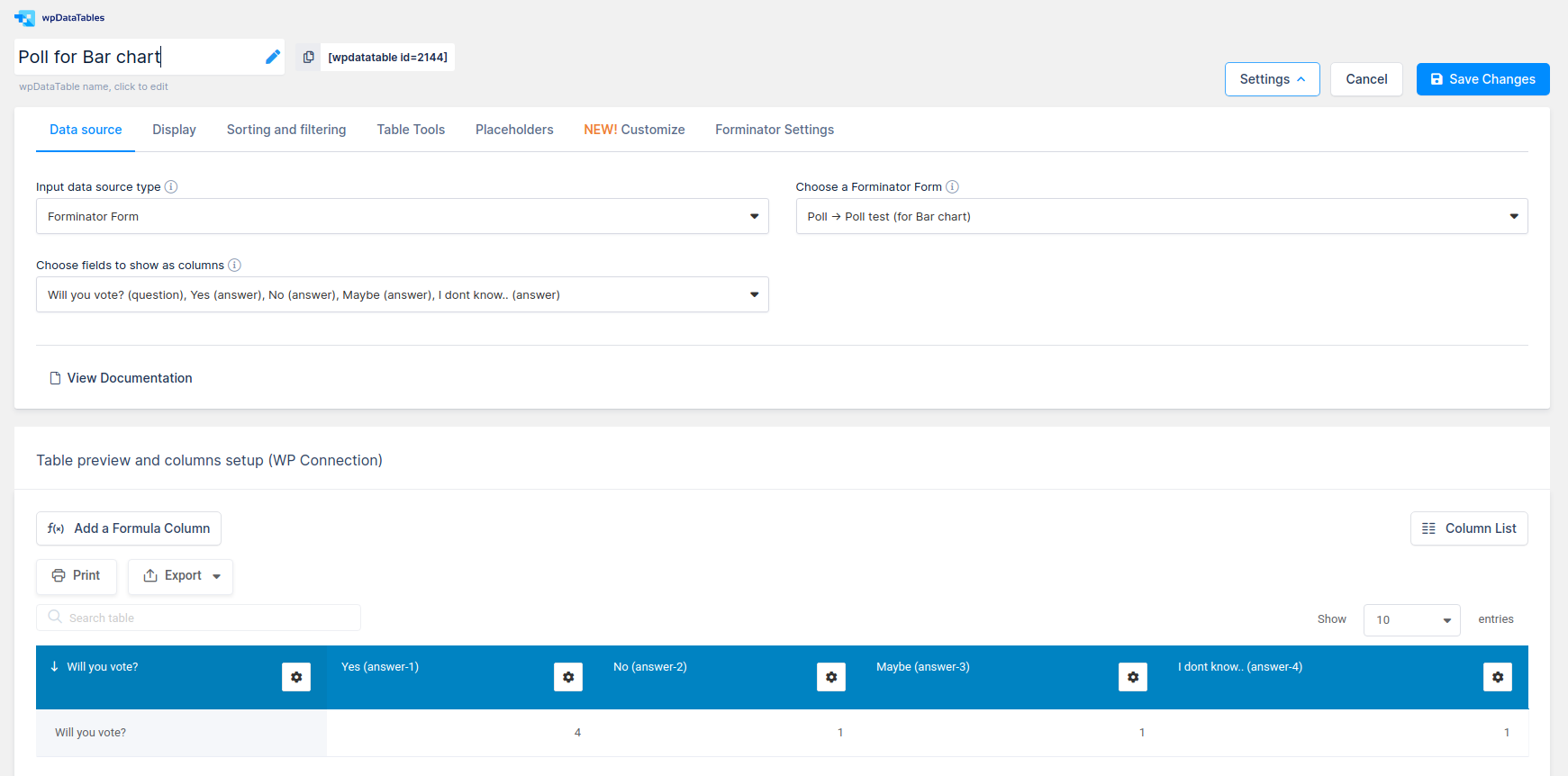
In the first case, if you select the Poll for Bar chart option, you can choose the columns to be created from the Poll question and Answers of that poll in the table. Only one row of data will be shown, since the data is grouped. After creating a table you are able to create a Google Bar chart and to show it on the front-end.
-
In the second case, if you select the Poll for Pie chart option, you can choose only the columns to be created from the Poll answers and Total votes of that poll in the table. Then, the first column will list all the possible answers (Poll answers), and the second one (Total votes), will display grouped data for each answer. After creating a table, you can create a Google Pie chart and add it on the website page as well.
If you need, you can show both charts (Pie and Bar) on the front-end for the same Poll.
Integration settings
Each Forminator form-based wpDataTable receives an extra Forminator settings tab on the table configuration page, together with several additional table settings. Using this tab, you can define which form entries will appear in the wpDataTable based on the range of entry IDs, entry date by choosing one of the two possible filtering logic options in the Filter by date select box. You can select between Filter by date range and Filter by the last X time period; or, you can leave this block empty if you don’t wish to filter form entries displayed in the table.
-
Filter by entry ID range – Two input fields (“From” and “To”) are shown in this section. If you define some values in these number input fields, wpDataTable rows will be updated according to the selected range.
-
Filter by date range – If you select this option, two input fields (“From” and “To”) will be displayed right to the Filter by date select box. By defining some date values in these datetimepicker input fields, wpDataTable rows will be narrowed down according to the provided date range.
-
Filter by last X time period – When this option is selected, the Filter by date select box will display two input fields. In the first one, you can define a number (e.g., 30), and in the second one, you can choose between (Day(s), Week(s), Month(s), and Year(s)). By selecting, e.g., “30 Day(s)” you will filter and display in the wpDataTable only the entries added in the last 30 days in the Forminator Form used as a data source for this wpDataTable.
In those tables, you can use all features that are included in wpDataTables:
- NEW! Create 9 different Chart.js charts types,
- NEW! Responsive datatables
- NEW! Integration with Avada Website builder
- NEW! Integration with DIVI Website builder
- NEW! Caching data
- NEW! Auto update cache data
- NEW! FULL Frontend WCAG compatibility
- NEW! Responsive Charts – now each chart (both Google and Chartjs) can be responsive
- NEW! Grouping Charts – rows with same labels would be treated as a single entry, summing up all the values in other cells
- Global search,
- Sorting,
- Column visibility,
- Pagination,
- Show rows per page,
- Row grouping,
- Table layout,
- Scrollable,
- Export data (in Excel, CSV, PDF, Copy or Print),
- Create 14 different Google charts types,
- Global and ,
- Column customization
If, apart from creating tables based on the Forminator forms data, you would also like to create tables from scratch or from other data sources, wpDataTables provides more options for you:
- NEW! Create tables from Nested JSON – Text and video documentation
- Create Simple tables from scratch – Text and video documentation
- Create tables from Excel – Text and video documentation
- Create tables from CSV – Text and video documentation
- Create tables from JSON – Text and video documentation
- Create tables from XML – Text and video documentation
- Create tables from Serialized PHP array – Text and video documentation
To check out the table on the front-end you can insert wpDataTables shortcode in your page or post (for example [wpdatatable id=1]) or with page widgets/blocks if you are using some of the page builders like WP Bakery, Elementor or Gutenberg.
Limitation
Those tables do not have a server-side option (this means that these tables can’t contain a large amount of data (no exact limit, but 2.000 – 3.000 rows is a good example)), and that they cannot be editable.
Installation
Installation of the plugin is straightforward.
- Make sure you have both wpDataTables and Forminator core plugins installed.
- Install using one of these options:
- Install directly from the WordPress Admin panel: go to Plugins -> Add New -> Search for “wpDataTables integration for Forminator forms”, and click the Install button.
- Download the ZIP manually from WordPress’s plugins repository, and upload it through the WordPress Admin panel: go to Plugins -> Add New -> Upload Plugin, browse to the downloaded Zip and upload it.
- Download the ZIP, extract it and manually upload the extracted folder through FTP to the
/wp-content/plugins/directory of your WordPress installation.
- Activate the plugin through the ‘Plugins’ menu in WordPress.
- That’s it!
Changelog
1.3.11
- Compatibility with WordPress 7.0.4 approved.
- Other small bug fixes and stability improvements.
1.3.10
- Compatibility with WordPress 6.9.4 approved.
- Other small bug fixes and stability improvements.
1.3.9
- Compatibility with WordPress 6.9 approved.
- Other small bug fixes and stability improvements.
1.3.8
- Compatibility with WordPress 6.9 approved.
- Other small bug fixes and stability improvements.
1.3.8
- Compatibility with WordPress 6.8.3 approved.
- Other small bug fixes and stability improvements.
1.3.7
- Compatibility with WordPress 6.8.2 approved.
- Other small bug fixes and stability improvements.
Screenshots



For developers
Is this your plugin? Show off the numbers.
Add a live badge to your site, docs or GitHub README. It updates on its own — no account needed.
Best wpDataTables integration for… alternatives
All form plugins →





FAQ
wpDataTables integration for Formin…: quick answers
Straight answers, pulled from live WordPress.org data.
Live data from WordPress.org · checked Sep 27, 2026
Is wpDataTables integration for Fo… free?
Yes. wpDataTables integration for Fo… is free to download and use from the official WordPress.org plugin directory.
Is wpDataTables integration for Fo… safe to use in 2026?
wpDataTables integration for Fo… is a solid plugin choice in 2026, with a few things worth checking first. It runs on 1K+ sites, is rated 5/5 and was last updated 1 month ago, and scores 68/100 on our health check.
How many websites use wpDataTables integration for Fo…?
wpDataTables integration for Fo… is active on 1K+ WordPress websites and has been downloaded 63,657 times since it launched in May 2021. It was downloaded 800 times in the last 30 days.
Does wpDataTables integration for Fo… work with WordPress 7.1?
wpDataTables integration for Fo… is officially tested up to WordPress 7.0.6, while the latest release is 7.1.2. It may still work, but try it on a staging site first.
What PHP version does wpDataTables integration for Fo… need?
wpDataTables integration for Fo… requires PHP 7.4 or higher. Most hosts run PHP 8.x today, so it works on any modern WordPress hosting.
When was wpDataTables integration for Fo… last updated?
The latest version, 1.3.11, was released on August 19, 2026 (1 month ago).
Who makes wpDataTables integration for Fo…?
wpDataTables integration for Fo… is developed and maintained by Melograno Venture Studio.
What are the best alternatives to wpDataTables integration for Fo…?
The most popular alternatives to wpDataTables integration for Fo… are MC4WP: Mailchimp for WordPr… (1M+ installs), MW WP Form (200K+ installs) and Conditional Fields for Cont… (100K+ installs).
Powered by PageForge
Want thousands of pages that rank like these? Build them in an afternoon.
This directory runs on the same engine as PageForge. Turn any spreadsheet, CSV or API into thousands of fast, SEO-ready WordPress pages — with schema, internal links and AI-written copy baked in.
- CSV, Google Sheets & API data sources
- AI content, schema & internal links per page
- Works with Elementor, Gutenberg, Yoast & Rank Math
- Free on WordPress.org — no credit card


