


WPC Grouped Product for WooCommerce
WPC Grouped Product helps you make up standalone products that are presented as a group.

Solid choice
WPC Grouped Product for WooComm… is a solid plugin choice in 2026, with a few things worth checking first. It runs on 2K+ sites, is rated 4.9/5 and was last updated 2 weeks ago, and scores 77/100 on our health check.
- Loved by users — 4.9/5 from 27 reviews
- Actively developed — last update 2 weeks ago
- Tested with the latest WordPress (7.1)
- Momentum — downloads up 183.8% vs the previous 30 days
How does it stack up?
Side-by-side on installs, updates, ratings & support



Daily downloads
Download spikes usually follow a new release — each site that auto-updates counts as a download.
Rankings
Where WPC Grouped Product for Woo… stands todayWordPress.org search rankings
Live position in the plugin search, top 100| Keyword | Position |
|---|---|
| group | #21 |
| grouped | #1 |
| kits | #44 |
| woocommerce | >100 |
| wpc | #17 |
Version adoption
Share of active sites per release.
Rating breakdown
★★★★★★★★★★ 4.9 from 27 reviews
About WPC Grouped Product for WooCommerce
From the official readme · v5.3.5Description
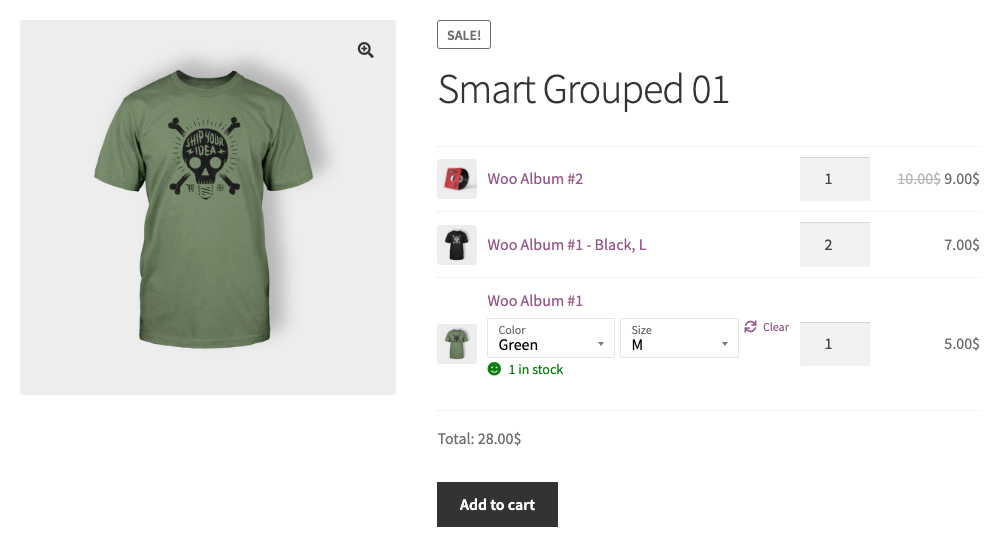
WPC Grouped Product for WooCommerce offers a way of bringing different products together into a unifying group to form a new product type. Users can freely form grouped products from individual items and set any predefined quantity for each of them. This is such a powerful complement product bundling method that helps sellers in giving suggestions on related items to buy, and at the same time enhances the cross-selling and revenues for their WooCommerce online shops.
WPC Grouped Product is a convenient way of giving zero or low-price gifts, giveaways, or free entailed service of other products as well. Check this out now, you’ll be stunned by its possibilities.
Live demo
Visit our live demo here to see how this plugin works.
Features
- Easy to search & add product
- Drag & drop to rearrange the items
- Customizable price format at system and product level
- Enable/disable the link to individual products
- Enable/disable Zero price main product to be added to cart
- Editable above/under item list text
- Allow setting up varied predefined quantity for items
- Various custom positions for the grouped product list
- Compatible with WPC Variations Radio Buttons for beautiful interfaces
- Compatible with WPC Smart Quick View for getting customers’ attention quickly
- Editable “Add to Cart” labels on the archive and single product page
- Show/hide product details: price, description, thumbnail
- Advanced search settings: by ID, SKU, exact phrase & search limit
- Allow a product to be added multiple times
- Allow the main product’s image and price to be changed on variation selection
- Compatible with other WPC plugins, most WooCommerce addons and WordPress themes
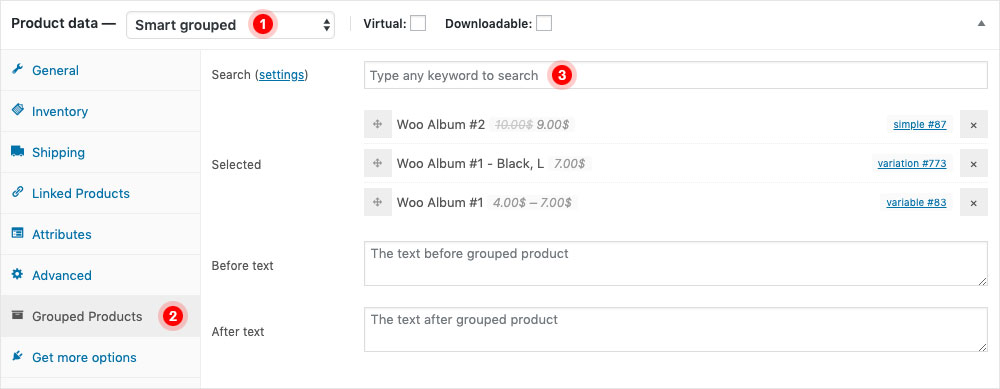
- Premium: Add a variable product or a specific variation to the grouped product
- Premium: Prompt customer support and lifetime update for free
- Premium: Customization service to be ordered for free to make our plugin match your site’s design.
Powerful Product Grouping for WooCommerce Stores
A grouped product is an exceptional type of product, whose grouped items are, in fact, remained as individual products with no available promoting or discounting method. To offer discounts for a grouped product, users will have to create coupons or vouchers then provide these to their customers to enter the code in the checkout step. WPC Grouped Products is a very intuitive plugin, you’ll know how to use it right without the need to read through any detailed documentation.
By default, WooCommerce only lets you create grouped products from simple ones, but WPC Grouped Product (Premium) takes it a bit further to let users add variable products or a specific variation to the list. This is proudly one of the most powerful features in our plugin, which makes any professional site builders or store owners feel excited enough to try it out immediately on their store.
Items in a grouped product list might share something in common, like they are all “bestsellers,” “pick of the day,” “new arrivals,” “favorite series,” etc. Grouped items are in a group, but they are treated as separate items, so the quantity of each can be adjusted freely: customers can buy all, some, or none of them based on their needs. Grouped items can be considered as optional ones, no default or required choices. By nature, a grouped product is merely a listing of individual items put together as a suggestion for buyers to consider buying more at once.
Useful Cases in Practice of WPC Grouped Products
Below are some common cases where users can use the WPC Grouped Product at its best:
- Sellers want to keep different versions/choices of a product as separate simple products to easily manage the stock instead of setting them as variations of a variable product.
- Products to be grouped together are distinct but still related or have something in common, like a series of textbooks and workbooks for all subjects in grade 1 (math, literature, etc.)
- Some products belong to quite a good number of categories at the same time, so they can be added to a grouped product to make different listings with freedom of choice for the buyers. For example, a CD can belong to categorize and subcategories like “Best-sellers”, “Great Hits of the 90s”, “Best Songs of Michael Jackson”, etc.
- Predefined quantity is a mere suggestion of how many buyers should consider. It’s not obligatory to buy the whole deal with that combination of items. But after customers change the quantity and add it to the cart, the quantity display in the listing will return back to the default.
- Store owners can sell an item and offer another with a very low price or a freebie as incentives to encourage customers to buy.
- Any product that entails some kind of warranty, support or maintenance services can introduce the grouped products at a very low price to persuade buyers to spend a bit more just to increase the benefits they can get.
- Offer a buy 1 and get 1 for free or zero price main product with Bought Together of Force Sells deals. Buy 1, get 1 for free can be configured by adding 1 grouped product at normal price, 1 bought together (disabled custom quantity) or force sell product with new price at 0% or $0 to the deal.
- Give away 2 pieces of postcards for every order during Christmas (set 2 postcards at $0 or 0% as force sells items); they must be added to the cart for customers to purchase and checkout. The quantity of force selling items will always be synced with the main product’s quantity. That’s said, if the quantity of the main product is 2, buyers can get 4 pieces of force sells postcards in the above example.
Zero Price Main Product
Free Gift & Giveaway Items: You might have grown very familiar with the situation when customers can get a free item as an added gift to another product. But with WPC Grouped Product, the case is different. Studies found customers mostly make decisions based on their calculation of spending they can save and benefits they can get from the deal. By offering the main product at zero prices, sellers make the deal more appealing to the buyers. And their customers, in fact, would think they can save more with this, so they’re more willing to say yes.
Flexible Combination with WPC Frequently Bought Together or WPC Force Sells: First, to combine with these plugins, from the admin dashboard, please navigate to WPClever >> Grouped Product >> find the “Include main product” option, then choose “Yes”. The main product with the price as $0 will be added alongside the Bought Together or Force Sell items to the cart.
Not what you needed?
Please try other plugins from us:
Installation
- Please make sure that you installed WooCommerce
- Go to plugins in your dashboard and select “Add New”
- Search for “WPC Grouped Product,” Install & Activate it
- Now when you create/edit a product, you can choose a product type is “Smart Grouped,” then add products as you want
- Almost done! Click Save and see the result
Changelog
5.3.5
- Updated: Optimized the code
5.3.4
- Fixed: Minor CSS/JS issues in the backend
- Updated: Compatible with WP 7.1 & Woo 11.2
5.3.3
- Fixed: Minor CSS/JS issues in the backend
5.3.2
- Fixed: Minor CSS/JS issues in the backend
- Updated: Compatible with WP 7.1 & Woo 11.0
5.3.1
- Updated: Optimized the code
- Updated: Compatible with WP 7.0 & Woo 10.9
5.3.0
- Updated: Optimized the code
Screenshots
For developers
Is this your plugin? Show off the numbers.
Add a live badge to your site, docs or GitHub README. It updates on its own — no account needed.
Best WPC Grouped Product for WooCo… alternatives
All group plugins →




FAQ
WPC Grouped Product for WooCommerce: quick answers
Straight answers, pulled from live WordPress.org data.
Source: WordPress.org
Is WPC Grouped Product for WooComm… free?
Yes. WPC Grouped Product for WooComm… is free to download and use from the official WordPress.org plugin directory. The developer also sells premium add-ons or a Pro version with extra features.
Is WPC Grouped Product for WooComm… safe to use in 2026?
WPC Grouped Product for WooComm… is a solid plugin choice in 2026, with a few things worth checking first. It runs on 2K+ sites, is rated 4.9/5 and was last updated 2 weeks ago, and scores 77/100 on our health check.
How many websites use WPC Grouped Product for WooComm…?
WPC Grouped Product for WooComm… is active on 2K+ WordPress websites and has been downloaded 258,072 times since it launched in June 2019. It was downloaded 4,569 times in the last 30 days.
Does WPC Grouped Product for WooComm… work with WordPress 7.1?
Yes. The developer has tested WPC Grouped Product for WooComm… up to WordPress 7.1.5, the latest release. It requires WordPress 5.9 or newer.
When was WPC Grouped Product for WooComm… last updated?
The latest version, 5.3.5, was released on November 10, 2026 (2 weeks ago).
Who makes WPC Grouped Product for WooComm…?
WPC Grouped Product for WooComm… is developed and maintained by WPClever.
What are the best alternatives to WPC Grouped Product for WooComm…?
The most popular alternatives to WPC Grouped Product for WooComm… are BuddyPress (90K+ installs), WP Telegram (Auto Post and… (30K+ installs) and WP Telegram Widget and Join… (3K+ installs).
Powered by PageForge
One template and a spreadsheet. A real page for every search.
PageForge turns each row of a CSV into a WordPress page with its own title, URL, SEO fields and schema, built on the layout you already designed. Free on WordPress.org.
- CSV and XLSX, plus Google Sheets on Professional and Enterprise
- Its own title, URL, SEO fields and schema for every page
- Works with the block editor, Elementor, Divi and Avada
- Free on WordPress.org, no credit card