



WP-Memory-Usage
Monitor PHP memory usage, set alert thresholds, and diagnose your server configuration — directly inside WordPress admin.

Safe pick
Yes — WP-Memory-Usage is a safe, well-maintained plugin to use in 2026. It runs on 10K+ sites, is rated 4.5/5 and was last updated 4 weeks ago, and scores 88/100 on our health check.
- Proven at scale on 10K+ active sites
- Loved by users — 4.5/5 from 21 reviews
- Actively developed — last update 4 weeks ago
- Tested with the latest WordPress (7.1)
- Momentum — downloads up 361% vs the previous 30 days
How does it stack up?
Side-by-side on installs, updates, ratings & support



Daily downloads
Download spikes usually follow a new release — each site that auto-updates counts as a download.
Rankings
Where WP-Memory-Usage stands todayWordPress.org search rankings
Live position in the plugin search, top 100| Keyword | Position |
|---|---|
| admin | >100 |
| memory | #1 |
| php | #46 |
| server | #64 |
| usage | #1 |
Version adoption
Share of active sites per release.
Rating breakdown
★★★★★★★★★★ 4.5 from 21 reviews
About WP-Memory-Usage
From the official readme · v2.3.1Description
WP-Memory-Usage is a lightweight but powerful WordPress plugin that monitors and displays memory usage directly in your WordPress admin area.
It is essential for site administrators and developers who need to keep an eye on memory consumption, identify bottlenecks, and act before users are affected.
What the plugin shows:
In the admin footer (every admin page):
* Current memory usage vs. WordPress limit (with percentage)
* Current memory usage vs. PHP limit (with percentage)
* Server IP address and server name
* PHP version
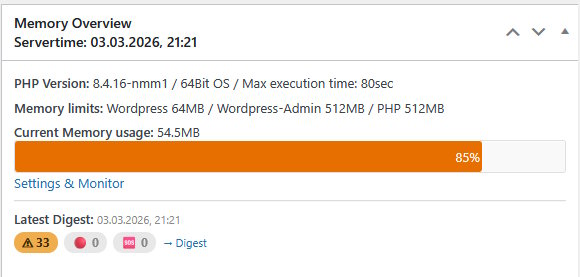
In the Dashboard widget (“Memory Overview”):
* PHP version, architecture (32/64 bit), max execution time
* WordPress memory limit (WP_MEMORY_LIMIT), WordPress admin limit (WP_MAX_MEMORY_LIMIT), PHP memory limit
* Current peak memory usage with a visual progress bar (colour-coded: green / orange / red)
* Latest digest status summary (warn / danger / critical badges)
* Link to the Threshold Alerts settings page
Settings & Monitor — Tabs (since 2.0.0):
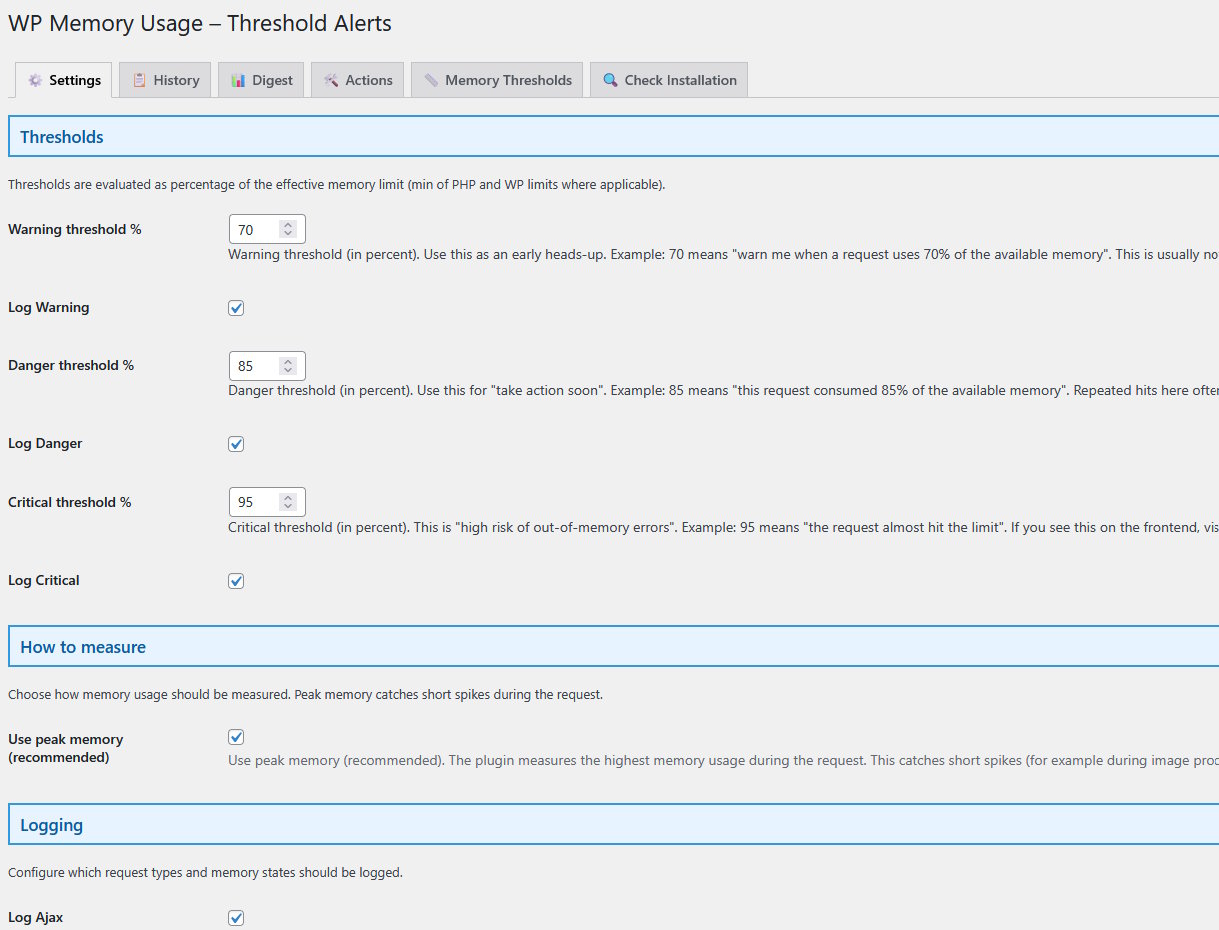
- Settings — thresholds, logging options, email alerts, log rotation
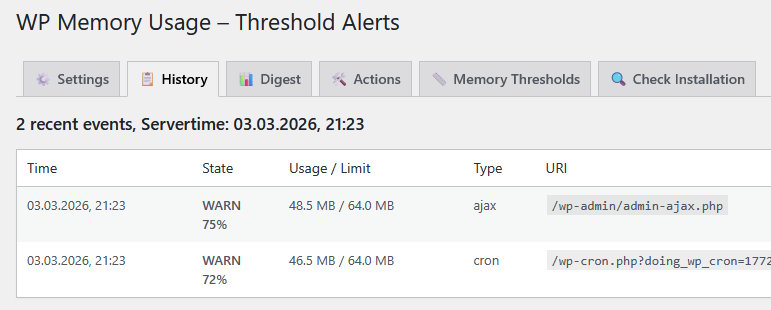
- History — latest logged requests with full context (URL, type, user, memory)
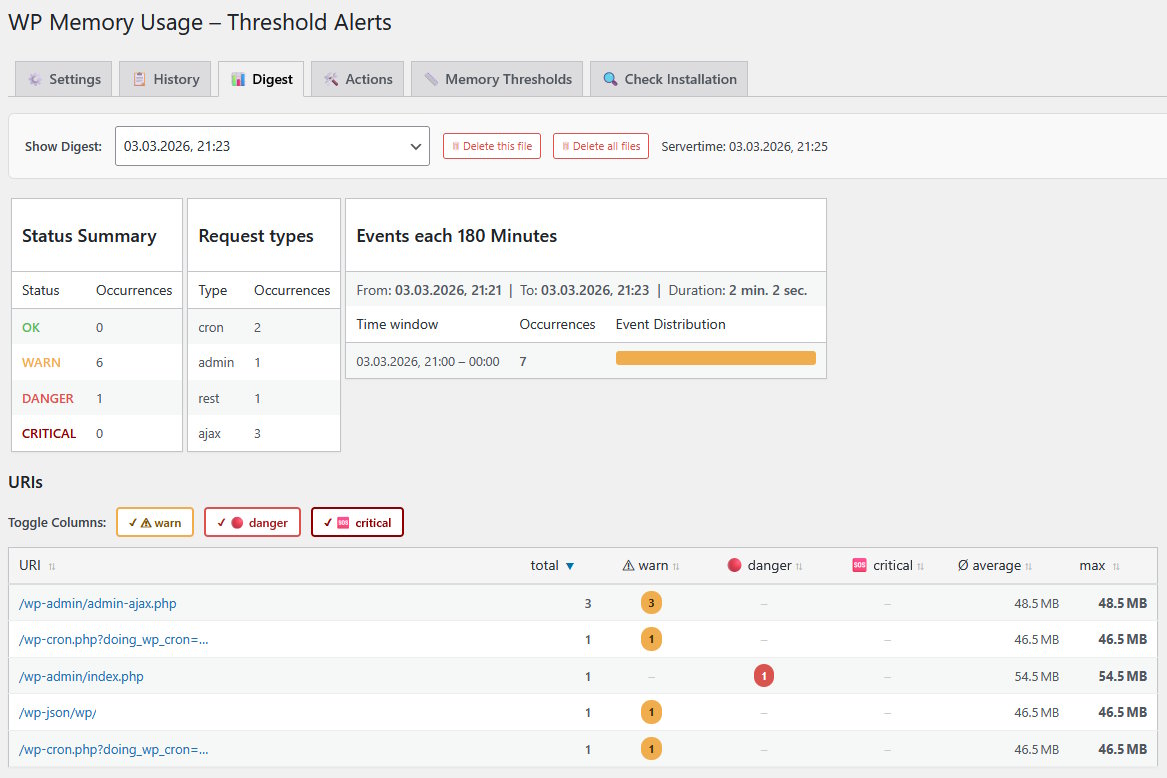
- Digest — aggregated summaries of past log intervals; browse, merge, and delete digest files
- ️Actions — practical guidance on what to do when you receive a memory alert
- Diagnose (new in 2.1.0) — full PHP/WordPress configuration snapshot with a ready-to-paste AI prompt for analysis
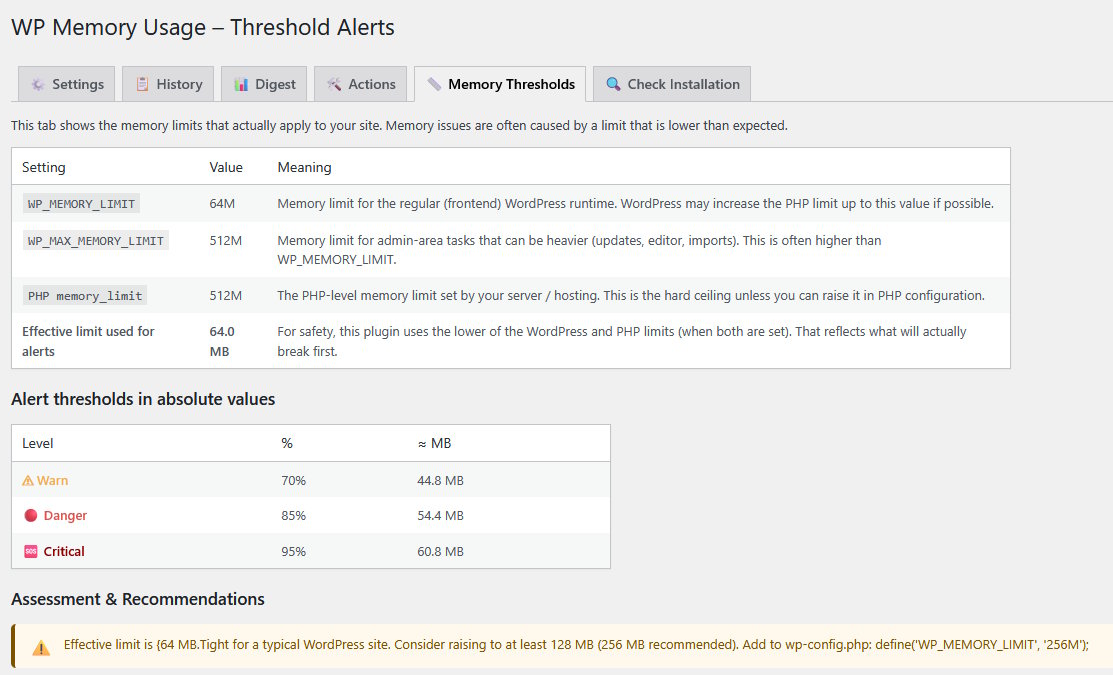
- Memory Thresholds — current limits, threshold assessment, and recommendations
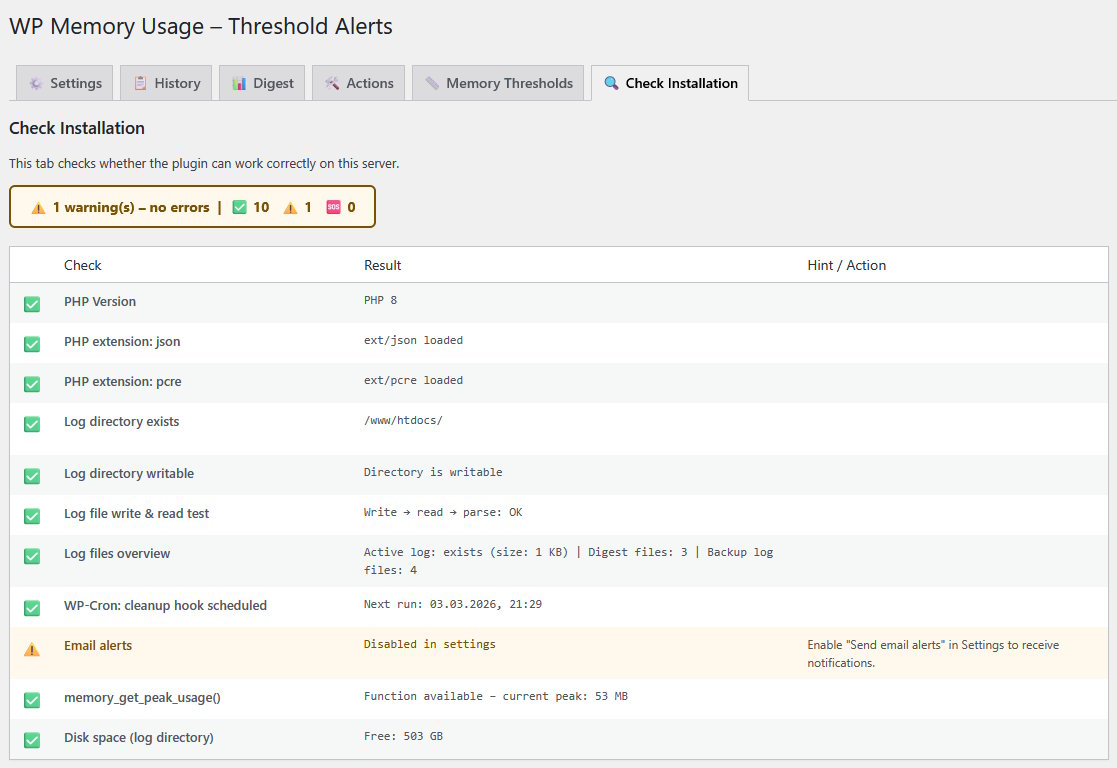
- Check Installation — verifies that the plugin can run correctly on your server
Why Use WP-Memory-Usage?
Excessive memory usage leads to slower sites, HTTP 500 errors, and failed background jobs (cron, imports, backups). WP-Memory-Usage gives you the information you need to act before users are affected — without overwhelming you with notifications.
Features
- Real-time memory display in the dashboard widget and every admin page footer
- Colour-coded progress bar (green / orange / red) for instant status recognition
- Three alert levels: Warning, Danger, Critical — each configurable as a percentage of the effective memory limit
- Flexible logging: Ajax, REST, Admin, Cron, favicon requests — log only what matters
- Email alerts with configurable recipient
- History tab: recent requests with full context (URL, type, admin screen, REST route, AJAX action, user)
- Digest tab: aggregated interval reports — browse, merge, and delete digest files
- Actions tab: plain-language guidance on resolving memory alerts, no developer skills required
- Diagnose tab (new in 2.1.0): full configuration snapshot + one-click AI prompt (English, copy & paste ready)
- Memory Thresholds tab: shows effective limits, threshold gaps, and concrete recommendations
- Check Installation tab: verifies log directory, WP-Cron, PHP functions, disk space, and email setup
- Admin bar indicator: quick status badge visible on every admin page
- Multisite compatible
- Clean uninstall: removes all options, cron jobs, database-tables and log files on deletion
PluginCheck-Plugin Status
Plugin is compatible with PluginCheck-Plugin. Note regarding “trademarked_term”: “WP-Memory-Usage” and “wp-memory-usage” are today considered restricted terms. This plugin entered the WordPress repository in 2009, when those terms were permitted.
Credits
Copyright 2009–2013 by Alex Rabe, 2022– Bernhard Kux
Frequently asked questions
Where is the memory usage displayed?
In three places: the WordPress dashboard widget “Memory Overview”, the admin footer on every backend page, and in detail across the plugin’s settings tabs.
What information does the plugin display?
PHP version, operating system architecture, WordPress and PHP memory limits, current peak memory usage (in MB and as a percentage), server IP address, and PHP max execution time.
How can I find out which request consumes the most memory?
Enable logging in the Settings tab. The History tab shows individual requests with their memory usage and context. The Digest tab aggregates this data and highlights the top memory-consuming URLs. Temporarily deactivating plugins is a common next step to isolate the cause.
What is the Diagnose tab?
The Diagnose tab (new in 2.1.0) collects a comprehensive snapshot of your PHP and WordPress memory configuration — OPcache status, garbage collector, loaded extensions, php.ini settings, and more. It generates a ready-made prompt you can copy and paste directly into an AI assistant (ChatGPT, Claude, etc.) for instant analysis.
Does the plugin work with WordPress Multisite?
Yes.
What happens when I delete the plugin?
A clean uninstall removes all stored options, scheduled cron jobs, database-tables, and log files. Nothing is left behind.
Changelog
Plugin ok with WordPress 7.1 Plugin made compatible with WordPress "Plugin Check (PCP)" version 2.1.0.
2.3.1
- Plugin ok with WordPress 7.1
- Plugin made compatible with WordPress “Plugin Check (PCP)” version 2.1.0.
2.3.0
WordPress-Repository does not update to 2.2.1, tried it with 2.3.0
2.2.1
Improvement: Under “Diagnostics,” more data is now collected for the AI prompt to help suggest appropriate measures.
2.2.0
New: You can now choose whether settings and log files are stored in files (recommended default) or in the WordPress database. If saving to files does not work, you can try the database option.
2.1.1
Improved: Show a warning on save if the log path is not readable and writable, and optimized the loading of translations
2.1.0
- New: Diagnose tab generates a ready-made AI prompt (copy & paste into ChatGPT, Claude, etc.) for instant analysis
- New: Diagnose tab — full PHP/WordPress configuration snapshot (OPcache, GC, extensions, php.ini settings and more)
Screenshots

For developers
Is this your plugin? Show off the numbers.
Add a live badge to your site, docs or GitHub README. It updates on its own — no account needed.
Best WP-Memory-Usage alternatives
All admin plugins →




FAQ
WP-Memory-Usage: quick answers
Straight answers, pulled from live WordPress.org data.
Live data from WordPress.org · checked Sep 27, 2026
Is WP-Memory-Usage free?
Yes. WP-Memory-Usage is free to download and use from the official WordPress.org plugin directory.
Is WP-Memory-Usage safe to use in 2026?
Yes — WP-Memory-Usage is a safe, well-maintained plugin to use in 2026. It runs on 10K+ sites, is rated 4.5/5 and was last updated 4 weeks ago, and scores 88/100 on our health check.
How many websites use WP-Memory-Usage?
WP-Memory-Usage is active on 10K+ WordPress websites and has been downloaded 316,811 times since it launched in June 2009. It was downloaded 8,875 times in the last 30 days.
Does WP-Memory-Usage work with WordPress 7.1?
Yes. The developer has tested WP-Memory-Usage up to WordPress 7.1.2, the latest release. It requires WordPress 6.2 or newer.
What PHP version does WP-Memory-Usage need?
WP-Memory-Usage requires PHP 7.4 or higher. Most hosts run PHP 8.x today, so it works on any modern WordPress hosting.
When was WP-Memory-Usage last updated?
The latest version, 2.3.1, was released on September 2, 2026 (4 weeks ago).
Who makes WP-Memory-Usage?
WP-Memory-Usage is developed and maintained by berkux.
What are the best alternatives to WP-Memory-Usage?
The most popular alternatives to WP-Memory-Usage are Loginizer (1M+ installs), Redux Framework (900K+ installs) and Admin Menu Editor (300K+ installs).
Powered by PageForge
Want thousands of pages that rank like these? Build them in an afternoon.
This directory runs on the same engine as PageForge. Turn any spreadsheet, CSV or API into thousands of fast, SEO-ready WordPress pages — with schema, internal links and AI-written copy baked in.
- CSV, Google Sheets & API data sources
- AI content, schema & internal links per page
- Works with Elementor, Gutenberg, Yoast & Rank Math
- Free on WordPress.org — no credit card


