



Nested Pages
Nested Pages provides a drag and drop interface for managing pages & posts in the WordPress admin, while maintaining quick edit functionality.

Solid choice
Nested Pages is a solid plugin choice in 2026, with a few things worth checking first. It runs on 90K+ sites, is rated 4.7/5 and was last updated 2 months ago, and scores 79/100 on our health check.
- Proven at scale on 90K+ active sites
- Loved by users — 4.7/5 from 126 reviews
- Tested with the latest WordPress (7.1)
- Slow support — only 20% of recent threads resolved
How does it stack up?
Side-by-side on installs, updates, ratings & support



Daily downloads
Download spikes usually follow a new release — each site that auto-updates counts as a download.
Rankings
Where Nested Pages stands todayWordPress.org search rankings
Live position in the plugin search, top 100| Keyword | Position |
|---|---|
| admin | >100 |
| nested | #1 |
| page tree | #3 |
| pages | #3 |
| tree view | #4 |
Version adoption
Share of active sites per release.
Rating breakdown
★★★★★★★★★★ 4.7 from 126 reviews
About Nested Pages
From the official readme · v3.3.3Description
Why use Nested Pages?
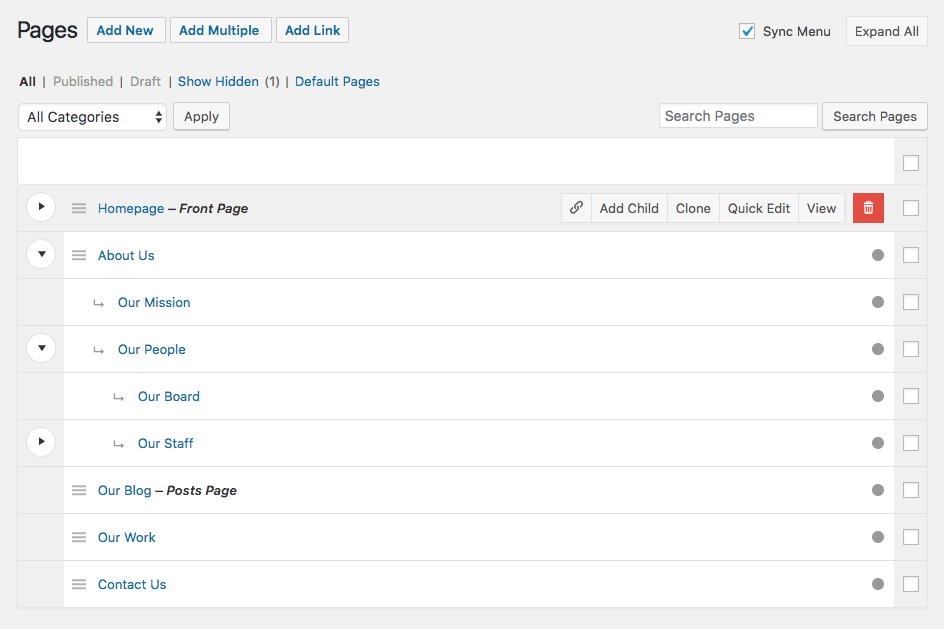
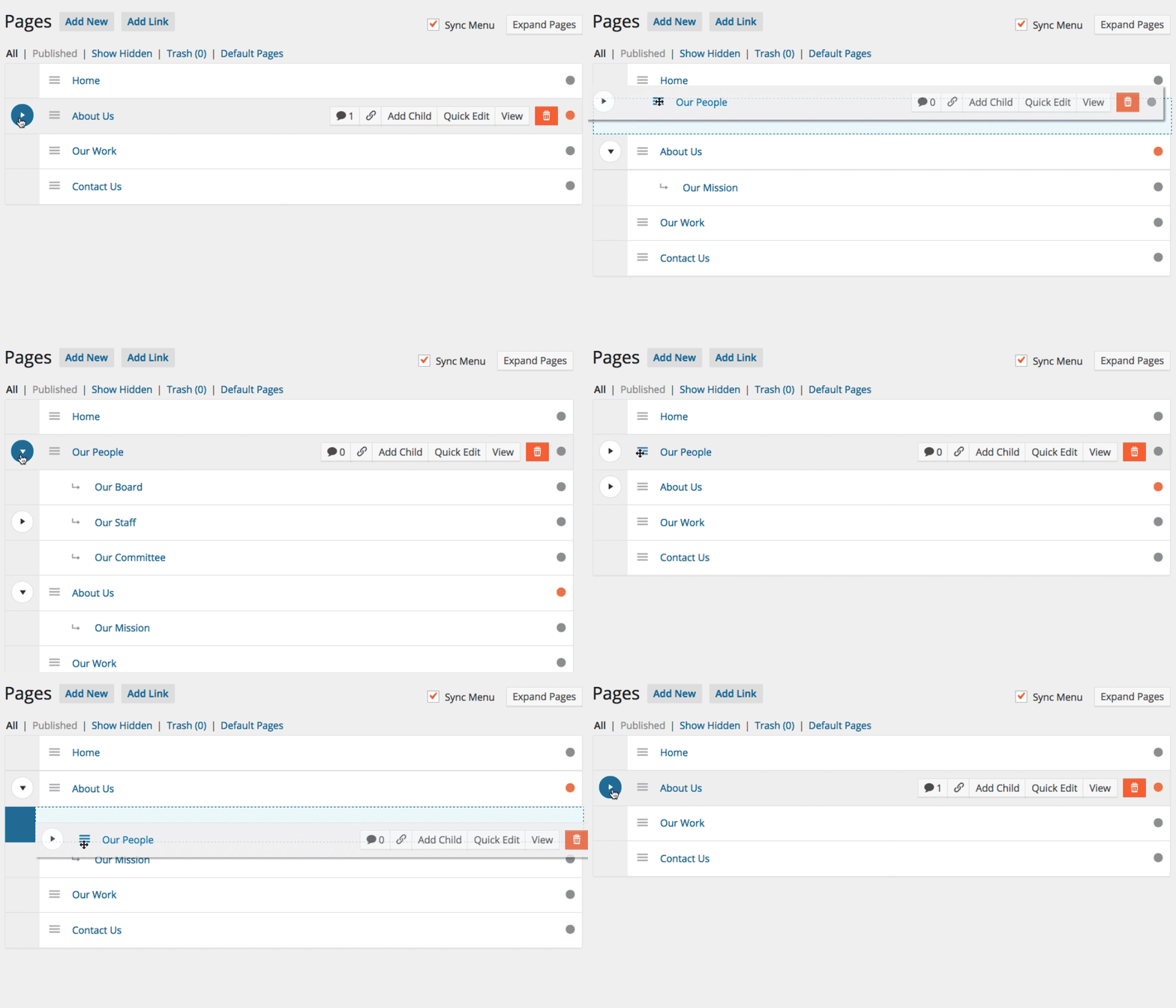
- Provides a simple & intuitive drag and drop interface for managing your page structure and post ordering
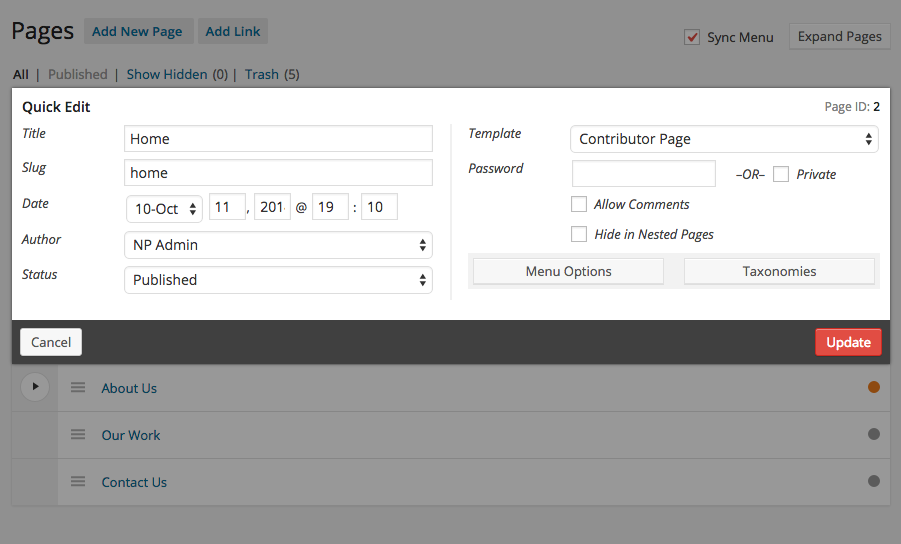
- Enhanced quick edit functionality
- Adds an editable, sortable tree view of your site’s page structure
- Automatically generates a native WordPress menu that matches your page structure
- A way to quickly add multiple pages & posts (ideal for development)
- Works with any post type
- Works on touch-enabled devices
For more information visit hookandfilter.com.
Important: Nested Pages requires WordPress version 3.8 or higher, and PHP version 5.4 or higher.
Languages:
- Danish (Thomas Blomberg)
- Dutch (Arno Vije)
- English
- Finnish (Roni Laukkarinen)
- French (Nico Mollet)
- German/Swiss German (Bartosz Podlewski)
- Italian (Francesco Canovi)
- Portuguese (Luis Martins)
- Russian (Алексей Катаев)
- Spanish (Raúl Martínez)
- Swedish (Marcus Forsberg)
- Turkish (Yuksel Beyti)
More Information
Generated Menu
The default menu generated automatically is named “Nested Pages”. You may rename the menu under Appearance > Menus, or under the Nested Pages settings.
Toggling the Page Tree
To toggle the child pages in and out of view, click the arrow to the left of a parent page. To quickly expand and collapse all pages, click the button in the upper right corner of the Nested Pages Screen.
Theme Use
To order by nested pages ordering in your theme, use the menu_order order option in your queries.
Hiding Pages from the Tree View
To hide a page from the tree view, open the quick edit form, select the option to “Hide in Nested Pages” and click Update to save the change.
To toggle the page back into view, click the “Show Hidden Pages” link at the top of the screen. The hidden pages are now visible, and can be re-edited to be shown.
Sorting Pages
To sort pages, hover over the page row. A menu icon (three lines) will appear. Click (or tap) this icon and drag to reorder within the menu. To drag a page underneath another, drag the page to the right and underneath the target parent. Visual indication is provided with an indentation. The drag and drop functionality works similarly to WordPress menus.
Menu Sync
After installing Nested Pages, a new menu will be available with the name Nested Pages. By default, menu syncing is enabled. To disable the sync, uncheck “Sync Menu” at the top of the Nested Pages screen. Recheck the box to enable it again and to run the sync.
Saving Performance: If your site has a very large number of pages, disabling page sync may help speed up the save time when using Nested Pages.
Editing the generated menu: Any manual changes made to the menu outside of the Nested Pages interface will be overwritten after the synchronization runs.
Hiding Pages in the Menu: To hide a page from the Nested Pages menu, click “Quick Edit” on it’s row, select “Hide in Nav Menu”, and click “update”. If menu sync is disabled, enable it now to sync the setting. Hidden pages are marked “(Hidden)”. If a page with child pages is hidden from the menu, all of it’s child pages will also be hidden.
WPML Compatibility
As of version 2.0.1, some features of Nested Pages are compatible with WPML. There are some important exceptions to take note of before upgrading to version 2 if WPML is installed, or if installing WPML on an existing Nested Pages enabled site.
WPML and menu support: Certain features within Nested Pages are disabled if WPML is installed and enabled. This is due to the complexity of menu synchronization across languages. While automatic menu sync remains available for the site’s primary language, additional languages must be synchronized using WPML’s menu synchronization methods. If menu sync is enabled within Nested Pages, a “Sync WPML Menus” link is available on non-primary language screens for convenience.
Custom Links: Custom links within Nested Pages are disabled on installs with WPML. Custom links may be added through the traditional Appearance > Menus interface. This ensures that WPML menus synchronize successfully across languages.
Filters
the_title($title, $post_id, $view)– Standard title filter. Applied to the title displayed in the nested interface. A third paramater, $view, is passed to check if the current title is being displayed in the nested view.nestedpages_thumbnail($image, $post)– Customize the thumbnail for each page/post. Note: Thumbnails must be enabled for the post type.nestedpages_thumbnail_fallback($image, $post)– Customize the thumbnail fallback for each page/post (if the post does not have a featured image). Note: Thumbnails must be enabled for the post type.nestedpages_edit_link($link, $post)– Customize the “edit” link for each page/post in the nested interface.nestedpages_edit_link_text($text, $post)– Customize the “edit” link text for each page/post in the nested interface.nestedpages_view_link($link, $post)– Customize the “view” button link for each page/post in the nested interface.nestedpages_view_link_text($text, $post)– Customize the “view” button text for each page/post in the nested interface.
Installation
- Upload wp-nested-pages to the wp-content/plugins/ directory
- Activate the plugin through the Plugins menu in WordPress
- Click on the Pages Menu item to begin ordering pages. Nested Pages replaces the default Page management screen.
- To access the default the pages screen, select Default Pages located in the Pages submenu, or on the Nested Pages screen
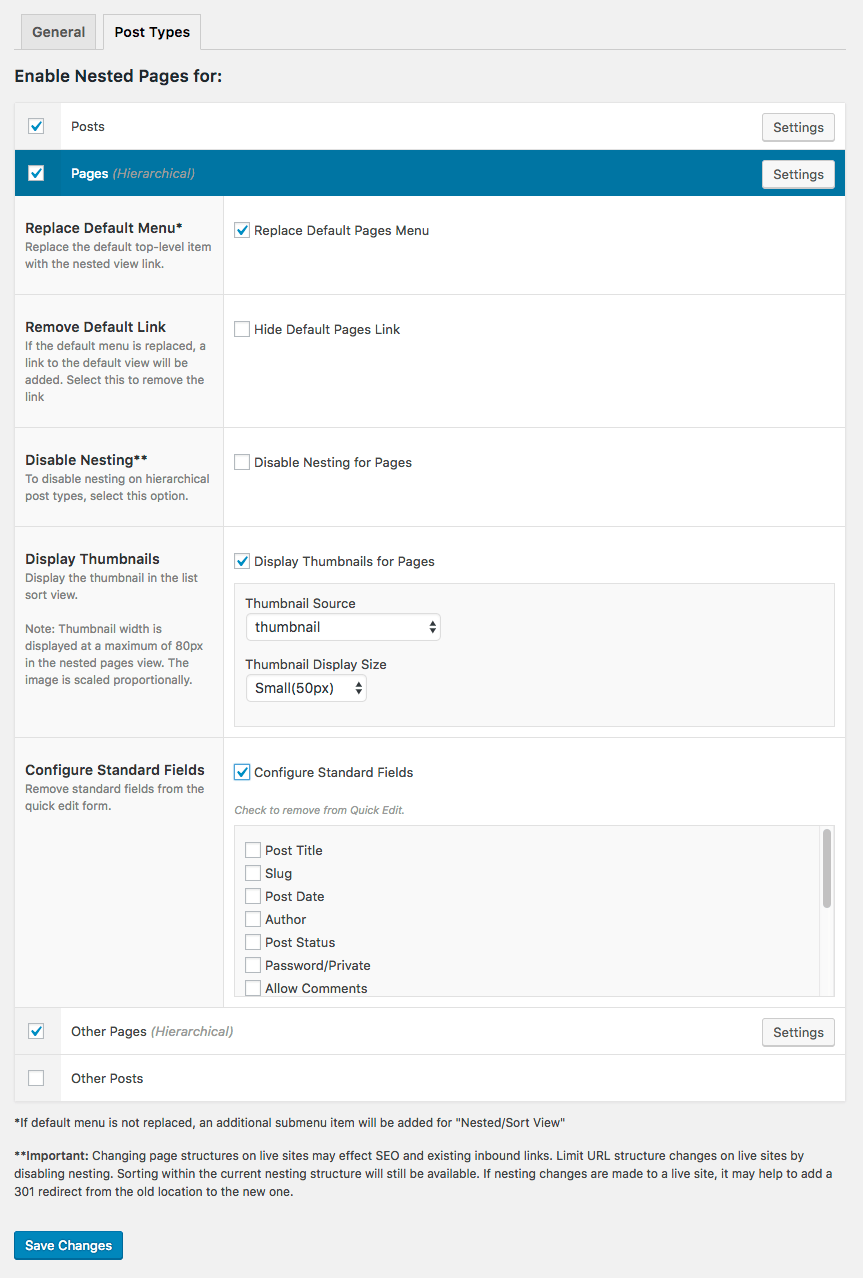
- Additional options are available through the plugin settings at Settings > Nested Pages. Nested Pages may be enabled for any post type, and is configurable by post type. Options include quick edit field settings, thumbnail display and more.
Changelog
Resolves issue with custom user roles/permissions and deleting posts. Important patch for sites using custom user roles. Thanks to Yuksel Beyti for finding/patching.
3.3.3
- Security Update. Thanks to Ananda Dhakal for the responsible disclosure.
3.3.2
- Fixes issue where post type settings were not saving correctly
- Updates minimum PHP version to 8.0
3.3.1
- Additional style updates
3.3.0
- Updates styles to better match WordPress 7+
3.2.15
- Security update – Thanks to Meher Sudhakar Abbireddi for reporting
3.2.14
- Tested with WordPress 7
- Security update – Thanks to Meher Sudhakar Abbireddi for reporting
Screenshots



For developers
Is this your plugin? Show off the numbers.
Add a live badge to your site, docs or GitHub README. It updates on its own — no account needed.
Best Nested Pages alternatives
All admin plugins →



FAQ
Nested Pages: quick answers
Straight answers, pulled from live WordPress.org data.
Live data from WordPress.org · checked Nov 16, 2026
Is Nested Pages free?
Yes. Nested Pages is free to download and use from the official WordPress.org plugin directory.
Is Nested Pages safe to use in 2026?
Nested Pages is a solid plugin choice in 2026, with a few things worth checking first. It runs on 90K+ sites, is rated 4.7/5 and was last updated 2 months ago, and scores 79/100 on our health check.
How many websites use Nested Pages?
Nested Pages is active on 90K+ WordPress websites and has been downloaded 2,546,567 times since it launched in October 2014. It was downloaded 22,696 times in the last 30 days.
Does Nested Pages work with WordPress 7.1?
Yes. The developer has tested Nested Pages up to WordPress 7.1.4, the latest release. It requires WordPress 3.8 or newer.
What PHP version does Nested Pages need?
Nested Pages requires PHP 8.0 or higher. Most hosts run PHP 8.x today, so it works on any modern WordPress hosting.
When was Nested Pages last updated?
The latest version, 3.3.3, was released on September 25, 2026 (2 months ago).
Who makes Nested Pages?
Nested Pages is developed and maintained by Hook & Filter.
What are the best alternatives to Nested Pages?
The most popular alternatives to Nested Pages are Loginizer (1M+ installs), Redux Framework (900K+ installs) and Admin Menu Editor (300K+ installs).
Powered by PageForge
Want thousands of pages that rank like these? Build them in an afternoon.
This directory runs on the same engine as PageForge. Turn any spreadsheet, CSV or API into thousands of fast, SEO-ready WordPress pages — with schema, internal links and AI-written copy baked in.
- CSV, Google Sheets & API data sources
- AI content, schema & internal links per page
- Works with Elementor, Gutenberg, Yoast & Rank Math
- Free on WordPress.org — no credit card


