



WP Fusion Lite – Marketing Automation and CRM Integration for WordPress
WP Fusion Lite synchronizes your WordPress users with contact records in your CRM or marketing automation system.

Safe pick
Yes — WP Fusion Lite is a safe, well-maintained plugin to use in 2026. It runs on 5K+ sites, is rated 5/5 and was last updated 22 hours ago, and scores 83/100 on our health check.
- Loved by users — 5/5 from 69 reviews
- Actively developed — last update 22 hours ago
- Tested with the latest WordPress (7.1)
How does it stack up?
Side-by-side on installs, updates, ratings & support



Daily downloads
Download spikes usually follow a new release — each site that auto-updates counts as a download.
Rankings
Where WP Fusion Lite stands todayWordPress.org search rankings
Live position in the plugin search, top 100| Keyword | Position |
|---|---|
| crm | #8 |
| integration | #28 |
| marketing automation | #9 |
| membership | #78 |
| sync | #71 |
Version adoption
Share of active sites per release.
Rating breakdown
★★★★★★★★★★ 5 from 69 reviews
About WP Fusion Lite
From the official readme · v3.48.0Description
WP Fusion Lite synchronizes your WordPress users with leading CRMs and marketing automation systems, keeps user profiles in sync with CRM contact records, and lets you protect site content based on CRM tags.
Features
- Automatically create new contacts in your CRM when users register in WordPress
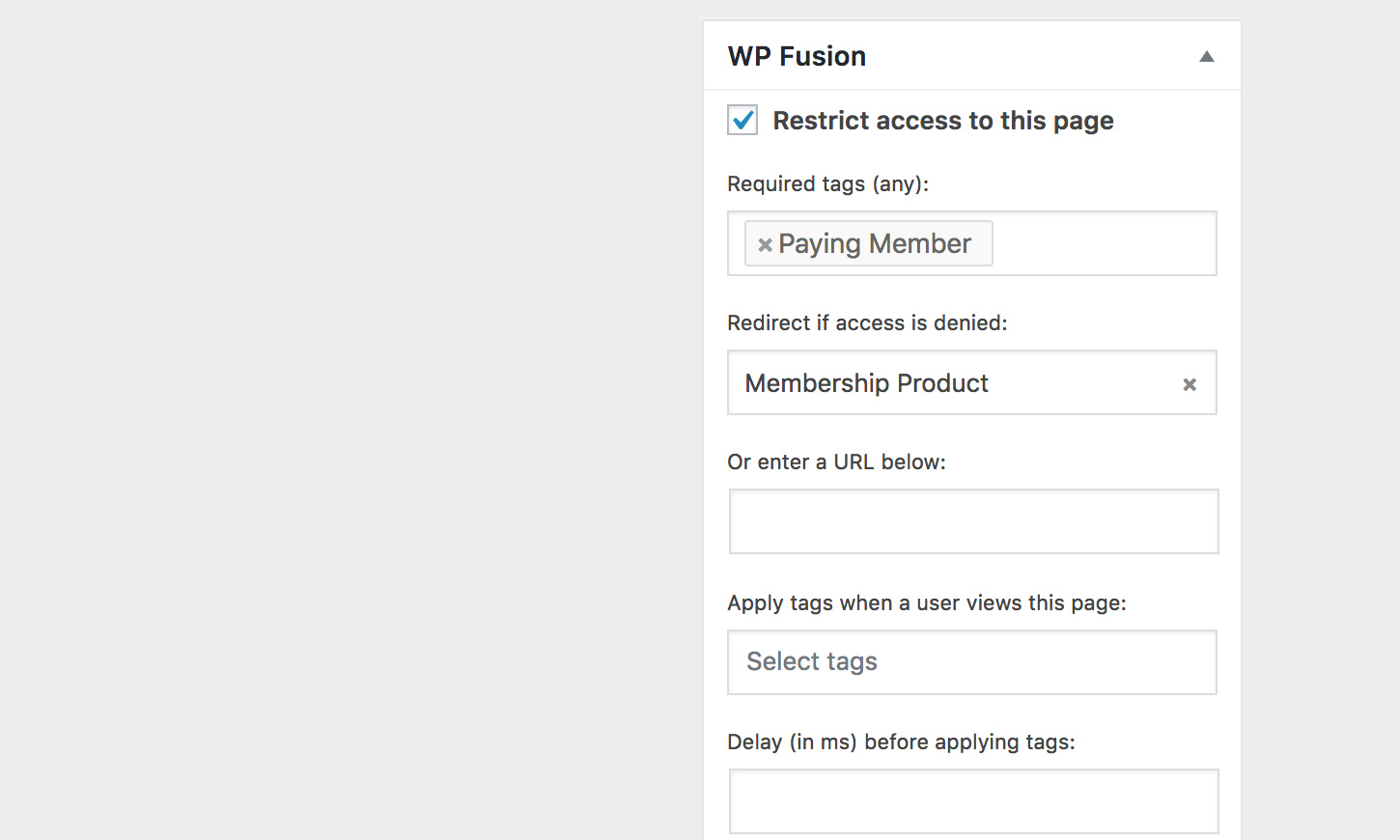
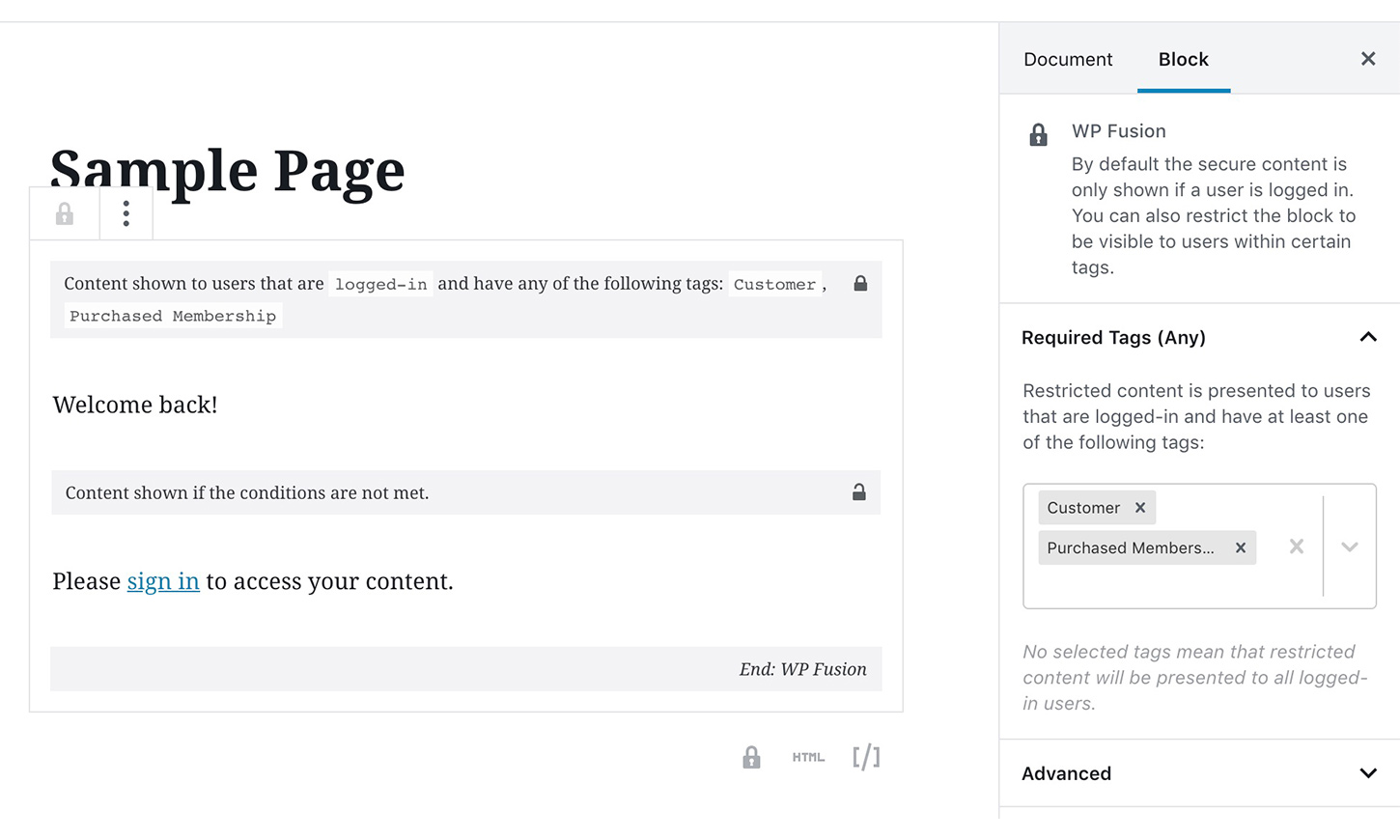
- Restrict access to site content using tags and lists in your CRM
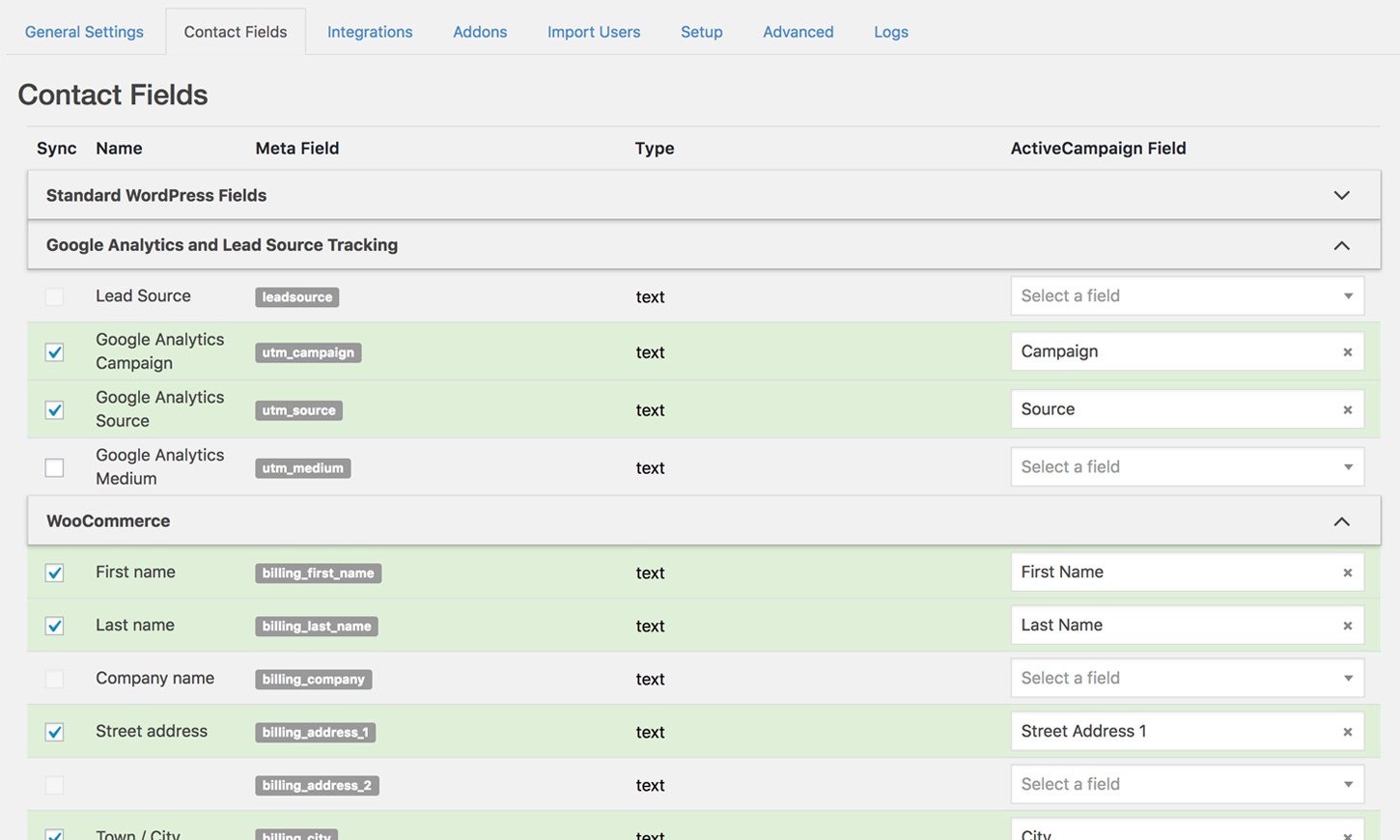
- Synchronize any WordPress user data with custom fields in your CRM
- Apply tags when users register
- Import contacts from your CRM as new WordPress users and generate passwords for them
- Export WordPress users to your CRM as contact records
- Track visitor activity using your CRM’s tracking scripts (with supported CRMs)
WP Fusion is a critical tool in our toolkit for our clients, and we VERY strongly encourage our clients to use WP Fusion if they have any kind of CRM. The software is top notch, and the support team is fast and friendly. Nothing but love for WP Fusion from my team here at House Trevethan.
Allen Trevethan – House Trevethan
Lite Version
This is a free version of WP Fusion. WP Fusion Lite synchronizes your registered WordPress users with your connected CRM, including their name and email address.
It does not apply tags based on purchases or course activity, sync form entries, sync customers, or detect any data generated by other plugins.
For integration with WooCommerce, LearnDash, Gravity Forms, Elementor and over 100 other popular WordPress plugins, check out one of our paid licenses.
Benefits
-
⚡ Replace Zapier, Integromat, and other integration tools. WP Fusion gives you a direct data sync between your site and your CRM, with no delays or limits.
-
🔒 Create easy to manage membership sites with drip-released content using timers and logic in your CRM.
-
💎 Personalize your site by displaying data from CRM contact records, and showing / hiding content based on a user’s CRM tags or lists.
WP Fusion allows us to provide tailored customer experiences in WordPress that wow every time.
Hundreds of plugins that used to be one size fits all, can now perform differently for each Ontraport contact. For example, a low scoring Ontraport contact can be presented with a winback customer journey in WordPress.
This has allowed our clients to increase customer engagement and retention. It’s the only solution that should be considered for any WordPress integration.
Josh Schleifer – Triple Canopy
Docs and Tutorials
- 📦 Installation Guide
- 🔒 Controlling access to content with CRM tags
- 📝 Shortcodes
- 👀 Displaying CRM data in WordPress
- 🔥 Sync WordPress users with CRM contact records
- 🔑 Import users from your CRM and generate passwords
- 📤 Export users and metadata to your CRM
- 📈 Sync Google Analytics and other leadsource variables with your CRM
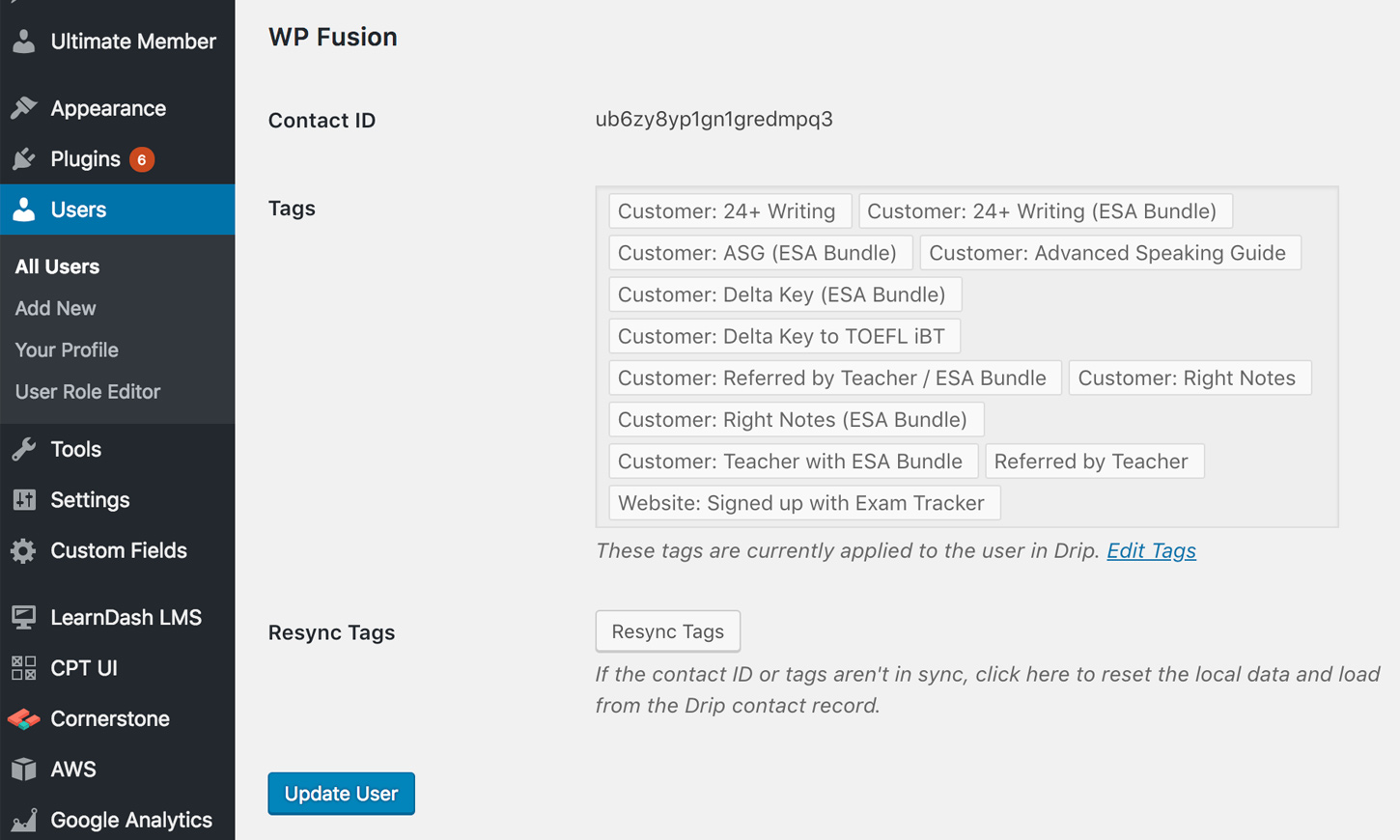
- 🏷️ Track user activity using tags
- 🔮 Auto login links
WP Fusion builds a critical bridge between our WooCommerce powered ecommerce site and LifterLMS powered training site to our CRM ActiveCampaign. It was easy to set up. The technical support is above and beyond anything I’ve ever seen. What it does is clearly intelligently designed and well built.
Chris Badgett – LifterLMS
Supported CRMs and marketing automation platforms
- ActiveCampaign
- AgileCRM
- Autopilot
- Autonami
- Bento
- BirdSend
- Capsule
- Constant Contact
- ConvertKit
- Copper
- Customerly
- Customer.io
- Drift
- Drip
- EmailOctopus
- Emercury
- Encharge
- Engage
- EngageBay
- Flexie
- FluentCRM (same site or REST API)
- GetResponse
- Gist
- Groundhogg (same site or REST API)
- Growmatik
- HighLevel
- HubSpot
- Infusionsoft
- Intercom
- Jetpack CRM
- Kartra
- Kit
- Klaviyo
- Klick-Tipp
- Loopify
- MailChimp
- MailEngine
- MailerLite
- Mailjet
- MailPoet
- Maropost
- Mautic
- Microsoft Dynamics 365
- MooSend
- NationBuilder
- Omnisend
- Ontraport
- Ortto
- Pipedrive
- Platform.ly
- PulseTechnologyCRM
- Quentn
- Salesflare
- Salesforce
- SendFox
- Sender.net
- SendinBlue
- Sendlane
- Tubular
- UserEngage
- WP ERP
- Zoho
For more info on CRM compatibility, check out the compatibility table.
WP Fusion is one of my secret weapons for getting WordPress to keep our member’s data synced with our CRM. This makes everything work so much better when you don’t have to worry about your members having issues logging into the member’s area.
If you have or are considering having a membership website using WordPress this plugin is a must-have. It will save you hours of time and frustration.
Greg Russell – SuccessTeam Marketing
Installation
Upload and activate the plugin, then go to Settings >> WP Fusion. Select your desired CRM, enter your API credentials and click “Connect” to verify the connection.
For CRM-specific setup information, see our Installation Guide.
Frequently asked questions
Who is it for?
WP Fusion is built for anyone using a CRM or marketing automation platform, and running their website with WordPress. CRMs empower businesses to track leads, send email broadcasts, manage contact data, track sales, delegate client relationships between employees, and more. WordPress handles the public facing side of your business: your sales pages, ecommerce platform, support forums, photos and videos, and anything else you want the world to see. But your CRM and WordPress don’t talk to each other. This is where WP Fusion comes in. WP Fusion acts as a bridge between your WordPress data and…
How is it different from Zapier?
While WP Fusion and Zapier are both integration tools, they work quite differently. Zapier is a SaaS (Software as a Service) solution that acts as a middleman between your site and your CRM (as well as many other platforms). When something is updated in WordPress, it is synced to Zapier’s website, and then Zapier syncs the data on to your desired platform. Depending on your plan there is a delay before the data is synced, and/or limit on how many “tasks” you can run each month. WP Fusion connects your site directly to your CRM or marketing automation platform over the API (nothing goes…
Why are your version numbers so funny?
WP Fusion Lite is a copy of the Pro WP Fusion plugin, with support for third-party plugins removed. Each time we release a Lite update, it brings it up to date with the latest version of the Pro plugin. For the full details see the changelog on our site.
Can I disable the upgrade nags?
WP Fusion Lite has a few banners on the settings pages with additional info about the features available in the Pro version. If you’d prefer not to see these you can disable them with the filter: add_filter( 'wp_fusion_hide_upgrade_nags', '__return_true' );
How can I report security bugs?
You can report security bugs through the Patchstack Vulnerability Disclosure Program. The Patchstack team help validate, triage and handle any security vulnerabilities. Report a security vulnerability.
Where can I find the source code?
The source code and build files for WP Fusion Lite are available on GitHub.
Do you have more FAQs?
Of course, see our Frequently Asked Questions.
Changelog
3.48.0 – 9/23/2026
- Improved – Updated Klaviyo integration to the 2026-07-15 API
- Improved – FunnelKit Automations now uses the v3 REST API, and falls back to the older unversioned routes on sites that still have them
- Fixed Keap company sync by looking up or creating the company and linking the contact by ID, since Keap no longer accepts company_name on contact updates
- Fixed MailerLite deactivating webhooks that took longer than 3 seconds to respond. Webhooks are acknowledged immediately and processed in the background, and async imports still ignore privileged roles sent from the CRM
- Fixed an unauthenticated change of the FluentCRM REST, FunnelKit Automations, and Groundhogg REST connection. The application-password return could replace the CRM URL, username, and password before WordPress checked for a logged-in user. Saving those credentials now requires an administrator on the WP Fusion settings screen, with a nonce
- Fixed subscribers listing every user’s email from the activity log search, and re-syncing another user’s CRM contact, with the admin nonce from their own profile. Log search requires an administrator. Re-sync requires the ability to edit users. The tag and redirect pickers stay available to anyone who can edit content
3.47.14 – 7/30/2026
- Improved – Only the active CRM is bootstrapped at load time instead of instantiating every CRM class, and MailPoet’s translated name is deferred until init to avoid WordPress 6.7 textdomain notices
- Fixed Drip failing to reactivate inactive contacts by keying updates off email and sending built-in fields like status as top-level API parameters
- Fixed Kit (ConvertKit) v4 webhook imports failing after contact ID parsing, including missing-email and missing-name edge cases
- Fixed Brevo phone formatting for non-US numbers, including expanded E.164 country coverage and prevention of double-prefixing
- Fixed multiline CRM field values (e.g. HubSpot textareas) being flattened to a single line when synced into WordPress user meta
3.47.13 – 6/17/2026
- Improved – Dynamics 365 now detects an expired Azure client secret (AADSTS7000222) and returns an actionable message — update WP Fusion and clear PHP OPcache, then re-authorize — instead of a raw Azure error string
- Improved – MailerLite now honors the “Resubscribe” setting when updating existing contacts, re-subscribing previously unsubscribed contacts on update
- Fixed HubSpot returning an “invalid or unknown list” error when WP Fusion created a new list, caused by the v3 API nesting the new list ID under a list object in the response
- Fixed errors that could occur when refreshing the HubSpot list ID migration
- Fixed text and multi-line text fields not being cleared in the CRM when their value was emptied — null values are now preserved through to the CRM as a clear instead of being silently dropped
- Fixed Mailchimp rejecting contact updates that contained an empty merge fields object
- Fixed WordPress admin page styling on the WP Fusion settings pages under WordPress 7.0
- Fixed a PHP warning from the access control “apply tags on view” feature when the global post was unavailable during script enqueue
- Fixed auto-login links and Customer.io syncing failing for email addresses containing a “+” character
- Fixed Brevo double opt-in failing when the template ID was passed as a string instead of an integer
3.47.12 – 5/8/2026
- Added new “push” webhook action that lets a CRM trigger WP Fusion to push the user’s WP meta to the CRM — the reverse of the existing update webhook. Supports an optional
fieldsparameter (comma-separated list of WP or CRM field keys) to limit the sync, an async mode for queued processing, and lockout against concurrent update / update_tags / add webhooks for the same contact - Improved – HubSpot v1→v3 list ID safety net now uses the standard idmapping flow (sync_tags_v3 + /crm/v3/lists/idmapping) directly, anchors the migration cutoff to 2026-05-01 00:00 UTC so April 30 applies consistently across server timezones, and guards the mapping fetch against malformed JSON and non-200 responses
- Improved – Autonami / FunnelKit load_contacts hardening: handle WP_Error from get_contacts(), normalize the contacts array, and guard before foreach
- Fixed Autonami / FunnelKit Automations sync pagination — offset stayed at 0 between pages, causing sync_tags, sync_lists, and load_contacts to re-fetch page 1 endlessly on sites with 100+ tags
- Fixed FluentCRM (REST) bulk import returning no contacts when tags are stored by numeric ID. load_contacts() now uses GET /tags/{id} for numeric tag IDs and keeps the /tags?search= endpoint for slug-based tag keys
3.47.11.1 – 5/8/2026
- Fixed fatal error on admin pages for HubSpot sites that had not yet completed the v1 to v3 list ID migration after the 4/30/2026 cutoff, caused by a missing get_v3_list_ids() method on the HubSpot CRM class
3.47.11 – 4/22/2026
- Added app disconnect functionality for HubSpot
- Improved – HubSpot webhook handling now defaults to async, dramatically improving workflow extension success rates by responding to HubSpot in milliseconds instead of waiting for follow-up API calls. Use ?async=false in the webhook URL or the wpf_hubspot_webhook_async filter to opt back into synchronous processing.
- Improved – HubSpot integration now retries rate-limited (429) and temporarily-unavailable (503) requests once, honoring the Retry-After header, instead of returning an immediate error
- Improved – Consolidated CRM disconnect flow into a new shared WPF_CRM_Disconnect class; HubSpot, Klaviyo, and Pipedrive now share a standardized confirmation and result page when disconnecting from the CRM
- Improved – ActiveCampaign integration now validates its cached ecom customer ID against the order email, preventing orders from being linked to the wrong customer when a buyer’s email changes between orders
- Improved – Async loopback requests now use wp_remote_post() instead of wp_safe_remote_post() for compatibility with local development environments (.local TLDs, local IPs, non-standard ports)
- Fixed ActiveCampaign load_ecom_customer() returning a “not found” response for real API errors, which could cause duplicate customers to be created
- Fixed NationBuilder v2 API custom_values payload handling when tag labels were numeric vs string values
- Fixed tag and list string-replacement logic in the settings exporter/importer to match on whole words only, preventing unintended replacement of similarly-named tags or list IDs
Screenshots
For developers
Is this your plugin? Show off the numbers.
Add a live badge to your site, docs or GitHub README. It updates on its own — no account needed.
Best WP Fusion Lite alternatives
All crm plugins →





FAQ
WP Fusion Lite: quick answers
Straight answers, pulled from live WordPress.org data.
Live data from WordPress.org · checked Sep 26, 2026
Is WP Fusion Lite free?
Yes. WP Fusion Lite is free to download and use from the official WordPress.org plugin directory. The developer also sells premium add-ons or a Pro version with extra features.
Is WP Fusion Lite safe to use in 2026?
Yes — WP Fusion Lite is a safe, well-maintained plugin to use in 2026. It runs on 5K+ sites, is rated 5/5 and was last updated 22 hours ago, and scores 83/100 on our health check.
How many websites use WP Fusion Lite?
WP Fusion Lite is active on 5K+ WordPress websites and has been downloaded 161,368 times since it launched in September 2018. It was downloaded 1,534 times in the last 30 days.
Does WP Fusion Lite work with WordPress 7.1?
Yes. The developer has tested WP Fusion Lite up to WordPress 7.1.2, the latest release. It requires WordPress 4.6 or newer.
What PHP version does WP Fusion Lite need?
WP Fusion Lite requires PHP 7.4 or higher. Most hosts run PHP 8.x today, so it works on any modern WordPress hosting.
When was WP Fusion Lite last updated?
The latest version, 3.48.0, was released on September 25, 2026 (22 hours ago).
Who makes WP Fusion Lite?
WP Fusion Lite is developed and maintained by Jack Arturo.
What are the best alternatives to WP Fusion Lite?
The most popular alternatives to WP Fusion Lite are Flamingo (800K+ installs), HubSpot All-In-One Marketing (200K+ installs) and FluentCRM (80K+ installs).
Powered by PageForge
Want thousands of pages that rank like these? Build them in an afternoon.
This directory runs on the same engine as PageForge. Turn any spreadsheet, CSV or API into thousands of fast, SEO-ready WordPress pages — with schema, internal links and AI-written copy baked in.
- CSV, Google Sheets & API data sources
- AI content, schema & internal links per page
- Works with Elementor, Gutenberg, Yoast & Rank Math
- Free on WordPress.org — no credit card


