



WP WooCommerce Mailchimp
Simple and flexible Mailchimp integration for WooCommerce.

Use with caution
WP WooCommerce Mailchimp works, but test it on a staging site before relying on it in 2026. It runs on 5K+ sites, is rated 4.3/5 and was last updated 6 months ago, and scores 53/100 on our health check.
- Only tested up to WordPress 6.9 (latest is 7.1)
How does it stack up?
Side-by-side on installs, updates, ratings & support



Daily downloads
Download spikes usually follow a new release — each site that auto-updates counts as a download.
Rankings
Where WP WooCommerce Mailchimp stands todayWordPress.org search rankings
Live position in the plugin search, top 100| Keyword | Position |
|---|---|
| ecommerce | >100 |
| >100 | |
| mailchimp | #10 |
| woocommerce | >100 |
Version adoption
Share of active sites per release.
Rating breakdown
★★★★★★★★★★ 4.3 from 35 reviews
About WP WooCommerce Mailchimp
From the official readme · v3.2.0Description
WP WooCommerce Mailchimp provides simple and flexible Mailchimp integration for WooCommerce.
Automatically subscribe customers to a designated Mailchimp list and, optionally, Mailchimp interest groups and tags upon order creation or order completion.
This can be done quietly or based on the user’s consent with several opt-in settings that support international opt-in laws.
Works with both Classic and Block-Based Checkout — fully compatible with WooCommerce’s default block checkout (the default since WooCommerce 8.3) and the traditional shortcode checkout.
Features
WooCommerce Event Selection
- Subscribe customers to Mailchimp after order creation
- Subscribe customers to Mailchimp after order processing
- Subscribe customers to Mailchimp after order completion
Works with Mailchimp Interest Groups and Tags
- Set one or more interest groups to add users to based on the selected Mailchimp list
- Set one or more tags to add users to based on the selected Mailchimp list
Block Checkout Support
- Opt-in checkbox renders natively in WooCommerce’s block-based checkout
- Matches WooCommerce’s native checkout styling
- Fully backward compatible with classic shortcode checkout
Opt-In Settings
- Mailchimp double opt-in support (control whether a double opt-in email is sent to the customer)
- Optionally, display an opt-in checkbox on the checkout page (required in some countries)
- Control the label displayed next to the opt-in checkbox
- Control whether or not the opt-in checkbox is checked or unchecked by default
- Control the placement of the opt-in checkbox on the checkout page (classic checkout)
Upgrade to Pro
WP WooCommerce Mailchimp Pro unlocks powerful features for growing stores:
- Per-Product Mailchimp Settings — assign different lists, interest groups, and tags per product
- Per-Variation Mailchimp Settings — different Mailchimp mappings for each product variation (Monthly vs Annual, Small vs Large, etc.)
- Merge Field Mapping — map any WooCommerce order, customer, or product field to Mailchimp merge fields without writing code. Set global defaults with per-product and per-variation overrides.
- WooCommerce Subscriptions Integration — sync Mailchimp membership with subscription lifecycle (active, cancelled, expired)
- Subscription Expiration Actions — automatically unsubscribe, remove tags, or remove interest groups when a subscription expires
Learn more about WP WooCommerce Mailchimp Pro
Translation Support
Would you like to help translate the plugin into more languages? Join our Translations Community at https://translate.wordpress.org/projects/wp-plugins/woocommerce-mailchimp.
WooCommerce Mailchimp translation is managed through WordPress language packs here: https://translate.wordpress.org. This allows WooCommerce Mailchimp to be translated into other languages. The preferred tool for translating plugins is called GlotPress. You can read about how GlotPress works in the WordPress Translator’s Handbook.
Thanks in advance for your help on any translation efforts!
We also support bundled translations via:
- Included woocommerce-mailchimp.pot file
- WPML support via wpml-config.xml
Included Translations:
- English (US) (default)
- French.
Custom Translations
If you don’t want to use WordPress language packs or bundled translations, you can use your own custom translations.
- Place custom translations in
/wp-content/languages/woocommerce-mailchimp/woocommerce-mailchimp_{lang}_{country}.mo. This ensures they won’t get overwritten by plugin updates.
Translation Loading
If no custom translations are present, languages will be loaded in the following order:
- From WordPress language packs in:
/wp-content/languages/plugins/woocommerce-mailchimp/woocommerce-mailchimp_{lang}_{country}.mo - From the plugin bundled in:
/wp-content/plugins/woocommerce-mailchimp/languages/woocommerce-mailchimp_{lang}_{country}.mo
Multisite
- All features should work for each blog in multisite installations.
Requirements
WP WooCommerce Mailchimp requires PHP 7.4+, WordPress 6.2+, and WooCommerce 8.3+.
Documentation & Support
Online documentation and code samples are available via our Help Center.
Please visit the
WP WooCommerce MailChimp support forum on WordPress.org for basic support and help from other users. Since this is a free plugin, we respond to these as we have time.
Dedicated support is available for WP WooCommerce Mailchimp Pro customers.
Contribute
All development for WP WooCommerce Mailchimp is handled via GitHub. Opening new issues and submitting pull requests are welcome.
If you enjoy using the plugin, we’d love it if you could give us a review!
Installation
- Upload or extract the
woocommerce-mailchimpfolder to your site’s/wp-content/plugins/directory. You can also use the *Add new- option found in the *Plugins- menu in WordPress. - Enable the plugin from the *Plugins- menu in WordPress.
Usage
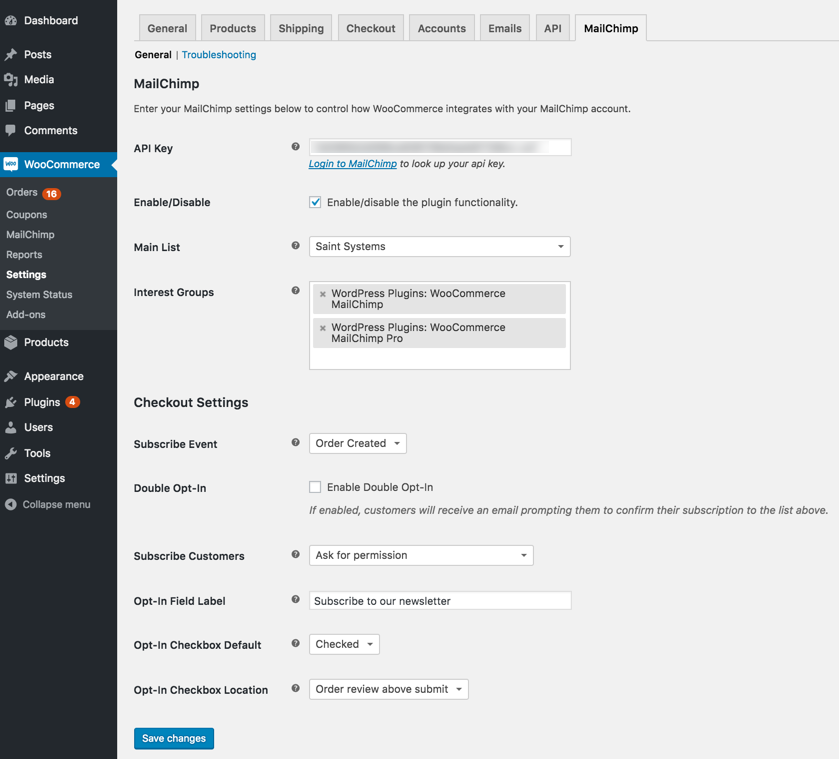
- Go to WooCommerce > Settings > Mailchimp
- First, paste your MailChimp API Key to get started.
- Select whether you want customers to be subscribed to your Mailchimp list after order creation, order processing or order completion (there’s a difference in WooCommerce).
- Next, select your Mailchimp list and select any interest groups (optional).
- Select your opt-in, double opt-in settings and hit
Save changes. - That’s it, your WooCommerce store is now integrated with Mailchimp!
Changelog
3.2.0 – Apr 7, 2026
- Feature: add Upgrade to Pro upsell on settings page and style plugin row link
- Fix: remove early __() calls in constructors to resolve WP 6.7+ textdomain notice
3.1.0 – Apr 2, 2026
- Feature: remove bundled Action Scheduler in favor of WooCommerce built-in
- Fix: remove bundled Action Scheduler — use WooCommerce’s built-in copy
- Fix: update readme with block checkout, pro features, and requirements
- Fix: use –ignore-platform-reqs for composer install in CI
3.0.5 – Apr 1, 2026
- Fix: bump WP tested up to 6.9.4
3.0.4 – Apr 1, 2026
- Fix: rewrite SVN deploy to match proven release.sh approach
3.0.3 – Apr 1, 2026
- Fix: remove release-please markers from readme.txt Stable tag
3.0.2 – Apr 1, 2026
- Fix: use block annotation for version marker in plugin header
Screenshots

For developers
Is this your plugin? Show off the numbers.
Add a live badge to your site, docs or GitHub README. It updates on its own — no account needed.
Best WP WooCommerce Mailchimp alternatives
All ecommerce plugins →





FAQ
WP WooCommerce Mailchimp: quick answers
Straight answers, pulled from live WordPress.org data.
Live data from WordPress.org · checked Sep 26, 2026
Is WP WooCommerce Mailchimp free?
Yes. WP WooCommerce Mailchimp is free to download and use from the official WordPress.org plugin directory.
Is WP WooCommerce Mailchimp safe to use in 2026?
WP WooCommerce Mailchimp works, but test it on a staging site before relying on it in 2026. It runs on 5K+ sites, is rated 4.3/5 and was last updated 6 months ago, and scores 53/100 on our health check.
How many websites use WP WooCommerce Mailchimp?
WP WooCommerce Mailchimp is active on 5K+ WordPress websites and has been downloaded 586,507 times since it launched in October 2013. It was downloaded 647 times in the last 30 days.
Does WP WooCommerce Mailchimp work with WordPress 7.1?
WP WooCommerce Mailchimp is officially tested up to WordPress 6.9.9, while the latest release is 7.1.2. It may still work, but try it on a staging site first.
What PHP version does WP WooCommerce Mailchimp need?
WP WooCommerce Mailchimp requires PHP 7.4 or higher. Most hosts run PHP 8.x today, so it works on any modern WordPress hosting.
When was WP WooCommerce Mailchimp last updated?
The latest version, 3.2.0, was released on April 7, 2026 (6 months ago).
Who makes WP WooCommerce Mailchimp?
WP WooCommerce Mailchimp is developed and maintained by Saint Systems.
What are the best alternatives to WP WooCommerce Mailchimp?
The most popular alternatives to WP WooCommerce Mailchimp are WooCommerce (7M+ installs), Popup Builder & Popup Maker… (1M+ installs) and WooCommerce PayPal Payments (800K+ installs).
Powered by PageForge
Want thousands of pages that rank like these? Build them in an afternoon.
This directory runs on the same engine as PageForge. Turn any spreadsheet, CSV or API into thousands of fast, SEO-ready WordPress pages — with schema, internal links and AI-written copy baked in.
- CSV, Google Sheets & API data sources
- AI content, schema & internal links per page
- Works with Elementor, Gutenberg, Yoast & Rank Math
- Free on WordPress.org — no credit card


