



CURCY – Multi Currency for WooCommerce
Show multi-currency pricing and dual-currency display, accept multi-currency payment, support IP detection, custom/global rate, fixed price and more

Solid choice
CURCY is a solid plugin choice in 2026, with a few things worth checking first. It runs on 20K+ sites, is rated 4.3/5 and was last updated 3 days ago, and scores 76/100 on our health check.
- Proven at scale on 20K+ active sites
- Actively developed — last update 3 days ago
- Tested with the latest WordPress (7.1)
- Momentum — downloads up 61.1% vs the previous 30 days
- Slow support — only 0% of recent threads resolved
How does it stack up?
Side-by-side on installs, updates, ratings & support



Daily downloads
Download spikes usually follow a new release — each site that auto-updates counts as a download.
Rankings
Where CURCY stands todayWordPress.org search rankings
Live position in the plugin search, top 100| Keyword | Position |
|---|---|
| ecommerce | >100 |
| multi currency for woo | #1 |
| woocommerce | >100 |
| woocommerce currency switcher | #7 |
| woocommerce multi currency | #2 |
Version adoption
Share of active sites per release.
Rating breakdown
★★★★★★★★★★ 4.3 from 227 reviews
About CURCY – Multi Currency for WooCommerce
From the official readme · v2.2.22Description
If you have a WooCommerce store, CURCY – Multi Currency for WooCommerce is a must-have plugin for you. CURCY – Multi Currency for WooCommerce allows your customers to switch between currencies and helps your store accept payments in multi-currency. The exchange rate can be set up manually or automatically. The plugin can automatically get customers’ geolocation and display the price in the customers’ native currency.
Preview CURCY – Multi Currency for WooCommerce
How to install and use the plugin
Important Notice:
-
Plugin works based on WooCommerce 7.x plugin.
-
Conditional display rules use an allowlisted parser for WordPress/WooCommerce
is_*()tags only (noeval()). Only fill this field with proper conditional tags from trusted developers. -
It is released on WordPress.org and you can use plugin as free to build themes for sale.
MULTI CURRENCY FOR WOOCOMMERCE FEATURES
-
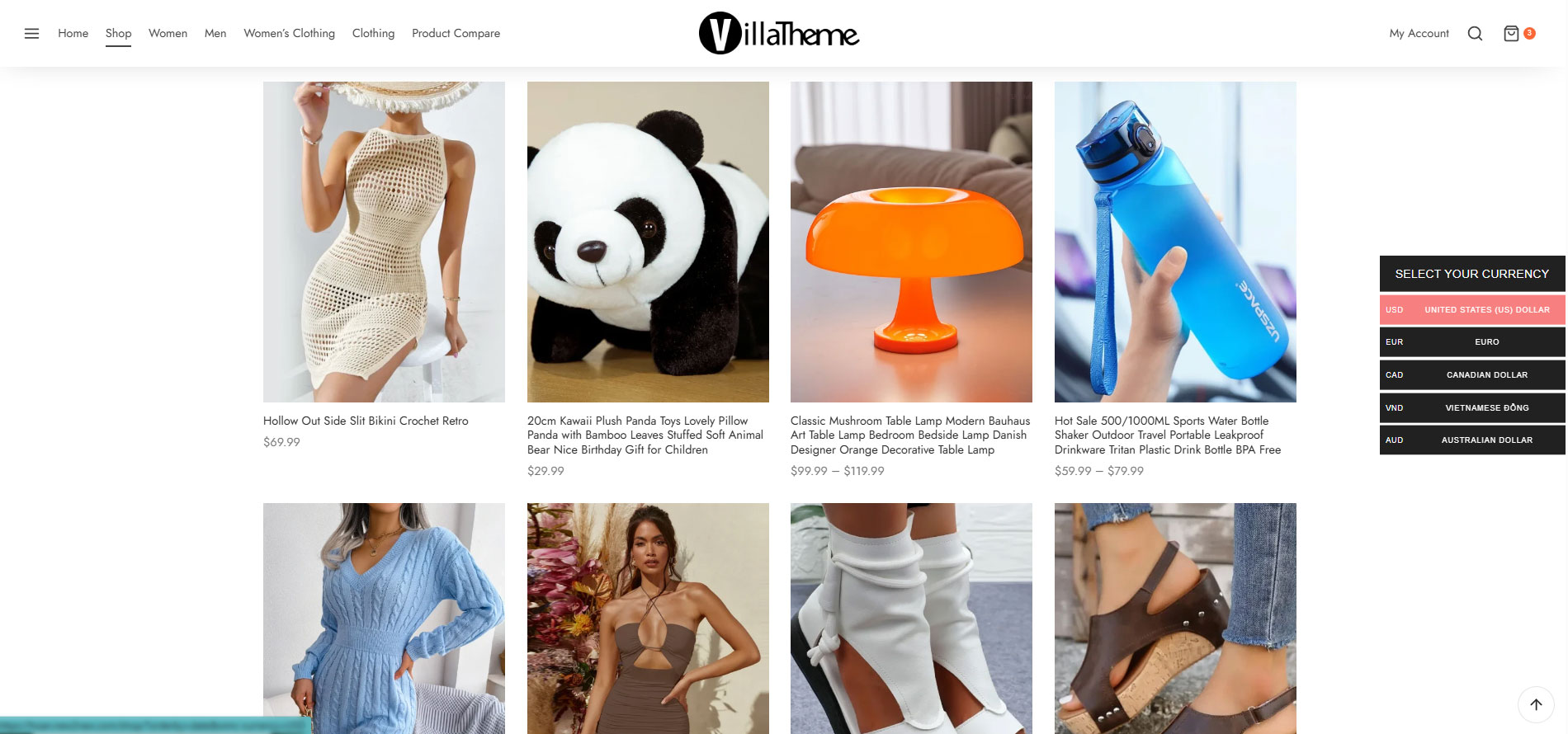
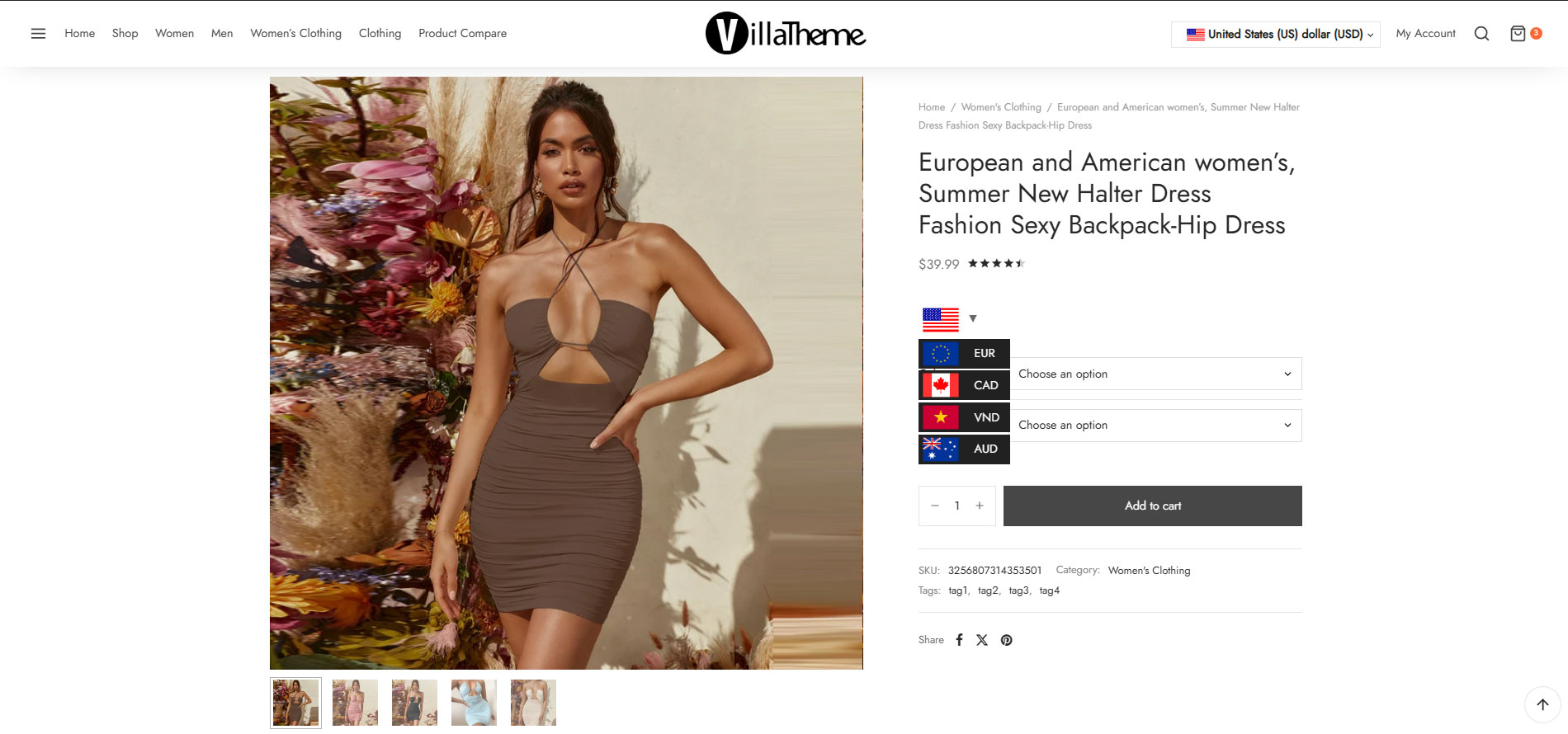
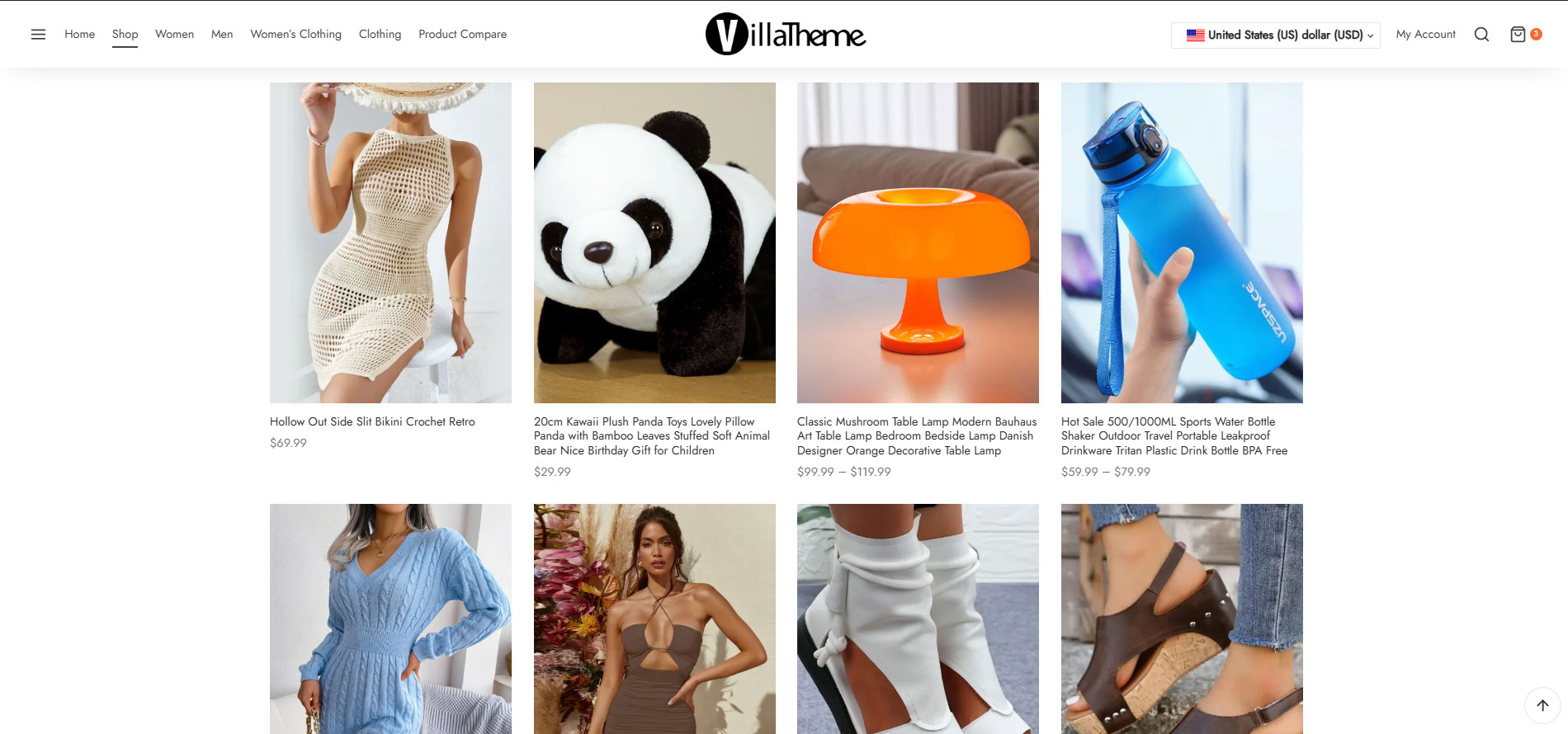
Let customers see product prices in different currencies: Use the Currency bar (manage in Design tab), Currency Price Switcher (manage this in General tab), or shortcode to let customers switch the currency.
-
Pay in different currencies: Enable this option to allow your customers to pay in different currencies
-
Auto Detect: Automatically detect a customer’s country code based on IP address and display respective currency set for their country.
-
Geo API: Choose between WooCommerce and External service. If this option is set to WooCommerce, our plugin will geolocate IP from ipinfo.io or ip-api.com. If this option is set to External, our plugin will use IP2Location with your API key.
-
Display approximate price: If you do not want the plugin to detect customer’s country and show the price in their native currency directly when they come to your store, WooCommerce Multi Currency can still show the price in default currency AND the approximate price in the customer’s native currency
-
Set the exchange rate manually: WooCommerce Multi Currency also allows you to set up the exchange rate manually.
-
Manage the Exchange fee: Every time you exchange money from one currency to another, the bank or money transfer operator may apply a currency exchange fee. The difference between the exchange rate they decide to apply and the real exchange rate traded in the market is the currency exchange fee. WooCommerce Multi Currency allows you to add permanent exchange fees to exchange rates.
-
Set custom currency symbols: You can add your custom currency symbols. Example: United States Dollar can be displayed as USD, US$, $…
-
Set fixed price: WooCommerce Multi Currency allows you to add fixed prices in different currencies to the product price. The fixed prices will overwrite the prices calculated by exchange rates.
-
Hide Currency: WooCommerce Multi Currency allows you to hide currencies that you do not want to be shown on the front-end.
PREMIUM FEATURES
►All features from the free version.
-
Unlimited currency: with the premium version, you can add as many currencies as you want. With the free version, you can use 2 currencies only.
-
Use SESSION: Enable this option and the plugin will use the session instead of cookies to save the selected currency.
-
Force a specific currency to Checkout: Put a mandatory currency after customers click “Place order”
-
Display multiple currencies: If the product price on the Single product page and the Checkout page is not in the same currency, this option is helpful
-
Price format: you can create some rule to adjust final price to display beautifully for each currency such as $9.87 -> $9.99 …
-
Switch currency by JS: with the free version, the plugin will add a tag to your URL to define the selected currency, yourwebsite.com/?wmc-currency=EUR for example. The switch currency by JS can help to switch currency without adding the tag to your URL.
-
Select payment methods: select which payment method is available with each currency. Other payment methods will be hidden in the checkout page.
-
Multilingual support: able to select which currency to be used for which language, currently support WPML and Polylang
-
Bulk fixed price: you can quickly add fixed price for every currency by importing them from a CSV file
-
Change currency follow: force currency to change to the one you configure for each country when customers change their billing/shipping country
-
Update exchange rate automatically: The plugin automatically updates exchange rates. You can set the time for the automatic update: every 30 minutes, 1 hour, 6 hours, 1 day, 2 days, 3 days, 1 week, 1 month.
-
Select currency exchange rate APIs: You can select to update the exchange rate from VillaTheme.com, Google Finance, Yahoo Finance. More exchange rate APIs will be added in the future.
-
Receive update exchange rate email: This option of WooCommerce Multi Currency allows the admin to receive a notification email whenever it updates the exchange rate.
-
Premium support: with each purchase, you will have 6 or 12 months of premium support from VillaTheme. Our developers will help if you have any problems with Multi Currency for WooCommerce.
And much more things are waiting for you to discover
Check screenshots at https://villatheme.com/woo-multi-currency/ or https://villatheme.com/extensions/woo-multi-currency/
Documentation
Plugin Links
MAY BE YOU NEED
Abandoned Cart Recovery for WooCommerce
Advanced Product Information for WooCommerce
AFFI – Affiliate Marketing for WooCommerce
ALD – Dropshipping and Fulfillment for AliExpress and WooCommerce
Boost Sales for WooCommerce – Set up Up-Sells & Cross-Sells Popups & Auto Apply Coupon
Bopo – WooCommerce Product Bundle Builder
Bulky – Bulk Edit Products for WooCommerce
Cart All In One For WooCommerce
Catna – Woo Name Your Price and Offers
Checkout Upsell Funnel for WooCommerce
ChinaDS – Tmall-Taobao Dropshipping for WooCommerce
Clear Autoptimize Cache Automatically
COMPE – WooCommerce Compare Products
Coreem – Coupon Reminder for WooCommerce
CURCY – Multi Currency for WooCommerce – Smoothly on WooCommerce 9.x
Customer Coupons for WooCommerce
DEPART – Deposit and Part payment for Woo
Email Template Customizer for WooCommerce
EPOW – Custom Product Options for WooCommerce
EXMAGE – WordPress Image Links
Faview – Virtual Reviews for WooCommerce
FEWC – Extra Checkout Fields For WooCommerce
Free Shipping Bar for WooCommerce
GIFT4U – Gift Cards All in One for Woo
HANDMADE – Dropshipping for Etsy and WooCommerce
HAPPY – Helpdesk Support Ticket System
LookBook for WooCommerce – Shoppable with Product Tags
Lucky Wheel for WooCommerce – Spin a Sale
Notification for WooCommerce | Boost Your Sales – Recent Sales Popup – Live Feed Sales – Upsells
Orders Tracking for WooCommerce
Pofily – WooCommerce Product Filters
PRENA – Product Pre-Orders for WooCommerce
Product Builder for WooCommerce – Custom PC Builder
Product Size Chart For WooCommerce
Product Variations Swatches for WooCommerce
REDIS – WooCommerce Dynamic Pricing and Discounts
S2W – Import Shopify to WooCommerce
SUBRE – Product Subscription for WooCommerce – Recurring Payments
Suggestion Engine for WooCommerce
Thank You Page Customizer for WooCommerce – Increase Your Sales
TMDS – Dropshipping for TEMU and Woo
VARGAL – Additional Variation Gallery for WooCommerce
VIMA – Multi Customer Addresses for Woo
W2S – Migrate WooCommerce to Shopify
Installation
- Unzip the download package
- Upload
woo-multi-currencyto the/wp-content/plugins/directory - Activate the plugin through the ‘Plugins’ menu in WordPress
Changelog
2026.11.13 – version 2.2.22
– Fixed: When Pay in many currencies is disabled, WooCommerce Blocks / Store API checkout uses default currency for totals and payments, not only the order currency code
– Fixed: Store API cart requests during block checkout recalculate cart totals in the default currency without affecting mini-cart or browse pricing in the visitor currency
– Fixed: When Pay in many currencies is disabled, enforce_default_order_currency rebuilds order line amounts from the cart in the default currency instead of only relabelling the order currency
– Fixed: Store API checkout payment detection prefers WP_REST_Request route path segments over raw REQUEST_URI / rest_route / Referer substring matching
– Updated: Cache-compatible AJAX and approximate price now refresh WooCommerce product blocks (Product Collection / All Products / Product Price) via wc/store/collections invalidation and approximate markup injection
– Updated: Custom symbol with #PRICE# (e.g. US #PRICE# $) now formats correctly on WC Cart/Checkout Blocks via Store API CurrencyFormatter and response rewrite
– Updated: Store API checkout payment detection for wmc_get_price() and currency symbols when Pay in many currencies is disabled
– Updated: Register WooCommerce Blocks IntegrationInterface for Cart, Checkout, and Mini Cart (Blocks-native script + read-only currency metadata; Store API currency behavior unchanged)
2026.11.06 – version 2.2.21
– Fixed: Validate currency cookie and set_current_currency against configured currencies to prevent unauthenticated zero-price conversion
– Fixed: wmc_get_price() returns the unconverted price when the current currency rate is missing
– Fixed: Apply product visibility check to exchange[] in wmc_get_products_price so draft/private prices are not returned to guests
– Fixed: When Pay in many currencies is disabled, classic checkout AJAX forces default currency so order currency matches unconverted totals
– Fixed: When Pay in many currencies is disabled, classic and Store API checkout set the order currency to the default currency used for totals
– Updated: Enforce default currency on Store API checkout when Pay in many currencies is disabled
– Updated: Compatible with PDF Invoices & Packing Slips for WooCommerce – WP Overnight
– Updated: VillaTheme support
2026.10.29 – version 2.2.20
– Added: External geo API key setting; auto-detect uses ip2location.io when External geo API is enabled
– Fixed: Variation fixed prices when multi-currency price meta is already stored as an array
– Fixed: Catalog price filter min/max handling and flat-rate shipping cost conversion
– Fixed: wmc_get_exchange_rate() no longer rounds the raw rate by Number of Decimals, so wmc_revert_price() and third-party converters using the rate work correctly
– Updated: wmc_revert_price() formats the reverted amount with settle_price after dividing by the raw rate
– Updated: Cache-compatible AJAX prices with Woodmart, Goya, and Alukas theme AJAX requests
2026.10.17 – version 2.2.19
– Updated: The currency switcher only follows a return URL that WordPress accepts.
– Updated: Update Rate keeps the raw exchange rate and raises rate decimals when rounding would turn the rate into 0.
– Updated: Price decimal trimming uses the magnitude of the price so small amounts keep enough decimal places.
2026.10.03 – version 2.2.18
– Updated: Low exchange rates with insufficient decimal places rounding totals to 0.00 and allowing free checkouts.
2026.09.25 – version 2.2.17
– Fixed: Unauthenticated reflected XSS in layout5 currency switcher (javascript: via wmc_current_url)
– Fixed: Low exchange rate with insufficient Number of Decimals could round cart/order totals to 0.00 and allow free checkout
– Updated: Update Rate also fills Number of Decimals from the rate (ceil(-log10(rate))+2, cap 12); merchants can still edit before Save
– Updated: Admin settings warn when a currency would round amounts to zero; storefront falls back to default currency with a once-per-session notice
2026.08.17 – version 2.2.16
– Updated: Compatible WooCommerce 11.0
2026.06.20 – version 2.2.15
– Updated: Support Class
2026.04.24 – version 2.2.14
– Fixed: Feature setting display incorrect
– Fixed: Bulk edit variation price not working properly
2026.04.08 – version 2.2.13
– Updated: Preview blocks
– Updated: Country code for Currency
– Updated: Compatibility with version WC 10.6
2026.02.06 – version 2.2.12
– Updated: Only specific conditional tags are supported in the “Conditional Tags” option.
2026.01.22 – version 2.2.11
– Fixed: Conflict with WooCommerce HPOS
2026.01.20 – version 2.2.10
– Updated: New register Elementor widget hook
– Updated: Compatibility with WP 6.9 and WC 10.4
2025.07.23 – version 2.2.9
– Updated: Minify some source code
– Updated: Add setting descriptions
2025.04.18 – version 2.2.8
– Updated: Compatibility with WP 6.8 and WC 9.8
2017.11.09 – version 2.0.0
– Updated: New version 2.0
– VillaThemePlugins:[{“title”:”Freetop – WooCommerce Free Shipping Bar – Increase Average Order Value”,”link”:”https:\/\/villatheme.com\/extensions\/woocommerce-free-shipping-bar\/”,”thumb”:”https:\/\/s3.envato.com\/files\/496252669\/logo.jpg”,”image”:”https:\/\/villatheme.com\/wp-content\/uploads\/2017\/03\/01_preview-6.jpg”,”free_url”:”https:\/\/wordpress.org\/plugins\/woo-free-shipping-bar\/”,”slug”:”woocommerce-free-shipping-bar”,”demo_url”:”https:\/\/new2new.com\/?item=woocommerce-free-shipping-bar”,”document_url”:”https:\/\/docs.villatheme.com\/?item=woocommerce-free-shipping-bar”},{“title”:”EXMAGE – WordPress Image Links”,”link”:”https:\/\/villatheme.com\/extensions\/exmage-wordpress-image-links\/”,”thumb”:”https:\/\/s3.envato.com\/files\/648476901\/logo-80×80.jpg”,”image”:”https:\/\/villatheme.com\/wp-content\/uploads\/2021\/12\/exmage-banner-590.jpg”,”free_url”:”https:\/\/wordpress.org\/plugins\/exmage-wp-image-links\/”,”slug”:”exmage-wp-image-links”,”demo_url”:”https:\/\/new2new.com\/?item=exmage”,”document_url”:”https:\/\/docs.villatheme.com\/?item=exmage”},{“title”:”WebPOS – WooCommerce POS – Point of Sale – Restaurant – Grocery”,”link”:”https:\/\/villatheme.com\/extensions\/webpos-woocommerce-pos-point-of-sale\/”,”thumb”:”https:\/\/s3.envato.com\/files\/496243736\/icon-80×80.jpg”,”image”:”https:\/\/villatheme.com\/wp-content\/uploads\/2021\/11\/01_preview-3.jpg”,”free_url”:”https:\/\/wordpress.org\/plugins\/webpos-point-of-sale-for-woocommerce\/”,”slug”:”webpos-point-of-sale-for-woocommerce”,”demo_url”:”https:\/\/new2new.com\/?item=webpos”,”document_url”:”https:\/\/docs.villatheme.com\/?item=webpos”},{“title”:”W2S – Migrate WooCommerce to Shopify”,”link”:”https:\/\/villatheme.com\/extensions\/w2s-migrate-woocommerce-to-shopify\/”,”thumb”:”https:\/\/s3.envato.com\/files\/496242887\/logo.jpg”,”image”:”https:\/\/villatheme.com\/wp-content\/uploads\/2021\/08\/w2s-banner-590.jpg”,”free_url”:”https:\/\/wordpress.org\/plugins\/w2s-migrate-woo-to-shopify\/”,”slug”:”w2s-migrate-woocommerce-to-shopify”,”demo_url”:”https:\/\/new2new.com\/?item=w2s”,”document_url”:”https:\/\/docs.villatheme.com\/?item=w2s”},{“title”:”S2W – Import Shopify to WooCommerce – Migrate from Shopify to WooCommerce”,”link”:”https:\/\/villatheme.com\/extensions\/s2w-import-shopify-to-woocommerce\/”,”thumb”:”https:\/\/s3.envato.com\/files\/496247356\/logo.jpg”,”image”:”https:\/\/villatheme.com\/wp-content\/uploads\/2019\/04\/01_preview-4.jpg”,”free_url”:”https:\/\/wordpress.org\/plugins\/import-shopify-to-woocommerce\/”,”slug”:”s2w-import-shopify-to-woocommerce”,”demo_url”:”https:\/\/new2new.com\/?item=s2w”,”document_url”:”https:\/\/docs.villatheme.com\/?item=s2w”},{“title”:”Recarto – WooCommerce Abandoned Cart Recovery – Send Cart Recovery Email Plugin – SMS”,”link”:”https:\/\/villatheme.com\/extensions\/woo-abandoned-cart-recovery\/”,”thumb”:”https:\/\/s3.envato.com\/files\/496247157\/logo.jpg”,”image”:”https:\/\/villatheme.com\/wp-content\/uploads\/2019\/06\/01_preview-4.jpg”,”free_url”:”https:\/\/wordpress.org\/plugins\/woo-abandoned-cart-recovery\/”,”slug”:”woocommerce-abandoned-cart-recovery”,”demo_url”:”https:\/\/new2new.com\/?item=woocommerce-abandoned-cart-recovery”,”document_url”:”https:\/\/docs.villatheme.com\/?item=woocommerce-abandoned-cart-recovery”},{“title”:”BuildKit – WooCommerce Product Builder – Custom PC Builder – Product Configurator”,”link”:”https:\/\/villatheme.com\/extensions\/woocommerce-product-builder\/”,”thumb”:”https:\/\/s3.envato.com\/files\/496248811\/logo.jpg”,”image”:”https:\/\/villatheme.com\/wp-content\/uploads\/2017\/05\/01_preview-3.jpg”,”free_url”:”https:\/\/wordpress.org\/plugins\/woo-product-builder\/”,”slug”:”woocommerce-product-builder”,”demo_url”:”https:\/\/new2new.com\/?item=woocommerce-product-builder”,”document_url”:”https:\/\/docs.villatheme.com\/?item=woocommerce-product-builder”},{“title”:”ChinaDS \u2013 WooCommerce Tmall-Taobao Dropshipping”,”link”:”https:\/\/villatheme.com\/extensions\/chinads-woocommerce-tmall-taobao-dropshipping\/”,”thumb”:”https:\/\/s3.envato.com\/files\/496239932\/logo.jpg”,”image”:”https:\/\/villatheme.com\/wp-content\/uploads\/2022\/03\/01_preview-2.jpg”,”free_url”:”https:\/\/wordpress.org\/plugins\/chinads-dropshipping-taobao-woocommerce\/”,”slug”:”chinads-taobao-dropshipping-for-woocommerce”,”demo_url”:”https:\/\/new2new.com\/?item=chinads”,”document_url”:”https:\/\/docs.villatheme.com\/?item=chinads”},{“title”:”CURCY – WooCommerce Multi Currency – Currency Switcher”,”link”:”https:\/\/villatheme.com\/extensions\/woo-multi-currency\/”,”thumb”:”https:\/\/s3.envato.com\/files\/496248550\/curcy-logo.jpg”,”image”:”https:\/\/villatheme.com\/wp-content\/uploads\/2016\/04\/01_preview-3.jpg”,”free_url”:”https:\/\/wordpress.org\/plugins\/woo-multi-currency\/”,”slug”:”woocommerce-multi-currency”,”demo_url”:”https:\/\/new2new.com\/?item=woo-multi-currency”,”document_url”:”https:\/\/docs.villatheme.com\/?item=woo-multi-currency”},{“title”:”Bulky – WooCommerce Bulk Edit Products, Orders, Coupons”,”link”:”https:\/\/villatheme.com\/extensions\/bulky-woocommerce-bulk-edit-products\/”,”thumb”:”https:\/\/s3.envato.com\/files\/496245614\/logo.jpg”,”image”:”https:\/\/villatheme.com\/wp-content\/uploads\/2021\/07\/01_preview-5.jpg”,”free_url”:”https:\/\/wordpress.org\/plugins\/bulky-bulk-edit-products-for-woo\/”,”slug”:”bulky-woocommerce-bulk-edit-products”,”demo_url”:”https:\/\/new2new.com\/?item=bulky-woocommerce-bulk-edit-products”,”document_url”:”https:\/\/docs.villatheme.com\/?item=bulky-woocommerce-bulk-edit-products”},{“title”:”Mailonix – WooCommerce Email Template Customizer”,”link”:”https:\/\/villatheme.com\/extensions\/woocommerce-email-template-customizer\/”,”thumb”:”https:\/\/s3.envato.com\/files\/496246285\/logo.jpg”,”image”:”https:\/\/villatheme.com\/wp-content\/uploads\/2020\/02\/email-template-banner-590.jpg”,”free_url”:”https:\/\/wordpress.org\/plugins\/email-template-customizer-for-woo\/”,”slug”:”woocommerce-email-template-customizer”,”demo_url”:”https:\/\/new2new.com\/?item=woocommerce-email-template-customizer”,”document_url”:”https:\/\/docs.villatheme.com\/?item=woocommerce-email-template-customizer”},{“title”:”ALD – Aliexpress Dropshipping and Fulfillment for WooCommerce”,”link”:”https:\/\/villatheme.com\/extensions\/aliexpress-dropshipping-and-fulfillment-for-woocommerce\/”,”thumb”:”https:\/\/s3.envato.com\/files\/496246096\/logo.jpg”,”image”:”https:\/\/villatheme.com\/wp-content\/uploads\/2019\/11\/01_preview-4.jpg”,”free_url”:”https:\/\/wordpress.org\/plugins\/woo-alidropship\/”,”slug”:”aliexpress-dropshipping-and-fulfillment-for-woocommerce”,”demo_url”:”https:\/\/new2new.com\/?item=aliexpress-dropshipping-and-fulfillment-for-woocommerce”,”document_url”:”https:\/\/docs.villatheme.com\/?item=aliexpress-dropshipping-and-fulfillment-for-woocommerce”},{“title”:”Revopic – WooCommerce Photo Reviews – Review Reminders – Review for Discounts”,”link”:”https:\/\/villatheme.com\/extensions\/woocommerce-photo-reviews\/”,”thumb”:”https:\/\/s3.envato.com\/files\/496248216\/logo.jpg”,”image”:”https:\/\/villatheme.com\/wp-content\/uploads\/2017\/11\/01_preview-3.jpg”,”free_url”:”https:\/\/wordpress.org\/plugins\/woo-photo-reviews\/”,”slug”:”woocommerce-photo-reviews”,”demo_url”:”https:\/\/new2new.com\/?item=woocommerce-photo-reviews”,”document_url”:”https:\/\/docs.villatheme.com\/?item=woocommerce-photo-reviews”},{“title”:”Salevo – WooCommerce Boost Sales – WooCommerce Cross sell and Upsell”,”link”:”https:\/\/villatheme.com\/extensions\/woocommerce-boost-sales\/”,”thumb”:”https:\/\/s3.envato.com\/files\/496249068\/logo.jpg”,”image”:”https:\/\/villatheme.com\/wp-content\/uploads\/2017\/04\/01_preview-8.jpg”,”free_url”:”https:\/\/wordpress.org\/plugins\/woo-boost-sales\/”,”slug”:”woocommerce-boost-sales”,”demo_url”:”https:\/\/new2new.com\/?item=woocommerce-boost-sales”,”document_url”:”https:\/\/docs.villatheme.com\/?item=woocommerce-boost-sales”},{“title”:”9MAIL – WordPress Email Templates Designer”,”link”:”https:\/\/villatheme.com\/extensions\/9mail-wordpress-email-templates-designer\/”,”thumb”:”https:\/\/s3.envato.com\/files\/496231601\/icon-80×80.jpg”,”image”:”https:\/\/villatheme.com\/wp-content\/uploads\/2022\/03\/01_preview-4.jpg”,”free_url”:”https:\/\/wordpress.org\/plugins\/9mail-wp-email-templates-designer\/”,”slug”:”9mail-wordpress-email-templates-designer”,”demo_url”:”https:\/\/new2new.com\/?item=9mail”,”document_url”:”https:\/\/docs.villatheme.com\/?item=9mail”},{“title”:”WPBulky – WordPress Bulk Edit Post Types”,”link”:”https:\/\/villatheme.com\/extensions\/wpbulky-wordpress-bulk-edit-post-types\/”,”thumb”:”https:\/\/s3.envato.com\/files\/496245248\/logo.jpg”,”image”:”https:\/\/villatheme.com\/wp-content\/uploads\/2021\/09\/01_preview-3.jpg”,”free_url”:”https:\/\/wordpress.org\/plugins\/wpbulky-wp-bulk-edit-post-types\/”,”slug”:”wpbulky-wordpress-bulk-edit-post-types”,”demo_url”:”https:\/\/new2new.com\/?item=wpbulky”,”document_url”:”https:\/\/docs.villatheme.com\/?item=wpbulky”},{“title”:”Bopo – WooCommerce Product Bundle Builder – Build Your Own Box”,”link”:”https:\/\/villatheme.com\/extensions\/bopo-woocommerce-product-bundle-builder\/”,”thumb”:”https:\/\/s3.envato.com\/files\/496244167\/logo.jpg”,”image”:”https:\/\/villatheme.com\/wp-content\/uploads\/2021\/08\/01_preview-10.jpg”,”free_url”:”https:\/\/wordpress.org\/plugins\/bopo-woo-product-bundle-builder\/”,”slug”:”bopo-woo-product-bundle-builder”,”demo_url”:”https:\/\/new2new.com\/?item=bopo”,”document_url”:”https:\/\/docs.villatheme.com\/?item=bopo”},{“title”:”Pofily – WooCommerce Product Filters – SEO Product Filter”,”link”:”https:\/\/villatheme.com\/extensions\/pofily-woocommerce-product-filters\/”,”thumb”:”https:\/\/s3.envato.com\/files\/496244629\/Pofily.jpg”,”image”:”https:\/\/villatheme.com\/wp-content\/uploads\/2021\/08\/01_preview-11.jpg”,”free_url”:”https:\/\/wordpress.org\/plugins\/pofily-woo-product-filters\/”,”slug”:”pofily-woocommerce-product-filters”,”demo_url”:”https:\/\/new2new.com\/?item=pofily”,”document_url”:”https:\/\/docs.villatheme.com\/?item=pofily”},{“title”:”Upzell – WooCommerce Checkout Upsell Funnel – Order Bump”,”link”:”https:\/\/villatheme.com\/extensions\/woocommerce-checkout-upsell-funnel\/”,”thumb”:”https:\/\/s3.envato.com\/files\/496245742\/logo.jpg”,”image”:”https:\/\/villatheme.com\/wp-content\/uploads\/2019\/08\/01_preview-4.jpg”,”free_url”:”https:\/\/wordpress.org\/plugins\/checkout-upsell-funnel-for-woo\/”,”slug”:”woocommerce-checkout-upsell-funnel”,”demo_url”:”https:\/\/new2new.com\/?item=woocommerce-checkout-upsell-funnel”,”document_url”:”https:\/\/docs.villatheme.com\/?item=woocommerce-checkout-upsell-funnel”},{“title”:”CartSuite – WooCommerce Cart All In One – One Click Checkout – Sticky|Side Cart”,”link”:”https:\/\/villatheme.com\/extensions\/woocommerce-cart-all-in-one\/”,”thumb”:”https:\/\/s3.envato.com\/files\/496245921\/logo.jpg”,”image”:”https:\/\/villatheme.com\/wp-content\/uploads\/2019\/06\/01_preview-6.jpg”,”free_url”:”https:\/\/wordpress.org\/plugins\/woo-cart-all-in-one\/”,”slug”:”woo-cart-all-in-one”,”demo_url”:”https:\/\/new2new.com\/?item=woocommerce-cart-all-in-one”,”document_url”:”https:\/\/docs.villatheme.com\/?item=woocommerce-cart-all-in-one”},{“title”:”Trakoo – WooCommerce Orders Tracking – SMS – PayPal Tracking Autopilot”,”link”:”https:\/\/villatheme.com\/extensions\/woocommerce-orders-tracking\/”,”thumb”:”https:\/\/s3.envato.com\/files\/496289393\/Orders-tracking.jpg”,”image”:”https:\/\/villatheme.com\/wp-content\/uploads\/2019\/05\/01_preview-7.jpg”,”free_url”:”https:\/\/wordpress.org\/plugins\/woo-orders-tracking\/”,”slug”:”woocommerce-orders-tracking”,”demo_url”:”https:\/\/new2new.com\/?item=woo-orders-tracking”,”document_url”:”https:\/\/docs.villatheme.com\/?item=woo-orders-tracking”},{“title”:”WordPress Lucky Wheel – Lucky Wheel Spin and Win”,”link”:”https:\/\/villatheme.com\/extensions\/wordpress-lucky-wheel\/”,”thumb”:”https:\/\/s3.envato.com\/files\/497038246\/logo.jpg”,”image”:”https:\/\/villatheme.com\/wp-content\/uploads\/2018\/04\/01_preview-3.jpg”,”free_url”:”https:\/\/wordpress.org\/plugins\/wp-lucky-wheel\/”,”slug”:”wordpress-lucky-wheel”,”demo_url”:”https:\/\/new2new.com\/?item=wordpress-lucky-wheel”,”document_url”:”https:\/\/docs.villatheme.com\/?item=wordpress-lucky-wheel”},{“title”:”Spinzo – WooCommerce Lucky Wheel – Spin to win”,”link”:”https:\/\/villatheme.com\/extensions\/woocommerce-lucky-wheel\/”,”thumb”:”https:\/\/s3.envato.com\/files\/496248112\/logo.jpg”,”image”:”https:\/\/villatheme.com\/wp-content\/uploads\/2018\/03\/01_preview-3.jpg”,”free_url”:”https:\/\/wordpress.org\/plugins\/woo-lucky-wheel\/”,”slug”:”woocommerce-lucky-wheel”,”demo_url”:”https:\/\/new2new.com\/?item=woocommerce-lucky-wheel”,”document_url”:”https:\/\/docs.villatheme.com\/?item=woocommerce-lucky-wheel”},{“title”:”Notivo – WooCommerce Notification – Boost Your Sales”,”link”:”https:\/\/villatheme.com\/extensions\/woocommerce-notification-boost-sales\/”,”thumb”:”https:\/\/s3.envato.com\/files\/496249627\/logo.jpg”,”image”:”https:\/\/villatheme.com\/wp-content\/uploads\/2016\/06\/01_preview-5.jpg”,”free_url”:”https:\/\/wordpress.org\/plugins\/woo-notification\/”,”slug”:”woocommerce-notification”,”demo_url”:”https:\/\/new2new.com\/?item=woocommerce-notification”,”document_url”:”https:\/\/docs.villatheme.com\/?item=woocommerce-notification”},{“title”:”Thanko – WooCommerce Thank You Page Customizer – Increase Customer Retention Rate – Boost Sales”,”link”:”https:\/\/villatheme.com\/extensions\/woocommerce-thank-you-page-customizer\/”,”thumb”:”https:\/\/s3.envato.com\/files\/496247553\/logo.jpg”,”image”:”https:\/\/villatheme.com\/wp-content\/uploads\/2018\/11\/01_preview-3.jpg”,”free_url”:”https:\/\/wordpress.org\/plugins\/woo-thank-you-page-customizer\/”,”slug”:”woocommerce-thank-you-page-customizer”,”demo_url”:”https:\/\/new2new.com\/?item=woo-thank-you-page-customizer”,”document_url”:”https:\/\/docs.villatheme.com\/?item=woo-thank-you-page-customizer”},{“title”:”Lookzy – WooCommerce Lookbook – Shop by Instagram – Shoppable with Product Tags”,”link”:”https:\/\/villatheme.com\/extensions\/woocommerce-lookbook\/”,”thumb”:”https:\/\/s3.envato.com\/files\/496248348\/logo.jpg”,”image”:”https:\/\/villatheme.com\/wp-content\/uploads\/2018\/01\/01_preview-3.jpg”,”free_url”:”https:\/\/wordpress.org\/plugins\/woo-lookbook\/”,”slug”:”woocommerce-lookbook”,”demo_url”:”https:\/\/new2new.com\/?item=woocommerce-lookbook”,”document_url”:”https:\/\/docs.villatheme.com\/?item=woocommerce-lookbook”},{“title”:”Coupzy – WooCommerce Coupon Box”,”link”:”https:\/\/villatheme.com\/extensions\/woocommerce-coupon-box\/”,”thumb”:”https:\/\/s3.envato.com\/files\/496247716\/logo.jpg”,”image”:”https:\/\/villatheme.com\/wp-content\/uploads\/2016\/01\/01_preview-2.jpg”,”free_url”:”https:\/\/wordpress.org\/plugins\/woo-coupon-box\/”,”slug”:”woocommerce-coupon-box”,”demo_url”:”https:\/\/new2new.com\/?item=woo-coupon-box”,”document_url”:”https:\/\/docs.villatheme.com\/?item=woo-coupon-box”},{“title”:”Choosly – WooCommerce Product Variations Swatches”,”link”:”https:\/\/villatheme.com\/extensions\/woocommerce-product-variations-swatches\/”,”thumb”:”https:\/\/s3.envato.com\/files\/496273605\/logo.jpg”,”image”:”https:\/\/villatheme.com\/wp-content\/uploads\/2020\/03\/01_preview-5.jpg”,”free_url”:”https:\/\/wordpress.org\/plugins\/product-variations-swatches-for-woocommerce\/”,”slug”:”woocommerce-product-variations-swatches”,”demo_url”:”https:\/\/new2new.com\/?item=woo-product-variations-swatches”,”document_url”:”https:\/\/docs.villatheme.com\/?item=woo-product-variations-swatches”},{“title”:”Faview – Virtual Reviews for WooCommerce”,”link”:”https:\/\/villatheme.com\/extensions\/faview-virtual-reviews-for-woocommerce\/”,”thumb”:””,”image”:”https:\/\/villatheme.com\/wp-content\/uploads\/2018\/12\/faview-banner-590.jpg”,”free_url”:”https:\/\/wordpress.org\/plugins\/woo-virtual-reviews\/”,”slug”:”woo-virtual-reviews”,”demo_url”:”https:\/\/new2new.com\/?item=faview”,”document_url”:”https:\/\/docs.villatheme.com\/?item=faview”},{“title”:”Countix – Sales Countdown Timer for WooCommerce and WordPress”,”link”:”https:\/\/villatheme.com\/extensions\/sales-countdown-timer\/”,”thumb”:”https:\/\/s3.envato.com\/files\/496246971\/logo.jpg”,”image”:”https:\/\/villatheme.com\/wp-content\/uploads\/2018\/06\/01_preview-4.jpg”,”free_url”:”https:\/\/wordpress.org\/plugins\/sales-countdown-timer\/”,”slug”:”sales-countdown-timer”,”demo_url”:”https:\/\/new2new.com\/?item=sales-countdown-timer”,”document_url”:”https:\/\/docs.villatheme.com\/?item=sales-countdown-timer”},{“title”:”TMDS – Dropshipping for TEMU and WooCommerce”,”link”:”https:\/\/villatheme.com\/extensions\/tmds-dropshipping-for-temu-and-woo\/”,”thumb”:”https:\/\/s3.envato.com\/files\/649149484\/logo-80×80.jpg”,”image”:”https:\/\/villatheme.com\/wp-content\/uploads\/2024\/12\/tmds-banner-590.jpg”,”free_url”:”https:\/\/wordpress.org\/plugins\/tmds-dropshipping-for-temu-and-woo\/”,”slug”:”tmds-dropshipping-for-temu-and-woo”,”demo_url”:”https:\/\/new2new.com\/?item=tmds”,”document_url”:”https:\/\/docs.villatheme.com\/?item=tmds”},{“title”:”AFFI – WooCommerce Affiliate Marketing”,”link”:”https:\/\/villatheme.com\/extensions\/affi-woocommerce-affiliate-marketing\/”,”thumb”:”https:\/\/s3.envato.com\/files\/645395111\/logo-80-80.jpg”,”image”:”https:\/\/villatheme.com\/wp-content\/uploads\/2024\/03\/AFFI-BANNER-590.jpg”,”free_url”:”https:\/\/wordpress.org\/plugins\/affi-affiliate-marketing-for-woo\/”,”slug”:”affi-woocommerce-affiliate-marketing”,”demo_url”:”https:\/\/new2new.com\/?item=affi”,”document_url”:”https:\/\/docs.villatheme.com\/?item=affi”},{“title”:”VARGAL – Additional Variation Gallery for WooCommerce”,”link”:”https:\/\/villatheme.com\/extensions\/vargal-additional-variation-gallery-for-woo\/”,”thumb”:”https:\/\/s3.envato.com\/files\/648441473\/logo-80×80.jpg”,”image”:”https:\/\/villatheme.com\/wp-content\/uploads\/2025\/02\/vargal-banner-590.jpg”,”free_url”:”https:\/\/wordpress.org\/plugins\/vargal-additional-variation-gallery-for-woo\/”,”slug”:”vargal-additional-variation-gallery-for-woo”,”demo_url”:”https:\/\/new2new.com\/?item=vargal”,”document_url”:”https:\/\/docs.villatheme.com\/?item=vargal”},{“title”:”Sizor – WooCommerce Product Size Chart”,”link”:”https:\/\/villatheme.com\/extensions\/woocommerce-product-size-chart\/”,”thumb”:”https:\/\/s3.envato.com\/files\/523274014\/icon-80×80.png”,”image”:”https:\/\/villatheme.com\/wp-content\/uploads\/2021\/01\/01_preview-5.jpg”,”free_url”:”https:\/\/wordpress.org\/plugins\/product-size-chart-for-woo\/”,”slug”:”woocommerce-product-size-chart”,”demo_url”:”https:\/\/new2new.com\/?item=woocommerce-product-size-chart”,”document_url”:”https:\/\/docs.villatheme.com\/?item=woocommerce-product-size-chart”},{“title”:”eCommerce Notification – Live Feed Recent Sales”,”link”:”https:\/\/villatheme.com\/extensions\/ecommerce-notification\/”,”thumb”:”https:\/\/s3.envato.com\/files\/497035723\/logo.jpg”,”image”:”https:\/\/villatheme.com\/wp-content\/uploads\/2017\/07\/01_preview-2.jpg”,”free_url”:””,”slug”:”ecommerce-notification”,”demo_url”:”https:\/\/new2new.com\/?item=wordpress-ecommerce-notification”,”document_url”:”https:\/\/docs.villatheme.com\/?item=wordpress-ecommerce-notification”},{“title”:”REES – Real Estate for WooCommerce”,”link”:”https:\/\/villatheme.com\/extensions\/rees-real-estate-for-woocommerce\/”,”thumb”:”https:\/\/woocommerce.com\/wp-content\/uploads\/2026\/01\/rees-160.jpg”,”image”:”https:\/\/villatheme.com\/wp-content\/uploads\/2024\/02\/rees-banner-590.jpg”,”free_url”:”https:\/\/wordpress.org\/plugins\/rees-real-estate-for-woo\/”,”slug”:”rees-real-estate-for-woocommerce”,”demo_url”:”https:\/\/new2new.com\/?item=rees”,”document_url”:”https:\/\/docs.villatheme.com\/?item=rees”},{“title”:”Catna – WooCommerce Name Your Price and Offers”,”link”:”https:\/\/villatheme.com\/extensions\/catna-woocommerce-name-your-price-and-offers\/”,”thumb”:”https:\/\/s3.envato.com\/files\/496245446\/logo.jpg”,”image”:”https:\/\/villatheme.com\/wp-content\/uploads\/2021\/07\/01_preview-6.jpg”,”free_url”:”https:\/\/wordpress.org\/plugins\/catna-woo-name-your-price-and-offers\/”,”slug”:”catna-woocommerce-name-your-price-and-offers”,”demo_url”:”https:\/\/new2new.com\/?item=catna-woocommerce-name-your-price-and-offers”,”document_url”:”https:\/\/docs.villatheme.com\/?item=catna-woocommerce-name-your-price-and-offers”},{“title”:”WordPress EU Cookies Bar – General Data Protection Regulation Compliance”,”link”:”https:\/\/villatheme.com\/extensions\/wordpress-eu-cookies-bar\/”,”thumb”:””,”image”:”https:\/\/villatheme.com\/wp-content\/uploads\/2018\/06\/EU-banner-590.jpg”,”free_url”:”https:\/\/wordpress.org\/plugins\/eu-cookies-bar\/”,”slug”:”eu-cookies-bar”,”demo_url”:”https:\/\/new2new.com\/?item=eu-cookies-bar”,”document_url”:”https:\/\/docs.villatheme.com\/?item=eu-cookies-bar”},{“title”:”Jagif – WooCommerce Free Gift”,”link”:”https:\/\/automattic.pxf.io\/N9Vbov”,”thumb”:”https:\/\/villatheme.com\/wp-content\/uploads\/2021\/08\/icon-80×80-5.jpg”,”image”:”https:\/\/villatheme.com\/wp-content\/uploads\/2021\/08\/JAGIF-banner-590.jpg”,”free_url”:”https:\/\/wordpress.org\/plugins\/jagif-woo-free-gift\/”,”slug”:”jagif-woocommerce-free-gift”,”demo_url”:”https:\/\/new2new.com\/?item=jagif”,”document_url”:”https:\/\/docs.villatheme.com\/?item=jagif”}]
– VillaThemeCampaign:{“heading”:”Mid-Year Sales 2026!”,”description”:”20% OFF WooCommerce Photo Reviews and Bulky – WooCommerce Bulk Edit Products, Orders, Coupons”,”link”:”https:\/\/1.envato.market\/VOA0D6″,”id”:”june2026″,”start”:””,”end”:”2026-07-01″,”loop”:”2,4″}
Screenshots
For developers
Is this your plugin? Show off the numbers.
Add a live badge to your site, docs or GitHub README. It updates on its own — no account needed.
Best CURCY alternatives
All ecommerce plugins →





FAQ
CURCY: quick answers
Straight answers, pulled from live WordPress.org data.
Live data from WordPress.org · checked Nov 16, 2026
Is CURCY free?
Yes. CURCY is free to download and use from the official WordPress.org plugin directory.
Is CURCY safe to use in 2026?
CURCY is a solid plugin choice in 2026, with a few things worth checking first. It runs on 20K+ sites, is rated 4.3/5 and was last updated 3 days ago, and scores 76/100 on our health check.
How many websites use CURCY?
CURCY is active on 20K+ WordPress websites and has been downloaded 1,173,363 times since it launched in March 2016. It was downloaded 36,630 times in the last 30 days.
Does CURCY work with WordPress 7.1?
Yes. The developer has tested CURCY up to WordPress 7.1.4, the latest release. It requires WordPress 6.0 or newer.
What PHP version does CURCY need?
CURCY requires PHP 7.4 or higher. Most hosts run PHP 8.x today, so it works on any modern WordPress hosting.
When was CURCY last updated?
The latest version, 2.2.22, was released on November 13, 2026 (3 days ago).
Who makes CURCY?
CURCY is developed and maintained by VillaTheme.
What are the best alternatives to CURCY?
The most popular alternatives to CURCY are WooCommerce (7M+ installs), Popup Builder & Popup Maker… (1M+ installs) and WooCommerce PayPal Payments (700K+ installs).
Powered by PageForge
Want thousands of pages that rank like these? Build them in an afternoon.
This directory runs on the same engine as PageForge. Turn any spreadsheet, CSV or API into thousands of fast, SEO-ready WordPress pages — with schema, internal links and AI-written copy baked in.
- CSV, Google Sheets & API data sources
- AI content, schema & internal links per page
- Works with Elementor, Gutenberg, Yoast & Rank Math
- Free on WordPress.org — no credit card


