



Wellenbrecher – Anti-Spam for Forms, Comments and WooCommerce
Blocks spam in registrations, WooCommerce checkout, comments and eight form builders. Scored on your own server, no cloud and no captcha.

Use with caution
Wellenbrecher works, but test it on a staging site before relying on it in 2026. Was last updated 1 month ago, and scores 60/100 on our health check.
- Tested with the latest WordPress (7.1)
- Small user base (<10 active installs)
- Very few reviews so far
- Needs PHP 8.1 or newer
How does it stack up?
Side-by-side on installs, updates, ratings & support



Daily downloads
Download spikes usually follow a new release — each site that auto-updates counts as a download.
Rankings
Where Wellenbrecher stands todayWordPress.org search rankings
Live position in the plugin search, top 100| Keyword | Position |
|---|---|
| antispam | >100 |
| comment spam | >100 |
| form spam | >100 |
| spam | >100 |
| spam filter | >100 |
About Wellenbrecher
From the official readme · v1.3.2Description
Most anti-spam plugins for WordPress guard one door: the comment form. Wellenbrecher guards the ones that cost you money. User registration, the WooCommerce checkout and the eight form builders that carry the traffic on real sites are covered the moment the plugin is active, comments and trackbacks included. Nothing is sent to a third party, and no visitor is asked to prove they are human.
Every submission is scored on your own server. There is no account to create, no API key to enter, no request quota, and no data processing agreement to sign, because no submission ever leaves your site. That is the difference that matters under the GDPR: a filter that ships every comment and every contact request to a third-party service is a processing step you have to declare, find a legal basis for and tell your visitors about. This one is not.
More than thirty small signals contribute points to the score: a hidden honeypot field, a form token, whether JavaScript ran, how fast the form was filled in, request headers, link density, mixed writing systems, throwaway email domains, repeat offenders from your own log, and a filter that learns from your own moderation decisions. Three zones decide the outcome: let it through, hold it in quarantine, or block it.
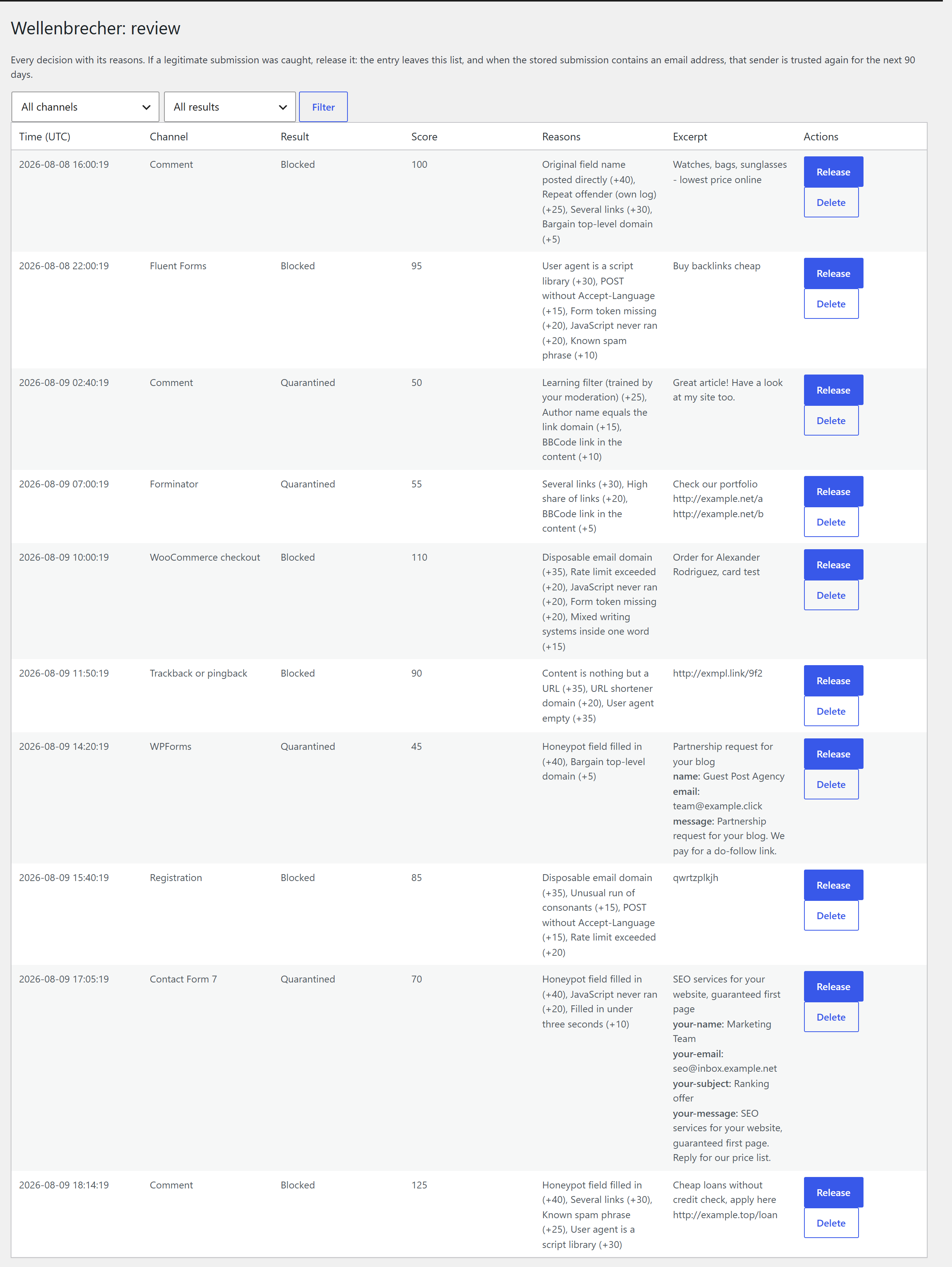
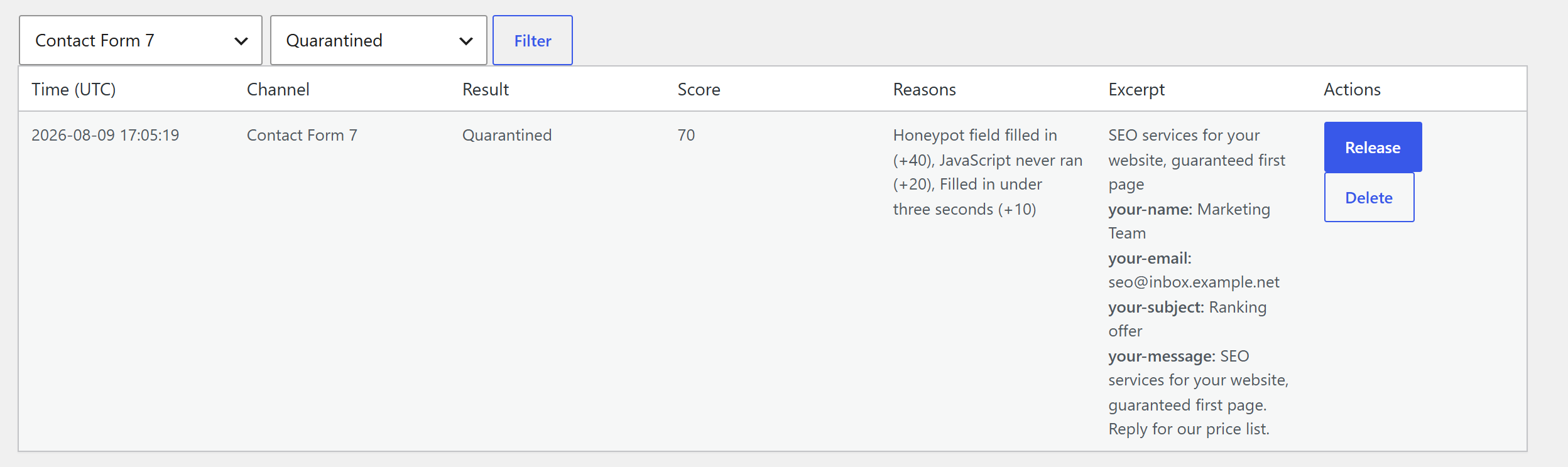
Nothing disappears silently. Every decision lands in the log with its score and the rules that produced it, so a legitimate submission that was caught is visible instead of lost. Releasing it takes one click, and the sender is trusted again afterwards.
Which forms are covered
Wellenbrecher hooks into each builder’s own submission path, so there is nothing to configure. Install the plugin, and these are covered as soon as the builder is active:
- Contact Form 7
- WPForms
- Gravity Forms
- Jetpack forms
- Fluent Forms
- Forminator
- Ninja Forms
- MetForm
Alongside them: WordPress comments and trackbacks, user registration including multisite and the WooCommerce account form, WooCommerce product reviews, the WooCommerce checkout, and the Hafenstudios Leadlotse form plugin.
Coverage is not identical everywhere, and it should not be sold as if it were. Where a builder renders an ordinary HTML form, Wellenbrecher adds its own hidden signals to it and gets the full picture. Ninja Forms and MetForm rebuild their form in the browser and submit it through their own endpoint, so those extra fields cannot be attached; both are still scored, but on content and request signals only, not on behaviour. User registration is scored the same way, on content and request signals, because the registration form is WordPress’ own and carries no extra fields. The classic WooCommerce checkout does get the hidden fields and the honeypot; the block-based checkout submits through the Store API and is scored on content and request signals as well.
What you get
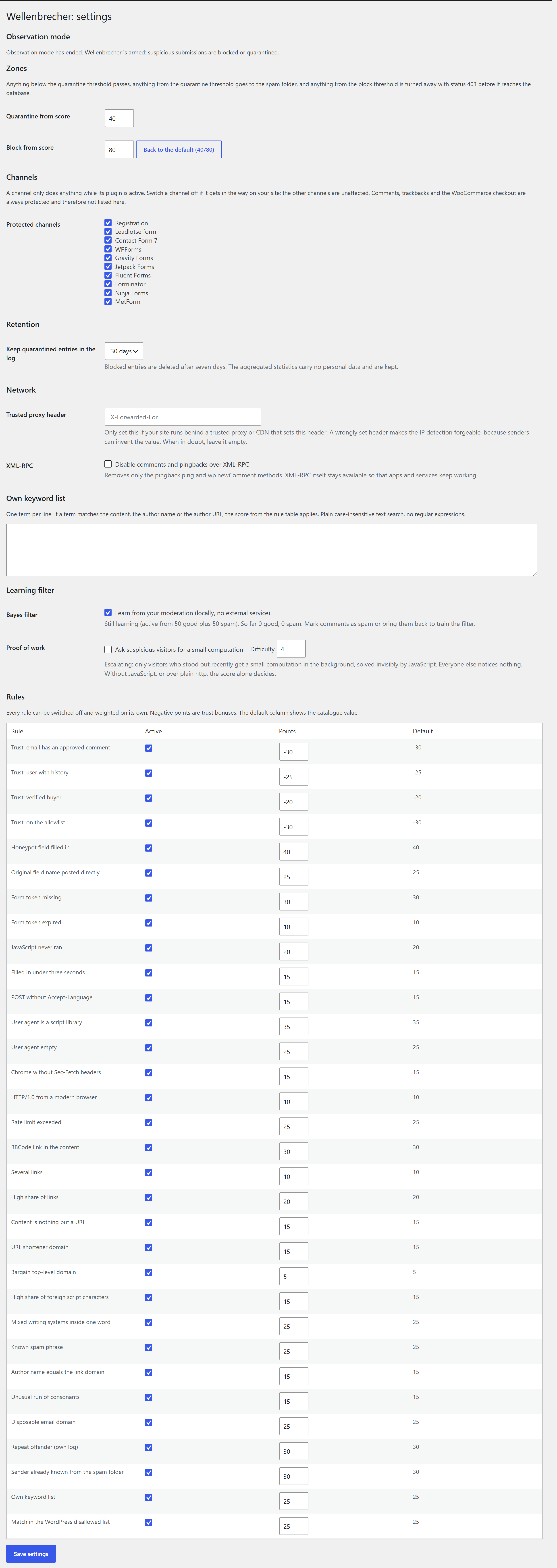
- An explainable score with three zones. Every rule can be switched off or reweighted, and the breakdown is shown for each decision
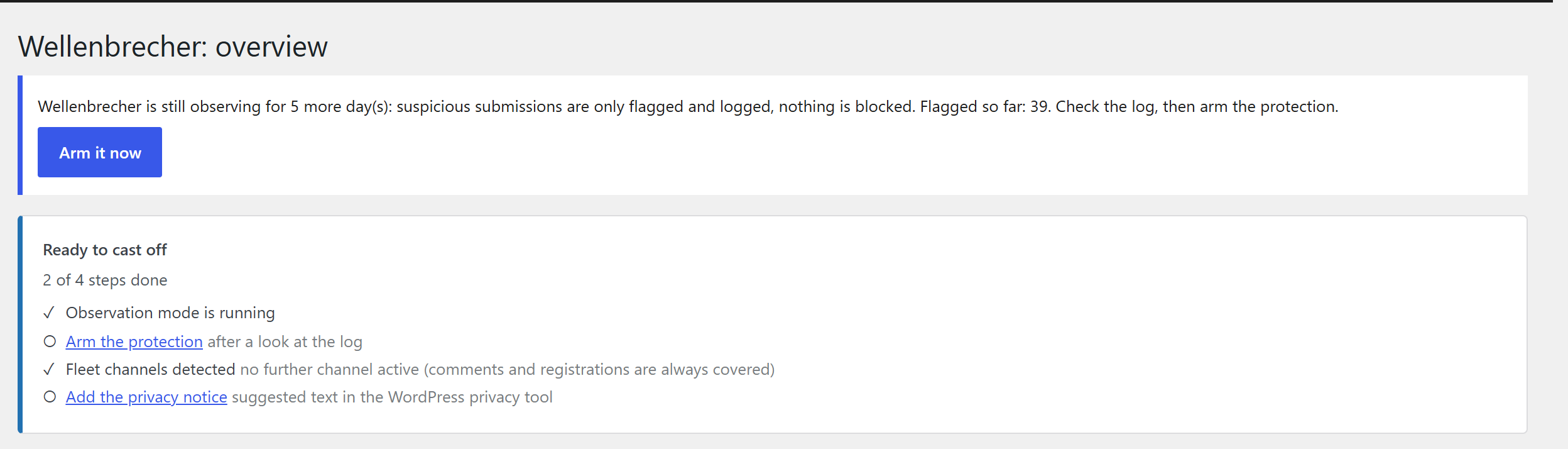
- Observation mode for the first seven days: everything is recorded, nothing is blocked, so you see what would have happened before you arm it
- A log with a release button, so a false positive costs one click instead of a customer
- A learning filter trained by your own moderation, entirely on your server
- Quarantine for form submissions: the log keeps the submitted values and releases them per row
- Comment quarantine in the native WordPress spam folder, with a column that shows the score
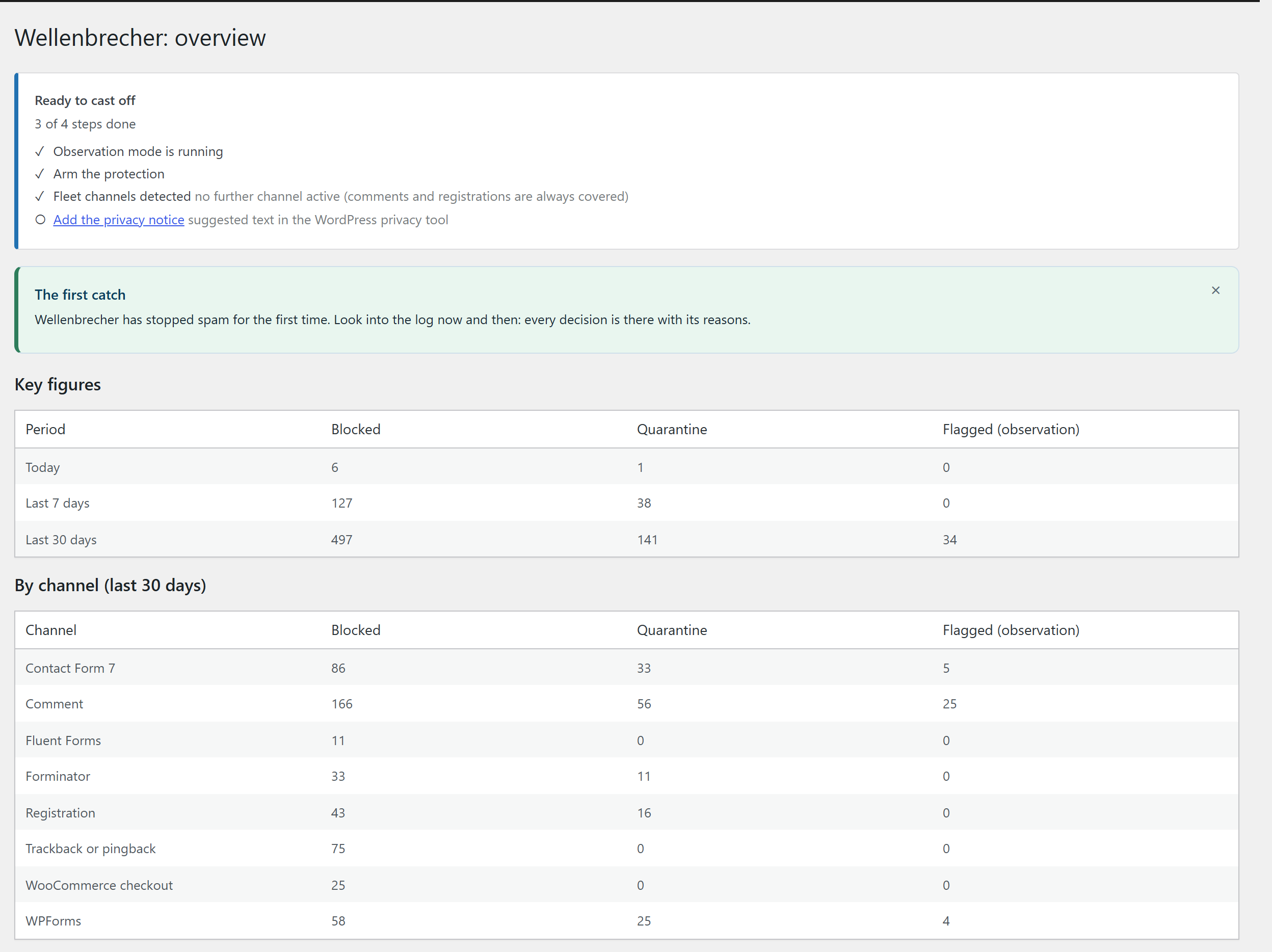
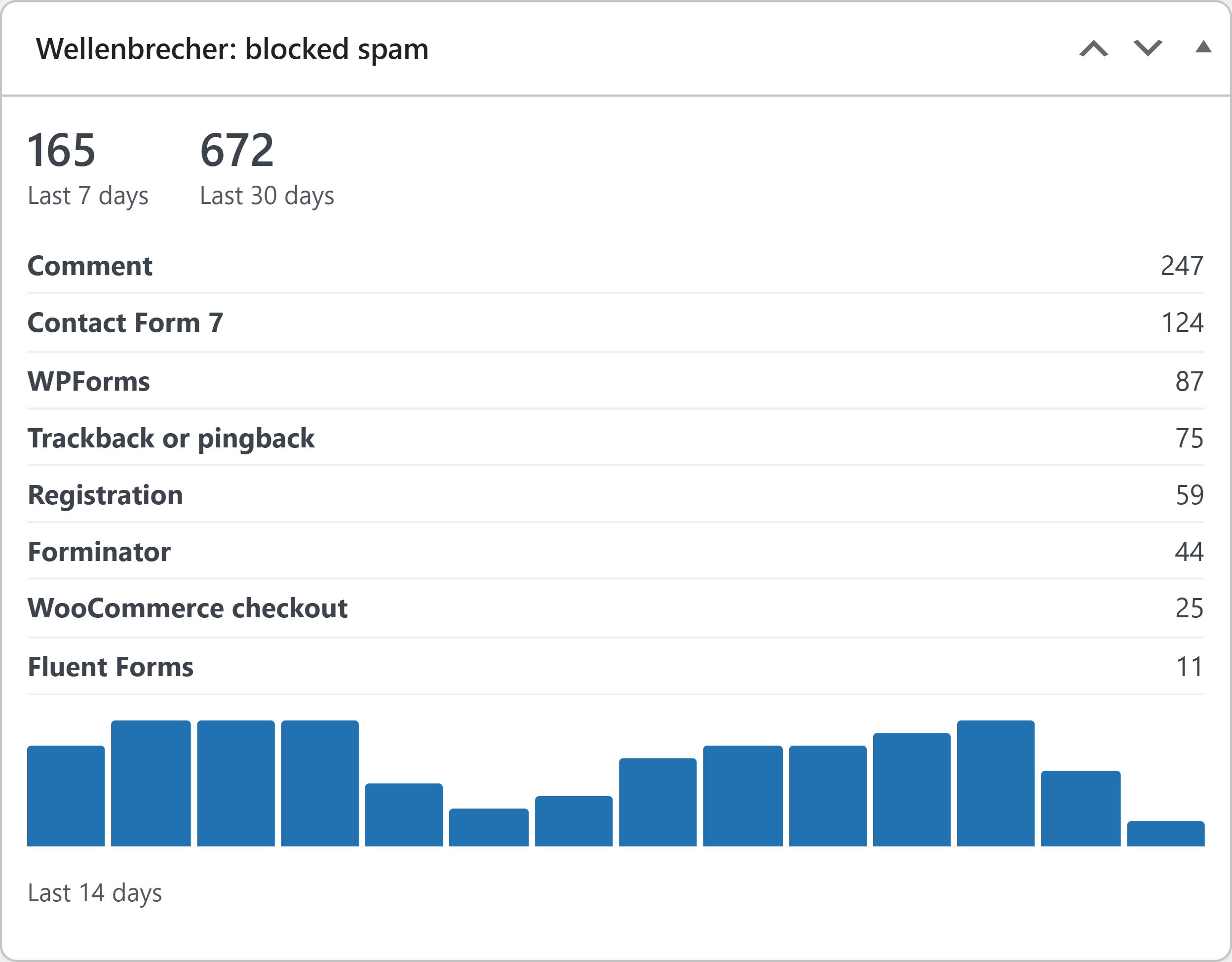
- A dashboard widget with the last 14 days, the totals for 7 and 30 days and a breakdown per channel
- Statistics and a CSV export of the log for your own records
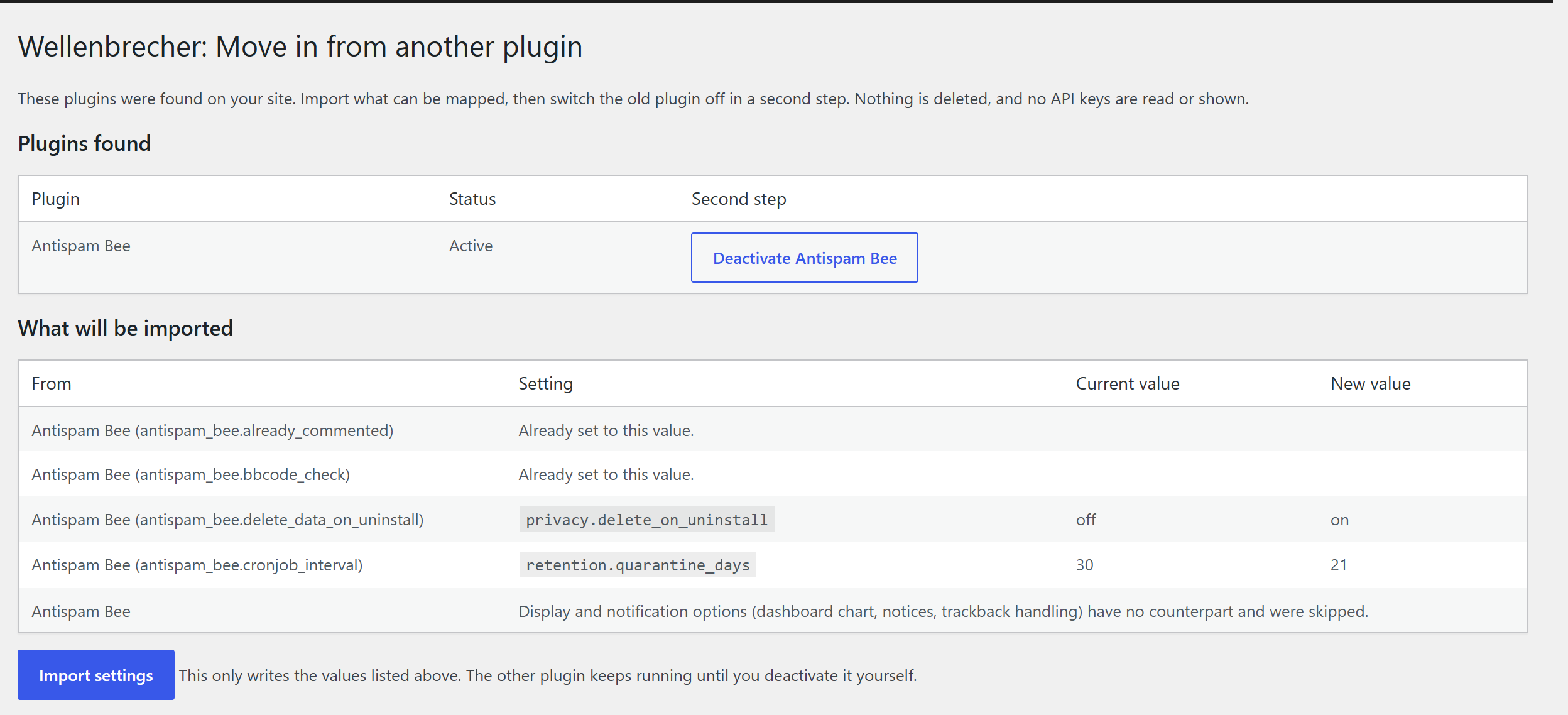
- Move-in help: reads what a previously installed anti-spam plugin had configured, shows what maps across, and imports it on your confirmation. Nothing is deleted and no service keys are read
- Your own keyword list, and the option to remove the XML-RPC methods for comments and pingbacks
- Invisible to visitors. No captcha, no puzzle, no cookie
- Fail-open by design: if the plugin hits an internal error, the submission passes through to normal moderation instead of vanishing
No external services
Wellenbrecher makes no outbound request. The scoring, the word lists, the learning filter, the statistics and the log all live on your server. There is no telemetry, no remote font, no remote script and no phone-home of any kind.
Privacy
- IP addresses are never stored in clear text, only as a non-reversible check value under a key that rotates weekly
- Of email addresses only the domain is kept
- Retention is automatic: blocked and flagged rows after seven days, quarantine after 30 days, both adjustable
- Suggested text for the WordPress privacy policy tool, plus hooks into the WordPress data export and erasure requests
Not a security plugin
Wellenbrecher stops spam, not attacks. It brings no login brute-force protection, no firewall and no .htaccess changes, so it stays out of the way of a dedicated security plugin.
Wellenbrecher Pro
The free version is not a trial and nothing in it is held back. Every channel, all thirty-six rules, the learning filter, the log and the reports are in the version you just installed, and they stay there.
Pro adds four optional rules that do the one thing this plugin otherwise refuses to do, which is talk to the outside world. Each one is off until you switch it on, and each one states its data flow before you do.
- A check against a public register of reported abusive IP addresses
- Country of origin, read from a local database file instead of a lookup service
- A datacenter rule that tells submissions from server networks apart from ordinary visitors
- A second opinion from a language model of your choosing, asked only about scores in the grey zone between the two thresholds, and never given an email address
Pro also keeps the throwaway-domain list current by itself instead of shipping it with each release.
Details and pricing: https://hafenstudios.com/wellenbrecher
Installation
- Install the plugin from the directory, or upload it under Plugins, Add New.
- Activate it. Wellenbrecher starts in observation mode for seven days.
- Open the Wellenbrecher menu and follow the setup checklist.
- After the observation window, arm the protection.
Frequently asked questions
Does Wellenbrecher send data anywhere?
No. Scoring happens entirely on your server. The plugin makes no outbound request at all, so there is nothing to declare in your privacy policy beyond the data it stores locally.
Do my visitors have to solve a captcha?
No. There is no captcha, no puzzle and no checkbox. The signals run in the background, and a visitor without JavaScript is never blocked for that reason alone.
What happens to a legitimate submission that gets caught?
It appears in the log with its score and the rules that fired. Release it, and the entry leaves the list; when the stored submission carries an email address, that sender passes freely for the next 90 days. The submitted values stay in the log entry, so nothing is lost while you decide.
I use a page cache or a CDN. Anything to watch out for?
Wellenbrecher bakes nothing dynamic into cached pages. The form token is fetched through a small REST route (/wellenbrecher/v1/token) that sends no-cache headers. Exclude that route from full page caching. A missing token is only one signal among many and never blocks on its own.
A Forminator submission was held back and I cannot find it in Forminator
That is how Forminator handles a spam verdict: it answers with its own error message and does not store the submission at all, so there is nothing in its own spam folder to look at. The submission is in the Wellenbrecher log with its values and can be released from there.
My theme renders the comment form itself. Does the protection still work?
Yes. The honeypot and the field swap need markup this plugin renders itself, so those two signals fall away; all other rules keep working. One case is worth knowing about, because it adds a rule instead of removing one: if another template on the same site does use the standard comment form, the plugin has proof that its fields render somewhere, and a comment from the hand-built form is then charged 30 points for the missing form token. On its own that stays below the quarantine threshold; together with one further signal, a filled-in website field or a link in a short comment, it can reach…
Does it protect WooCommerce?
Yes. Product reviews are comments and are covered automatically, the checkout has its own channel, and verified buyers get a trust bonus so their reviews are not held back.
Can I turn off XML-RPC comments and pingbacks?
Yes, in the settings. Only the pingback.ping and wp.newComment methods are removed; xmlrpc.php itself stays reachable so that apps and services keep working.
What is left behind when I uninstall it?
Uninstalling removes the plugin’s own tables, options and scheduled task. Comments that WordPress moved to its spam folder stay where they are, because they belong to WordPress.
Changelog
Housekeeping from the directory review: plain action link, admin assets only on the plugin's own pages, tightened input handling and uninstall cleanup. Scoring is unchanged.
1.3.2
- Fixed: on sites behind a reverse proxy on the same machine, every visitor arrived with the same internal address and shared a single rate limit for the form token. Once a few visitors were active per minute, the token stopped being issued and honest submissions were scored as if the browser had never loaded the page. Requests without a usable public address are no longer counted at all.
- Fixed: a crafted request to a Leadlotse form could make the scoring skip the submission entirely. The value that carries the proof-of-work answer is now type checked before it is read.
- Tested with WordPress 7.1.
1.3.1
- Changed: the entry in the plugin list row is now a plain action link like any other. It was a colored, inline-styled button before, which drew more attention inside a shared admin screen than it should (directory guideline 11).
- Changed: the admin stylesheet and script now load only on the plugin’s own pages instead of on every admin screen.
- Changed: activation registers only the single capability this plugin actually uses. Earlier versions also created a shared role and eight further capabilities that belong to sibling plugins, not to an anti-spam plugin.
- Changed: internal fail-open notices are written to the PHP error log only when WP_DEBUG is enabled.
- Improved: every server header the scoring reads is unslashed before sanitization, matching the WordPress coding standards; the same for the user agent recorded by the bundled consent helper.
- Fixed: the endpoint that remembers a dismissed onboarding card now caps the length and number of stored card IDs.
- Fixed: uninstalling with data removal enabled left two options behind; they are removed now.
- Removed: an unused framework class that shipped with the package.
1.3.0
- New: the hidden honeypot field now also works in Contact Form 7 and Forminator. Those two builders previously ran without the single strongest rule; they no longer do.
- Changed: detection recalibrated. A filled honeypot on its own is enough for quarantine again, which it had not been in the previous build.
- Changed: a visitor whose browser never ran the JavaScript is no longer charged twice for it. The form token cannot exist without that script, so its absence is no longer counted separately. A real visitor without JavaScript now stays clearly below the quarantine threshold.
- Changed: the token and JavaScript rules stand down only when this plugin’s own hidden fields were demonstrably never rendered for that channel, instead of whenever they are missing from the request. A bot that posts straight to the endpoint is scored again.
- Improved: the honeypot markup is now built in one place for every channel and stays invisible through two independent mechanisms, a stylesheet class and an inline style, so a caching or optimisation plugin that drops one of them cannot expose the field. A test checks this on every release.
- Fixed: a database query against the token table was flagged by strict review tooling. The query itself was safe; the annotation was one line off.
1.2.0
- New: eight form builders are covered out of the box, Contact Form 7, WPForms, Gravity Forms, Jetpack forms, Fluent Forms, Forminator, Ninja Forms and MetForm. No setup, each builder is hooked on its own submission path.
- New: the log lets you release a false positive with one click. The entry leaves the list, and the sender is trusted again for 90 days.
- New: a dashboard widget with the last 14 days, the totals for 7 and 30 days, and a breakdown per channel.
- New: move-in help for sites coming from another anti-spam plugin. It shows what was configured there, imports what maps across on your confirmation, and offers to switch the old plugin off in a separate second step. No service keys are read.
- Improved: the learning filter, the proof of work, the checkout channel and the reports are part of the standard feature set.
1.1.0
- New: learning filter, escalating proof of work, WooCommerce checkout protection and reports with CSV export.
1.0.0
- First release: explainable scoring with three zones, observation mode, comments, trackbacks, registrations and product reviews, honeypot and field swap, form quarantine, log and statistics, privacy tooling.
Screenshots
For developers
Is this your plugin? Show off the numbers.
Add a live badge to your site, docs or GitHub README. It updates on its own — no account needed.
Best Wellenbrecher alternatives
All antispam plugins →





FAQ
Wellenbrecher: quick answers
Straight answers, pulled from live WordPress.org data.
Live data from WordPress.org · checked Sep 29, 2026
Is Wellenbrecher free?
Yes. Wellenbrecher is free to download and use from the official WordPress.org plugin directory.
Is Wellenbrecher safe to use in 2026?
Wellenbrecher works, but test it on a staging site before relying on it in 2026. Was last updated 1 month ago, and scores 60/100 on our health check.
How many websites use Wellenbrecher?
Wellenbrecher is active on <10 WordPress websites and has been downloaded 154 times since it launched in August 2026. It was downloaded 71 times in the last 30 days.
Does Wellenbrecher work with WordPress 7.1?
Yes. The developer has tested Wellenbrecher up to WordPress 7.1.2, the latest release. It requires WordPress 6.5 or newer.
What PHP version does Wellenbrecher need?
Wellenbrecher requires PHP 8.1 or higher. Most hosts run PHP 8.x today, so it works on any modern WordPress hosting.
When was Wellenbrecher last updated?
The latest version, 1.3.2, was released on August 23, 2026 (1 month ago).
Who makes Wellenbrecher?
Wellenbrecher is developed and maintained by hafenstudios.
What are the best alternatives to Wellenbrecher?
The most popular alternatives to Wellenbrecher are Akismet Anti-spam: Spam Pro… (5M+ installs), Antispam Bee (700K+ installs) and reCaptcha by BestWebSoft (100K+ installs).
Powered by PageForge
Want thousands of pages that rank like these? Build them in an afternoon.
This directory runs on the same engine as PageForge. Turn any spreadsheet, CSV or API into thousands of fast, SEO-ready WordPress pages — with schema, internal links and AI-written copy baked in.
- CSV, Google Sheets & API data sources
- AI content, schema & internal links per page
- Works with Elementor, Gutenberg, Yoast & Rank Math
- Free on WordPress.org — no credit card


