



AntiSpam for Contact Form 7
A trustworthy antispam plugin for Contact Form 7. Wave goodbye to spam and keep your inbox clean!

Use with caution
AntiSpam for Contact Form 7 works, but test it on a staging site before relying on it in 2026. It runs on 10K+ sites, is rated 4.2/5 and was last updated 5 months ago, and scores 49/100 on our health check.
- Proven at scale on 10K+ active sites
- Only tested up to WordPress 6.9 (latest is 7.1)
How does it stack up?
Side-by-side on installs, updates, ratings & support



Daily downloads
Download spikes usually follow a new release — each site that auto-updates counts as a download.
Rankings
Where AntiSpam for Contact Form 7 stands todayWordPress.org search rankings
Live position in the plugin search, top 100| Keyword | Position |
|---|---|
| antispam | #5 |
| GeoIP | #7 |
| honeypot | #18 |
| security | >100 |
Version adoption
Share of active sites per release.
Rating breakdown
★★★★★★★★★★ 4.2 from 13 reviews
About AntiSpam for Contact Form 7
From the official readme · v0.7.6Description
Are you unsatisfied with your current antispam solution for Contact Form 7? It might be using an ineffective method to combat the specific type of bot attacks you’re facing. Fortunately, I have a solution for you!
Antispam for Contact Form 7 is a simple yet highly effective plugin that protects your mailbox from bot flooding. Say goodbye to tedious configurations and captchas, which often lead to reduced conversions and inconvenience for genuine users. Our plugin utilizes a combination of on-page and off-page bot traps, along with an auto-learning mechanism powered by a statistical “Bayesian” spam filter called B8.
CF7-AntiSpam seamlessly integrates with Flamingo and enhances its functionality. When both plugins are installed, Flamingo gains additional controls, and an extra dashboard widget is enabled.
SETUP
Basic – Install and go! No configuration, keys, or registrations are required to activate the antispam protection. In this case, some protections, such as fingerprinting, language checks, and honeypots, will be enabled.
Advanced – For CF7A to properly analyze the email content using its dictionary, it needs to parse the input message field of your form. To notify the antispam to check this field, you’ll need to add a “marker” to each contact form on your website. Simply add ‘flamingo_message: “[your-message]”‘ in the additional settings panel of each contact form you want to secure. This process follows the same method used with Flamingo. While this step may seem tedious, it is required for advanced text statistical analysis. Without it, the B8 filter cannot be enabled.
GeoIP – (Optional) If you need to restrict which countries or languages can email you, you can enable this functionality. To enable GeoIP, you’ll need to agree to the GeoLite2 End User License Agreement and sign up for GeoLite2 Downloadable Databases. This will provide you with the required key to download the database. For detailed instructions, please refer to the dedicated section in the cf7-antispam plugin settings.
Antispam Available Tests
✅ Browser Fingerprinting
✅ Language checks (Geo-ip, http headers and browser)
✅ Honeypot
️✅ Honeyform*
✅ Domain Name System Blackhole List (DNSBL)
✅ Blocklists (with automatic ban after N failed attempts, user defined ip exclusion list)
✅ Hidden fields with encrypted unique hash
✅ Time elapsed (with min/max values)
✅ Prohibited words in message/email and user agent
✅ B8 statistical “Bayesian” spam filter
✅ High Entropy / Gibberish checks
✅ Identity protection
✅ Webmail protection
Extends Flamingo and turns it into a spam manager!
With this plugin, you can now review emails and train B8 to identify spam and legitimate messages. This feature proves useful, especially during the initial stages when some spam emails may slip through.
Already using Flamingo? Even better! Just remember to add ‘flamingo_message: “[your-message]”‘ to the advanced settings (similar to other Flamingo labels) before activating the plugin. Alternatively, you can explore the advanced options and select “rebuild dictionary.”
Upon activating CF7A, all previously collected emails will be parsed, and B8 will learn and develop its vocabulary. This pre-trained algorithm gives you a head start. How cool is that?
Additional Notes:
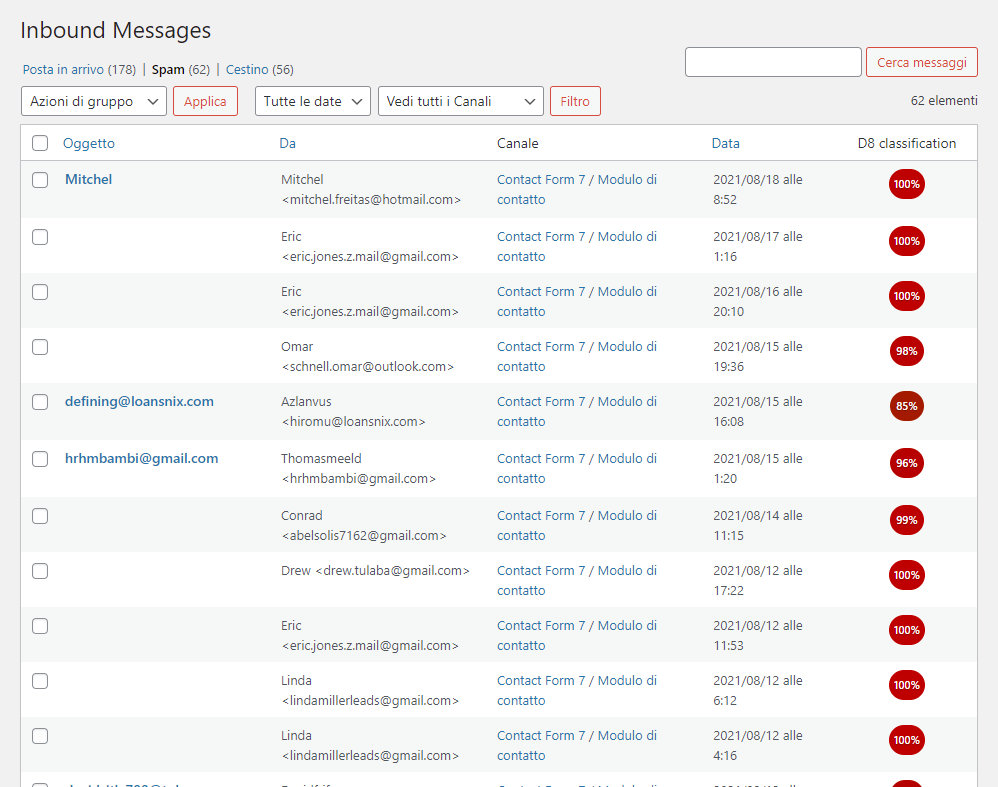
– A new column has been added to the right side of the Flamingo inbound page, displaying the level of spaminess for each email.
– If you unban an email on the Flamingo “inbound” page, the corresponding IP will be removed from the blocklist. However, marking an email as spam will not blocklist the IP again.
– Before activating this plugin, please make sure to mark all spam emails as spam in the Flamingo inbound section. This auto-training process will help the B8 algorithm.
– If you receive a spam message, please avoid deleting it from the “ham” section. Instead, place it in the spam section to teach B8 how to differentiate between spam and legitimate messages.
B8 statistical “Bayesian” Filter
Originally created by Gary Robinson b8 is a statistical “Bayesian” spam filter implemented in PHP.
The B8 filter is a foundational example of Machine Learning (ML) for text classification, representing an early, yet powerful, statistical approach in Natural Language Processing (NLP). This approach precedes feature-weighting methods like TF-IDF, which in turn paved the way for modern deep learning architectures, such as Transformers and GPT.
The filter tells you whether a text is spam or not, using statistical text analysis. What it does is: you give b8 a text and it returns a value between 0 and 1, saying it’s ham when it’s near 0 and saying it’s spam when it’s near 1. See How does it work? for details about this.
To be able to distinguish spam and ham (non-spam), b8 first has to learn some spam and some ham texts. If it makes mistakes when classifying unknown texts or the result is not distinct enough, b8 can be told what the text actually is, getting better with each learned text.
This takes place on your own server without relying on third-party services.
More info: nasauber.de
Identity protection
To fully protect the forms, it may be necessary to enable a couple of additional controls, because bots use the public data of the website to spam on it.
– The first is user related and denies those who are not logged in the possibility of asking (sensitive) information about the user via wp-api and the protection for the xmlrpc exploit wordpress.
– The second one is the WordPress protection that will obfuscate sensitive WordPress and server data, adding some headers in order to enhance security against xss and so on.
Will be hidden the WordPress and WooCommerce version (wp_generator, woo_version), pingback (X-Pingback), server (nginx|apache|…) and php version (X-Powered-By), enabled xss protection headers (X-XSS-Protection), removes rest api link from header (but it will only continue to work if the link is not made public).
Mailbox Protection (Multiple Send)
Enhance email security by enabling the “Multiple Send” feature, which prevents consecutive email submissions to the user’s mailbox. This measure is effective in thwarting automated spam attempts and ensures a secure communication environment.
Security & Privacy: A Local-First Approach
AntiSpam for Contact Form 7 is built with your security and privacy as the top priority. Unlike many modern anti-spam solutions that rely on external cloud services or third-party subscriptions, our plugin is designed to run entirely on your own WordPress installation.
- 100% Local Processing: All anti-spam logic, checks, and data processing are performed directly on your server. No data is ever sent to, or stored by, any external third-party service (including ours).
- Not a Software as a Service (SaaS): This plugin is a standalone, self-contained software solution, not an interface to a paid or subscription-based external service. Once installed, it works autonomously.
- Enhanced Security: Since there is no central server or external API endpoint to communicate with, your website is immune to potential risks associated with centralized services, such as Single Point of Failure or data breach risks.
You retain complete control and ownership over the security of your Contact Form 7 submissions.
Privacy Notices
AntiSpam for Contact Form 7 only processes the IP but doesn’t store any personal data directly from the user input. However, it creates a dictionary of spam and ham (non-spam) words in the WordPress database.
This dictionary is built from words found in the submitted messages, meaning it may contain words that were part of the user’s e-mail message or personal data. This data is “degenerated,” which means the words might be normalized or altered before being stored.
The sole purpose of this word collecting is to build a dictionary used for local, decentralized spam detection.
Support
Community support: via the support forums on wordpress.org
Bug reporting (preferred): file an issue on GitHub
Contribute
We love your input! We want to make contributing to this project as easy and transparent as possible, whether it’s:
- Reporting a bug
- Testing the plugin with different user agent and report fingerprinting failures
- Discussing the current state, features, improvements
- Submitting a fix or a new feature
We use GitHub to host code, to track issues and feature requests, as well as accept pull requests.
By contributing, you agree that your contributions will be licensed under its GPLv2 License.
My goal is to create an antispam that protects cf7 definitively without relying on external services. And free for everyone.
if you want to help me, GitHub is the right place 😉
copyright
AntiSpam for Contact Form 7, Copyright 2021 Codekraft Studio
AntiSpam for Contact Form 7 is distributed under the terms of the GNU GPL
This program is free software: you can redistribute it and/or modify
it under the terms of the GNU General Public License as published by
the Free Software Foundation, either version 3 of the License, or
(at your option) any later version.
This program is distributed in the hope that it will be useful,
but WITHOUT ANY WARRANTY; without even the implied warranty of
MERCHANTABILITY or FITNESS FOR A PARTICULAR PURPOSE.
See the LICENSE file for more details.
Resources
- Contact Form 7 and Flamingo © 2021 Takayuki Miyoshi,LGPLv3 or later
- B8 https://nasauber.de/opensource/b8/, © 2021 Tobias Leupold, LGPLv3 or later
- GeoLite2 license
- GeoIP2 PHP API GeoIP2-php
- chart.js https://www.chartjs.org/, © 2021 Chart.js contributors, MIT
- Sudden Shower in the Summer, Public domain, Wikimedia Commons https://commons.wikimedia.org/wiki/File:Sudden_Shower_in_the_Summer_(5759500422).jpg
Contibutions
Mirek Długosz – #30 fixes a crash that occurred when analysing flamingo metadata
MeliEve – #42 Fix “internal_server_error” when message is empty
MeliEve – #61 Handle deferrer script loading
Zodiac1978 – #67 Remove warning for unsafe email configuration w/o protection
JohnHooks – #66 Readme + plugin env
sdellenb – #66 Fix $reason parameter for calling cf7a_ban_by_ip
Special thanks
This project is tested with BrowserStack. Browserstack
MaxMind GeoIP2
This plugin on demand can enable GeoLite2 created by MaxMind, available from https://www.maxmind.com
While enabled you may have to mention it in the privacy policy of your site, depending on the law regulating privacy in your state!
* GeoIP2 databases GeoLite2 Country
DNSBL servers privacy policies
- dnsbl-1.uceprotect.net www.uceprotect.net license
- dnsbl-2.uceprotect.net www.uceprotect.net license
- dnsbl-3.uceprotect.net www.uceprotect.net license
- dnsbl.sorbs.net sorbs.net license
- zen.spamhaus.org spamhaus.org license
- bl.spamcop.net spamcop.net license
- b.barracudacentral.org barracudacentral.org privacy-policy
- dnsbl.dronebl.org dronebl.org
- all.spamrats.com spamrats.com tos
- bl.ipv6.spameatingmonkey.net spameatingmonkey.net
Inspirations, links
- Nikolai Tschacher incolumitas.com
- Antoine Vastel fp-scanner/fp-collect
- Niespodd niespodd
- Thomas Breuss tbreuss
- Domain Name System-based blackhole list wiki
- dnsbl list wiki
Installation
- Upload the entire
cf7-antispamfolder to the/wp-content/plugins/directory. - Activate the plugin through the ‘Plugins’ menu in WordPress, you MUST have Contact Form 7 installed and enabled.
- Setup advanced settings in Contact Form 7 in the same way you do for flamingo, but add also ‘flamingo_message: “[your-message]”‘ – reference https://contactform7.com/save-submitted-messages-with-flamingo/
- The configuration page for this plugin is located in the submenu “Antispam” under the Contact Form 7 menu
Frequently asked questions
Will I finally be 100% protected from spam?
NO, nobody can guarantee that, and anyone who tells you that is lying. But luckily, bots are limited by the fact that they don’t use a real browser and they use fairly repetitive routes which can be recognised.
Why I need to install Flamingo to get the full AntiSpam manager functionalities?
Contact form 7 is made this way, the main plugin is made to be extended with other modules and this has resulted in many 3rd party plugins like mine! There is already a module for handling received emails, why should I redo it? And, in this way I can focus on my plugin, I believe the “power” of cf7 is just that and I invite you to check how many other nice and free extensions there are!
Why are there so many antispam-tests?
Because there are so many types of bots in this way detect them all! Phantom-based bots fail with fingerprinting but are proficient with honeypots, while bots written in python fail with honeypots but are proficient with metadata forgery!
How spam score works
The system used to evaluate the e-mail is a non-proportional scoring system and each test have a different score (and can be customised with the advanced settings). When the mail score is equal to or greater than 1 it is considered spam.
What do you mean by Standard Spam Filters
Some standard test are Elapsed time, Auto-Blocklisting, Prohibited IP/strings and, in addition, we got some advanced test like HoneyPots, HoneyForms and the browser FingerPrinting.
*HoneyForm, or you mean Honeypot?
No, I mean HoneyForm! This is a hidden, bogus form that bots will fill, as it is part of the page code for them and they rarely check the visibility of an element. While honeypots can be easily spotted by some bots, these forms are not because they have the same characteristics as a ‘normal’ form, and it is impossible to distinguish them without truly visiting the page. This is the first time they have been used, at the moment they seem to work and be effective, but consider this an experimental feature! (ps let me know your feedback about)
But the standard Honeypot?
We also have honeypots, to activate them just click on a checkbox, and they will be generated automatically for each text field. The only thing you need to check in the CF7A options page is the name of the fields used that need to differ with the names used in contact form 7.
DNSBL… What?
After that the sender ip will be searched into DNS-based Black-hole server to found if that ip is delisted for spam. 10 server are already set as default, but you can add or remove as you like, there are 50 server available (list below).
What is B8? How it works?
B8 cuts the text to classify to pieces, extracting stuff like email addresses, links and HTML tags and of course normal words. For each such token, it calculates a single probability for a text containing it being spam, based on what the filter has learned so far. B8 is a free software form Tobias Leupold, who I thank for making it available to everyone.
Filters
Before processing the email add_filter('cf7a_message_before_processing', 'my_message_before_processing', 10, 2 ); Before processing the email with bayesian filter add_filter('cf7a_before_b8', 'my_before_b8', 10, 3 ); Add your own spam filter add_filter('cf7a_additional_spam_filters', 'my_additional_spam_filters', 10, 3 ); Add some content when resending a mail (useful to add a message like “this was spammed” or the original mail date/time) add_filter('cf7a_before_resend_email', 'my_before_resend_email', 10, 3 );
DEBUG
define( ‘CF7ANTISPAM_DEBUG’, true); Enables debug mode (wp-debug has to be enabled) – verbose mode, prints email analysis results into wp-content/debug.log define( 'CF7ANTISPAM_DEBUG_EXTENDED', true); Enable extended debug mode (“CF7ANTISPAM_DEBUG” has to be enabled) – disable autoban, enable advanced logging, when you uninstall the plugin, the word database, blocklist and options are not deleted.
Changelog
0.7.6
- Fix: Resolved an issue where form submissions failed on modern desktop browsers (Chrome, Edge, Firefox) by removing the sandbox attribute from canvas fingerprinting iframes to comply with strict security policies against sandbox escaping. (thanks to @khoehne and @heikoppi for reporting it)
- Enhancement: Added High Entropy (Gibberish) settings to the plugin’s configuration dashboard allowing fine-tuning of minimum words and consecutive consonants.
- Fix: Resolved an issue where the honeyform position dropdown selection did not reflect the saved value.
- Fix: Eliminated severe false positives caused by
cf7a_get_honeypot_input_names()force-merging legacy common field names (email, zip, phone, name, address, …) into every honeypot check. The function now returns only the names explicitly configured by the administrator, so legitimate form fields can no longer be mistaken for honeypots. (thanks to @heikoppi and @khoehne for reporting it) - Fix: Cleaned up dead code in
Filter_Honeypot::process(): removed the unused$mail_tag_textcollection and the outer guard that silently suppressed the honeypot check on forms without text-type tags. The filter now reliably checks only the user-configured honeypot field names on every submission.
0.7.5
- Enhancement: Added WordPress Comment Spam Protection: Extended the plugin’s capabilities beyond Contact Form 7 to actively protect native WordPress comments against spam.
- Enhancement: Added Regex support for spam filtering: You can now use Regular Expressions in your filters, providing advanced and highly flexible rules to catch complex spam patterns. (thanks to @jackrus60 for suggesting it)
- Enhancement: Introduced custom Wordlists: Administrators can now define specific keywords to filter, giving more granular control over blocked form submissions.
- Security: Improved email header sanitization: Automatically strip newline characters from email headers to prevent Email Header Injection vulnerabilities.
- Security: Enhanced overall plugin security with stricter sanitization, validation, and capability checks across the codebase.
- Enhancement: Flamingo integration improvements: Enhanced the email resending functionality to ensure better reliability and smoother recovery of false positives.
- Enhancement: CF7 SMTP Integration: Added seamless compatibility with SMTP configurations for Contact Form 7, ensuring reliable email delivery.
- Fix: Improved action detection: Fixed issues with form submission detection to ensure spam checks are consistently and accurately triggered across various CF7 setups. Also fixes an issue with Flamingo plugin actions (thanks to @jackrus60 for suggesting it)
- Fix: Ensure ban reasons are properly formatted: Addressed a bug in cf7a_compress_array to guarantee that logs accurately display the specific reason for rejection.
- Fix: Resolved iframe/sandbox restrictions: Added the allow-scripts sandbox attribute to ensure necessary scripts can execute properly in restricted preview environments. (thanks to @oceandigitals for reporting it)
- Fix: Restricted widget visibility: Ensured dashboard widgets are now correctly restricted and only visible to users with the appropriate permissions. (thanks to @islp for reporting it)
- Enhancement: General code consolidation and major refactoring of the core anti-spam engine for better performance and maintainability.
0.7.4
- Fix: Improve message sanitization: handle arrays, skip empty/non-string values, and refine length checks (thanks to @sleepygoth for reporting it)
0.7.3
- Fix: Dismissing the “Flamingo Message” notice now works correctly (thanks to @WORX Developer for reporting it)
- Enhancement: Improved spam filter performance with additional fallbacks for edge cases
- Security: Email strings are now properly sanitized before being sent
- Enhancement: New dashboard empty-state view
- Enhancement: Added JS selector for allowed/disallowed countries and languages
- Typo: Replaced “blacklist” with “blocklist” and “whitelist” with “allowlist” (thanks to @WORX Developer for waning me about this mistake)
- Enhancement: New summary table added at the top of the settings page to display form configuration status
- Enhancement: Cache compatibility improvements
- Enhancement: Removed UCEPROTECT from predefined blocklists: We have optimized the default DNSBL configuration by removing the uceprotect service. This strategic change reduces the risk of false positives for legitimate users hosted on shared environments and improves the overall form submission speed by eliminating redundant DNS queries.
- Fix: Fix cf7a_ban_by_ip reason parameter: Addressed a bug where the ban reason was not correctly passed to the blocking function. Logs will now accurately reflect the specific trigger (e.g., Honeypot violation, DNSBL match) that caused an IP ban, restoring full observability for administrators (Thanks to @sdellenb – PR #163).
- Compatibility: Implemented a fix for WEBGL_debug_renderer_info in iOS/Safari on newer iOS devices. This resolves potential JavaScript execution errors during browser fingerprinting, ensuring seamless form functionality on iPhones and iPads with strict privacy settings.
- Enhancement: Added blueprint.json: Introduced a configuration file for WordPress Playground. Contributors and users can now instantly spin up a browser-based testing environment for the plugin without local setup.
- Enhancement: Updated unit tests to display GeoIP database information if available. This enhances local debugging capabilities by verifying that geolocation data is loaded correctly during test runs.
- Enhancement: Applied comprehensive PHP linting to the Admin interface files, enforcing WordPress Coding Standards for better maintainability.
0.7.2
- Update fallback (thanks for the idea to @lemurnick)
- Fix for missing enqueue in some cases (thanks to @ohhcee, @o2xav, @WORX Developer for the feedbacks)
- Blocklist filters cleanup
- Registers the spam checks individually
- Updated encrypt/decrypt function
0.7.1
- Fix: Fixes a wrong escape placeholder in the prepare SQL query that was preventing to check if an IP was blocklisted. (thanks to @jackrus60 for the report)
Screenshots



For developers
Is this your plugin? Show off the numbers.
Add a live badge to your site, docs or GitHub README. It updates on its own — no account needed.
Best AntiSpam for Contact Form 7 alternatives
All antispam plugins →





FAQ
AntiSpam for Contact Form 7: quick answers
Straight answers, pulled from live WordPress.org data.
Live data from WordPress.org · checked Sep 26, 2026
Is AntiSpam for Contact Form 7 free?
Yes. AntiSpam for Contact Form 7 is free to download and use from the official WordPress.org plugin directory.
Is AntiSpam for Contact Form 7 safe to use in 2026?
AntiSpam for Contact Form 7 works, but test it on a staging site before relying on it in 2026. It runs on 10K+ sites, is rated 4.2/5 and was last updated 5 months ago, and scores 49/100 on our health check.
How many websites use AntiSpam for Contact Form 7?
AntiSpam for Contact Form 7 is active on 10K+ WordPress websites and has been downloaded 105,573 times since it launched in May 2021. It was downloaded 1,866 times in the last 30 days.
Does AntiSpam for Contact Form 7 work with WordPress 7.1?
AntiSpam for Contact Form 7 is officially tested up to WordPress 6.9.9, while the latest release is 7.1.2. It may still work, but try it on a staging site first.
What PHP version does AntiSpam for Contact Form 7 need?
AntiSpam for Contact Form 7 requires PHP 7.4 or higher. Most hosts run PHP 8.x today, so it works on any modern WordPress hosting.
When was AntiSpam for Contact Form 7 last updated?
The latest version, 0.7.6, was released on April 21, 2026 (5 months ago).
Who makes AntiSpam for Contact Form 7?
AntiSpam for Contact Form 7 is developed and maintained by Erik.
What are the best alternatives to AntiSpam for Contact Form 7?
The most popular alternatives to AntiSpam for Contact Form 7 are Akismet Anti-spam: Spam Pro… (5M+ installs), Antispam Bee (700K+ installs) and Spam protection, Honeypot,… (200K+ installs).
Powered by PageForge
Want thousands of pages that rank like these? Build them in an afternoon.
This directory runs on the same engine as PageForge. Turn any spreadsheet, CSV or API into thousands of fast, SEO-ready WordPress pages — with schema, internal links and AI-written copy baked in.
- CSV, Google Sheets & API data sources
- AI content, schema & internal links per page
- Works with Elementor, Gutenberg, Yoast & Rank Math
- Free on WordPress.org — no credit card


