



Appointment Bookings for Zoom GoogleMeet and more – Wappointment
Get clients to quickly book a meeting with you by Zoom, GoogleMeet, phone or at your office

Solid choice
Appointment Bookings for Zoom G… is a solid plugin choice in 2026, with a few things worth checking first. It runs on 1K+ sites, is rated 4.7/5 and was last updated 4 months ago, and scores 71/100 on our health check.
- Loved by users — 4.7/5 from 50 reviews
How does it stack up?
Side-by-side on installs, updates, ratings & support



Daily downloads
Download spikes usually follow a new release — each site that auto-updates counts as a download.
Rankings
Where Appointment Bookings for Zo… stands todayWordPress.org search rankings
Live position in the plugin search, top 100| Keyword | Position |
|---|---|
| appointment booking | #23 |
| appointment scheduling | #23 |
| booking calendar | #61 |
| booking form | #78 |
| zoom | #8 |
Version adoption
Share of active sites per release.
Rating breakdown
★★★★★★★★★★ 4.7 from 50 reviews
About Appointment Bookings for Zoom GoogleMee…
From the official readme · v2.7.7Description
Get clients to quickly book a meeting with you by Zoom, GoogleMeet, phone or at your office
Booking plugin for WordPress
Appointment booking calendar for personal coaches, teachers, therapists and service professionals of all kind.
Get booked 24/7 with the most intuitive booking form.
Convert visitors into customers with a simple call to action.
The perfect Calendly alternative for WordPress.
Try the demo of the booking calendar
Scheduling system headache free
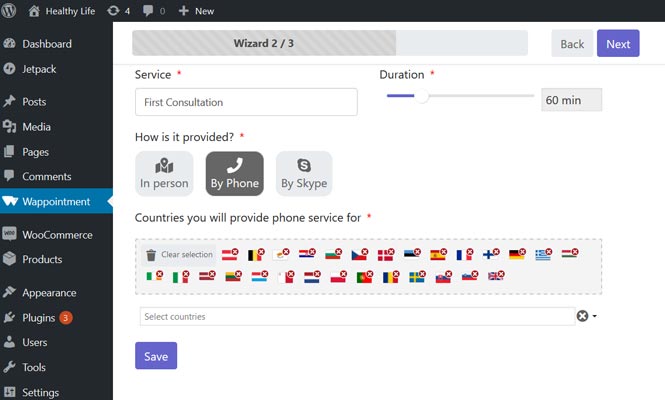
Provide your appointments the way you like
- as a video Meeting over Zoom, GoogleMeet, Jitsi or Skype
- over the Phone
- or at your office
Sync bookings with Google Calendar
- Setup a 2-way sync quickly with Google Calendar
- 1-way sync is available with any .ICS Calendar, Microsoft Outlook, Apple Ical, etc …
Avoid Double Bookings
Keep your availability updated using our powerful centralized system.
Your availability gets refreshed whenever something changes in your schedule:
- when a new client books you
- when a client cancels his appointment
- when you manually create new time slots during which you are busy or free
- when a new event gets created on your synched personal calendar (Google Calendar, Apple iCal, Outlook Calendar)
Simplify your Booking Process
Our user friendly booking form gives your clients a quick overview of your availability, making the booking process a breeze.
Reduce No-Shows
Your clients receive appointment confirmations and reminders.
Quickly define when and how many of them do they receive (1 day before appointment, 1 hour before appointment).
Make it simple for your customers
- Clients book you within seconds, from their mobile phone, tablet or desktop computer
- The available booking slots are displayed in your client’s timezone, no more confusion for your international clients
- Clients receive a confirmation and as many reminders as you wish
- Clients can easily save your appointment to their personal calendar
Manage your schedule simply
- Unlimited bookings
- User-friendly and intuitive interfaces with no coding involved
Availability Setup
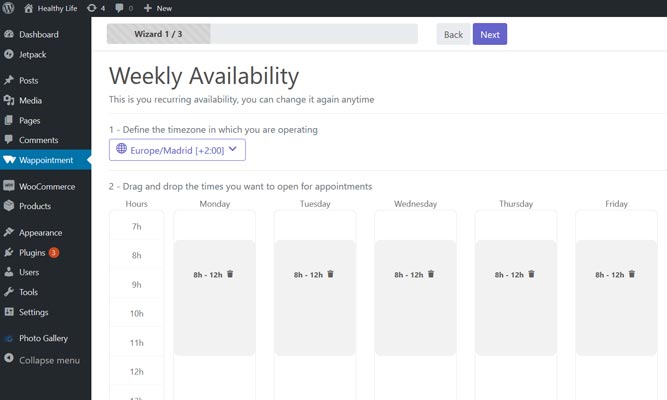
- Set your recurrent availability within seconds
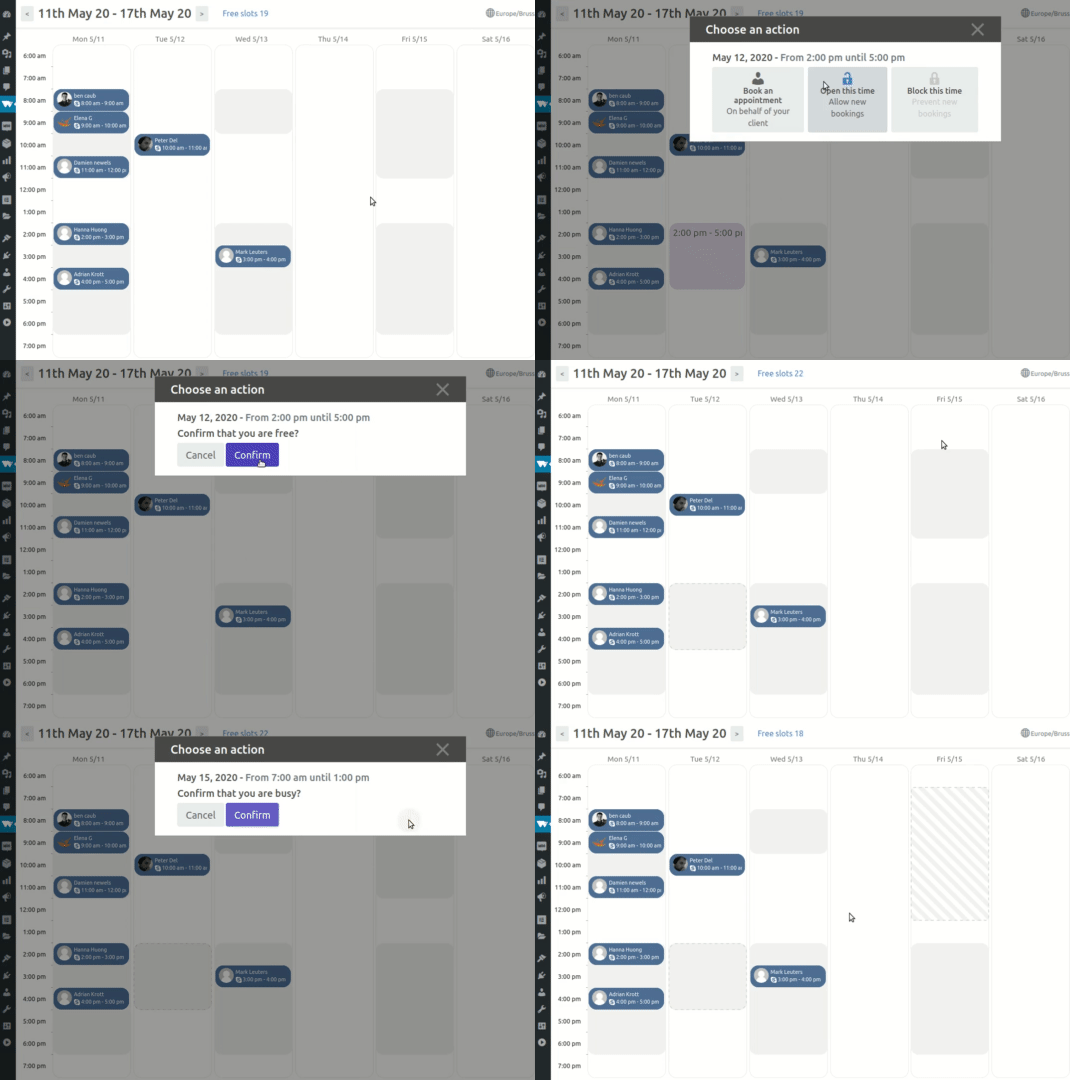
- Set your punctual availability and block your non-bookable time (non working days and hours, busy times, holidays, etc) in just few clicks
- Select the timezone from which you operate
Appointments Settings
- Set the duration of your meeting 5 min, 10 min, 15 min , 60 min etc …
- Set the appointments’ approval mode: automatic or manual
- Set how far in advance an appointment can be booked
- Allow clients to cancel and reschedule appointments
- Book an appointment on behalf of your customer
- Connect your personal calendar to the booking system and automatically block times during which you are busy
- Change the date and time format
Customizing the appearance
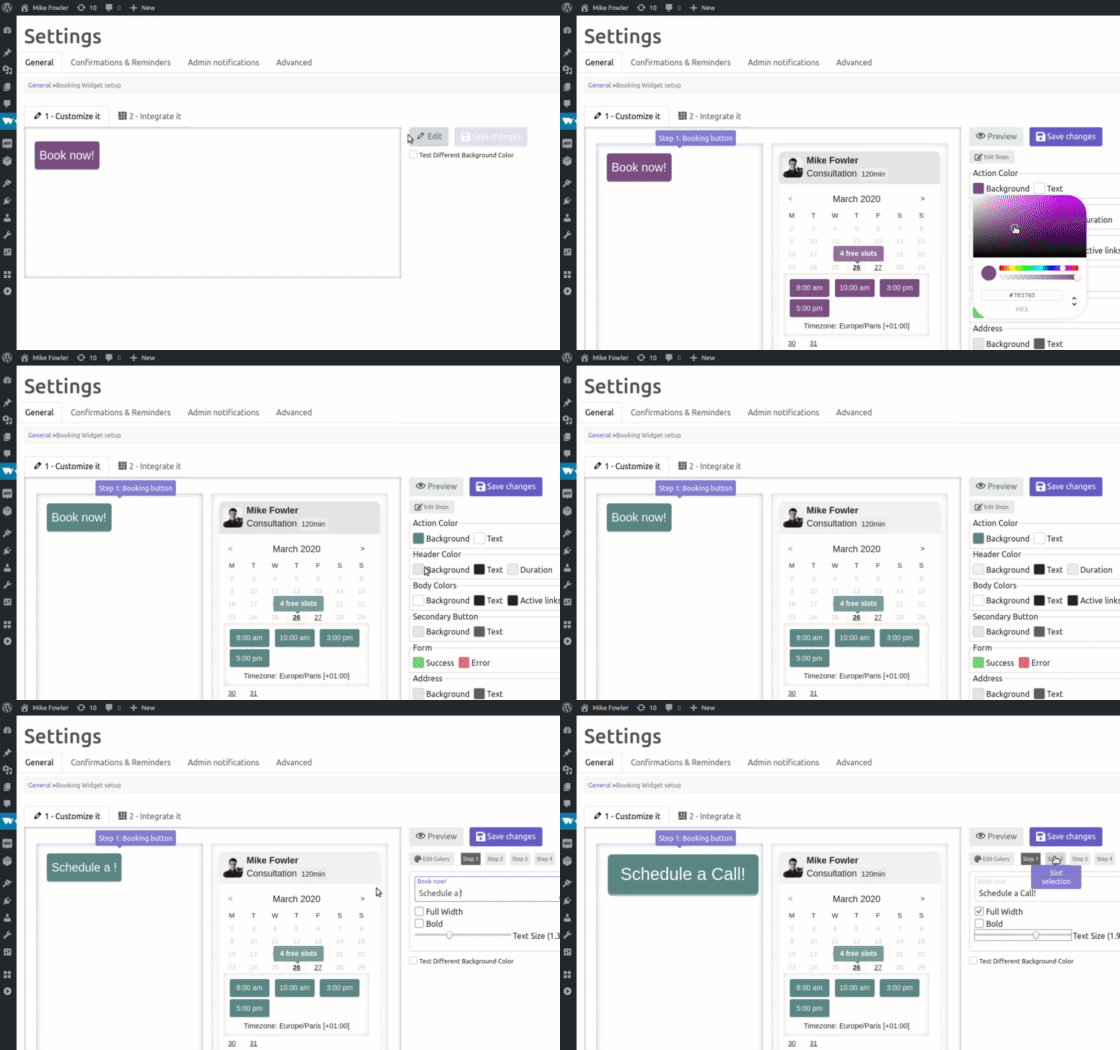
- Quickly customize colors and texts for your booking form
- 4-steps booking process, each step is fully editable
Appointments’ Confirmations Reminders and Notifications
- Receive email notifications when clients book, reschedule or cancel an appointment
- Receive daily and weekly notifications
- Customize and personalize your confirmations and reminders sent to your clients
Advanced options for edge use-cases
- Limit/Maximum active bookings per client
- Force user account’s email for logged in users
- Open new slots in new day at a specific time e.g.” new slots everyday at 11pm”
Have a Question?
Our plugin is free, and easy to install. Try it first 🙂
And for any question or doubt, you can reach us:
- Straight from the plugin in Wappointment > Help
- Here on the WordPress’ forum
- From our contact page.
Installation
Minimum Requirements
- WordPress 4.7(or greater)
- PHP version 7.0(or greater)
- MySQL version 5.6(or greater) or MariaDB 10.0(or greater)
Always keep your softwares updated.
It requires work on your end but keeps your site safe and optimized.
Frequently asked questions
Can I change text and colors of the booking form?
You can change all the texts, colors and few other parameters of each step of the booking process. We plan on adding several templates in the future, meanwhile simply use css to make it exactly the way you want.
Can I set time limits for cancelling and rescheduling appointments?
You can configure when clients can cancel and reschedule their appointments in the settings page Wappointment > Settings > General
Can I sync multiple calendars besides of my Google calendar?
Sure you can, we allow up to 4 calendars in the ics format to be synched from. It can be personal calendar(Google, Outlook, iCal, etc..) or from external applications handling part of your schedule
How often my Google calendar is being checked for sync?
Every 5 minutes we download your calendar and check for changes, we don’t do it more often as it could be a heavy task depending on how big is your calendar.
Why do reminders go out late sometimes?
It depends on your website’s configuration. The most reliable solution is to setup a cron task manually on your server(check your host’s documentation) and disable WP cron (DISABLE_WP_CRON)
Why does nobody receive my confirmations or reminders emails?
Your emails most likely go straight to SPAM or don’t event reach your inbox. Change the email sending method in Wappointment > Settings > Confirmations & Reminders just go for the easy and reliable solution, create a free account at SendGrid (100emails/day are free) and configure Wappointment with the SendGrid API
I need 10 minutes to prepare between 2 appointments, how do I proceed?
You can set buffer time for that particular case, you can define it in the Wappointment > Settings > Advanced. When someone books you, you will become unavailable during the time of the appointment + buffer time
Changelog
2.7.7 – 2026-05-24
- fixed security issue CVE-2025-68575 and CVE-2026-9188
2.7.6 – 2026-03-22
- fixed phone validation script with new prefix not working
- fixed bug with conditional slots and group event
- fixed timezone and conditional slots issue
2.7.5 – 2026-01-18
- fix timezone issue (thanks to lukesUbuntu)
- fixed error messages showing
- fixed remove addons tab
- fixed remove skype option
2.7.2 – 2025-12-09
- improved timezone display in emails to show full timezone name instead of abbreviation
- enhanced vendor patches for PHP 8.1+ compatibility
- fixed deprecated warnings in Carbon and Illuminate packages
2.7.1 – 2025-12-06
- fixed fatal error in backend (php version issue)
- fixed email reminder editor
- improved appointment date/time display to include timezone abbreviation in emails
- fixed php notices
2.7.0 – 2025-10-24
- added search feature on clients listing
- fixed xss security issue
- fixed remove broken and unused full width mode
Screenshots


For developers
Is this your plugin? Show off the numbers.
Add a live badge to your site, docs or GitHub README. It updates on its own — no account needed.
Best Appointment Bookings for Zoom… alternatives
All appointment booking plugins →





FAQ
Appointment Bookings for Zoom Googl…: quick answers
Straight answers, pulled from live WordPress.org data.
Live data from WordPress.org · checked Oct 2, 2026
Is Appointment Bookings for Zoom G… free?
Yes. Appointment Bookings for Zoom G… is free to download and use from the official WordPress.org plugin directory.
Is Appointment Bookings for Zoom G… safe to use in 2026?
Appointment Bookings for Zoom G… is a solid plugin choice in 2026, with a few things worth checking first. It runs on 1K+ sites, is rated 4.7/5 and was last updated 4 months ago, and scores 71/100 on our health check.
How many websites use Appointment Bookings for Zoom G…?
Appointment Bookings for Zoom G… is active on 1K+ WordPress websites and has been downloaded 81,276 times since it launched in September 2019. It was downloaded 458 times in the last 30 days.
Does Appointment Bookings for Zoom G… work with WordPress 7.1?
Appointment Bookings for Zoom G… is officially tested up to WordPress 7.0.6, while the latest release is 7.1.2. It may still work, but try it on a staging site first.
What PHP version does Appointment Bookings for Zoom G… need?
Appointment Bookings for Zoom G… requires PHP 7.4 or higher. Most hosts run PHP 8.x today, so it works on any modern WordPress hosting.
When was Appointment Bookings for Zoom G… last updated?
The latest version, 2.7.7, was released on May 24, 2026 (4 months ago).
Who makes Appointment Bookings for Zoom G…?
Appointment Bookings for Zoom G… is developed and maintained by Wappointment team.
What are the best alternatives to Appointment Bookings for Zoom G…?
The most popular alternatives to Appointment Bookings for Zoom G… are Appointment Booking Plugin (100K+ installs), Online Scheduling and Appoi… (60K+ installs) and Simply Schedule Appointments (50K+ installs).
Powered by PageForge
Want thousands of pages that rank like these? Build them in an afternoon.
This directory runs on the same engine as PageForge. Turn any spreadsheet, CSV or API into thousands of fast, SEO-ready WordPress pages — with schema, internal links and AI-written copy baked in.
- CSV, Google Sheets & API data sources
- AI content, schema & internal links per page
- Works with Elementor, Gutenberg, Yoast & Rank Math
- Free on WordPress.org — no credit card


