



Waitlist for Tutor LMS
Waitlist for Tutor LMS adds waitlist functionality to your Tutor LMS courses,When a course is full, students can easily join the waitlist.

Consider an alternative
Waitlist for Tutor LMS shows warning signs in 2026 — compare the alternatives below before installing. It runs on 40+ sites and was last updated 8 months ago, and scores 39/100 on our health check.
- Small user base (40+ active installs)
- Very few reviews so far
- Only tested up to WordPress 6.9 (latest is 7.1)
How does it stack up?
Side-by-side on installs, updates, ratings & support



Daily downloads
Download spikes usually follow a new release — each site that auto-updates counts as a download.
Rankings
Where Waitlist for Tutor LMS stands todayWordPress.org search rankings
Live position in the plugin search, top 100| Keyword | Position |
|---|---|
| course | >100 |
| elearning | #68 |
| learning management system | >100 |
| lms | >100 |
| tutor | #35 |
Version adoption
Share of active sites per release.
About Waitlist for Tutor LMS
From the official readme · v1.0Description
Waitlist for Tutor LMS is a powerful Tutor LMS addon that helps you manage fully booked courses with ease. When a course reaches its maximum enrollment, students can simply join the waitlist instead of missing out.
👥 Stop losing students due to full courses—turn them into future enrollments with Waitlist For Tutor LMS!
🔹 Key Features:
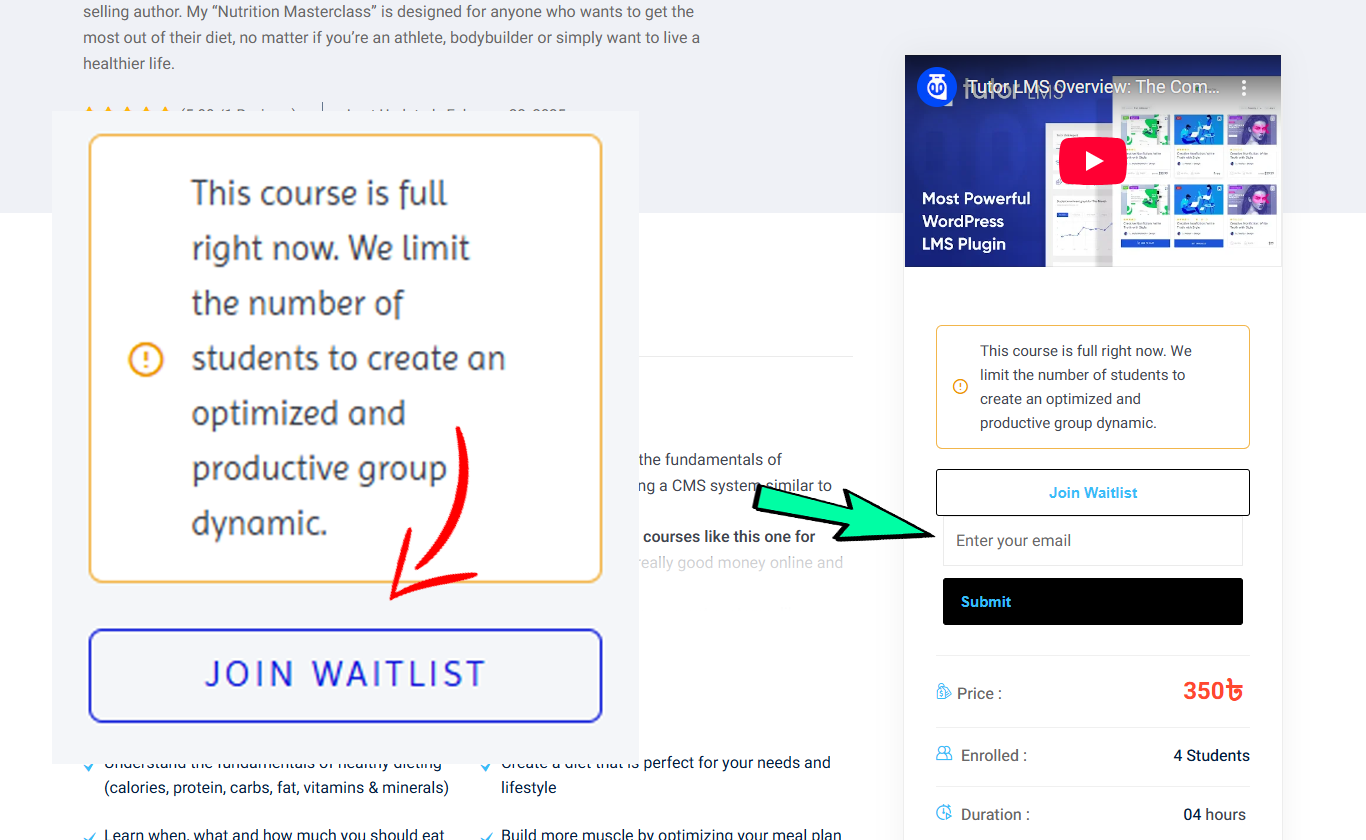
✅ “Join Waitlist” – Automatically appears on fully booked Tutor LMS courses
📧 Email Notifications – Instantly notifies students when a spot becomes available
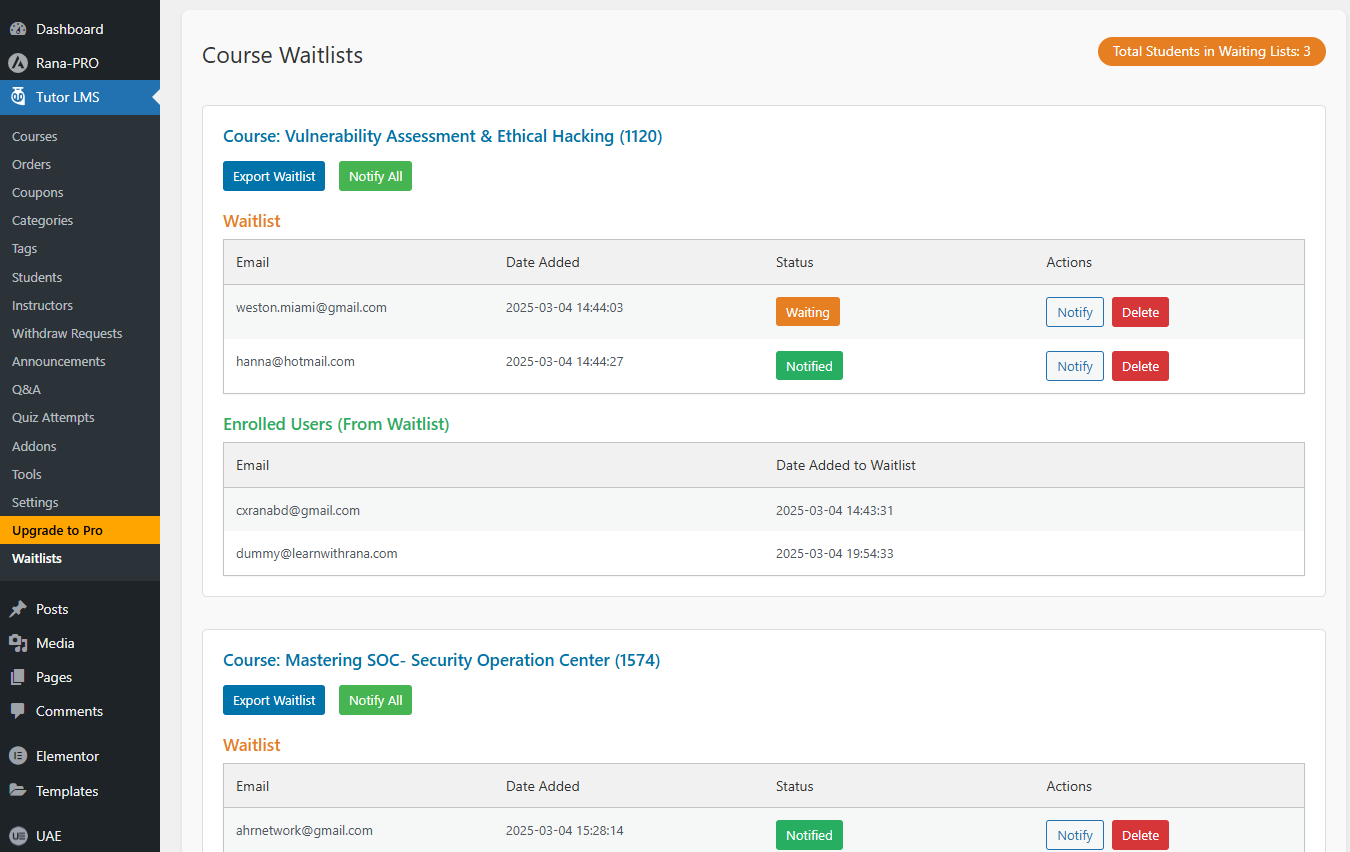
📊 Admin Dashboard – Manage Waitlists and Enrolled Users (From Waitlist)
📢 Bulk “Notify All” – One-click email alert to all waitlisted students
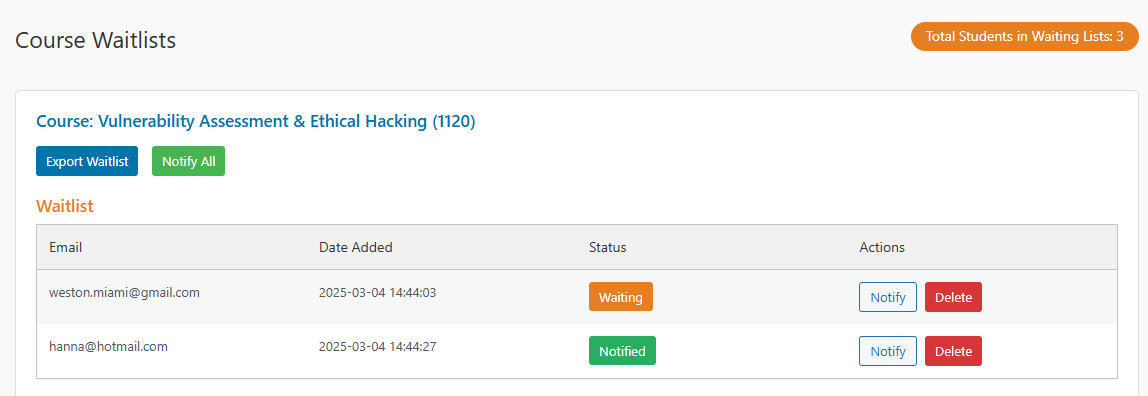
🎯 Individual Actions – Notify or remove students with a single click
📂 Export to CSV – Download waitlist data for easy record-keeping
🟠 Visual Status Indicators – 🟠 “Waiting” | ✅ “Notified” for quick tracking
✨ Modern UI – Clean, user-friendly interface for efficient management
🔢 Waitlist Counter – Displays the total waitlist count in the admin header
🔄 Seamless Tutor LMS Integration – Automatically detects enrolled users
🎯 How It Works
📌 For Students:
1️⃣ If a course is full, a “Join Waitlist” button appears.
2️⃣ Students enter their email and join the waitlist.
3️⃣ They receive an email notification when a seat opens.
📌 For Administrators:
1️⃣ Access the Waitlist Dashboard in Tutor LMS.
2️⃣ View and manage waitlist entries.
3️⃣ Notify students individually or in bulk.
4️⃣ Track students who enrolled from the waitlist.
5️⃣ Export waitlist data for records.
💡 This plugin requires Tutor LMS to function.
Additional Information
For support or feature requests, visit Website or submit a Feature Request. Check out more Tutor LMS addons at 📹 Video for Tutor LMS.
❤️ Love this plugin? Consider donating: Donate Here
Installation
1️⃣ Upload the plugin folder to /wp-content/plugins/
2️⃣ Activate it via the ‘Plugins’ menu in WordPress
3️⃣ Ensure Tutor LMS is installed and active
4️⃣ The waitlist feature will now automatically integrate with fully booked courses
Frequently asked questions
Does this plugin require Tutor LMS?
Yes, it’s an addon designed specifically for Tutor LMS and requires it to function.
Can administrators notify users multiple times?
Yes, admins can notify waitlisted students repeatedly. The status updates to “Notified,” but entries remain manageable in the dashboard.
How are enrolled users identified?
The plugin matches waitlist emails with Tutor LMS enrollment data, moving enrolled users to a separate “Enrolled Users (From Waitlist)” section.
Is there a limit to the waitlist size?
No, there’s no inherent limit to the number of students who can join a waitlist.
Where do I manage the waitlist?
Under the Tutor LMS menu in the WordPress admin area, look for “Waitlists” to access the management dashboard.
Changelog
⚠️ Ensure Tutor LMS is installed and activated before using this plugin.
1.0
Initial release with full waitlist management & email notifications.
Screenshots


For developers
Is this your plugin? Show off the numbers.
Add a live badge to your site, docs or GitHub README. It updates on its own — no account needed.
Best Waitlist for Tutor LMS alternatives
All course plugins →




FAQ
Waitlist for Tutor LMS: quick answers
Straight answers, pulled from live WordPress.org data.
Live data from WordPress.org · checked Oct 6, 2026
Is Waitlist for Tutor LMS free?
Yes. Waitlist for Tutor LMS is free to download and use from the official WordPress.org plugin directory.
Is Waitlist for Tutor LMS safe to use in 2026?
Waitlist for Tutor LMS shows warning signs in 2026 — compare the alternatives below before installing. It runs on 40+ sites and was last updated 8 months ago, and scores 39/100 on our health check.
How many websites use Waitlist for Tutor LMS?
Waitlist for Tutor LMS is active on 40+ WordPress websites and has been downloaded 1,070 times since it launched in March 2025. It was downloaded 71 times in the last 30 days.
Does Waitlist for Tutor LMS work with WordPress 7.1?
Waitlist for Tutor LMS is officially tested up to WordPress 6.9.9, while the latest release is 7.1.2. It may still work, but try it on a staging site first.
What PHP version does Waitlist for Tutor LMS need?
Waitlist for Tutor LMS requires PHP 7.0 or higher. Most hosts run PHP 8.x today, so it works on any modern WordPress hosting.
When was Waitlist for Tutor LMS last updated?
The latest version, 1.0, was released on February 20, 2026 (8 months ago).
Who makes Waitlist for Tutor LMS?
Waitlist for Tutor LMS is developed and maintained by Anowar Hossain Rana.
What are the best alternatives to Waitlist for Tutor LMS?
The most popular alternatives to Waitlist for Tutor LMS are Tutor LMS (100K+ installs), LearnPress (70K+ installs) and MasterStudy LMS WordPress P… (10K+ installs).
Powered by PageForge
Want thousands of pages that rank like these? Build them in an afternoon.
This directory runs on the same engine as PageForge. Turn any spreadsheet, CSV or API into thousands of fast, SEO-ready WordPress pages — with schema, internal links and AI-written copy baked in.
- CSV, Google Sheets & API data sources
- AI content, schema & internal links per page
- Works with Elementor, Gutenberg, Yoast & Rank Math
- Free on WordPress.org — no credit card


