


Visual Edit Lite – Visual Editor for Block Themes
Click any text, image or link on the live page and change it there. Visual Edit Lite is a front-end editor for WordPress that keeps every save as a restore point, so you can always go back to the page as it was.

Solid choice
Visual Edit Lite is a solid plugin choice in 2026, with a few things worth checking first. Was last updated 5 hours ago, and scores 64/100 on our health check.
- Actively developed — last update 5 hours ago
- Tested with the latest WordPress (7.1)
- Small user base (<10 active installs)
- Very few reviews so far
How does it stack up?
Side-by-side on installs, updates, ratings & support


Daily downloads
Download spikes usually follow a new release — each site that auto-updates counts as a download.
Rankings
Where Visual Edit Lite stands todayWordPress.org search rankings
Live position in the plugin search, top 100| Keyword | Position |
|---|---|
| block-theme | >100 |
| front-end editor | >100 |
| frontend editing | >100 |
| inline editor | >100 |
| visual editor | >100 |
About Visual Edit Lite
From the official readme · v1.31.5Description
Click any text, image or link on the live page and change it there. Visual Edit Lite is a front-end editor for WordPress that keeps every save as a restore point, so you can always go back to the page as it was.
It works in two places. On a block theme such as Twenty Twenty-Five, it hosts WordPress’s own editor and adds a floating inspector for typography, colour, spacing and Google Fonts. The native block, pattern, template and Global Styles controls stay available.
On a site converted from static HTML to WordPress, it makes the original pages editable by clicking. That can be a hand-written site, or one exported from Lovable, Bolt, v0.dev, aidesigner.ai or a Claude design. The markup stays byte for byte as it was.
Nothing is locked, timed or waiting for a key. Everything the plugin contains works on every install, offline included.
What you get
- Edit text, links, images and video on the live page, where they are shown. Every save goes into that page’s history.
- Go back to any saved version. The ten most recent saves plus the Original are kept for every page, all listed and any of them restorable. The Original is never dropped.
- With a block theme, WordPress’s editor opens inside a Visual Edit toolbar. You get a floating inspector, up to five Google Fonts, new sections from your theme’s patterns, and duplicate or trash for the open page or post.
- Repeating content works as a list. You reorder, edit, add and remove FAQ entries, service cards, team members or portfolio tiles together.
- Connect a designed HTML form by clicking, without rebuilding it. Submissions are stored in wp-admin and emailed through your server, SMTP, or Brevo, SendGrid, Postmark or Mailgun. A honeypot, a minimum fill time, a per-IP rate limit and, if you have it, Akismet hold off spam.
- You can also hand a form to Contact Form 7 or Fluent Forms. The design stays, and that plugin validates, checks spam, verifies its captcha, notifies and records.
- Mailing list signup comes with double opt-in, Brevo integration and a subscriber list in wp-admin.
- Blog listings repeat the design’s own card markup for real WordPress posts, with a “load more” button for the next page.
- Menus keep the design’s own navigation markup and are managed from Appearance → Menus.
- Each page gets its own SEO titles, descriptions, Open Graph, canonicals, robots and redirects, carried over from the original site. They work with Yoast SEO and Rank Math when present, and stand on their own when not.
- For AI search, the plugin adds schema.org structured data including FAQ and an
llms.txtfile. It also adds AI-crawler rules in robots.txt and a read-only audit of what the site tells search engines and AI assistants. This is about being readable by AI search. The plugin has no AI writing or image tools and sends nothing to any AI provider. - Import brings in a converted theme’s content bundle (pages, menus, media, forms and SEO records), and you review it before anything is written.
Home page and documentation: html2wp.dev/visualedit.
Source, build script and translation template: github.com/iOSDevSK/visual-edit-lite.
The PHP, CSS and JavaScript in this package are the source, unminified.
What this plugin needs
A block theme, or a theme whose pages are raw HTML and which declares its contract through the clara_ve_theme_contract filter. The contract for converted themes is documented on GitHub: https://github.com/iOSDevSK/visual-edit-lite/blob/main/docs/developer/theme-requirements.md
Forms, email delivery, mailing lists, SEO, redirects and llms.txt do not depend on the theme and work on any site.
Important notes
- Raw-HTML editing requires the
unfiltered_htmlcapability, because markup round-trips through that editor. On a block theme the plugin uses WordPress’s normal permissions for the page, template or other entity being edited. - Deactivating the plugin keeps all data and reverts the front page to the theme’s shipped design until reactivation. Other pages keep their edited content.
- Deleting the plugin always removes stored secrets (SMTP password, provider API keys) and its own transients. Everything else (submissions, subscribers, edit history, page sources) is kept unless “also delete all stored data” is enabled under Visual Edit Lite → Form Settings → Uninstall. That option removes the plugin’s options, its two database tables and the form submissions. It leaves your pages and their content in place. A few marker fields the plugin wrote on them also stay, and so do any files it imported into the Media Library or the uploads folder.
External services
This plugin does not contact any external service on its own. Every service below is reached only after you switch it on, or connect a form plugin that uses it, and only for the purpose described.
Google Fonts
Used only if you open the Google fonts picker in the editor. Opening it makes your server request the public font catalogue from fonts.google.com (cached for a week), and your own browser loads a preview stylesheet from fonts.googleapis.com, and its font files from fonts.gstatic.com, for each family you scroll past. A page that uses a font you kept loads that font’s stylesheet and files from the same two hosts, which means visitors’ browsers connect to Google and Google receives their IP address and user agent. A site where no Google font was kept requests nothing from Google on the front end.
- Terms: https://policies.google.com/terms
- Privacy: https://policies.google.com/privacy
- Google Fonts privacy FAQ: https://developers.google.com/fonts/faq/privacy
Akismet
Used only if the separate Akismet plugin is installed and configured and you enable Akismet filtering under Form Settings. Each form submission is then sent to Akismet for a spam verdict: its field values, the email address found among them, the sender’s IP address, user agent and referrer, and your site’s address.
- Terms: https://akismet.com/tos/
- Privacy: https://automattic.com/privacy/
Email delivery providers
Used only if you select one as the mailer and enter its API key. From then on every email WordPress sends from this site, not only form notifications, goes through the provider you chose: recipient, sender name and address, reply-to, subject and body.
- Brevo terms: https://www.brevo.com/legal/termsofuse/
- Brevo privacy: https://www.brevo.com/legal/privacypolicy/
- SendGrid terms: https://www.twilio.com/en-us/legal/tos
- SendGrid privacy: https://www.twilio.com/en-us/legal/privacy
- Postmark terms: https://postmarkapp.com/terms-of-service
- Postmark privacy: https://postmarkapp.com/privacy-policy
- Mailgun terms: https://www.mailgun.com/legal/terms/
- Mailgun privacy: https://www.mailgun.com/legal/privacy-policy/
Brevo (mailing lists)
Used only if you connect Brevo as your mailing-list provider. Opening a form’s list picker in the editor asks Brevo for the names of your lists. When a visitor subscribes (after confirming, if double opt-in is on) Brevo receives their email address, the list you chose, the other fields they filled in on that form as contact attributes, and, if you use Brevo’s own double opt-in, the template id and redirect address you set. Same terms and privacy links as above.
Your own SMTP server
Used only if you select SMTP as the mailer. The message is sent to the host you configured.
Contact Form 7 and Fluent Forms
Used only if you hand a designed form to one of those plugins in the editor. The submission is then processed by that plugin on your own server: its validation, spam checks, notifications and records apply, under its own settings. Nothing leaves the site through this plugin for that.
Google reCAPTCHA
Used only if a form you handed to Contact Form 7 or Fluent Forms has reCAPTCHA configured in that plugin. The page then loads the reCAPTCHA script from www.google.com in the visitor’s browser, which sends Google their IP address, user agent and how they interact with the page, and Google may set cookies. The token it returns is verified by Contact Form 7 or Fluent Forms with the secret key you entered there; this plugin holds no key.
- Terms: https://policies.google.com/terms
- Privacy: https://policies.google.com/privacy
hCaptcha
Used only if a form you handed to Fluent Forms uses hCaptcha. The page then loads the hCaptcha script from js.hcaptcha.com in the visitor’s browser, which receives their IP address, user agent and how they interact with the page. The token is verified by Fluent Forms with your hCaptcha secret; this plugin holds no key.
- Terms: https://www.hcaptcha.com/terms
- Privacy: https://www.hcaptcha.com/privacy
Importing a remote image
When you click “Import image into this site” on a picture hosted elsewhere, the plugin downloads that one URL, which you chose, and stores the file in your Media Library.
Gravatar
Used only if a listing template you designed includes the {author_image} placeholder. It resolves through WordPress’s own get_avatar_url(), so unless another plugin serves avatars locally the portrait is fetched by visitors’ browsers from gravatar.com, which then receives their IP address and user agent. A template without that placeholder requests nothing.
- Terms: https://automattic.com/terms/
- Privacy: https://automattic.com/privacy/
Privacy
The plugin stores form submissions and mailing-list subscribers in your own database. It sets no cookies of its own, runs no analytics, and sends nothing anywhere about you or your site. Secrets you enter (SMTP password, provider API keys) are encrypted at rest with your site’s own salt and are always removed when the plugin is deleted.
Credits
The click-to-edit layer (assets/bridge.js, assets/editor.js, assets/bridge.css and assets/editor.css) is derived in part from Open Design (https://github.com/nexu-io/open-design), Copyright 2026 Open Design contributors, licensed under the Apache License, Version 2.0 (https://www.apache.org/licenses/LICENSE-2.0). Those files were ported from TypeScript and modified for WordPress, and each carries this notice. The Apache License 2.0 is compatible with version 3 of the GPL, which this plugin’s “GPLv2 or later” licence allows.
Installation
From your dashboard
- Go to Plugins → Add Plugin and search for “Visual Edit Lite”.
- Click Install Now, then Activate.
Manual
- Download the ZIP from this page.
- Go to Plugins → Add Plugin → Upload Plugin, choose the ZIP and click Install Now.
- Activate the plugin.
After activation
On a block theme, open Visual Edit Lite in the admin menu and pick a page. Nothing else is needed.
On a theme converted from static HTML, activate that theme first, then follow its setup screen to import the site’s content. Every page is then editable from the Visual Edit Lite menu.
Frequently asked questions
Does this front-end editor work with my theme?
Yes, if it is a block theme: Twenty Twenty-Five and other themes built on templates and patterns work out of the box. With a classic PHP theme the visual editor does not apply, but forms, email delivery, mailing lists, SEO, redirects and llms.txt still work. A theme converted from static HTML works when it declares the clara_ve_theme_contract filter, which every html2wp conversion does.
How do I edit my WordPress site with it?
Open Visual Edit Lite in the admin menu and pick a page. Then click the text, image or link you want to change, and its panel opens beside it. Each save becomes a restore point in the page’s history. On a theme converted from static HTML, import the site’s content first, as described under Installation.
Can I undo a change after I saved it?
Yes. Every save is a restore point. The History panel lists the ten most recent saves of the page plus the Original, and restoring any of them writes it back as the live page. The Original, the design exactly as the theme shipped it, is never dropped.
Is anything disabled until I pay?
No. Visual Edit Lite has no licence key, no trial period and no locked buttons. The features it does not have are not part of it, so there is nothing in the plugin waiting to be switched on.
Does it send my content anywhere?
No. Editing happens on your own server. The only outside connections are the ones you switch on yourself, such as Google Fonts if you pick one, an email provider if you select one, or Akismet if you enable it. Each one is described in the External services section of the description.
What happens to my pages if I deactivate or delete the plugin?
Deactivating keeps everything: your pages keep their edited content, and the front page shows the theme’s shipped design until you reactivate. Deleting removes stored secrets and, only if you enable that option first, the plugin’s own tables and submissions. Your pages stay.
Can I keep using Contact Form 7 or Fluent Forms with a designed form?
Yes. Click the form, choose the plugin and one of its forms, and check which of its fields each designed field fills. The design stays as it is; that plugin validates, checks spam, verifies its captcha, sends and records the submission.
Can I use it on a theme I built myself?
Yes, if the theme’s pages are raw HTML and it declares the clara_ve_theme_contract filter. The requirements are documented on GitHub: https://github.com/iOSDevSK/visual-edit-lite/tree/main/docs
Does the front end work without JavaScript?
Forms submit and work without JavaScript. The editor itself is a wp-admin screen and needs JavaScript, like the block editor does.
Where do I report a bug?
In the support forum here, or on GitHub: https://github.com/iOSDevSK/visual-edit-lite/issues
Changelog
Edit history now keeps ten saves per page plus the Original, and lists all of them. A page with a longer history is trimmed to that when its history is next opened or the page is saved. The live page and the Original are not affected.
1.31.5
- Fix: A Page List block in a navigation menu no longer offers move, remove or add controls whose changes could not be saved. Its pages are listed as they appear, in the order set on each page and then by title.
- New: “Convert to links” turns a Page List in a navigation menu into separate links you can reorder, the same way WordPress’s own Edit Page List dialog does.
1.31.4
- New: A designed form can be handed to Contact Form 7 or Fluent Forms. Pick the form in the FORM panel and check which of its fields each designed field fills; that plugin then validates, checks for spam, verifies its captcha, sends and records the submission, while the design stays as it is. Without JavaScript the page comes back with the errors under the fields.
- New: On a block theme, the ⋯ menu of the Visual Edit Lite workspace can duplicate the page or post that is open, and move it to the trash. The copy is a draft and brings its content, categories and tags, featured image, search-appearance record and small-screen rules; its canonical address is not copied. The front page and the posts page cannot be removed from here.
- Changed: Duplicating works for posts as well as pages, and asks for the right to create whichever of the two is being copied.
- Fixed: A backslash in page content survives a save. Every write of page content now goes through wp_slash(), which WordPress expects.
- Changed: The readme no longer describes the paid edition, and documents the captcha providers a connected form plugin may load.
1.31.3
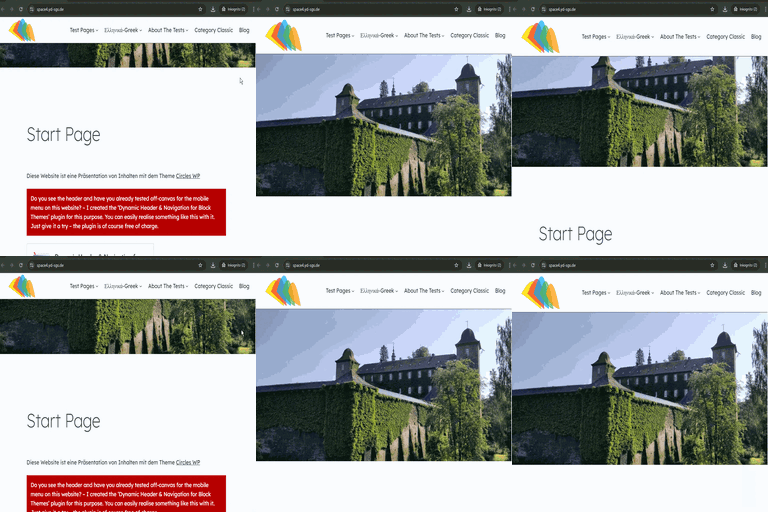
- Changed: The readme carries captions for the seven screenshots on the plugin’s directory page.
- Changed: The plugin’s homepage link points at html2wp.dev; the source stays on GitHub.
1.31.2
- Fixed: The SMTP password is stored exactly as it is typed. It was trimmed before being encrypted, so a password that begins or ends with a space saved without complaint and then failed to authenticate. Secrets are never put through a text sanitizer: they are encrypted, and never printed back. A pasted API key still loses the stray space or newline a paste leaves on it.
1.31.1
- Security: Each editor route asks for the right to do what it does, on top of the right to edit the page: copying a page asks for the right to create pages, removing one for the right to delete it, importing an image for the right to upload files, and a save, a restore or a search-appearance change addressed to one page asks about that page.
- Security: The form block’s output is filtered through an allowlist of what a form may consist of at the moment it is returned, so nothing else can come out of it. The honeypot field is hidden by a stylesheet rule as well as its own inline one.
- Changed: Navigation class names supplied by a theme are escaped as attribute values when they are written into a menu.
1.31.0
- Changed: Edit history keeps the ten most recent saves of each page plus the Original. Every save the plugin holds is listed and can be restored. A page with a longer log is trimmed to that the next time its history is opened or the page is saved.
- Changed: Every stylesheet and script the plugin adds now goes through the WordPress enqueue API — the decorative and article styling layers, per-block styles, and the Form Settings and SEO & Sharing screens, whose behaviour moved into assets/admin-settings.js. Structured data is printed with WordPress’s own inline script tag function.
- Changed: The paid plugin is mentioned in one place: a single plain item, Visual Edit Pro, at the end of the Visual Edit Lite menu, opening one screen of text with one link. The two Pro-marked items are gone, and nothing is added to any other admin screen.
- Removed: The part of the content exporter that could package a theme. Lite exports content bundles only; theme export is not in this plugin.
- Security: The public “load more” route answers only for a published page without a password, and gives one answer for every refusal. A listing no longer includes password-protected posts.
- Security: A form field whose name starts with an underscore is ignored, so a visitor cannot write one of the submission’s internal meta keys.
- Security: The legacy static import copies only files of a type WordPress accepts as an upload, from inside the extracted folder. A double opt-in link stops working after fourteen days, and exporting parked content, which can include submissions and subscribers, requires an administrator.
- Added: A Credits section, and a notice in the four editor files that derive from Open Design (Apache License 2.0).
Screenshots


For developers
Is this your plugin? Show off the numbers.
Add a live badge to your site, docs or GitHub README. It updates on its own — no account needed.
Best Visual Edit Lite alternatives
All block-theme plugins →




FAQ
Visual Edit Lite: quick answers
Straight answers, pulled from live WordPress.org data.
Live data from WordPress.org · checked Sep 30, 2026
Is Visual Edit Lite free?
Yes. Visual Edit Lite is free to download and use from the official WordPress.org plugin directory.
Is Visual Edit Lite safe to use in 2026?
Visual Edit Lite is a solid plugin choice in 2026, with a few things worth checking first. Was last updated 5 hours ago, and scores 64/100 on our health check.
How many websites use Visual Edit Lite?
Visual Edit Lite is active on <10 WordPress websites and has been downloaded 109 times since it launched in September 2026. It was downloaded 104 times in the last 30 days.
Does Visual Edit Lite work with WordPress 7.1?
Yes. The developer has tested Visual Edit Lite up to WordPress 7.1.2, the latest release. It requires WordPress 6.6 or newer.
What PHP version does Visual Edit Lite need?
Visual Edit Lite requires PHP 7.4 or higher. Most hosts run PHP 8.x today, so it works on any modern WordPress hosting.
When was Visual Edit Lite last updated?
The latest version, 1.31.5, was released on September 30, 2026 (5 hours ago).
Who makes Visual Edit Lite?
Visual Edit Lite is developed and maintained by Filip Dvoran.
What are the best alternatives to Visual Edit Lite?
The most popular alternatives to Visual Edit Lite are Create Block Theme (20K+ installs), Dynamic Header & Navigation… (200+ installs) and Enable bbPress for Block Th… (100+ installs).
Powered by PageForge
Want thousands of pages that rank like these? Build them in an afternoon.
This directory runs on the same engine as PageForge. Turn any spreadsheet, CSV or API into thousands of fast, SEO-ready WordPress pages — with schema, internal links and AI-written copy baked in.
- CSV, Google Sheets & API data sources
- AI content, schema & internal links per page
- Works with Elementor, Gutenberg, Yoast & Rank Math
- Free on WordPress.org — no credit card


