



3D viewer by Visody
Easily add beautiful, fully-customizable 3D viewers to your WooCommerce product galleries and WordPress pages! AR capabilies included.

Solid choice
3D viewer by Visody is a solid plugin choice in 2026, with a few things worth checking first. It runs on 1K+ sites, is rated 5/5 and was last updated 4 months ago, and scores 62/100 on our health check.
- Very few reviews so far
How does it stack up?
Side-by-side on installs, updates, ratings & support



Daily downloads
Download spikes usually follow a new release — each site that auto-updates counts as a download.
Rankings
Where 3D viewer by Visody stands todayWordPress.org search rankings
Live position in the plugin search, top 100| Keyword | Position |
|---|---|
| 3d model | #2 |
| 3d product viewer | #3 |
| 3D viewer | #3 |
| AR | #9 |
Version adoption
Share of active sites per release.
Rating breakdown
★★★★★★★★★★ 5 from 4 reviews
About 3D viewer by Visody
From the official readme · v2.5.1Description
The 3D viewer by Visody allows you to seemlessly add 3D models to your WooCommerce product galleries and WordPress pages!
For the WooCommerce product viewers you can choose to display the 3D product viewer in an overlay over the default product gallery, or include the 3D product viewer as part of your product gallery.
👉 Official Demo Links: Try out multiple Visody 3D viewer demos
👉 Learn More About Visody (PRO): All the features of the Visody 3D viewer
👉 Need help getting started? Read our Documentation
✨ UNLIMITED 3D VIEWERS ✨
The Visody 3D product viewer plugin allows you to add an unlimited amount of 3D viewers to your WordPress and WooCommerce website! Simply install the plugin, create 3D viewers and upload your 3D models. Full functionalities. Zero limitations!
📱 BUILT-IN AR SUPPORT 📱
The Visody 3D product viewer supports AR-capabilies on the last two major versions of all evergreen desktop and mobile browsers, plus the last two versions of Safari (on MacOS and iOS).
✅ SUPPORTED 3D FILE TYPES ✅
The 3D product viewer can only load GLB or glTF 3D models. If you have a different model type, simply convert your model to GLB or glTF using your favorite 3D model editor. Most 3D model editors support export to GLB or glTF.
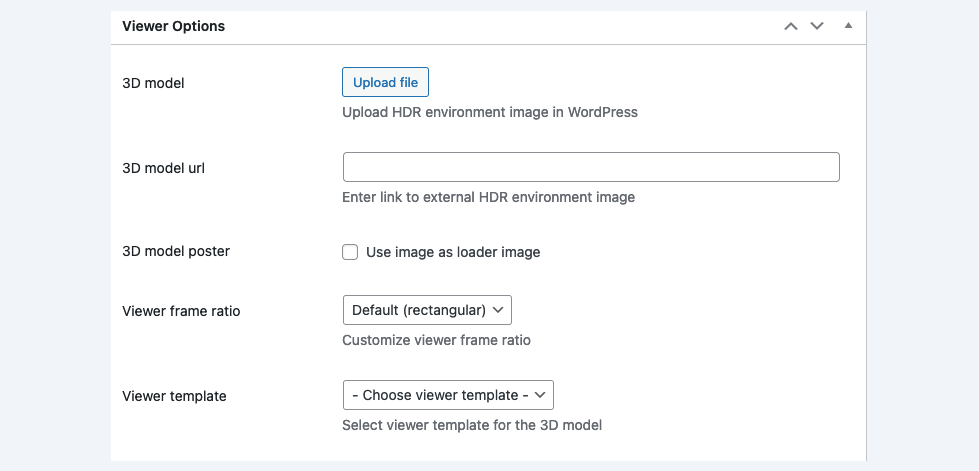
The plugin allows you to upload your GLB or glTF 3D models right into WordPress media library. If you are concerned about server disk space, you can also choose to upload your 3D model elsewhere and link it using an URL, instead of uploading it to WordPress itself.
💥 3D VIEWER FEATURES 💥
The plugin ships with a set of awesome features, including:
- Add unlimited 3D viewers to any of your posts or pages
- Embed one 3D model into your WooCommerce product gallery
- Upload 3D models right into WordPress or link external 3D model source
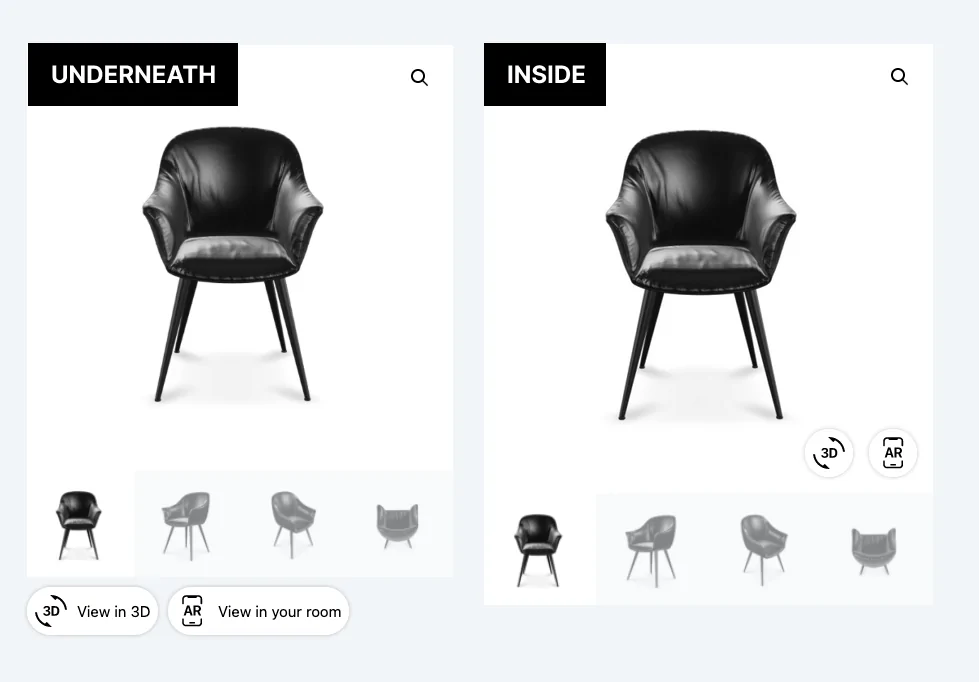
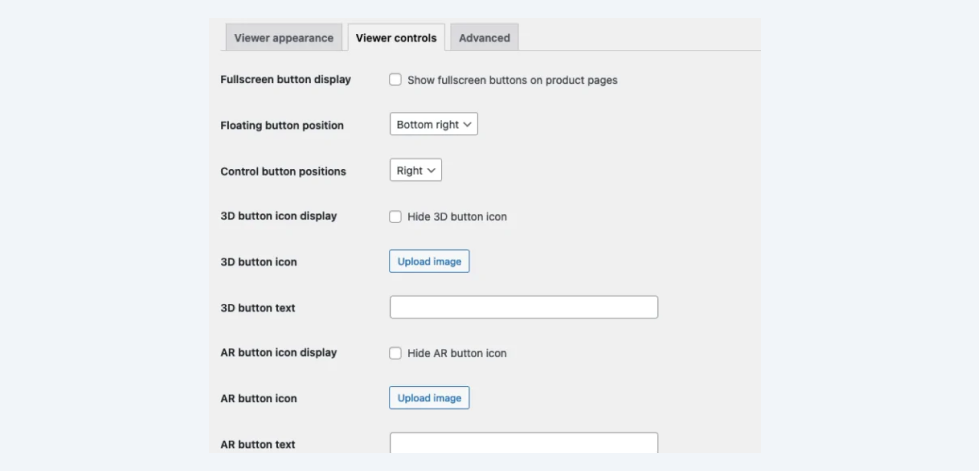
- Display 3D and AR buttons inside the gallery or underneath the gallery
- Show 3D as main gallery image or as an overlay
- Ships with built-in AR support
- Capture 3D model view and save as picture
- Make 3D viewer show in fullscreen
- Plenty of 3D viewer customization options (see below)
- Translation support
- Sheet editor support for bulk management
- QuickViewer plugin support (inline 3D viewers only)
- Custom variation swatches plugin support
🎨 3D VIEWER CUSTOMIZATIONS 🎨
The 3D product viewer contains a lot of settings that can be changed and customized:
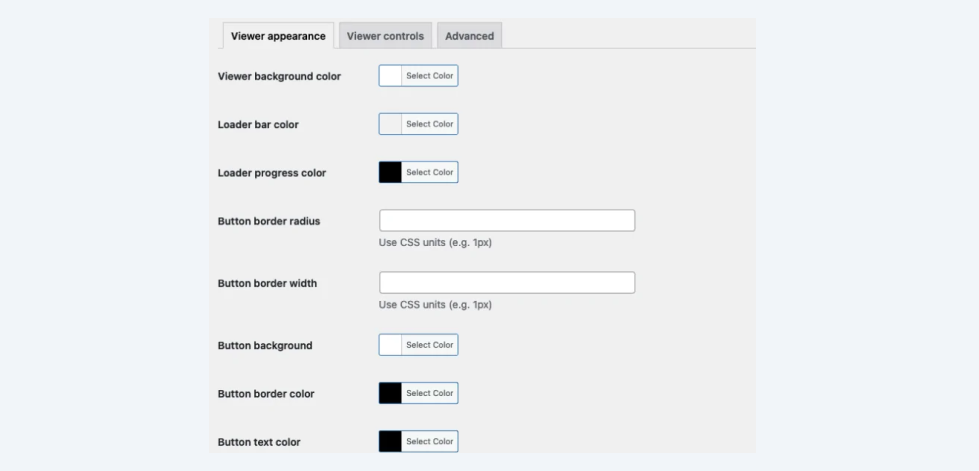
- Viewer background
- Viewer button colors
- Viewer button icons
- Viewer button texts
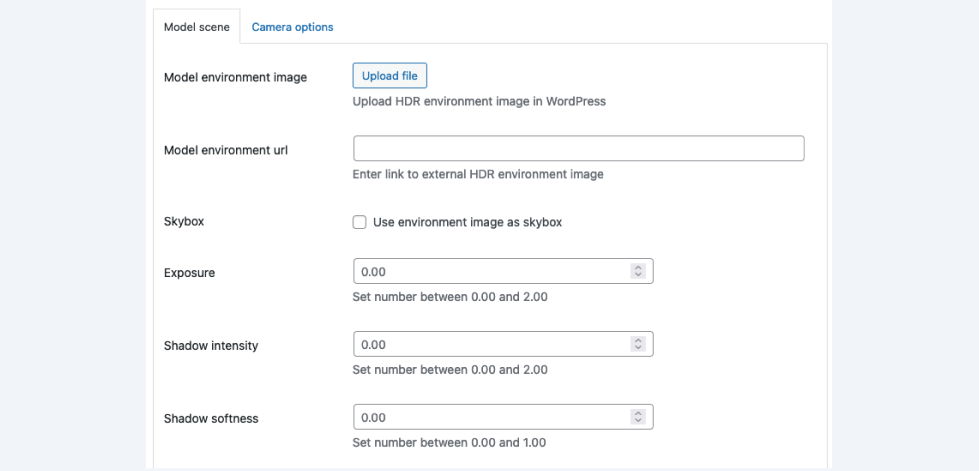
- Model environment image (HDR, used for lightning)
- Model environment image exposure
- Model environment image display (show as skybox)
- Shadow intensity
- Shadow softness
- AR placement
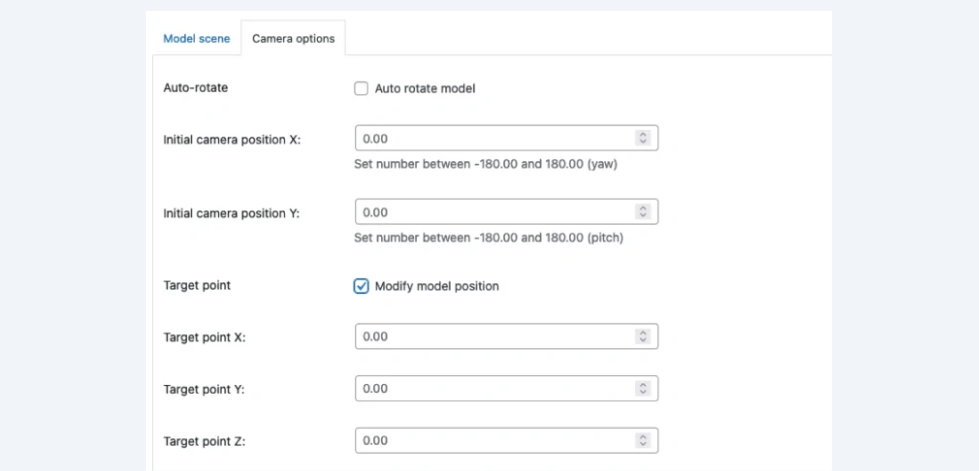
- Auto rotate model
- Customize initial camera position
- Customize target camera position
- Customize camera view limits
- Apply camera zoom limit
⭐️ PRO FEATURES ⭐️
- Configure a 3D model for each WooCommerce product variation
- Display your 3D models as the product thumbnail on product loop items (listing pages, related products)
- Display view in AR button on desktop devices to show QR code to open model in AR directly on mobile
- Create product walk-through using model annotations
- Play model animations
🚀 Getting started 🚀
You can get the plugin up-and-running in under 15 minutes!
WooCommerce: Simply download and activate the plugin and add your 3D models to your WooCommerce products, just like you would do with images!
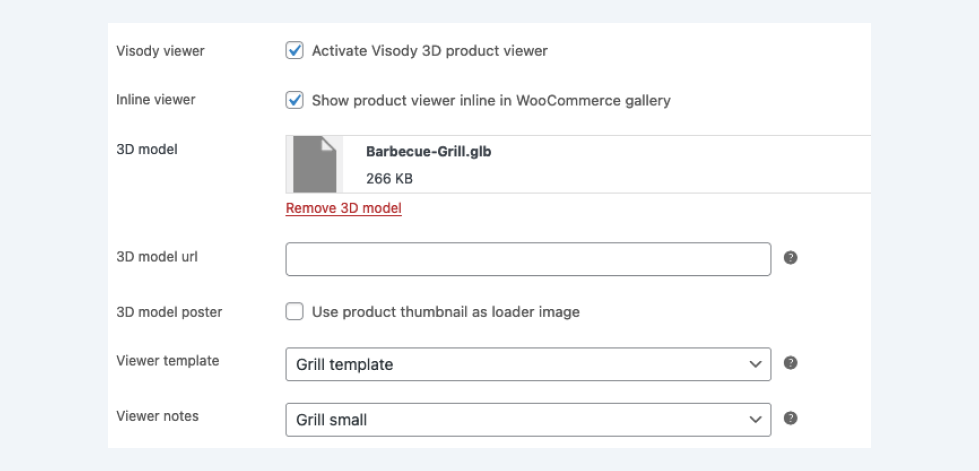
And don’t forget to tick the box “Activate Visody 3D product viewer”. Otherwise the product viewer (indicator) will not show up.
WordPress: If you are using WordPress only, simply head over to Visody -> 3D viewers and create a new 3D viewer. Use the shortcode to place it anywhere on your website pages.
As a finishing touch you can customize the viewer colors to your likings. And customize all the 3D model viewer options you would expect!
About
The Visody 3D product viewer allows you to upload 3D models right into WordPress and display the 3D viewer in your WooCommerce product galleries and on any WordPress page using the 3D viewer shortcodes.
Installation
- Upload
visody-3d-product-viewer.zipto the/wp-content/plugins/directory - Activate the plugin through the ‘Plugins’ menu in WordPress
- Go to Products and select a product you want to edit.
- Locate the “Visody Viewer” tab in the Product data metabox
- Check the box “Activate Visody 3D product viewer” and upload a 3D model or add a link to your 3D model
- If you want to customize camera settings, go to Visody -> Templates and create a new template.
- Edit all the settings you want and hit the publish (or save) button.
- Go back to your product and select the newly added viewer template (refresh the page if the template is not listed).
- Finally, you can customize the appearance. Go to Visody -> Appearance and adjust the settings.
- Enjoy!
Frequently asked questions
Q. I can’t upload 3D models. What should I do?
Please read this article on our website on how to upload 3D models to your WordPress website.
Q. Can I use the Visody 3D viewer when I do not have GLB or glTF 3D models?
No, the Visody 3D viewer only works with GLB or glTF 3d models. But you can simply convert any 3D model to the GLB/glTF format using a 3D editor like Blender or online converters.
Q. Why is my 3D viewer or 3D button not displayed in the product gallery?
If you are using a custom gallery plugin or custom theme, chances are your site is using different class names. Please update class names accordingly in the advanced settings tab.
Q. Do you offer support?
Official support is only accessible to our paying customers. If you encounter issues, simply submit a new ticket on our plugin page and we will get back to you as soon as possible.
Q. My question is not listed
Please check out our FAQ page for more questions and anwers.
Changelog
2.5.1 (27-05-2026)
- WordPress 7.0 support
- Add support for numeric hotspot indicators (pro)
2.5.0 (15-05-2026)
- Library updates
2.4.3 (21-01-2026)
- Fix fullscreen mode when using multiple shortcodes
2.4.2 (06-12-2025)
- Add WordPress 6.9 support
- Library updates
2.4.1 (30-10-2025)
- Add support to add links in annotations (pro)
- Library updates
2.4.0 (07-06-2025)
- Add support to show percentage above loading bar
- Add support to customize template per variation (pro)
Screenshots


For developers
Is this your plugin? Show off the numbers.
Add a live badge to your site, docs or GitHub README. It updates on its own — no account needed.
Best 3D viewer by Visody alternatives
All 3d model plugins →





FAQ
3D viewer by Visody: quick answers
Straight answers, pulled from live WordPress.org data.
Live data from WordPress.org · checked Oct 3, 2026
Is 3D viewer by Visody free?
Yes. 3D viewer by Visody is free to download and use from the official WordPress.org plugin directory.
Is 3D viewer by Visody safe to use in 2026?
3D viewer by Visody is a solid plugin choice in 2026, with a few things worth checking first. It runs on 1K+ sites, is rated 5/5 and was last updated 4 months ago, and scores 62/100 on our health check.
How many websites use 3D viewer by Visody?
3D viewer by Visody is active on 1K+ WordPress websites and has been downloaded 14,864 times since it launched in March 2024. It was downloaded 337 times in the last 30 days.
Does 3D viewer by Visody work with WordPress 7.1?
3D viewer by Visody is officially tested up to WordPress 7.0.6, while the latest release is 7.1.2. It may still work, but try it on a staging site first.
When was 3D viewer by Visody last updated?
The latest version, 2.5.1, was released on May 27, 2026 (4 months ago).
Who makes 3D viewer by Visody?
3D viewer by Visody is developed and maintained by visodywp.
What are the best alternatives to 3D viewer by Visody?
The most popular alternatives to 3D viewer by Visody are 3D Viewer Block (1K+ installs), Augmented Reality Viewer (400+ installs) and AR for WordPress (300+ installs).
Powered by PageForge
Want thousands of pages that rank like these? Build them in an afternoon.
This directory runs on the same engine as PageForge. Turn any spreadsheet, CSV or API into thousands of fast, SEO-ready WordPress pages — with schema, internal links and AI-written copy baked in.
- CSV, Google Sheets & API data sources
- AI content, schema & internal links per page
- Works with Elementor, Gutenberg, Yoast & Rank Math
- Free on WordPress.org — no credit card


