



AKDev Spline animation – Delight your users experience with 3d scroll animations.
Create Spline 3d scrolling animations with ease and wow your users.

Consider an alternative
AKDev Spline animation shows warning signs in 2026 — compare the alternatives below before installing. It runs on 100+ sites and was last updated 2 years ago, and scores 28/100 on our health check.
- Small user base (100+ active installs)
- Very few reviews so far
- No update in over a year
- Only tested up to WordPress 6.7 (latest is 7.1)
How does it stack up?
Side-by-side on installs, updates, ratings & support



Daily downloads
Download spikes usually follow a new release — each site that auto-updates counts as a download.
Rankings
Where AKDev Spline animation stands todayWordPress.org search rankings
Live position in the plugin search, top 100| Keyword | Position |
|---|---|
| 3d model | >100 |
| animations | >100 |
| block | >100 |
| Gutenberg block | >100 |
| spline | #4 |
Version adoption
Share of active sites per release.
About AKDev Spline animation
From the official readme · v1.0.3Description
Introducing a new WordPress Gutenberg plugin: AKDev Spline animation! Say goodbye to boring websites and hello to interactive 3D magic. With this plugin, you can easily add stunning 3D animations that respond to scrolling, giving your site a whole new dimension.
No need to be a tech whiz – our interface is super simple and intuitive. Just pick your favorite spline 3D models and watch them come to life as visitors scroll through your content.
Whether you’re showcasing products, sharing your portfolio, or telling a story, 3D Scroll Effects adds that extra “wow” factor that’ll keep your audience hooked.
Why settle for ordinary when you can turn your WordPress site into a captivating experience? Upgrade your website today with Spline animation and watch as your content comes to life!
For whom
- Creative Designer and Agencies.
- Trainer / Course Creators
- E-commerce sites that want to display their products in 3D.
- Web designer/developer
Features
- Animation Interface: intuitive user interface to add 3d animations
- Responsive options: currently the only responsive functionality in plugin is to show or hide the animation block on different devices, to access that settings click on the animation block and see the right sidebar and scroll down until you see “responsive settings” checkbox enable it and add your settings there.
How to use
- First, install the Spline animation Block plugin
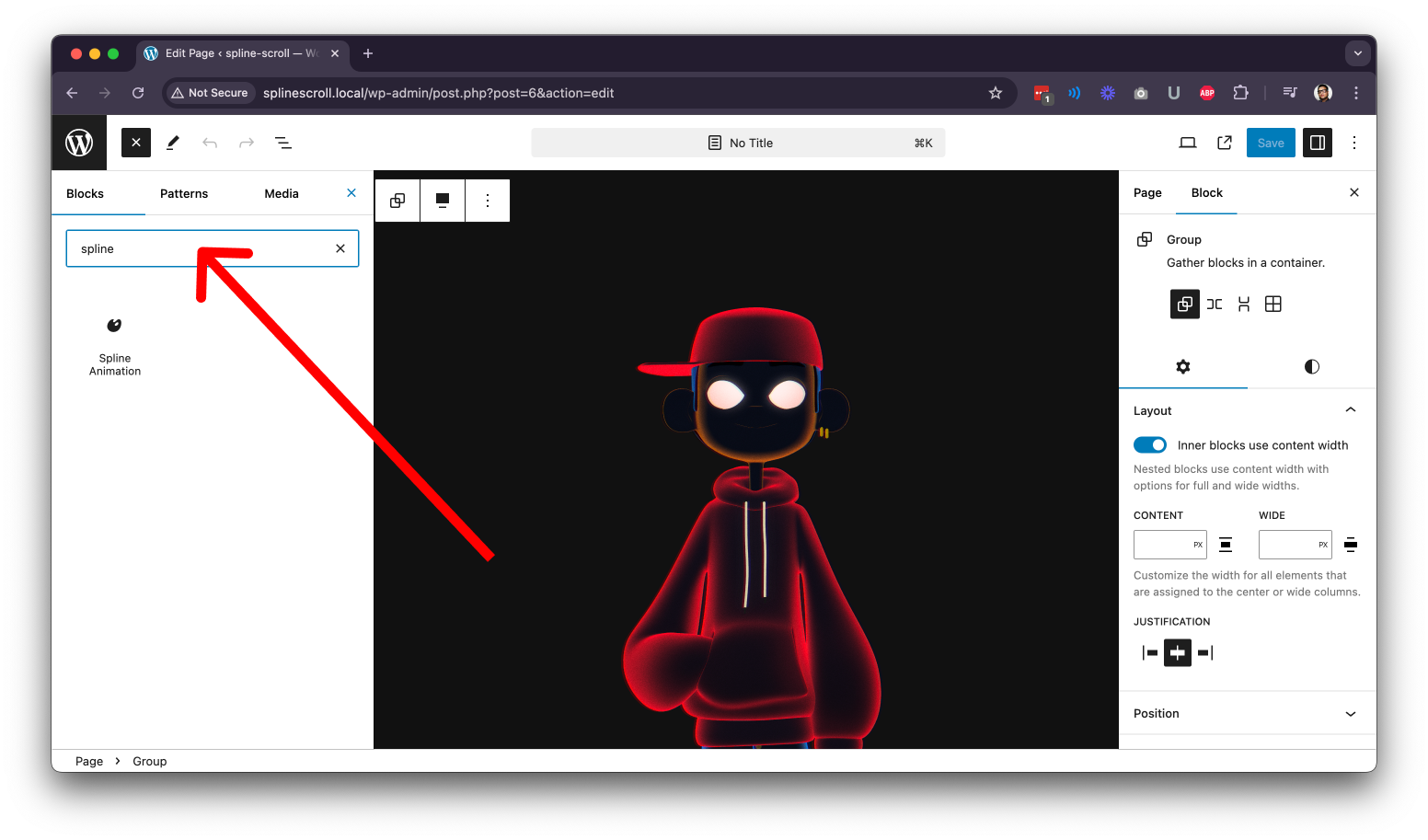
- Add the Spline animation block from the block category called “Animations” in the Gutenberg editor.
- You can change block settings from the right-side settings sidebar.
-
Enjoy!
-
For installation help click on Installation Tab
Feedback
- Did you like this plugin? Dislike it? Do you have a feature request? Please share your feedback with me
Inspect github code
You can view and inspect this plugins full source code on github
Terms and Privacy Policies
This plugin uses the following scripts, and their respective terms and privacy policies are listed below:
- Spline
- License: https://github.com/splinetool/react-spline/blob/main/LICENSE
- The following URLs originate from the Spline script:
Installation
From Gutenberg Editor:
- Go to the WordPress Block/Gutenberg Editor
- Search For AKDev Spline animation
- Click on the Spline animation to add the block
Download & Upload:
- Download the AKDev Spline animation Block** plugin (.zip file*)
- In your admin area, go to the Plugins menu and click on Add New
- Click on Upload Plugin and choose the
Spline-animation-block.zipfile and click on Install Now - Activate the plugin and Enjoy!
Manually:
- Download and upload the AKDev Spline animation Block plugin to the
/wp-content/plugins/directory - Activate the plugin through the Plugins menu in WordPress
From Gutenberg Editor:
- Go to the WordPress Block/Gutenberg Editor
- Search For AKDev Spline animation
- Click on the Spline animation to add the block
Frequently asked questions
Is AKDev Spline animation Block free?
Yes, AKDev Spline animation Block is a free Gutenberg block plugin.
Is this a offical plugin from https://spline.design/?
This plugin is not affiliated with spline official website.
Does it work with any WordPress theme?
Yes, it will work with any standard block WordPress theme.
Can I change block settings?
Yes, you can change block settings from the Gutenberg block editor’s right sidebar.
Position sticky is not working?
Make sure any parent element of spline animation block do not have overflow css property, that messes with sticky position.
How many times can I reuse a block?
You can use unlimited times as you want.
Where can I get support?
You can post your questions on the support forum here
Changelog
1.0.3
- Removed scripts conflicting with wordpress.org
1.0.2
- Spline model not loading issue fix
- some other fixes
1.0.1
- Animation state undo fixed
- Readme updated
1.0.0
- Initial Release
Screenshots


For developers
Is this your plugin? Show off the numbers.
Add a live badge to your site, docs or GitHub README. It updates on its own — no account needed.
Best AKDev Spline animation alternatives
All 3d model plugins →





FAQ
AKDev Spline animation: quick answers
Straight answers, pulled from live WordPress.org data.
Live data from WordPress.org · checked Oct 4, 2026
Is AKDev Spline animation free?
Yes. AKDev Spline animation is free to download and use from the official WordPress.org plugin directory.
Is AKDev Spline animation safe to use in 2026?
AKDev Spline animation shows warning signs in 2026 — compare the alternatives below before installing. It runs on 100+ sites and was last updated 2 years ago, and scores 28/100 on our health check.
How many websites use AKDev Spline animation?
AKDev Spline animation is active on 100+ WordPress websites and has been downloaded 3,003 times since it launched in July 2024. It was downloaded 103 times in the last 30 days.
Does AKDev Spline animation work with WordPress 7.1?
AKDev Spline animation is officially tested up to WordPress 6.7.9, while the latest release is 7.1.2. It may still work, but try it on a staging site first.
What PHP version does AKDev Spline animation need?
AKDev Spline animation requires PHP 7.1 or higher. Most hosts run PHP 8.x today, so it works on any modern WordPress hosting.
When was AKDev Spline animation last updated?
The latest version, 1.0.3, was released on November 14, 2024 (2 years ago).
Who makes AKDev Spline animation?
AKDev Spline animation is developed and maintained by anasakdev.
What are the best alternatives to AKDev Spline animation?
The most popular alternatives to AKDev Spline animation are 3D Viewer Block (1K+ installs), 3D viewer by Visody (1K+ installs) and Augmented Reality Viewer (400+ installs).
Powered by PageForge
Want thousands of pages that rank like these? Build them in an afternoon.
This directory runs on the same engine as PageForge. Turn any spreadsheet, CSV or API into thousands of fast, SEO-ready WordPress pages — with schema, internal links and AI-written copy baked in.
- CSV, Google Sheets & API data sources
- AI content, schema & internal links per page
- Works with Elementor, Gutenberg, Yoast & Rank Math
- Free on WordPress.org — no credit card


