


Virtual Media Folders
Virtual folder organization and intelligent management for the WordPress Media Library, without altering file locations on disk.

Solid choice
Virtual Media Folders is a solid plugin choice in 2026, with a few things worth checking first. It runs on 200+ sites, is rated 5/5 and was last updated 1 month ago, and scores 72/100 on our health check.
- Tested with the latest WordPress (7.1)
- Momentum — downloads up 19.4% vs the previous 30 days
- Small user base (200+ active installs)
- Very few reviews so far
- Needs PHP 8.3 or newer
How does it stack up?
Side-by-side on installs, updates, ratings & support



Daily downloads
Download spikes usually follow a new release — each site that auto-updates counts as a download.
Rankings
Where Virtual Media Folders stands todayWordPress.org search rankings
Live position in the plugin search, top 100| Keyword | Position |
|---|---|
| AI | >100 |
| folders | #8 |
| media | #78 |
| media library | #82 |
| organization | #43 |
Version adoption
Share of active sites per release.
Rating breakdown
★★★★★★★★★★ 5 from 2 reviews
About Virtual Media Folders
From the official readme · v2.1.5Description
Virtual Media Folders brings virtual folder organization to your WordPress Media Library. Organize your media files into hierarchical folders without moving files on disk—folders are virtual, so your URLs never change.
Features
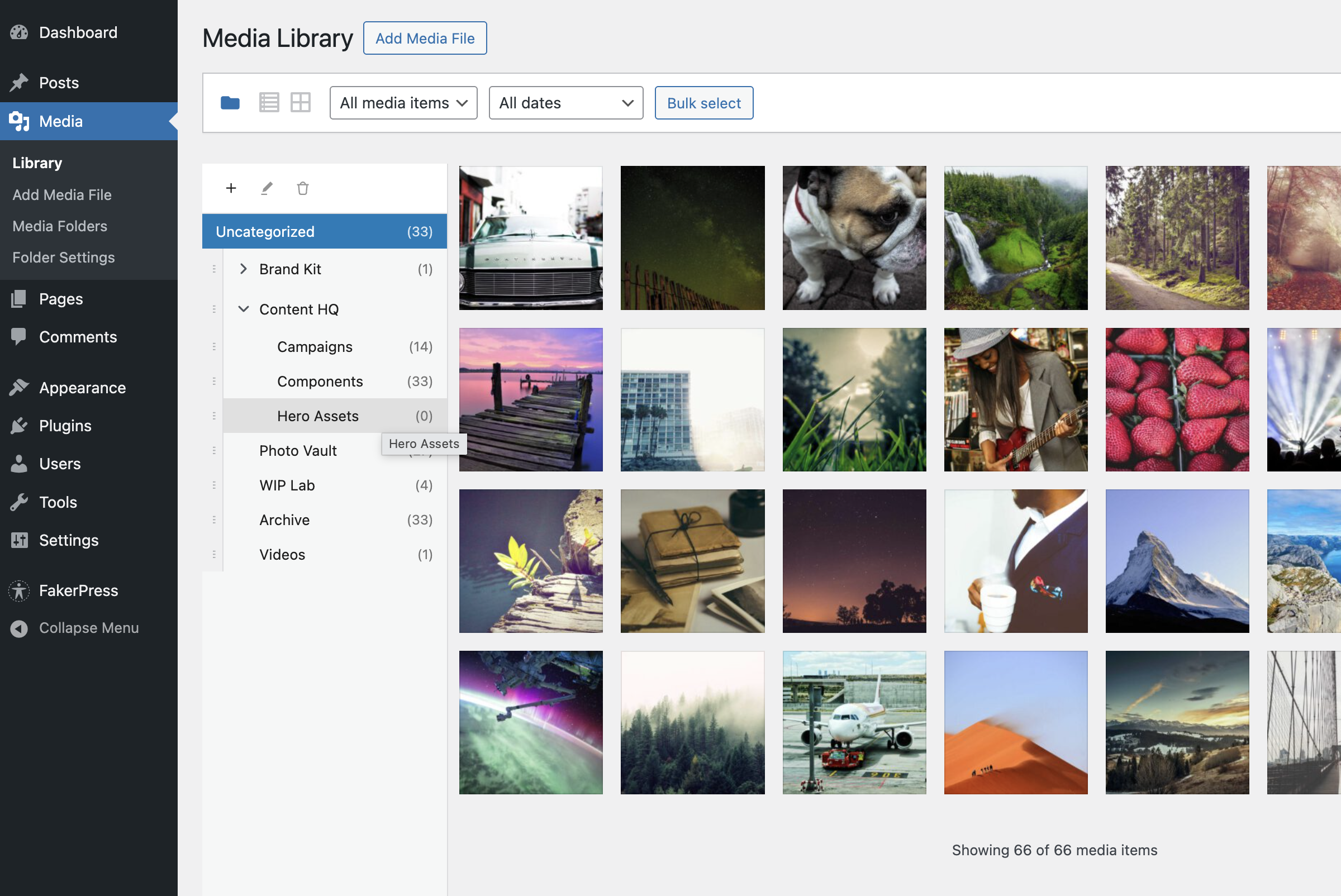
- Virtual Folders – Create hierarchical folder structures to organize media
- Drag & Drop – Easily move media between folders with drag and drop
- Sticky Sidebar – Folder navigation stays visible while scrolling through media
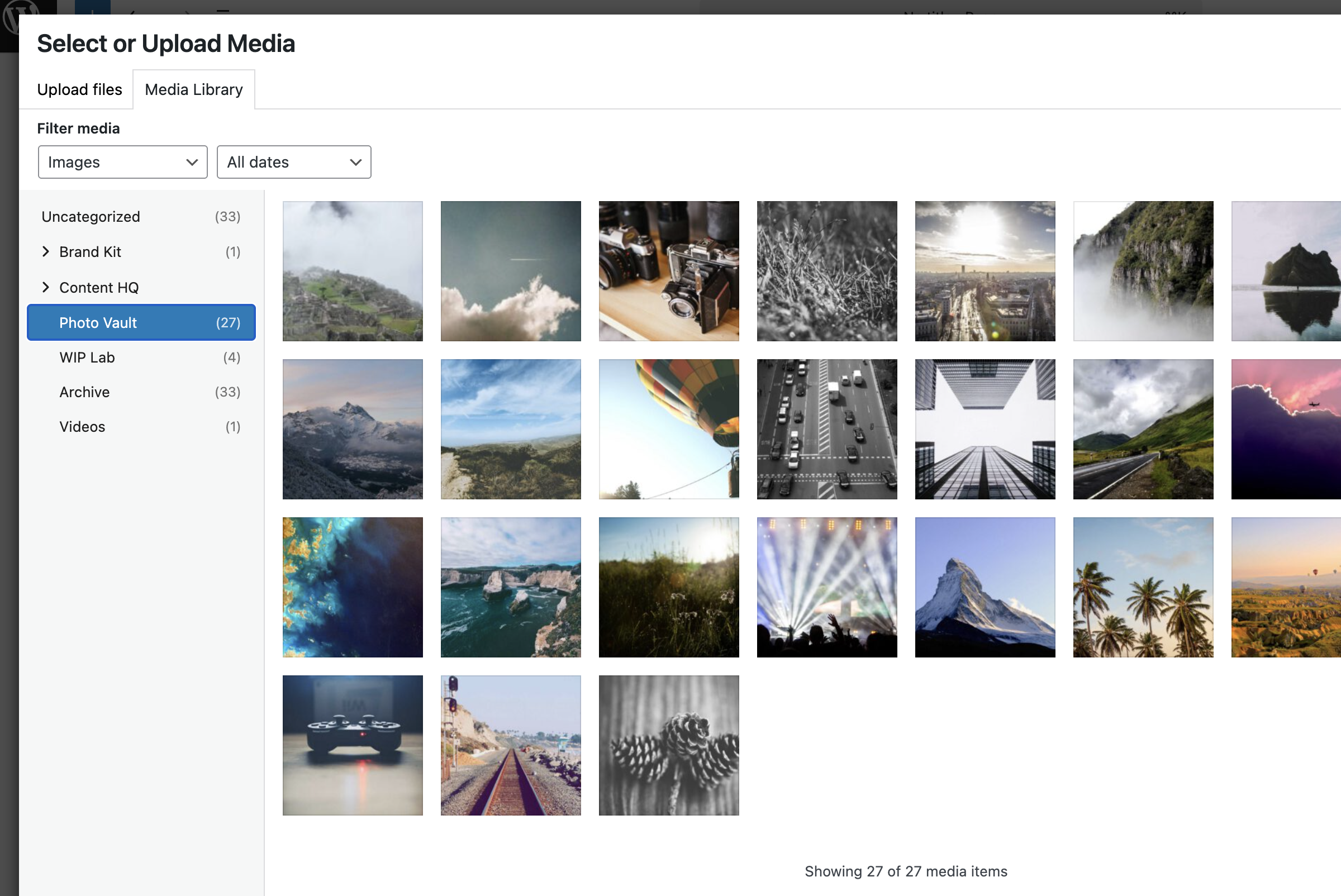
- Gutenberg Integration – Filter media by folder directly in the block editor
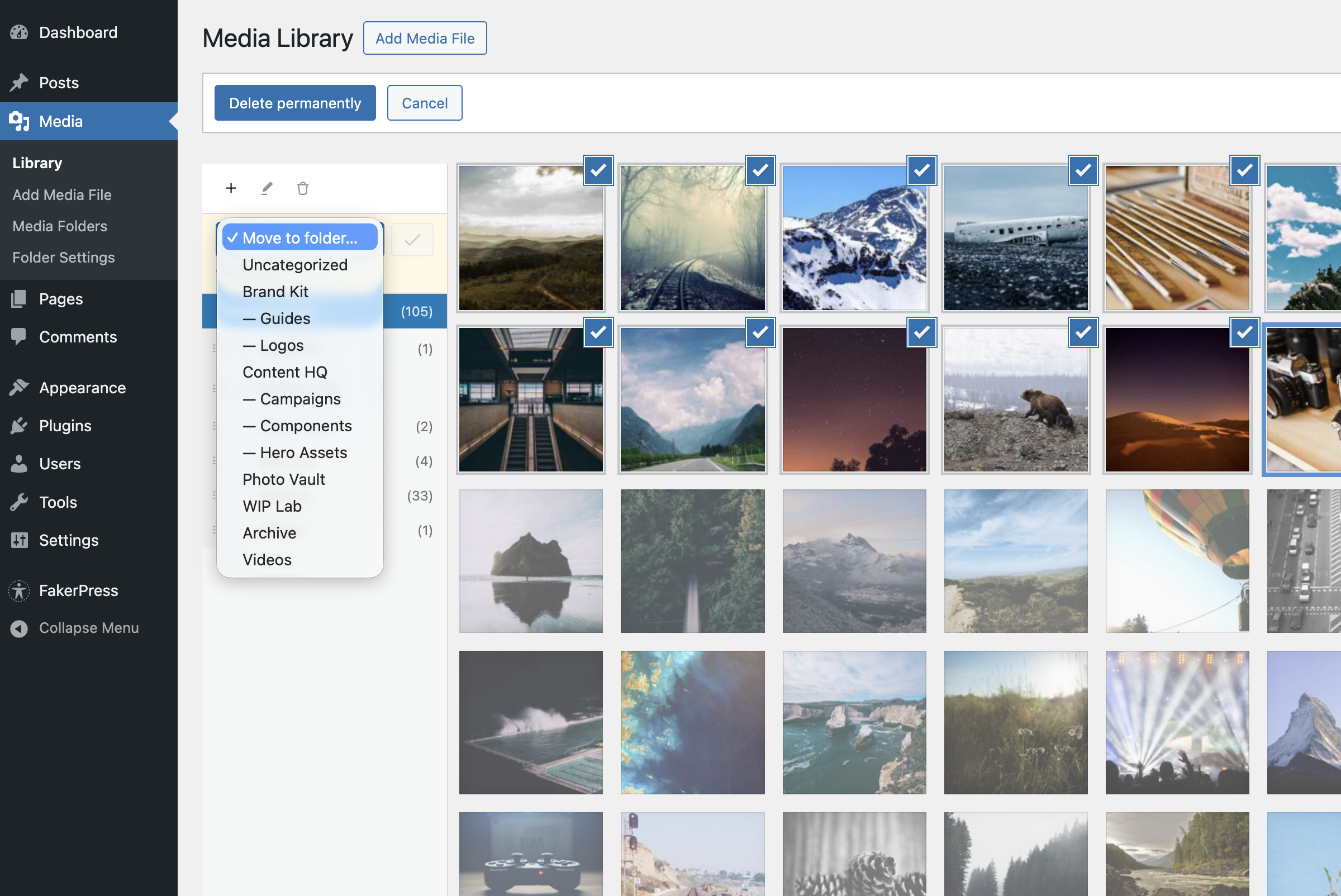
- Bulk Actions – Move multiple media items at once
- Keyboard Accessible – Full keyboard navigation support
- Internationalized – Ready for translation (Norwegian Bokmål included)
Free add-ons
Add-On Manager lets you easily install and manage add-ons that extend Virtual Media Folders with powerful new features:
- AI Ability – Registers MCP tools for AI agents via the WordPress Abilities API.
- AI Organizer – Uses vision-capable AI models to analyze actual image content and automatically organize your media library into virtual folders. This is add-on functionality requiring an API key from a supported AI service provider, or a local LLM.
- Editorial Workflow – Role-based folder access, move restrictions, and Inbox workflow.
- Folder Exporter – Export folders (or subtrees) as ZIP archives with optional CSV manifests.
- Media Cleanup – Tools to identify and clean up unused or duplicate media files.
- Migrate – Migrate folder structures from other media folder plugins to Virtual Media Folders.
- Rules Engine – Rule-based automatic folder assignment for media uploads, based on metadata, file type, EXIF or IPTC data.
- Search – Fast, typo-tolerant search for the WordPress Media Library, powered by the Loupe Search engine.
How It Works
Virtual Media Folders uses a custom taxonomy to assign media to folders. This means:
- Your media files stay exactly where they are on the server
- URLs never change when you reorganize
- Folders can be nested to create hierarchies
Usage
Organizing Media
- Go to Media > Library
- Click the folder icon to show the sidebar
- Use + to create folders
- Drag media onto folders to organize / Bulk select media and use the “Move to Folder” action
- Click a folder to filter the view
Settings
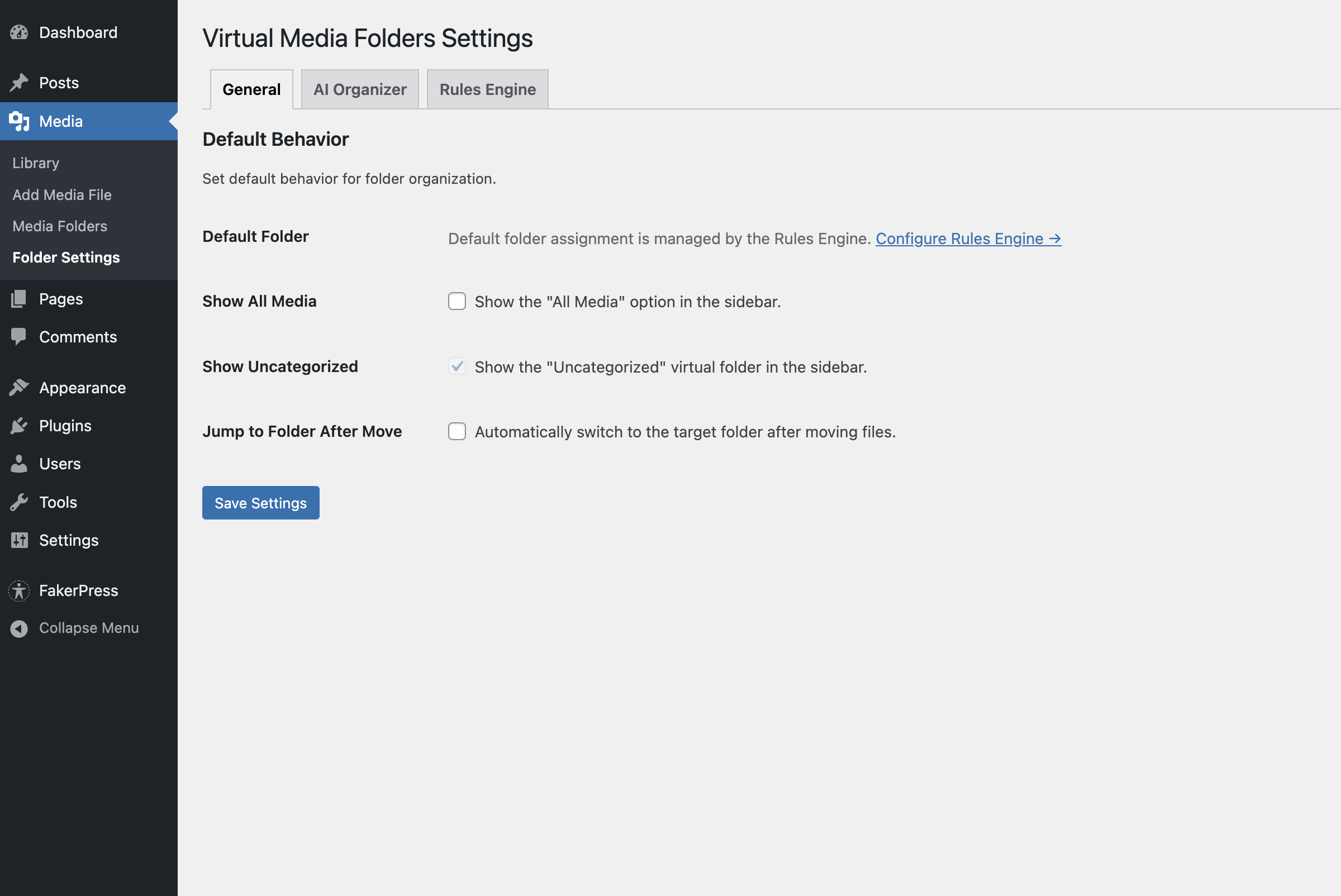
Go to Media > Folder Settings to configure:
- Show “All Media” – Display “All Media” option in sidebar
- Show “Uncategorized” – Display folder for unassigned media
- Jump to folder after move – Navigate to target folder after moving
- Default folder for uploads – Auto-assign new uploads to a folder
Block Editor
When inserting media from a block (Image, Gallery, etc.):
- Open the Media Library modal
- Use the folder sidebar to filter
- Select your media as usual
Documentation
- Accessibility – Keyboard navigation and screen reader support
- Development – Setup, API reference, hooks, and contributing
- MCP Integration – MCP client configuration, upload flow, and AI agent usage using the AI Ability add-on
- Add-on Development – Guide to building add-on plugins
Privacy Policy
Virtual Media Folders does not:
- Track users
- Send data to external servers
- Use cookies
- Collect any personal information
All data is stored locally in your WordPress database.
Installation
From WordPress Plugin Directory
- Go to Plugins → Add New in your WordPress admin
- Search for “Virtual Media Folders”
- Click “Install Now” and then “Activate”
Frequently asked questions
Will this move my actual files?
No. Virtual Media Folders uses virtual folders. Your files stay exactly where they are on the server, and all URLs remain unchanged.
Can I nest folders?
Yes! You can create hierarchical folder structures with unlimited nesting levels.
Does this work with Gutenberg?
Yes! When inserting media in the block editor, you can filter by folder using the sidebar in the Media Library modal.
Can I assign media to multiple folders?
No, each media item belongs to one folder at a time. Moving media to a new folder removes it from the previous folder.
What happens if I delete a folder?
Only the folder organization is removed. Your media files are not deleted.
Is this compatible with my theme?
Virtual Media Folders works entirely within the WordPress admin. It doesn’t affect your front-end theme.
Does this .. ?
If you are missing a feature and the add-ons don’t cover it, please open a feature request 🙂 The Migrate add-on was created in response to a user request for migration from Enhanced Media Library, but it also supports FileBird, Real Media Library, HappyFiles, WP Media Folder, Media Library Assistant, and CatFolders.
Changelog
Bugfix release: Fixed remaining mediamanager references in REST API paths, events, and filters.
2.1.5
- Added: Block inserter “Media” tab now lists your top-level virtual folders as image sources, so you can insert images straight from a folder alongside Images and Openverse.
- Added: “Block Inserter Folders” setting (VMF Settings → General, on by default) to enable or disable the feature.
- Performance: Folder media categories skip the block editor’s per-category emptiness probe — opening the Media tab makes no requests until you open a specific folder.
2.1.4
- Fixed: Folder sidebar layout in the block editor media modal on WordPress 7.1 (grid no longer overlaps the sidebar; works on 7.0–7.1).
2.1.3
- Security: Resolved Dependabot alerts by updating build/test dependencies (
npm audit fix,@wordpress/scripts31 → 32). All production/runtime dependencies are clean. - Changed: Added grouped
.github/dependabot.ymlconfig (npm/composer/github-actions) to consolidate future dependency update PRs.
2.1.2
- Changed: Renamed “Folder Settings” menu to “VMF Settings” for consistency.
- Changed: Moved VMF Settings menu to bottom of Media submenu.
2.1.1
- Fixed: Gallery block edit modal now preserves selected images by skipping VMFO sidebar injection in the gallery-edit state.
- Fixed: Image block media-library folder filtering no longer returns empty results for matching virtual folders.
2.1.0
- BREAKING: Abilities API integration extracted to separate add-on
vmfa-ai-ability - Removed: MCP tools (
vmfo/list-folders,vmfo/create-folder,vmfo/add-to-folder) – installvmfa-ai-abilityfor MCP support
Screenshots
For developers
Is this your plugin? Show off the numbers.
Add a live badge to your site, docs or GitHub README. It updates on its own — no account needed.
Best Virtual Media Folders alternatives
All AI plugins →





FAQ
Virtual Media Folders: quick answers
Straight answers, pulled from live WordPress.org data.
Live data from WordPress.org · checked Oct 5, 2026
Is Virtual Media Folders free?
Yes. Virtual Media Folders is free to download and use from the official WordPress.org plugin directory.
Is Virtual Media Folders safe to use in 2026?
Virtual Media Folders is a solid plugin choice in 2026, with a few things worth checking first. It runs on 200+ sites, is rated 5/5 and was last updated 1 month ago, and scores 72/100 on our health check.
How many websites use Virtual Media Folders?
Virtual Media Folders is active on 200+ WordPress websites and has been downloaded 7,207 times since it launched in December 2025. It was downloaded 1,247 times in the last 30 days.
Does Virtual Media Folders work with WordPress 7.1?
Yes. The developer has tested Virtual Media Folders up to WordPress 7.1.2, the latest release. It requires WordPress 6.8 or newer.
What PHP version does Virtual Media Folders need?
Virtual Media Folders requires PHP 8.3 or higher. Most hosts run PHP 8.x today, so it works on any modern WordPress hosting.
When was Virtual Media Folders last updated?
The latest version, 2.1.5, was released on August 26, 2026 (1 month ago).
Who makes Virtual Media Folders?
Virtual Media Folders is developed and maintained by Per Søderlind.
What are the best alternatives to Virtual Media Folders?
The most popular alternatives to Virtual Media Folders are Elementor Website Builder (10M+ installs), All in One SEO (2M+ installs) and AI Agent by SiteGround (1M+ installs).
Powered by PageForge
Want thousands of pages that rank like these? Build them in an afternoon.
This directory runs on the same engine as PageForge. Turn any spreadsheet, CSV or API into thousands of fast, SEO-ready WordPress pages — with schema, internal links and AI-written copy baked in.
- CSV, Google Sheets & API data sources
- AI content, schema & internal links per page
- Works with Elementor, Gutenberg, Yoast & Rank Math
- Free on WordPress.org — no credit card


