


View Admin As
View the WordPress admin as a different role or visitor, switch between users, temporarily change your capabilities, set screen settings for roles.

Safe pick
Yes — View Admin As is a safe, well-maintained plugin to use in 2026. It runs on 9K+ sites, is rated 4.9/5 and was last updated 1 month ago, and scores 85/100 on our health check.
- Loved by users — 4.9/5 from 49 reviews
- Tested with the latest WordPress (7.1)
- Momentum — downloads up 20.4% vs the previous 30 days
How does it stack up?
Side-by-side on installs, updates, ratings & support



Daily downloads
Download spikes usually follow a new release — each site that auto-updates counts as a download.
Rankings
Where View Admin As stands todayWordPress.org search rankings
Live position in the plugin search, top 100| Keyword | Position |
|---|---|
| admin | #5 |
| roles | #68 |
| switch | #20 |
| users | >100 |
| view | #6 |
Version adoption
Share of active sites per release.
Rating breakdown
★★★★★★★★★★ 4.9 from 49 reviews
About View Admin As
From the official readme · v1.8.10Description
The ultimate User switcher and Role manager
This plugin will add a menu item to your admin bar where you can change your view in the WordPress admin.
Switch to other users without the need to login as that user or even switch roles and temporarily change your own capabilities.
When you’re viewing as a different user, you can also change this user’s preferences; like screen settings on various admin pages.
With the “Role defaults” module you can set default screen settings and metabox locations for roles and apply them to users through various bulk actions.
It also features a “Role manager” module to add, edit or remove roles and grant or deny them capabilities.
Overview / Features
- Switch between user accounts
- Edit this user’s screen preferences and settings
- Switch between roles
- Temporarily change your own capabilities (non-destructively)
- View your site as an unregistered visitor
- Switch language/locale on backend and frontend
- Make combinations of the above view types
- Easily switch back anytime
- Completely secure (see Security below)
- Do all the above without logging out!
Module: Role defaults (screen settings)
- Set default screen settings for roles
- Apply defaults to a user
- Apply defaults to all users of a role
- Apply defaults when registering a new user (in a multisite this is done when a user is added to its first blog)
- Copy defaults from one role to another (or multiple)
- Import/Export role defaults, can also download (and upload) setting files
- Disable the “screen settings” option and/or lock the meta boxes for all users that don’t have access to this plugin
Click here for Role Defaults documentation
Module: Role manager (role editor)
Note: Changes made with the Role Manager are permanent!
- Add, edit or delete roles
- Grant and/or add capabilities to roles
- Rename roles
- Clone roles
- Import/Export roles, can also download (and upload) setting files
- Update role capabilities from current view
- Automatically migrate users to another role after deleting a role
Click here for Role Manager documentation
Compatibility & Integrations
This plugin will work with most other plugins but these are tested:
- Advanced Access Manager (Pro version not verified)
- bbPress
- BuddyPress
- Genesis Framework (and probably other theme frameworks)
- Google Site Kit
- Gravity Forms
- Groups 2.1+ (Custom integration: adds a view type for groups. Pro version not tested)
- Pods Framework 2.0+
- Members
- Restrict User Access 0.13+ (Custom integration: adds a view type for access levels)
- User Roles and Capabilities
- User Role Editor (Pro version not verified)
- User Switching (Not sure why you’d want this but yes, switch-ception is possible!)
- WPFront User Role Editor
- WP Admin UI Customize 1.5.11+
- Yoast SEO
Full list of tested plugins and details: Compatibility & Integrations
I can’t switch back!
See item 3 at FAQ.
It’s not working! / I found a bug!
Please let me know through the support and add a plugins and themes list! 🙂
Security
This plugin is completely safe and will keep your users, passwords and data secure.
For more info see item 7 at FAQ!
Developer notes
This plugin will only be useful for admins (network super admins or regular admins). It will not add functionalities for other roles unless you specifically apply custom capabilities for those users.
Also keep in mind that switching to users that have equal roles is disabled. (regular admins to regular admins + super admins to super admins)
I’ve created this at first for myself since I’m a developer and often need to see the outcome on roles which my clients use.
So, when you are developing a plugin or theme that does anything with roles or capabilities you can use this plugin to easily check if everything works.
No more hassle of creating test users and constantly logging out and in anymore!
This plugin is also useful to support your clients and/or users. For example; make screen display presets of the edit and overview pages before you let them log in.
You can find me here:
Translations
Please help translating this plugin on translate.wordpress.org!
Actions & Filters
Plugin capabilities
Ideas?
Please let me know on GitHub!
Installation
Installation of this plugin works like any other plugin out there. Either:
- Upload and unpack the zip file to the ‘/wp-content/plugins/’ directory
- Activate the plugin through the ‘Plugins’ menu in WordPress
Or search for “View Admin As” via your plugins menu.
Minimum Requirements
- WordPress 4.1 or greater (Though I always recommend to update to the latest version!)
Install as a must-use plugin
Move the view-admin-as.php file into the root of your mu-plugins directory, not in the view-admin-as subdirectory.
This is a limitation of WordPress and probably won’t change soon.
Example:
All files dir: /wp-content/mu-plugins/view-admin-as/...
Main file dir: /wp-content/mu-plugins/view-admin-as.php
Changelog
Version 1.7 introduces some radical code changes to the plugin and requires WordPress 4.1 or higher. Please clear your cache after updating.
1.8.10
- Compatibility: Move label initialization to fix
_load_textdomain_just_in_timenotice since WP 6.7. - Fix: Clear view in current session when resetting manually.
- Fix: URE Integration: Fix the level at which the View Admin As group appears. #135 (credits @pbiron)
- Tests: Fix unit tests.
Detailed info: PR on GitHub
1.8.9
- Fix: Event bubbling for select elements #130
- Fix: Check if removable query args exists before adding removal script on front-end
Detailed info: PR on GitHub
1.8.8
- Enhancement: RTL support. #122
- Enhancement: User context for checking the
edit_usercapability. - Enhancement: Enhance front-end CSS by preventing theme overrides. #120
- Enhancement/Fix: JSON/REST call checks.
Detailed info: PR on GitHub
1.8.7
- Enhancement: Added hooks
vaa_view_admin_as_reset_all_views,vaa_view_admin_as_cleanup_views,vaa_view_admin_as_reset_view,vaa_view_admin_as_update_view. - Enhancement/Compatibility: Fix compatibility issue with MetaSlider block preview (JSON/AJAX requests) #117
- Compatibility: Fixed issues with capability filters overwriting available capabilities.
- Compatibility: Remove redundant canonical tag. #119
- Compatibility: WordPress 5.7 UI.
- Fixed: Missing textdomain parameter.
- Refactor: Added action logs.
- Refactor: Enhance view type classes.
Detailed info: PR on GitHub
1.8.6
- Compatibility: WordPress 5.4
apply_shortcodes()function. #111 - Compatibility: Add Google Site Kit capabilities. #110
- Compatibility: User Role Editor capability filter format. #112
- Enhancement: Always show
force-ajax-userssetting to optionally prevent query.
Detailed info: PR on GitHub
1.8.5
- Compatibility: CSS compatibility for WP 5.3
- Compatibility: Roles are now translated in all cases since WP 5.2.
- Enhancement: JS performance.
- Enhancement: Enhance AJAX checks.
Detailed info: PR on GitHub
Screenshots
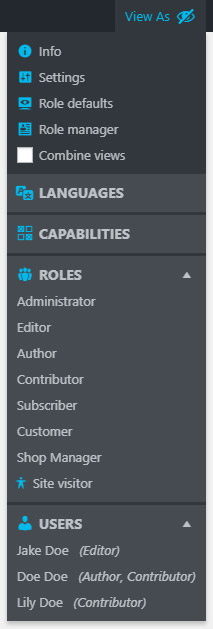


For developers
Is this your plugin? Show off the numbers.
Add a live badge to your site, docs or GitHub README. It updates on its own — no account needed.
Best View Admin As alternatives
All admin plugins →




FAQ
View Admin As: quick answers
Straight answers, pulled from live WordPress.org data.
Source: WordPress.org
Is View Admin As free?
Yes. View Admin As is free to download and use from the official WordPress.org plugin directory.
Is View Admin As safe to use in 2026?
Yes — View Admin As is a safe, well-maintained plugin to use in 2026. It runs on 9K+ sites, is rated 4.9/5 and was last updated 1 month ago, and scores 85/100 on our health check.
How many websites use View Admin As?
View Admin As is active on 9K+ WordPress websites and has been downloaded 133,167 times since it launched in September 2015. It was downloaded 2,286 times in the last 30 days.
Does View Admin As work with WordPress 7.1?
Yes. The developer has tested View Admin As up to WordPress 7.1.5, the latest release. It requires WordPress 4.1 or newer.
What PHP version does View Admin As need?
View Admin As requires PHP 5.2.4 or higher. Most hosts run PHP 8.x today, so it works on any modern WordPress hosting.
When was View Admin As last updated?
The latest version, 1.8.10, was released on October 19, 2026 (1 month ago).
Who makes View Admin As?
View Admin As is developed and maintained by Jory Hogeveen.
What are the best alternatives to View Admin As?
The most popular alternatives to View Admin As are Loginizer (1M+ installs), Redux Framework (900K+ installs) and Admin Menu Editor (300K+ installs).
Powered by PageForge
One template and a spreadsheet. A real page for every search.
PageForge turns each row of a CSV into a WordPress page with its own title, URL, SEO fields and schema, built on the layout you already designed. Free on WordPress.org.
- CSV and XLSX, plus Google Sheets on Professional and Enterprise
- Its own title, URL, SEO fields and schema for every page
- Works with the block editor, Elementor, Divi and Avada
- Free on WordPress.org, no credit card