



Social Login, Passkeys, Magic Link & Email OTP – Passwordless Login by VentraConnect
Social login & passwordless login with Passkeys, Magic Link and Email OTP, plus Guardrails to control spam registrations.

Solid choice
Social Login, Passkeys, Magic L… is a solid plugin choice in 2026, with a few things worth checking first. It runs on 90+ sites, is rated 5/5 and was last updated 3 weeks ago, and scores 75/100 on our health check.
- Actively developed — last update 3 weeks ago
- Tested with the latest WordPress (7.1)
- Small user base (90+ active installs)
- Very few reviews so far
How does it stack up?
Side-by-side on installs, updates, ratings & support



Daily downloads
Download spikes usually follow a new release — each site that auto-updates counts as a download.
Rankings
Where Social Login, Passkeys, Mag… stands todayWordPress.org search rankings
Live position in the plugin search, top 100| Keyword | Position |
|---|---|
| Email OTP | #8 |
| magic link | #13 |
| passkeys | #8 |
| passwordless login | #14 |
| social login | #26 |
Version adoption
Share of active sites per release.
Rating breakdown
★★★★★★★★★★ 5 from 3 reviews
About Social Login, Passkeys, Magic Link & Em…
From the official readme · v1.4.4Description
VentraConnect provides a native authentication stack and unified login system for WordPress: Social Login, Passkeys, Magic Link and Email OTP.
Built around the native WordPress user system, it gives your site modern sign-in methods without routing sensitive authentication data through external proxy servers or relying on third-party passkey platforms.
- Social Login: with 15+ providers, including Google, Facebook, X/Twitter, LinkedIn, Microsoft, GitHub and more.
- Native Passkeys: Secure passwordless sign-in using supported device authenticators such as Touch ID, Face ID and Windows Hello. Passkey authentication uses WebAuthn through your WordPress site, without relying on an external passkey platform.
- Passwordless Login with Magic Link and Email OTP
- Can run in Login only mode (existing users) or Login & Register mode (allow new accounts)
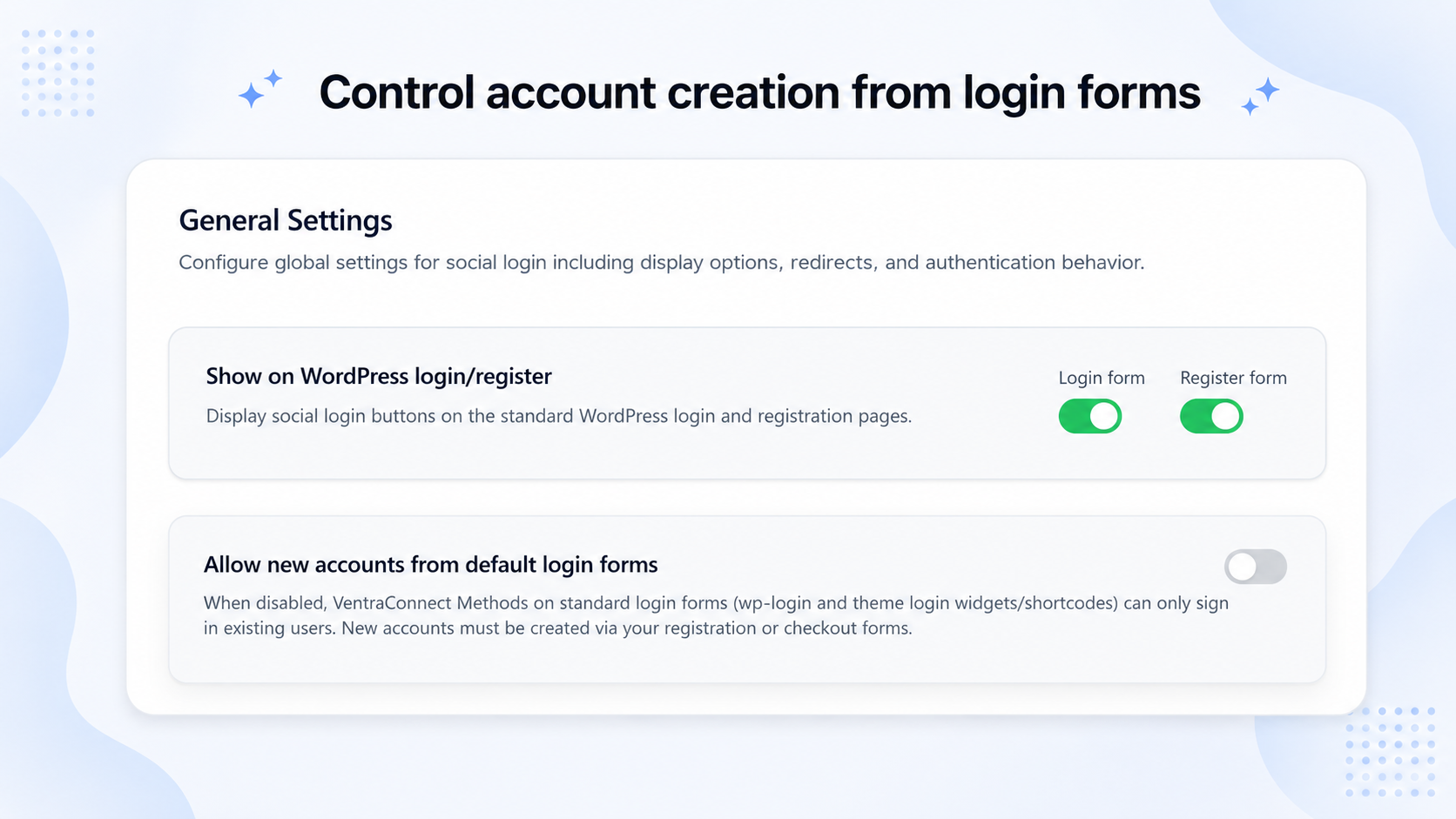
- Guardrails (optional): Unlike standard plugins that automatically create a new account whenever an unknown visitor uses a social button on your login screen, VentraConnect gives you full control over registration. Guardrails allow Social Login, Magic Link and Email OTP to securely authenticate your existing users while blocking the creation of new accounts from the login form when you choose. This prevents random visitors from turning your login screen into an accidental open registration form, while your official registration screen and custom onboarding flows continue to work exactly as intended.
Use the login methods your site needs
VentraConnect is modular. Enable Social Login, Passkeys, Magic Link and Email OTP individually, or combine the available methods into one sign-in experience.
For example, a site can offer one or more social providers only, Email OTP only, Magic Link only, Passkeys only, or several sign-in methods together alongside normal WordPress passwords.
There is no required login-method bundle. Social Login, Magic Link and Email OTP can also use Guardrails to control whether unknown visitors are allowed to create new accounts, while still allowing existing users to sign in.
Works out-of-the-box on the default WordPress login/registration screens (wp-login.php) and also supports shortcodes for custom pages and page builders.
No proxy servers. No third-party tracking. VentraConnect connects directly to social providers through official OAuth flows. Passkey authentication is handled natively through your WordPress site using WebAuthn, without external platform dependencies.
Modern WordPress login with VentraConnect
Best for
- Sites that want faster sign-in and fewer abandoned registrations by offering Social Login, Passkeys, Magic Link and Email OTP alongside normal WordPress login.
- WooCommerce stores that want a smoother checkout and account experience with Social Login and passwordless login on supported login, checkout and My Account flows (Pro).
- LMS, membership and community sites that need simpler onboarding, modern login choices and advanced authentication placements across courses, memberships and member areas (Pro).
- Sites fighting spam registrations that want Guardrails to control whether Social Login, Magic Link and Email OTP can create new accounts from the default wp-login.php screen, without locking out existing users.
- Security-focused site owners who want native Passkey sign-in with supported device authenticators such as Touch ID, Face ID and Windows Hello, plus profile-based Passkey management.
- Growing sites and agencies that want one authentication foundation for WordPress, WooCommerce, LMS and membership workflows instead of stitching together separate login plugins.
- Flexible site architectures that want to introduce Passkeys, Magic Link or Email OTP without removing the classic username/password login fallback.
Key Features (Free)
Social Login
- 15+ Social Providers: Google, Facebook, X/Twitter, LinkedIn, Microsoft, GitHub, Discord, Reddit, Slack, Twitch, Spotify, TikTok, Amazon, Yahoo, WordPress.com and LINE.
- Native WordPress Login Screens: Adds login buttons to default WordPress login and registration screens (
wp-login.php). - Custom Shortcodes: Add login methods to custom pages, page builders and dedicated login layouts.
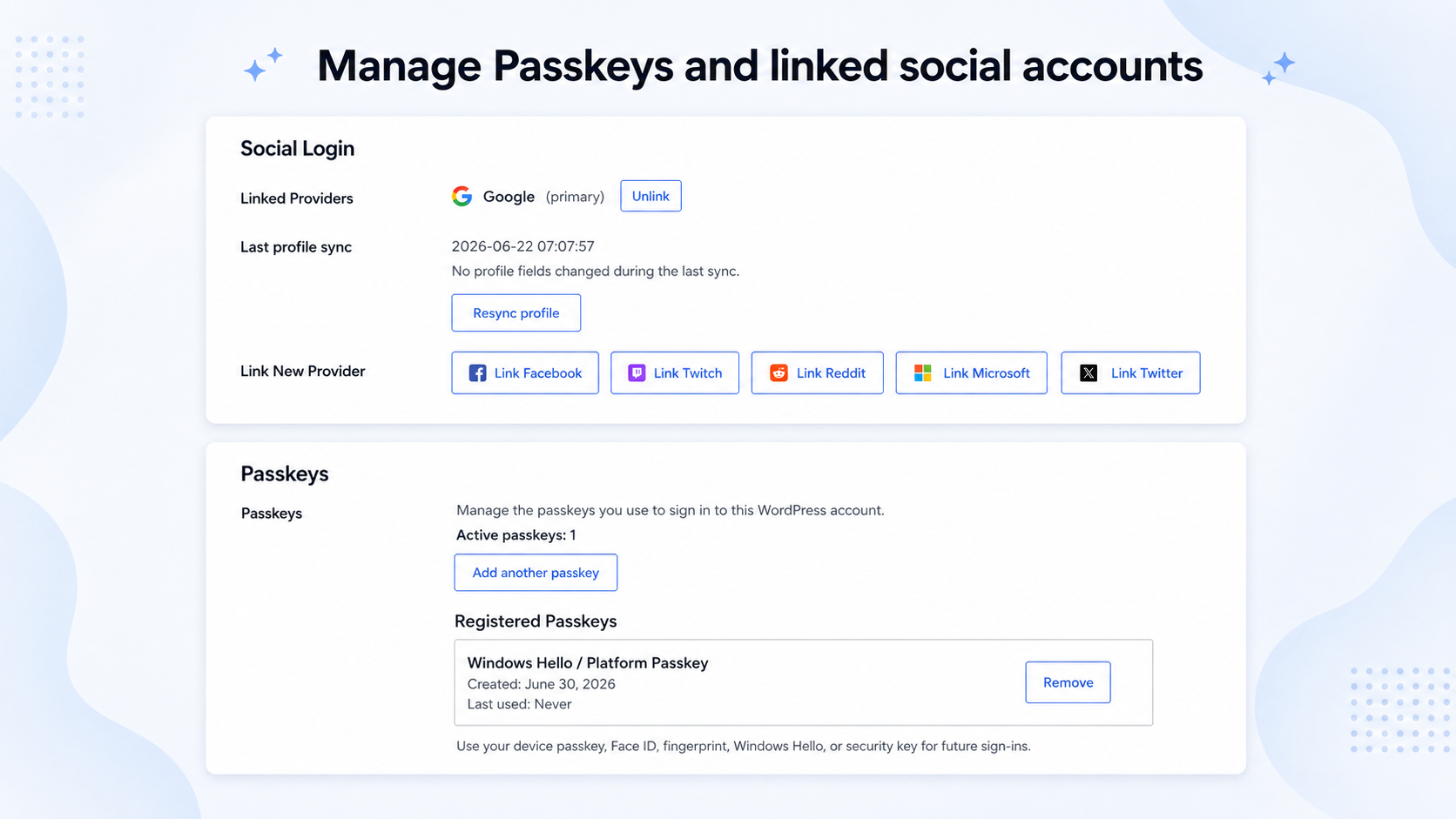
- Account Linking: Users can connect or remove multiple social providers from one WordPress account.
- Profile Sync: Optionally sync display names and avatars from verified social providers.
- Button Styles: Light, Dark and Minimal themes, with wide or compact social button layouts.
Native Passkeys
- Native WordPress Architecture: Passkey authentication is handled through your WordPress site using WebAuthn, without relying on an external passkey platform.
- Modern Device Support: Works with supported authenticators such as Touch ID, Face ID, Windows Hello, Android biometrics and hardware security keys.
- Core Login and Registration Support: Passkey sign-in and registration on supported default WordPress forms, plus the VentraConnect shortcode.
- Profile Passkey Management: Users can add and remove multiple Passkeys from their WordPress profile.
- Built-In Fallback Options: Enable Magic Link or Email OTP alongside Passkeys, so users can still sign in from older devices, restricted browsers or situations where their Passkey is not available.
Passwordless Login: Magic Link and Email OTP
- Built-In Security: Expiry windows, resend throttling, single-use Magic Links and verification attempt limits.
- Per-Method Rules: Set each method to Login only or Login & Register.
- Redirect Controls: Redirect users to the same page, referrer, homepage or a custom URL after login.
- Email Controls: Edit sender details, subjects and email message templates.
- Polished HTML Emails: Default Magic Link and Email OTP email templates designed for clear sign-in actions and easy code entry.
Guardrails: Spam and Signup Control
- Registration Control: Choose whether Social Login, Magic Link and Email OTP can create new WordPress accounts from login forms.
- Existing Users Can Still Sign In: Keep login methods available for known users while blocking unwanted account creation when needed.
- Keep Your Existing Registration Process: Normal WordPress registration, custom onboarding pages and third-party registration workflows continue to work as intended.
Admin and Diagnostic Tools
- Redirect Settings: Configure global redirect behaviour for Social Login and passwordless methods.
- Local Diagnostics and Logs: Troubleshoot OAuth callbacks and login issues from the WordPress dashboard.
- Account Creation Notifications: Send email notifications to users and administrators when a new account is created through Social Login.
Pro Add-on (Optional)
VentraConnect Pro extends the same native authentication stack into WooCommerce, LMS, membership and community workflows with advanced Passkey placements, branded authentication experiences and deeper controls.
New in Pro for 1.4.0: Dedicated integrations for Tutor LMS and Paid Membership Subscriptions (PMS), including supported login, registration and account experiences.
Advanced Passkey Integrations
- WooCommerce Passkey Experiences: Add Passkey sign-in and setup prompts across supported login, checkout, Thank You and My Account flows.
- Floating Passkey Setup Prompt: Encourage logged-in users who have not registered a Passkey to secure their account with a simple, non-intrusive setup panel.
- Advanced Account Placements: Add Passkey setup and management experiences across supported third-party account areas.
WooCommerce Integration
- Add Social Login, Passkeys, Magic Link and Email OTP to supported WooCommerce login, checkout and My Account flows.
- Let returning customers sign in with a saved Passkey during supported checkout and login experiences.
- Show optional Passkey setup prompts to eligible logged-in customers on checkout and Thank You pages.
- Keep Magic Link and Email OTP available alongside Passkeys as passwordless fallback options when needed.
- Control account creation through Guardrails-aware Social Login, Magic Link and Email OTP flows.
LMS, Membership and Community Integrations
- LMS Platforms: Tutor LMS, LearnDash, LifterLMS and LearnPress integrations for supported login, registration and account experiences.
- Membership and Community Platforms: MemberPress, Ultimate Member, Paid Memberships Pro (PMPro), Paid Membership Subscriptions (PMS) and BuddyPress.
- Integration-Aware Login Methods: Place supported authentication methods where they make sense across third-party login, registration and account screens.
Password Phaseout and Advanced Rules
- Password Phaseout: Choose Off, Recommended or Strict modes to control how passwords are presented on supported forms, while keeping an administrator fallback available.
- Advanced Redirect Rules: Apply redirects based on login, registration, checkout or supported integration context.
- Context-Based Shortcodes: Control authentication placement for supported third-party login surfaces.
Branded Emails, Forms and Insights
-
Inline Magic Link and Email OTP Forms: Embed complete forms directly into custom pages, headers, Elementor popups, account areas and tailored login layouts.
[ventraconnect_magic_link_form]
[ventraconnect_email_otp_form]
-
Branded Authentication Emails: Add your logo, accent colour and footer text to Magic Link, Email OTP and Passkey registration emails.
- Analytics and Login Insights: Review login activity, popular social providers and authentication-method performance.
- Advanced Diagnostics: Access additional logs and diagnostics for complex authentication setups.
Pro features require the separate VentraConnect Pro add-on.
Supported Social Providers
Google, Facebook, X (Twitter), LinkedIn, Microsoft, GitHub, Discord, Reddit, Slack, Twitch, Spotify, TikTok, Amazon, Yahoo, WordPress.com and LINE.
How It Works
Users can sign in with Social Login, Passkeys, Magic Link or Email OTP.
Social Login uses the selected provider’s official OAuth flow.
Passkeys use WebAuthn through the user’s supported browser and device.
Magic Link and Email OTP verify ownership of the user’s email address.
VentraConnect matches verified provider or email data with an existing WordPress user and signs them in. New accounts may be created based on your registration settings and Guardrails configuration.
External Services
VentraConnect acts as an OAuth client only. During Social Login, users are redirected to the selected provider, which returns an authorization token to your WordPress site. VentraConnect then retrieves basic profile data such as provider ID, email address, display name and avatar URL.
Passkey authentication is handled natively on your WordPress site using WebAuthn and the user’s browser or device authenticator. No external passkey service is required.
No user data is sent to or stored on servers owned by the plugin author. Communication happens directly between your WordPress site and the enabled provider’s official APIs.
Provider Domains Used
Google: accounts.google.com, oauth2.googleapis.com, people.googleapis.com
Facebook: graph.facebook.com
Microsoft: login.microsoftonline.com, graph.microsoft.com
TikTok: open.tiktokapis.com
Reddit: www.reddit.com, oauth.reddit.com
LINE: access.line.me, api.line.me
Slack: slack.com
Discord: discord.com
Twitch: id.twitch.tv, api.twitch.tv
GitHub: github.com, api.github.com
Amazon: www.amazon.com, api.amazon.com
Yahoo: api.login.yahoo.com
WordPress.com: public-api.wordpress.com
LinkedIn: www.linkedin.com, api.linkedin.com
Each provider has its own Terms of Service and Privacy Policy. You are responsible for complying with those terms when enabling a provider.
Frequently asked questions
Is VentraConnect secure?
Yes. VentraConnect uses official OAuth flows for Social Login, WebAuthn for Passkeys, and email verification for Magic Link and Email OTP. Social provider passwords are never received or stored by your WordPress site. For Passkeys, the private key remains on the user’s device or authenticator; your WordPress site stores only the public credential data needed to verify future sign-ins. VentraConnect connects directly to enabled providers. There is no third-party proxy server in the middle and no additional tracking layer added by the plugin.
Does this plugin replace passwords completely?
In the free plugin, no. Classic WordPress username/password login remains available, while Social Login, Passkeys, Magic Link and Email OTP are optional methods you can enable or disable. In VentraConnect Pro, Password Phaseout controls let you decide how passwords are presented on supported forms: Off: Keeps normal password login unchanged. Recommended: Promotes modern sign-in methods while keeping passwords available. Strict: Can hide password fields for normal users on supported forms while retaining an administrator fallback path.
Can I use only one login method?
Yes. VentraConnect does not require you to enable every available method. You can use one or more Social Login providers only, Email OTP only, Magic Link only, Passkeys only, or combine methods based on the login experience you want to offer. Standard WordPress username/password login can remain available. In VentraConnect Pro, Password Phaseout controls can also change how password login is presented on supported forms.
Does it work with existing WordPress users?
Yes. For Social Login, Magic Link and Email OTP, VentraConnect checks the verified email address. When it matches an existing WordPress user, that user is signed in and no duplicate account is created. For Passkeys, existing users can sign in on supported login forms using a Passkey already registered to their WordPress account.
Does it create new user accounts?
It can. Social Login, Magic Link and Email OTP can create new accounts when the email address does not already exist, depending on: Each method’s Login only or Login & Register setting. Your WordPress registration settings. Your Guardrails configuration. Passkeys follow their own native registration flow. New users can create an account and register a Passkey from supported registration forms.
Can I restrict who is allowed to create accounts?
Yes. Guardrails let you control whether Social Login, Magic Link and Email OTP can create new WordPress users, particularly from the default wp-login.php screen. You can keep these methods available for existing-user login while sending new registrations through your own process, such as a custom registration page, LMS onboarding flow or membership signup process. Guardrails do not replace your normal WordPress registration settings and do not govern the separate Passkey registration flow.
Can users register using Magic Link or Email OTP?
Yes. Each method can run in: Login only mode — available only to existing users. Login & Register mode — new users can also sign up through Magic Link or Email OTP when WordPress registration is open and Guardrails allow new accounts. Normal WordPress registration continues to work in both cases.
Does VentraConnect support Passkeys?
Yes. The free plugin includes native Passkey login, registration and profile-based Passkey management on supported WordPress environments. Users can add and remove multiple Passkeys from their WordPress profile, allowing secure sign-in from more than one device. Passkey authentication uses WebAuthn and does not rely on an external passkey service. For the best coverage across devices, site owners can enable Magic Link or Email OTP alongside Passkeys as fallback sign-in options for older devices, restricted browsers or situations where a user’s Passkey is not available. VentraConnect Pro adds…
Can I use Passkeys with Magic Link or Email OTP?
Yes. VentraConnect lets you offer Passkeys alongside Magic Link and Email OTP. Passkeys provide fast passwordless sign-in on supported devices, while Magic Link and Email OTP can remain available as fallback options for users on older devices, restricted browsers or situations where their Passkey is not available.
Do Passkeys work with Touch ID, Face ID, Windows Hello and security keys?
VentraConnect uses WebAuthn, the browser standard for Passkeys. Users can sign in with supported device authenticators such as Touch ID, Face ID, Windows Hello, Android biometrics and compatible hardware security keys. Availability depends on the user’s browser, device and authenticator support.
Does VentraConnect use an external Passkey service?
No. Passkey authentication is handled natively through your WordPress site using WebAuthn. VentraConnect does not require a separate cloud passkey platform, proxy relay or third-party Passkey subscription.
What data is stored from social providers and Passkeys?
For Social Login, VentraConnect may store: Provider user ID Name Email address Avatar URL No provider passwords are stored, and access tokens are not stored as reusable login credentials. For Passkeys, VentraConnect stores the public credential information required to verify future Passkey sign-ins. The private key remains on the user’s device or authenticator. To display a detailed privacy notice on login or registration screens, use the ventraconnect_sl_privacy_notice_html filter.
How do Passkeys help WooCommerce stores?
Passkeys help returning customers sign in without typing or resetting a password. On supported WooCommerce login and checkout experiences, customers can use a saved Passkey from their device, such as Face ID, Touch ID, Windows Hello or a security key. VentraConnect Pro can also encourage eligible logged-in customers to create a Passkey after checkout or on the Thank You page. Magic Link and Email OTP can remain enabled as passwordless fallback options for customers whose Passkey is unavailable. The result is a smoother returning-customer experience while giving store owners more control over…
Where do I get OAuth credentials?
Links to each provider’s developer console are shown in the plugin settings. VentraConnect automatically generates the correct callback URL using WordPress admin-ajax.php. Always copy the callback URL shown in the settings instead of manually creating your own.
Will this slow down my site?
VentraConnect only loads its frontend assets where login methods are displayed. OAuth, Passkey and passwordless requests run only when a user starts a login or registration flow. There are no external proxy calls or background requests added to normal page loads.
Does it work with WooCommerce, LMS or membership plugins?
The free plugin works on default WordPress login and registration screens, plus custom pages where you place the VentraConnect shortcode. VentraConnect Pro adds integrations for: WooCommerce: Supported login, checkout, Thank You and My Account flows. LMS plugins: Tutor LMS, LearnDash, LifterLMS and LearnPress. Membership and community plugins: MemberPress, Ultimate Member, Paid Memberships Pro, Paid Membership Subscriptions (PMS) and BuddyPress. Supported Pro integrations provide context-aware Social Login, Magic Link, Email OTP and advanced Passkey placements where appropriate.
Can I add login methods to custom pages or custom login screens?
Yes. The free plugin provides a shortcode for custom pages, page builders and custom login layouts. Social Login, Passkeys, Magic Link and Email OTP can appear through the main VentraConnect shortcode on your WordPress site. Pro adds integration-aware placements and inline Magic Link / Email OTP forms for advanced layouts.
Do you offer a Pro version?
Yes. VentraConnect Pro is an optional add-on for sites that need: Deep WooCommerce, LMS, membership and community integrations. Advanced Passkey placements, setup prompts and account-management experiences. Password Phaseout controls for supported forms. Advanced redirect controls. Custom-branded authentication emails. Inline Magic Link and Email OTP forms. Analytics, diagnostics and additional login insights. The free plugin already includes Social Login with 15+ providers, native Passkeys, Guardrails, Magic Link and Email OTP on core WordPress login and registration screens, plus custom…
Does VentraConnect include inline Magic Link and Email OTP forms?
Yes. VentraConnect Pro includes inline Magic Link and Email OTP form shortcodes for custom pages, Elementor popups, account dropdowns, WooCommerce account popups, membership login pages, LMS login pages and custom login layouts. The free plugin displays Magic Link and Email OTP as login method buttons through the main VentraConnect shortcode and supported standard login flows. These buttons open the normal VentraConnect passwordless flow. Pro inline forms place the actual Magic Link or Email OTP form directly inside your layout, allowing users to request a Magic Link or enter an Email OTP…
Can I customize authentication emails?
Yes. In the free plugin, you can edit the sender name, subject and message content for Magic Link and Email OTP emails. VentraConnect also includes polished default HTML email templates for both methods. In VentraConnect Pro, you can apply your own logo, accent colour and footer text to Magic Link, Email OTP and Passkey registration emails.
Changelog
Major update introducing native WebAuthn Passkeys for WordPress login, registration and profile management. VentraConnect Pro now includes advanced Passkey integrations for supported WooCommerce, LMS, membership and community flows, including Tutor LMS and Paid Membership Subscriptions.
1.4.4
- Security: Require an explicit trusted verified-email signal before matching a new social provider subject to an existing WordPress user by email.
1.4.3
- Security: Hardened public Passkey registration responses to reduce account-status disclosure.
1.4.2
- Fix: Improved shortcode compatibility in supported login page configurations.
1.4.1
- Security: Hardened Email OTP verification with improved failed-attempt handling, verification throttling, secure OTP storage, and invalidation of previous codes when a new code is issued.
- Security: Revoked legacy active Email OTP codes on update.
- Props to Pedro Pinho for responsibly reporting this issue through WPScan.
1.4.0
Major release: Native Passkeys and advanced authentication integrations.
- New: Added native Passkey login and registration for supported WordPress login and registration flows.
- New: Added WebAuthn-based Passkey authentication without requiring an external passkey platform or proxy service.
- New: Added Passkey management in the WordPress profile, allowing users to add and remove multiple Passkeys.
-
New: Added Passkey support to the main VentraConnect shortcode for custom login pages.
-
New: VentraConnect Pro now includes advanced Passkey placements for supported WooCommerce, LMS, membership and community flows.
- New: Added WooCommerce Passkey login and optional setup prompts on supported checkout, Thank You and My Account experiences.
-
New: Added Tutor LMS and Paid Membership Subscriptions (PMS) integrations in VentraConnect Pro.
-
Improved: Passkeys now work alongside existing Magic Link and Email OTP methods, giving site owners optional fallback sign-in choices when a Passkey is unavailable.
- Improved: Renamed Passwordless Mode to Password Phaseout across the admin interface and documentation.
- Improved: Passkeys now count as an available method in Password Phaseout safety checks and readiness guidance.
- Improved: Updated compact button layouts so Passkey, Magic Link and Email OTP remain full-width while social providers can use compact layouts.
-
Improved: Updated Pro Passkey settings, button styling, admin preview and floating setup-panel controls.
-
Security: Strengthened validation, escaping and compatibility checks across the plugin, with additional WordPress.org compliance improvements.
- Tweak: Updated plugin title, listing copy and readme content to reflect Social Login, Passkeys, Magic Link and Email OTP.
1.3.1
- New: Added polished default HTML email templates for Magic Link and Email OTP.
- Improvement: Magic Link emails now include a styled sign-in button and visible raw-link fallback.
- Improvement: OTP emails now use a clearer code-focused layout.
- Compatibility: Pro users can now apply logo, accent color, and footer branding to Magic Link and OTP emails.
Screenshots




For developers
Is this your plugin? Show off the numbers.
Add a live badge to your site, docs or GitHub README. It updates on its own — no account needed.
Best Social Login, Passkeys, Magic… alternatives
All Email OTP plugins →





FAQ
Social Login, Passkeys, Magic Link…: quick answers
Straight answers, pulled from live WordPress.org data.
Live data from WordPress.org · checked Sep 29, 2026
Is Social Login, Passkeys, Magic L… free?
Yes. Social Login, Passkeys, Magic L… is free to download and use from the official WordPress.org plugin directory.
Is Social Login, Passkeys, Magic L… safe to use in 2026?
Social Login, Passkeys, Magic L… is a solid plugin choice in 2026, with a few things worth checking first. It runs on 90+ sites, is rated 5/5 and was last updated 3 weeks ago, and scores 75/100 on our health check.
How many websites use Social Login, Passkeys, Magic L…?
Social Login, Passkeys, Magic L… is active on 90+ WordPress websites and has been downloaded 2,428 times since it launched in December 2025. It was downloaded 299 times in the last 30 days.
Does Social Login, Passkeys, Magic L… work with WordPress 7.1?
Yes. The developer has tested Social Login, Passkeys, Magic L… up to WordPress 7.1.2, the latest release. It requires WordPress 6.2 or newer.
What PHP version does Social Login, Passkeys, Magic L… need?
Social Login, Passkeys, Magic L… requires PHP 7.4 or higher. Most hosts run PHP 8.x today, so it works on any modern WordPress hosting.
When was Social Login, Passkeys, Magic L… last updated?
The latest version, 1.4.4, was released on September 5, 2026 (3 weeks ago).
Who makes Social Login, Passkeys, Magic L…?
Social Login, Passkeys, Magic L… is developed and maintained by Fahad Aslam.
What are the best alternatives to Social Login, Passkeys, Magic L…?
The most popular alternatives to Social Login, Passkeys, Magic L… are Email OTP Authenticator (100+ installs), Wonyx Form Builder (30+ installs) and Happy Coders OTP Login for… (20+ installs).
Powered by PageForge
Want thousands of pages that rank like these? Build them in an afternoon.
This directory runs on the same engine as PageForge. Turn any spreadsheet, CSV or API into thousands of fast, SEO-ready WordPress pages — with schema, internal links and AI-written copy baked in.
- CSV, Google Sheets & API data sources
- AI content, schema & internal links per page
- Works with Elementor, Gutenberg, Yoast & Rank Math
- Free on WordPress.org — no credit card


