



UsersWP – Front-end login form, User Registration, User Profile & Members Directory plugin for WP
Light weight Front-end login form, User Registration, User Profile and Members Directory plugin.

Safe pick
Yes — UsersWP is a safe, well-maintained plugin to use in 2026. It runs on 20K+ sites, is rated 4.7/5 and was last updated 1 week ago, and scores 89/100 on our health check.
- Proven at scale on 20K+ active sites
- Loved by users — 4.7/5 from 183 reviews
- Actively developed — last update 1 week ago
- Tested with the latest WordPress (7.1)
How does it stack up?
Side-by-side on installs, updates, ratings & support



Daily downloads
Download spikes usually follow a new release — each site that auto-updates counts as a download.
Rankings
Where UsersWP stands todayWordPress.org search rankings
Live position in the plugin search, top 100| Keyword | Position |
|---|---|
| login form | #15 |
| registration | #13 |
| registration form | #18 |
| user profile | #10 |
| User Registration | #5 |
Version adoption
Share of active sites per release.
Rating breakdown
★★★★★★★★★★ 4.7 from 183 reviews
About UsersWP
From the official readme · v1.2.74Description
The only lightweight and 100% secure user registration, user login and user profile plugin for WordPress. Customize the design with your favorite page builder. Fully compatible with Elementor, Oxygen, Divi, Beaver Builder, Gutenberg and many other page builders. UsersWP features front end user profiles and accounts, users directory, unlimited registration forms and login form.
While BuddyPress, Ultimate Member, Profile Builder and similar plugins are excellent, we wanted to create something much lighter and simpler to use.
Something that could be gentle on your server resources. With less options to make it easy to setup, 100% compatible with page builders and more hooks to make it infinitely extensible for developers.
Today UsersWP is by far the simplest solution available to manage users on WordPress. It takes seconds to setup, it is super fast and it’s perfect to create a community of users within your website.
FEATURES
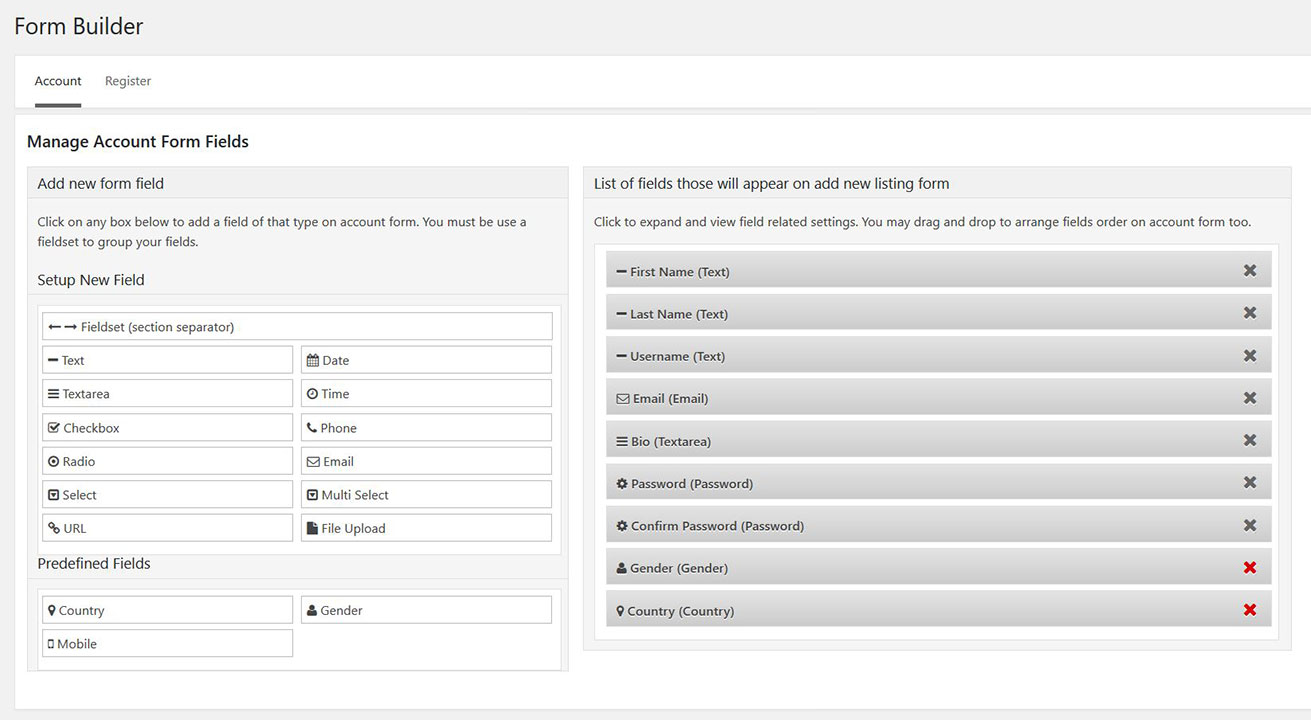
- Drag and Drop forms builder with all kind of custom fields for your user profiles.
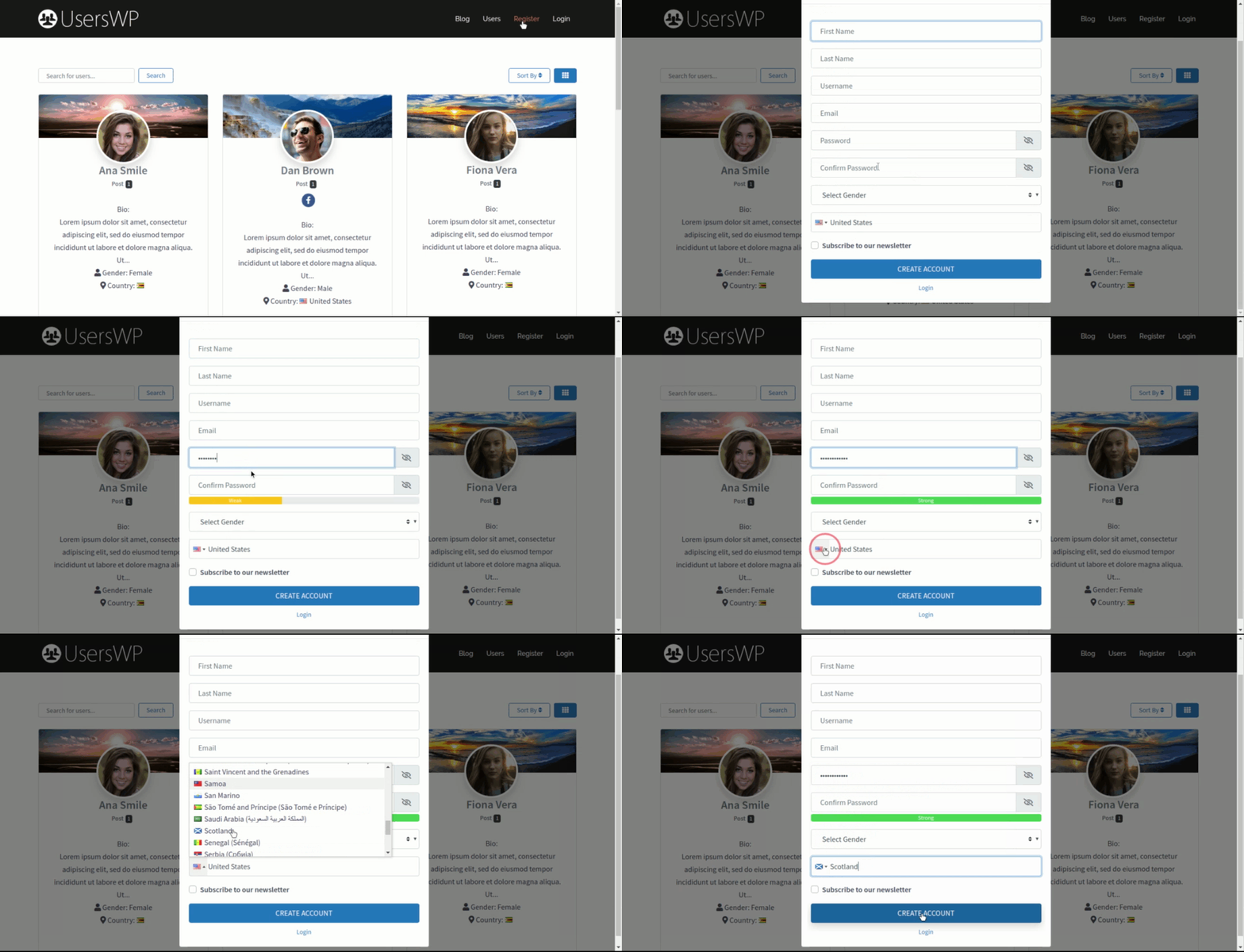
- Multiple registration forms, allowing to assign a different role to each form.
- Login form
- Edit Account form
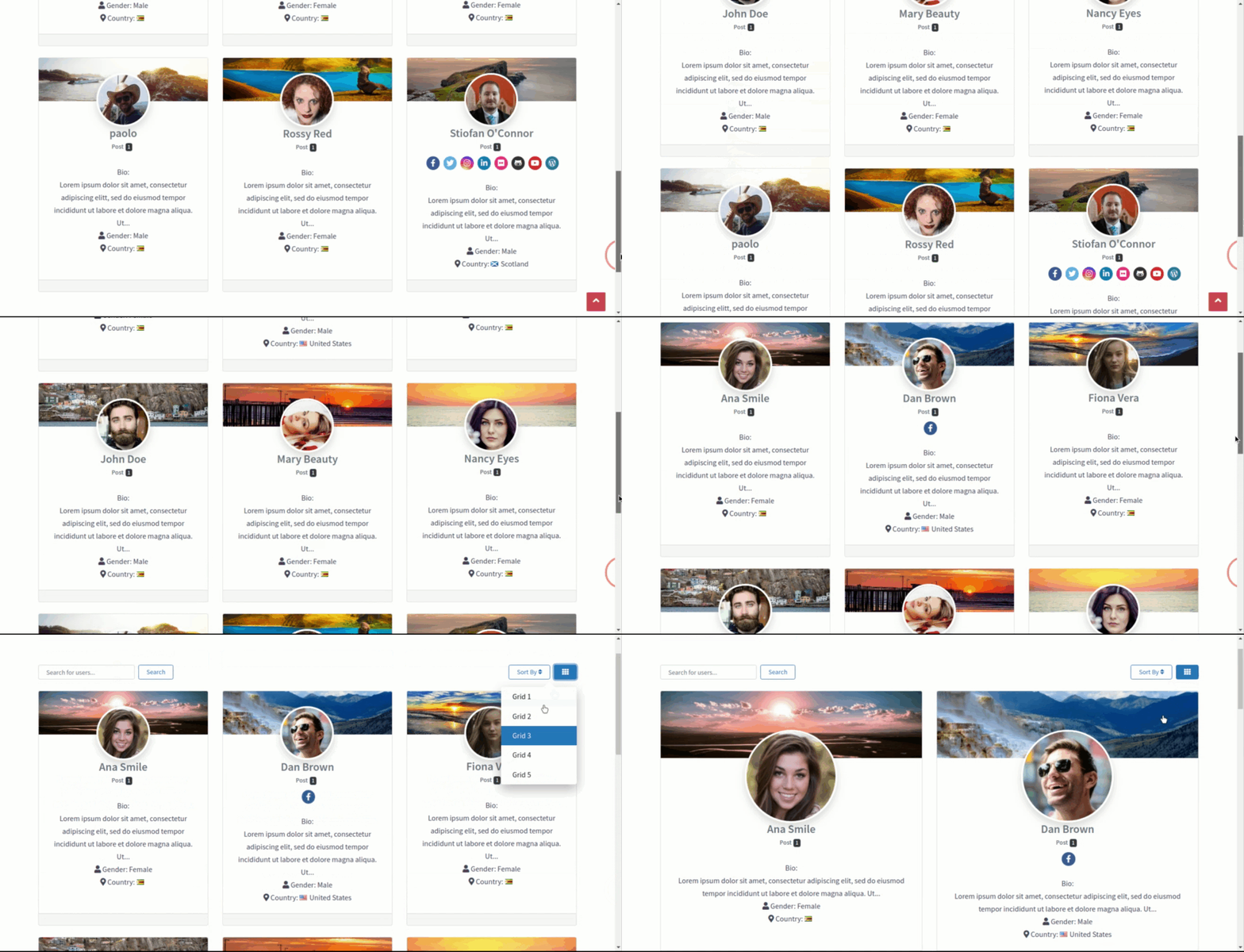
- Users Directory
- User profile
- Password Recovery form
- Change Password form
- Reset Password form
- Authorbox
- Custom menu items like login/logout links and links to relevant pages.
All the above elements can be added to your website via Gutenberg Blocks, Widgets (that can be used with most page builders) or Shortcodes.
After activation all pages are created with the correct shortcodes so that you are good to go in seconds.
You can customize the design of both the Users Directory and the User Profile templates using your favorite page builder. For example, you can decide where any element of the user profile appears. Elements like: the Avatar, the header banner, the name and all custom fields you created.
User Profile
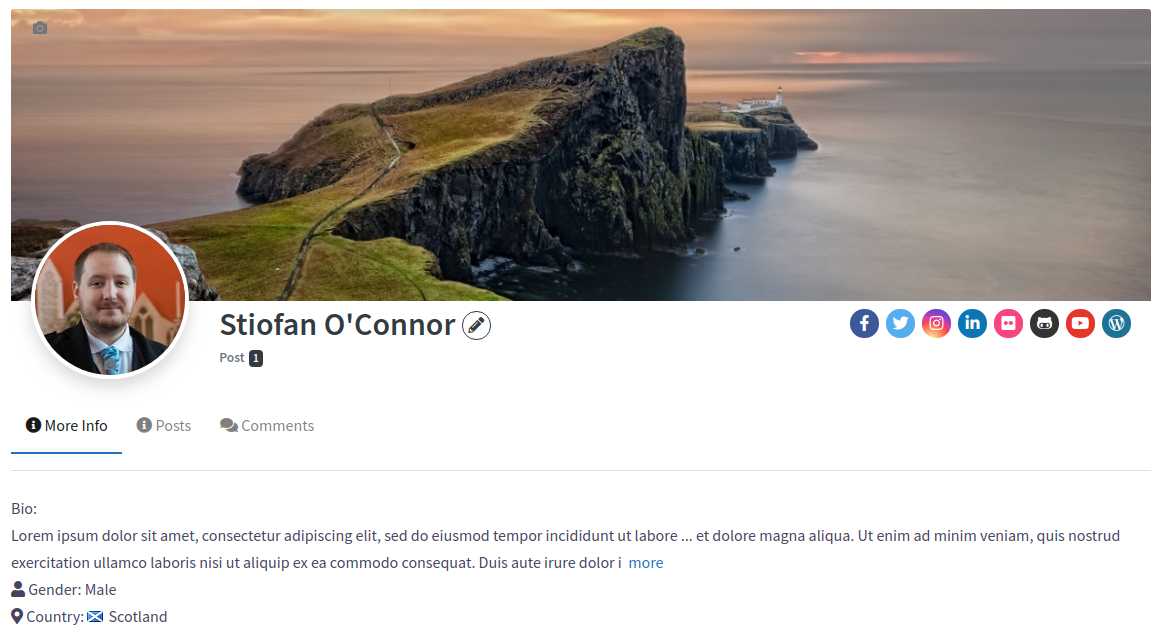
The user profile features a cover image, an avatar and an optional tabbed menu showing :
- User’s posts
- User’s comments
- Custom fields (if any)
You can chose if you want to hide any section of it and where to show the custom fields. In a sidebar or in their own tab.
Or you can redesign the template completely just like you modify any WordPress page. Using shortcodes, blocks or widgets, through the classic editor, Gutenberg or any page builder.
Otherwise, just customize the PHP templates as you wish within your child theme.
Free Add-ons
We provide some free extensions:
Premium Add-ons
UsersWP can be extended with several add-ons. Few examples are:
* ~~GeoDirectory~~ – NOW BUILT IN TO CORE – Create a tab for each listing type submitted, reviews and favorite listings.
* WooCommerce – Connect WooCommerce with UsersWP, display orders and reviews in user profile pages.
* bbPress – Connect bbPress with UsersWP, display forum interactions in user profile pages.
* Easy Digital Downloads – Display “Downloads” and “Purchases” tab in user profile pages.
* WP Job Manager – Connects WP Job Manager with UsersWP, display Jobs tab in user profile pages.
* MailChimp – Allows the user to subscribe to your newsletters via Mailchimp during registration.
* MailerLite – Allows the user to subscribe to your newsletters via MailerLite during registration.
* MailPoet – Allows the user to subscribe to your newsletters via MailPoet during registration.
* Moderation – Lets you manually approve or reject user signups.
* Restrict User Signups – Restrict usernames and emails or even email domains to prevent spam.
* myCRED – myCRED add on for UsersWP, earn points and lets users send points.
* Profile Progress – Assign %’s and show profile completion progress bar via a widget.
* Followers – Your users can follow each other, just like twitter with this addon.
* Friends – Your users can send and accept friend requests, just like facebook with this addon.
* Online Users – This addon displays the list of users who are currently online and more.
* Frontend Post – Lets users submit blog post from the frontend.
* Multisite Creator – Lets your users to create new site for multisite on registration.
* Activity – Show a users activity actions right on their profile.
* Verified Users – Make verified users stand out with their own verified badge.
* Realtime Notifications – Sends notifications to users, about activity on your website.
* Advanced Search – Extends the regular UsersWP search form by adding options to filter by custom fields.
* Groups – Easily create a community with discussion groups like Facebook.
* User to User Private Messages – Allow your users to send each other private messages in a Facebook-like chat.
* Membership – Add Membership functionality to your WordPress website!
* Dashboard – Manage everything from one simple, easy-to-use dashboard.
* MailerLite – Capture newsletter subscribers during registration to your mailerlite newsletter list.
* MailPoet – Capture newsletter subscribers during registration to your mailpoet newsletter list.
* Constant Contact – Capture newsletter subscribers during registration to your Constant Contact newsletter list.
* Campaign Monitor – Capture newsletter subscribers during registration to your Campaign Monitor newsletter list.
* GetResponse – Capture newsletter subscribers during registration to your GetResponse newsletter list.
* Active Campaign – Capture newsletter subscribers during registration to your Active Campaign newsletter list.
* Brevo – Capture newsletter subscribers during registration to your Brevo newsletter list.
* Aweber – Capture newsletter subscribers during registration to your Aweber newsletter list.
* The Newsletter – Capture newsletter subscribers during registration to your The Newsletter newsletter list.
There are many others and we release new Add-ons frequently. You can see the full collection here: UsersWP Premium Add-ons
Should you find any bug, please report it in the support forum and we will fix it asap!
UsersWP is 100% translatable.
Security
To report a security vulnerability, please review our vulnerability disclosure policy.
Installation
Minimum Requirements
- WordPress 6.1 or greater
- PHP version 7.2 or greater
- MySQL version 8.0 or greater
Automatic installation
Automatic installation is the easiest option. To do an automatic install of UsersWP, log in to your WordPress dashboard, navigate to the Plugins menu and click Add New.
In the search field type UsersWP and click Search Plugins. Once you’ve found our plugin you install it by simply clicking Install Now. UsersWP installation
Manual installation
The manual installation method involves downloading UsersWP and uploading it to your webserver via your favourite FTP application. The WordPress codex will tell you more here.
Updating
Automatic updates should seamlessly work. We always suggest you backup up your website before performing any automated update to avoid unforeseen problems.
Frequently asked questions
Can I create more than 1 user registration form, for example one for teachers and one for students
Yes you can and you can assign a custom role to each user registration form.
How many user registration forms can I create?
Unlimited user registration forms.
Can I moderate user registrations?
Yes you can moderate user registration, but you’ll need the User Registration Moderation add-on, which lets you manually approve or reject user registrations.
Can I customize the design of the User profile with Elementor?
Yes, you can customize it with Elementor, but also with Gutenberg, Divi, Beaver Builder, Oxygen, and other page builders.
Changelog
New settings screen, all addons will need to be updated - BREAKING CHANGE
1.2.74 – 2026-09-16
- Update AUI 0.2.54 and SD 1.2.36 – CHANGED
1.2.73 – 2026-09-15
- Privacy tab settings on the Account page now reflect immediately after saving, without needing to flush the object cache. – FIXED
- Support for Wordfence 2FA in login form – ADDED
1.2.72 – 2026-08-18
- Merge AUI 0.2.52 & SD 1.2.35 – CHANGED
1.2.71 – 2026-08-17
- Arbitrary File Deletion via upload_file_remove() AJAX handler – FIXED/SECURITY
1.2.70 – 2026-08-03
- Badge Widget Variable Substitution – FIXED/SECURITY
- Merge AUI 0.2.51 & SD 1.2.34 – CHANGED
1.2.69 – 2026-07-22
- Allow username or email on the forgot Password form – FIXED
Screenshots
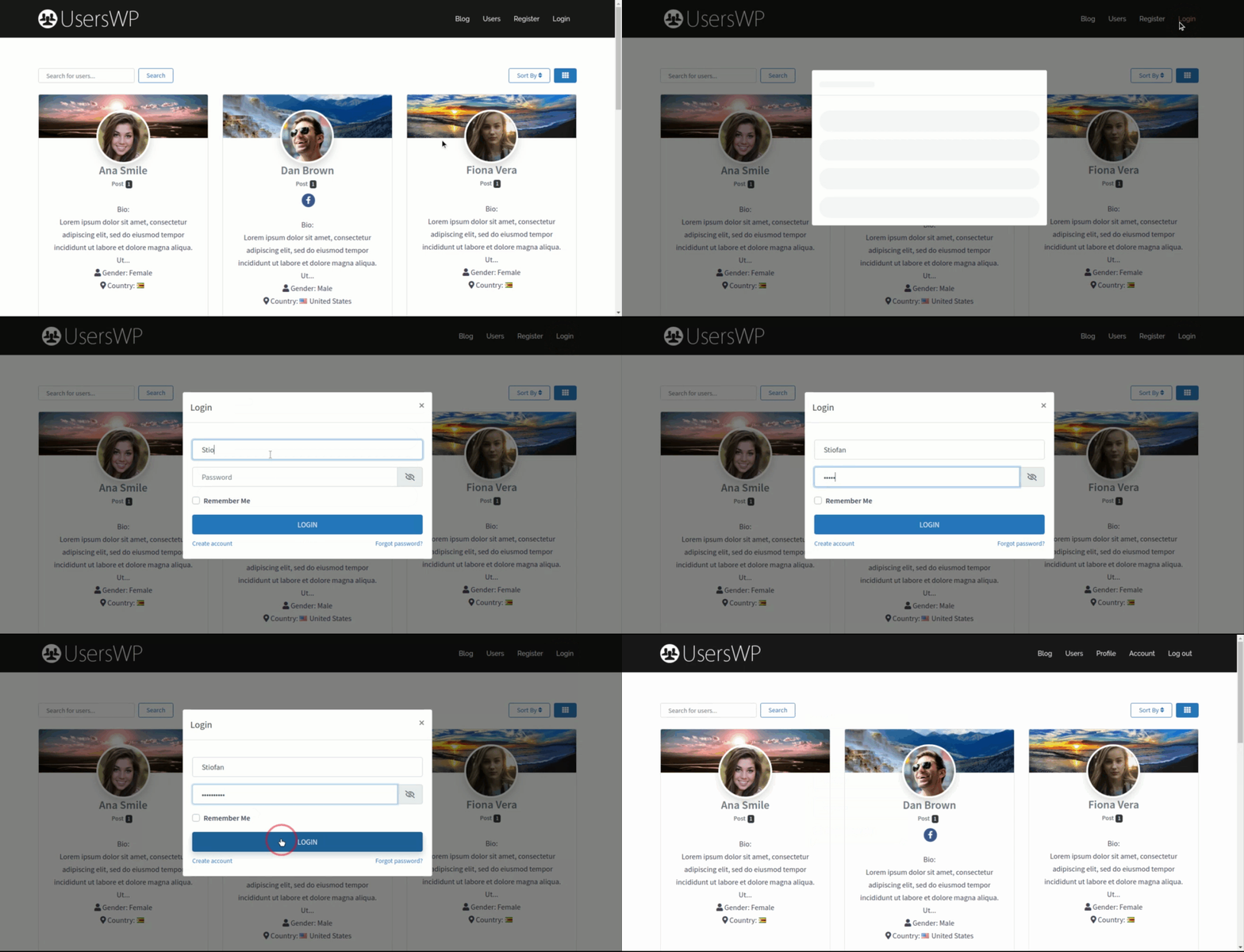
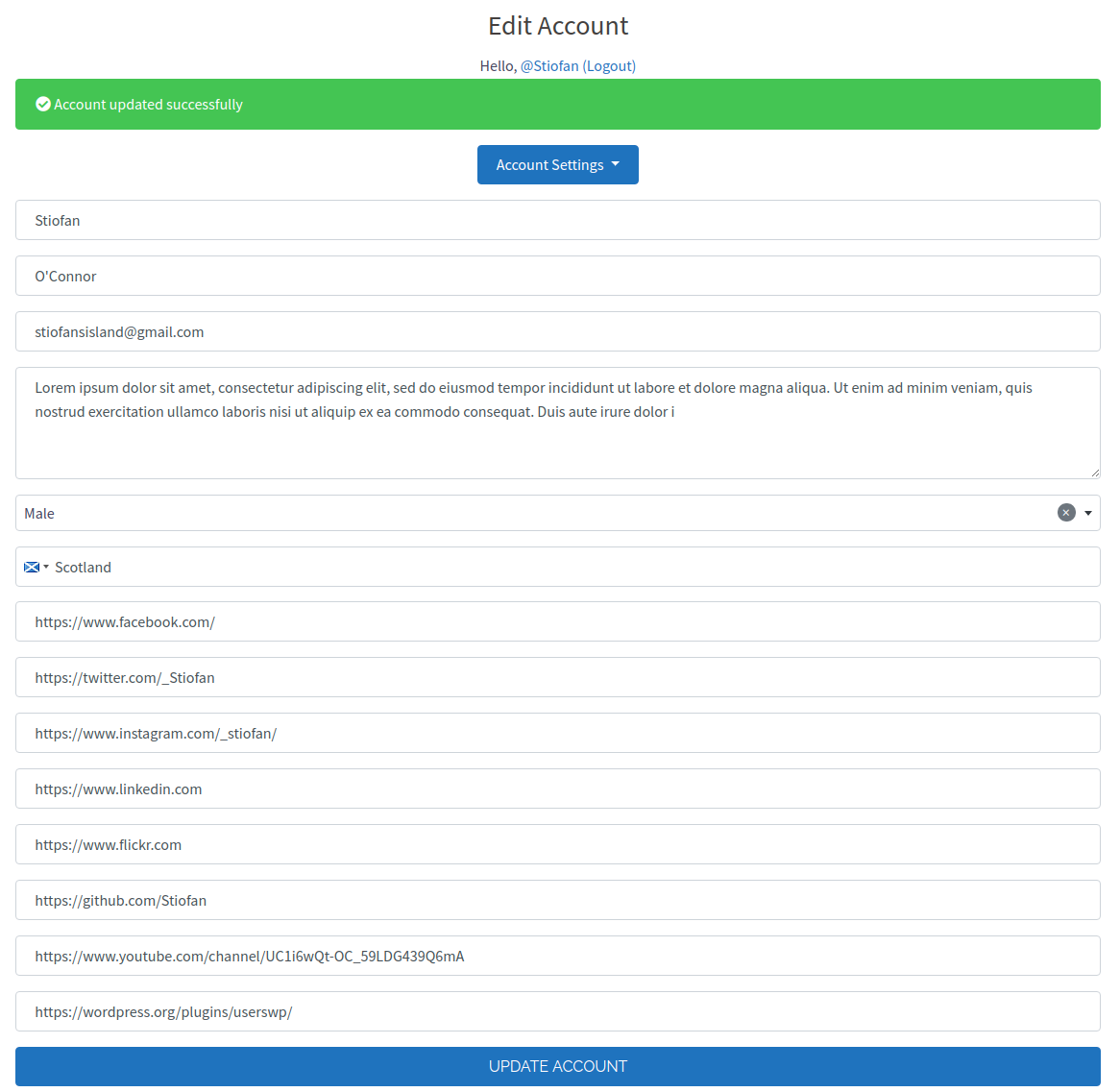
For developers
Is this your plugin? Show off the numbers.
Add a live badge to your site, docs or GitHub README. It updates on its own — no account needed.
Best UsersWP alternatives
All login form plugins →


FAQ
UsersWP: quick answers
Straight answers, pulled from live WordPress.org data.
Live data from WordPress.org · checked Sep 26, 2026
Is UsersWP free?
Yes. UsersWP is free to download and use from the official WordPress.org plugin directory.
Is UsersWP safe to use in 2026?
Yes — UsersWP is a safe, well-maintained plugin to use in 2026. It runs on 20K+ sites, is rated 4.7/5 and was last updated 1 week ago, and scores 89/100 on our health check.
How many websites use UsersWP?
UsersWP is active on 20K+ WordPress websites and has been downloaded 1,416,884 times since it launched in July 2017. It was downloaded 24,291 times in the last 30 days.
Does UsersWP work with WordPress 7.1?
Yes. The developer has tested UsersWP up to WordPress 7.1.2, the latest release. It requires WordPress 6.1 or newer.
When was UsersWP last updated?
The latest version, 1.2.74, was released on September 16, 2026 (1 week ago).
Who makes UsersWP?
UsersWP is developed and maintained by Stiofan.
What are the best alternatives to UsersWP?
The most popular alternatives to UsersWP are Custom Login Page Customizer (50K+ installs), Pie Register (1K+ installs) and Login Page Customizer (1K+ installs).
Powered by PageForge
Want thousands of pages that rank like these? Build them in an afternoon.
This directory runs on the same engine as PageForge. Turn any spreadsheet, CSV or API into thousands of fast, SEO-ready WordPress pages — with schema, internal links and AI-written copy baked in.
- CSV, Google Sheets & API data sources
- AI content, schema & internal links per page
- Works with Elementor, Gutenberg, Yoast & Rank Math
- Free on WordPress.org — no credit card


