



User Spam Remover
Automatically removes spam user registrations and other old, unused user accounts. Blocks annoying e-mail to administrator after new registrations.

Consider an alternative
User Spam Remover shows warning signs in 2026 — compare the alternatives below before installing. It runs on 1K+ sites, is rated 4.1/5 and was last updated 3 years ago, and scores 35/100 on our health check.
- No update in 2 years
- Only tested up to WordPress 6.4 (latest is 7.1)
How does it stack up?
Side-by-side on installs, updates, ratings & support



Daily downloads
Download spikes usually follow a new release — each site that auto-updates counts as a download.
Rankings
Where User Spam Remover stands todayWordPress.org search rankings
Live position in the plugin search, top 100| Keyword | Position |
|---|---|
| admin | >100 |
| registration | >100 |
| spam | >100 |
| user | >100 |
| users | >100 |
Version adoption
Share of active sites per release.
Rating breakdown
★★★★★★★★★★ 4.1 from 18 reviews
About User Spam Remover
From the official readme · v1.1Description
User Spam Remover is a plugin for WordPress that automatically removes spam user registrations and other old, never-used user accounts. It also blocks the notification e-mail that WordPress normally sends to the administrator whenever a new user registers (annoying when that registration is spam!) and logs it instead.
The plugin adds a configuration panel so that all of these options can be turned on or off, and it logs and fully backs up all user accounts that it deletes, so that you can restore them if you need to.
Features:
-
Automatically deletes user registration spam and other orphaned, never-used accounts.
-
Very simple, enable and go! Doesn’t interfere with the normal user registration process in any way. So, it doesn’t add captchas or activation or anything else — you’re free to use it alongside a plugin that does, if you like.
-
Blocks notification e-mail that WordPress normally sends to the administrator every time a new user registers (instead, logs this event).
-
Fully configurable, with grace period for new accounts and optional username whitelist.
-
Fully logs all actions and backs up all user accounts that it deletes so that you can seamlessly restore them if you ever need to.
Please see requirements and installation instructions below, or online in the WordPress support forum.
For more information, please go to: https://lyncd.com/user-spam-remover/
Installation
Requirements:
-
PHP 5.1+ (tested with PHP 5.2-8.2)
-
MySQL using PHP mysqli extension (read on for details)
-
WordPress 3.9+
If you are strictly assigning MySQL privileges, note that the plugin adds two column indexes, so your database account must be assigned the ALTER and CREATE privileges (if you don’t know what this means, don’t worry, you probably already have this).
-
Download, unzip and upload into your plugins directory. (Or, install through the plugins menu in WordPress.)
-
Go to the Plugins configuration screen in WordPress and activate. Look for the settings link to go to the User Spam Remover settings page (User Spam Remover also gets added to the left menu under “Users”).
Note: if you see mysqli errors at the top of the activation or settings page, you need to tell WordPress use use the
mysqliextension instead of the oldermysqlone. Add this line to yourwp-config.php(insert it next to all the other DB settings, near the top):define('WP_USE_EXT_MYSQL', FALSE); -
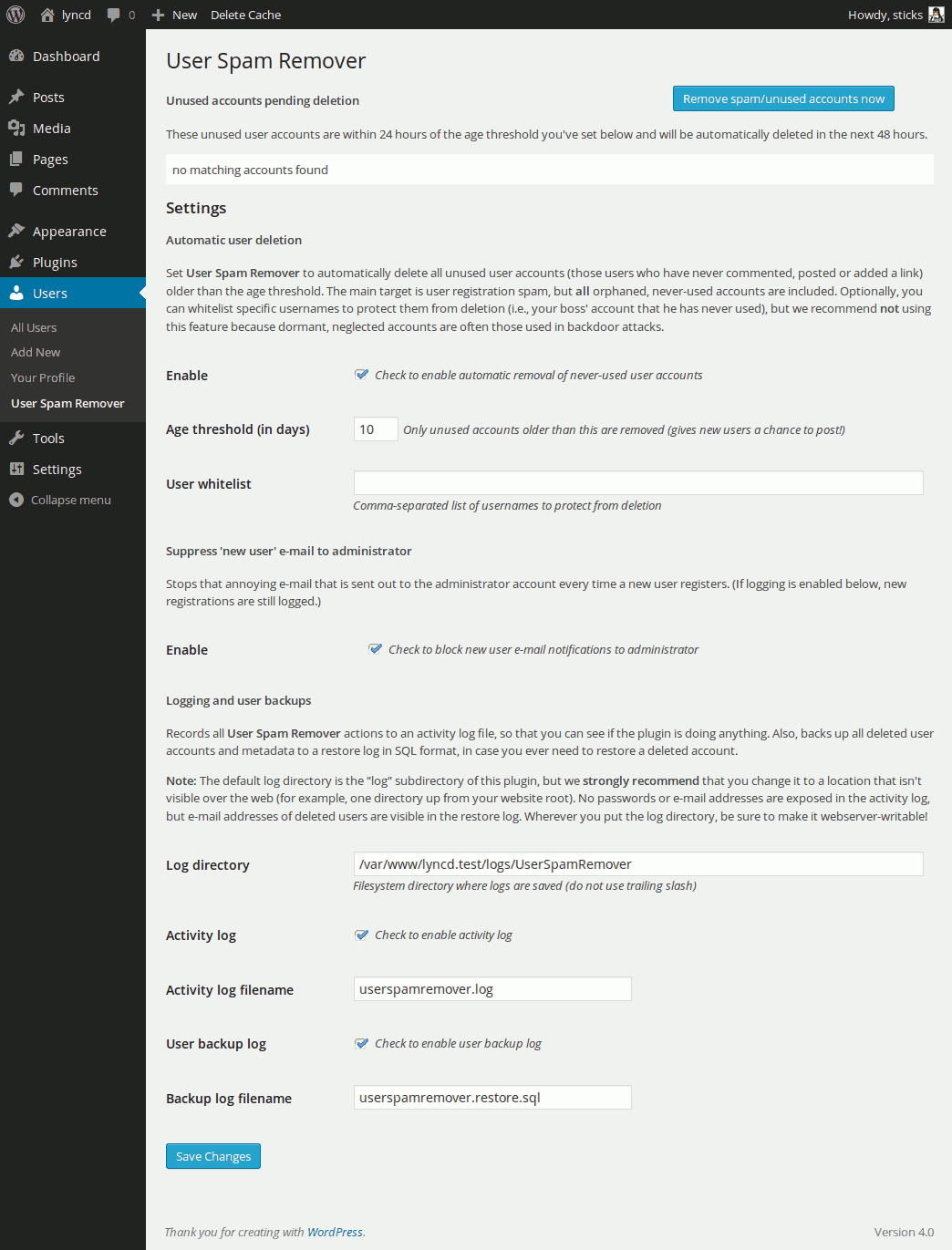
On the settings page, you’ll need to click the “Enable” checkbox to turn the plugin on. Scroll down and change any options you like. Click “Save Changes.”
One note on logging: By default, all logging is enabled (good!), but the log directory is set to a filesystem location that may not be writable by the webserver, or where you may not want it. I recommend you change this directory to someplace else (i.e., if the root of your site is
/www/mysite/html, you could make a directory like/www/mysite/log). Be sure to usechmodor your FTP program to make this directory webserver-writable (User Spam Remover will warn you if it’s not). -
Once you’re done, that’s it! Feel free to use the blue “Remove spam/unused accounts now” button to test it out. User Spam Remover will run once a day automatically from now on.
Changelog
1.1
- Changed default filesystem log location to not be inside the plugin directory. This means the default is no longer www-visible, but new users really should set the Log Directory after installing the plugin because the default may not be webserver-writable.
1.0
- Bump to 1.0. No changes to core functionality. For existing users there is no urgent reason to upgrade to this version.
- Improved error message when
mysqliis not enabled. - Reformat of readme.txt due to wordpress.org redesign of their plugin directory.
0.9.9
- Update to code that suppresses new user registration notification email. WordPress core made a change to the API starting with version 4.3.0 of WordPress, so this update to User Spam Remover fixes the problem where the user gets a bogus registration notification email and is unable to complete site registration. Props to Oliver @ www.webmandesign.eu for the report.
0.9.8
-
Now requires mysqli. If your PHP version is < 5.5 you may need to force WordPress to use
mysqliinstead of the oldermysqlextension. Just add this line towp-config.php, near the top by the other DB settings:define('WP_USE_EXT_MYSQL', FALSE);
0.9.1
- Now detects and adds absent MySQL indexes to wp_comments.user_id and wp_links.link_owner columns. Greatly speeds performance and enables use on much larger databases. Big props to Raph Koster for help debugging!
- Enables MySQL sql_big_selects config var at runtime for use on shared hosts and other installations where this is disabled by default.
- MySQL SELECT errors now logged/shown to the user as appropriate.
- Hard limit of 1000 users per deletion to prevent long-running operations. Upped limit to 10000 records per SELECT, thanks to improved SQL and indexes.
- No longer deletes users with only comments marked as “spam.” This is a small functional regression, but it speeds SQL performance. Once the spam is permanently removed these users will be deleted anyway.
- Minor bug fix affecting settings page user list display w/ bbPress users.
- Changes to method visibility. Many previously public methods now protected.
- Code refactoring.
0.9
- Version/compatibility bump so that wordpress.org plugin repository info is accurate.
- Added check for wp_usermeta ‘last_posted’ record so that users of database-integrated bbPress installations are not deleted if they have ever posted anything.
- Added hard limit of 5000 records to prevent long-running operations.
- Added a list of user accounts pending deletion to the settings page.
- Style fix to inline error messages per r16205 changes to WordPress core file wp-admin/css/colors-fresh.dev.css.
- Miscellaneous minor style fixes.
Screenshots
For developers
Is this your plugin? Show off the numbers.
Add a live badge to your site, docs or GitHub README. It updates on its own — no account needed.
Best User Spam Remover alternatives
All admin plugins →




FAQ
User Spam Remover: quick answers
Straight answers, pulled from live WordPress.org data.
Live data from WordPress.org · checked Sep 27, 2026
Is User Spam Remover free?
Yes. User Spam Remover is free to download and use from the official WordPress.org plugin directory.
Is User Spam Remover safe to use in 2026?
User Spam Remover shows warning signs in 2026 — compare the alternatives below before installing. It runs on 1K+ sites, is rated 4.1/5 and was last updated 3 years ago, and scores 35/100 on our health check.
How many websites use User Spam Remover?
User Spam Remover is active on 1K+ WordPress websites and has been downloaded 57,321 times since it launched in August 2010. It was downloaded 290 times in the last 30 days.
Does User Spam Remover work with WordPress 7.1?
User Spam Remover is officially tested up to WordPress 6.4.12, while the latest release is 7.1.2. It may still work, but try it on a staging site first.
When was User Spam Remover last updated?
The latest version, 1.1, was released on March 3, 2024 (3 years ago).
Who makes User Spam Remover?
User Spam Remover is developed and maintained by Joel.
What are the best alternatives to User Spam Remover?
The most popular alternatives to User Spam Remover are Loginizer (1M+ installs), Redux Framework (900K+ installs) and Admin Menu Editor (300K+ installs).
Powered by PageForge
Want thousands of pages that rank like these? Build them in an afternoon.
This directory runs on the same engine as PageForge. Turn any spreadsheet, CSV or API into thousands of fast, SEO-ready WordPress pages — with schema, internal links and AI-written copy baked in.
- CSV, Google Sheets & API data sources
- AI content, schema & internal links per page
- Works with Elementor, Gutenberg, Yoast & Rank Math
- Free on WordPress.org — no credit card


