


UrVenue Web Services
Integrate UrVenue events and inventory into your WordPress site. Display event calendars, venue maps, and enable direct booking.

Use with caution
UrVenue Web Services works, but test it on a staging site before relying on it in 2026. Was last updated 3 months ago, and scores 49/100 on our health check.
- Small user base (<10 active installs)
- Very few reviews so far
How does it stack up?
Side-by-side on installs, updates, ratings & support



Daily downloads
Download spikes usually follow a new release — each site that auto-updates counts as a download.
Rankings
Where UrVenue Web Services stands todayWordPress.org search rankings
Live position in the plugin search, top 100| Keyword | Position |
|---|---|
| booking | >100 |
| calendar | >100 |
| events | >100 |
| hospitality | #41 |
| tickets | >100 |
About UrVenue Web Services
From the official readme · v1.2.7Description
UrVenue Web Services connects your WordPress site with the UrVenue platform, allowing you to display and manage hospitality events, venue maps, and bookable inventory directly on your website.
Features
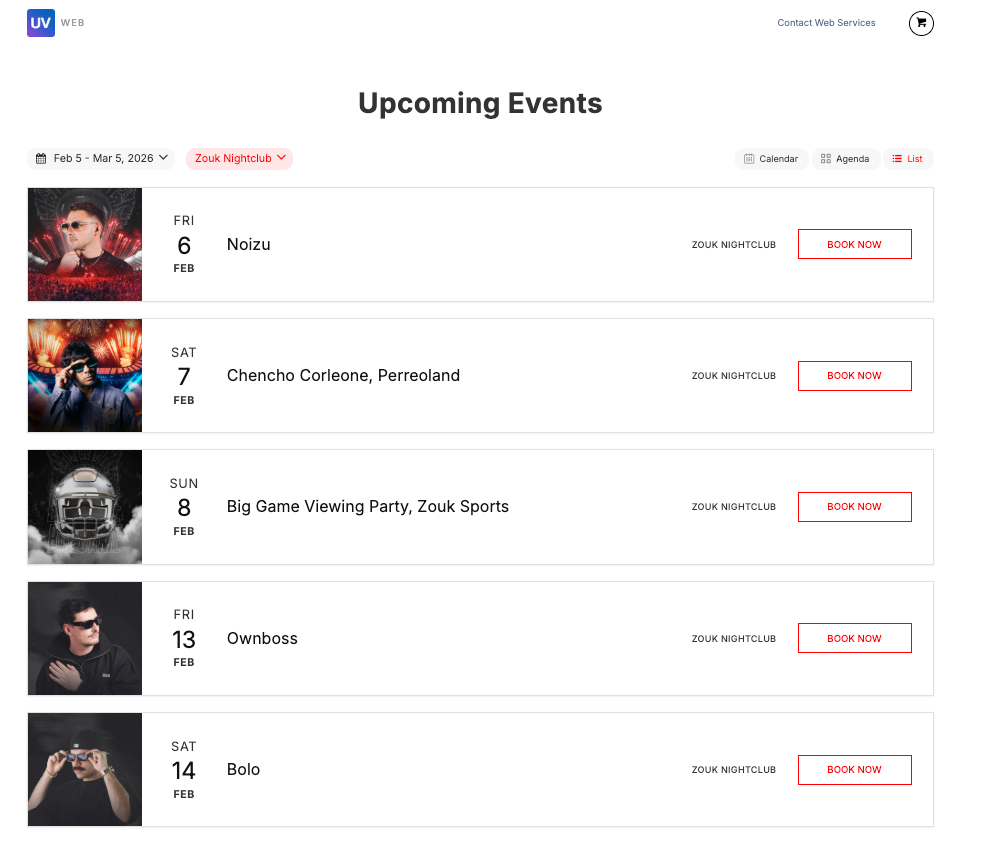
- Events Calendar – Display your events in calendar, agenda, or list view with date range filtering and venue selection.
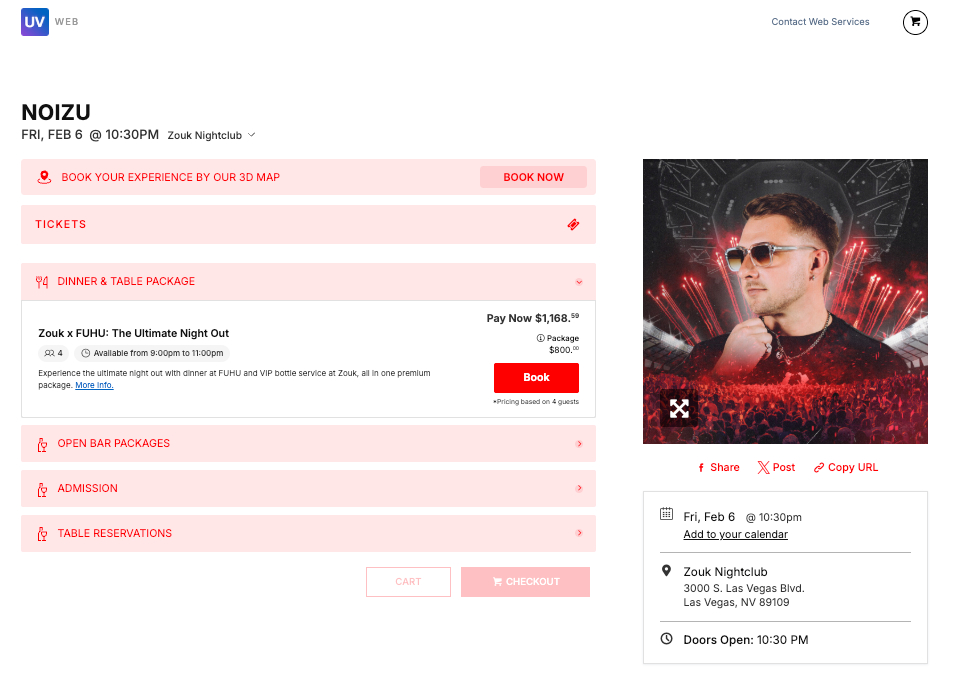
- Event Pages – Automatically generate individual pages for each event with full details, images, and booking options.
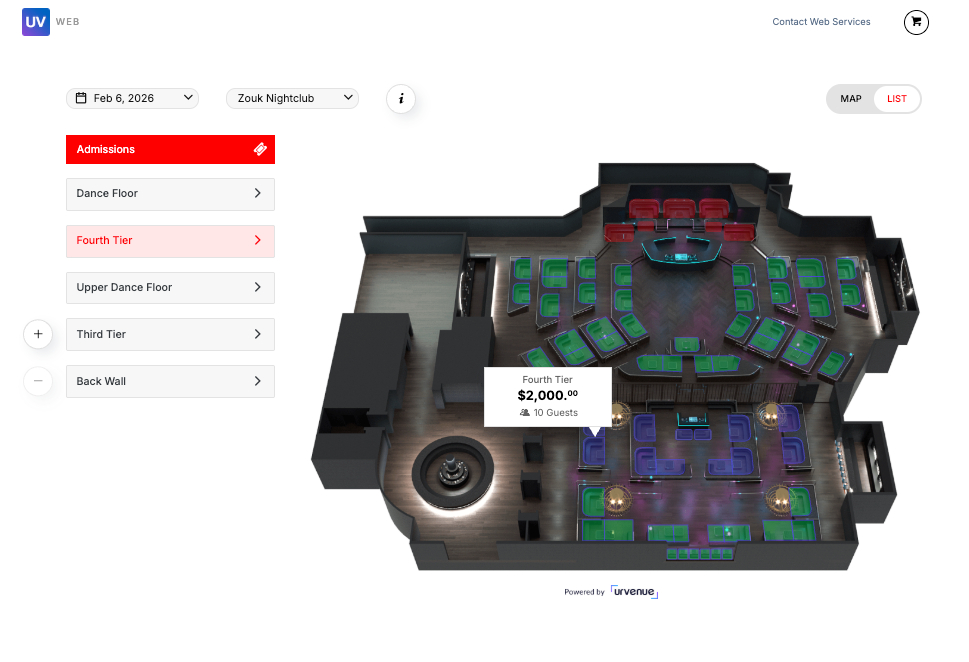
- Venue Map – Interactive venue map with zoom, pan, and clickable sections for inventory selection.
- Inventory Integration – Allow visitors to browse and purchase experiences, packages, and memberships directly from your site.
- Reservations – Enable table and bottle service reservations through your website.
- Guest Itinerary – Provide guests with a personalized itinerary view of their bookings.
Available Shortcodes
[urvenue_ws_events]– Events calendar, agenda, and list views.[urvenue_ws_event]– Single event page with details and inventory.[urvenue_ws_map]– Interactive venue map with inventory.[urvenue_ws_inventory_item_page]– Individual inventory item page.[urvenue_ws_inquiry]– Reservations / inquiry form.[urvenue_ws_packages]– Packages listing with booking.[urvenue_ws_itinerary]– Guest itinerary view.
This plugin connects to the UrVenue platform to retrieve event data, venue information, and inventory. All event and booking data is fetched from and processed through UrVenue servers. See the “External Services” section below for full disclosure.
External Services
This plugin connects to the following external services to provide event display, inventory management, checkout, reservation, and optional cache-purge functionality. Below is a full disclosure of each service: what it does, what data is sent, when it is sent, and links to its terms of service and privacy policy.
1. UrVenue / UvTix API
Service: UrVenue API (UvTix) — the core data platform that powers this plugin.
URL: https://uvtix.com/api/ and https://{env}.urvenue.me/v1/ and https://{env}.urvenue.me/v2/
Purpose: Retrieve venue, event, and inventory data displayed by the plugin shortcodes; manage cart and checkout operations; submit inquiry and reservation forms.
Data sent: API key (configured by the site administrator), source code (sourcecode), source location identifier (sourceloc), venue/item identifiers, and — for inquiry form submissions — visitor-entered contact information (name, email, phone, party size, and marketing opt-in flag).
When: On every page where a plugin shortcode is active; and when a visitor interacts with cart, availability, or inquiry forms. The API key and source identifiers are sent on every request. Visitor contact information is only sent when a visitor explicitly submits an inquiry or reservation form.
- UrVenue website: https://www.urvenue.com/
- Terms of Service: https://www.urvenue.com/legal/terms-conditions/
- Privacy Policy: https://urvenue.me/privacy-policy
2. Booketing — Checkout and Payment Platform
Service: Booketing, UrVenue’s hosted checkout platform.
URL: https://booketing.com/
Purpose: Redirect visitors to cart review, checkout, payment, and booking-confirmation pages hosted by Booketing.
Data sent: Cart code, sourcecode, sourceloc, manageentid, resellerid, providerid, language preference, and optional environment parameters — transmitted as URL query parameters during the browser redirect. No data is transmitted server-to-server by the plugin; the visitor’s browser is redirected to Booketing where payment and personal information is collected directly.
When: When a visitor clicks “Proceed to Checkout” from an inventory item or cart view.
- Booketing website: https://booketing.com/
- Terms of Service: https://booketing.com/terms/
- Privacy Policy: https://booketing.com/privacy/
3. SevenRooms Reservation Widget
Service: SevenRooms — hospitality reservation and guest management platform.
URL: https://www.sevenrooms.com/reservations/
Purpose: Display an embedded reservation iframe for venues that use SevenRooms as their reservation provider.
Data sent: Venue identifier (SevenRooms venue ID) and the visitor-selected reservation date, transmitted as URL parameters when the iframe loads. All reservation data entered by the visitor (name, party size, contact details) is submitted directly to SevenRooms, not through this plugin.
When: Only when a visitor views a venue item that has been configured by the site administrator to use SevenRooms as its reservation vendor.
- SevenRooms website: https://sevenrooms.com/
- Terms of Service: https://sevenrooms.com/terms-of-service/
- Privacy Policy: https://sevenrooms.com/privacy-policy/
4. OpenTable Reservation Widget
Service: OpenTable — online restaurant reservation platform.
URL: https://www.opentable.com/restref/client/
Purpose: Display an embedded reservation iframe for venues that use OpenTable as their reservation provider.
Data sent: Restaurant identifier (rid/restref), default party size, selected date and time, and display preferences (language, color scheme) — transmitted as URL parameters when the iframe loads. All reservation data entered by the visitor is submitted directly to OpenTable, not through this plugin.
When: Only when a visitor views a venue item that has been configured by the site administrator to use OpenTable as its reservation vendor.
- OpenTable website: https://www.opentable.com/
- Terms of Service: https://www.opentable.com/legal/terms-and-conditions
- Privacy Policy: https://www.opentable.com/legal/privacy-policy
5. Google Maps and Google Calendar (Link Generation Only)
Service: Google Maps and Google Calendar.
URLs: https://www.google.com/maps/search/ and https://www.google.com/calendar/render
Purpose: Generate a “Get Directions” deep link to a venue address on Google Maps, and an “Add to Google Calendar” deep link for event pages. This plugin does not make any server-side requests to Google.
Data sent: For Maps — venue name and address, encoded as URL query parameters in the link. For Calendar — event name, start/end dates, and venue location, encoded as URL query parameters in the link. Data is only transmitted to Google when the visitor explicitly clicks one of these links in their browser.
When: When a visitor clicks the “Get Directions” or “Add to Google Calendar” link on a venue or event page.
- Google Terms of Service: https://policies.google.com/terms
- Google Privacy Policy: https://policies.google.com/privacy
6. WP Engine Cache Purge API (Optional)
Service: WP Engine API — hosting platform cache management.
URL: https://api.wpengineapi.com/
Purpose: Purge the server-side page cache for sites hosted on WP Engine after inventory data is refreshed.
Data sent: WP Engine install identifier and administrator-configured API credentials (username and password) transmitted in the HTTP Authorization header; cache type (page, object, or CDN) in the request body. No visitor data is sent.
When: Only triggered by an administrator action in the plugin settings panel, or automatically after a feed cache refresh — and only if the WP Engine integration has been configured by the site administrator. This feature is completely inactive if no WP Engine credentials are configured.
- WP Engine website: https://wpengine.com/
- Terms of Service: https://wpengine.com/legal/terms-of-service/
- Privacy Policy: https://wpengine.com/legal/privacy/
7. Webhook Notifications (Optional, Administrator-Configured)
Service: User-defined webhook endpoint (e.g., Slack, Microsoft Teams, or any custom HTTP endpoint).
URL: Configured freely by the site administrator in the plugin settings. The plugin developer has no control over or visibility into the destination.
Purpose: Send alert notifications when plugin conditions occur (e.g., an inventory feed returns empty results).
Data sent: Alert message text and optional error details or API response snippets, sent via HTTP POST to the administrator-provided URL. No visitor personal data is included.
When: Only if notifications are enabled and a webhook URL has been configured by the site administrator; throttled to a maximum of one notification per alert type every 30 minutes.
8. Facebook / Meta Pixel Event Tracking (Conditional)
Service: Meta (Facebook) — advertising and analytics platform.
URL: https://www.facebook.com/
Purpose: Push ecommerce events to a Facebook Pixel that the site owner has independently installed, enabling inventory interaction tracking in Meta Ads Manager.
Data sent: Ecommerce event name (“AddToCart”), item identifier, item name, price (USD), and quantity — relayed to the Facebook Pixel JavaScript already loaded on the page by the site owner. This plugin does not load or inject the Facebook Pixel script.
When: When a visitor adds an item to the cart. This event only fires if a Facebook Pixel script is already present on the site; it is entirely the site owner’s responsibility to ensure the Pixel is installed in compliance with Meta’s terms and applicable privacy regulations.
- Meta Terms of Service: https://www.facebook.com/legal/terms
- Meta Privacy Policy: https://www.facebook.com/privacy/policy/
Source Code and Build Information
This plugin does not use any build tools (such as webpack, gulp, or composer) to generate its production code. All custom JavaScript and CSS files included in this plugin are human-readable, non-minified source code located in the uvcore/assets/js/ and uvcore/assets/css/ directories.
The full source code for this plugin is publicly available at:
https://github.com/urvenue/wp-urvenue-web-plugin
Third-Party Libraries
This plugin includes the following third-party libraries in their minified/compressed form. The original source code for each library is available at the linked repositories:
- jQuery v3.3.1 – Source Code – MIT License
- Flatpickr v4.6.6 – Source Code – MIT License
- Hammer.JS v2.0.8 – Source Code – MIT License
- jQuery Validation Plugin v1.22.1 – Source Code – MIT License
- Litepicker v2.0.12 – Source Code – MIT License
- svg-pan-zoom v3.6.1 – Source Code – BSD-2-Clause License
- noUiSlider v15.6.1 – Source Code – MIT License
- perfect-scrollbar v1.5.3 – Source Code – MIT License
- Pristine.js (form validation) – Source Code – MIT License
No build steps are required to use or modify this plugin. Simply edit the source files directly.
Installation
- Upload the
wp-urvenue-webservicesfolder to the/wp-content/plugins/directory, or install the plugin through the WordPress plugins screen. - Activate the plugin through the ‘Plugins’ screen in WordPress.
- Go to the UrVenue settings page and enter your API Key and Microcode provided by UrVenue.
- Create pages and assign them in the UrVenue settings for events, single event, map, and inventory item pages.
- Add the shortcodes to your pages (e.g.,
[urvenue_ws_events]for the events page).
Frequently asked questions
What do I need to start using UrVenue Web Services?
You need a UrVenue account. With your account you will receive an API Key and a Microcode to configure the plugin.
How can I get a UrVenue account?
Contact our sales team to request a demo: https://www.urvenue.com/request-demo/
What event display formats are available?
The plugin supports three display formats: Calendar (monthly grid view), Agenda (sequential list), and List (detailed cards with images).
Can visitors purchase tickets directly from my site?
Yes, the plugin integrates with the UrVenue inventory system, allowing visitors to browse and purchase experiences, packages, and reservations directly from your WordPress site.
Changelog
Updated third-party libraries.
1.2.7
- WP Revisions about WP_DEBUG.
1.2.6
- Fixed external services privacy policy URL to point to the correct urvenue.me domain, resolving WordPress.org plugin review requirement.
- Added full external services disclosure in readme to comply with WordPress.org plugin guidelines.
- Security improvements and bug fixes.
1.2.5
- Added full external services disclosure in readme to comply with WordPress.org plugin guidelines.
- Security improvements and bug fixes.
1.2.4
- Bug fixes and security patch.
1.2.3
- Updates for WP security
1.2.2
- Remove eval
Screenshots

For developers
Is this your plugin? Show off the numbers.
Add a live badge to your site, docs or GitHub README. It updates on its own — no account needed.
Best UrVenue Web Services alternatives
All booking plugins →





FAQ
UrVenue Web Services: quick answers
Straight answers, pulled from live WordPress.org data.
Live data from WordPress.org · checked Oct 14, 2026
Is UrVenue Web Services free?
Yes. UrVenue Web Services is free to download and use from the official WordPress.org plugin directory.
Is UrVenue Web Services safe to use in 2026?
UrVenue Web Services works, but test it on a staging site before relying on it in 2026. Was last updated 3 months ago, and scores 49/100 on our health check.
How many websites use UrVenue Web Services?
UrVenue Web Services is active on <10 WordPress websites and has been downloaded 201 times since it launched in July 2026. It was downloaded 55 times in the last 30 days.
Does UrVenue Web Services work with WordPress 7.1?
UrVenue Web Services is officially tested up to WordPress 7.0.7, while the latest release is 7.1.3. It may still work, but try it on a staging site first.
What PHP version does UrVenue Web Services need?
UrVenue Web Services requires PHP 7.4 or higher. Most hosts run PHP 8.x today, so it works on any modern WordPress hosting.
When was UrVenue Web Services last updated?
The latest version, 1.2.7, was released on July 14, 2026 (3 months ago).
Who makes UrVenue Web Services?
UrVenue Web Services is developed and maintained by uvwebservices.
What are the best alternatives to UrVenue Web Services?
The most popular alternatives to UrVenue Web Services are Booking for Appointments an… (90K+ installs), Online Scheduling and Appoi… (60K+ installs) and Simply Schedule Appointments (50K+ installs).
Powered by PageForge
Want thousands of pages that rank like these? Build them in an afternoon.
This directory runs on the same engine as PageForge. Turn any spreadsheet, CSV or API into thousands of fast, SEO-ready WordPress pages — with schema, internal links and AI-written copy baked in.
- CSV, Google Sheets & API data sources
- AI content, schema & internal links per page
- Works with Elementor, Gutenberg, Yoast & Rank Math
- Free on WordPress.org — no credit card


