



URL Shortify – Simple and Easy URL Shortener
URL Shortify helps you beautify, manage, share & cloak any links on or off your WordPress website. Create links using your domain name!

Safe pick
Yes — URL Shortify is a safe, well-maintained plugin to use in 2026. It runs on 10K+ sites, is rated 4.7/5 and was last updated 1 month ago, and scores 89/100 on our health check.
- Proven at scale on 10K+ active sites
- Loved by users — 4.7/5 from 169 reviews
- Tested with the latest WordPress (7.1)
How does it stack up?
Side-by-side on installs, updates, ratings & support



Daily downloads
Download spikes usually follow a new release — each site that auto-updates counts as a download.
Rankings
Where URL Shortify stands todayWordPress.org search rankings
Live position in the plugin search, top 100| Keyword | Position |
|---|---|
| affiliate links | #43 |
| cloaking | #6 |
| link branding | #6 |
| short links | #10 |
| url shortener | #2 |
Version adoption
Share of active sites per release.
Rating breakdown
★★★★★★★★★★ 4.7 from 169 reviews
About URL Shortify
From the official readme · v2.7.2Description
URL Shortify helps you beautify, manage, and share any URL on or off of your WordPress website. Create links that look how you want using your domain name! It’s a Simple, Easy & Elegant self hosted alternative to Bitly, TinyURL, Cuttly, Pretty Links, URL Shortener By My Theme Shop, Rebrandly, BL.Link, Short.io, and many other SaaS URL Shortener services.
✨Simple and fast URL Shortener!
URL Shortify allows to reduce long links from Facebook, YouTube, Twitter, Linked In and top sites on the Internet, You can copy the shortened URL and share it on websites, chat and e-mail
Shorten, Share and Track
Your shortened URLs can be used in publications, advertisements, blogs, forums, e-mails, instant messages, and other locations. Track statistics for your business and projects by monitoring the number of hits from your URL with the click counter, you do not have to register.
URL Shortify enables you to shorten links using your own domain name (as opposed to using tinyurl.com, bit.ly, or any other link shrinking service)! In addition to creating clean links, URL Shortify tracks each hit on your URL and provides a full, detailed report of where the hit came from, the browser, os, and host. URL Shortify is a plugin for people who want to clean up their affiliate links, track clicks from emails, their links on Twitter to come from their own domain, or generally increase the reach of their website by spreading these links on forums or comments on other blogs.
💝WHY You Need Link Shortener aka URL Shortify
➡️ Brand – Enhance brand visibility and trust by putting your brand name on every link you share
➡️ Collaborate – Share branded short links across departments, regions, and teams with one cohesive strategy
➡️ Integrate – Incorporate branded links into your existing processes, workflow, and tools with ease
➡️ Track – Understand social media, email marketing, ads, and SEO through detailed click stats
➡️ Optimize – Growth and Target your audience with our link shortener
➡️ Scale – Increase usage with an infrastructure that can grow at the same rate as your business
➡️ Easy – It’s easy and fast, enter the long link to get your shortened link
➡️ Shortened – Use any link, no matter what size, URL Shortify always shortens
➡️ Secure – It’s fast & secure
➡️ Reliable – All links that try to disseminate spam, viruses, and malware are deleted
Features
⚙️ Easy Configuration
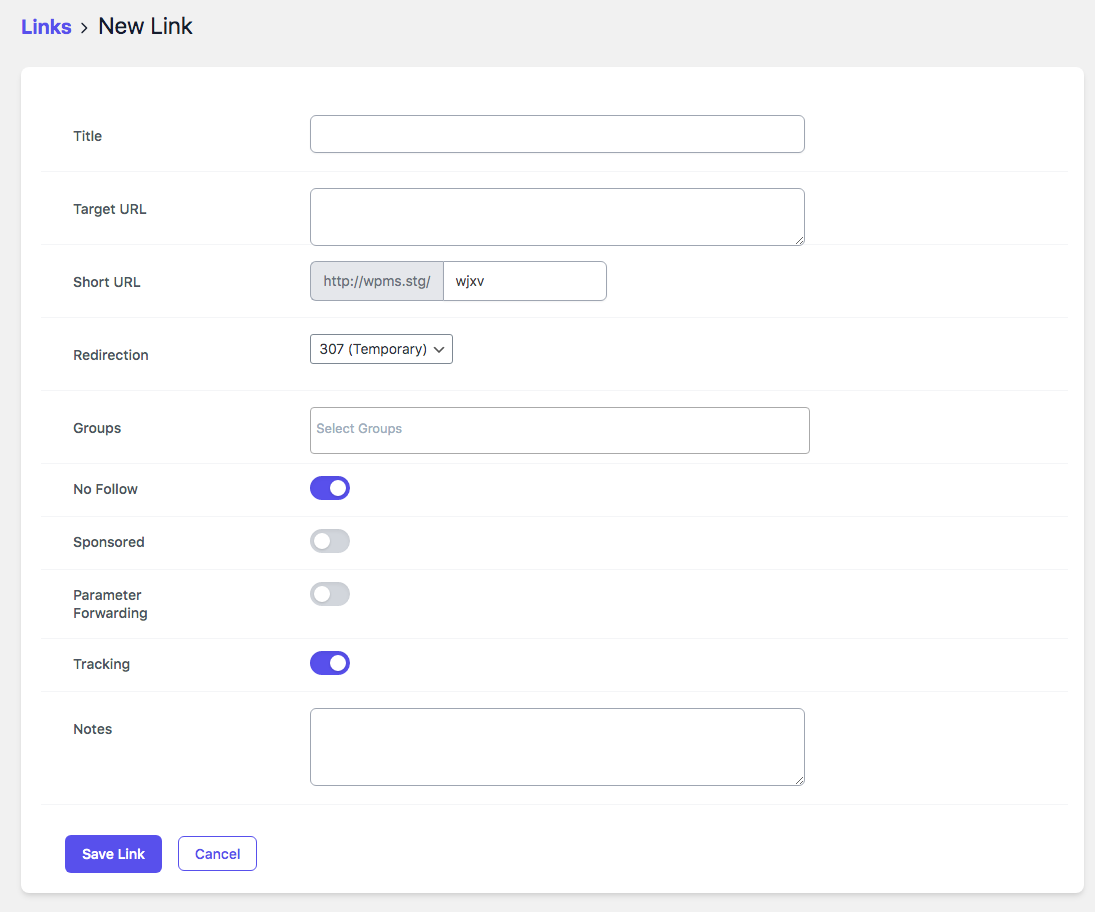
Easily set up your Link Redirects (301, 302, and 307) and all your Link options👉 Create Short Links
Create short links that your visitors will easily be able to memorize and that you can fit into Tweets, Facebook posts, and more.👉 Editable Destination URL
Update destination URL of branded links anytime.🔎 Search Links
Find a specific branded link using an inbuilt search tool.👉 Fully Customizable
Change settings to make your short links just the way you want them. Make sure your links reflect your brand and stick in the memory!👉 Hide Affiliate Links
URL Shortify is a great way to hide affiliate links. This is a perfect way to ensure that people don’t bypass your links and cost you money!👉 Easy To Use
URL Shortify could not be easier to use. This is a quick way to generate links to any page on your site!👉 301 SEO Redirect
Create branded links that are optimized for search engines👉 Redirect With 302/307 Headers
Redirect your visitors and keep them updated as to what’s going on. This is a good way to deal with dead links and keep that visitor engagement.👉 Parameters Forwarding
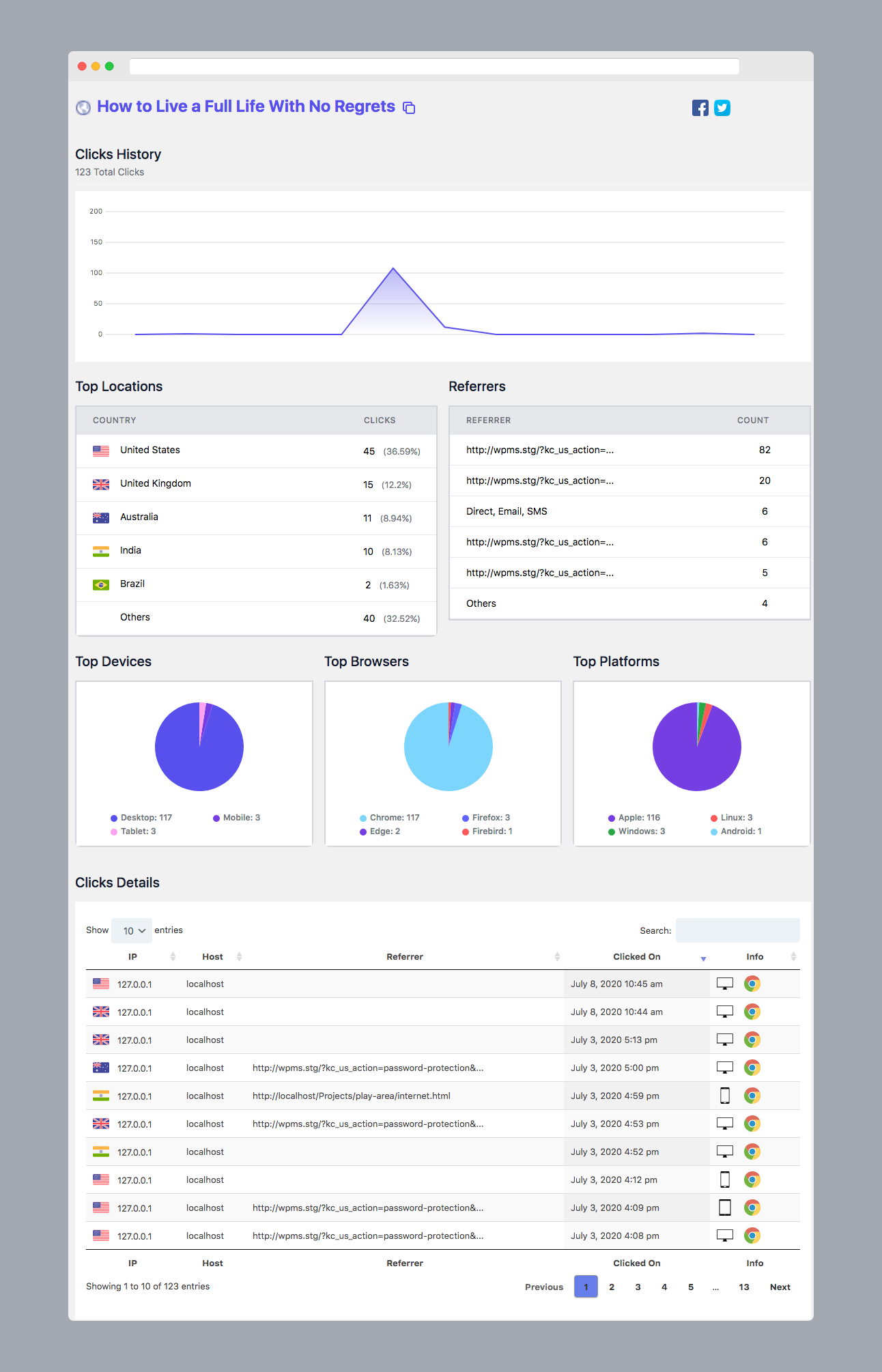
Automatically forward parameters to the destination URL by appending them to branded links.👉 Basic Link Analytics. Track Each And Every User Who Click A Link
Full analytics for individual links and link groups, including geo 🇺🇸 🇬🇧 🇦🇺 🇫🇷 🇮🇳 🇩🇪 and device information, referrers, browser, IP, and more.👉 Automatically Create Short Links For Posts & Pages
Want to create short links for WordPress Posts & Pages? Don’t worry. We will save you time by creating short links for Posts & Pages automatically.👉 Organize Short Links In Groups
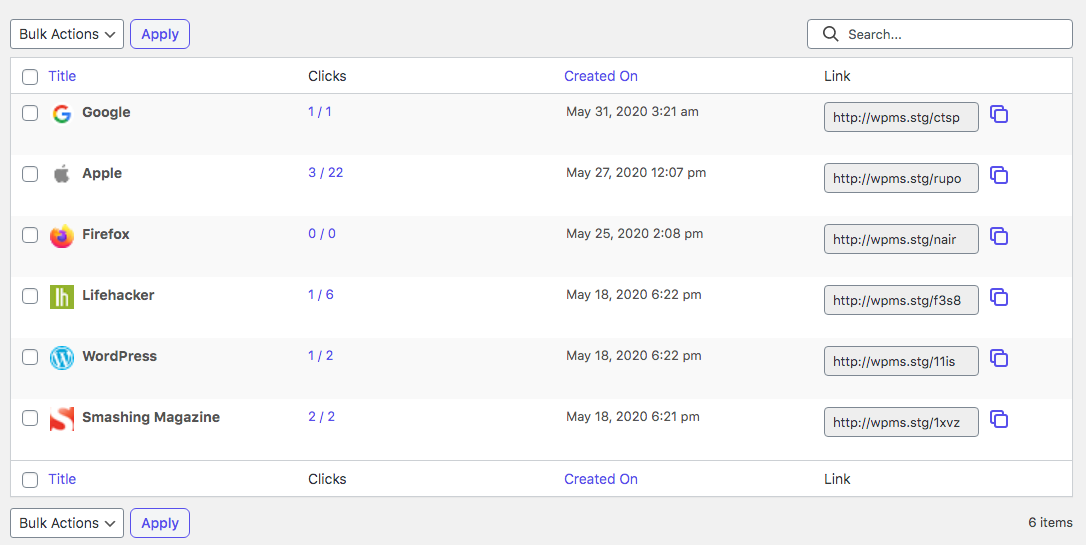
Group links together for easier management and analytics for a group as well as the individual link.👉 Add & Move links to group in bulk
Move links to group and add links to group in bulk using Bulk actions.👉 Dashboard
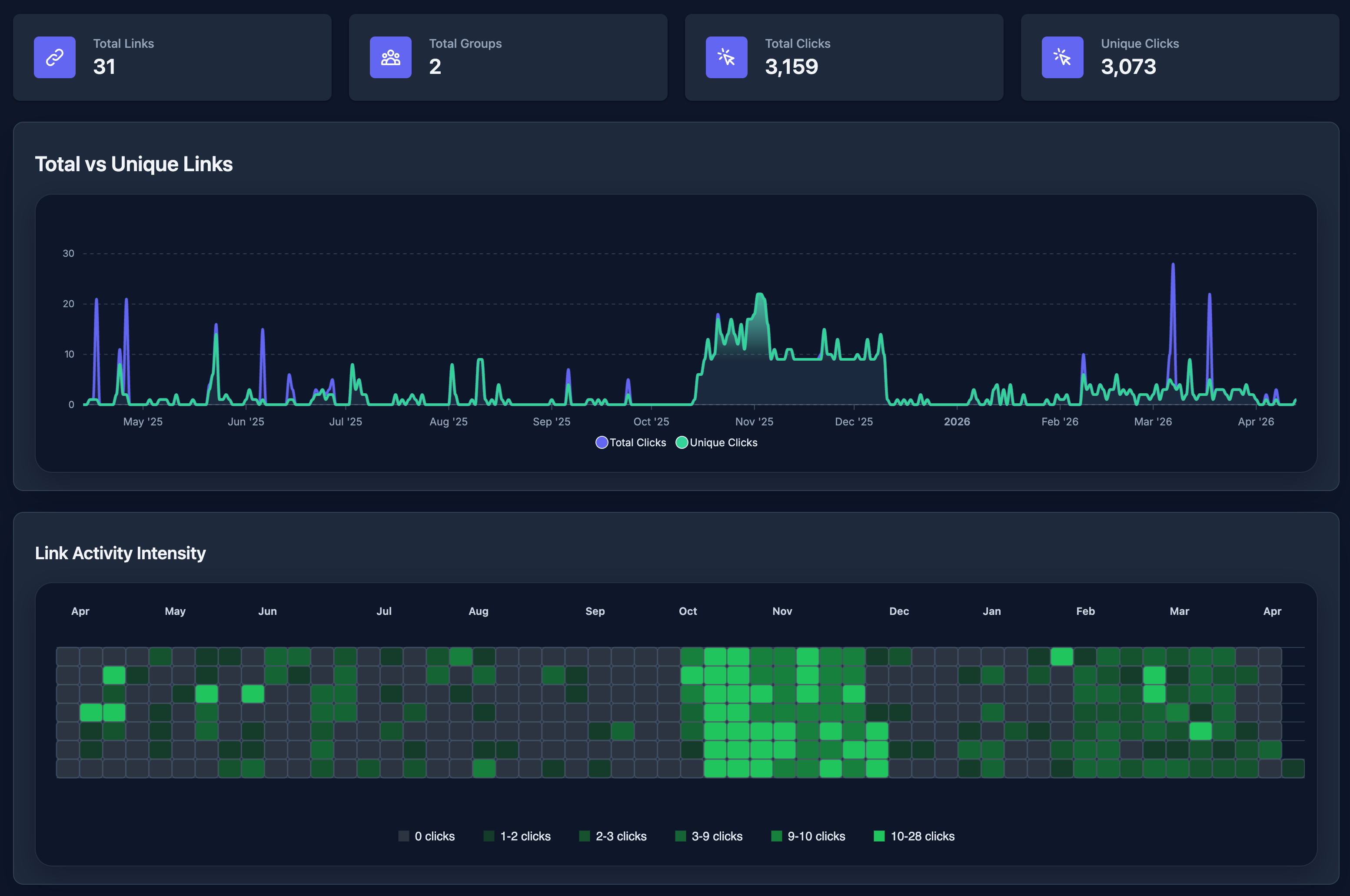
Get useful KPIs & information right on your dashboard👉 One Click Share
Copy your shortened URL right from the dashboard and share it instantly.👉 Link Prefix
Added Link Prefix setting using which you can set the prefix for all links. Once you set the link prefix, prefix will be added to short links
generated after that.👉 GDPR Privacy
As a data processor, URL Shortify is fully compliant with GDPR👉 Quick Add Dashboard Widget
Quickly create short links from WordPress Dashboard using URL Shortify Quick Add Widget.👉 Import links from CSV file.
Exported links from other tools in CSV format? You can directly import all links from CSV file to URL Shortify.👉 Allow to show Short URL with the Posts, Pages & with the excerpt.
With the use of settings you can display Short URL to above & below to Posts, Pages & Excerpt.👉 REST API to create short links.
Able to create short links using WordPress REST API from anywhere.👉 Email Digest
Get daily, weekly and monthly summary of new links and clicks report via email.
One click Import from other WordPress plugins
We have one click import setup for following WordPress Plugin. If you are using any of the following plugin, you can import all your short links in a single click.
👉 Pretty Links
👉 ThirstyAffiliates Affiliate Link Manager
👉 URL Shortener by MyThemeShop
👉 301 Redirect
👉 Simple 301 Redirects
👉 Redirection
👉 LinkCentral
👉 Short URL
Premium Features
📊 Full & Real Time Link Analysis
7 days click history is available with URL Shortify free version. Unlock full click history by upgrading to PRO.👉 Generate Short Links For Posts, Pages & Custom Post Types in bulk
Using Bulk Generate Short Links feature, you can generate Short Links in bulk in a single click.👉 Cloak Links
Link cloaking is the process of disguising the affiliate link URL provided by an affiliate program to obfuscate the affiliate ID and make the link shorter. This protects your affiliate commissions by making the affiliate ID less visible. At the same time, it makes the link more visually appealing to visitors👉 Popular Links Dashboard Widget
Show popular links right from the WordPress Dashboard using Popular Links Widget👉 Enable/ Disable Shortlinks For Custom Post Types
Create short links for all custom post types. You can also enable/ disable the creation of short link for different post types👉 Meta Refresh
Redirect visitors to a target URL with the Meta Refresh Tag👉 Customize Slug Character Count
By default URL slug is of 4 characters. With URL Shortify PRO, you can customize it according to your need👉 Expired Short Links
Decide when a link will be automatically turned off by the system.👉 Password Protected Links
You can also protect your short links with the password with this PRO ONLY feature👉 Advanced Link Analysis
Visualize popular click metrics from audiences like top countries, devices, frequent times, and more👉 QR Codes Of Short Links
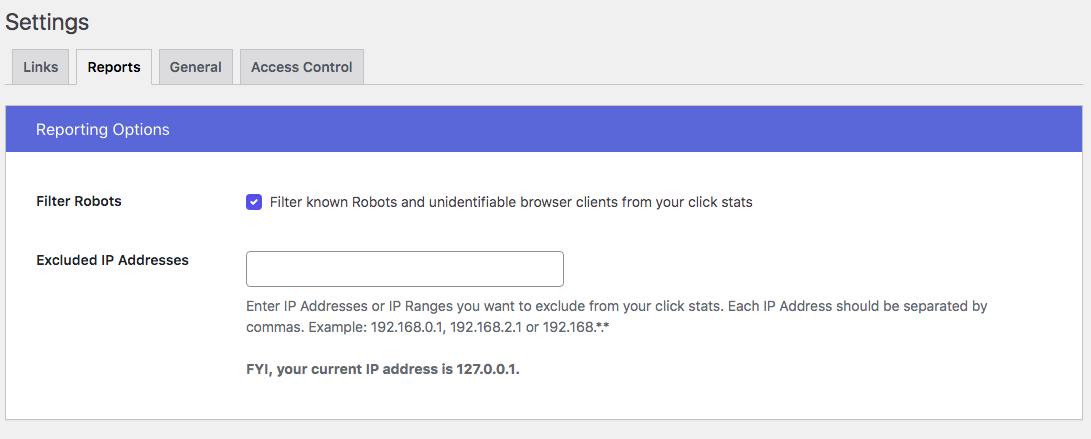
Generate QR codes from your branded links👉 Filter Out Known Robots Clicks
Stop tracking clicks from the known robots and track only real clicks.👉 Exclude IP Addresses
Stop tracking clicks that come from specific IP addresses. Add those IP addresses into Excluded IP addresses list.👉 One Click Social Share
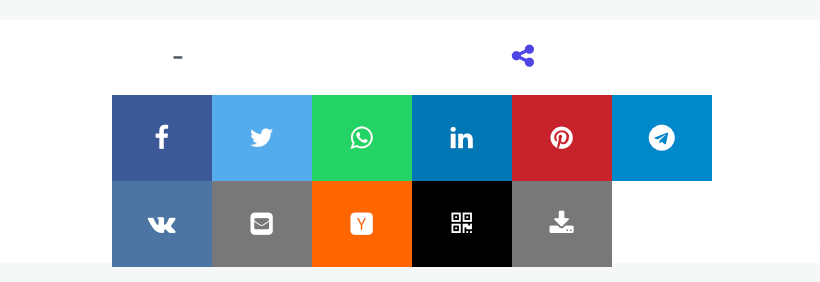
Share short links on social media like Facebook, Twitter, WhatsApp, Linkedin, Pinterest, Telegram, VKontakte, Email, Hacker News, etc in a single click from the links dashboard👉 Custom Domains
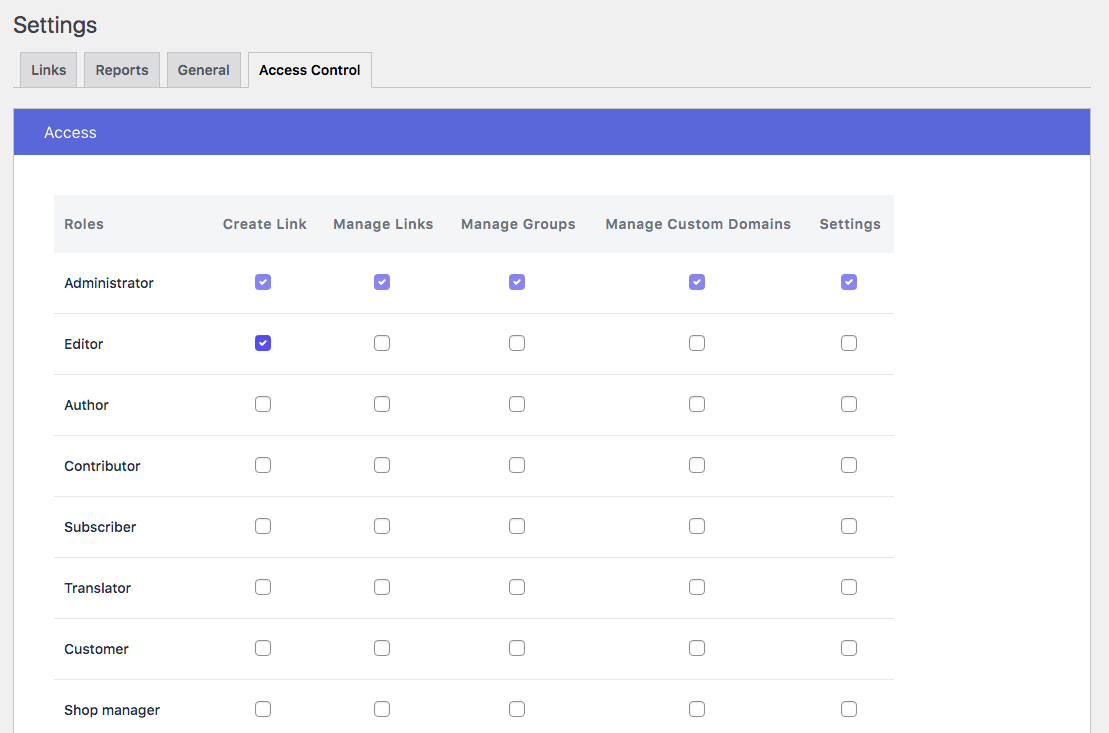
Access short links from multiple custom domains along with your main site.👉 Access Control
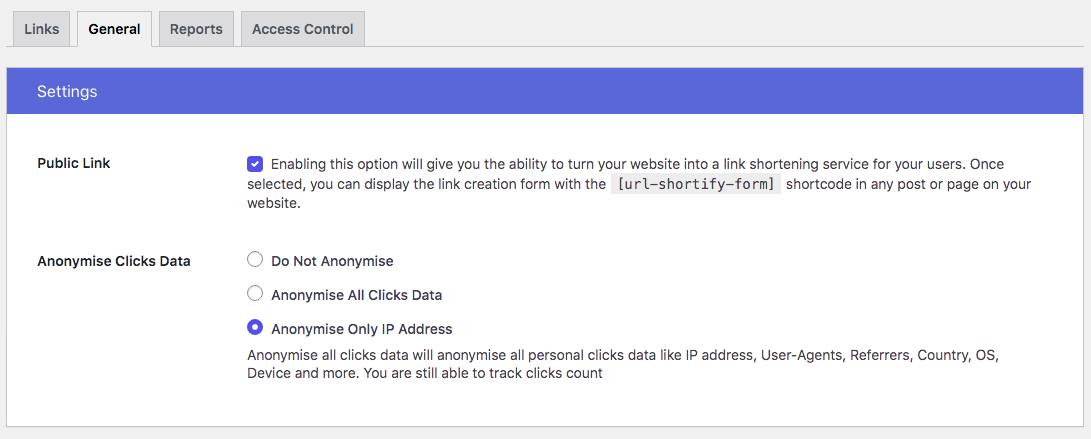
Manage roles who can create & manage branded short links, groups and manage settings.👉 Anonymise Clicks Data
Anonymise all click data will anonymise all personal click data like IP address, User-Agents, Referrers, Country, OS, Device, and more without impacting clicks count.👉 Convert Your Site Into URL Shortener Service
Enable public-facing URL Shortener form using which anyone can generate short URL.👉 UTM Builder
Add UTM parameters to destination URLs to get branded link metrics in Google Analytics👉 Bookmarklet
No need to come to URL Shortify dashboard or Chrome or Firefox extension to generate short link. Using Bookmarklet, one can create short link in a single click for any webpage they are visiting.👉 UTM Presets
Save preset templates for UTM parameters and save time when creating branded links.👉 Export Short links & click history
Export click history for analytics purpose.👉 Case Sensitive short URL
Generate short URL case sensitive. That means/abcd&/Abcdhave different target URLs.👉 Dynamic Redirection, aka Traffic Routing
Send visitors to specific landing pages or direct them to your mobile app based on their location, device, operating system or Browser.👉 Delete historical click data
Delete historical click data older than 30 days, 60 days, 90 days and all clicks at once.👉 Tracking Pixels – Retargeting
Add retargeting pixels to your links and turn every URL into perfectly targeted ads. Use Google Tag Manager, Facebook pixels to retarget your audience.👉 Link Rotations
Add multiple target URLs for short link and redirect based on the weights of the URL.👉 WP All Imports
Now, you can generate short links automatically after importing Posts, Pages, Products, Courses etc… using WP All Import WordPress plugin.👉 Filter Links
Filter links using Groups, Redirect Types, additional link parameters like Nofollow, Sponsored, Parameter Forwarding & Tracking On/Off, Password Protected links & Expired links.👉 Tags
Quickly add tags to the links and search links based on the tags. It’s a great way to organize links and find them quickly.👉 Favorite Links
Mark links as Favorite and access them quickly using Favorite filter.👉 Broken Link Checker
Quickly find the broken links and restore their functionality, ensuring your website is up and running smoothly.👉 Auto Link Keywords
Automatically link keywords in the content to short links. This is a great way to increase the traffic to your website and also to increase the sales if you are an affiliate marketer.👉 Splash Page
Create a splash page for your short links. A splash page is a landing page that is displayed to the visitors before they are redirected to the destination URL. This is a great way to show some information to the visitors before they are redirected to the destination URL.👉 A/B Testing
Learn how new page components influence users’ behavior by doing A/B Testing👉 Amazon Affiliates
Adds your Amazon Affiliate-Tag to all Amazon URLs before redirection.👉 REST API to create short links in bulk.
Able to create short links in bulk using WordPress REST API from anywhere.👉 Duplicate Short Links
Copy any short link in a single click, one at a time or in bulk. The duplicate keeps every setting of the original — target URL, redirect type, link attributes, expiry, password, custom domain, UTM parameters, tracking pixels, groups and tags — and gets a freshly generated slug, so you can build a new link from an existing one without setting it up again.👉 Export / Import – Move Your Data Between Sites
Move everything URL Shortify stores — links, groups, tags, custom domains, UTM presets, tracking pixels, click history and your plugin settings — from one site to another in a single file. Preview exactly what will be imported before it runs, choose what happens to entries that already exist, and get an automatic backup taken before anything is replaced. Ideal for staging to production workflows and site migrations.
Do you want to buy URL Shortify PRO? Buy Now
Integrations
➡️ WooCommerce
➡️ Social Linkz
➡️ LifterLMS
➡️ Sassy Social Share
➡️ Easy Digital Downloads
➡️ The Events Calendar
➡️ Events Manager
➡️ WordPress Knowledgebase
➡️ Modern Events Calendar
Do you want us to integrate your WordPress plugin with URL Shortify❓❓❓ Let us know. We would love to integrate your WordPress plugins. We will check the possibility of integration and if it matches, we will integrate your plugins too.
What users are saying about URL Shortify?
👉 Support & Quality Plugin
The support and help in setting up my plugin were fantastic. Mike walked through the specific use case with me. The plugins easy to use, fast, efficient and does what it says. Excited to see it evolve too and kick the competitors!
– driverasp
Go to URL Shortify plugin review section and read our all reviews.
DO YOU HAVE ANY QUESTIONS/ FEEDBACK/ FEATURE REQUEST/ BUG REPORT❓
Feel free to create a ticket here. We love to communicate with you and reply to all your queries.
Spread The Word ❤️
If you like URL Shortify, please leave us a ⭐⭐⭐⭐⭐ review and also spread the word about it via Facebook and Twitter. That helps fellow website owners assess URL Shortify easily and benefit from it!
What’s Next
If you like this plugin then consider checking out our other solutions:
Update URLs – Quick and Easy way to search and replace text/url in WordPress
Logify – Simple & Easy to use activity log plugin for monitor & record system changes
Magic Link – Simple, Easy and Secure one click login for WordPress
Social Linkz – Easily place social share icon on your posts, pages etc..
UtilityKit – It’s a simple & neat plugin which helps you to customize your WordPress setup in a very elegant way
Zapify – WordPress workflow automation plugin.
Installation
The easy way..
- Go to WordPress Dashboard. Locate Plugins -> Add New
- Search URL Shortify plugin using the search option
- Find the plugin and click Install Now button
- After installation, click on Activate Plugin link to activate the plugin.
The hard way..
- Download the plugin url-shortify.zip
- Go to WordPress Dashboard. Locate Plugins -> Add New
- Click on the Upload Plugin link from the top
- Upload the downloaded url-shortify.zip file and click on Install Now
- After installation, click on Activate Plugin link to activate the plugin.
Changelog
Rebuilds every statistics screen around the figures that tell you whether a link is working, adds a Deep link redirect type that opens your destination in its own app on mobile, counts QR scans separately, and widens the share menu to twenty networks. Please update to the latest version to get the best experience. Learn more in the changelog.
2.7.2 – 2026-10-12
- Update: Minor bug fixes and improvements.
2.7.1 – 2026-10-05
- New: Rebuilt the statistics screens for links, groups, tags and the dashboard. Each now opens with the figures that answer “is this link working?” – clicks, unique clicks, visitors, repeat rate and clicks per day, each carrying its change against the period immediately before it – followed by a short strip of plain-language observations about what the numbers are doing. PRO
- New: Traffic channels. Referrers are grouped into search, social, email, other websites and direct, so you can see what kind of effort is bringing people in rather than reading a list of individual URLs. PRO
- New: A weekday-by-hour grid showing when your audience actually clicks, in your site’s own timezone, so you can time the next share for it. PRO
- New: Groups and tags now show a ranked table of the links inside them, with each link’s position, total clicks, unique clicks, its share of the set, and the device, browser and platform behind it. The link doing the work sits at the top and the ones doing none sit at the bottom rather than being hidden, because those are the rows worth acting on. The rank, the link and the two click figures are available on every site; share and the audience columns are PRO.
- New: A Top links leaderboard on the dashboard – the ten busiest links with their share, their change against the previous period and the audience behind each one. PRO
- New: Smart Reports carry the same audience panels as the rest of the plugin – headline figures, insights, traffic channels, peak times, locations, referrers, and devices, browsers and platforms – scoped to the report’s own selection and date range. PRO
- New: Deep link redirect type. A link set to it opens its destination in that site’s own app when the visitor is on a phone or tablet – the Amazon app for an Amazon link, YouTube for a YouTube one – and redirects normally everywhere else. It also answers links tapped inside Telegram, Instagram or Facebook, which open in that app’s own browser and could not previously get out of it. PRO
- New: QR scan tracking. Scans of a QR code generated by the plugin are now counted as their own source of traffic, with a QR scans tile, a QR row in traffic channels and an insight line, instead of disappearing into “Direct & apps” alongside every other click with no referrer. Codes printed before this release carry no marker, so their scans stay uncounted. PRO
- New: The share menu carries twenty networks instead of nine – Facebook, X, WhatsApp, LinkedIn, Telegram, Reddit, Pinterest, Bluesky, Threads, Tumblr, LINE, Xing, Pocket, Buffer, email, SMS, VKontakte, Hacker News and the two QR code downloads. PRO
- New: One “New” menu on the dashboard listing everything your site can create – link, group, tag, domain, UTM preset, tracking pixel, auto link keyword and smart report – in place of two loose buttons.
- New: A copy control on every row of the group and tag link tables, so a short link can be copied without opening that link’s own page.
- Update: Devices, browsers, platforms, locations and referrers are now horizontal bars with their icons rather than pie charts, because a share is read by comparing lengths against a shared baseline. Every bar carries the same mark the click log and the link tables use.
- Update: Rebuilt the click log. It carried seven columns, two of which held the same value and two of which were identical down the whole page. It now reads Visitor, Source, Device and When, with the Link column back on the screens where rows span more than one link.
- Update: The links inside a group or a tag are paged ten at a time with a search box once there are more than ten of them, so a group of 240 links no longer buries the rest of the screen. Searching keeps each link’s true standing rather than renumbering the results.
- Update: The activity heatmap is available on every site. It always shows a year of daily rhythm, which is the only span the shape is good for, and the card now says so rather than appearing to follow the date filter.
- Update: Export actions say what they export – “Export Links” and “Export Clicks Data” rather than “Export CSV”, which named the file format – and all of them carry an icon.
- Update: Social sharing has been removed from the link statistics screen. Statistics are for reading what a link did; the share menu stays on the links list and the link edit form.
- Update: The clicks CSV export includes a Source column, so QR scans can be counted outside the plugin too.
- Fix: Every breakdown on the statistics screens reported all time whatever period you selected. Locations, referrers, devices, browsers and platforms now follow the date range, and a custom range reaches every panel instead of being silently discarded before it got there.
- Fix: The dashboard’s period filter did nothing at all. The pills rendered and linked, but every range shared one stored result, so whichever range was viewed first was the one everybody got afterwards.
- Fix: The click log disagreed with the figures above it, because it counted a rolling window of the last few times twenty-four hours while everything else counted calendar days. They are resolved through the same window now and agree by construction.
- Fix: A site without a licence could ask for all time through the address bar on the dashboard, link, group and tag screens and be given it. The tag screen did not even need that – it showed everyone all time by default.
- Fix: Group and tag statistics could render with the device, browser and platform columns missing for up to three hours after an update, because a stored page was trusted on the strength of its version suffix alone.
- Fix: Three share links were broken or out of date. Telegram’s was malformed and used an address desktop browsers cannot open, WhatsApp’s was missing a slash, and LinkedIn used an endpoint that has been retired.
- Fix: The device icon fell back to a broken image for any device the tracker did not recognise, including the “Others” bucket. Unknown devices now show the same neutral mark browsers and platforms already used.
- Fix: The dashboard’s New dropdown never opened – the control had been inert – and its outside-click handler never fired.
- Fix: Sorting the click log by a column could silently order by a different one, because the table kept its own copy of the column positions.
- Fix: Saved Smart Reports could open on “No clicks in this range” with a goal link reading “Deleted link”.
- Translations: Updated .POT file for new translations.
Screenshots

For developers
Is this your plugin? Show off the numbers.
Add a live badge to your site, docs or GitHub README. It updates on its own — no account needed.
Best URL Shortify alternatives
All affiliate links plugins →




FAQ
URL Shortify: quick answers
Straight answers, pulled from live WordPress.org data.
Live data from WordPress.org · checked Nov 16, 2026
Is URL Shortify free?
Yes. URL Shortify is free to download and use from the official WordPress.org plugin directory. The developer also sells premium add-ons or a Pro version with extra features.
Is URL Shortify safe to use in 2026?
Yes — URL Shortify is a safe, well-maintained plugin to use in 2026. It runs on 10K+ sites, is rated 4.7/5 and was last updated 1 month ago, and scores 89/100 on our health check.
How many websites use URL Shortify?
URL Shortify is active on 10K+ WordPress websites and has been downloaded 668,174 times since it launched in May 2020. It was downloaded 7,208 times in the last 30 days.
Does URL Shortify work with WordPress 7.1?
Yes. The developer has tested URL Shortify up to WordPress 7.1.4, the latest release. It requires WordPress 5.0.0 or newer.
What PHP version does URL Shortify need?
URL Shortify requires PHP 5.6 or higher. Most hosts run PHP 8.x today, so it works on any modern WordPress hosting.
When was URL Shortify last updated?
The latest version, 2.7.2, was released on October 12, 2026 (1 month ago).
Who makes URL Shortify?
URL Shortify is developed and maintained by KaizenCoders.
What are the best alternatives to URL Shortify?
The most popular alternatives to URL Shortify are PrettyLinks (200K+ installs), ThirstyAffiliates (30K+ installs) and BetterLinks (20K+ installs).
Powered by PageForge
Want thousands of pages that rank like these? Build them in an afternoon.
This directory runs on the same engine as PageForge. Turn any spreadsheet, CSV or API into thousands of fast, SEO-ready WordPress pages — with schema, internal links and AI-written copy baked in.
- CSV, Google Sheets & API data sources
- AI content, schema & internal links per page
- Works with Elementor, Gutenberg, Yoast & Rank Math
- Free on WordPress.org — no credit card


