


Content Egg – Affiliate Product Importer & Price Comparison
Import affiliate products, compare prices, and publish product reviews with 25+ editorial Gutenberg blocks.

Safe pick
Yes — Content Egg is a safe, well-maintained plugin to use in 2026. It runs on 10K+ sites, is rated 3.9/5 and was last updated 3 weeks ago, and scores 89/100 on our health check.
- Proven at scale on 10K+ active sites
- Actively developed — last update 3 weeks ago
- Tested with the latest WordPress (7.1)
- Momentum — downloads up 29.5% vs the previous 30 days
How does it stack up?
Side-by-side on installs, updates, ratings & support



Daily downloads
Download spikes usually follow a new release — each site that auto-updates counts as a download.
Rankings
Where Content Egg stands todayWordPress.org search rankings
Live position in the plugin search, top 100| Keyword | Position |
|---|---|
| affiliate links | #26 |
| affiliate marketing | #20 |
| CSV Import | #62 |
| gutenberg blocks | >100 |
| price comparison | #1 |
Version adoption
Share of active sites per release.
Rating breakdown
★★★★★★★★★★ 3.9 from 58 reviews
About Content Egg
From the official readme · v12.1.0Description
Content Egg is an affiliate marketing plugin for WordPress and WooCommerce. It pulls live product data — prices, availability, images, offers — from affiliate networks, supplier feeds and almost any online store, keeps it current on a schedule, and publishes it in your posts as editorial blocks, comparison tables and price lists.
Two things make it more than a shortcode-and-table plugin:
- 25+ Egg Blocks — labelled, schema-ready article sections (FAQ, pros & cons, methodology, comparison table, verdict) wired straight to your product data. These are the self-contained chunks AI search engines quote.
- AI Agents — connect ChatGPT, Claude, or any assistant that can call an API, then work in plain language: “Add a live price list of the Ninja air fryer to my review.”
Every feature is in the free version. PRO adds more affiliate networks, more feed slots, and write access for AI agents.
What is this plugin for?
✔ Product reviews & niche blogs
✔ Price comparison sites
✔ Automated affiliate sites
✔ WooCommerce listings
✔ Daily deals & coupons
Official website · Egg Blocks demo article · Documentation
Egg Blocks — 25+ Editorial Gutenberg Blocks for Affiliate Content
Stop building product reviews from generic paragraphs and shortcodes. Egg Blocks are 25+ purpose-built Gutenberg blocks designed for affiliate content — each one semantically labelled, schema-ready, and wired directly to your Content Egg products.
Article structure: intro, conclusion, section header, table of contents, FAQ, callout, step list
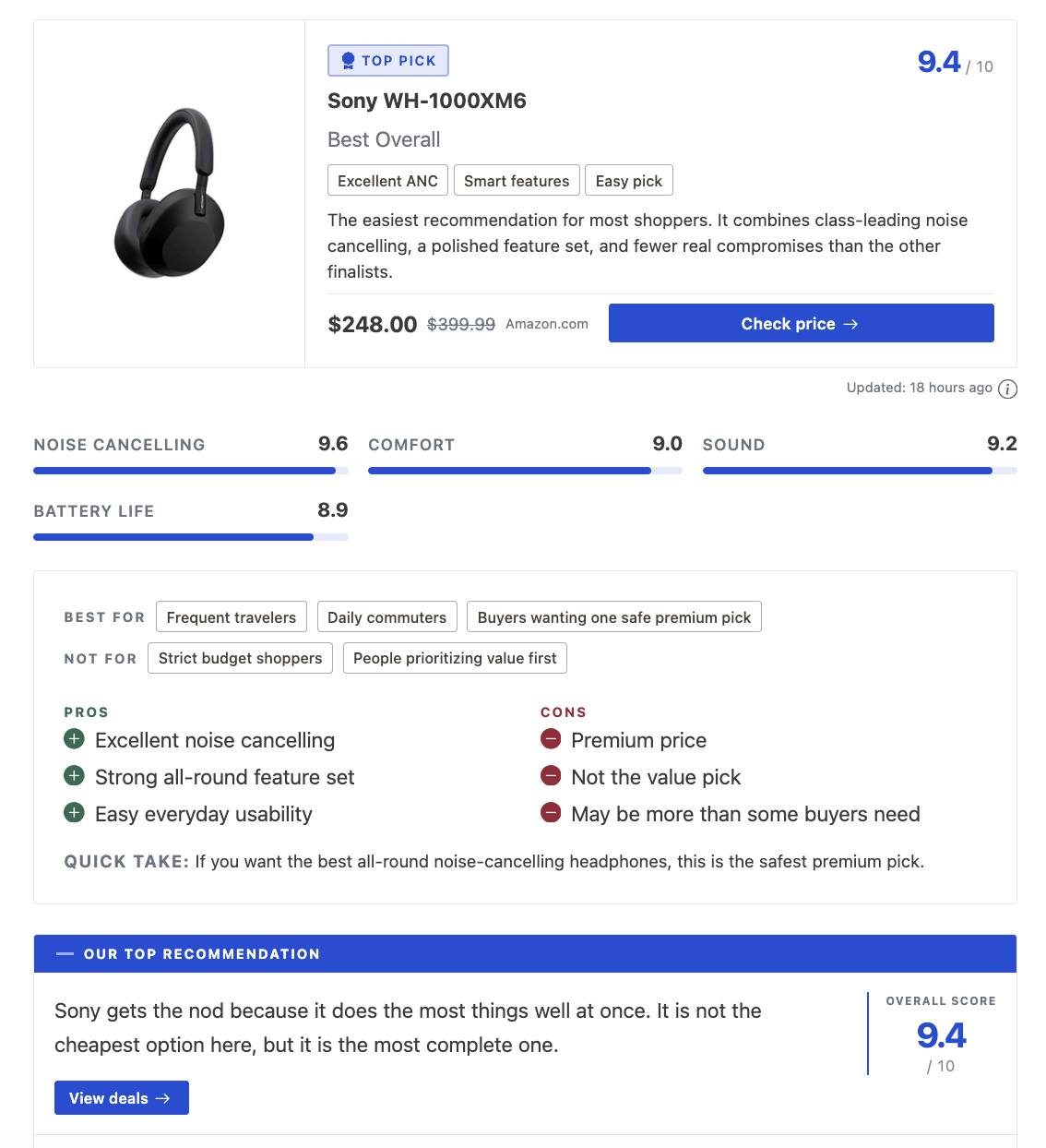
Editorial insights: key takeaways, criteria, methodology, definitions, myth vs fact, pros & cons
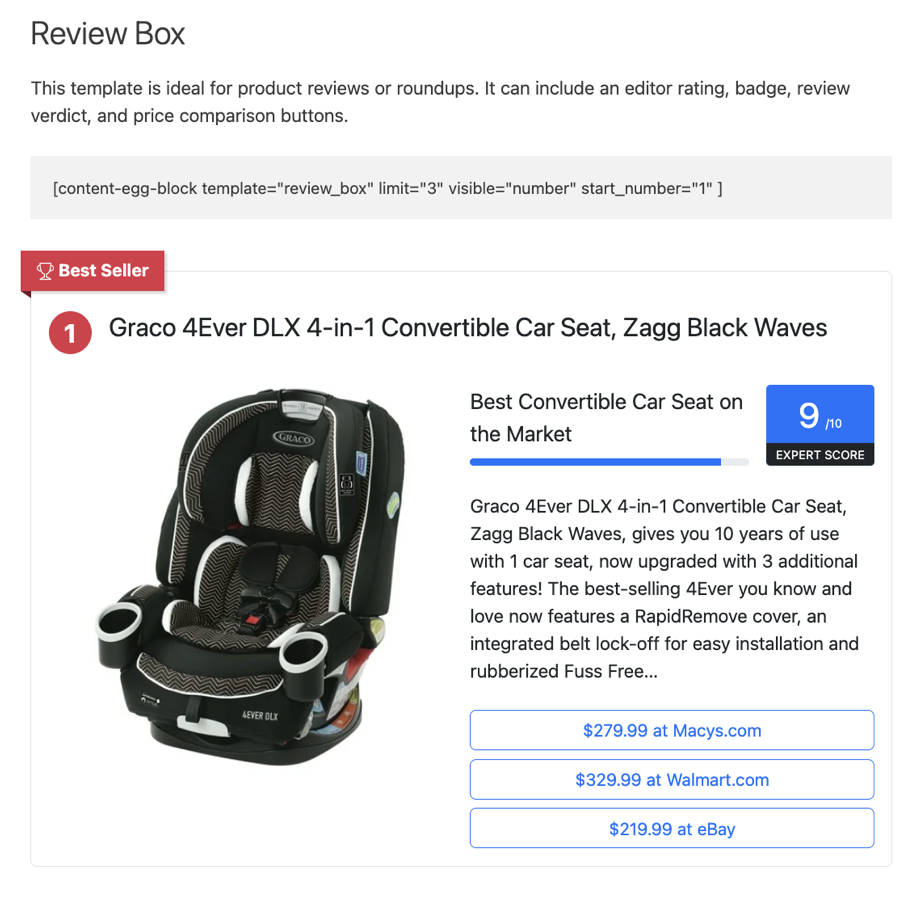
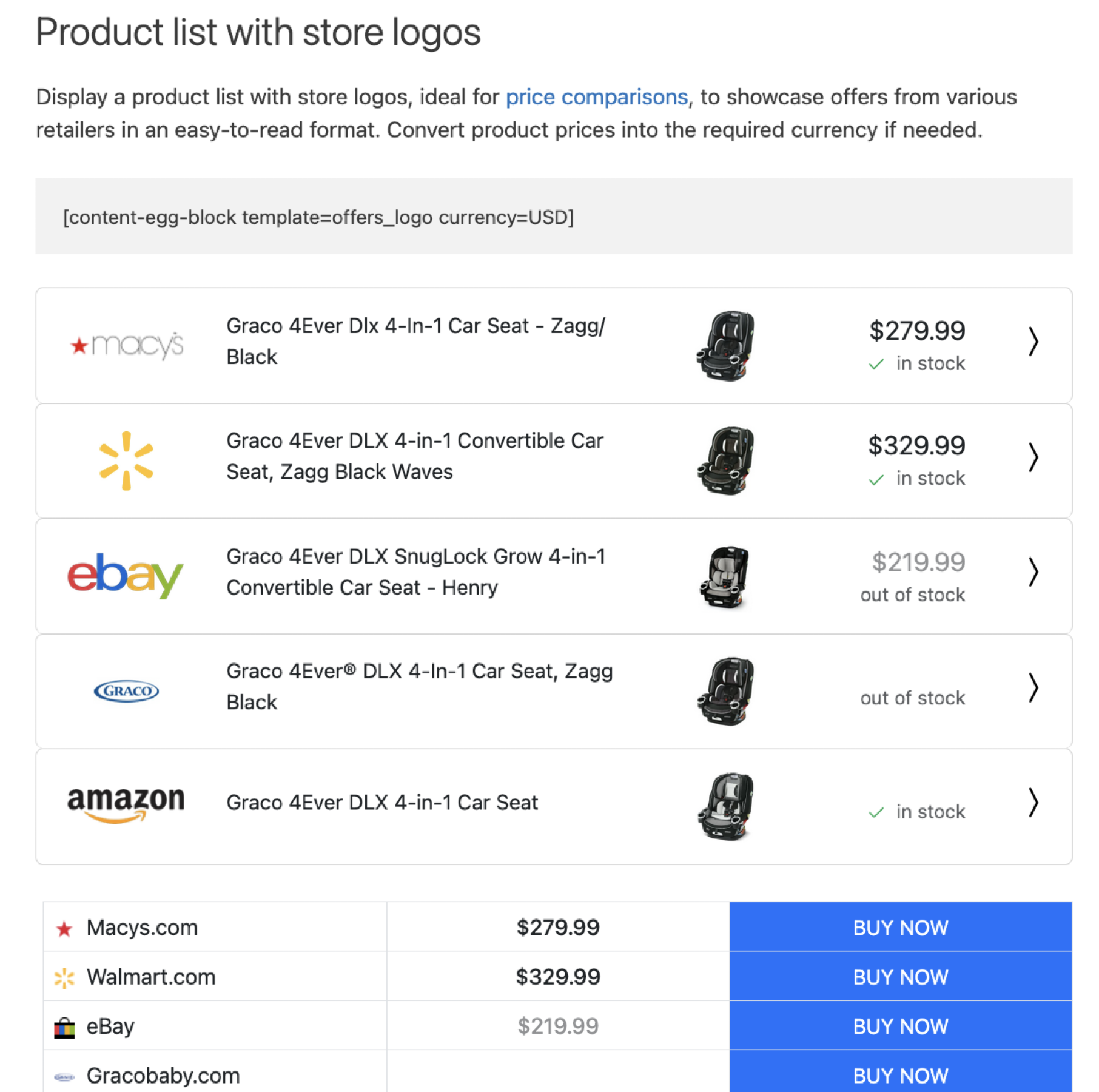
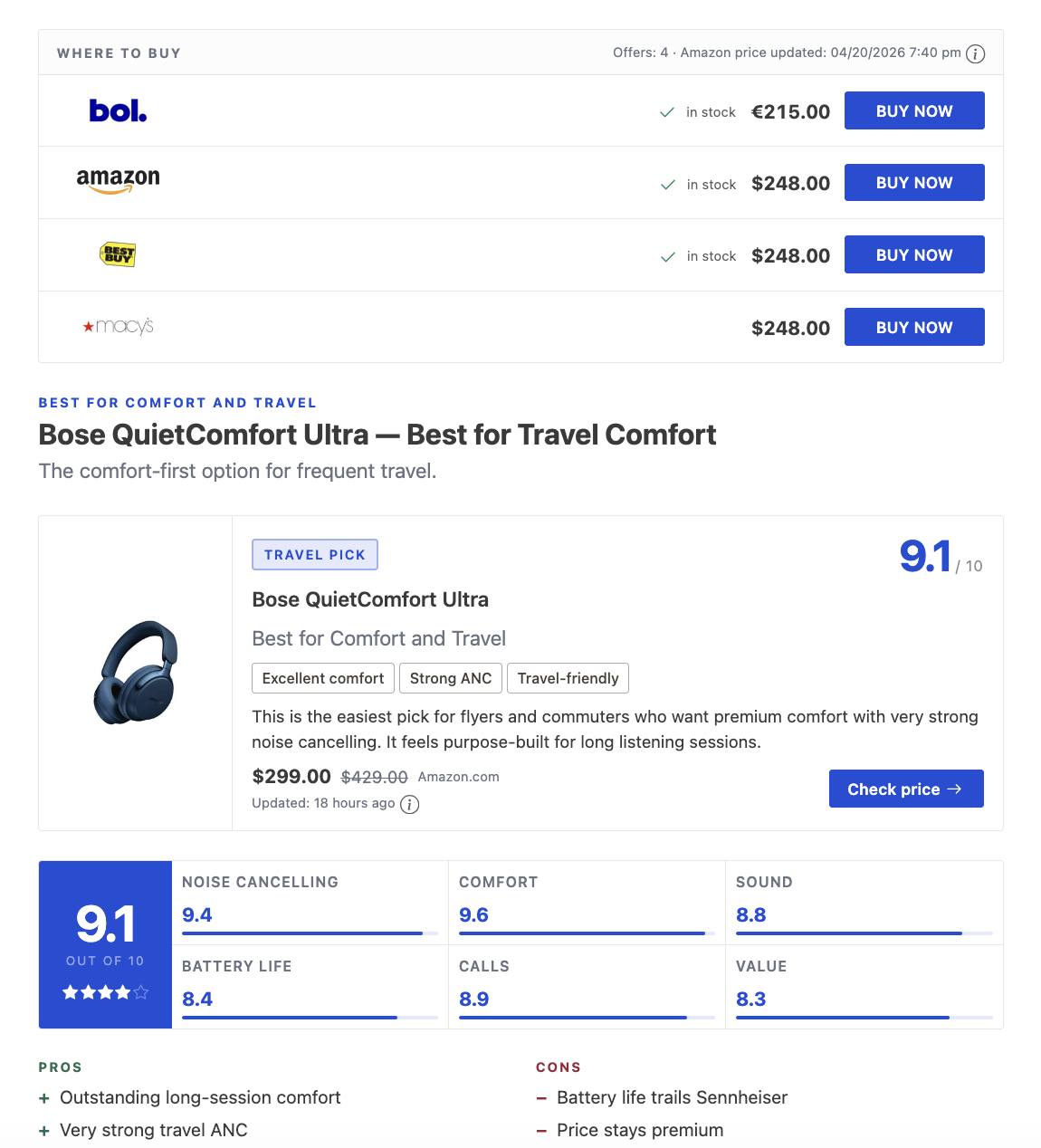
Product & commerce: product card, editorial product, quick picks, where to buy, comparison table, verdict, rating breakdown, specifications
Conversion & social proof: contextual CTA, pricing, testimonial, trust signals
Navigation: related posts
The editorial product block is the quiet one: a real product shown as part of the article, with no price, rating or buy button, so a guide can cite products and still read like a guide.
Why it matters for SEO: AI search engines (Google AI Overviews, Perplexity, ChatGPT) cite chunks of content, not whole pages. Egg Blocks break your article into self-contained, machine-readable sections — a labeled FAQ block, a methodology block, a pros/cons section — each one a candidate for AI citation and rich results. The FAQ block emits FAQPage structured data automatically.
EggBlocks Writer: a free external skill you paste into ChatGPT, Claude, or any capable AI chat. Ask for a full article and the AI outputs ready-to-paste Gutenberg markup using real Egg Blocks. Copy, paste into the WordPress Code Editor, assign your Content Egg products, publish.
AI Agents — Run Content Egg from ChatGPT or Claude
Connect ChatGPT, Claude, Claude Code, Cursor, or anything that can call an API, then just ask in plain language. Your assistant talks to your site directly over the WordPress REST API — no middleman service, no API keys to manage. Set-up is a WordPress application password, and every action your assistant takes is logged. Requires WordPress 6.9 or newer.
Free version — your assistant can research, compose and preview. Content Egg’s own write actions are PRO:
- “Which modules are active, and did my CSV feed import last night?”
- “Search my feeds for robot vacuums under $300.”
- “Find 3 YouTube videos and 5 images for my air fryer post.”
- “What products and blocks are already on ‘Best Air Fryers’?”
- “Compose a roundup of the 5 best countertop blenders with Egg Blocks and show me a preview.”
You get the rendered preview plus the finished block markup — paste it into the editor yourself, or let your assistant create the draft through WordPress’s own REST API. Editorial blocks land ready to publish; blocks that display products stay empty until products are attached, which is a PRO action.
PRO — your assistant does the work on your site, from one message:
- “Create a full roundup article of the 5 best countertop blenders.”
- “Add an FAQ section to my post ‘Best Air Fryers’.”
- “Drop a live price list of the Ninja air fryer into my review.”
- “Rewrite this post with Egg Blocks.”
- “Refresh the prices on my Ninja review and set its featured image.”
- “Connect this feed to my site: example.com/products.csv”
- “Activate the Amazon module and set price updates every 24 hours.”
Behind those prompts: attach products (including custom ones you describe), edit, reorder and remove them, refresh prices, add images, videos and coupons, insert blocks, create a full draft page, publish or schedule it, and manage modules, settings, feeds and new affiliate shops.
▶ Claude Scheduled Tasks for WordPress: Automate Article Publishing
Both videos show the PRO workflow end to end. Full set-up guide: AI Agents.
Import Products from CSV, XML and JSON Feeds
Paste a supplier feed URL and the setup wizard detects the format, encoding, currency and CSV settings, lets you map fields against real sample data, then imports in the background with live progress. Feeds are cached between syncs and re-import on the schedule you set — including into WooCommerce.
Create Product Posts and WooCommerce Products
No more copy-pasting product details. Turn imported data into posts or WooCommerce products in one click — ready to publish and monetize. Bulk keyword import creates a post per keyword, and product prefill monetizes the posts you already have.
Price Comparison for WordPress
- Price Blocks: Combine offers from multiple networks into one block.
- Historical Price Data: Display past prices to help users find the best purchase times.
- Dynamic Charts: Create charts showing price changes over time.
- Price Drop Alerts: Email alerts for price drops.
- EAN Search: Merge products into a single comparison list using EANs.
Deals Websites
Run a deals site on your own WordPress install: every deal is a post with its own page, and Content Egg keeps its price current.
- Deal pages with price, old price, discount, store, coupon code, a countdown and “checked 2 hours ago”.
- Automatic expiry: a deal expires when the product goes out of stock or its price rises, and comes back when it recovers.
- Community voting with a “Hot” badge, sorting by newest, biggest discount, popular or ending soon.
- Store and category pages with breadcrumbs, plus a Deals block for your homepage.
- Import deals from a list of product links, or automatically with a minimum-discount rule.
AI Content Generation for Product Reviews
Write from the product data you imported — title, specs, offers, attributes — instead of from a blank prompt. One click per section:
- Product reviews
- How-to-use instructions
- Buyer’s guides
- Product descriptions
- Translations, summaries and rewrites
Every prompt is editable and takes dynamic variables for product fields. Works with the current OpenAI (GPT-5.x) and Anthropic (Claude) models.
Bridge Pages
Create clean, product-focused landing pages on your site before sending visitors to merchants. Bridge Pages keep users engaged longer, improve SEO with targeted keywords, and boost affiliate conversions.
- 1-Click setup: Instantly build from Content Egg offers.
- Flexible layouts: Use as product, review, or comparison pages.
- SEO control: Set global or post-specific canonical options.
▶ Watch Bridge Pages in action
How It Works
- Activate the modules you need
- Add or import products from supported networks and stores
- Publish content and start earning affiliate commissions
Plugin Features
Import & sync: one-click feed import for full supplier catalogs · scheduled auto-import at custom intervals · bulk keyword import to create product posts · CSV, XML and JSON feeds · WooCommerce sync and autoblogging · Affiliate Egg integration for stores without an API · official network APIs
Prices & offers: automatic price updates with tracker & alerts · price comparison blocks with multiple offers · historical prices and charts · add offers by keyword or product URL · EAN matching · auto-insert affiliate IDs in links
Publish: 25+ Egg Blocks for reviews, roundups and buying guides · high-conversion product templates (ready-made or custom) · create custom templates with ChatGPT · shortcodes for flexible placement · images, videos, news and coupons · works with any WordPress theme · multi-language
Automate & measure: AI Agents (ChatGPT, Claude, MCP) · AI content generation · product prefill for existing posts · Bridge Pages · clicks statistics reports
Free Version vs Content Egg PRO
Every feature is in the free version — feed imports, price comparison and price history, AI content generation, Egg Blocks, Bridge Pages, clicks statistics, WooCommerce sync and autoblogging. PRO widens the reach rather than unlocking the basics:
- 32 more network modules — Amazon, eBay, AliExpress, Walmart, AWIN, CJ, Rakuten and more
- 50 feed modules instead of 3
- Write access for AI agents — your assistant builds and edits pages instead of only researching them
- Fully automatic AI prefill — monetize existing posts unattended, start to finish
Free version modules:
Includes CSV-XML Feed, CJ Links, Coupon, GdeSlon, Google Images, Offer, Pexels, Pexels Videos, Pixabay, Related Keywords, RSS Fetcher, Skimlinks Coupons, Sovrn, Unsplash, YouTube.
PRO adds:
Includes Aliexpress, AllKeyShop, Amazon, Amazon NoAPI, Avantlink, AWIN, BestBuy, Billigerde, Bol.com, CJ Products, CityAds.com, Clickbank, Clickwise, Coupang, eBay, Envato, Flipkart, Geizhalsde, Impact Radius, Kelkoogroup, Kieskeurig.nl, Linkwise, Lomadee.com, Magalu, Paytm.com, Rakuten (LinkShare), Shopee, Tradedoubler, TradeTracker, Trovaprezzi, Walmart, Webgains.
➡️ Visit us at www.keywordrush.com/contentegg
Demos & Guides
Official website: www.keywordrush.com/contentegg
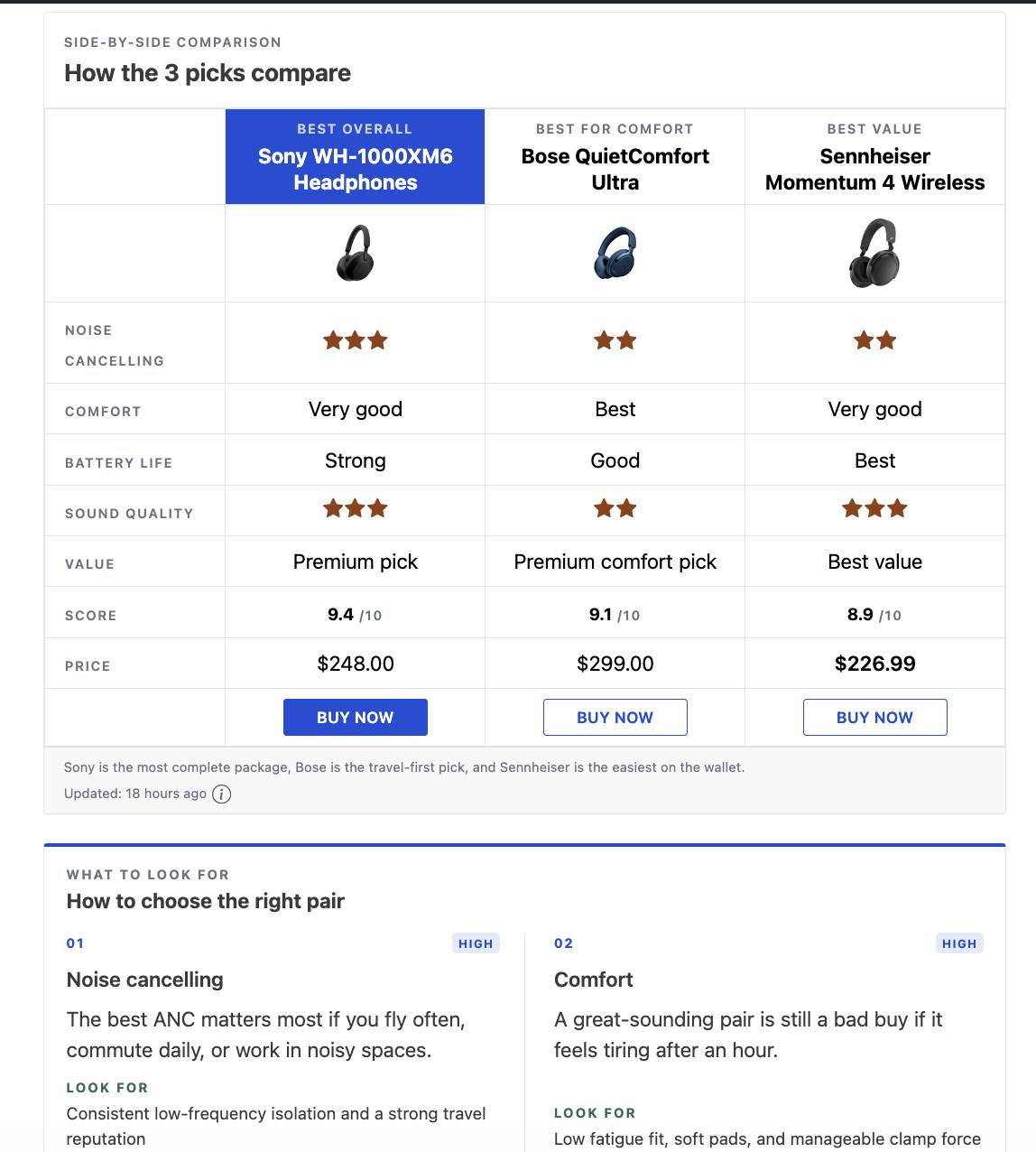
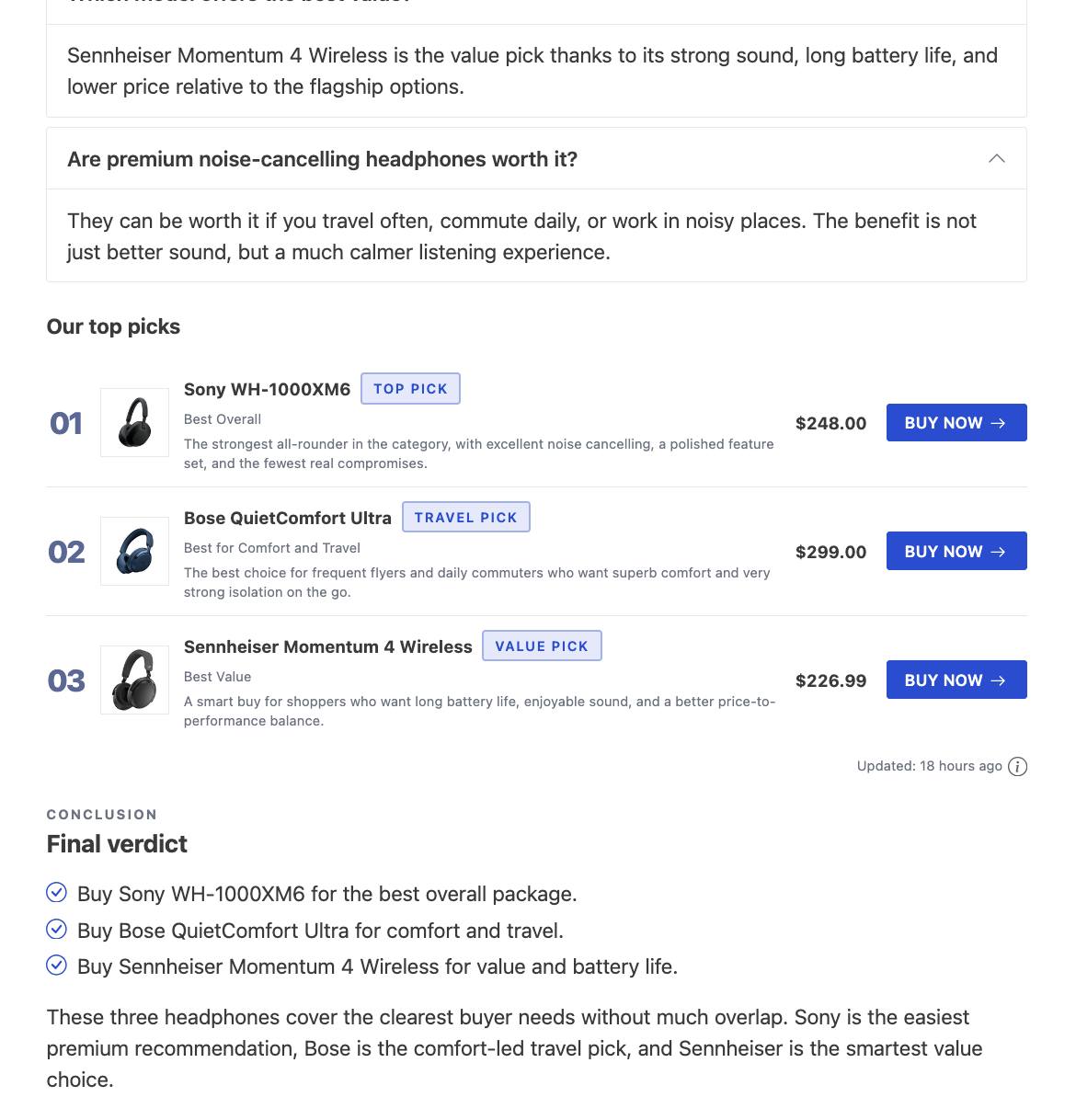
Egg Blocks demo: best-noise-cancelling-headphones
Product templates demo: content-egg-pro-output-demo
Documentation: ce-docs.keywordrush.com
Video Guides: YouTube Playlist
AI Power: www.keywordrush.com/toomuchniche
Installation
Requirements
- PHP version 8.0 or higher.
- WordPress 6.9 or higher.
Installation Instructions
- Upload the content-egg folder to the /wp-content/plugins/ directory.
- Activate the plugin through the ‘Plugins’ menu in WordPress.
- Configure the plugin settings.
- For detailed configuration instructions, refer to the Content Egg User Guide
Changelog
12.1.0
- New: AI agents can look up your deals: whether a product already has a deal (by product, link or GTIN), or a list of deals by status, store, category or end date. Creating and changing deals through an agent is part of Content Egg PRO.
- New: Feed module — this site’s WooCommerce products can be the product source instead of a feed file. Your own catalog becomes searchable in Content Egg and usable as the product source for Too Much Niche e-commerce plans.
- Improvement: Settings → Deals links to your deals archive.
- Fix: WooCommerce — removing or reordering external gallery images in the product editor broke the gallery.
- Fix: Deals — imports with a Deal preset no longer create a second deal for a product that already has one.
- Fix: Deals block — styles in the block editor, card titles the same size as on the site, and clicking a card in the editor no longer leaves the editor or casts a vote.
- Security: Hardened permission checks.
12.0.0
- Deals are off by default: nothing changes on your site until you turn them on in Settings → Deals.
- New: Deals. Turn on Settings → Deals to get a Deal post type with ready-made deal pages (price, old price, discount, store, “checked N hours ago”, lowest-price-in-30-days badge, countdown, voting), a /deals/ archive with sorting and store/category filters, and a Deals block. Deals expire on their own when the product goes out of stock, its price rises, or its end date passes, and come back when the product does.
- New: Deals → Add deals creates deals from a list of product links.
- New: A coupon code per deal, with a one-click Copy button on the deal page, a “Coupon” label on cards, a “With coupon” filter and a coupon-only option in the Deals block.
- New: Store and category pages for deals — breadcrumbs with BreadcrumbList markup, a store header with logo, deal count and store link, category links, and a link to the store’s Cashback Tracker page when Cashback Tracker is installed.
- New: “Hot” badge for deals whose vote score reaches Settings → Deals → Hot deal score (default 50), with cegg_deal_hot_score and cegg_deal_is_hot filters.
- New: Deal button text setting, “Get deal at {store}” by default.
- New: Auto-import rules can require a minimum discount and in-stock products.
- New: “Used and Refurbished Offers” setting (General settings). When enabled, used and refurbished offers no longer set the best price, the WooCommerce price, price history or price alerts, and they get a “Used” or “Refurbished” label. An offer with “Renewed”, “Refurbished” or a similar word in its title counts as refurbished even when the shop lists it as new. Enabled by default on new installations; existing sites keep their current behavior until you turn it on.
- New: WooCommerce “Automatic Synchronization Scope”. Sync product prices from all modules and exclude the ones you don’t want, or keep syncing only the selected modules. New installations sync from all modules; existing sites keep their current setting. A notice now tells you when automatic sync is off because no module is selected.
- New: Comparable prices with and without VAT. Set each shop’s VAT basis and rate in Shops, then choose Excluding or Including VAT in Settings → Normalize Shop Prices. Prices are converted before they are saved, so price history, charts and price alerts stay consistent. Existing data is recalculated in the background.
- New: Default shipping cost per shop by price range, used when a product has no shipping cost from its source.
- New: Optional shipping line (visible=shipping_cost) in the Price comparison widget, Price comparison card and Sorted offers list with product images templates.
- New: Feed modules — “condition” column in the feed mapping.
- New: Feed modules — search by the feed’s own product ID with “id:12345” to add an exact offer. Works in the editor search, Prefill and auto-update keywords; separate several IDs with commas (id:123,id:456).
- New: Prefill — “Values are feed product IDs” option for the Custom Field source. Plain feed product IDs saved in a custom field are matched exactly, one per field value or comma-separated.
- New: AI agents see which modules can search by EAN, URL or product ID and get the product identifiers needed to compare offers. The agent guide is now split into topics, including a new price comparison topic.
- New: ChatGPT connects through ChatGPT Work and a ChatGPT project, with scheduled tasks that run in the cloud. The AI Agents screen shows the new steps; Custom GPTs, which OpenAI is retiring, are no longer needed.
- Improved: Merchant logos work again without an API key. The default logo source is now the shop’s website icon, since Clearbit no longer provides logos.
- Improved: Every shop now gets its logo from the Logo Source setting, so all logos look the same; your own logos still take priority. When Brandfetch or Logo.dev has no logo for a shop, or no key is set, the shop’s website icon is used instead.
- Improved: Changing Logo Source now replaces the logos Content Egg downloaded before; logos you placed in the ce-logos folder yourself are kept. A logo that could not be downloaded is tried again after 7 days.
- Improved: Prefill no longer sends an EAN to modules that can’t search by EAN.
- Improved: Content Egg now bundles Action Scheduler, so background tasks run reliably even when no other plugin provides it.
- Improved: Block styles now load only on pages that use the blocks.
- Improved: Price comparison and price history templates fit mobile screens.
- Improved: Price history chart dates no longer overlap.
- Improved: Sorted and filtered deal archive pages are no longer indexed by search engines.
- Fixed: Feed modules — an offer stayed out of stock for good once the merchant re-listed the product under a new ID. The update now falls back to the EAN within the same shop and reconnects the offer on a single unambiguous match, refreshing price, stock, image and links while keeping the saved product data and price history.
- Fixed: Sovrn — offers from many shops had no logo. They now get the logo Sovrn provides, and Target, The Home Depot, Lowe’s, Ace Hardware, Wayfair, REI and other shops are matched to their website.
- Fixed: Large product feeds served through a redirect could exhaust PHP memory before the import started.
- Fixed: Products stayed unticked under Post Types when WooCommerce was installed after Content Egg’s settings had been saved. Activating WooCommerce now turns them on, and saving the settings while WooCommerce is inactive no longer unticks them.
- Fixed: Sorting by highest price, and the “Maximum Price” WooCommerce sync, put out-of-stock offers first.
- Fixed: WooCommerce product schema (AggregateOffer) included out-of-stock offers.
- Fixed: WooCommerce attributes were re-synced for every offer marked for attribute sync instead of only the first.
- Fixed: The currency option did not convert shipping costs.
- Fixed: Price statistics showed the wrong product name for the lowest price.
- Fixed: Price history chart not showing in blocks rendered via AJAX (async or lazy load).
- Fixed: Clearing a product price in the editor was undone on save.
- Fixed: PHP 8.4 deprecation notices.
- Fixed: Codex could not use the MCP endpoint on sites with WooCommerce, and asked to approve every call.
11.9.0
- New: Shop badge — a badge text and color on each shop’s Content Egg > Shops page, shown automatically on every offer from that domain unless the offer already has its own badge.
- New: Update keywords by group — one keyword per row with an optional product group, so a single post refreshes several CE Products blocks at once: one EAN per group, one group per block.
- New: Paste a list into product search — one keyword, product URL or EAN per line — instead of searching for five products one at a time. Results are grouped under the line that found them, each group with its own “Add all”, so a URL that finds nothing is one line’s problem rather than a failed search.
- Fixed: Feed setup wizard — analysing a large feed always failed with a 30-second timeout when the feed host ignores range requests, as Admitad and other on-the-fly feed generators do. The analysis now ends the download itself once it has the sample it needs, whatever the feed’s size.
- Fixed: sort=price in a block shortcode was ignored whenever the products carried a manual order (drag-and-drop, the Order field, or a [1] title prefix). An explicit sort now takes priority over that order.
- Fixed: Security hardening and fixes.
- Changed: Affiliate modules now default to Cron Job updates instead of Page View, so every post refreshes on the same schedule instead of waiting for a visitor to arrive.
11.8.1
- Fixed: “Save images on server” — every automatic price update downloaded the product image again, filling the uploads folder with product-1.jpg, product-2.jpg and so on. Affects AE and custom feed modules.
11.8.0
- New: Egg Blocks — a Plain variant for nine blocks, including Product Card, Verdict, Pros & Cons and Callout. No panel, no tinted background, no bordered tags: the blocks line up on a shared label column so a review reads as one article instead of a stack of widgets.
- New: Import presets — Category Mapping. Send a merchant’s feed category to one of your own categories, so products arrive filed correctly instead of needing cleanup. A rule can name the full path or a single level, and * matches a whole branch.
- New: Editorial Product — an alt text field for the product image.
- Fixed: Editorial Product was missing from the block catalog the agent API publishes, so an AI agent could not create or validate one.
- Fixed: AWIN — the maximum price was ignored when searching a feed.
11.7.0
- New: Editorial Product block — show a product as part of the article, not as an advert. Four layouts, from a full-width figure to a one-line mention, with no price, rating, score or buy button; the link rides on the product name and image.
Screenshots


For developers
Is this your plugin? Show off the numbers.
Add a live badge to your site, docs or GitHub README. It updates on its own — no account needed.
Best Content Egg alternatives
All affiliate links plugins →



FAQ
Content Egg: quick answers
Straight answers, pulled from live WordPress.org data.
Live data from WordPress.org · checked Nov 16, 2026
Is Content Egg free?
Yes. Content Egg is free to download and use from the official WordPress.org plugin directory.
Is Content Egg safe to use in 2026?
Yes — Content Egg is a safe, well-maintained plugin to use in 2026. It runs on 10K+ sites, is rated 3.9/5 and was last updated 3 weeks ago, and scores 89/100 on our health check.
How many websites use Content Egg?
Content Egg is active on 10K+ WordPress websites and has been downloaded 681,525 times since it launched in August 2015. It was downloaded 8,686 times in the last 30 days.
Does Content Egg work with WordPress 7.1?
Yes. The developer has tested Content Egg up to WordPress 7.1.4, the latest release. It requires WordPress 6.9 or newer.
What PHP version does Content Egg need?
Content Egg requires PHP 8.0 or higher. Most hosts run PHP 8.x today, so it works on any modern WordPress hosting.
When was Content Egg last updated?
The latest version, 12.1.0, was released on October 29, 2026 (3 weeks ago).
Who makes Content Egg?
Content Egg is developed and maintained by keywordrush.
What are the best alternatives to Content Egg?
The most popular alternatives to Content Egg are PrettyLinks (200K+ installs), ThirstyAffiliates (30K+ installs) and BetterLinks (20K+ installs).
Powered by PageForge
Want thousands of pages that rank like these? Build them in an afternoon.
This directory runs on the same engine as PageForge. Turn any spreadsheet, CSV or API into thousands of fast, SEO-ready WordPress pages — with schema, internal links and AI-written copy baked in.
- CSV, Google Sheets & API data sources
- AI content, schema & internal links per page
- Works with Elementor, Gutenberg, Yoast & Rank Math
- Free on WordPress.org — no credit card


