


Uploadfic – Upload Any Mime Types
Uploadfic lets you enable unfiltered uploads in WordPress SVG, Excel, Docs, and more. Supports all MIME types easily and securely.

Solid choice
Uploadfic is a solid plugin choice in 2026, with a few things worth checking first. It runs on 10+ sites and was last updated 1 month ago, and scores 62/100 on our health check.
- Tested with the latest WordPress (7.1)
- Small user base (10+ active installs)
- Very few reviews so far
How does it stack up?
Side-by-side on installs, updates, ratings & support


Daily downloads
Download spikes usually follow a new release — each site that auto-updates counts as a download.
Rankings
Where Uploadfic stands todayWordPress.org search rankings
Live position in the plugin search, top 100| Keyword | Position |
|---|---|
| file upload | >100 |
| mime | #39 |
| SVG | >100 |
| upload | >100 |
Version adoption
Share of active sites per release.
About Uploadfic – Upload Any Mime Types
From the official readme · v1.0.1Description
Uploadfic lets you enable unfiltered uploads in WordPress SVG, Excel, Docs, and more. Supports all MIME types easily and securely.
🔥 Features of Uploadfic
📁 Upload Any File Format – Effortlessly upload all file formats by selecting or adding custom MIME types.
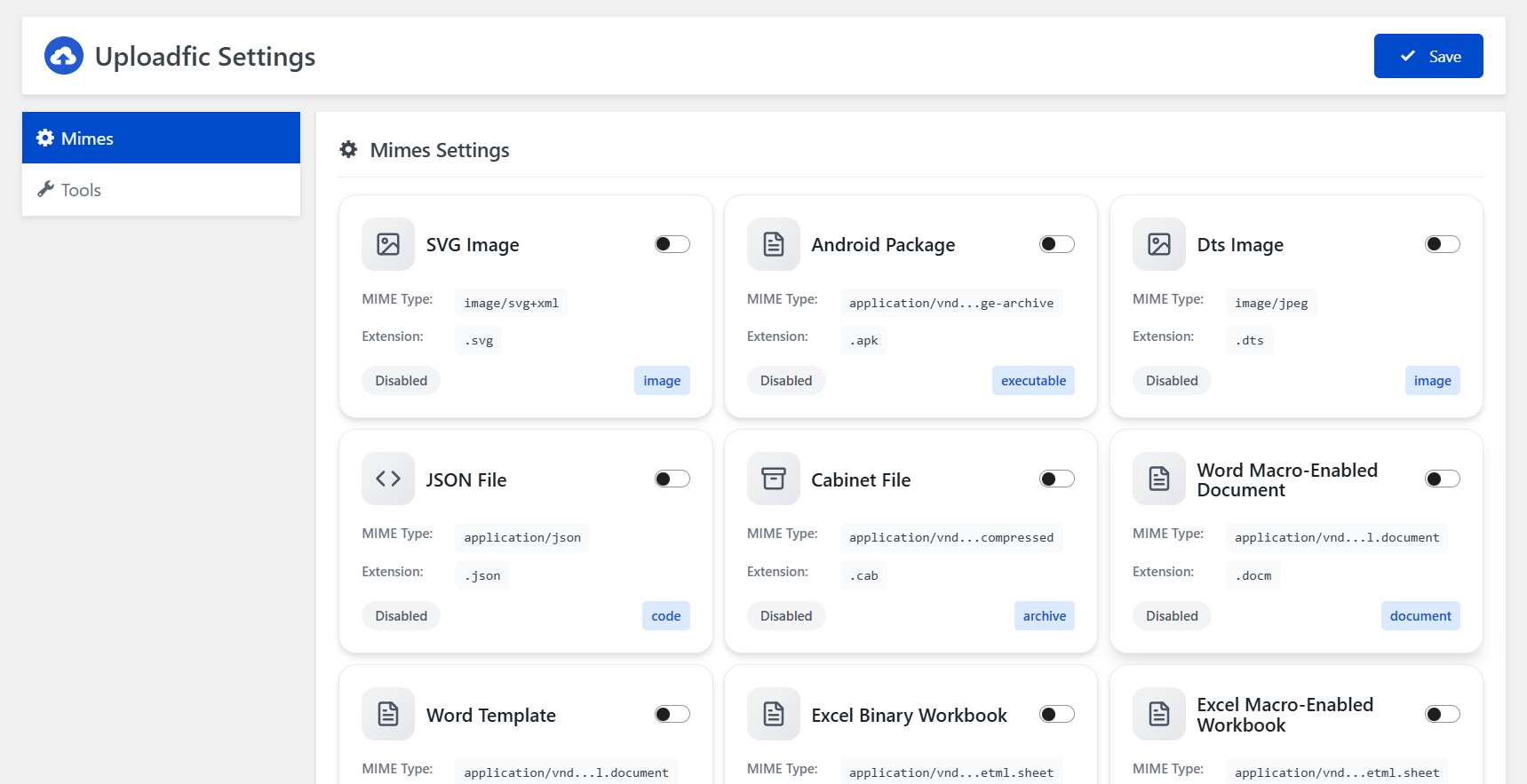
🖼️ Modern Format Support – Full compatibility with SVG, EXE, ICO, JSON, HTML, and other popular file types.
🚫 Bypass Upload Limits ( New ⚡ ) – Override WordPress’s default restrictions without touching core files. It’s working based on the server configuration.
🧰 Zero Coding Needed – Intuitive interface designed for both beginners and advanced users.
🔐 Secure Upload Filtering – Built-in validation to block unsafe or unsupported file uploads.
➕ Custom MIME Type Control ( Coming Soon ) – Easily define and manage your own MIME types with just a few clicks.
🌟 Benefits of Uploadfic
✅ Unlock Restricted File Types – Enable uploads for file formats normally blocked by WordPress, like SVG, DOCX, EXE, and more.
✅ Save Time & Effort – No need for manual code edits or plugins for each file type—manage everything from one place.
✅ Boost Workflow Flexibility – Perfect for developers, designers, and content creators needing to upload a wide range of assets.
✅ Enhance Site Functionality – Expand what your WordPress site can handle by supporting more file types for media, tools, or documents.
✅ Improve File Management – Centralized control over all MIME types makes your media library more powerful and versatile.
✅ Stay Secure – Upload with confidence thanks to built-in checks that keep malicious files out.
📘 How to use ?
- Navigate WordPress Dashboard to
UploadficMenu. - Enable Your Preferred Mime Type & Click Save Button on the Header.
Installation
- Install Uploadfic by uploading the
uploadficzip file to the/wp-content/plugins/directory. - Activate
Uploadficthrough thePluginsmenu in WordPress.
Frequently asked questions
Can I upload svg?
Yes.
I need more help please!
Please use the support forum.
What file types can I upload to WordPress by default?
By default, WordPress only allows cetain types of files to be uploaded to a website for security reasons.
Can I Upload SVG to WordPress?
WordPress by default doesn’t allow uploading SVG files. Using Upload Any MIME Types plugin, you can now upload and use SVG files in WordPress.
Can I Upload HEIC to WordPress?
WordPress by default doesn’t allow uploading HEIC image files. This plugin unlocks compatibility so you can upload and display stunning HEIC photos with ease.
Will This Plugin Allow Custom Font Files Upload?
WordPress by default doesn’t allow uploading some font files like TTF, OTF, WOFF, EOT, and others. This plugin opens the gate to easy custom font upload.
Can I Upload APK Files to WordPress?
WordPress by default doesn’t allow uploading APK files. This plugin removes that barrier, letting you share Android app packages directly from your site.
Can I Upload Figma Files to WordPress?
WordPress by default doesn’t allow uploading Figma (.fig) files. With this plugin, you can upload design files just like images or documents.
Can I Upload GPX Files to WordPress?
WordPress by default doesn’t allow uploading GPX files. This plugin enables GPS file uploads so you can share maps, routes, and location data instantly.
Can I Upload EPUB Files to WordPress?
WordPress by default doesn’t allow uploading EPUB files. This plugin makes it simple to upload eBooks and digital publications in just a few clicks.
Help! I need support or have an issue.
Support is available for File Upload Types via the WordPress.org support forums.
Changelog
1.0.1
- Max file upload limit has been added
1.0.0
- Initial version
Screenshots
For developers
Is this your plugin? Show off the numbers.
Add a live badge to your site, docs or GitHub README. It updates on its own — no account needed.
Best Uploadfic alternatives
All file upload plugins →





FAQ
Uploadfic – Upload Any Mime Types: quick answers
Straight answers, pulled from live WordPress.org data.
Live data from WordPress.org · checked Sep 27, 2026
Is Uploadfic free?
Yes. Uploadfic is free to download and use from the official WordPress.org plugin directory.
Is Uploadfic safe to use in 2026?
Uploadfic is a solid plugin choice in 2026, with a few things worth checking first. It runs on 10+ sites and was last updated 1 month ago, and scores 62/100 on our health check.
How many websites use Uploadfic?
Uploadfic is active on 10+ WordPress websites and has been downloaded 295 times since it launched in July 2026. It was downloaded 97 times in the last 30 days.
Does Uploadfic work with WordPress 7.1?
Yes. The developer has tested Uploadfic up to WordPress 7.1.2, the latest release. It requires WordPress 5.2 or newer.
What PHP version does Uploadfic need?
Uploadfic requires PHP 7.4 or higher. Most hosts run PHP 8.x today, so it works on any modern WordPress hosting.
When was Uploadfic last updated?
The latest version, 1.0.1, was released on August 22, 2026 (1 month ago).
Who makes Uploadfic?
Uploadfic is developed and maintained by pluginfic.
What are the best alternatives to Uploadfic?
The most popular alternatives to Uploadfic are File Upload Types by WPForms (40K+ installs), Iptanus File Upload (10K+ installs) and Shared Files (4K+ installs).
Powered by PageForge
Want thousands of pages that rank like these? Build them in an afternoon.
This directory runs on the same engine as PageForge. Turn any spreadsheet, CSV or API into thousands of fast, SEO-ready WordPress pages — with schema, internal links and AI-written copy baked in.
- CSV, Google Sheets & API data sources
- AI content, schema & internal links per page
- Works with Elementor, Gutenberg, Yoast & Rank Math
- Free on WordPress.org — no credit card


