


UpdatePulse Server
Run your own update server for plugins, themes or any other software: manage packages & licenses, and provide updates to your users.

Use with caution
UpdatePulse Server works, but test it on a staging site before relying on it in 2026. It runs on 30+ sites, is rated 5/5 and was last updated 6 months ago, and scores 46/100 on our health check.
- Small user base (30+ active installs)
- Very few reviews so far
- Only tested up to WordPress 6.7 (latest is 7.1)
How does it stack up?
Side-by-side on installs, updates, ratings & support



Daily downloads
Download spikes usually follow a new release — each site that auto-updates counts as a download.
Rankings
Where UpdatePulse Server stands todayWordPress.org search rankings
Live position in the plugin search, top 100| Keyword | Position |
|---|---|
| license | >100 |
| Plugin Updates | >100 |
| theme updates | >100 |
| Wordpress updates | >100 |
Version adoption
Share of active sites per release.
Rating breakdown
★★★★★★★★★★ 5 from 1 reviews
About UpdatePulse Server
From the official readme · v1.0.12Description
UpdatePulse Server allows developers to provide updates for software packages, including WordPress plugins and themes.
Some example use cases:
- provide updates for premium plugins or themes, with a license key
- provide custom theme or plugin updates to clients of a webdesign agency and not intended for the general public
- provide updates for a desktop software that integrates with UpdatePulse Server’s update and license API
Packages may be either uploaded directly, or downloaded automatically from configured Version Control Systems, public or private.
Package updates may require a license ; both packages and licenses can be managed through an API or a user interface within UpdatePulse Server.
Important notes
The target audience of this plugin is developers, not end-users.
Zip PHP extension is required.
For more information, available APIs, functions, actions and filters, see the plugin’s full documentation.
Make sure to read the full documentation and the content of the “Help” tab under “UpdatePulse Server” settings before opening an issue or contacting the author.
Overview
This plugin adds the following major features to WordPress:
- Package management: to manage update packages, showing a listing with Package Name, Version, Type, File Name, Size, File Modified and License Status; includes bulk operations to delete and download, and the ability to delete all the packages.
- Add Packages: Upload update packages from a local machine to the server, or download them to the server from a Version Control System.
- Version Control Systems: Instead of manually uploading packages, use Version Control Systems to host packages, and download them to UpdatePulse Server automatically. Supports Bitbucket, Github and Gitlab, as well as self-hosted installations of Gitlab.
- Cloud Storage: Instead of storing packages on the file system where UpdatePulse Server is installed, they can be stored on a cloud storage service, as long as it is compatible with Amazon S3’s API. Examples: Amazon S3, Cloudflare R2, Backblaze B2, MinIO, and many more!
- UpdatePulse Server does not install executable code from the Version Control System onto your installation of WordPress, and does not track your activity. It is designed to only store packages and licenses, and to provide updates when they are requested.
- Licenses: manage licenses with License Key, Registered Email, Status, Package Type, Package Slug, Creation Date, and Expiration Date; add and edit them with a form, or use the API for more control. Licenses prevent packages from being updated without a valid license. Licenses Keys are generated automatically by default and the values are unguessable (it is recommended to keep the default). When checking the validity of licenses, an extra license signature is also checked to prevent the use of a license on more than the configured allowed domains.
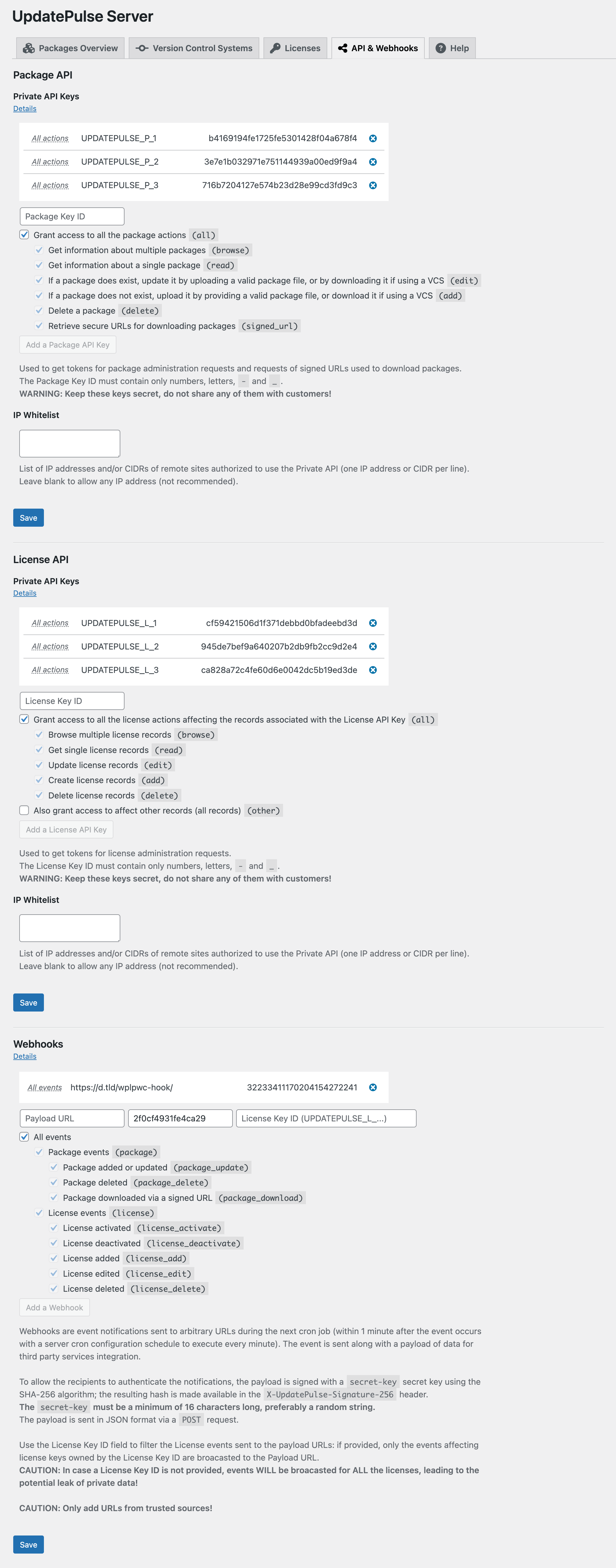
- API: UpdatePulse Server provides APIs to manage packages and licenses. The APIs keys are secured with a system of tokens: the API keys are never shared over the network, acquiring a token requires signed payloads, and the tokens have a limited lifetime. For more details about tokens and security, see the Nonce API documentation.
To connect their plugins or themes and UpdatePulse Server, developers can find integration examples in the UpdatePulse Server Integration Examples repository – theme and plugin examples rely heavily on the popular Plugin Update Checker by Yahnis Elsts.
Companion Plugins
The following plugins are compatible with UpdatePulse Server and can be used to extend its functionality:
* Updatepulse Blocks: a seamless way to display packages from UpdatePulse Server directly within your site using the WordPress Block Editor or shortcodes.
* UpdatePulse for WooCommerce: a WooCommerce connector for UpdatePulse Server, allowing you to sell licensed packages through your WooCommerce store, either on the same WordPress installation or a separate store site.
Developers are encouraged to build plugins and themes integrated with UpdatePulse Server, leveraging its publicly available functions, actions and filters, or by making use of the provided APIs.
If you wish to see your plugin added to this list, please contact the author.
Troubleshooting
Please read the plugin FAQ, there is a lot that may help you there!
UpdatePulse Server is regularly updated for compatibility, and bug reports are welcome, preferably on Github. Pull Requests from developers following the WordPress Coding Standards (WordPress-Extra ruleset) are highly appreciated and will be credited upon merge.
In case the plugin has not been updated for a while, no panic: it simply means the compatibility flag has not been changed, and it very likely remains compatible with the latest version of WordPress. This is because it was designed with long-term compatibility in mind from the ground up.
Each bug report will be addressed in a timely manner if properly documented – previously unanswered general inquiries and issues reported on the WordPress forum may take significantly longer to receive a response (if any).
Only issues occurring with WordPress core, WooCommerce, and default WordPress themes (incl. WooCommerce Storefront) will be considered.
Troubleshooting involving 3rd-party plugins or themes will not be addressed on the WordPress support forum.
Installation
This section describes how to install the plugin and get it working.
- Upload the plugin files to the
/wp-content/plugins/updatepulse-serverdirectory, or install the plugin through the WordPress plugins screen directly - Activate the plugin through the ‘Plugins’ screen in WordPress
- Edit plugin settings
Frequently asked questions
How do I use UpdatePulse Server?
UpdatePulse Server is a plugin for developers, not end-users. It allows developers to provide updates for their software packages, including WordPress plugins and themes. For more information on how to use it, please refer to the documentation.
How do I connect my plugin/theme to UpdatePulse Server?
To connect your plugin or theme to UpdatePulse Server, you can either use one of the integration examples provided in the UpdatePulse Server Integration Examples, or develop your own on top of Plugin Update Checker. If you decide to develop your own, the key is to call the UpdatePulse Server Update API to check for updates, with the necessary information in the request. The API will return a JSON response with the update information, which you can then use to display the update notification, check for a license for your plugin or theme, and download the update package.
How does the license system work?
The license system allows developers to manage licenses for their software packages. Licenses prevent packages from being updated without a valid license. License Keys are generated automatically by default and the values are unguessable (it is recommended to keep the default). When checking the validity of licenses, an extra license signature is also checked to prevent the use of a license on more than the configured allowed domains.
How do I manage packages?
You can manage packages through the UpdatePulse Server interface, through the API, or by letting the plugin download them automatically from a Version Control System (preferred). The interface allows you to view a listing of packages, view details, delete, download, and upload new packages manually (discouraged).
I have a problem with the plugin, what should I do?
If you have a problem with the plugin, please check the FAQ and the documentation first. Then, make sure to flush your WordPress permalinks (Settings > Permalinks > Save Changes), clear your browser cache, and clear any caching plugins you may have installed. If you are using a CDN, make sure to clear the cache there as well. Make sure you are not trying to update a package installed alongside UpdatePulse Server – the package must be installed on a different WordPress installation. If you still have a problem, please open an issue on GitHub with a detailed description of the problem…
How can I sell package licenses?
UpdatePulse Server does not provide a built-in way to sell licenses. To sell licenses, your chosen e-commerce solution must be integrated with UpdatePulse Server License API. This can be done by creating a custom plugin that connects your e-commerce solution with UpdatePulse Server License API, or by using an existing integration if available. At this time, there is no official e-commerce integration plugin for UpdatePulse Server.
Is UpdatePulse Server compatible with X Plugin/Theme? with multisite?
UpdatePulse Server by itself does not provide any frontend functionality to your users. As a general rule, the more isolated UpdatePulse Server is from the rest of your ecosystem, the better, as it allows the server to perform without interference: it is not meant to be used alongside other plugins or themes, but more as a standalone server. UpdatePulse Server is not meant to be used in a multisite environment either: it is a server delivering packages and licenses to clients, and has no place in a multisite environment. If you still decide to use UpdatePulse Server on a website not solely…
Changelog
For installations using VCS in schedule mode (as opposed to webhook mode): - delete all packages and re-register them - remove any remaining json files from wp-content/uploads/updatepulse-server/metadata folder - use the "Force Clear & Reschedule" button in the VCS settings
1.0.12
- Convert Bitbucket authentication from deprecated App Password to API Tokens with scopes. This is a breaking change for users using Bitbucket with App Passwords, who will need to create API Tokens and update their VCS settings.
1.0.11
- Fix issue Add License Button missing from Licenses tab
- Fix
Webhook_API::fire_webhookmethod to handle base64-encoded compressed payloads - Fix missing
upserv_deactivate_license_payloadhook inLicense_APIclass - Fix issue Reactivation blocked after reinstalling plugin or website
1.0.10
- Introduce constant
PUC_FORCE_BRANCHto bypass tags & releases in VCS detection strategies - Minor fix
- Fix activation issue –
WP_Filesystemcall
1.0.9
- Schedule mode: remove package metadata files when deleting packages
- Schedule mode: make sure to reinitialise the update checker to avoid slug conflicts
1.0.8
- Fix scheduled mode package overrides. After update, if using this mode: delete all packages and re-register them ; remove any remaining
jsonfiles fromwp-content/uploads/updatepulse-server/metadatafolder ; use the “Force Clear & Reschedule” button in the VCS settings - Fix VCS candidates with webhook mode
1.0.7
- Full documentation of all classes and functions
Screenshots



For developers
Is this your plugin? Show off the numbers.
Add a live badge to your site, docs or GitHub README. It updates on its own — no account needed.
Best UpdatePulse Server alternatives
All license plugins →




FAQ
UpdatePulse Server: quick answers
Straight answers, pulled from live WordPress.org data.
Live data from WordPress.org · checked Oct 6, 2026
Is UpdatePulse Server free?
Yes. UpdatePulse Server is free to download and use from the official WordPress.org plugin directory.
Is UpdatePulse Server safe to use in 2026?
UpdatePulse Server works, but test it on a staging site before relying on it in 2026. It runs on 30+ sites, is rated 5/5 and was last updated 6 months ago, and scores 46/100 on our health check.
How many websites use UpdatePulse Server?
UpdatePulse Server is active on 30+ WordPress websites and has been downloaded 1,551 times since it launched in February 2025. It was downloaded 109 times in the last 30 days.
Does UpdatePulse Server work with WordPress 7.1?
UpdatePulse Server is officially tested up to WordPress 6.7.9, while the latest release is 7.1.2. It may still work, but try it on a staging site first.
What PHP version does UpdatePulse Server need?
UpdatePulse Server requires PHP 8.0 or higher. Most hosts run PHP 8.x today, so it works on any modern WordPress hosting.
When was UpdatePulse Server last updated?
The latest version, 1.0.12, was released on April 18, 2026 (6 months ago).
Who makes UpdatePulse Server?
UpdatePulse Server is developed and maintained by Alexandre Froger.
What are the best alternatives to UpdatePulse Server?
The most popular alternatives to UpdatePulse Server are License For Envato (9K+ installs), Envato Toolkit (5K+ installs) and Serial Numbers (1K+ installs).
Powered by PageForge
Want thousands of pages that rank like these? Build them in an afternoon.
This directory runs on the same engine as PageForge. Turn any spreadsheet, CSV or API into thousands of fast, SEO-ready WordPress pages — with schema, internal links and AI-written copy baked in.
- CSV, Google Sheets & API data sources
- AI content, schema & internal links per page
- Works with Elementor, Gutenberg, Yoast & Rank Math
- Free on WordPress.org — no credit card


