



Envato Toolkit
Validate purchase code, check for item update & support expiration, download newest version, lookup for user details, search for Envato item id & more

Consider an alternative
Envato Toolkit shows warning signs in 2026 — compare the alternatives below before installing. It runs on 5K+ sites, is rated 2.8/5 and was last updated 5 years ago, and scores 32/100 on our health check.
- Low rating so far — 2.8/5 from only 9 reviews
- No update in 5 years
- Only tested up to WordPress 5.7 (latest is 7.1)
How does it stack up?
Side-by-side on installs, updates, ratings & support



Daily downloads
Download spikes usually follow a new release — each site that auto-updates counts as a download.
Rankings
Where Envato Toolkit stands todayWordPress.org search rankings
Live position in the plugin search, top 100| Keyword | Position |
|---|---|
| api | >100 |
| envato | #43 |
| license | >100 |
| purchase validator | #55 |
| update checker | >100 |
Version adoption
Share of active sites per release.
Rating breakdown
★★★★★★★★★★ 2.8 from 9 reviews
About Envato Toolkit
From the official readme · v1.4Description
It is a 3 files library + Visual UI, to validate the purchase codes of your customers, get details about specific Envato user (country, city, total followers, total sales, avatar), get his license purchase and support expiration dates, license type he bought, check for updates of purchased plugins and themes and get the download links for them.
Plus – this library has Envato Item Id search feature by providing plugin’s or theme’s name and author. So – yes, this is a tool you, as a developer / author, have been looking for months.
If you are looking for the library-only version to integrate into your plugin / theme, it’s on GitHub:
Envato Toolkit (Standalone)
The main purpose of this plugin is to help you to start much easier without having a headache trying to understand WordPress - Envato Market plugins code, that is the only one built by Envato, and has so complicated and unclear code, that you never get how it works (see example below).
When I tried to create plugin’s [Check for Update] and [Validate Purchase Code] feature-buttons in the plugin myself, and I saw the code of the WordPress - Envato Market plugin, I was shocked how badly it is written and how you should not to code.
For example – you would like to give an error message, if Envato user token is empty, which is a required string, i.e. – pAA0aBCdeFGhiJKlmNOpqRStuVWxyZ44. If you like K.I.S.S., PSR-2, D.R.Y., clean code coding standards and paradigms, you’d probably just have these five lines of code, so that every developer would get it:
$token = get_user_meta(get_current_user_id(), 'envato_token', TRUE);
if($token == "")
{
    return new \WP_Error('api_token_error', __('An API token is required.', 'envato-toolkit'));
}
Now lets see how the same task traceback looks like in WordPress - Envato Market plugin:
-
[Api.php -> request(..)]Check if the token is empty:if ( empty( $token ) ) { return new WP_Error( 'api_token_error', __( 'An API token is required.', 'envato-market' ) ); } -
[Api.php -> request(..)]Parse it from another string:$token = trim( str_replace( 'Bearer', '', $args['headers']['Authorization'] ) ); -
[Api.php -> request(..)]Parse it one more time – this time from arguments array:public function request( $url, $args = array() ) { $defaults = array( 'timeout' => 20, ); $args = wp_parse_args( $args, $defaults ); } -
[Api.php -> download(..)]Transfer the token variable one more time – this time via params:class Envato_Market_API { public function download( $id, $args = array() ) { $url = 'https://api.envato.com/v2/market/buyer/download?item_id=' . $id . '&shorten_url=true'; return $this->request( $url, $args ); } } -
[admin.php -> maybe_deferred_download(..)]Pass it again – this time get it to args array from another method call:function maybe_deferred_download( $options ) { $args = $this->set_bearer_args(); $options['package'] = envato_market()->api()->download( $vars['item_id'], $args ); return $options; } -
[admin.php -> set_bearer_args(..)]Wrap the token into multi-dimensional string array:$args = array( 'headers' => array( 'Authorization' => 'Bearer ' . $token, ), ); -
[admin.php -> set_bearer_args(..)]Pass the wrapped token one more time – this time get it from get_option:foreach ( envato_market()->get_option( 'items', array() ) as $item ) { if ( $item['id'] === $id ) { $token = $item['token']; break; } } -
[admin.php -> get_option(..)]So what’s in thisget_option? – Correct, another call to another method –get_options():public function get_option( $name, $default = '' ) { $options = self::get_options(); $name = self::sanitize_key( $name ); return isset( $options[ $name ] ) ? $options[ $name ] : $default; } -
[admin.php -> get_options()]Finally, after almost 10 steps in the tree, we are finally getting the original
WordPress method call, but now I’m getting confused again – what is thatoption_namevariable here:public function get_options() { return get_option( $this->option_name, array() ); } -
[envato-market.php -> init_globals()]Here is it is – theoption namekey name is… Oh wait…
No it is not here it. It is equals to another variable, who is is put
in another clean-up function – look like I’m keep seeing this for the 2 time in the tree – the sanitization of sanitization:$this->option_name = self::sanitize_key( $this->slug ); -
[envato-market.php -> init_globals()]So theoption namekey name is the name of$this->slug.
Now lets see what is the value of$this->slug:$this->slug = 'envato-market';
So it takes eleven (!) steps to understand one variable. And the whole code of that plugin is like that. The example above was the headache I had, until I realized that I must write a new Envato API Management Toolkit, instead of trying to use what Envato is giving, because otherwise I won’t get anything working ever.
And, I believe, that many other developers had the same issue when tried to create update check feature for their plugins or themes.
So instead of using that library for myself, I decided that I want to help all these developers to save their time, and I’m sharing this code with you. I’m releasing it under MIT license, which allows you to use this code in your plugin without any restrictions for both – free and commercial use.
Plus – I’m giving a promise to you, that this plugin is and will always be 100% free, without any ads, ‘Subscribe’, ‘Follow us’, ‘Check our page’, ‘Get Pro Version’ or similar links.
If you created in hi-quality code a valuable additional functionality to the library and you want to share it with everyone – I’m open here to support your efforts, and add your code to the plugin’s library, so that we all together make this plugin better for authors – the better is the plugin, the better plugins authors will make for their customers. The better quality products we will have on the internet, the happier people will be all over the world.
Finally – the code is poetry – the better is the plugin, the happier is the world.
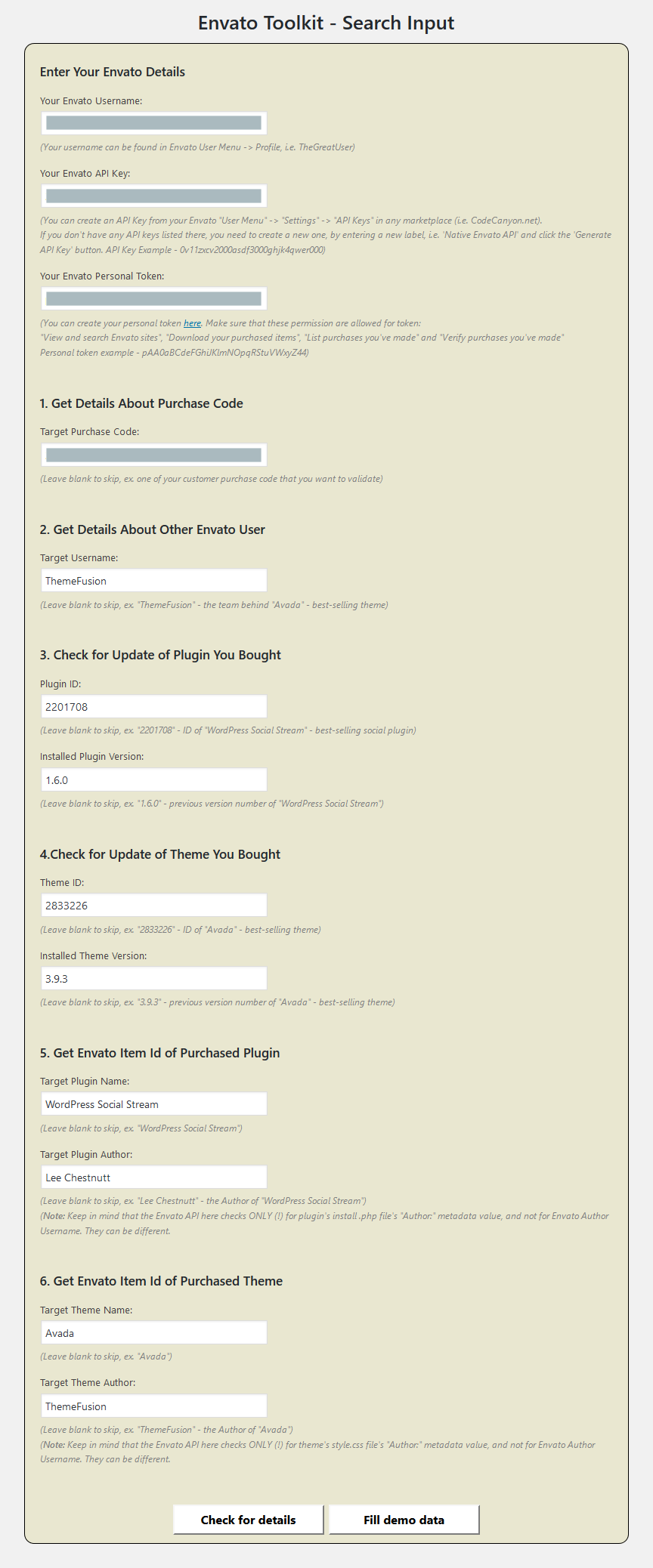
The pseudo-code of example output of the plugin is this:
Details about you:
----------------------------------------------------------
List of all different plugins you bought:
<?php foreach($plugins AS $pluginId => $plugin): ?>
    <?='Plugin Id: '.$pluginId.', Name: '.$plugin['name'];?>, Licenses:
    <?php foreach($plugin['licenses'] AS $license): ?>
        Code: <?=$license['purchase_code'];?>,
        License: <?=$license['license'];?>,
        Purchased: <?=$license['license_purchase_date'];?> <?=$license['license_purchase_time'];?>,
        Expires: <?=$license['support_expiration_date'];?> <?=$license['support_expiration_time'];?>,
        Support Status: <?=$license['support_active'];?>
    <?php endforeach; ?>
<?php endforeach; ?>

List of all different themes you bought:
<?php foreach($themes AS $themeId => $theme): ?>
    <?='Theme Id: '.$themeId.', Name: '.$theme['name'];?>, Licenses:
    <?php foreach($theme['licenses'] AS $license): ?>
        Code: <?=$license['purchase_code'];?>,
        License: <?=$license['license'];?>,
        Purchased: <?=$license['license_purchase_date'];?> <?=$license['license_purchase_time'];?>,
        Expires: <?=$license['support_expiration_date'];?> <?=$license['support_expiration_time'];?>,
        Status: <?=$license['support_active'] == 1 ? "Supported" : "Support Expired";?>
    <?php endforeach; ?>
<?php endforeach; ?>

Your summary:
Your location is <?=$authorCity;?>, <?=$authorCountry;?>.
You've sold your items <?=$authorSales;?> times and you have <?=$authorFollowers;?> followers on Envato.

1. Your Customer's License Details
----------------------------------------------------------
Purchase Code: <?=$targetPurchaseCode;?>
Is Valid License: <?=$isValidTargetLicense ? 'Yes' : 'No';?>
Buyer Username: <?=$targetLicenseBuyer;?>
License Type: <?=$targetLicenseType;?>
Purchased At: <?=$targetLicensePurchasedAt;?>
Supported Until: <?=$targetLicenseSupportedUntil;?>
Support Status: <?=$targetLicenseSupportActive == 1 ? "Supported" : "Support Expired";?>

2. Details About Target Envato User - <?=$targetUsername;?>
----------------------------------------------------------
<?=$targetUsername;?> is located in <?=$targetUserCity;?>, <?=$targetUserCountry;?>.
He sold his items <?=$targetUserSales;?> times and has <?=$targetUserFollowers;?> followers on Envato.

3. Status of Purchased Plugin ID - <?=$targetPluginId;?>
----------------------------------------------------------
Plugin Name: <?=$nameOfTargetPluginId;?>
Plugin Update Available: <?=$pluginUpdateAvailable ? 'Yes' : 'No';?>
Installed Plugin Version: <?=$installedPluginVersion;?>
Available Plugin Version: <?=$availablePluginVersion;?>
Plugin Update Download URL:
<a href="<?=$pluginUpdateDownloadUrl;?>" target="_blank" title="Download newest version">Download newest version</a>

4. Status of Purchased Theme ID - <?=$targetThemeId;?>:
----------------------------------------------------------
Theme Name: <?=$nameOfTargetThemeId;?>
Theme Update Available: <?=$themeUpdateAvailable ? 'Yes' : 'No';?>
Installed Theme Version: <?=$installedThemeVersion;?>
Available Theme Version: <?=$availableThemeVersion;?>
Theme Update Download URL:
<a href="<?=$themeUpdateDownloadUrl;?>" target="_blank" title="Download newest version">Download newest version</a>

5. Envato Item Id of Purchased Plugin
----------------------------------------------------------
Searched for Name: <?=$targetPluginName;?>
Searched for Author: <?=$targetPluginAuthor;?>
Found Plugin Id: <?=$foundPluginId;?>

6. Envato Item Id of Purchased Theme
----------------------------------------------------------
Searched for Name: <?=$targetThemeName;?>
Searched for Author: <?=$targetThemeAuthor;?>
Found Theme Id: <?=$foundThemeId;?>
And the example input of the output above, it this:
$objToolkit = new EnvatoAPIManager($toolkitSettings);

// Details about you
$purchasedPlugins = $objToolkit->getPurchasedPluginsWithDetails();
$plugins = array();
foreach($purchasedPlugins AS $pluginId => $purchasedPlugin)
{
    $purchasedPlugin['licenses'] = $objToolkit->getLicensesByItemId($pluginId);
    $plugins[$pluginId] = $purchasedPlugin;
}

$purchasedThemes = $objToolkit->getPurchasedThemesWithDetails();
$themes = array();
foreach($purchasedThemes AS $themeId => $purchasedTheme)
{
    $purchasedTheme['licenses'] = $objToolkit->getLicensesByItemId($themeId);
    $themes[$themeId] = $purchasedTheme;
}

$authorDetails = $objToolkit->getUserDetails($sanitizedEnvatoUsername);
// View vars
$view->plugins = $plugins;
$view->themes = $themes;
if($authorDetails != FALSE)
{
    $view->authorCity = $authorDetails['city'];
    $view->authorCountry = $authorDetails['country'];
    $view->authorSales = $authorDetails['sales'];
    $view->authorFollowers = $authorDetails['followers'];
} else
{
    $view->authorCity = '';
    $view->authorCountry = '';
    $view->authorSales = 0;
    $view->authorFollowers = 0;
}

// 1. Details About Target Purchase Code
$targetLicenseDetails = $objToolkit->getLicenseDetails($sanitizedTargetPurchaseCode);
// View vars
$view->targetPurchaseCode = esc_html($sanitizedTargetPurchaseCode); // Ready for print
$view->isValidTargetLicense = $objToolkit->isValidLicense($sanitizedTargetPurchaseCode);
$view->targetLicenseBuyer = $targetLicenseDetails['buyer_username'];
$view->targetLicense = $targetLicenseDetails['license'];
$view->targetLicensePurchasedAt = $targetLicenseDetails['license_purchase_date'].' '.$targetLicenseDetails['license_purchase_time'];
$view->targetLicenseSupportedUntil = $targetLicenseDetails['support_expiration_date'].' '.$targetLicenseDetails['support_expiration_time'];
$view->targetLicenseSupportActive = $targetLicenseDetails['support_active'];

// 2. Details About Target Envato User
$targetUserDetails = $objToolkit->getUserDetails($sanitizedTargetUsername);
// View vars
$view->targetUsername = esc_html($sanitizedTargetUsername); // Ready for print
$view->targetUserCity = $targetUserDetails['city'];
$view->targetUserCountry = $targetUserDetails['country'];
$view->targetUserSales = $targetUserDetails['sales'];
$view->targetUserFollowers = $targetUserDetails['followers'];

// 3. Status of Purchased Plugin ID
$availablePluginVersion = $objToolkit->getAvailableVersion($sanitizedTargetPluginId);
$pluginUpdateAvailable = version_compare($sanitizedInstalledPluginVersion, $availablePluginVersion, '<');
// View vars
$view->targetPluginId = intval($sanitizedTargetPluginId); // Ready for print
$view->installedPluginVersion = esc_html($sanitizedInstalledPluginVersion); // Ready for print
$view->nameOfTargetPluginId = esc_html($objToolkit->getItemName($sanitizedTargetPluginId));
$view->availablePluginVersion = $availablePluginVersion;
$view->pluginUpdateAvailable = $pluginUpdateAvailable;
$view->pluginUpdateDownloadUrl = $pluginUpdateAvailable ? $objToolkit->getDownloadUrlIfPurchased($sanitizedTargetPluginId) : '';

// 4. Status of Purchased Theme ID
$availableThemeVersion = $objToolkit->getAvailableVersion($sanitizedTargetThemeId);
$themeUpdateAvailable = version_compare($sanitizedInstalledThemeVersion, $availableThemeVersion, '<');
// View vars
$view->targetThemeId = intval($sanitizedTargetThemeId); // Ready for print
$view->installedThemeVersion = esc_html($sanitizedInstalledThemeVersion); // Ready for print
$view->nameOfTargetThemeId = esc_html($objToolkit->getItemName($sanitizedTargetThemeId));
$view->availableThemeVersion = $availableThemeVersion;
$view->themeUpdateAvailable = $themeUpdateAvailable;
$view->themeUpdateDownloadUrl = $themeUpdateAvailable ? $objToolkit->getDownloadUrlIfPurchased($sanitizedTargetThemeId) : '';

// 5. Envato Item Id of Purchased Plugin
$view->targetPluginName = esc_html($sanitizedTargetPluginName); // Ready for print
$view->targetPluginAuthor = esc_html($sanitizedTargetPluginAuthor); // Ready for print
$view->foundPluginId = $objToolkit->getItemIdByPluginAndAuthorIfPurchased($sanitizedTargetPluginName, $sanitizedTargetPluginAuthor);

// 6. Envato Item Id of Purchased Theme
$view->targetThemeName = esc_html($sanitizedTargetThemeName); // Ready for print
$view->targetThemeAuthor = esc_html($sanitizedTargetThemeAuthor); // Ready for print
$view->foundThemeId = $objToolkit->getItemIdByThemeAndAuthorIfPurchased($sanitizedTargetThemeName, $sanitizedTargetThemeAuthor);
Installation
This section describes how to install the plugin and get it working.
- Upload
EnvatoToolkit(ortoolkit-for-envato) to the/wp-content/plugins/directory. - Activate the plugin through the ‘Plugins’ menu in WordPress.
- Go to admin menu item
EnvatoToolkitand enter your Envato Username, Envato API Key and Envato Private Token. - That’s it.
Frequently asked questions
How does it work?
This plugin uses both – Envato Edge API and Envato Market API to retrieve required data automatically, without any need of server-in-the-middle. So there is no need to save your head revision number or last version on your server, it will get that that automatically from Envato via it’s API.
Changelog
Just drag and drop new plugin folder.
1.4
- Improved debugging.
1.3
- Added support for purchase time and license expiration time. Plus split to two fields on ‘license_type’ to ‘license’ and ‘license_type’.
1.2
- Added support for the situations if Envato API is down, plus added detailed error message handler.
1.1
- Removed 1 redundant API class method that should be handled by the controller, not a model. Plus, for security reasons, changelog.txt is no more in the plugin folder (so that there would be no way to discover the actual plugin version by public.
1.0
- Initial release!
Screenshots

For developers
Is this your plugin? Show off the numbers.
Add a live badge to your site, docs or GitHub README. It updates on its own — no account needed.
Best Envato Toolkit alternatives
All api plugins →





FAQ
Envato Toolkit: quick answers
Straight answers, pulled from live WordPress.org data.
Live data from WordPress.org · checked Sep 27, 2026
Is Envato Toolkit free?
Yes. Envato Toolkit is free to download and use from the official WordPress.org plugin directory.
Is Envato Toolkit safe to use in 2026?
Envato Toolkit shows warning signs in 2026 — compare the alternatives below before installing. It runs on 5K+ sites, is rated 2.8/5 and was last updated 5 years ago, and scores 32/100 on our health check.
How many websites use Envato Toolkit?
Envato Toolkit is active on 5K+ WordPress websites and has been downloaded 127,915 times since it launched in June 2017. It was downloaded 360 times in the last 30 days.
Does Envato Toolkit work with WordPress 7.1?
Envato Toolkit is officially tested up to WordPress 5.7.19, while the latest release is 7.1.2. It may still work, but try it on a staging site first.
What PHP version does Envato Toolkit need?
Envato Toolkit requires PHP 5.4 or higher. Most hosts run PHP 8.x today, so it works on any modern WordPress hosting.
When was Envato Toolkit last updated?
The latest version, 1.4, was released on April 26, 2021 (5 years ago).
Who makes Envato Toolkit?
Envato Toolkit is developed and maintained by KestutisIT.
What are the best alternatives to Envato Toolkit?
The most popular alternatives to Envato Toolkit are WP Consent API (200K+ installs), Disable REST API (80K+ installs) and Mailgun for WordPress (80K+ installs).
Powered by PageForge
Want thousands of pages that rank like these? Build them in an afternoon.
This directory runs on the same engine as PageForge. Turn any spreadsheet, CSV or API into thousands of fast, SEO-ready WordPress pages — with schema, internal links and AI-written copy baked in.
- CSV, Google Sheets & API data sources
- AI content, schema & internal links per page
- Works with Elementor, Gutenberg, Yoast & Rank Math
- Free on WordPress.org — no credit card


