


LAPDI Easy Dev Framework
Create plugins quickly using our framework.

Solid choice
LAPDI Easy Dev Framework is a solid plugin choice in 2026, with a few things worth checking first. It runs on 100+ sites, is rated 5/5 and was last updated 2 months ago, and scores 66/100 on our health check.
- Small user base (100+ active installs)
- Very few reviews so far
How does it stack up?
Side-by-side on installs, updates, ratings & support



Daily downloads
Download spikes usually follow a new release — each site that auto-updates counts as a download.
Rankings
Where LAPDI Easy Dev Framework stands todayWordPress.org search rankings
Live position in the plugin search, top 100| Keyword | Position |
|---|---|
| developer | >100 |
| framework | #17 |
| object oriented | #5 |
| OO | #2 |
| tutorial | >100 |
Version adoption
Share of active sites per release.
Rating breakdown
★★★★★★★★★★ 5 from 1 reviews
About LAPDI Easy Dev Framework
From the official readme · v2.0.10Description
LAPDI Easy Dev Framework is the shared framework for WordPress plugins created by Let A Pro Do IT!. It provides the reusable administration, settings, templating and compatibility layer used by LAPDI plugins.
Features Included
Upgrades will include fixes only, no new functionality
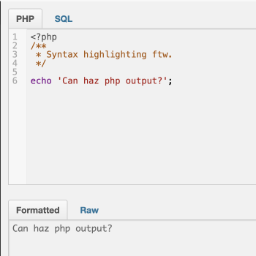
- Create functional plugins in as little as 5 lines of code
- Add additional
external URL linksto your plugins description - Use on as many plugin projects as necessary
- Add a
settings pagemenu for your plugin, and for future plugins - Supports the usage of your own
custom shortcodes - Verify user
uses correct version of WordPressfor your plugin - When ready to deploy, require users to install THIS plugin or bundle the code into YOUR plugin
Smartybundled into package (display html easily)- Smarty
form field templatesincluded for creating forms on the fly
Pro Version Features
Includes all of the features of the standard version AND…
- Checks for browser type and version (currently supports Chrome, Firefox, Safari, Opera and IE detection)
- Add form fields (metadata) to posts
- Add form fields (metadata) to categories
- Check for
incompatible pluginson activate - Check for
required pluginson activate - Deregister annoying scripts
- Display
favicons(ie Twitter, Facebook, GitHub, thumbs, folders, etc) easily in your html Format your htmlinto columns on the fly- Additional images and resources
Upgrades includes fixes and new functionality from our community of developers
Visit Let A Pro Do IT!’s Marketplace to download the Professional Version of Easy Dev Developers.
Installation
- Upload
tsp-easy-devto the/wp-content/plugins/directory - Activate the plugin through the ‘Plugins’ menu in WordPress
Usage
Please see the project documentation for setup and framework information.
Frequently asked questions
What happens when I delete the plugin?
Deleting Easy Dev Framework removes its framework settings and generated runtime files, including debug logs and compiled/cache files under its uploads directory. Dependent LAPDI plugins and their saved settings are not deleted, but they cannot run until Easy Dev Framework is installed and active again.
What is an Framework?
A framework provides a method of building software applications. Easy Dev is a framework for WordPress plugin development. Developers can use our simple framework instead of learning how to interface directly with WordPress. Easy Dev’s framework does all the hard work for you behind the scenes.
How do I use the framework? Where do I begin?
The project documentation and other LAPDI plugins provide working Easy Dev integration examples.
I’ve installed the plugin but nothing happens. What did I do wrong?
Nothing. The plugin runs in real-time behind the scenes. Once installed, there are no other steps to take. You use our plugin to build your own plugins.
Changelog
Branding: Replace primary logos and favicons
2.0.10
- Branding: Replace primary logos and favicons
2.0.9
- Cleanup: Register WordPress-native uninstall handling that removes framework settings and generated runtime files while preserving dependent plugins and their data.
- Branding: Replace the legacy runtime icons and administration-page logo with the current LAPDI identity.
2.0.8
- Branding. Present the plugin as LAPDI Easy Dev Framework so administrators can clearly identify its role as a shared dependency.
- Packaging. Include Composer package metadata alongside the production dependencies required at runtime.
- Documentation. Clarify the framework settings page and header labels, dependency purpose, and administrator/developer usage guidance.
2.0.7
- Documentation. Keep required-plugin guidance generic; dependent plugins declare Easy Dev through their own
Requires Pluginsheaders instead of maintaining a reverse-dependency list here.
2.0.6
- Compliance. Resolve plugin locations through WordPress metadata instead of hardcoded directories, filenames or direct dependency includes.
- Reliability. Use the real plugin basename so Easy Dev continues to work when its installation directory is renamed.
- Reliability. Stop invoking the uninstall routine during activation and use each dependent plugin’s discovered basename when deactivation is required.
- Reliability. Correct the reversed Smarty cache and compiled-template directory assignments.
- Privacy and filesystem safety. Keep framework debug, Smarty cache and compiled files under the WordPress uploads directory.
- Compatibility. Remove a PHP 8.5 parameter-order deprecation and enable TLS certificate verification by default for framework API requests.
- Maintenance. Prefix Easy Dev’s internal instance, settings, upload-directory and autoloader identifiers while retaining the established public framework API for existing plugins.
- Documentation. Replace obsolete lab links and remove development-only files from the release package.
2.0.5
- Rebrand. Refreshed icons and admin styling; the LAPDI Plugins catalog page now reads its plugin list from a local registry instead of fetching a remote JSON file.
- Compliance. Resolved all WordPress.org Plugin Check errors and warnings (missing ABSPATH guards, unescaped output, missing nonce verification, non-literal text-domain arguments, and more).
- Maintenance. Corrected plugin tags/contributors for WordPress.org import, updated the donate link, and documented the Git-to-SVN release workflow.
Screenshots

For developers
Is this your plugin? Show off the numbers.
Add a live badge to your site, docs or GitHub README. It updates on its own — no account needed.
Best LAPDI Easy Dev Framework alternatives
All developer plugins →




FAQ
LAPDI Easy Dev Framework: quick answers
Straight answers, pulled from live WordPress.org data.
Live data from WordPress.org · checked Sep 29, 2026
Is LAPDI Easy Dev Framework free?
Yes. LAPDI Easy Dev Framework is free to download and use from the official WordPress.org plugin directory.
Is LAPDI Easy Dev Framework safe to use in 2026?
LAPDI Easy Dev Framework is a solid plugin choice in 2026, with a few things worth checking first. It runs on 100+ sites, is rated 5/5 and was last updated 2 months ago, and scores 66/100 on our health check.
How many websites use LAPDI Easy Dev Framework?
LAPDI Easy Dev Framework is active on 100+ WordPress websites and has been downloaded 19,778 times since it launched in August 2013. It was downloaded 118 times in the last 30 days.
Does LAPDI Easy Dev Framework work with WordPress 7.1?
LAPDI Easy Dev Framework is officially tested up to WordPress 7.0.6, while the latest release is 7.1.2. It may still work, but try it on a staging site first.
What PHP version does LAPDI Easy Dev Framework need?
LAPDI Easy Dev Framework requires PHP 7.4 or higher. Most hosts run PHP 8.x today, so it works on any modern WordPress hosting.
When was LAPDI Easy Dev Framework last updated?
The latest version, 2.0.10, was released on August 4, 2026 (2 months ago).
Who makes LAPDI Easy Dev Framework?
LAPDI Easy Dev Framework is developed and maintained by Let A Pro Do IT!.
What are the best alternatives to LAPDI Easy Dev Framework?
The most popular alternatives to LAPDI Easy Dev Framework are Elementor Beta (Developer E… (30K+ installs), FakerPress (10K+ installs) and Debug Log Manager (10K+ installs).
Powered by PageForge
Want thousands of pages that rank like these? Build them in an afternoon.
This directory runs on the same engine as PageForge. Turn any spreadsheet, CSV or API into thousands of fast, SEO-ready WordPress pages — with schema, internal links and AI-written copy baked in.
- CSV, Google Sheets & API data sources
- AI content, schema & internal links per page
- Works with Elementor, Gutenberg, Yoast & Rank Math
- Free on WordPress.org — no credit card


