



TryMyLook Virtual Try-On
AI-powered virtual try-on for WooCommerce. Let customers try on products before they buy.

Consider an alternative
TryMyLook Virtual Try-On shows warning signs in 2026 — compare the alternatives below before installing. It runs on 10+ sites and was last updated 11 months ago, and scores 38/100 on our health check.
- Small user base (10+ active installs)
- Very few reviews so far
- Only tested up to WordPress 6.8 (latest is 7.1)
How does it stack up?
Side-by-side on installs, updates, ratings & support



Daily downloads
Download spikes usually follow a new release — each site that auto-updates counts as a download.
Rankings
Where TryMyLook Virtual Try-On stands todayWordPress.org search rankings
Live position in the plugin search, top 100| Keyword | Position |
|---|---|
| AI | >100 |
| ecommerce | >100 |
| product visualization | #81 |
| virtual try on | #38 |
| woocommerce | >100 |
Version adoption
Share of active sites per release.
About TryMyLook Virtual Try-On
From the official readme · v1.0.3Description
Transform your WooCommerce store with TryMyLook’s AI-powered virtual try-on technology. Give your customers the confidence to purchase by showing them exactly how clothing and accessories will look on them.
Key Features
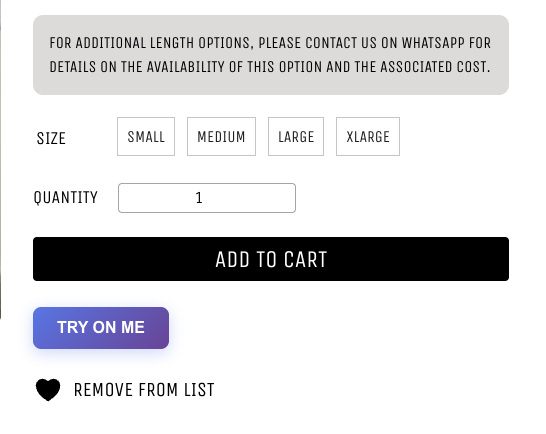
- One-Click Virtual Try-On – Add a beautiful “Try On Me” button to any product page
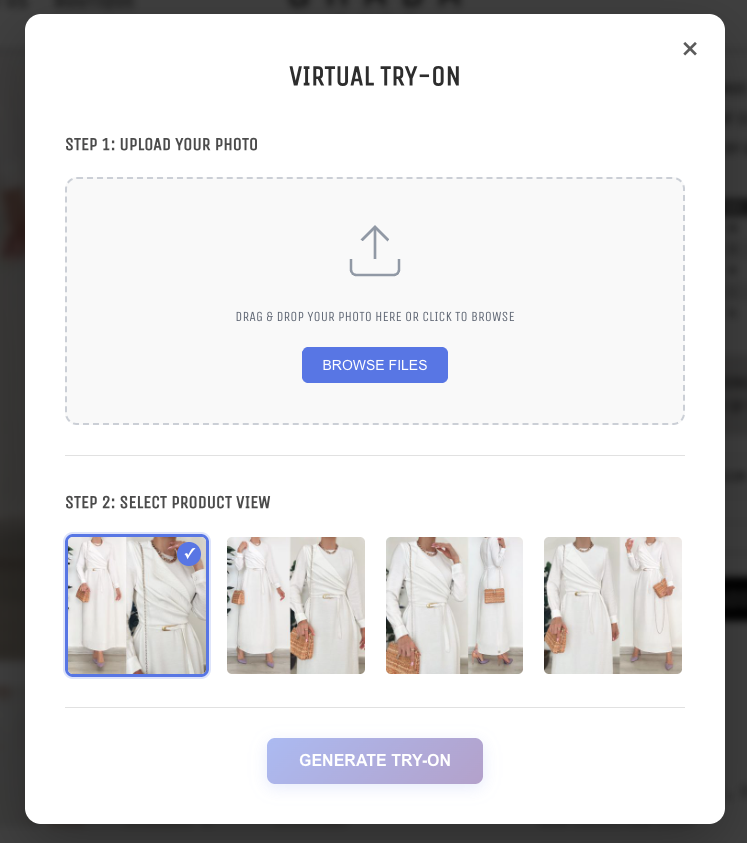
- Easy Photo Upload – Drag & drop or browse to upload customer photos
- Multiple Product Views – Let customers try on different product angles
- AI-Powered Generation – Advanced AI creates realistic try-on images in 30-60 seconds
- Download Results – Optional feature to let customers save their try-on images
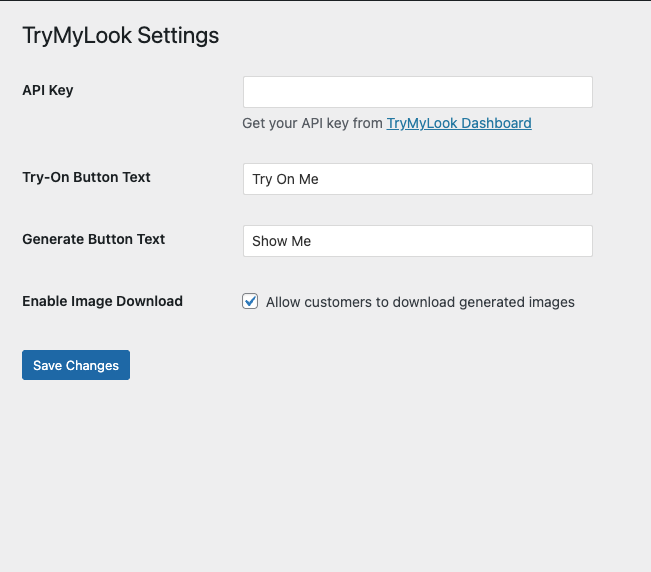
- Fully Customizable – Configure button text and features from WordPress admin
- Mobile Responsive – Works perfectly on all devices and screen sizes
- Secure & Private – All processing happens via secure API, no data stored
How It Works
- Customer clicks “Try On Me” on a product page
- Uploads their photo (drag & drop or file browser)
- Selects which product image/angle to try on
- Clicks “Generate” and waits 30-60 seconds
- Views realistic try-on result
- Optional: Downloads the image for later
Perfect For
- Fashion & Apparel Stores
- Jewelry & Accessories
- Eyewear & Sunglasses
- Hats & Headwear
- Any wearable products
Requirements
- Active WooCommerce installation
- TryMyLook API key (sign up at https://trymylook.app)
Technical Details
API Integration
The plugin communicates with TryMyLook’s REST API:
* POST /api/v1/wordpress/generate – Submit try-on request
* GET /api/v1/wordpress/status/{id} – Check generation status
Browser Support
- Chrome/Edge (latest)
- Firefox (latest)
- Safari (latest)
- Mobile browsers (iOS Safari, Chrome Mobile)
Performance
- Minimal JS/CSS footprint
- Only loads on WooCommerce product pages
- Async processing – doesn’t block page load
- Optimized for mobile networks
Security
- API key stored securely in WordPress options
- AJAX requests protected with WordPress nonces
- File upload validation and size limits
- Secure HTTPS communication with API
Support
For support, documentation, or feature requests:
* Visit: https://trymylook.app/docs
* Email: support@trymylook.app
Privacy
This plugin connects to TryMyLook’s external API service to generate virtual try-on images. When customers use the try-on feature:
* Their uploaded photo is sent to TryMyLook’s servers
* The photo is processed to generate a try-on image
* Photos are not permanently stored
* No personal information is collected beyond the image
For more details, see TryMyLook’s privacy policy at https://trymylook.app/privacy
Installation
Automatic Installation
- Go to Plugins → Add New
- Search for “TryMyLook Virtual Try-On”
- Click “Install Now” and then “Activate”
- Go to Settings → TryMyLook to configure
Manual Installation
- Download the plugin ZIP file
- Go to Plugins → Add New → Upload Plugin
- Choose the ZIP file and click “Install Now”
- Activate the plugin
- Go to Settings → TryMyLook to configure
After Installation
- Sign up at https://trymylook.app to get your API key
- Go to WordPress Admin → Settings → TryMyLook
- Enter your API key
- Customize button text (optional)
- Enable/disable download button
- Save changes
- Visit any product page to see the “Try On Me” button
Frequently asked questions
Do I need a TryMyLook account?
Yes, you need to sign up at https://trymylook.app to get an API key. The plugin communicates with TryMyLook’s AI service to generate virtual try-on images.
How much does it cost?
The plugin itself is free, but you need a TryMyLook subscription for the AI processing. Visit https://trymylook.app/pricing for current plans.
What image formats are supported?
The plugin supports JPEG, PNG, and WebP images. Maximum file size is 10MB per image.
How long does generation take?
Typically 30-60 seconds depending on image size and current server load. The plugin shows a loading indicator while processing.
Can customers download the try-on images?
Yes! You can enable the download button in the plugin settings (Settings → TryMyLook).
Is this mobile-friendly?
Absolutely! The plugin is fully responsive and works great on phones, tablets, and desktops.
Will this slow down my site?
No, the plugin only loads its resources on product pages and the processing happens on TryMyLook’s servers, not yours.
Can I customize the button appearance?
Yes, you can customize the button text in the settings. For advanced styling, you can add custom CSS to your theme.
What if generation fails?
The plugin shows clear error messages if something goes wrong. Common issues: – Invalid API key (check your settings) – Poor quality images (use clear, well-lit photos) – Generation limit reached (upgrade your plan)
Is customer data stored?
Customer photos are only used for generating the try-on image and are not permanently stored by TryMyLook.
Changelog
Important compatibility update for WooCommerce HPOS feature. Recommended for all users.
1.0.3
- Fixed: File upload dialog no longer opens twice when clicking Browse Files button
- Updated: Text domain changed to ‘trymylook-virtual-try-on’ for WordPress.org compliance
- Updated: All translation functions now use proper escaping (esc_html_e)
- Removed: Deprecated load_plugin_textdomain() call (WordPress.org handles this automatically)
- Security: Improved input sanitization with wp_unslash() for POST variables
- Security: Enhanced file upload validation and sanitization
1.0.2
- Fixed: Now sends full-size product images instead of thumbnails to the API
- Improved: Added fallback logic to get the highest quality image available
- Improved: Added console logging for debugging image URLs
- Enhancement: Better compatibility with different WooCommerce themes
1.0.1
- Fixed: Added WooCommerce HPOS (High-Performance Order Storage) compatibility
- Updated: Declared compatibility with WooCommerce 9.0
- Updated: Added “Requires Plugins” header for better dependency management
1.0.0
- Initial release
- WooCommerce product page integration
- Virtual try-on modal interface
- Photo upload with drag & drop
- Product image selection
- AI generation with status polling
- Result display with download option
- Admin settings page
- Mobile responsive design
- API key authentication
- Error handling and user feedback
Screenshots
For developers
Is this your plugin? Show off the numbers.
Add a live badge to your site, docs or GitHub README. It updates on its own — no account needed.
Best TryMyLook Virtual Try-On alternatives
All AI plugins →





FAQ
TryMyLook Virtual Try-On: quick answers
Straight answers, pulled from live WordPress.org data.
Live data from WordPress.org · checked Oct 19, 2026
Is TryMyLook Virtual Try-On free?
Yes. TryMyLook Virtual Try-On is free to download and use from the official WordPress.org plugin directory.
Is TryMyLook Virtual Try-On safe to use in 2026?
TryMyLook Virtual Try-On shows warning signs in 2026 — compare the alternatives below before installing. It runs on 10+ sites and was last updated 11 months ago, and scores 38/100 on our health check.
How many websites use TryMyLook Virtual Try-On?
TryMyLook Virtual Try-On is active on 10+ WordPress websites and has been downloaded 448 times since it launched in November 2025. It was downloaded 46 times in the last 30 days.
Does TryMyLook Virtual Try-On work with WordPress 7.1?
TryMyLook Virtual Try-On is officially tested up to WordPress 6.8.11, while the latest release is 7.1.3. It may still work, but try it on a staging site first.
What PHP version does TryMyLook Virtual Try-On need?
TryMyLook Virtual Try-On requires PHP 7.4 or higher. Most hosts run PHP 8.x today, so it works on any modern WordPress hosting.
When was TryMyLook Virtual Try-On last updated?
The latest version, 1.0.3, was released on November 24, 2025 (11 months ago).
Who makes TryMyLook Virtual Try-On?
TryMyLook Virtual Try-On is developed and maintained by kudzuai.
What are the best alternatives to TryMyLook Virtual Try-On?
The most popular alternatives to TryMyLook Virtual Try-On are Elementor Website Builder (10M+ installs), All in One SEO (2M+ installs) and AI Agent by SiteGround (1M+ installs).
Powered by PageForge
Want thousands of pages that rank like these? Build them in an afternoon.
This directory runs on the same engine as PageForge. Turn any spreadsheet, CSV or API into thousands of fast, SEO-ready WordPress pages — with schema, internal links and AI-written copy baked in.
- CSV, Google Sheets & API data sources
- AI content, schema & internal links per page
- Works with Elementor, Gutenberg, Yoast & Rank Math
- Free on WordPress.org — no credit card


