



Torque – Optimise the transport of your Website
A Wordpress plugin to optimise the transport of your website to the client. Reduce the load on your server and make your Wordpress website fly!

Consider an alternative
Torque shows warning signs in 2026 — compare the alternatives below before installing. Was last updated 2 years ago, and scores 24/100 on our health check.
- Small user base (<10 active installs)
- Very few reviews so far
- No update in over a year
- Only tested up to WordPress 6.7 (latest is 7.1)
How does it stack up?
Side-by-side on installs, updates, ratings & support


Daily downloads
Download spikes usually follow a new release — each site that auto-updates counts as a download.
Rankings
Where Torque stands todayWordPress.org search rankings
Live position in the plugin search, top 100| Keyword | Position |
|---|---|
| minification | >100 |
| minify | >100 |
| optimization | >100 |
| performance | >100 |
| security | >100 |
About Torque
From the official readme · v1.0.0Description
Take advantage of best in class minification to squeeze every byte out of your HTML, CSS, and Javascript, combine this with the control over cache headers, lazy loading, and more, and your website will not only be noticeably faster, your server will be under less load, enabling you to serve more clients with your existing metal.
The plugin also includes a suite of security features to help you secure your website, including full control over Content-Security-Policy, which enables you to control which domains can embed assets on your website, and what domains you can connect to. This prevents malicious scripts from being able to run and more.
Features
- Site Analysis
- Environment information
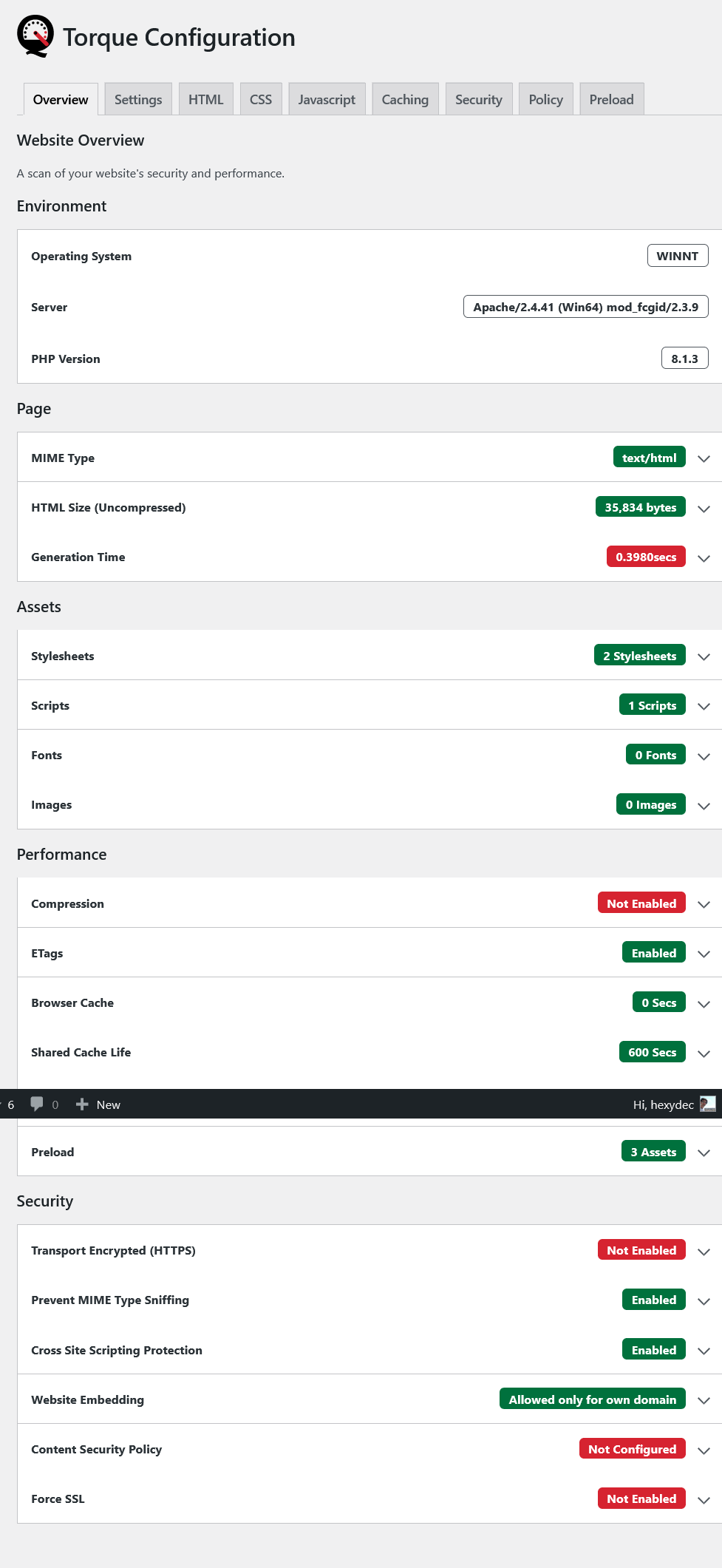
- Page information such as MIME type, output size and compression ratio
- Asset counts and sizes with recommendations
- Performance metrics with descriptions and recommendations
- Security metrics with descriptions and recommendations
- Minification
- Minify your HTML (Uses HTMLdoc)
- Minify and cache your inline CSS (Uses CSSdoc)
- Minify and cache your inline Javascript (Uses JSlite)
- Combine Files
- Combine and minify CSS files
- Combine and minify Javascript files
- Lazy load images
- Headers
- Set shared cache timeout
- Set client cache timeout
- Enable client to check whether their cached page is still valid, and send an HTTP 304 response if it is
- Security
- Disable MIME sniffing
- XSS protection
- Control how the site can be embedded
- Enable HSTS to force browsers to only connect over HTTPS
- Specify Content-Security-Policy to control what domains can connect and embed content in your site
- Preload
- Select which assets to preload with first load
- Preload combined stylesheets
- Administration panel to control all features, including all minification optimisations
- Print minification stats in the console
See the Torque Github homepage for more information.
Installation
Upon installation of the plugin, most of the settings will be disabled. Only the settings in the “Caching” section will be implemented.
To get the plugin up and running to a basic level, enable some settings in the “Settings” section.
It is recommended that you do not use this plugin with other minification plugins.
Frequently asked questions
What kind of compression can I expect from minification?
Depending on how compressible you content is you can expect ~10 – 15% compression of your page before gzip compression, after gzip you can expect ~ 5 – 10%.
How long does it take to minify my page?
You can tick the “Show stats in the console” option to see how long it takes to minify your page and what compression was achieved, view the output in the developer console (Press F12). Note that inline CSS and Javascript is cached in a WordPress transient, so if you page has inline code, it should be faster after first run.
What are the tradeoffs for minifying my HTML?
You are swapping the time it takes to send the extra bytes down the wire to your clients for extra CPU time on the server. Torque uses my other project HTMLdoc to minify your code, it has been designed to use on the fly and has been optimised for speed. Even so I recommend you use some sort of cache in front of your PHP code to make sure your time-to-first-byte is optimised, then the extra CPU time doesn’t matter.
How can I test if my page is faster after using your plugin?
The best tool to use is Lighthouse, which is built into Blink based browsers such as Chrome, Edge and others: Press F12 to bring up the developer tools Select the “Lighthouse” tab Click “Generate Report” Do this before you enable the plugin, and then again after you have enabled and configured the plugin. The performance metric should be higher with the plugin. You can also look at the Network tab in the developer console and see that the total download size and number of requests is lower (With combine and minify enabled).
I enabled minification and it broke my site
Some advanced minification optimisations can cause issues with your website’s layout, or break your Javascript depending on how your CSS/Javascript selectors are setup. For example, you can strip default attributes from your HTML such as type="text" on the object. If you have a CSS or Javascript selector that relies on this attribute being there, such as input[type=text], the selector will no longer match. See HTMLdoc: Mitigating Side Effects of Minification for solutions.
Why is HTMLdoc best in class?
Other minification plugins blindly find and replace patterns within your code to make it smaller, often using outdated 3rd-party libraries. HTMLdoc is a compiler, it parses your code to an internal representation, optimises it, and then compiles it back to code. The result is better reliability, compression, and performance. It also bundles CSS and Javascript compilers from the same author for minifying your inline CSS and Javascript which use the same technology to make less mistakes and offer better compression. All three libraries have automated test suites to ensure reliability, and…
What is Content Security Policy?
Content Security Policy (CSP) is a very powerful browser security feature that only enables assets to be downloaded from the specified domains. Any assets that are downloaded from domains that are not listed will be blocked.
How do I setup my Content Security Policy?
Using the developer tools in your browser (Press F12), look at the network tab on each page, and note down the domains that are used for different assets, along with their asset type. You can then enter those domains in to the relevant CSP boxes. Be sure to run any extra features of your website that use Fetch or XHR, as these connections are also bound by CSP. Once the domains are entered, and with the CSP setting set to “Enabled only for me (testing)”, go through the pages of your website again, checking for Content-Security-Policy errors in the console. If there are errors, the console…
How does preload work?
Preload works by notifies the browser as soon as possible of assets it will need to load the page, this enables it to start downloading them sooner than if it discovered them on page. For example font files are normally linked from the stylesheet, so the browser has to download and parse the stylesheet before it can request them. By preloading, when it discovers that it needs those assets, they will already be downloading. Thus your website will load faster.
Changelog
Version 1.0.0
- Tested with WordPress version 6.7.1
- Updated packages to latest versions
- Stylesheets and Javascript will now be rebuilt on the fly if any included files have been updated since the output files were built
- Fixed bug in app::getContentSecurityPolicy() where the directive img-src was mispelt as image-src
- Fixed spelling mistake
- Updated functions missing a return type
- Fixed issue where the default value for method arguments was null, but this was not defined in the type hint
- Moved to stable release
- Updated readme.txt
Version 0.7.5
- Tested with WordPress version 6.5.2
- The minimum supported PHP version is now 8.1
- Updated packages to latest versions
- Updated text in the Preload section
Version 0.7.4
- The name of the app is not title case when Console Logging in app::drawStats()
- Used PHP 8.0 property type definitions, and union return types where needed
- Updated require calls in autoloaders to be used as a keyword and for the spl_autoload_register() call not to return a value
- Fixed issue in csp::recommendations() where if the recommended URL was the base URL of the site, it should use ‘self` instead
- The minimum supported PHP version is now 8.0
- Updated packages to latest versions
Version 0.7.3
- Updated assets::getPage() to disable peer verification on localhost
- Fixed issue in assets::getPageAssets() where it didn’t detect URL’s with the local hostname, but no scheme
- Updated font config in overview::__construct() where the included fonts were registered as all the font formats, it now matches the names and reads only the first font of each group in the calculations
- Updated packages to latest versions
Version 0.7.2
- Fixed issue when combining CSS where any inline CSS attached to an external stylesheet was not combined, sometimes causing ordering issues
- Updated packages to latest versions
- Fixed bug where 304 headers were not set the WordPress way, which caused WordPress to overwrite it
- Fixed incorrectly loaded rebuild command
- Fixed minor PHP 8.1 data handling issues
Version 0.7.1
- Updated JSlite to fix javascript parsing issue
Screenshots


For developers
Is this your plugin? Show off the numbers.
Add a live badge to your site, docs or GitHub README. It updates on its own — no account needed.
Best Torque alternatives
All minification plugins →




FAQ
Torque: quick answers
Straight answers, pulled from live WordPress.org data.
Live data from WordPress.org · checked Sep 30, 2026
Is Torque free?
Yes. Torque is free to download and use from the official WordPress.org plugin directory.
Is Torque safe to use in 2026?
Torque shows warning signs in 2026 — compare the alternatives below before installing. Was last updated 2 years ago, and scores 24/100 on our health check.
How many websites use Torque?
Torque is active on <10 WordPress websites and has been downloaded 9,438 times since it launched in September 2021. It was downloaded 188 times in the last 30 days.
Does Torque work with WordPress 7.1?
Torque is officially tested up to WordPress 6.7.9, while the latest release is 7.1.2. It may still work, but try it on a staging site first.
What PHP version does Torque need?
Torque requires PHP 8.1 or higher. Most hosts run PHP 8.x today, so it works on any modern WordPress hosting.
When was Torque last updated?
The latest version, 1.0.0, was released on January 30, 2025 (2 years ago).
Who makes Torque?
Torque is developed and maintained by Hexydec.
What are the best alternatives to Torque?
The most popular alternatives to Torque are CSS Minify (200+ installs), CSS Above The Fold (200+ installs) and SpeedyGo (100+ installs).
Powered by PageForge
Want thousands of pages that rank like these? Build them in an afternoon.
This directory runs on the same engine as PageForge. Turn any spreadsheet, CSV or API into thousands of fast, SEO-ready WordPress pages — with schema, internal links and AI-written copy baked in.
- CSV, Google Sheets & API data sources
- AI content, schema & internal links per page
- Works with Elementor, Gutenberg, Yoast & Rank Math
- Free on WordPress.org — no credit card


