



TintCal
A beautiful and simple event calendar plugin for Japanese users. Add a calendar to any site with a shortcode, block, or widget.

Consider an alternative
TintCal shows warning signs in 2026 — compare the alternatives below before installing. It runs on 10+ sites and was last updated 10 months ago, and scores 38/100 on our health check.
- Small user base (10+ active installs)
- Very few reviews so far
- Only tested up to WordPress 6.9 (latest is 7.1)
How does it stack up?
Side-by-side on installs, updates, ratings & support



Daily downloads
Download spikes usually follow a new release — each site that auto-updates counts as a download.
Rankings
Where TintCal stands todayWordPress.org search rankings
Live position in the plugin search, top 100| Keyword | Position |
|---|---|
| business hours | >100 |
| calendar | >100 |
| events | >100 |
| holiday | >100 |
| schedule | >100 |
Version adoption
Share of active sites per release.
About TintCal
From the official readme · v2.2.6Description
TintCal is a new kind of event calendar plugin designed for Japanese website creators and administrators.
It eliminates the complexity and confusion often found in plugins made overseas, responding to the simple need of “just wanting to place an event calendar” with the best usability and a beautiful design.
= Key Features =
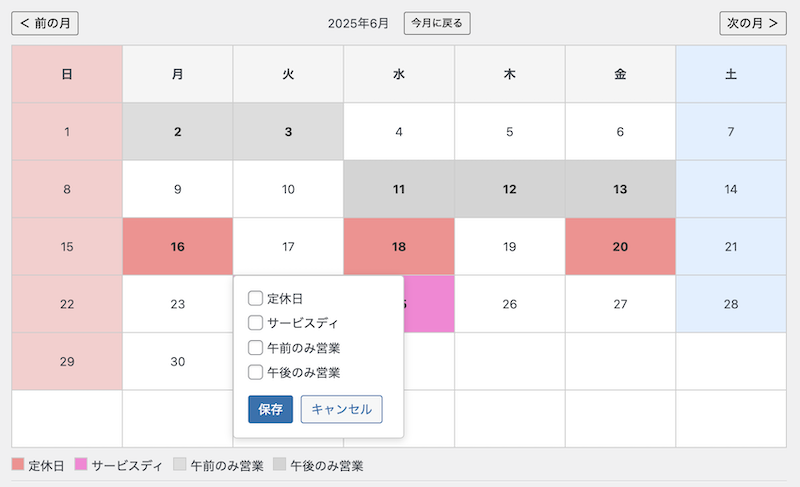
- Easy Event Registration: Anyone can intuitively register and edit events from the WordPress admin screen.
- Shortcode/Block Support: Place a calendar anywhere just by adding the
[tintcal id="..."]shortcode or a dedicated block in the editor. - Responsive Design: The calendar displays beautifully without breaking its layout on smartphones or tablets.
- Simple Settings: Basic customizations, such as the calendar header and weekend colors, can be easily configured.
- Holiday Display: Automatically displays Japanese public holidays on the calendar.
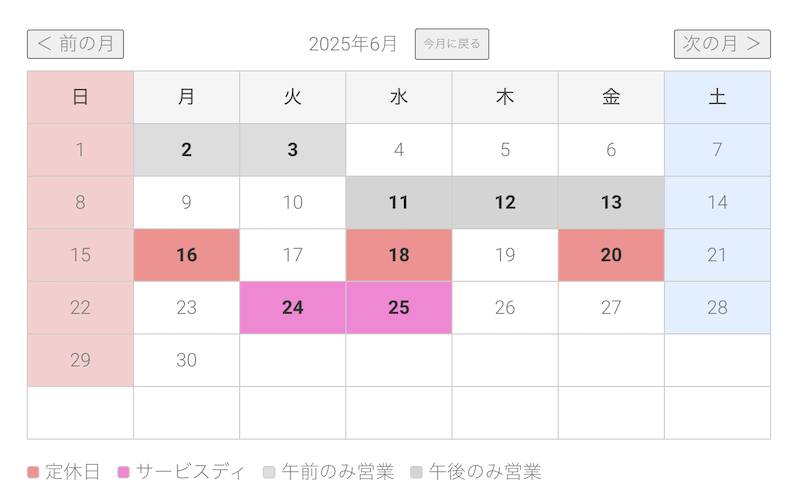
- Simple Category Management: You can register one type of schedule as a category and color-code the calendar.
Installation
- Upload the plugin files to the
/wp-content/plugins/directory, or install the plugin through the WordPress plugins screen directly. - Activate the plugin through the ‘Plugins’ screen in WordPress.
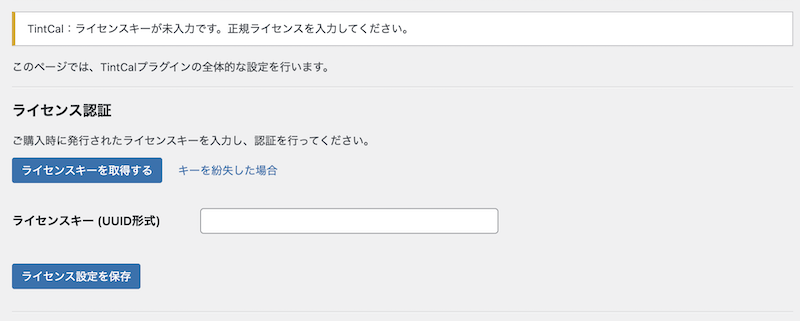
- Configure the settings by navigating to Settings > TintCal in your WordPress dashboard.
Frequently asked questions
How do I display the calendar?
Add the shortcode [tintcal id="..."] to the post or page where you want the calendar to appear.
Where can I get support?
For basic questions, please use the official support forums on WordPress.org.
Troubleshooting: the display or behavior looks wrong
Temporarily disable cache/optimization plugins (JS/CSS minification, lazy loading) and any CDN. If the issue persists, switch to a default theme (e.g., Twenty Twenty-Five) to check for theme/plugin conflicts. Please include exact reproduction steps.
The update installed but nothing changed
Clear browser, server, and plugin caches, and purge your CDN if you use one. Confirm the Plugins screen shows “Version: 2.2.6”.
What information should I include in a bug report?
WordPress and PHP versions (e.g., WP 6.6 / PHP 8.1) Theme and major active plugins Steps to reproduce (1 → 2 → 3) Expected result vs actual result Screenshots or error logs, if possible
Changelog
2.2.6
- Compatibility: Confirmed WordPress 6.9 support and updated “Tested up to”.
- Maintenance: Synced plugin header and internal version constant to 2.2.6.
2.2.5
- Enhancement: Added full translation coverage for 11 additional locales with updated
.po/.mofiles. - Fix: Corrected translation strings with unescaped quotes in localized admin text.
- Fix: Resolved issues where Simplified Chinese translations could not be compiled due to syntax errors.
2.2.4
- Enhancement: Added full internationalization support via
load_plugin_textdomain()and localized JavaScript strings. - Enhancement: Provided English and Japanese translation files (
.po/.mo) plus updated.pottemplate. - Enhancement: Localized Japanese public holiday names based on the active site language.
- Fix: Front-end and admin calendars now display translated weekday headers/month labels.
- Documentation: Updated stable tag and changelog for version 2.2.4.
2.2.3
- Fix: Category override bug in free version – form now properly disables when 1 category limit is reached
- Improvement: Enhanced security with WP_Filesystem API and proper fallback
- Improvement: Performance optimization with Transient API caching for holiday data
- Improvement: Added comprehensive PHPDoc documentation
- Improvement: Enhanced accessibility with ARIA attributes
- Improvement: Improved maintainability with CSS custom properties
- Technical: Added automated deployment workflow for WordPress.org
2.2.2
- Fix: incorrect calendar layout in some themes.
2.2.1
- Initial release on wordpress.org.
Screenshots

For developers
Is this your plugin? Show off the numbers.
Add a live badge to your site, docs or GitHub README. It updates on its own — no account needed.
Best TintCal alternatives
All business hours plugins →





FAQ
TintCal: quick answers
Straight answers, pulled from live WordPress.org data.
Live data from WordPress.org · checked Sep 30, 2026
Is TintCal free?
Yes. TintCal is free to download and use from the official WordPress.org plugin directory.
Is TintCal safe to use in 2026?
TintCal shows warning signs in 2026 — compare the alternatives below before installing. It runs on 10+ sites and was last updated 10 months ago, and scores 38/100 on our health check.
How many websites use TintCal?
TintCal is active on 10+ WordPress websites and has been downloaded 627 times since it launched in August 2025. It was downloaded 64 times in the last 30 days.
Does TintCal work with WordPress 7.1?
TintCal is officially tested up to WordPress 6.9.9, while the latest release is 7.1.2. It may still work, but try it on a staging site first.
What PHP version does TintCal need?
TintCal requires PHP 7.4 or higher. Most hosts run PHP 8.x today, so it works on any modern WordPress hosting.
When was TintCal last updated?
The latest version, 2.2.6, was released on December 2, 2025 (10 months ago).
Who makes TintCal?
TintCal is developed and maintained by NUMMIT.
What are the best alternatives to TintCal?
The most popular alternatives to TintCal are Business Hours Indicator (8K+ installs), We’re Open! (5K+ installs) and ITBoffins Live Opening Hour… (100+ installs).
Powered by PageForge
Want thousands of pages that rank like these? Build them in an afternoon.
This directory runs on the same engine as PageForge. Turn any spreadsheet, CSV or API into thousands of fast, SEO-ready WordPress pages — with schema, internal links and AI-written copy baked in.
- CSV, Google Sheets & API data sources
- AI content, schema & internal links per page
- Works with Elementor, Gutenberg, Yoast & Rank Math
- Free on WordPress.org — no credit card


