



Timetics – Appointment Booking Calendar & Scheduling
Appointment booking and scheduling plugin with online booking calendar, payments, reminders, and calendar sync.

Safe pick
Yes — Timetics is a safe, well-maintained plugin to use in 2026. It runs on 2K+ sites, is rated 4.6/5 and was last updated 5 days ago, and scores 90/100 on our health check.
- Loved by users — 4.6/5 from 36 reviews
- Actively developed — last update 5 days ago
- Tested with the latest WordPress (7.1)
- Momentum — downloads up 133.2% vs the previous 30 days
How does it stack up?
Side-by-side on installs, updates, ratings & support



Daily downloads
Download spikes usually follow a new release — each site that auto-updates counts as a download.
Rankings
Where Timetics stands todayWordPress.org search rankings
Live position in the plugin search, top 100| Keyword | Position |
|---|---|
| appointment booking | #16 |
| appointment scheduler | #7 |
| booking calendar | #16 |
| online booking | #29 |
| online scheduling | #6 |
Version adoption
Share of active sites per release.
Rating breakdown
★★★★★★★★★★ 4.6 from 36 reviews
About Timetics
From the official readme · v1.0.63Description
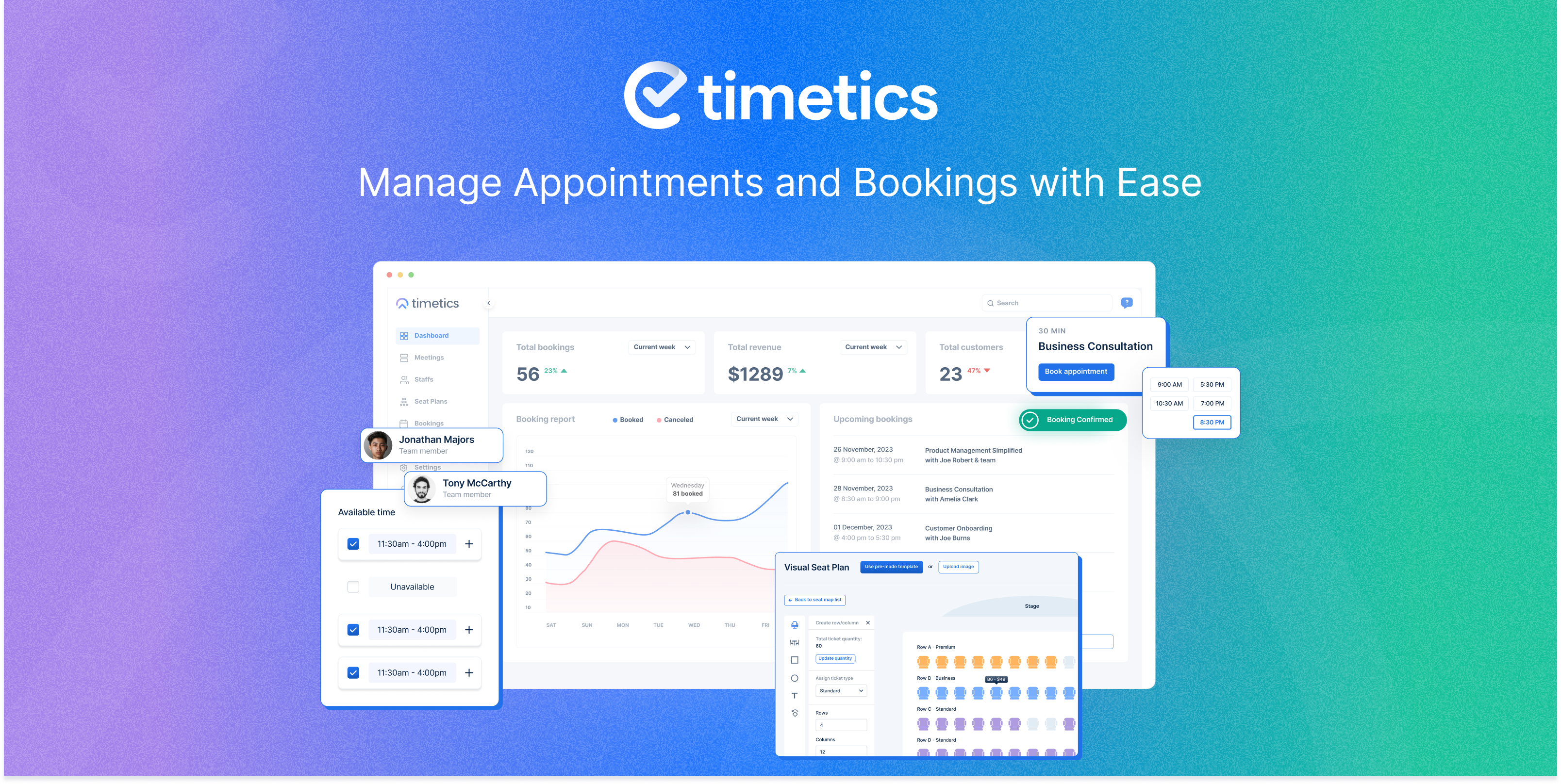
WPTimetics is an appointment booking and scheduling system that helps businesses accept online bookings, manage appointments, organize staff schedules, and automate booking workflows from one dashboard.
Customers can book appointments through an online booking calendar, choose available time slots, receive instant confirmations, and pay online. Built-in calendar management, automated reminders, and calendar sync help reduce manual scheduling and avoid booking conflicts.
Whether you run coaching sessions, consultations, eLearning and LMS appointments, classes, professional services, or team meetings, WPTimetics helps you manage bookings, schedules, payments, and customer communication more efficiently.
Let your customers book appointments online 24/7 while you stay focused on growing your business.
Why Choose Timetics Appointment Booking Plugin?
- ✅ Unlimited appointments, bookings & team members – completely free, no caps, ever
- ✅ Automatic double-booking prevention – confirmed time slots are blocked instantly
- ✅ Reduce no-shows with automated email, SMS, and WhatsApp reminders
- ✅ 24/7 self-service online booking – clients book while you sleep
- ✅ Free Google Meet integration – meeting links auto-generated on every booking
- ✅ Google Calendar two-way sync – changes reflect everywhere, in real time
- ✅ Stripe payments in the free version get paid at the point of booking
- ✅ GDPR-compliant – all booking data stays on your WordPress server
- ✅ Translation ready – fully compatible with WPML and Loco Translate
- ✅ No coding required – set up your first booking in under 5 minutes
Live Demo | Documentation | Roadmaps | Tutorials | Pro
Need help getting started? 👉 Contact our support team
Who Is the Timetics Appointment Booking Plugin For?
Timetics is a flexible WordPress booking system built for professional and service-based business that needs to schedule, manage, and automate client appointments online. Here are the most common use cases:
-
Education & Training – eLearning Use Cases– Schedule mentorship sessions, course consultations, tutoring, workshops, and career counseling with ease. WPTimetics allowing educators to manage student bookings, class scheduling, and live learning sessions without the complexity of a traditional Learning Management System. Perfect for anyone who needs class scheduling and student booking instead of a full LMS setup.
-
Recruiting & HR– Recruiters and HR teams can automate interview scheduling, let candidates choose available time slots, and receive instant booking confirmations – eliminating endless back-and-forth emails.
-
Customer Support & Client Services– Organize support calls, virtual help sessions, and follow-up appointments to ensure your customers get assistance promptly.
-
Sales & Marketing Teams– Let prospects book consultations, product demos, discovery calls, or strategy sessions directly from your website. Integrates seamlessly with CRM tools for tracking leads.
-
Consultants & Coaches – Online Learning & eLearning Sessions– From business consultants to life coaches, offer clients an easy way to book one-on-one or group sessions. Timetics is ideal for coaching-based eLearning businesses that rely on scheduled sessions instead of structured courses. A practical solution for professionals who deliver learning through live interaction rather than LMS-based courses.
-
Teachers & Mentors – Student Booking & Class Scheduling – Manage class schedules, private lessons, and tutoring sessions so students can book convenient time slots without email chains. Timetics acts as a student booking system for WordPress eLearning websites, helping teachers organize their availability and avoid scheduling conflicts. Ideal for educators who want a simple alternative to LMS platforms focused on scheduling and live classes.
-
Musicians & Creative Professionals– Allow clients and collaborators to book studio sessions, music lessons, or creative consultations. Manage availability, payments, and rescheduling with ease.
-
Self Sessions & Fitness Guide– Provide a convenient and hassle-free way for fitness-conscious clients to book appointments.
-
Event Organizers & Venues– Conference organizers, workshop hosts, venue managers, and ticketed event producers use Timetics PRO to manage event booking with an interactive Visual Seat Map — attendees browse your live floor plan, pick their exact seat, choose a ticket tier (VIP, Gold, Standard), and complete payment in one seamless flow directly on your WordPress site.
Need full-scale event management? Pair Timetics with Eventin the free WordPress event management plugin. Eventin leverages Timetics’ Visual Seat Map builder to power its own event seat plan feature, and adds speaker & schedule management, QR code attendee check-in, RSVP events, recurring events, and multi-gateway ticketing. Together, Timetics + Eventin cover every event and appointment booking need from a single WordPress dashboard.
📌 Timetics is not limited to these industries. It’s a complete appointment scheduling system for any professional or business that needs online booking, client self-service scheduling, and calendar management – from solo freelancers to multi-staff enterprises.
Free Appointment Booking Features for WordPress
The free version of Timetics is a fully capable appointment booking plugin for WordPress designed to handle your online meetings, consultations, service bookings, and client scheduling without paying a cent.
Unlimited Online Appointment Booking
Say goodbye to restrictions create unlimited appointments, unlimited bookings, and add unlimited team members with zero extra fees.
- Unlimited Meetings – Host one-on-one sessions, group events, or classes as often as you need.
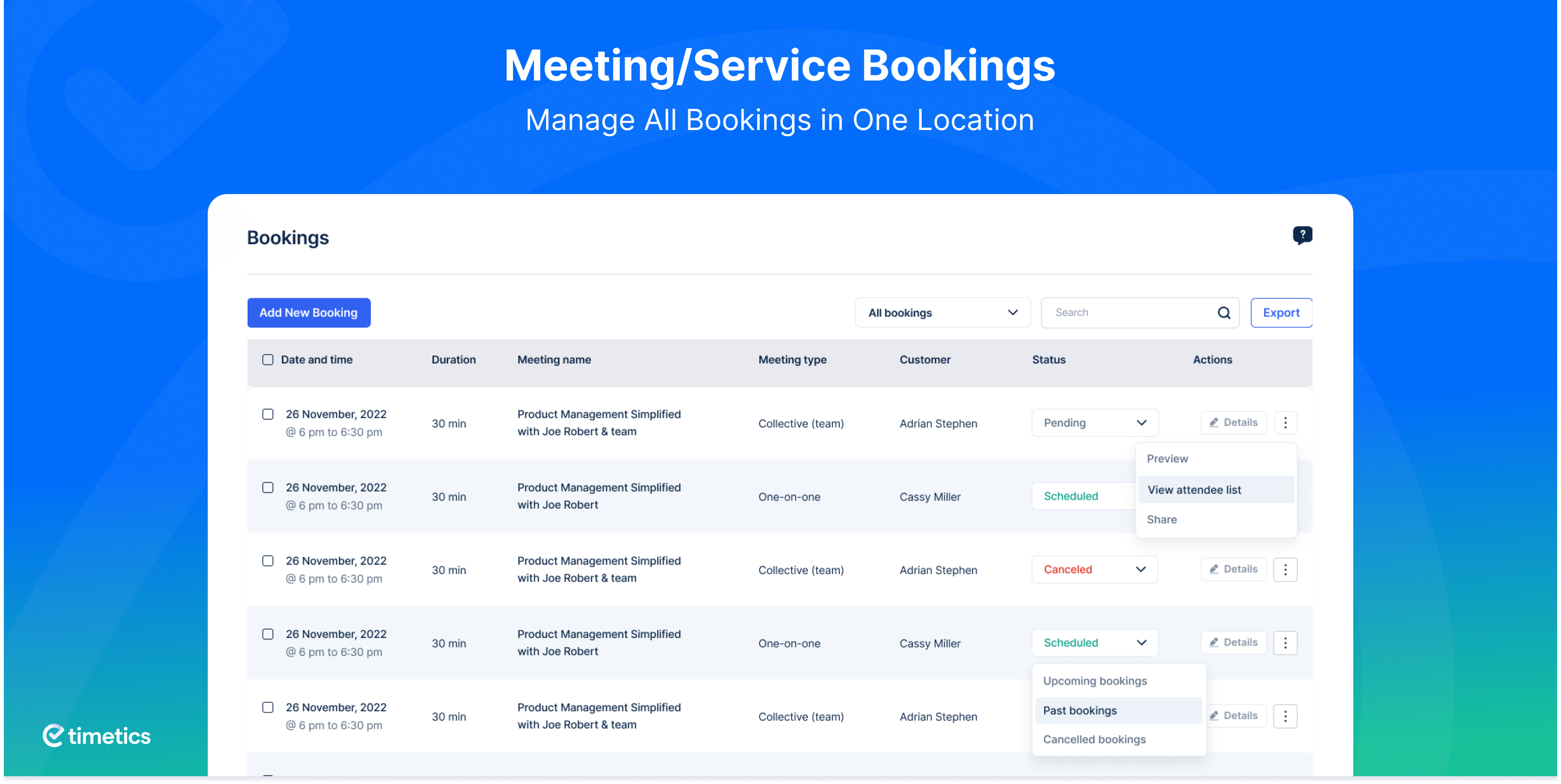
- Unlimited Bookings – Accept as many online bookings as your business can handle, with no monthly caps.
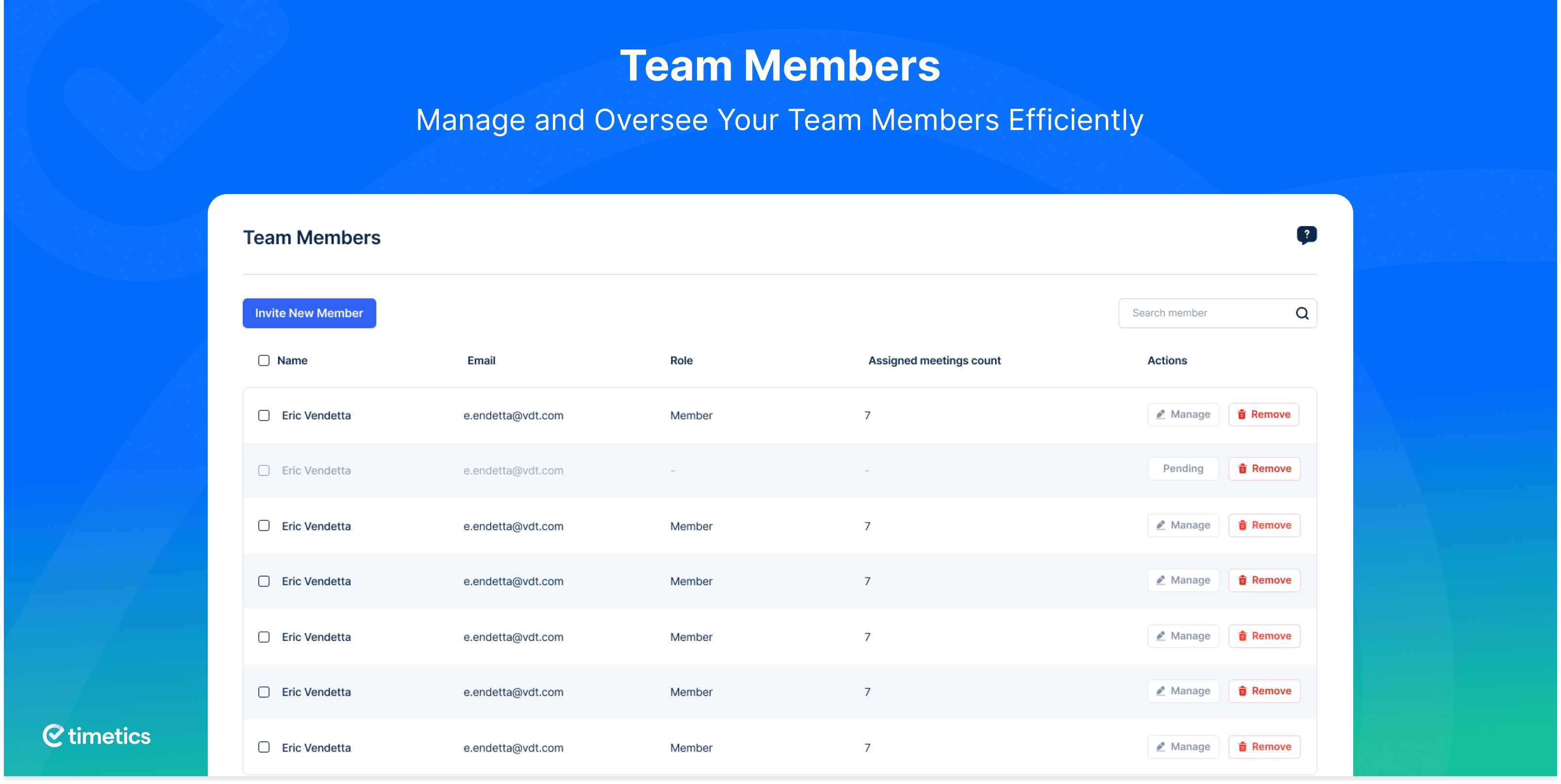
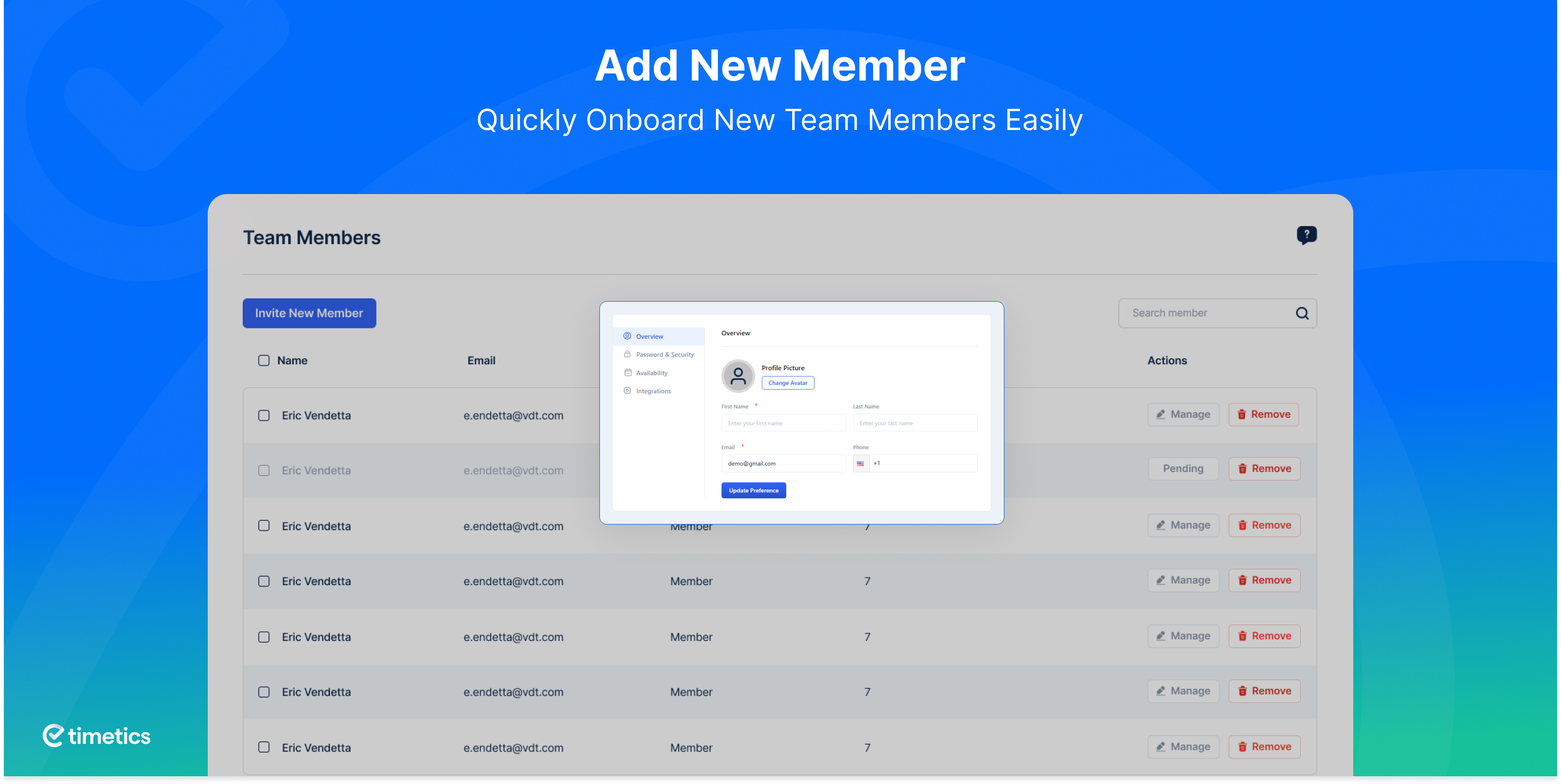
- Unlimited Team Members – Add all your staff and give each a dedicated booking profile and calendar.
- Automatic Double-Booking Prevention – Once a time slot is confirmed, it is instantly blocked. Your booking calendar stays clean and conflict-free, automatically.
Free Google Meet Integration for Online Booking
When a client books an appointment through Timetics, a Google Meet link is automatically generated and included in the confirmation email and all reminders no manual link sharing required.
- Google Meet Auto-Link – One-click join links work on desktop, mobile, and tablet.
- Organized in Google Calendar – Every booking appears in your connected Google Calendar automatically.
- Ideal for teachers, sales teams, customer support, consultants, and coaches who need a fast, secure way to hold video meetings without extra tools.
Online Booking & Appointment Management
- Availability Management – Define working hours, break times, and days off. Clients can only book genuinely available slots no overrides, no conflicts.
- Real-Time Booking Status – Track whether each appointment booking is pending, confirmed, or canceled from a single dashboard view.
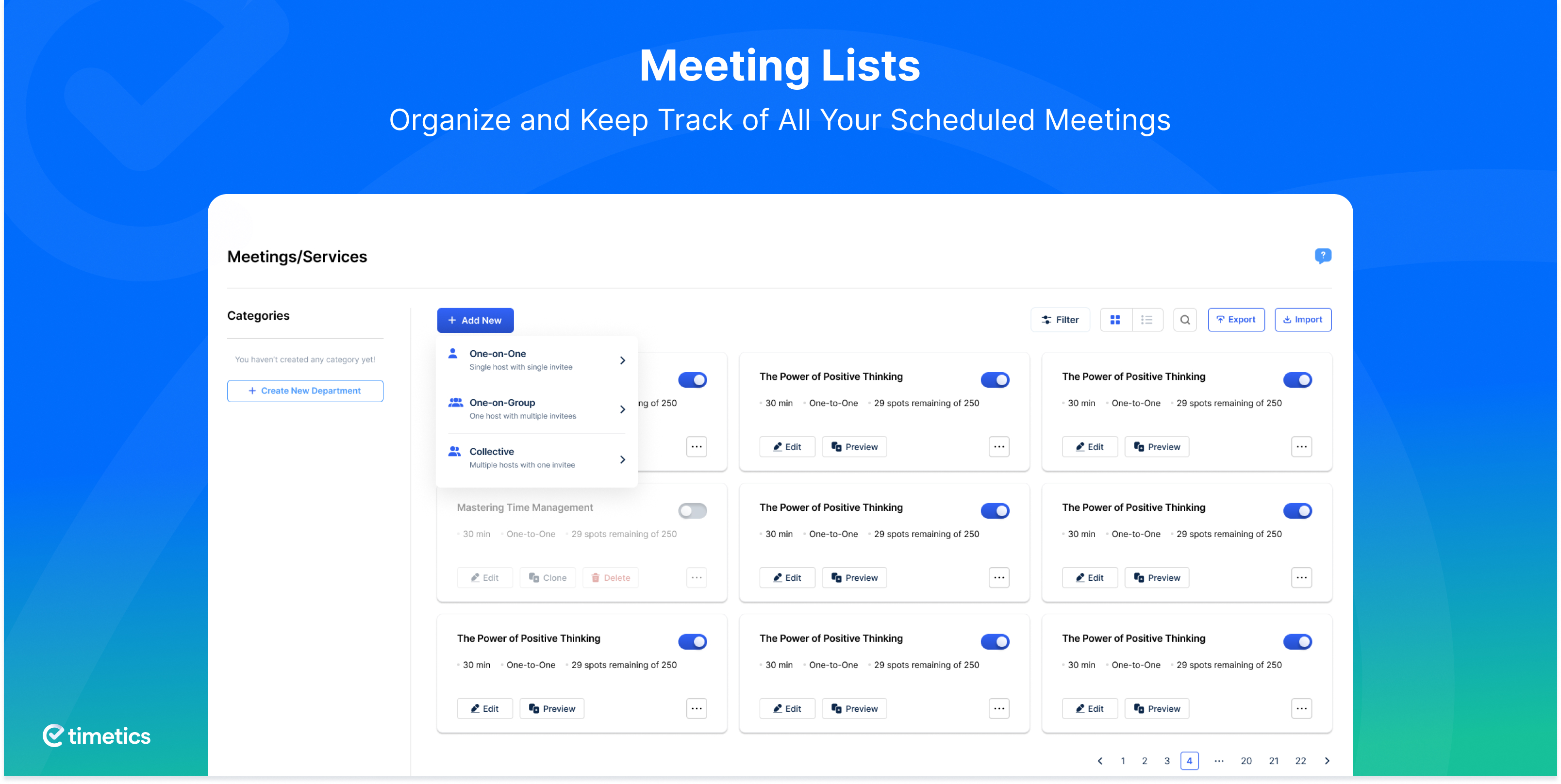
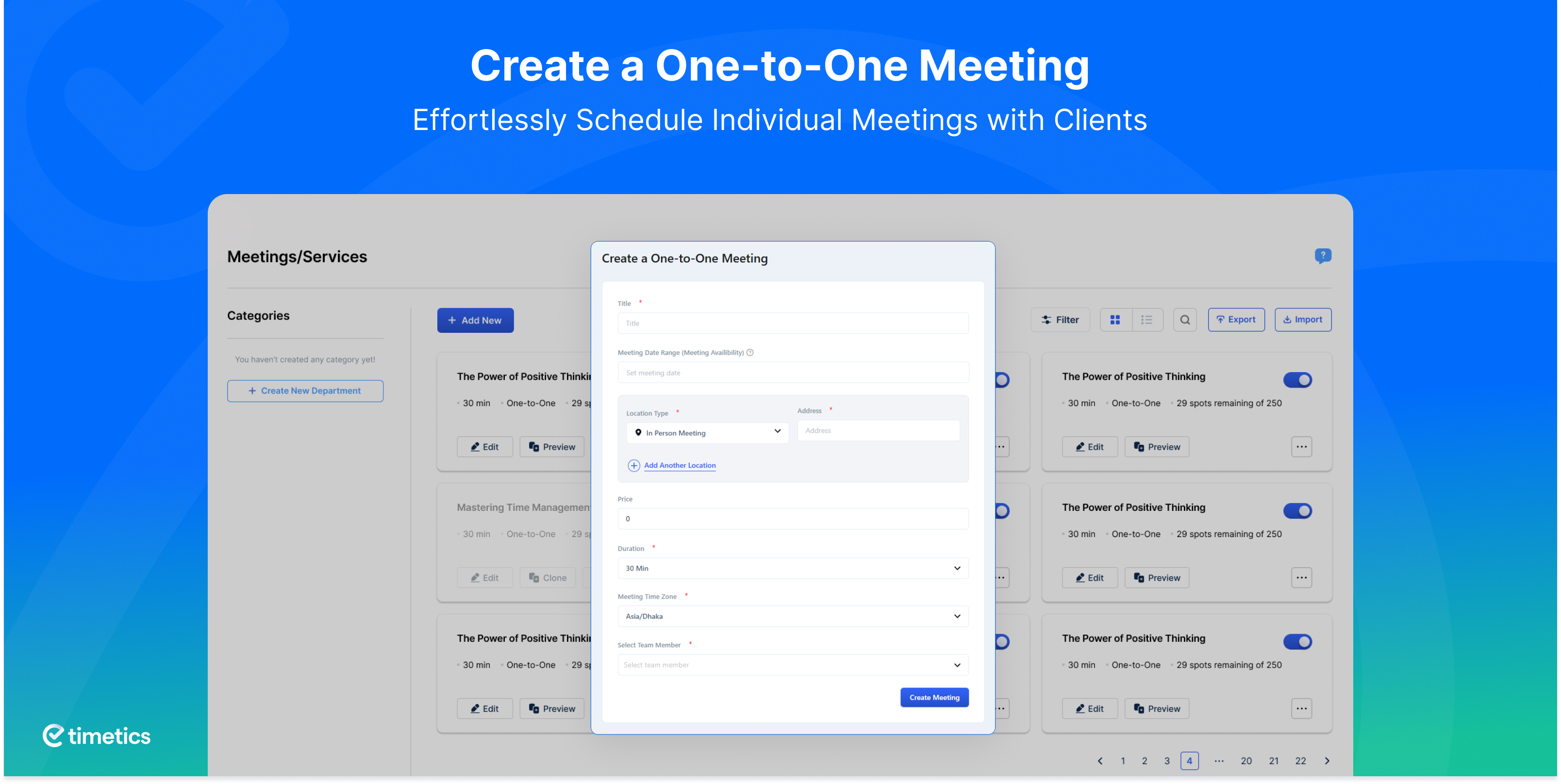
- One-to-One Appointment Booking – Perfect for private consultations, interviews, coaching sessions, and personal services. Set duration, buffer time, and location per meeting type.
- Guest Add-On – Clients can include colleagues, family members, or friends in the same booking without a separate reservation.
- 12 & 24-Hour Time Format Support – Your booking calendar displays time in the format that makes sense to every client, regardless of region.
Multi-Staff Appointment Booking & Team Management
In a multi-staff setup, clarity is everything. Timetics keeps each team member’s booking calendar accurate, assigns appointments to the right person, and eliminates the risk of double-booking or missed time slots.
- Team Management – View each staff member’s availability, assign them to bookings, and update their schedules from the admin dashboard.
- Email Notifications – Automatic alerts sent to staff the moment a booking is created or changed.
- Reduce No-Shows with Customer Reminders – Automatic booking confirmations and pre-appointment reminders keep clients informed and reduce missed appointments.
- Timezone Auto-Detection – Booking times display in each client’s local timezone automatically — no confusion, no late arrivals.
- International Phone Number Support – Country code selector ensures accurate contact records for global clients.
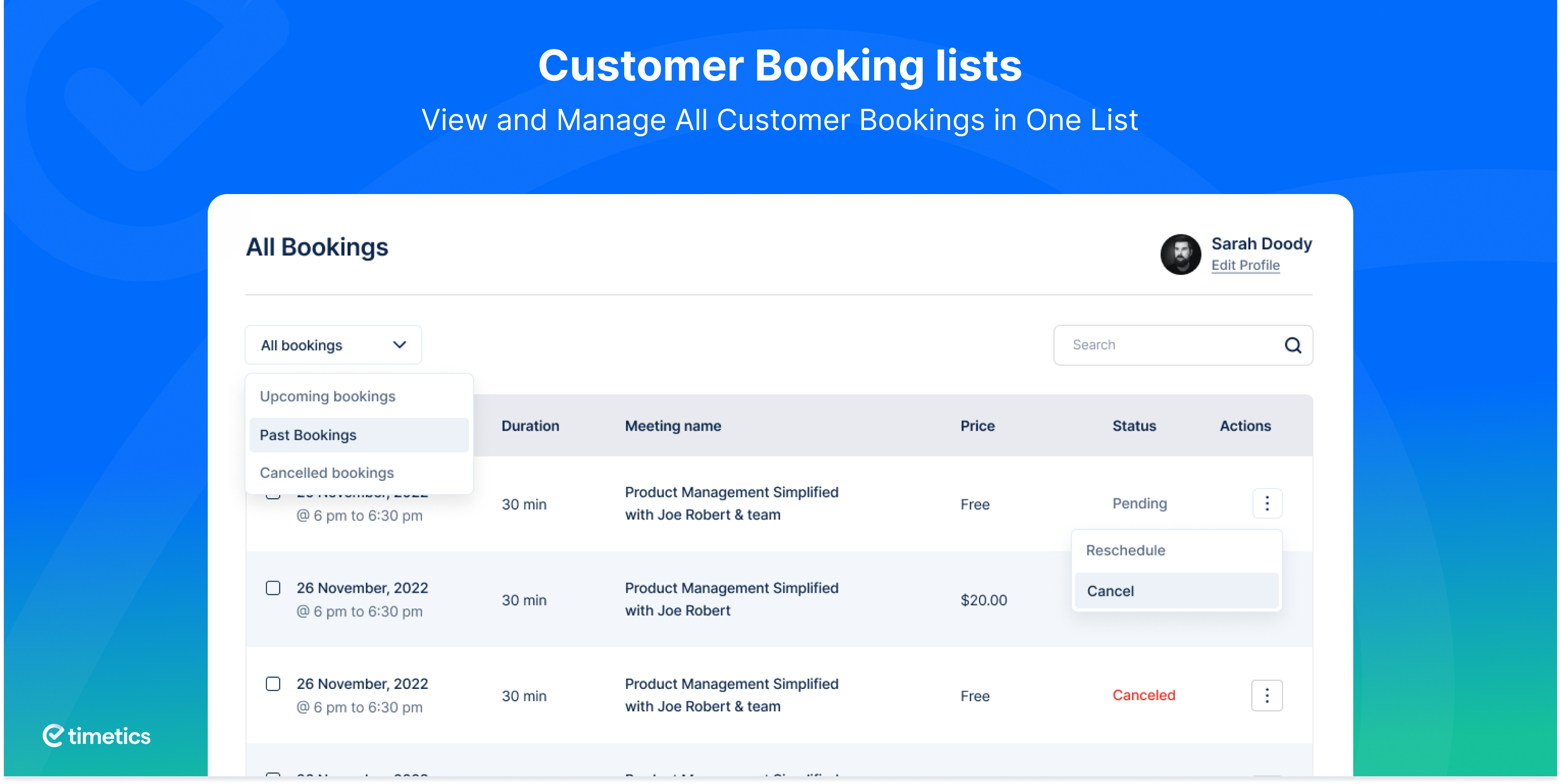
- Client Self-Service Dashboard – Clients log in to reschedule, cancel, or review their booking history — no need to contact you directly.
Easy Setup — Your First Booking in Under 5 Minutes
- Step-by-Step Onboarding Wizard – Guided setup takes you through every step of building your appointment booking system, even if it’s your first time.
- Shortcode Embedding – Drop your booking form into any page, post, or widget area using a simple shortcode. Works with Gutenberg, Elementor, Divi, Beaver Builder, and any WordPress page builder.
- Meeting List Shortcode – Display all your available services and appointment types in a clean, bookable list so clients can choose their preferred session instantly.
- No coding required – Timetics is built for every skill level, from beginners to developers.
Google Calendar Sync for Accurate Scheduling
- Two-Way Google Calendar Sync – Your appointment booking calendar and Google Calendar stay perfectly in sync. Any booking created, rescheduled, or canceled reflects on both sides instantly eliminating scheduling conflicts and double-booking.
Accept Online Payments at the Point of Booking
When clients pay during the booking process, they commit to the appointment reducing no-shows and securing your revenue upfront.
- Stripe Integration (Free) – Accept credit and debit card payments directly from your booking calendar. Clients confirm and pay in one seamless step.
- Local & Offline Payment Methods – Support clients who prefer cash or in-person payment by enabling flexible offline options.
- WooCommerce Integration – Unlock 100+ additional payment gateways and advanced order management by connecting Timetics to WooCommerce.
Booking Analytics & Revenue Reports
- Sales Analytics Dashboard – Monitor total bookings, revenue earned, and trends over time. Use the data to optimize your availability, services, and marketing strategy.
Timetics PRO: AI-Powered Appointment Booking & Advanced Scheduling System
Timetics PRO includes everything in the free version plus a suite of advanced, business-grade features built for teams, high-volume booking, and businesses that demand automation.
🤖 AI-Powered Appointment Scheduling (Exclusive Feature)
Timetics is the only WordPress appointment booking plugin with built-in AI scheduling. The AI engine analyzes your booking patterns and client history to automatically suggest the best available time slots for new appointments increasing booking conversions and reducing calendar gaps. No other booking plugin for WordPress offers this.
Learn more about AI-powered booking →
Advanced Appointment Scheduling & Recurring Bookings
- Recurring Appointments – Let clients book weekly, biweekly, monthly, or custom recurring slots in one step. Perfect for fitness classes, therapy sessions, coaching programs, and subscription-based services.
- Client Self-Rescheduling – Clients change their appointment date or time independently. The system sends updated confirmations and reminders automatically.
Expanded Calendar Integrations
- Google Calendar Advanced Sync – Full two-way synchronization with instant updates across all connected devices and team members.
- iCal / Apple Calendar Integration – Booking appointments sync directly to Apple Calendar for seamless mobile access.
- Outlook Calendar Sync – Designed for corporate environments running Microsoft Outlook as their primary scheduling tool.
Visual Seat Map & Group Event Booking (Exclusive Feature)
Timetics PRO is the only WordPress booking plugin with an interactive Visual Seat Map ideal for conferences, workshops, theaters, and ticketed events. Clients pick their exact seat from a live floor plan, choose a ticket tier, and complete booking in one flow.
- [Interactive Seat Selection] – Live seat map with real-time availability.
- Multi-Tiered Tickets – VIP, Gold, Standard, or any custom pricing tier.
- One-to-Many Booking – Webinars, workshops, and group sessions with multiple attendees.
- Group Event + Seat Plan – Combine group booking with visual seat selection.
Timetics’ Visual Seat Map also powers the event seat plan feature in Eventin – the free WordPress event management plugin adding speaker management, QR code check-in, RSVP, recurring events, and multi-gateway ticketing on top of Timetics’ booking engine.
Advanced Booking Form Customization
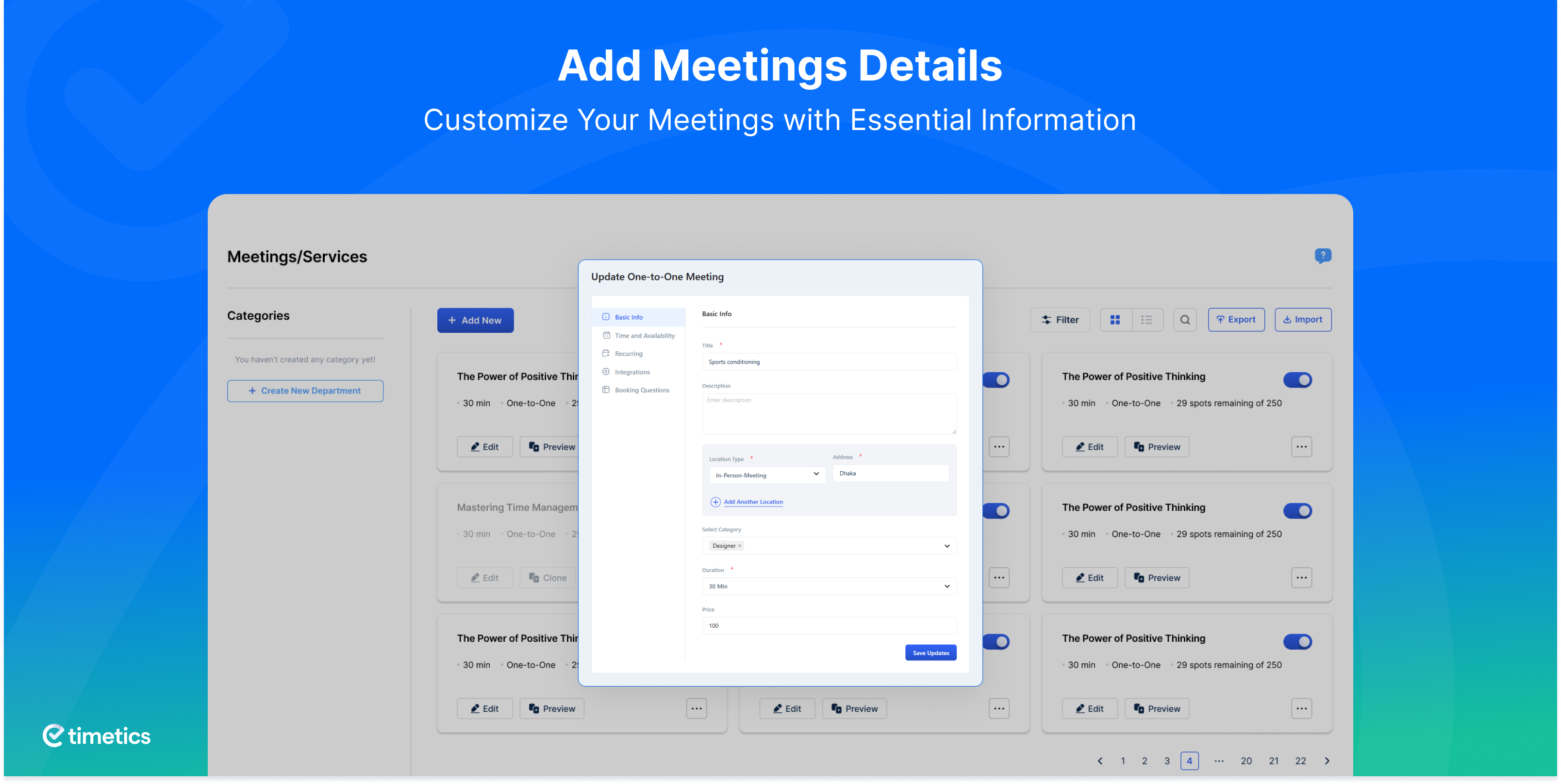
- Custom Booking Form Fields – Collect any information you need upfront: dietary requirements, project briefs, intake forms, or custom screening questions.
- Client Notes & Special Requests – Let clients add instructions or requests when booking.
- Special Availability Overrides – Override your regular schedule for holidays, staff leave, or one-off events without changing your default availability.
- Admin Calendar View – Full visual calendar overview of all scheduled appointments and bookings for easy day and week planning.
Multi-Host Event & Data Management
- Multiple Hosts Per Booking – Assign multiple team members to the same meeting, event, or session.
- CSV & Excel Data Export/Import – Migrate, back up, or report on all your booking data in standard spreadsheet formats.
Premium Integrations for Your Booking Workflow
- Zoom Integration – A unique Zoom meeting link is auto-generated the moment a booking is confirmed and delivered to both host and client. Reduces no-shows by giving clients instant, one-click access to their virtual appointment.
- FluentCRM Integration – Automatically add new and returning clients to CRM sequences for follow-ups, upsells, and retention campaigns.
- Pabbly Integration – Build automated multi-app workflows triggered by new bookings, cancellations, or rescheduling.
- Zapier Integration – Connect Timetics to thousands of apps to automate repetitive booking-related tasks.
- WhatsApp Booking Notifications – Send real-time booking confirmations and pre-appointment reminders via WhatsApp.
- Twilio SMS Reminders – Deliver instant text message reminders to clients’ phones before every appointment.
PRO Payment Options
- PayPal Integration – Accept PayPal payments from clients worldwide, in any currency.
- Stripe Integration – Full card payment support with real-time processing.
- WooCommerce Payments – Access 100+ payment gateways and advanced order management.
- Local / Offline Payment Methods – Support clients who prefer to pay in person.
Support & Resources
- 📖 Full Documentation
- 💬 Community Support Forum
- 🗺️ Feature Roadmap & Requests
- 🎥 Video Tutorials on YouTube
- 👥 Facebook Community Group
🔥 Now, What’s Next for You?
If you’re impressed with Timetics Appointments Booking Calendar and Scheduling Solution, please check out our other awesome WordPress plugins:
📅 Eventin – Free all-in-one event management and ticketing for WordPress.
🍽️ WPCafe – Online food ordering, restaurant menu, delivery, and table reservations.
📅 Booktics – Professional service-based booking for WordPress businesses.
External Services
This plugin connects to the following external services:
Arraytics FluentCRM Service
Connects to Arraytics.com’s FluentCRM service to manage contact information for marketing and communication purposes (product updates, feature announcements, support information).
Data sent: Your email address (only when you voluntarily provide it during business setup/onboarding).
Service provider: Arraytics – Terms of Service | Privacy Policy
Note: This is optional and not required for core plugin functionality.
Google Calendar API
Synchronizes appointment bookings between your WordPress site and Google Calendar (two-way sync). Enables automatic blocking of booked time slots and real-time calendar updates.
Data sent: Calendar event data (appointment details, dates, times, attendee information) when bookings are created, updated, or synchronized.
Service provider: Google LLC – Terms of Service | Privacy Policy
Note: Optional integration, only active if you connect your Google Calendar account.
Stripe Payment Processing
Handles secure online payment transactions for appointment bookings made through the booking calendar.
Data sent: Payment information (transaction amounts, booking details) when customers make payments.
Service provider: Stripe, Inc. – Terms of Service | Privacy Policy
Note: Optional integration, only active if you configure Stripe payment settings.
Installation
Minimum Requirements
- WordPress 5.2 or higher (Tested up to WordPress 6.9)
- PHP 7.3 or higher
Automatic Installation (Recommended)
The fastest way to install Timetics and start accepting online appointment bookings:
- Log in to your WordPress Dashboard.
- Go to Plugins → Add New.
- In the search bar, type Timetics.
- Click Install Now next to the Timetics Appointment Booking plugin.
- Click Activate — the setup wizard will launch automatically.
- Follow the onboarding steps and accept your first booking in under 5 minutes.
Manual Installation
- Download the Timetics plugin ZIP from the WordPress.org plugin directory.
- Unzip the file on your computer.
- Upload the unzipped
timeticsfolder to your/wp-content/plugins/directory via FTP or cPanel File Manager. - Go to Dashboard → Plugins → Installed Plugins and click Activate next to Timetics.
- The onboarding wizard will guide you through your initial booking system configuration.
Updating WPTimetics
WPTimetics updates automatically through the WordPress dashboard. If you have made custom code modifications to the plugin files, back up your changes before updating. After any update, if you experience permalink issues, go to Settings → Permalinks and click Save Changes to refresh your rewrite rules.
Frequently asked questions
Will I ever get double-booked with Timetics?
Never. Timetics automatically blocks confirmed time slots in real time, so the same time slot cannot be booked twice. Your appointment calendar is always accurate — no manual cleanup required.
How does Timetics compare to Calendly?
Unlike Calendly, Timetics is a WordPress-native appointment booking plugin. Your booking data lives on your own server, not a third-party SaaS platform. Timetics is free with no per-seat monthly fee, supports unlimited bookings and team members, includes Stripe payments, Google Meet, Zoom, WooCommerce, and AI-powered scheduling. Features that cost significantly more (or are unavailable) in Calendly. You also get a visual seat map for events, which Calendly does not offer at any price tier.
Is Timetics GDPR compliant?
Yes. All appointment booking data is stored on your own WordPress installation and server. No personal data is shared with external services unless you explicitly enable optional integrations (Google Calendar, Zoom, Stripe, etc.). This makes Timetics a solid choice for businesses operating under GDPR in the EU, and a strong foundation for HIPAA-conscious healthcare practices.
Does Timetics work with Elementor, Divi, or Gutenberg?
Yes. Use the Timetics shortcode to embed your booking form in any WordPress page builder — including Gutenberg blocks, Elementor, Divi, Beaver Builder, and the Classic Editor. Simply add the shortcode to any page or post and your booking calendar goes live immediately.
Can my clients book appointments 24/7 without my involvement?
Yes. Timetics enables fully automated 24/7 self-service online booking. Clients visit your booking page, see real-time availability, choose their time slot, fill in their details, pay if required, and receive an instant confirmation email — all without any action from you.
How many appointments and bookings can I add with Timetics?
Unlimited. The free version of Timetics has no caps on appointments, bookings, meetings, or team members. Your booking system grows with your business at no additional cost.
Who is the Timetics appointment booking plugin designed for?
Timetics is built for any service-based professional or business that relies on scheduled appointments — including consultants, coaches, educators, fitness trainers, hair salons, medical clinics, therapists, recruiters, legal professionals, and customer support teams. If your business runs on bookable time slots, Timetics keeps everything structured, automated, and easy to manage.
Does Timetics work with eLearning platforms?
Yes. Timetics works alongside popular LMS plugins like LearnDash, LifterLMS, TutorLMS. While your LMS manages course content and student progress, Timetics handles the live booking layer – letting students book 1-on-1 tutoring sessions, virtual office hours, course consultations, webinars, and mentorship calls directly on your WordPress site. It’s the ideal scheduling companion for any eLearning platform or online education business.
Does Timetics support recurring appointments?
Yes. Clients can schedule weekly, biweekly, monthly, or custom recurring bookings in a single step — ideal for ongoing coaching sessions, therapy appointments, fitness classes, and subscription-based services. This is a PRO feature.
Does Timetics send automatic booking confirmation and reminder emails?
Yes. Every new appointment booking triggers instant confirmation emails to both the client and the admin. Timetics also sends automated reminder emails before the appointment to reduce no-shows. SMS reminders via Twilio and WhatsApp reminders are available in Timetics PRO.
Can I manage appointments for multiple staff members?
Yes. Timetics supports unlimited team members in the free version. Each staff member gets their own booking profile, availability calendar, and notification preferences. You can assign appointments, view team schedules, and manage all bookings from one central admin dashboard.
Can I connect Timetics to other tools and automate tasks?
Yes. Timetics integrates with Zapier and Pabbly to connect your appointment booking system to thousands of other apps and automate workflows triggered by new bookings, cancellations, or rescheduling events.
Does Timetics support online payments?
Yes. The free version includes Stripe and WooCommerce payment support. Timetics PRO adds PayPal. Local and offline payment methods are available in both versions, giving clients full flexibility at checkout.
Is it possible to send SMS reminders with Timetics?
Yes. Timetics PRO includes Twilio integration for direct SMS reminders, as well as WhatsApp notification support – ensuring clients receive appointment reminders on whichever channel they prefer.
How do I suggest a feature for future versions of Timetics?
Share your feedback or feature request on the Timetics Roadmap. We actively review community suggestions when planning new releases.
Where do I report security bugs found in this plugin?
Please report security bugs found in the source code of the Timetics plugin through the Patchstack Vulnerability Disclosure Program. The Patchstack team will assist you with verification, CVE assignment, and notify the developers of this plugin.
Changelog
1.0.63 (September 21, 2026)
New: Added an Ask AI page with one-click Aisentic Plugin setup.
Fix: WooCommerce orders, thankyou page and emails now show full meeting details.
Fix: Retrying a failed Stripe payment no longer drops your slot.
Fix: Calendar events and emails now wait for payment to be confirmed.
Fix: Unpaid bookings are cleaned up automatically and slots are freed.
Fix: A booking retried after a failed payment no longer stays stuck as Failed.
Fix: Failed requests now show a clear error instead of a blank one.
1.0.62 (August 27, 2026)
Fix: Dashboard and report totals no longer disappear when the default booking status setting is changed.
Fix: Team members now see only their own bookings, earnings and customers on the dashboard.
Fix: Deleted bookings now free their time slot instead of keeping it blocked.
Fix: Rescheduling now frees the old time slot even when the booking and the meeting use different timezones.
Fix: Group meeting seat counts now go up and down correctly.
Fix: Slot times now show correctly for dates in a different daylight saving period.
Fix: Security improvements and hardening.
1.0.61 (July 22, 2026)
Fix: Google Calendar two-way sync no longer duplicates events for paid WooCommerce bookings.
Fix: Google Calendar event fetching now handles timezone offsets correctly.
Fix: Expired Google tokens now show a re-auth prompt instead of appearing disconnected.
Fix: Reminder emails now use the correct timezone and skip cancelled, deleted, or rescheduled bookings.
Fix: Failed-payment bookings now release their slots; group-meeting seats no longer go negative.
Fix: Notification flow REST API hardened against unauthorized access.
1.0.60 (June 28, 2026)
Fix: Fixed fatal error for email-automation classes.
1.0.59 (June 25, 2026)
New: Automation – Visual email flow builder with auto-seeded Automation templates.
Fix: One-to-one meeting double-booking when backend slot is marked unavailable.
Fix: Duplicate booking confirmation emails for paid bookings via Stripe, PayPal, and WooCommerce.
Fix: Booking reminder email templates using wrong option keys (created instead of reminder).
Fix: One-to-one meeting availability check now uses effective capacity of 1 instead of stored metadata.
Fix: Service Time-slot duration missmatch with service duration variation in booking summery.
Tweak : Security improvements and hardening.
1.0.58 (Jun 10, 2026)
Fix: Frontend rendering error for creating meetings is now fixed.
Tweak: Minor user experience improvements.
Screenshots

For developers
Is this your plugin? Show off the numbers.
Add a live badge to your site, docs or GitHub README. It updates on its own — no account needed.
Best Timetics alternatives
All appointment booking plugins →





FAQ
Timetics: quick answers
Straight answers, pulled from live WordPress.org data.
Live data from WordPress.org · checked Sep 26, 2026
Is Timetics free?
Yes. Timetics is free to download and use from the official WordPress.org plugin directory.
Is Timetics safe to use in 2026?
Yes — Timetics is a safe, well-maintained plugin to use in 2026. It runs on 2K+ sites, is rated 4.6/5 and was last updated 5 days ago, and scores 90/100 on our health check.
How many websites use Timetics?
Timetics is active on 2K+ WordPress websites and has been downloaded 83,897 times since it launched in January 2023. It was downloaded 3,472 times in the last 30 days.
Does Timetics work with WordPress 7.1?
Yes. The developer has tested Timetics up to WordPress 7.1.2, the latest release. It requires WordPress 5.2 or newer.
What PHP version does Timetics need?
Timetics requires PHP 7.3 or higher. Most hosts run PHP 8.x today, so it works on any modern WordPress hosting.
When was Timetics last updated?
The latest version, 1.0.63, was released on September 21, 2026 (5 days ago).
Who makes Timetics?
Timetics is developed and maintained by Arraytics.
What are the best alternatives to Timetics?
The most popular alternatives to Timetics are Appointment Booking Plugin (100K+ installs), Online Scheduling and Appoi… (60K+ installs) and Simply Schedule Appointments (50K+ installs).
Powered by PageForge
Want thousands of pages that rank like these? Build them in an afternoon.
This directory runs on the same engine as PageForge. Turn any spreadsheet, CSV or API into thousands of fast, SEO-ready WordPress pages — with schema, internal links and AI-written copy baked in.
- CSV, Google Sheets & API data sources
- AI content, schema & internal links per page
- Works with Elementor, Gutenberg, Yoast & Rank Math
- Free on WordPress.org — no credit card


