


Timeline Designer
Timeline Designer helps you to create a beautiful layout for your blog post and custom post type which is based on timeline concept.

Consider an alternative
Timeline Designer shows warning signs in 2026 — compare the alternatives below before installing. It runs on 50+ sites, is rated 1/5 and was last updated 1 year ago, and scores 29/100 on our health check.
- Small user base (50+ active installs)
- Very few reviews so far
- No update in over a year
- Only tested up to WordPress 6.8 (latest is 7.1)
How does it stack up?
Side-by-side on installs, updates, ratings & support



Daily downloads
Download spikes usually follow a new release — each site that auto-updates counts as a download.
Rankings
Where Timeline Designer stands todayWordPress.org search rankings
Live position in the plugin search, top 100| Keyword | Position |
|---|---|
| posts | >100 |
| template | >100 |
| Timeline Layout | >100 |
Version adoption
Share of active sites per release.
Rating breakdown
★★★★★★★★★★ 1 from 1 reviews
About Timeline Designer
From the official readme · v1.4.1Description
Timeline Designer plugin comes with various customizable options to help you easily make blog post timeline within just one minute. You just have to select a build in template and customize it according to your need like number of post to show on timeline, what date format you want to use, which color you want to apply in background of timeline and what color should be timeline as well as you have typograph option, padding, margin, post excerpt, build in social media icons etc.
Plugin will not collect any data from your site visitors. So it is GDPR compatible.
You have an option to show timeline vertically or horizontally, pagination option which is fully customizable.
Display a completely responsive & customizable post timeline on your website which match with the look and feel of your website.
It builts with 100% customization of color, background color, font size, border and many more that you think.
HOW IT WORKS
Step 1 : Create a Layout – Create a new layout and give it a name.
Step 2 : Select Page to show timeline – Select a page to show timeline or page shortcode of layout in a page to show timeline.
Step 3 : Select Post or Custom Post Type – Plugin provide option to select post and custom post type which will show in timeline.
Step 4 : Design Layout – Select a layout and customize it using color options, font/Typography, animation, show/hide element and using other many layout options.
Step 5 : Use Shortcode to display timeline – Add a shortcode in any page, anywhere to display created layout.
FEATURES
- 6 Layout Templates – 6 existing customizable layout templates with vertical and horizontal layout.
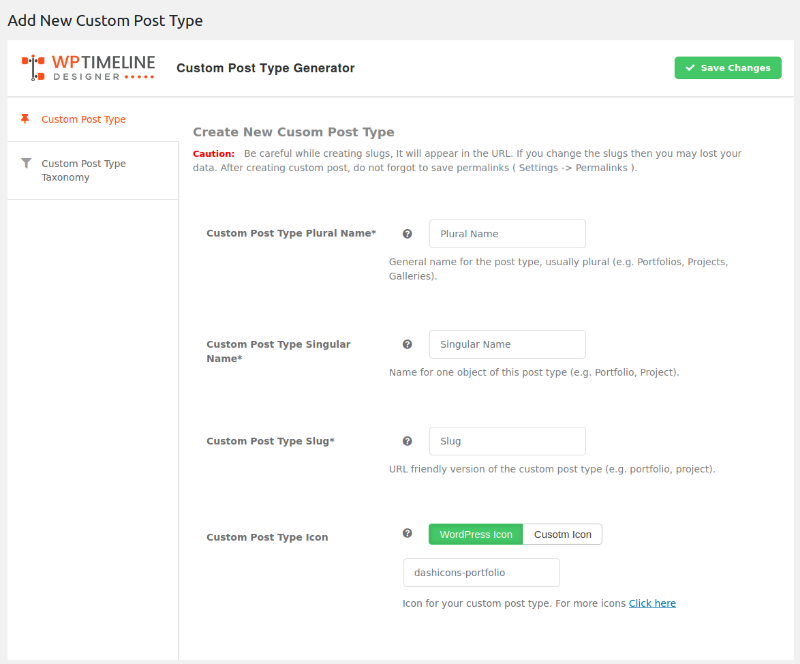
- Post and Custom Post Type – Support custom post type to show posts of a particular post type in a timeline.
- **Meta Option ** – Show or Hide Meta such as date, author, comment, category, tag etc. and meta typography options.
- Customize Timeline – set template background color, template layout color, show/hide timeline icon and basic animation.
- Customizable Post Title – option to set title color, hove color, alignment and link settings.
- Customizable Post Content – show full text or summary excerpt, display html or pure text, add dropcap, set content length, content color, typography.
- Read More Text and Button – Customizable read more text and button options with color, alignment, padding and margin options.
- Content Box Options – Style post content box using content box options.
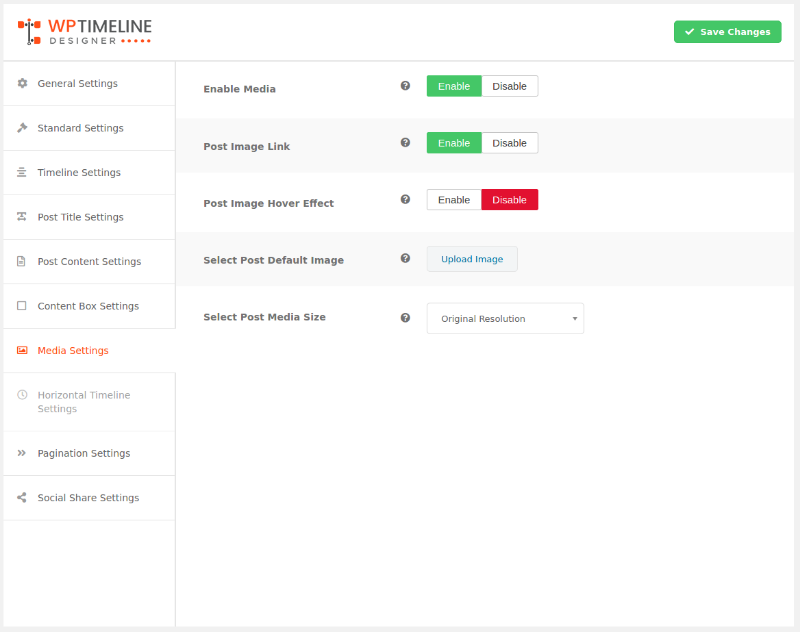
- Adjust Media – set size of post feature image, add featured image custom size , add animation on featured image, image link, upload default image for posts.
- Horizontal Timeline – With the horizontal option you can customize horizontal timeline such enable auto slide, scrolling speed, number item in navigation, number of slide etc.
- Pagination – numeric pagination with customizable template.
- Social Media Share – Social Media with pre icon pack, alignment, icon layout setting, enable/disable icon option particular social media.
- Google Fonts – most unique select google font perfect for timeline.
- Fully Responsive – Fully responsive will all devices
PRO version features
- 12+ Layout Templates – 12+ customizable layout templates
- Unlimited Timeline color – variety of color options to set up timeline, example: odd and even color, meta link color, repetitive color, timeline starting and ending text color etc.
- Custom Timeline Icon and Image – setup default timeline post icon or image
- Post Title Typography – setup title font, font size, line-height, font-style etc.
- 12+ animation – 12+ timeline animations.
- Ultimate FIlter – filter option ever best included all which require as well as advanced filter option, sort option.
- Advanced Pagination – pagination has a numeric pagination, a load on scroll option, as well ajax loader button, all pagination option customizable with pre templates.
- Woo Product Post Type Support – perfect for product timeline come with customizable options like, add cart button, rating, price, sale tag.
- Easy Digital Download Support – Support Easy Digital Download Post type with customizable options.
- HIGH PRIORITY SUPPORT – Fast professional support for premium users
Upgrade to PRO!
Installation
1. Go to Plugins > Add New.
2. Click on Upload Plugin and browse and select timeline-designer.zip then click on Install Now.
3. To activate Wp Timeline, Click on Activate link.
4. After plugin activation, move on Wp Timeline page of WordPress.
\1
1.4.1
- Security: Fix SQL injection in admin shortcode list search (
sparam) using $wpdb->prepare and esc_like. - Security: Sanitize
orderbyand use prepared statements for pagination queries. - Maintenance: Update \”Tested up to\” to 6.7.3 and add \”Requires PHP: 7.4\”.
1.4
Release Date: July 29, 2024
* Updated: Make compatible with WordPress version 6.6.1
* Fix minor bug issue.
1.3
Release Date: July 11, 2024
* Updated: Make compatible with WordPress version 6.5.5
* Added: Post Title Maximum Line Feature
* Fix minor bug issue.
* Fixed: Code Improvements
1.2
Release Date: April 11, 2024
* Updated: Make compatible with WordPress version 6.5.2
* Fix minor Bug issue.
1.1
Release Date: February 1, 2024
* Updated: Make compatible with WordPress version 6.4.3
* Updated: Make compatible with PHP version 8.3
* Updated: Make compatible with Font Awesome 6
1.0.9
Release Date: December 13, 2023
* Updated: Make compatible with WordPress version 6.4.2
1.0.8
Release Date: November 10, 2023
* Updated: Make compatible with WordPress version 6.4.1
* Fixed: minor bug issue
1.0.7
Release Date: July 31, 2023
* Updated: Make compatible with WordPress version 6.2.2
* Fixed: Design issues
* Fixed: Code Improvements
1.0.6
Release Date: April 5, 2023
* Updated: Make compatible with WordPress version 6.2
* Updated: Make compatible with PHP version 8.2
* Added: Lazyload Feature
* Fixed: minor bug issue
1.0.5
Release Date: December 21, 2022
* Updated: Make compatible with WordPress version 6.1.1
* Fixed: Code Improvements
1.0.4
Release Date: November 8, 2022
* Updated: Make compatible with WordPress version 6.1
* Fixed: minor bug issue
1.0.3
Release Date: August 18, 2022
* Updated: Make compatible with WordPress version 6.0.1
* Fixed: Make compatible with UpdraftPlus Plugin
* Fixed: minor bug issue
1.0.2
Release Date: May 31, 2022
* Updated: Make compatible with WordPress version 6.0
* Fixed: minor bug issue
1.0.1
Release Date: February 9, 2022
* Updated: Make compatible with WordPress version 5.9
* Updated: Make compatible with WordPress PHP 8.0
* Fixed: minor bug issue
1.0.0
Release Date: February 13, 2021
- Initial Release
Screenshots





For developers
Is this your plugin? Show off the numbers.
Add a live badge to your site, docs or GitHub README. It updates on its own — no account needed.
Best Timeline Designer alternatives
All posts plugins →


FAQ
Timeline Designer: quick answers
Straight answers, pulled from live WordPress.org data.
Live data from WordPress.org · checked Oct 8, 2026
Is Timeline Designer free?
Yes. Timeline Designer is free to download and use from the official WordPress.org plugin directory.
Is Timeline Designer safe to use in 2026?
Timeline Designer shows warning signs in 2026 — compare the alternatives below before installing. It runs on 50+ sites, is rated 1/5 and was last updated 1 year ago, and scores 29/100 on our health check.
How many websites use Timeline Designer?
Timeline Designer is active on 50+ WordPress websites and has been downloaded 7,288 times since it launched in February 2021. It was downloaded 131 times in the last 30 days.
Does Timeline Designer work with WordPress 7.1?
Timeline Designer is officially tested up to WordPress 6.8.11, while the latest release is 7.1.3. It may still work, but try it on a staging site first.
What PHP version does Timeline Designer need?
Timeline Designer requires PHP 7.4 or higher. Most hosts run PHP 8.x today, so it works on any modern WordPress hosting.
When was Timeline Designer last updated?
The latest version, 1.4.1, was released on August 12, 2025 (1 year ago).
Who makes Timeline Designer?
Timeline Designer is developed and maintained by solwininfotech.
What are the best alternatives to Timeline Designer?
The most popular alternatives to Timeline Designer are GenerateBlocks (200K+ installs), Post Duplicator (200K+ installs) and WP Popular Posts (100K+ installs).
Powered by PageForge
Want thousands of pages that rank like these? Build them in an afternoon.
This directory runs on the same engine as PageForge. Turn any spreadsheet, CSV or API into thousands of fast, SEO-ready WordPress pages — with schema, internal links and AI-written copy baked in.
- CSV, Google Sheets & API data sources
- AI content, schema & internal links per page
- Works with Elementor, Gutenberg, Yoast & Rank Math
- Free on WordPress.org — no credit card


