



Tabify Edit Screen
Enable tabs in the edit screen and manage them from the back-end.

Use with caution
Tabify Edit Screen works, but test it on a staging site before relying on it in 2026. It runs on 500+ sites, is rated 4.9/5 and was last updated 6 years ago, and scores 44/100 on our health check.
- Loved by users — 4.9/5 from 22 reviews
- Small user base (500+ active installs)
- No update in 5 years
- Only tested up to WordPress 5.6 (latest is 7.1)
How does it stack up?
Side-by-side on installs, updates, ratings & support



Daily downloads
Download spikes usually follow a new release — each site that auto-updates counts as a download.
Rankings
Where Tabify Edit Screen stands todayWordPress.org search rankings
Live position in the plugin search, top 100| Keyword | Position |
|---|---|
| admin | >100 |
| edit | >100 |
| page | >100 |
| post | >100 |
| tabs | >100 |
Version adoption
Share of active sites per release.
Rating breakdown
★★★★★★★★★★ 4.9 from 22 reviews
About Tabify Edit Screen
From the official readme · v1.0.0Description
When you’ve got lots of post meta-boxes, your post edit screen can become difficult to search. Make your post edit screen easier to navigate and manage by creating a set of tabs, with the Tabify Edit Screen plugin. And manage it all from the WordPress back-end!
There are still lots of things changing in the code base. There are some hooks you can use but they can change from implementation till 1.0. I will always try to maintain backwards-compatible but till 1.0 I can’t be sure for that.
Installation
- Upload the folder
tabify-edit-screento the/wp-content/plugins/directory - Activate the plugin through the ‘Plugins’ menu in WordPress
- Go to the Settings -> Tabify edit screen to enable tabs for a specific post type
Frequently asked questions
Can you define metaboxes that will always be visible?
At this moment the title and submit box are always visible. You can change this by using the following filters: * tabify_default_metaboxes – $defaults, $id, $type * tabify_default_metaboxes_$type – $defaults, $id The $id is for example the post type name when $type is posttypes.
Can I place the tabs under the title input field?
Yes, you can use the filter ‘tabify_tab_location’ and passing the value ‘after_title’ to it. You can also check on the second argument what the location is. Now always ‘posttype’
Does it work with all plugins?
Since version 0.9.0 it should work for almost all plugins. Unless they do extra checks it should work. Before there was a filter ‘tabify_plugin_support’ which still exists but shouldn’t be used anymore.
What happen with new metaboxes?
At this moment new metaboxes are places on the last tab. You can go to the settings screen to reorder the metabox. You can change which tab it should go like with meta boxes that don’t show up like Types or WordPress SEO. You do this with the filter ‘tabify_unattached_metaboxes_index’.
Changelog
1.0.0 ( 2021-02-28 )
- Fixed PHP and WordPress warnings
- Arguments for filter tabify_default_metaboxes changed
- Deprecated filter tabify_default_metaboxes_$post_type
- Improved detection layer a bit. It’s still not perfect and will be addressed in 1.1.0
- Action
tabify_settingsgot changed
0.9.7 ( 2016-12-20 )
- Fix on/off switch.
0.9.6 ( 2016-11-21 )
- Added on/off switch.
- Prevent empty tabs from showing.
- Make the filter ‘tabify_tab_posttype_tabs’ works. Reported by junander.
- Removed unused code.
- Started cleanup for version 1.0.0
- Compatibility check with WordPress 4.7
0.9.5 ( 2016-03-03 )
- Only load features once. Caused when plugins set a new current_screen.
0.9.4 ( 2016-02-28 )
- Rewrite of smart meta box detection to use Javascript instead.
- Clear Detection cache on needed moments.
- Increase caching time for smart detection to a week.
- Disabled plugin support which accidentally got enabled in 0.9.3
- Ability to enable/disable the post types tabs through the filter ‘tabify_tab_posttype_show’
- Fix notices on WooCommerce install screen
- Check if metaboxes got removed to prevent notices
- Remove action ‘tabify_tabs’ due to same filter.
0.9.3 ( 2016-02-18 )
- Fix undefined notice on settings page. Props Juliette Reinders Folmer
- Fix typo in detection transient name. Props Juliette Reinders Folmer
- Fix vertical tabs on setting page display next to each other in WordPress 4.4
- Added back plugin support with filter ‘tabify_plugin_support’
Screenshots
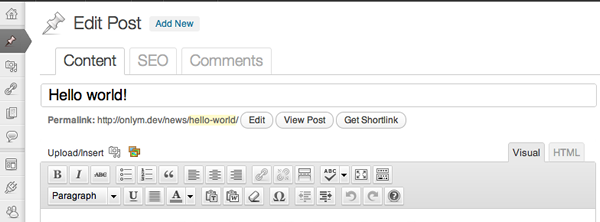
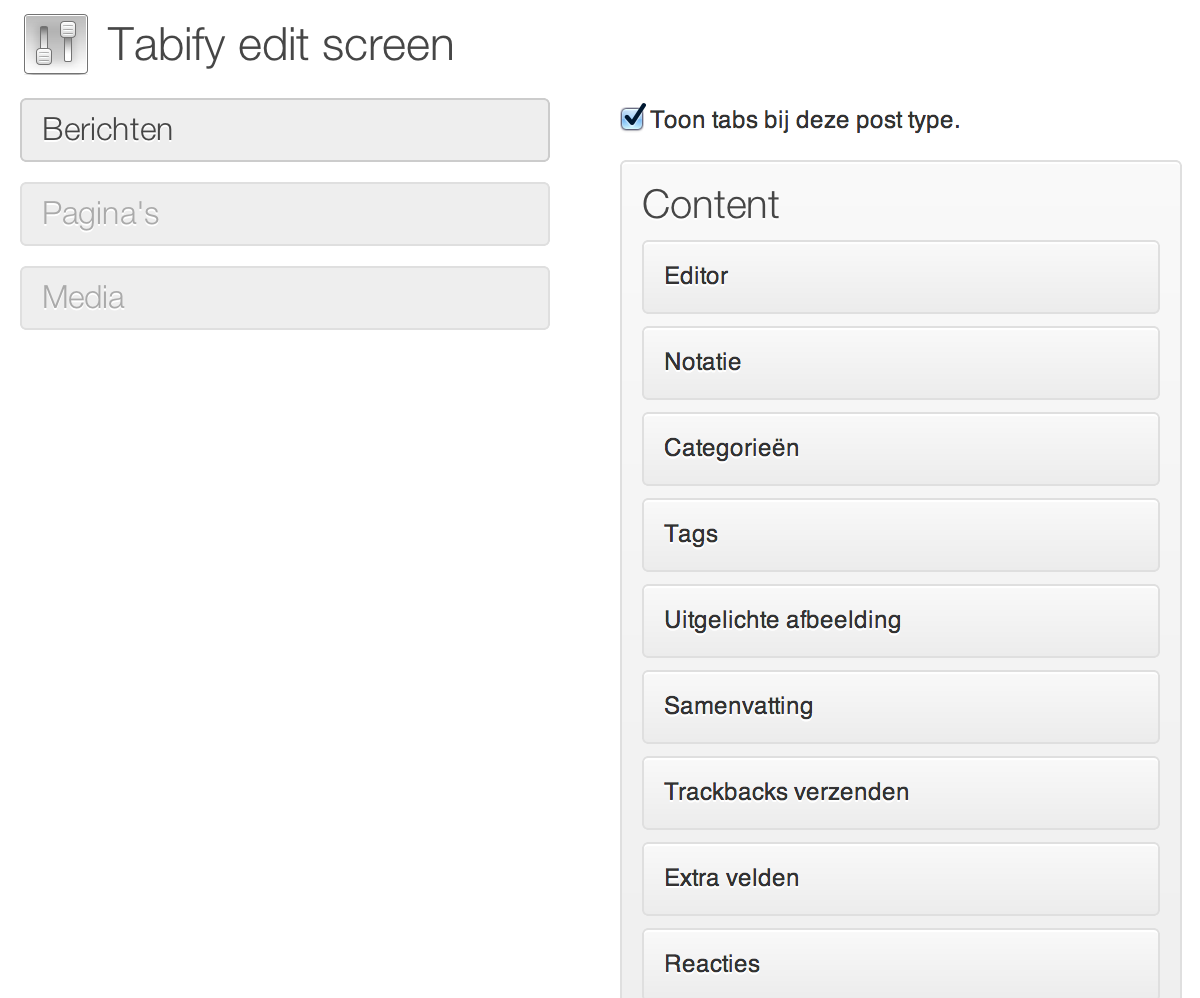
For developers
Is this your plugin? Show off the numbers.
Add a live badge to your site, docs or GitHub README. It updates on its own — no account needed.
Best Tabify Edit Screen alternatives
All admin plugins →




FAQ
Tabify Edit Screen: quick answers
Straight answers, pulled from live WordPress.org data.
Live data from WordPress.org · checked Sep 27, 2026
Is Tabify Edit Screen free?
Yes. Tabify Edit Screen is free to download and use from the official WordPress.org plugin directory.
Is Tabify Edit Screen safe to use in 2026?
Tabify Edit Screen works, but test it on a staging site before relying on it in 2026. It runs on 500+ sites, is rated 4.9/5 and was last updated 6 years ago, and scores 44/100 on our health check.
How many websites use Tabify Edit Screen?
Tabify Edit Screen is active on 500+ WordPress websites and has been downloaded 40,124 times since it launched in April 2012. It was downloaded 112 times in the last 30 days.
Does Tabify Edit Screen work with WordPress 7.1?
Tabify Edit Screen is officially tested up to WordPress 5.6.21, while the latest release is 7.1.2. It may still work, but try it on a staging site first.
When was Tabify Edit Screen last updated?
The latest version, 1.0.0, was released on February 28, 2021 (6 years ago).
Who makes Tabify Edit Screen?
Tabify Edit Screen is developed and maintained by Marko Heijnen.
What are the best alternatives to Tabify Edit Screen?
The most popular alternatives to Tabify Edit Screen are Loginizer (1M+ installs), Redux Framework (900K+ installs) and Admin Menu Editor (300K+ installs).
Powered by PageForge
Want thousands of pages that rank like these? Build them in an afternoon.
This directory runs on the same engine as PageForge. Turn any spreadsheet, CSV or API into thousands of fast, SEO-ready WordPress pages — with schema, internal links and AI-written copy baked in.
- CSV, Google Sheets & API data sources
- AI content, schema & internal links per page
- Works with Elementor, Gutenberg, Yoast & Rank Math
- Free on WordPress.org — no credit card


