



Syncific Vault — API Key Protection & Security
Encrypt your AI API keys and keep them out of the WordPress database — one secure vault for WordPress 7.0 Connectors and every AI plugin.

Use with caution
Syncific Vault works, but test it on a staging site before relying on it in 2026. Was last updated 4 months ago, and scores 49/100 on our health check.
- Small user base (<10 active installs)
- Very few reviews so far
How does it stack up?
Side-by-side on installs, updates, ratings & support



Daily downloads
Download spikes usually follow a new release — each site that auto-updates counts as a download.
Rankings
Where Syncific Vault stands todayWordPress.org search rankings
Live position in the plugin search, top 100| Keyword | Position |
|---|---|
| AI | >100 |
| api keys | >100 |
| connectors | >100 |
| encryption | >100 |
| security | >100 |
About Syncific Vault
From the official readme · v1.0.1Description
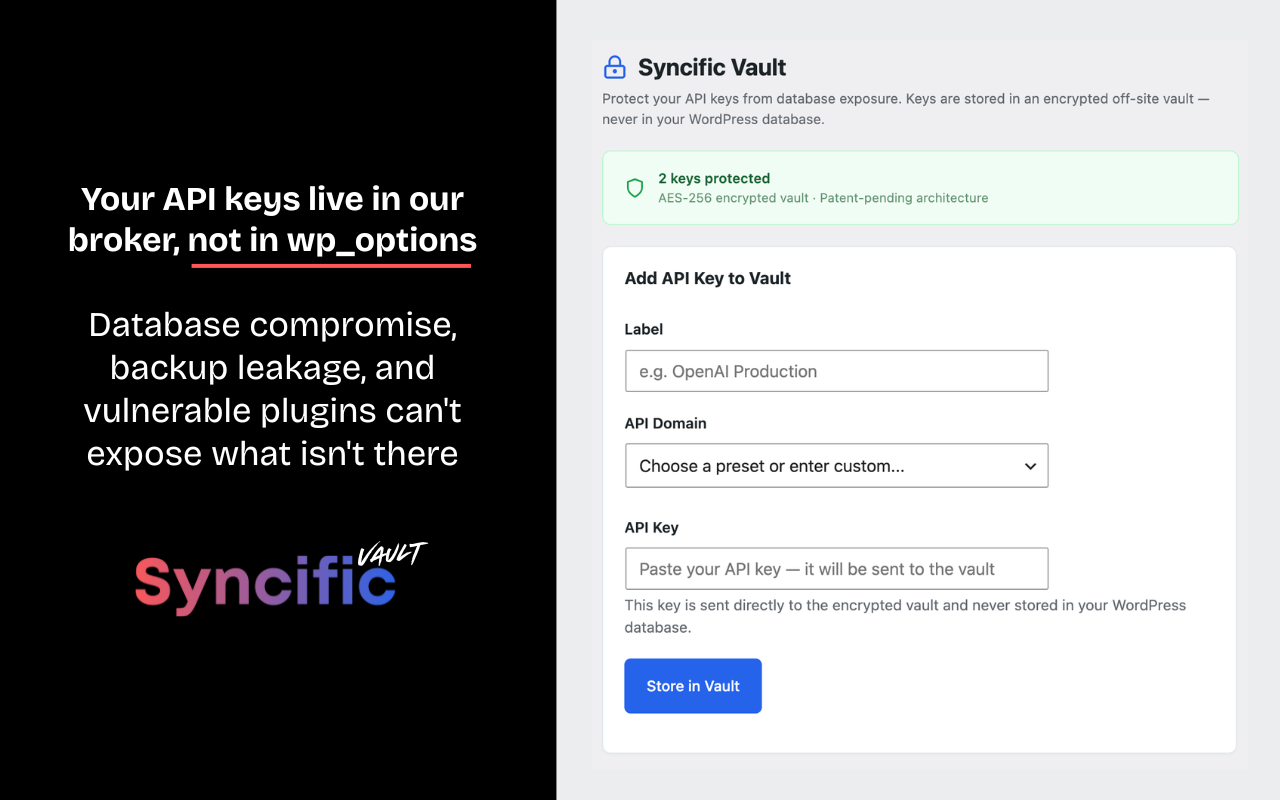
WordPress stores API keys in your database in plain text by default. If your database is compromised through SQL injection, a backup leak, or a vulnerable plugin, every API key is exposed. WordPress 7.0’s new Connectors API stores AI provider keys the same way (core ticket #64789).
Syncific Vault fixes this. Your API keys are moved to an encrypted vault hosted off-site. Your WordPress database stores only a reference — the real key is injected at request time and never persists locally.
One vault for all your AI plugins. Store your API keys in Syncific Vault — not in your database. Paste the secure placeholder into AI Engine, ClassifAI, Elementor AI, or any plugin that needs it. When you rotate a key with your provider, update it once in Syncific Vault — every plugin gets the new key instantly.
How it works
- Paste your API key in the Syncific Vault settings page
- The key is encrypted and sent to the Syncific Vault (AES-256, never in your database)
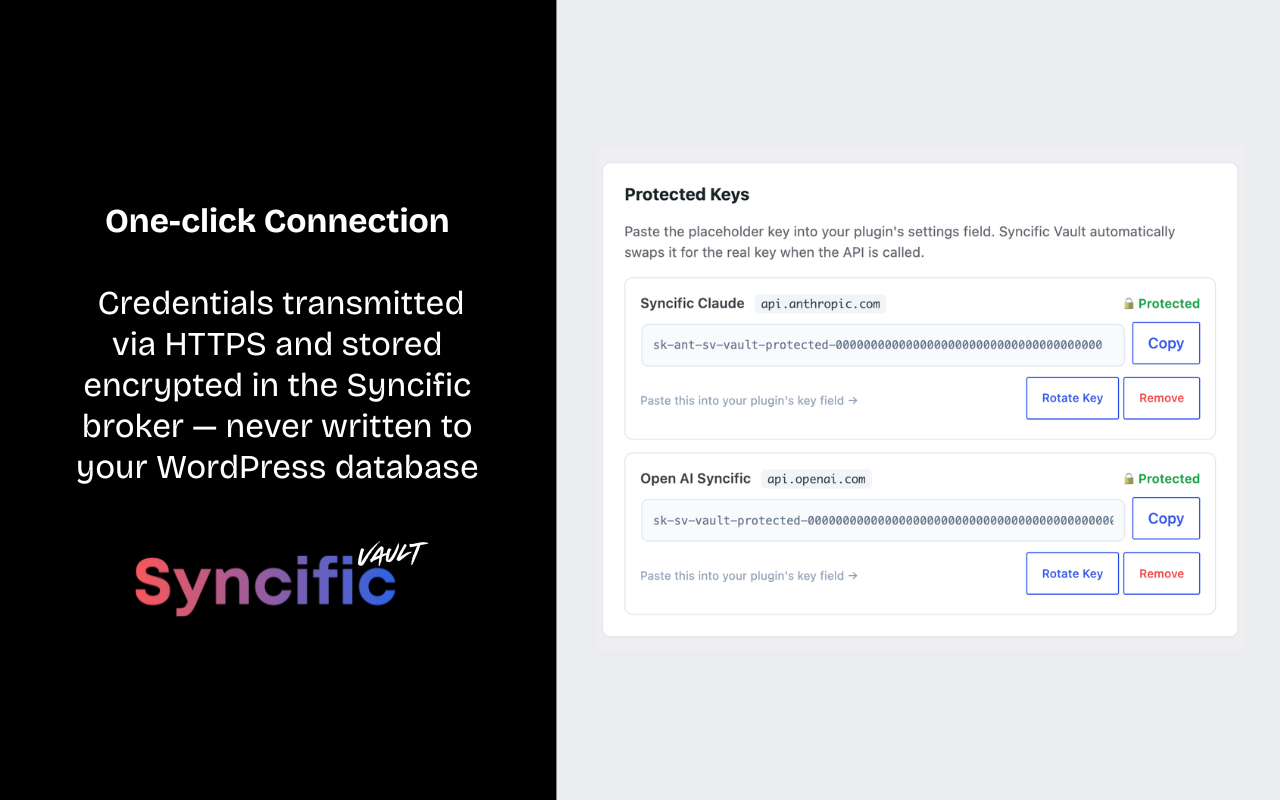
- A secure placeholder key is generated — paste it into your other plugins’ settings
- When any plugin makes an API call, Syncific Vault intercepts it and injects the real key
- Other plugins work normally — they don’t know the key was swapped
- If your database is dumped or compromised, no API keys are exposed
Supports any AI API key
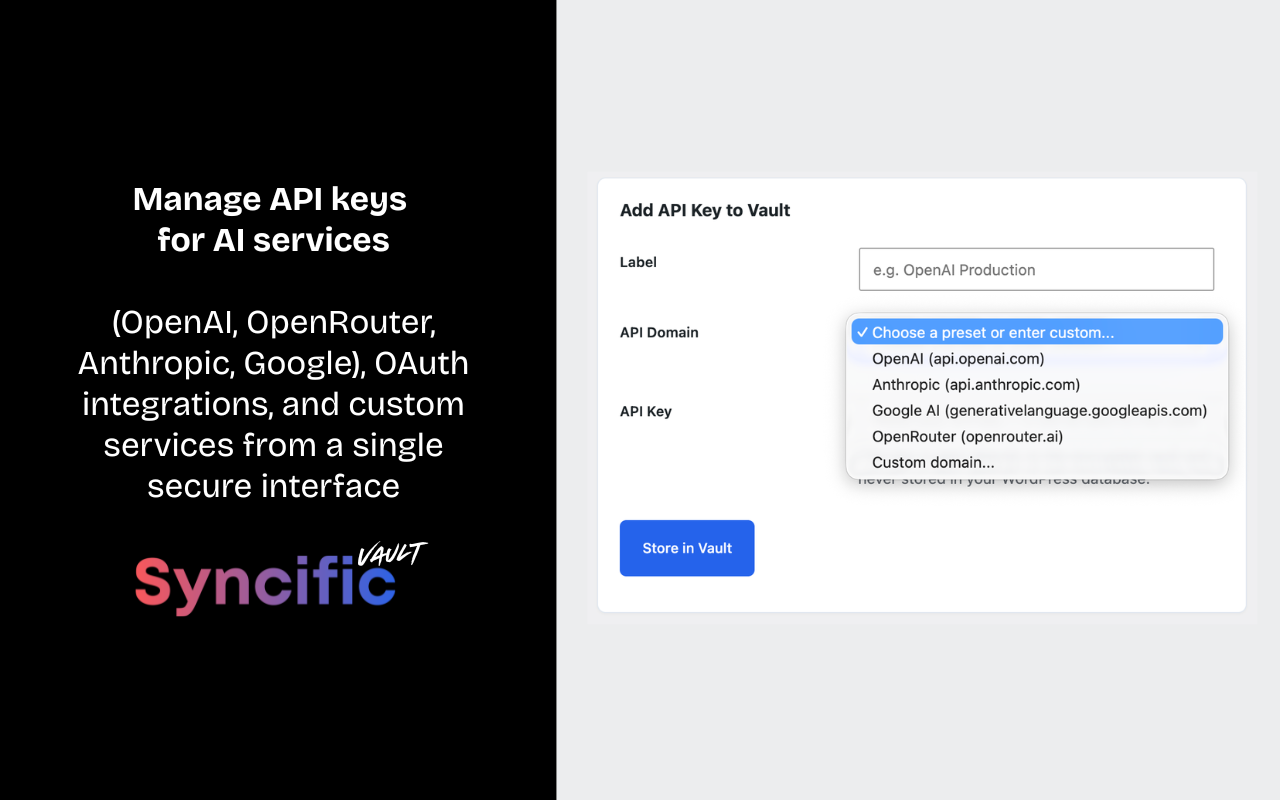
- AI providers: OpenAI, Anthropic, Google AI, OpenRouter
- Any API that uses header-based authentication (custom domain support included)
Security
- Keys encrypted with AES-256 in an isolated vault file — not a database
- Vault file stored outside the web root with strict file permissions
- Patent-pending broker architecture (US App. No. 19/440,404)
- Keys never stored in wp_options, wp_postmeta, or any WordPress table
- In-memory key retrieval only — credentials are not persisted in any WordPress storage layer (database, transients, or options)
- One-click key rotation — update a key once, every plugin gets the new key instantly
- Rate-limited vault access (60 requests/minute per site)
- Fails open by design — vault outages never break your WordPress site, though AI features dependent on protected keys will fail authentication until the vault is reachable again
Protects against
- Database dumps and backup file exposure
- SQL injection attacks
- Compromised plugins that read wp_options
- Unauthorized phpMyAdmin or database client access
- Hosting provider data breaches
External Service
This plugin relies on the Syncific Vault API, an external broker service operated by Syncific, to store and retrieve encrypted API keys. All requests are sent to the broker endpoint at https://lightsyncpro.com/wp-json/lsp-broker/v1/ — the broker host that Syncific operates for this service.
What the service does: Syncific Vault provides encrypted off-site storage for API keys. Keys are encrypted with AES-256 and stored in an isolated vault file on the Syncific broker server (lightsyncpro.com) — not in your WordPress database.
What data is sent and when:
- When you store a key: Your site URL, a hash of your site URL, a per-site authentication token, a single-use verification nonce, the API domain, the API key, a label, and the authentication header name are sent to the broker (
lightsyncpro.com) via HTTPS. The broker then calls your site back once at/wp-json/svault/v1/verifyto confirm site ownership before binding the key. - When a plugin makes an API call to a protected domain: Your site URL hash, per-site token, and the API domain are sent to the broker (
lightsyncpro.com) to retrieve the real key. The key is held in PHP memory only for the duration of the request and is never written to your database. - When you remove a key (or uninstall the plugin): Your site URL hash, per-site token, and the API domain are sent to the broker (
lightsyncpro.com) to remove the key from the vault.
No other user data, site content, or visitor information is ever transmitted.
Service links:
Supported AI Providers
Syncific Vault includes preset support for the following AI provider APIs. This plugin does not connect to these services directly. They are the destination domains whose API keys are protected by Vault. When another plugin on your site makes a request to one of these domains, Syncific Vault intercepts the request and injects the protected key. The traffic to these providers originates from your other plugins (such as AI Engine, ClassifAI, or any plugin you’ve configured), not from Syncific Vault itself.
- OpenAI (api.openai.com) — Terms of Use | Privacy Policy
- Anthropic (api.anthropic.com) — Consumer Terms | Privacy Policy
- Google AI / Gemini (generativelanguage.googleapis.com) — API Terms | Privacy Policy
- OpenRouter (openrouter.ai) — Terms | Privacy
You may also add any other domain through the “Add Custom Domain” option in the plugin settings. Whatever domain you add becomes a protected destination — your other plugins continue to send requests to that domain as they normally would, and Syncific Vault transparently provides the credentials.
Free and open source
Syncific Vault is completely free. No limits on the number of keys you can protect.
Made by Syncific
Syncific Vault is built by the team behind Syncific — the creative asset sync platform. The same patent-pending broker architecture that protects OAuth credentials for Lightroom, Figma, Canva, and Dropbox now protects your API keys.
Installation
- Upload the
syncific-vaultfolder to/wp-content/plugins/ - Activate the plugin through the ‘Plugins’ menu in WordPress
- Go to Settings → Syncific Vault
- Select a preset (OpenAI, Anthropic, etc.) or enter a custom domain
- Paste your API key and click “Store in Vault”
- Copy the placeholder key and paste it into your other plugins’ key fields
- Done — your key is now protected and every plugin works through the vault
Frequently asked questions
Where are my keys stored?
Your keys are encrypted with AES-256 and stored in an isolated vault file on the Syncific broker server. The vault file is not a database — it’s an encrypted file on disk with strict permissions (0600). The encryption key is separate from the vault file. Your WordPress database never contains your real API keys.
How is this different from a plugin that encrypts keys in the WordPress database?
Encryption-in-database plugins still leave the encrypted keys and the encryption key on your WordPress server. If an attacker gains access through SQL injection, a backup leak, or a vulnerable plugin, they can extract both the encrypted keys and the means to decrypt them. Syncific Vault is architecturally different: the keys aren’t on your WordPress server at all. There’s nothing to decrypt because there’s nothing there.
Will my existing plugins still work?
Yes. Syncific Vault uses WordPress’s http_request_args filter to intercept outgoing API calls and inject the real key before the request is sent. The calling plugin (AI Engine, ClassifAI, Elementor AI, WooCommerce, etc.) works exactly as before — it doesn’t know the key was swapped.
How do I rotate a key?
Click “Rotate Key” next to any protected key in the Syncific Vault settings page, paste your new key, and you’re done. Every plugin on your site that uses that key gets the new one instantly — no need to update settings in each individual plugin.
What happens if the vault is unreachable?
The plugin fails open — it never blocks your WordPress site from loading. During a Syncific Vault outage, API calls from your other plugins will proceed with the placeholder key and fail authentication at the provider (OpenAI, Anthropic, etc.). Your site remains fully functional; only the AI features dependent on protected keys are temporarily affected. Once the broker is reachable, key injection resumes automatically.
Is this compatible with WordPress 7.0’s Connectors API?
Yes. Syncific Vault intercepts the HTTP requests that the Connectors API makes to AI providers, injecting the real key from the vault instead of the one stored in the WordPress database.
What about multisite?
Each site in a multisite network gets its own vault entry (keyed by site URL hash). Sites cannot access each other’s keys.
Can I verify my keys are protected?
Yes. Syncific Vault includes a built-in database scanner that checks wp_options for common AI API key patterns (OpenAI, Anthropic, Google AI, OpenRouter). Run it anytime from the settings page to confirm no keys are exposed.
Do you store my keys forever?
Keys remain in the vault until you remove them. You can remove any key from the Syncific Vault settings page at any time. On plugin uninstall, local references are cleaned up. To remove keys from the vault itself, use the Remove button before uninstalling.
What if Syncific shuts down? Will I lose access to my AI services?
No. Syncific Vault doesn’t replace your provider relationship — OpenAI, Anthropic, Google AI, and OpenRouter all let you retrieve or regenerate keys from your provider dashboard at any time. We recommend keeping an off-vault backup of any business-critical API key. The plugin is designed so you can leave at any time: deactivate Syncific Vault, paste your original keys directly into your plugins, and continue normally. Your provider accounts and keys are always yours.
Changelog
Adds per-site token binding and broker callback verification, expands the credential scanner to 20 patterns across three tables, and hardens admin input validation. Recommended for all users.
1.0.1
- Added per-site token binding — every vault operation is authenticated by a site-specific secret stored locally, HMAC-verified on the broker
- Added broker-to-site callback verification on first registration — proves site ownership before binding (DNS-pinned, SSRF-protected on the broker)
- Expanded credential scanner from 5 to 20 patterns across wp_options, wp_postmeta, and wp_usermeta — now detects OpenAI, Anthropic, Google AI, OpenRouter, xAI, Replicate, HuggingFace, Stripe, GitHub, AWS, DigitalOcean, Slack, and SendGrid credential shapes
- Hardened input validation across admin AJAX handlers
- Normalized site URL handling to match broker canonical form (lowercase scheme/host, default ports stripped)
- Expanded preset AI provider documentation with provider terms and privacy policy links
- Clarified that the plugin does not connect to AI provider APIs directly — it protects keys for other plugins that do
1.0.0
- Initial release
- Support for AI API keys (OpenAI, Anthropic, Google AI, OpenRouter) and any custom API
- AES-256 encrypted off-site vault
- Automatic key injection via WordPress http_request_args filter
- Secure placeholder keys for cross-plugin compatibility
- One-click key rotation
- Built-in database scanner to verify protection
- Admin UI with domain presets and custom domain support
- Rate-limited vault access (60 requests/minute per site)
Screenshots
For developers
Is this your plugin? Show off the numbers.
Add a live badge to your site, docs or GitHub README. It updates on its own — no account needed.
Best Syncific Vault alternatives
All AI plugins →





FAQ
Syncific Vault: quick answers
Straight answers, pulled from live WordPress.org data.
Live data from WordPress.org · checked Oct 5, 2026
Is Syncific Vault free?
Yes. Syncific Vault is free to download and use from the official WordPress.org plugin directory.
Is Syncific Vault safe to use in 2026?
Syncific Vault works, but test it on a staging site before relying on it in 2026. Was last updated 4 months ago, and scores 49/100 on our health check.
How many websites use Syncific Vault?
Syncific Vault is active on <10 WordPress websites and has been downloaded 336 times since it launched in May 2026. It was downloaded 51 times in the last 30 days.
Does Syncific Vault work with WordPress 7.1?
Syncific Vault is officially tested up to WordPress 7.0.6, while the latest release is 7.1.2. It may still work, but try it on a staging site first.
What PHP version does Syncific Vault need?
Syncific Vault requires PHP 7.4 or higher. Most hosts run PHP 8.x today, so it works on any modern WordPress hosting.
When was Syncific Vault last updated?
The latest version, 1.0.1, was released on June 1, 2026 (4 months ago).
Who makes Syncific Vault?
Syncific Vault is developed and maintained by lightsyncpro.
What are the best alternatives to Syncific Vault?
The most popular alternatives to Syncific Vault are Elementor Website Builder (10M+ installs), All in One SEO (2M+ installs) and AI Agent by SiteGround (1M+ installs).
Powered by PageForge
Want thousands of pages that rank like these? Build them in an afternoon.
This directory runs on the same engine as PageForge. Turn any spreadsheet, CSV or API into thousands of fast, SEO-ready WordPress pages — with schema, internal links and AI-written copy baked in.
- CSV, Google Sheets & API data sources
- AI content, schema & internal links per page
- Works with Elementor, Gutenberg, Yoast & Rank Math
- Free on WordPress.org — no credit card


