


WP SVG Engine
Enable safe SVG & SVGZ uploads with automated DOM sanitization, Media Library preview fixes, dimension detection, and fast client-side inlining.

Solid choice
WP SVG Engine is a solid plugin choice in 2026, with a few things worth checking first. Is rated 5/5 and was last updated 1 month ago, and scores 67/100 on our health check.
- Tested with the latest WordPress (7.1)
- Small user base (<10 active installs)
- Very few reviews so far
How does it stack up?
Side-by-side on installs, updates, ratings & supportDaily downloads
Download spikes usually follow a new release — each site that auto-updates counts as a download.
Rankings
Where WP SVG Engine stands todayWordPress.org search rankings
Live position in the plugin search, top 100| Keyword | Position |
|---|---|
| inline svg | #62 |
| safe svg | #31 |
| SVG | >100 |
| svg tools | #42 |
| Vector | >100 |
Rating breakdown
★★★★★★★★★★ 5 from 1 reviews
About WP SVG Engine
From the official readme · v1.0.1Description
WP SVG Engine is a lightweight, modern, and secure solution for using SVG (Scalable Vector Graphics) in WordPress.
By default, WordPress restricts SVG uploads due to potential XML-based vulnerabilities (such as Cross-Site Scripting and XML External Entity attacks). WP SVG Engine solves this by implementing enterprise-grade DOM-level sanitization on upload, giving you complete peace of mind while designing beautiful, resolution-independent vector graphics.
Key Features
- Enterprise-Grade SVG & SVGZ Sanitization: Automated XML inspection powered by
enshrined/svg-sanitizeto strip malicious scripts, event listeners, and dangerous entities before files reach your disk. - Native Media Library Previews: Automatically fixes broken 1×1 or invisible SVG thumbnails in both Grid and List views in
wp-admin/upload.php. - Automatic Dimension Detection: Parses
viewBoxandwidth/heightcoordinates on upload and writes them to WordPress attachment metadata to preserve natural aspect ratios. - Zero-Overhead Frontend Inlining: Replaces target
<img>elements with raw<svg>using lightweight client-side Vanilla JS (< 2KB), enabling dynamic CSS styling (fill: currentColor) and hover animations. - Smart In-Memory Caching: Deduplicates identical SVG network requests so repeated icons on a page are downloaded only once.
- Dynamic DOM Observer: Fully compatible with Gutenberg block insertion, Elementor, and AJAX infinite scroll using
MutationObserver. - Role-Based Upload Permissions: Restrict SVG upload privileges to Administrators only or extend permissions to all users with upload capabilities (Authors/Editors).
- Lossless Vector Scaling: Skips unnecessary raster thumbnail generation (GD/Imagick) and disables redundant
srcsetgeneration to conserve server disk space.
Installation
- Log in to your WordPress Admin Dashboard.
- Navigate to Plugins → Add New.
- Search for WP SVG Engine or upload the
svigent-tools.ziparchive. - Click Install Now and activate the plugin.
- Go to Settings → WP SVG Engine to configure permissions and inlining preferences.
Frequently asked questions
Why does WordPress restrict SVG uploads by default?
SVG files are XML documents, meaning they can contain executable JavaScript and external entity references that could lead to Cross-Site Scripting (XSS) or XXE attacks. WP SVG Engine strips all hazardous elements during upload while preserving all visual graphics, gradients, and shapes.
How do I render an SVG inline on the frontend?
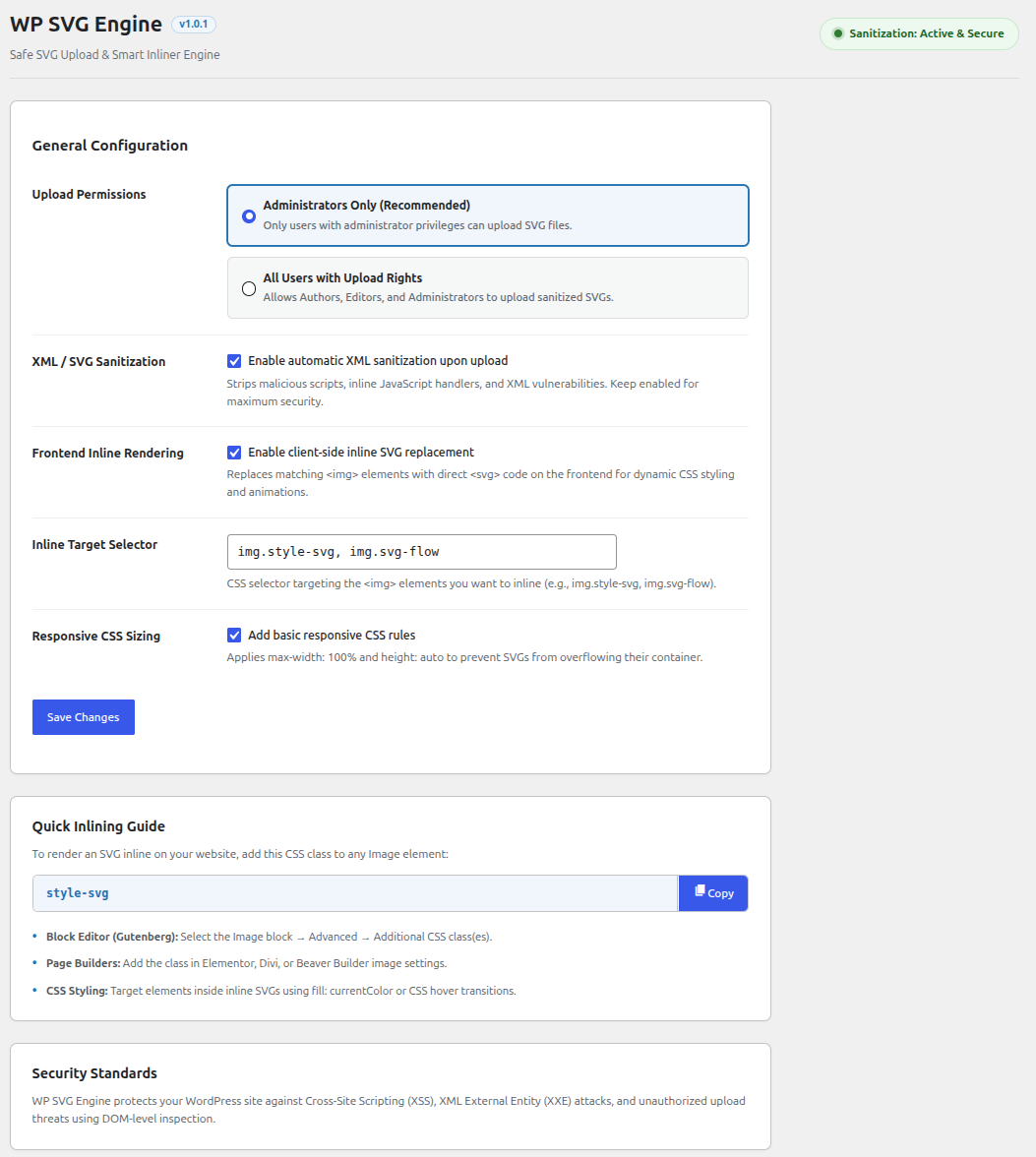
Enable Frontend Inline Rendering under Settings → WP SVG Engine. Add the class style-svg (or your custom selector) to any Image block or element. WP SVG Engine will automatically convert the tag into an inline element on the frontend.
Does WP SVG Engine work with page builders?
Yes! WP SVG Engine works out of the box with the WordPress Block Editor (Gutenberg), Elementor, Beaver Builder, Divi, and classic themes.
Do I need to write code to use WP SVG Engine?
No! WP SVG Engine works automatically. Once enabled, you can upload SVGs and style them using simple settings in your WordPress Admin.
Changelog
1.0.1
- UI & Responsiveness: Redesigned the settings screen layout into a clean, single-column workflow with enhanced mobile and tablet responsiveness.
- UI: Redesigned the Quick Inlining Guide copy-class box with a primary action button and border styling.
- Directory Assets: Added high-resolution icons, banners, and WordPress Playground blueprint configuration.
1.0.0
- Initial release.
- Added safe SVG and SVGZ upload handling.
- Integrated DOM-level XML sanitization via
enshrined/svg-sanitize. - Added Media Library grid and list thumbnail preview styling.
- Added automatic
viewBoxdimension extraction and attachment metadata normalization. - Added client-side Vanilla JS inlining engine with in-memory caching and
MutationObserver. - Added role-based upload restriction settings.
Screenshots
For developers
Is this your plugin? Show off the numbers.
Add a live badge to your site, docs or GitHub README. It updates on its own — no account needed.
Best WP SVG Engine alternatives
All inline svg plugins →| Rank | Plugin | Active installs |
|---|---|---|
| 1 |
 Gobbert SVG Studio
Edit SVGs inside WordPress: trace a PNG into a vector, recolour, simplify, animate. Safe…
Gobbert SVG Studio
Edit SVGs inside WordPress: trace a PNG into a vector, recolour, simplify, animate. Safe…
|
<10 |
FAQ
WP SVG Engine: quick answers
Straight answers, pulled from live WordPress.org data.
Live data from WordPress.org · checked Oct 16, 2026
Is WP SVG Engine free?
Yes. WP SVG Engine is free to download and use from the official WordPress.org plugin directory.
Is WP SVG Engine safe to use in 2026?
WP SVG Engine is a solid plugin choice in 2026, with a few things worth checking first. Is rated 5/5 and was last updated 1 month ago, and scores 67/100 on our health check.
How many websites use WP SVG Engine?
WP SVG Engine is active on <10 WordPress websites and has been downloaded 211 times since it launched in September 2026. It was downloaded 109 times in the last 30 days.
Does WP SVG Engine work with WordPress 7.1?
Yes. The developer has tested WP SVG Engine up to WordPress 7.1.3, the latest release. It requires WordPress 6.0 or newer.
What PHP version does WP SVG Engine need?
WP SVG Engine requires PHP 7.4 or higher. Most hosts run PHP 8.x today, so it works on any modern WordPress hosting.
When was WP SVG Engine last updated?
The latest version, 1.0.1, was released on September 15, 2026 (1 month ago).
Who makes WP SVG Engine?
WP SVG Engine is developed and maintained by Abinesh.S.
What are the best alternatives to WP SVG Engine?
The most popular alternatives to WP SVG Engine are Gobbert SVG Studio (<10 installs).
Powered by PageForge
Want thousands of pages that rank like these? Build them in an afternoon.
This directory runs on the same engine as PageForge. Turn any spreadsheet, CSV or API into thousands of fast, SEO-ready WordPress pages — with schema, internal links and AI-written copy baked in.
- CSV, Google Sheets & API data sources
- AI content, schema & internal links per page
- Works with Elementor, Gutenberg, Yoast & Rank Math
- Free on WordPress.org — no credit card


