



Super List Block
Nest multiple blocks inside lists of any kind of list (ordered, unordered, no marker, etc), or do away with list markers and use it like a repeater!

Use with caution
Super List Block works, but test it on a staging site before relying on it in 2026. It runs on 700+ sites, is rated 5/5 and was last updated 1 year ago, and scores 48/100 on our health check.
- Small user base (700+ active installs)
- No update in over a year
- Only tested up to WordPress 6.9 (latest is 7.1)
How does it stack up?
Side-by-side on installs, updates, ratings & support



Daily downloads
Download spikes usually follow a new release — each site that auto-updates counts as a download.
Rankings
Where Super List Block stands todayWordPress.org search rankings
Live position in the plugin search, top 100| Keyword | Position |
|---|---|
| block | >100 |
| list | >100 |
| nesting | #12 |
| repeater | >100 |
| superlist | #1 |
Version adoption
Share of active sites per release.
Rating breakdown
★★★★★★★★★★ 5 from 6 reviews
About Super List Block
From the official readme · v0.1.4Description
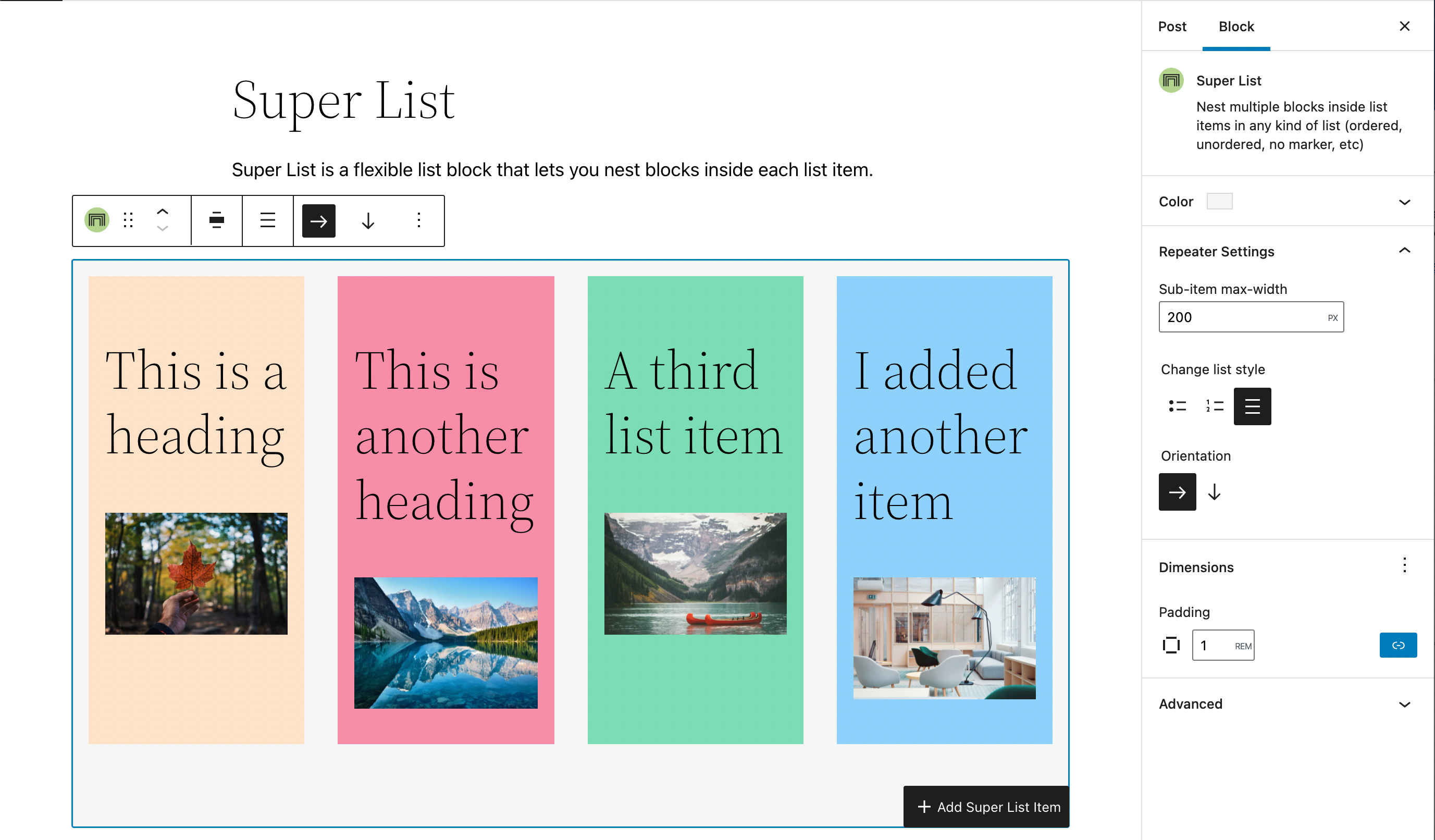
A handy little block that can be used in a variety of ways. Use it to nest other blocks inside list items, to create simple grid layouts ( like a properly responsive pricing table, or a wrapping icon list), or however you please.
This block is very light on styles (and avoids unnecessary div soup!). It aims to provide you with as much flexibility as possible, so you can harness it to create the content structure and layout you like.
If you enjoy the block, please leave a review! ⭐
If you have a feature request, please create an issue in the GitHub repository. ➕
If you need support, please use the support forum to reach out. 🆘
Key Features
A video tutorial to guide you through the features
- Nest blocks inside ordered and unordered lists.
- Nest blocks inside lists without any markers.
- Let’s you create single column content or grid like content with the horizontal orientation setting.
- Supports native color, padding, and margin settings. 🎉
- Has a handy
addbutton in the toolbar of list items to easily add more items while you’re in the flow. - Exposes the inner inserter with a clear text label for easy insertion.
- Built entirely native WordPress Block Editor components
- There is a pro version coming with even more features!
Stay Connected
Installation
- Upload the plugin files to the
/wp-content/plugins/directory, install the plugin through the WordPress plugins screen directly, or search forSuper List Blockin the Block Library. - Activate the plugin through the ‘Plugins’ screen in WordPress if installed manually or through the WordPress plugins screen.
- Use the
Super Listblock in the Block Editor
Changelog
0.1.4
- Fix issue where you can’t add new list items
- When adding a new Super List, only one list item is added by default
- List items no longer auto-add a paragraph block, matching the behavior of the Core better
- Fix issue where the Super List level block appender wasn’t showing the text label
- Added a blueprint for the plugin repository.
0.1.3
- Fix semantic output for lists without markers
- Mark plugin as tested with WordPress 6.7.2
0.1.1
- Fix registration bug that was causing the block to not install correctly
- Clarify Panel and List Item Max Width labels
- Allow indentation for super lists nested inside a list item
- Add typography support to both blocks
- Add transform from core/list block (by @cr0ybot)
- Add fix to ensure Super List is installable from the Block Library search
- Update language .pot file
- Add Anchor Block Support and Vertical Alignment capability
- Add theme.json support
0.1.0
- Release
Screenshots


For developers
Is this your plugin? Show off the numbers.
Add a live badge to your site, docs or GitHub README. It updates on its own — no account needed.
Best Super List Block alternatives
All block plugins →





FAQ
Super List Block: quick answers
Straight answers, pulled from live WordPress.org data.
Live data from WordPress.org · checked Oct 12, 2026
Is Super List Block free?
Yes. Super List Block is free to download and use from the official WordPress.org plugin directory.
Is Super List Block safe to use in 2026?
Super List Block works, but test it on a staging site before relying on it in 2026. It runs on 700+ sites, is rated 5/5 and was last updated 1 year ago, and scores 48/100 on our health check.
How many websites use Super List Block?
Super List Block is active on 700+ WordPress websites and has been downloaded 21,086 times since it launched in January 2022. It was downloaded 363 times in the last 30 days.
Does Super List Block work with WordPress 7.1?
Super List Block is officially tested up to WordPress 6.9.10, while the latest release is 7.1.3. It may still work, but try it on a staging site first.
What PHP version does Super List Block need?
Super List Block requires PHP 7.0 or higher. Most hosts run PHP 8.x today, so it works on any modern WordPress hosting.
When was Super List Block last updated?
The latest version, 0.1.4, was released on June 4, 2025 (1 year ago).
Who makes Super List Block?
Super List Block is developed and maintained by Aurooba Ahmed.
What are the best alternatives to Super List Block?
The most popular alternatives to Super List Block are Spectra Legacy (1M+ installs), Breadcrumb NavXT (800K+ installs) and PDF Embedder (300K+ installs).
Powered by PageForge
Want thousands of pages that rank like these? Build them in an afternoon.
This directory runs on the same engine as PageForge. Turn any spreadsheet, CSV or API into thousands of fast, SEO-ready WordPress pages — with schema, internal links and AI-written copy baked in.
- CSV, Google Sheets & API data sources
- AI content, schema & internal links per page
- Works with Elementor, Gutenberg, Yoast & Rank Math
- Free on WordPress.org — no credit card


