


SubHeading
This plugin uses a custom field to allow sub titles/headings to be added to any post type, including pages, posts and any public custom post type.

Consider an alternative
SubHeading shows warning signs in 2026 — compare the alternatives below before installing. It runs on 1K+ sites, is rated 4.2/5 and was last updated 9 years ago, and scores 36/100 on our health check.
- No update in 8 years
- Only tested up to WordPress 4.2 (latest is 7.1)
How does it stack up?
Side-by-side on installs, updates, ratings & support



Daily downloads
Download spikes usually follow a new release — each site that auto-updates counts as a download.
Rankings
Where SubHeading stands todayWordPress.org search rankings
Live position in the plugin search, top 100| Keyword | Position |
|---|---|
| admin | >100 |
| heading | >100 |
| sub | >100 |
| template | >100 |
| title | >100 |
Version adoption
Share of active sites per release.
Rating breakdown
★★★★★★★★★★ 4.2 from 11 reviews
About SubHeading
From the official readme · v1.8.1Description
This plugin uses a custom field to allow sub titles/headings to be added to any post type, including pages, posts and any public custom post type.
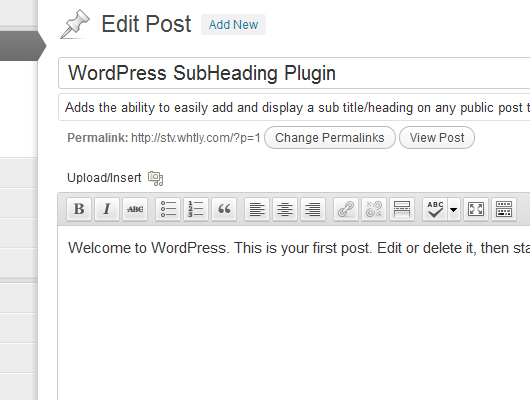
The custom subheading field is re-positioned so it is directly below the main title when editing.
Updates to your theme templates may be required in order for you to output the subheading values, please refer to the Installation instructions.
By default subheadings are also appended to RSS feeds and the admin edit post/page lists, these options and more can be modified via the settings page.
Following a plugin review by Alison Barrett (WordPress.com VIP) a number of improvements were introduced in version 1.7.
Languages: Also available in Brazilian Portuguese (Português do Brasil by mauriciomesquita).
Installation
Here we go:
- Upload the
subheadingfolder to the/wp-content/plugins/directory. - Activate the plugin through the ‘Plugins’ menu in WordPress.
- Place
<?php if (function_exists('the_subheading')) { the_subheading('<p>', '</p>'); } ?>in your template files where you want it to appear, or enable theAutomatically display subheadings before post contentoption on the settings page. - Add the subheading content using the standard WordPress edit page.
The settings for this plugin are found by navigating to the Settings menu and selecting Reading, with the options displayed towards the bottom of the page.
If you are not within the_loop, you can use get_the_subheading($postID); to fetch the value for a particular page or post.
Changelog
Stricter validation rules were added to the before and after settings values, please refer to the FAQs if your values are being stripped.
1.8.1
- Added Portuguese (Brazil) translation. Credit to mauriciomesquita.
1.8
- Introduced translation support.
1.7.4
- Allow subheadings to be requested via AJAX. Credit to scottbasgaard.
- Bug fix to admin settings JavaScript.
- Minor layout improvements to settings section.
1.7.3
- Fixed a bug with the JavaScript used by the settings page, which would incorrectly toggle the auto append value.
1.7.2
- Markup tags are now removed from the subheadings displayed on the admin post list columns.
- Added FAQ to explain some information on the use of anonymous functions used in examples.
1.7.1
- Added new
subheadingfilter to allow output to be manipulated. - Modified upgrade process to resolve some upgrade issues.
- Added some basic inline documentation to the main plugin file.
Screenshots

For developers
Is this your plugin? Show off the numbers.
Add a live badge to your site, docs or GitHub README. It updates on its own — no account needed.
Best SubHeading alternatives
All admin plugins →




FAQ
SubHeading: quick answers
Straight answers, pulled from live WordPress.org data.
Live data from WordPress.org · checked Sep 30, 2026
Is SubHeading free?
Yes. SubHeading is free to download and use from the official WordPress.org plugin directory.
Is SubHeading safe to use in 2026?
SubHeading shows warning signs in 2026 — compare the alternatives below before installing. It runs on 1K+ sites, is rated 4.2/5 and was last updated 9 years ago, and scores 36/100 on our health check.
How many websites use SubHeading?
SubHeading is active on 1K+ WordPress websites and has been downloaded 65,665 times since it launched in October 2009. It was downloaded 182 times in the last 30 days.
Does SubHeading work with WordPress 7.1?
SubHeading is officially tested up to WordPress 4.2.39, while the latest release is 7.1.2. It may still work, but try it on a staging site first.
When was SubHeading last updated?
The latest version, 1.8.1, was released on November 28, 2017 (9 years ago).
Who makes SubHeading?
SubHeading is developed and maintained by Steve.
What are the best alternatives to SubHeading?
The most popular alternatives to SubHeading are Loginizer (1M+ installs), Redux Framework (900K+ installs) and Admin Menu Editor (300K+ installs).
Powered by PageForge
Want thousands of pages that rank like these? Build them in an afternoon.
This directory runs on the same engine as PageForge. Turn any spreadsheet, CSV or API into thousands of fast, SEO-ready WordPress pages — with schema, internal links and AI-written copy baked in.
- CSV, Google Sheets & API data sources
- AI content, schema & internal links per page
- Works with Elementor, Gutenberg, Yoast & Rank Math
- Free on WordPress.org — no credit card


