



Combine Social Photos | Still BE
Provides Instagram embedding functionality exclusively for WP Block Editor. Your feeds, other Pro accounts' feeds and posts related to hashtags.

Solid choice
Combine Social Photos | Still BE is a solid plugin choice in 2026, with a few things worth checking first. It runs on 700+ sites, is rated 5/5 and was last updated 2 months ago, and scores 68/100 on our health check.
- Small user base (700+ active installs)
- Very few reviews so far
How does it stack up?
Side-by-side on installs, updates, ratings & support



Daily downloads
Download spikes usually follow a new release — each site that auto-updates counts as a download.
Rankings
Where Combine Social Photos stands todayWordPress.org search rankings
Live position in the plugin search, top 100| Keyword | Position |
|---|---|
| block | >100 |
| #44 | |
| instagram feed | #40 |
| instagram photos | #9 |
Version adoption
Share of active sites per release.
Rating breakdown
★★★★★★★★★★ 5 from 2 reviews
About Combine Social Photos | Still BE
From the official readme · v0.21.0Description
Add blocks where you can embed instagram feed. Provides embedding optimized for Block Editor.
Multiple accounts can be managed at a site.
You can be done on the block editor for all visual editing, making it possible to achieve the desired layout more comfortably, flexibility and speedy.
You can embed your own feeds, other Pro accounts’ feeds and posts related to hashtags.
Getting feeds from other Pro accounts (Business Discovery) or posts related to hashtags requires authentication with the Instagram Graph API.
Data got from Instagram is cached for faster display.
When the cache expires, it is automatically got data in the background and updated when the reacquisition is complete. This ensures that a valid cache is always available.
Blocks ; Common Options
All blocks have the following options.
- Advanced Getting Posts
- Type of Getting Posts
- Other User’s Username
- Hashtag
- Video Option
- Displaying Video
- Instagram Post Where to Open
- Post Caption
- Show / Hidden
- Lines
- Post Author
- Show / Hidden
- Post Time
- Show / Hidden
- Hover Effect
- Frosted Glass Effect
- Tilt Effect
- Footer
- Show / Hidden
- Position (Left / Center / Right)
- Like / Comments Count
- Show / Hidden
- Position (hover on image / below the image)
Block; Simple Grid
A block of posts placed on a grid.
The following customizations are available.
- Outline Gap (PC / Tablet / SP)
- Layout (PC / Tablet / SP)
- Columns
- Rows
- Aspect Ratio
- Gap
- Highlight
- Size
- Position (Left / Top)
- Header
- Show / Hidden
- Position (Left / Center / Right)
- Follows Count
- Show / Hidden
- Followers Count
- Show / Hidden
Block; Simple Slider
A block can slide horizontally.
The following customizations are available.
- Layout
- Base Width
- Min Width
- Min Columns
- Columns
- Rows
- Aspect Ratio
- Gap (between columns / rows)
- Scrolling
- Duration Time
- Easing Function (Linear / InOutSine / InOutQuad / InOutCubic / OutBounce / Cubic-bezier)
- Exclude Navigation Buttons
Block; Masonry Grid (Beta)
A block of posts placed on a masonry layout.
The following customizations are available.
- Outline Gap (PC / Tablet / SP)
- Layout
- Media Count
- Column Max Width
- Gap
- Loading Effect
- Header
- Show / Hidden
- Position (Left / Center / Right)
- Follows Count
- Show / Hidden
- Followers Count
- Show / Hidden
Modal Window
Selecting a modal window allows user to view the details of Instagram posts without leaving your website.
You can also put a CTA (Call to Action) within the modal window.
Link with Instagram Account
Easily link to your Instagram accounts.
Multiple accounts can be managed, and the account to be used can be selected individually when put a block.
3rd party resources
Font Awesome
WebSite: https://fontawesome.com/
License: https://fontawesome.com/license/free
Installation
- Enter “Combine Social Photos” in the plugin search field in your admin screen.
- Once you find this plugin, click “Install Now” to install.
(Alternative) Upload “still-be-combine-social-photos.zip” directly to your Plugins -> Add New in your admin screen.
(Alternative) Upload an unzipped “stillbe-image-quality-control” directory under the “/wp-content/plugins” directory. - Activate the plugin through the Plugins menu in WordPress.
Frequently asked questions
What is user authentication?
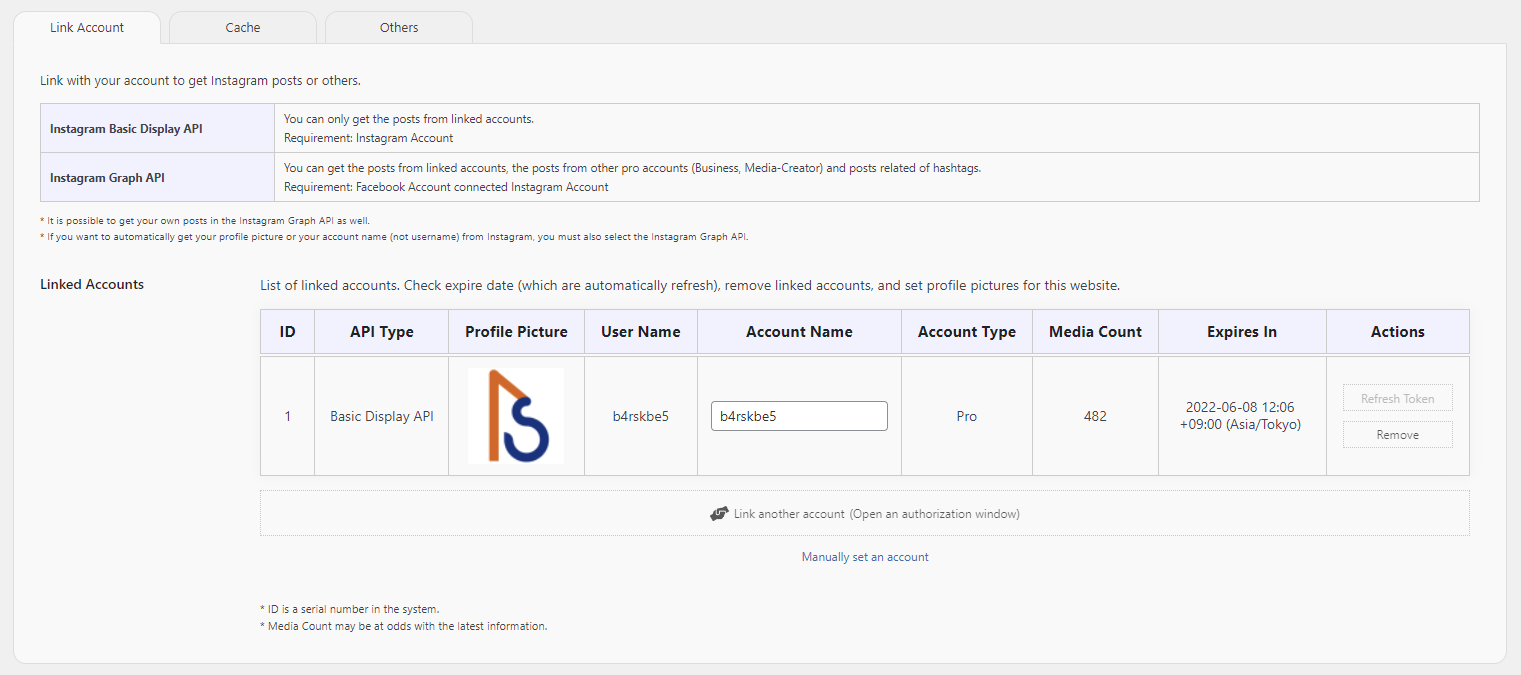
The plugin retrieves Instagram data via your account. Therefore, we need your permission to access Instagram on your behalf. To revoke these permissions, please check your Instagram or Facebook app settings.
What is the difference between the “Basic Display API” and the “Graph API”?
The Basic Display API is designed for displaying posts from your own account. It does not require connecting your Instagram account to a Facebook page (authorization is done via your Instagram account). While it is easy to set up, it does not provide detailed information such as profile images, like counts, or comment counts. The Graph API provides a wider range of information but requires an Instagram Professional account (Business or Creator) connected to a Facebook page (authorization is done via your Facebook account). Although it requires this setup, it allows you to display profile…
New posts do not appear in the embedded feed.
Please wait until the cache lifetime (default: 3,600 seconds) expires, as post data is cached for a specific duration. If you want the feed to update faster, shorten the cache lifetime in the settings screen. Also, if you have disabled WP-Cron, please re-enable it for automatic cache updates. When WP-Cron is disabled, cache updates only trigger when media cannot be loaded from the Instagram CDN. In such cases, users may see an expired cache notification and will need to reload the page.
Can it be used with the Classic Editor?
No, it is not supported. This plugin is exclusively designed for the Block Editor (Gutenberg).
Why can’t I convert a hashtag?
Hashtags must be converted to IDs, and this process is limited by Instagram to 30 requests every 7 days. If you are converting many hashtags, please wait a few days and try again.
Hashtag posts are not displayed.
Due to Instagram’s API limitations, only posts from the last 24 hours can be retrieved for the latest hashtag feeds. However, once a post is successfully fetched, the plugin will continue to display it because it stores cached data older than 24 hours. In other words, the feed will accumulate posts starting from 24 hours before you initially set up the block.
Why is author information not displayed for hashtag posts?
This is a limitation of the Instagram API. Author information cannot be retrieved for hashtag-related posts.
Video thumbnails are not displayed except for my own feeds.
This is due to Instagram’s API limitations. In version 0.8 or later, you can choose to either hide the video or enable autoplay as an alternative.
The layout changes each time it is displayed in a Masonry Grid. Is this a bug?
No, this is the expected behavior of the plugin. The plugin needs to load the images first to calculate the correct height for each element. The timing of when each image finishes loading can slightly affect the final layout.
Is Internet Explorer (IE) supported?
No. Microsoft ended support for Internet Explorer on June 15, 2022. This plugin only guarantees operation on modern web browsers.
When I set the navigation to display outside the slider, it disappears. Why?
Since the navigation elements are placed outside the Simple Slider block, they will not be visible if overflow: hidden; is applied to the block’s parent element (such as a content container). Please check your theme settings, or wrap the Simple Slider block inside a Group block and add enough left and right margin for the navigation.
Changelog
0.21.0
2026-07-26
Fixed an issue where data could not be retrieved stabilly for when some Instagram posts contained very long captions or many images.
0.20.3
2026-06-10
Fixed an error that occurred while fetching cached post data in chunks. This ensures stable cache data updates.
0.20.2
2026-04-06
Improved Slider Class initialization by clarifying dependencies due to unstable load order.
0.20.1
2026-04-06
Fixed the display position of additional modal content that was set in versions earlier than 0.20.
0.20.0
2026-04-04
Feature changes and additions
- Block API v3; block.json editor assets for blocks
- Inner blocks on Simple Grid, Simple Slider, Masonry Grid: follow-buttons + modal-slot
- Block Bindings source
sb-csp/ig-profile-url(follow button URL from account / Business Discovery / hashtag) - Inner blocks auto-synced with follow position and “open in modal” setting
- Parent
providesContextfor account fields and follow button position - Editor: modal CTA block pinned at bottom; layout/CSS for follow vs feed
- Editor SSR preview re-renders when account, follow position, or link target changes
Other improvements and testing
- Requires WordPress 6.7+ and PHP 8.0+
- Tested up to WordPress 7.0
- More reliable cache updates
- Removed unused editor localization; cleaned up dead JS imports
0.17.6
2025-12-05
Checked that it works with WordPress 6.9.
Screenshots


For developers
Is this your plugin? Show off the numbers.
Add a live badge to your site, docs or GitHub README. It updates on its own — no account needed.
Best Combine Social Photos alternatives
All block plugins →





FAQ
Combine Social Photos | Still BE: quick answers
Straight answers, pulled from live WordPress.org data.
Live data from WordPress.org · checked Sep 27, 2026
Is Combine Social Photos | Still BE free?
Yes. Combine Social Photos | Still BE is free to download and use from the official WordPress.org plugin directory.
Is Combine Social Photos | Still BE safe to use in 2026?
Combine Social Photos | Still BE is a solid plugin choice in 2026, with a few things worth checking first. It runs on 700+ sites, is rated 5/5 and was last updated 2 months ago, and scores 68/100 on our health check.
How many websites use Combine Social Photos | Still BE?
Combine Social Photos | Still BE is active on 700+ WordPress websites and has been downloaded 14,145 times since it launched in April 2022. It was downloaded 226 times in the last 30 days.
Does Combine Social Photos | Still BE work with WordPress 7.1?
Combine Social Photos | Still BE is officially tested up to WordPress 7.0.6, while the latest release is 7.1.2. It may still work, but try it on a staging site first.
What PHP version does Combine Social Photos | Still BE need?
Combine Social Photos | Still BE requires PHP 8.0 or higher. Most hosts run PHP 8.x today, so it works on any modern WordPress hosting.
When was Combine Social Photos | Still BE last updated?
The latest version, 0.21.0, was released on July 26, 2026 (2 months ago).
Who makes Combine Social Photos | Still BE?
Combine Social Photos | Still BE is developed and maintained by Daisuke Yamamoto.
What are the best alternatives to Combine Social Photos | Still BE?
The most popular alternatives to Combine Social Photos | Still BE are Spectra Legacy (1M+ installs), Breadcrumb NavXT (800K+ installs) and PDF Embedder (300K+ installs).
Powered by PageForge
Want thousands of pages that rank like these? Build them in an afternoon.
This directory runs on the same engine as PageForge. Turn any spreadsheet, CSV or API into thousands of fast, SEO-ready WordPress pages — with schema, internal links and AI-written copy baked in.
- CSV, Google Sheets & API data sources
- AI content, schema & internal links per page
- Works with Elementor, Gutenberg, Yoast & Rank Math
- Free on WordPress.org — no credit card


