


The Stars at Night
This plugin displays data of interest to amateur astronomers. It is calculated from user-provided location and date information. The plugin is called from a WordPress shortcode, and the parameters are specified in the…

Consider an alternative
The Stars at Night shows warning signs in 2026 — compare the alternatives below before installing. It runs on 100+ sites, is rated 5/5 and was last updated 5 years ago, and scores 32/100 on our health check.
- Small user base (100+ active installs)
- Very few reviews so far
- No update in 5 years
- Only tested up to WordPress 5.8 (latest is 7.1)
How does it stack up?
Side-by-side on installs, updates, ratings & support


Daily downloads
Download spikes usually follow a new release — each site that auto-updates counts as a download.
Rankings
Where The Stars at Night stands todayWordPress.org search rankings
Live position in the plugin search, top 100| Keyword | Position |
|---|---|
| astronomy | #13 |
Version adoption
Share of active sites per release.
Rating breakdown
★★★★★★★★★★ 5 from 3 reviews
About The Stars at Night
From the official readme · v1.9.1Description
This plugin displays data of interest to amateur astronomers. It is calculated from user-provided location and date information.
The plugin is called from a WordPress shortcode, and the parameters are specified in the shortcode. The following parameters are
required, in any order:
- lat : Lattitude of location in fractional degrees (e.g. 30.8910). Positive is north, negative is south of equator
- long : Longitude of location in fractional degrees (e.g.-98.4265). Positive is east, negative is west of the UTC line
- timezone : Timezone name, must be value recognized by PHP. See http://php.net/manual/en/timezones.php
These parameters are optional:
- name : The name of the location to be calculated
- days : The number of days of data to display. Must be a value from 1 to 10. Defaults to 3 if not specified.
Shortcode Examples:
- stars-at-night name=Chennai lat=13.08 long=80.26 timezone=Asia/Kolkata days=1
- stars-at-night name=”COE Observing Field” lat=30.891 long=-97.4265 timezone=America/Chicago days=10
You can also display the individual data tables via more specific shortcodes:
- stars-at-night-sun-moon name=”Mount Kilimanjaro” lat=-2.55 long=37.55 timezone=Africa/Nairobi
- stars-at-night-planets name=”Ushuaia” lat=-54.8 long=-68.33 timezone=America/Argentina/Ushuaia
- stars-at-night-iss name=”Mount Burnett Observatory” lat=-37.9 long=145.4 timezone=Australia/Melbourne days=7
The output consists of simple HTML tables:
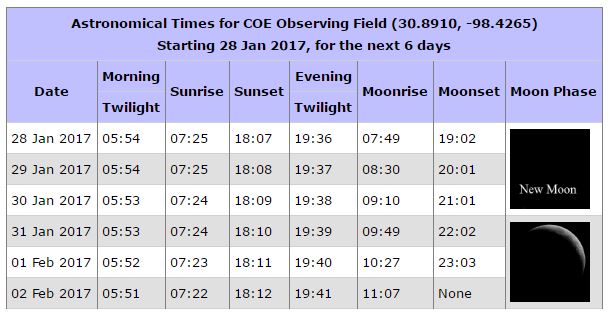
- Sun/Moon table: The times for sunrise, sunset, moonrise, moonset, morning astronomical twilight, and evening astronomical twilight for the specified days (max 10 days).
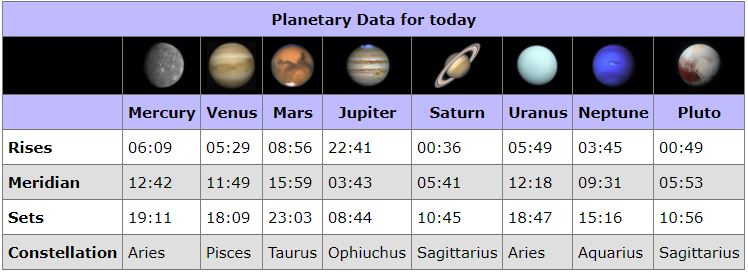
- Planets table: The times and visibility for the planets, for the current day.
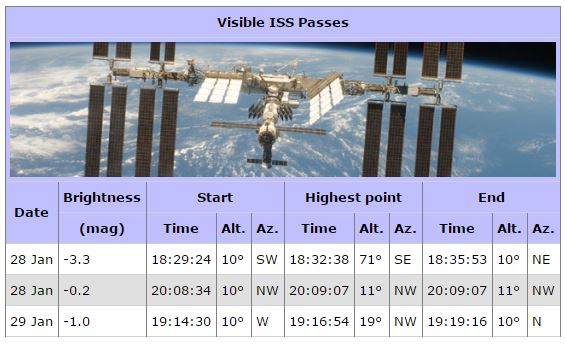
- ISS table: The times and directions for visible ISS passes over the specified days (max 10 days).
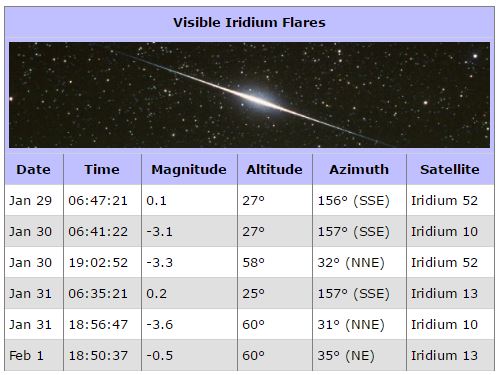
- (REMOVED) Iridium flares table: The times and directions for visible Iridium flares over the specified days (max 7 days).
You can view the plugin in action here: http://johnjleary.com/notforlong
Credits and Acknowledgements:
- Lunar images by Dan Morgan. Used with permission. http://DanMorgan.org.
- WordPress framework and sunrise/sunset algorithm: https://github.com/bengreeley/sunrisesunset
- Moonrise and Moonset class (with a correction for timezone): http://dxprog.com/entry/calculate-moon-rise-and-set-in-php
- Moon phase class: https://github.com/solarissmoke/php-moon-phase
- Planetary, ISS and Iridium Flare tables are obtained by sending GET requests to: http://heavens-above.com (HTTP API used with permission)
- Per-table shortcodes implemented by Peter Lieverdink
Contributors
stleary
Peter Lieverdink
Installation
- Login to your WordPress site as admin.
- From the Dashboard menu, select Plugins, then click the Add New button.
- In the Search text area, enter “stars at night”, then press Enter
- Find the stars-at-night plugin on the results page and select the Install Now button.
Frequently asked questions
What does twilight mean?
The sky is fully dark starting about 90 minutes after sunset. This is the evening astronomical twilight time. The sky stays fully dark until about 90 minutes before sunrise. This is the morning astronomical twilight time. These times are important for observers because they indicate when faint deep sky objects can be seen
Why is the reported sunrise/sunset a little different from (my favorite website)
Many PHP-based Sun calculators use an incorrect value for the zenith. This plugin uses the correct value. Search for ‘zenith’ in class-stars-at-night-manager.php for more information.
I would like a change made to the input, output format, or anything else
This plugin is driven by user requests. Just ask.
Where did you get the planet and satellite data?
The Planet, ISS, and Iridium flare data is obtained by parsing the response to a GET request to http://www.heavens-above.com.
Can you provide more astronomical data and images?
More is coming. Stay tuned! If you have a specific request, let us know.
Changelog
Minimum required version.
1.9
Short codes to display a single table at a time.
Restore ISS table.
1.8.1
update change num
1.8
Use correct version number, fix readme
1.7.3
Fix tested version and tag (not released)
1.7.2
Disable ISS passes (heavens-above API has changed), remove Iridium flares display. (not released)
1.7.1
Fix version, tag. No code changes.
Screenshots
For developers
Is this your plugin? Show off the numbers.
Add a live badge to your site, docs or GitHub README. It updates on its own — no account needed.
Best The Stars at Night alternatives
All astronomy plugins →


FAQ
The Stars at Night: quick answers
Straight answers, pulled from live WordPress.org data.
Live data from WordPress.org · checked Oct 10, 2026
Is The Stars at Night free?
Yes. The Stars at Night is free to download and use from the official WordPress.org plugin directory.
Is The Stars at Night safe to use in 2026?
The Stars at Night shows warning signs in 2026 — compare the alternatives below before installing. It runs on 100+ sites, is rated 5/5 and was last updated 5 years ago, and scores 32/100 on our health check.
How many websites use The Stars at Night?
The Stars at Night is active on 100+ WordPress websites and has been downloaded 7,071 times since it launched in December 2016. It was downloaded 104 times in the last 30 days.
Does The Stars at Night work with WordPress 7.1?
The Stars at Night is officially tested up to WordPress 5.8.18, while the latest release is 7.1.3. It may still work, but try it on a staging site first.
What PHP version does The Stars at Night need?
The Stars at Night requires PHP 7.0 or higher. Most hosts run PHP 8.x today, so it works on any modern WordPress hosting.
When was The Stars at Night last updated?
The latest version, 1.9.1, was released on September 11, 2021 (5 years ago).
Who makes The Stars at Night?
The Stars at Night is developed and maintained by stleary.
What are the best alternatives to The Stars at Night?
The most popular alternatives to The Stars at Night are Moon Phases (300+ installs), WP Moon Phase Widget (200+ installs) and Celestial Lunar Phase Widget (40+ installs).
Powered by PageForge
Want thousands of pages that rank like these? Build them in an afternoon.
This directory runs on the same engine as PageForge. Turn any spreadsheet, CSV or API into thousands of fast, SEO-ready WordPress pages — with schema, internal links and AI-written copy baked in.
- CSV, Google Sheets & API data sources
- AI content, schema & internal links per page
- Works with Elementor, Gutenberg, Yoast & Rank Math
- Free on WordPress.org — no credit card


