


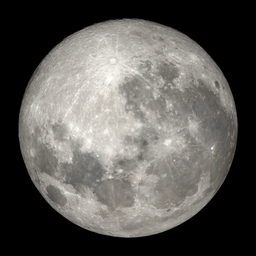
Celestial Lunar Phase Widget
Display lunar phase, moonrise, moonset, illumination, and astronomical twilight with local calculations and bundled imagery.

Solid choice
Celestial Lunar Phase Widget is a solid plugin choice in 2026, with a few things worth checking first. It runs on 40+ sites, is rated 5/5 and was last updated 2 weeks ago, and scores 69/100 on our health check.
- Actively developed — last update 2 weeks ago
- Small user base (40+ active installs)
- Very few reviews so far
How does it stack up?
Side-by-side on installs, updates, ratings & support



Daily downloads
Download spikes usually follow a new release — each site that auto-updates counts as a download.
Rankings
Where Celestial Lunar Phase Widget stands todayWordPress.org search rankings
Live position in the plugin search, top 100| Keyword | Position |
|---|---|
| astronomy | #2 |
| lunar phase | #1 |
| moon | #5 |
| moonrise | #1 |
| widget | >100 |
Version adoption
Share of active sites per release.
Rating breakdown
★★★★★★★★★★ 5 from 1 reviews
About Celestial Lunar Phase Widget
From the official readme · v2.3.0Description
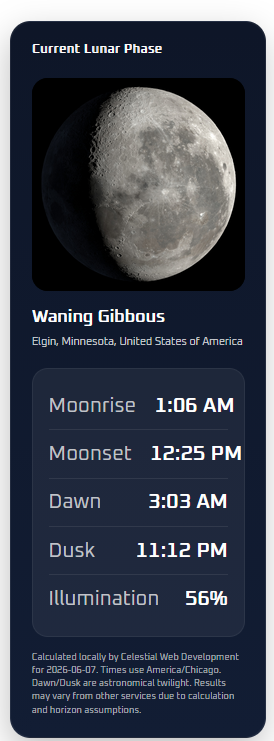
Celestial Lunar Phase Widget helps WordPress sites display the current Moon phase in a polished astronomy card.
The plugin shows:
- Current lunar phase name
- Moonrise time
- Moonset time
- Astronomical dawn time
- Astronomical dusk time
- Illumination percentage
- Bundled Moon phase image matched to the phase
- Optional location label
- Optional calculation/source note
Version 2.3 uses local astronomy calculations and adds automatic Moon image orientation by hemisphere. The plugin can rotate the bundled lunar imagery for Northern Hemisphere observers, with manual Northern, Southern, and Original orientation overrides in Settings.
Key features
- Local astronomy calculations; no API key required
- Moonrise and moonset times
- Astronomical dawn and dusk display
- Current lunar phase and illumination percentage
- Bundled Moon phase photos packaged locally
- Location lookup helper for admin setup
- Browser geolocation helper for admin setup
- Timezone dropdown to prevent typos and date-shift errors
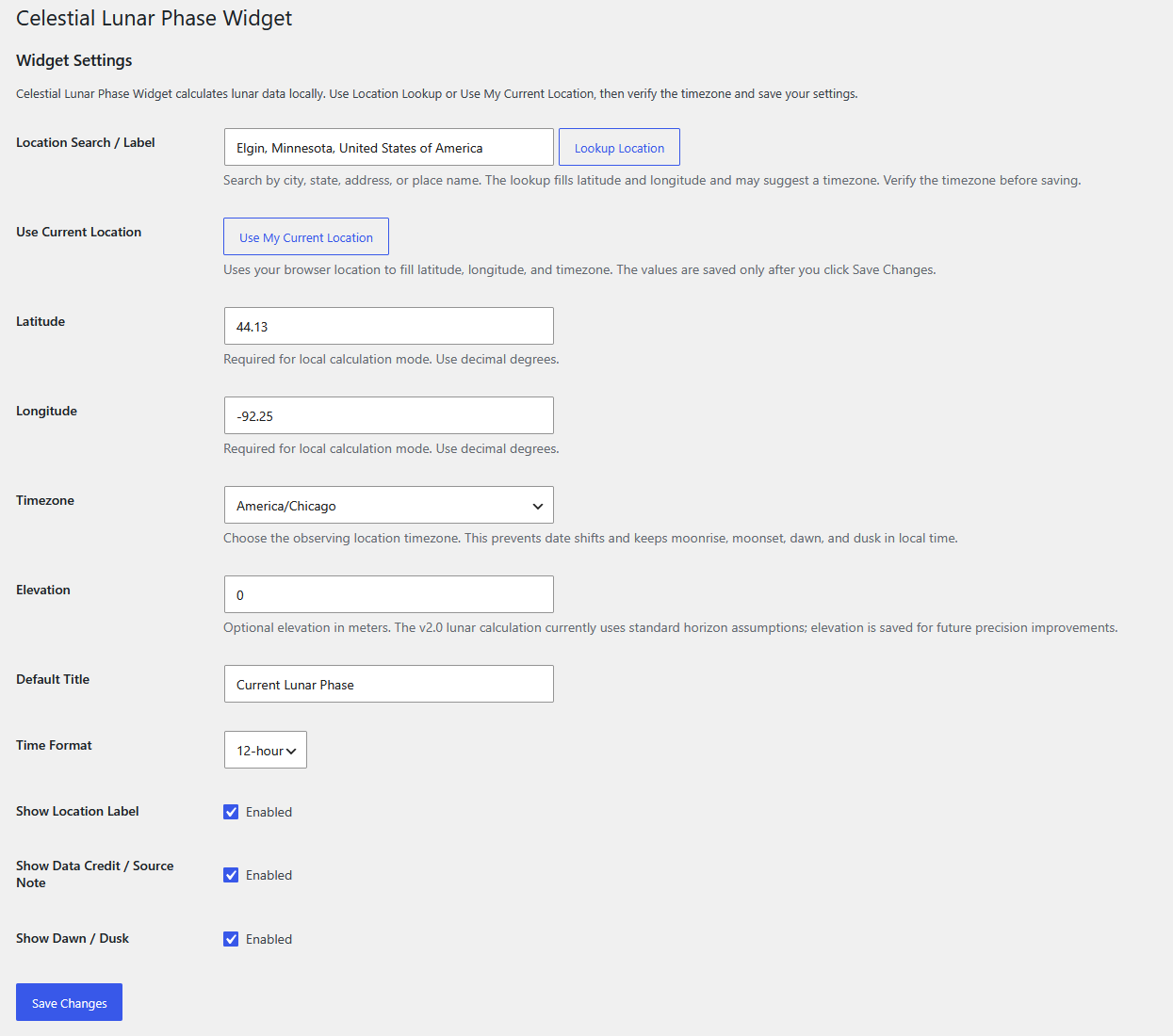
- Latitude, longitude, timezone, and optional elevation settings
- Shortcode:
[celestial_lunar_phase_widget] - Gutenberg block: Celestial Lunar Phase Widget
- 12-hour or 24-hour time display
- Per-location and per-date caching for better performance
- Admin notice after update if location settings need to be completed
- Automatic Moon image orientation based on configured latitude
- Manual Northern Hemisphere, Southern Hemisphere, and Original image orientation options
Support
Support and documentation are available at:
https://celestialwebdevelopment.com/lunar-phase-plugin/
External Services
This plugin performs all lunar phase, moonrise, moonset, astronomical dawn, and astronomical dusk calculations locally. It does not send visitor data to an astronomy API.
The optional Lookup Location button on the admin settings page uses the OpenStreetMap Nominatim geocoding service to convert a place name into latitude and longitude. This lookup is only triggered by an administrator clicking the button in wp-admin. The query entered by the administrator is sent to Nominatim for geocoding. The service may receive the searched location text, your site’s server IP address, and standard request metadata.
Service provider: OpenStreetMap Nominatim
Terms: https://operations.osmfoundation.org/policies/nominatim/
Privacy: https://osmfoundation.org/wiki/Privacy_Policy
The Use My Current Location button uses the browser’s built-in geolocation prompt. Coordinates are only saved after the administrator clicks Save Changes.
Installation
- Upload the plugin folder to
/wp-content/plugins/or install the ZIP from Plugins > Add New > Upload Plugin. - Activate the plugin.
- Go to Settings > Celestial Lunar Phase Widget.
- Enter a city, state, address, or place name and click Lookup Location, or use Use My Current Location.
- Verify the timezone dropdown and save changes.
- Add the Celestial Lunar Phase Widget block or place
[celestial_lunar_phase_widget]into a post, page, or widget area.
Frequently asked questions
Does the plugin require an API key?
No. Version 2.2 calculates the Moon phase, moonrise, moonset, astronomical dawn, and astronomical dusk locally. No WeatherAPI key or external astronomy data service is required.
Why do I need latitude and longitude?
Moonrise, moonset, dawn, and dusk are location-specific. Version 2.2 uses the configured latitude, longitude, and timezone to calculate the correct local values. The settings page includes Location Lookup and Use My Current Location helpers to make this easier.
What happens when upgrading from an older API-based version?
After the update, WordPress admins will see a notice asking them to complete the new location settings. The widget will display a safe setup message until latitude, longitude, and timezone are saved. Use Location Lookup or Use My Current Location from the settings page.
Why might times differ from Timeanddate.com or other services?
Moonrise and moonset times can differ between services because of location precision, elevation, terrain/horizon assumptions, atmospheric refraction, and calculation methods.
Does the plugin include Moon images?
Yes. Eight Moon phase images are bundled locally inside the plugin package.
Why does the Moon image orientation change?
Version 2.3 can orient the bundled Moon image for the observer’s hemisphere. Automatic mode uses the configured latitude. The bundled images use a Southern Hemisphere orientation, so Northern Hemisphere display is rotated 180 degrees. This is a practical hemisphere representation; the Moon’s exact apparent angle also varies with date, time, latitude, and position in the sky.
Does the plugin include a Gutenberg block?
Yes. The plugin includes a dynamic Gutenberg block with editor controls for location label, date, title, and display options.
Changelog
Adds automatic Moon image orientation by hemisphere plus manual orientation overrides. Existing location settings continue to work.
2.3.0
- Added automatic moon image orientation based on hemisphere.
- Added manual orientation options (Automatic, Northern Hemisphere, Southern Hemisphere, Original).
- Improved WordPress.org metadata (5 tags, shorter description).
- Tested up to WordPress 7.0.
- Various usability improvements.
2.2.3
- Updated WordPress compatibility and plugin header metadata.
- Removed production debug logging flagged by the Plugin Check tool.
- Added translator context for the localized calculation credit.
- Limited directory tags and shortened the plugin description.
2.2.0
- Added Location Lookup helper using OpenStreetMap Nominatim from the admin settings page.
- Added timezone dropdown with common timezones and all IANA timezone identifiers.
- Improved setup guidance and admin notice language for upgrades from API-based versions.
- Kept local astronomy calculations only; WeatherAPI remains removed.
2.1.0
- Removed WeatherAPI mode and API key settings.
- Added local-only astronomy calculations.
- Added admin notice when latitude, longitude, or timezone settings are missing after update.
- Kept browser geolocation helper for easier setup.
- Updated branding and documentation for Celestial Web Development.
2.0.9
- Fixed local date handling for the configured observing timezone.
- Shortened astronomical twilight labels to Dawn and Dusk.
2.0.8
- Improved moonrise and moonset calculations using a SunCalc-style algorithm.
- Improved phase and illumination calculation.
Screenshots
For developers
Is this your plugin? Show off the numbers.
Add a live badge to your site, docs or GitHub README. It updates on its own — no account needed.
Best Celestial Lunar Phase Widget alternatives
All astronomy plugins →


FAQ
Celestial Lunar Phase Widget: quick answers
Straight answers, pulled from live WordPress.org data.
Live data from WordPress.org · checked Oct 10, 2026
Is Celestial Lunar Phase Widget free?
Yes. Celestial Lunar Phase Widget is free to download and use from the official WordPress.org plugin directory.
Is Celestial Lunar Phase Widget safe to use in 2026?
Celestial Lunar Phase Widget is a solid plugin choice in 2026, with a few things worth checking first. It runs on 40+ sites, is rated 5/5 and was last updated 2 weeks ago, and scores 69/100 on our health check.
How many websites use Celestial Lunar Phase Widget?
Celestial Lunar Phase Widget is active on 40+ WordPress websites and has been downloaded 1,126 times since it launched in April 2026. It was downloaded 266 times in the last 30 days.
Does Celestial Lunar Phase Widget work with WordPress 7.1?
Celestial Lunar Phase Widget is officially tested up to WordPress 7.0.7, while the latest release is 7.1.3. It may still work, but try it on a staging site first.
What PHP version does Celestial Lunar Phase Widget need?
Celestial Lunar Phase Widget requires PHP 7.4 or higher. Most hosts run PHP 8.x today, so it works on any modern WordPress hosting.
When was Celestial Lunar Phase Widget last updated?
The latest version, 2.3.0, was released on September 25, 2026 (2 weeks ago).
Who makes Celestial Lunar Phase Widget?
Celestial Lunar Phase Widget is developed and maintained by John Martin.
What are the best alternatives to Celestial Lunar Phase Widget?
The most popular alternatives to Celestial Lunar Phase Widget are Moon Phases (300+ installs), WP Moon Phase Widget (200+ installs) and The Stars at Night (100+ installs).
Powered by PageForge
Want thousands of pages that rank like these? Build them in an afternoon.
This directory runs on the same engine as PageForge. Turn any spreadsheet, CSV or API into thousands of fast, SEO-ready WordPress pages — with schema, internal links and AI-written copy baked in.
- CSV, Google Sheets & API data sources
- AI content, schema & internal links per page
- Works with Elementor, Gutenberg, Yoast & Rank Math
- Free on WordPress.org — no credit card


