



Spam Filter For Elementor Form
Tired of spammy SEO pitches, fake marketing offers, and bot submissions flooding your Elementor Pro forms? By filtering only the message field, you can eliminate up to 95% spam submissions.

Consider an alternative
Spam Filter For Elementor Form shows warning signs in 2026 — compare the alternatives below before installing. It runs on 100+ sites and was last updated 1 year ago, and scores 34/100 on our health check.
- Small user base (100+ active installs)
- Very few reviews so far
- No update in over a year
- Only tested up to WordPress 6.8 (latest is 7.1)
How does it stack up?
Side-by-side on installs, updates, ratings & support



Daily downloads
Download spikes usually follow a new release — each site that auto-updates counts as a download.
Rankings
Where Spam Filter For Elementor F… stands todayWordPress.org search rankings
Live position in the plugin search, top 100| Keyword | Position |
|---|---|
| anti-spam | >100 |
| block spam | >100 |
| elementor pro form | >100 |
| spam filter | #79 |
| word filter | >100 |
Version adoption
Share of active sites per release.
About Spam Filter For Elementor Form
From the official readme · v1.4Description
Tired of spammy SEO pitches, fake marketing offers, and bot submissions flooding your Elementor Pro forms? By filtering only the message field, you can eliminate up to 95% spam submissions.
Spam Filter For Elementor Form do that and gives you the control you need to stop them, without relying on external services.
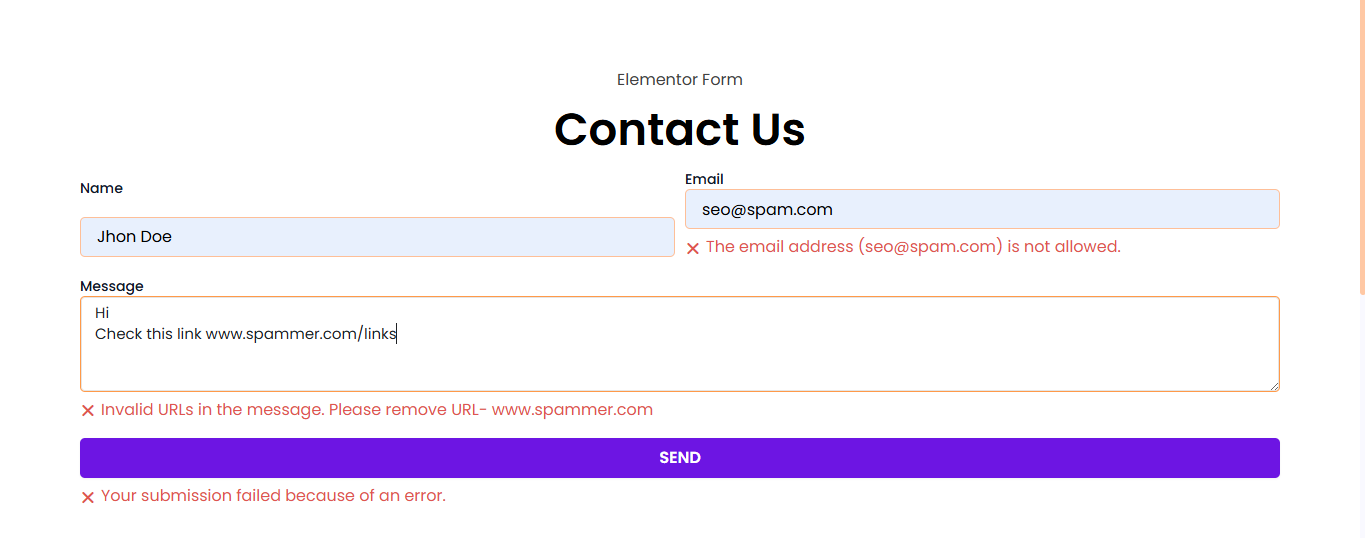
This plugin filters the input field of your forms to block submissions containing unwanted words, suspicious URLs, or emails from unauthorized domains. You can block all URLs except those from your domain or specific domains you allow. If someone tries to submit a form with a disallowed link, they’ll see a clear error message asking them to remove it.
Here’s the beauty of it: real visitors who want to share something useful will usually say, “I have a link to share, can you contact me so I can send it?” Spam bots, on the other hand, just drop links and hit submit. That’s where this filter stops them.
Whether you want to block certain phrases, links, or reject emails from shady domains, this plugin lets you do it easily, right from the WordPress dashboard.
Features:
-
Enable or disable filtering for specific or all Elementor Pro forms.
-
Block messages that contain specific words or patterns.
-
Reject any submission containing links—except those from allowed domains.
-
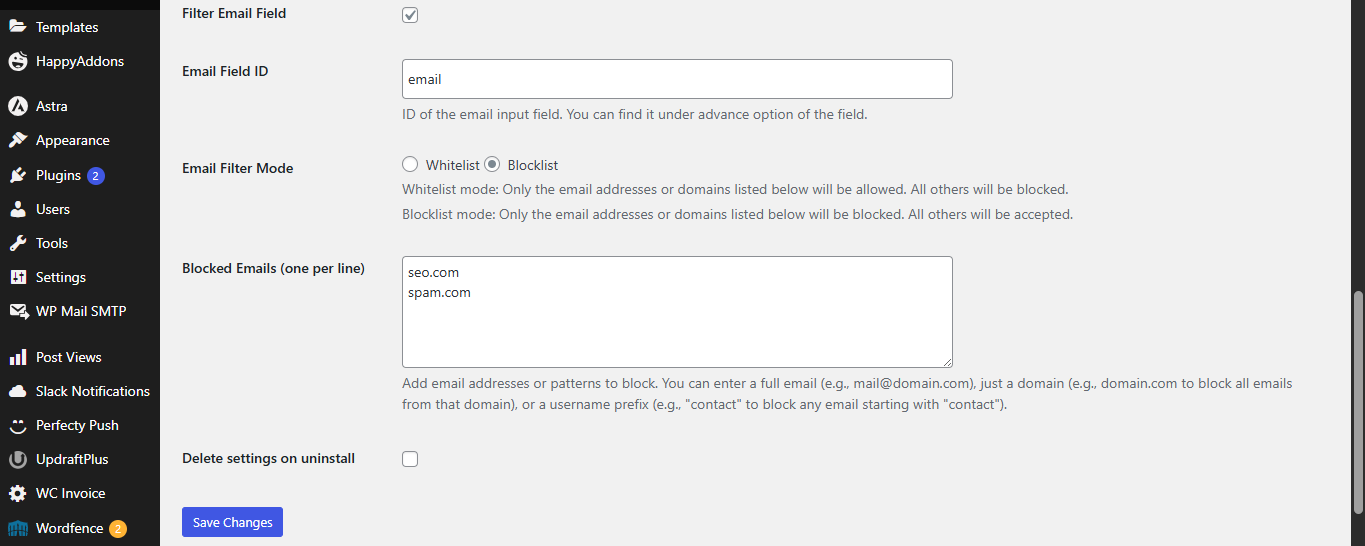
Block or allow email addresses based on domain (whitelist or blocklist mode).
-
Custom error messages shown directly inside the form.
-
No third-party services or APIs—fully local and lightweight.
-
Built exclusively for Elementor Pro forms.
Perfect for any site owner who’s fed up with form spam and wants a simple, effective way to stop it.
How to Use:
Enable Filtering:
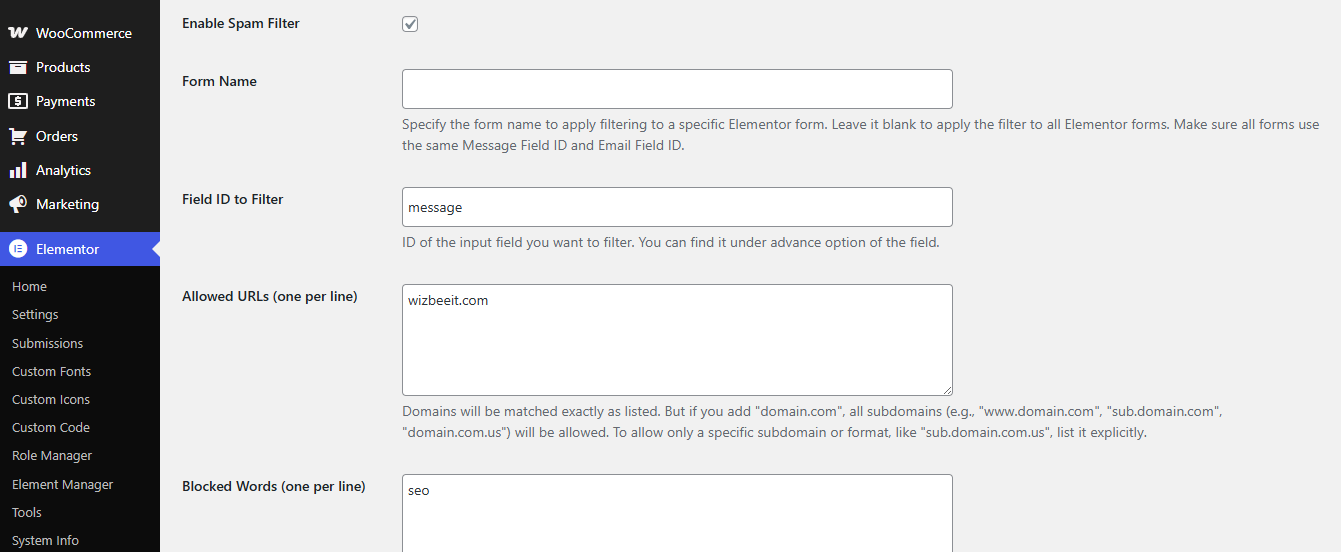
Go to Elementor → Settings → Contact Form Filter and check the “Enable Spam Filter” option.
Target the Right Form:
Enter the name of the form you want to filter in the “Form Name” setting. This must match the “Form Name” from your Elementor Pro form settings.
Set Blocked Words:
Add a list of blocked words (one per line). Any form submission containing these words will be rejected.
Filter URLs:
Only allow URLs from specific domains. Other links will trigger a validation error.
Control Email Domains:
Enable email filtering and choose between whitelist or blocklist mode. Add domains or full email addresses to control who can submit the form.
Enjoying the Plugin?
If you find Spam Filter For Elementor Form helpful, please consider leaving a review on WordPress.org. Your feedback helps us improve and reach more users.
Other useful and absolutely free plugins from WizBee IT
Easy Duplicate Woo Order: Adds a custom action to duplicate WooCommerce orders easily.
Custom Product in Woo Order: Add custom one-time items directly to WooCommerce orders without adding them to the catalog.
Visit our website for more at WizBee IT
License
This plugin is licensed under the GPLv2 or later license. For more information, see https://www.gnu.org/licenses/gpl-2.0.html.
Installation
- Upload the plugin files to the
/wp-content/plugins/elementor-form-spam-filterdirectory, or install the plugin directly through the WordPress plugin repository. - Make sure that Elementor Pro is installed and active.
- Activate the plugin through the ‘Plugins’ screen in WordPress.
- Go to Elementor → Settings → Contact Form Filter and configure your filters.
Frequently asked questions
Does this plugin work with free Elementor?
No, this plugin requires Elementor Pro, as it depends on the Pro form widget.
Can I use this on multiple forms?
Yes, just leave the form name empty in settings and the filer will apply to all Elementor form submissions.
What happens if a message contains blocked words or URLs?
The form submission will be rejected with a user-friendly error message shown below the relevant field.
Can I filter based on multiple criteria?
Yes. You can combine blocked words, URL restrictions, and email filters all at once.
Changelog
Initial release.
1.0
- Initial release with form name targeting, message and email filtering, and settings page.
Screenshots
For developers
Is this your plugin? Show off the numbers.
Add a live badge to your site, docs or GitHub README. It updates on its own — no account needed.
Best Spam Filter For Elementor Form alternatives
All anti-spam plugins →





FAQ
Spam Filter For Elementor Form: quick answers
Straight answers, pulled from live WordPress.org data.
Live data from WordPress.org · checked Sep 29, 2026
Is Spam Filter For Elementor Form free?
Yes. Spam Filter For Elementor Form is free to download and use from the official WordPress.org plugin directory.
Is Spam Filter For Elementor Form safe to use in 2026?
Spam Filter For Elementor Form shows warning signs in 2026 — compare the alternatives below before installing. It runs on 100+ sites and was last updated 1 year ago, and scores 34/100 on our health check.
How many websites use Spam Filter For Elementor Form?
Spam Filter For Elementor Form is active on 100+ WordPress websites and has been downloaded 829 times since it launched in July 2025. It was downloaded 65 times in the last 30 days.
Does Spam Filter For Elementor Form work with WordPress 7.1?
Spam Filter For Elementor Form is officially tested up to WordPress 6.8.10, while the latest release is 7.1.2. It may still work, but try it on a staging site first.
What PHP version does Spam Filter For Elementor Form need?
Spam Filter For Elementor Form requires PHP 7.8 or higher. Most hosts run PHP 8.x today, so it works on any modern WordPress hosting.
When was Spam Filter For Elementor Form last updated?
The latest version, 1.4, was released on July 24, 2025 (1 year ago).
Who makes Spam Filter For Elementor Form?
Spam Filter For Elementor Form is developed and maintained by wizbee IT.
What are the best alternatives to Spam Filter For Elementor Form?
The most popular alternatives to Spam Filter For Elementor Form are Akismet Anti-spam: Spam Pro… (5M+ installs), Antispam Bee (700K+ installs) and WP Armour (400K+ installs).
Powered by PageForge
Want thousands of pages that rank like these? Build them in an afternoon.
This directory runs on the same engine as PageForge. Turn any spreadsheet, CSV or API into thousands of fast, SEO-ready WordPress pages — with schema, internal links and AI-written copy baked in.
- CSV, Google Sheets & API data sources
- AI content, schema & internal links per page
- Works with Elementor, Gutenberg, Yoast & Rank Math
- Free on WordPress.org — no credit card


