


Social Dropdown
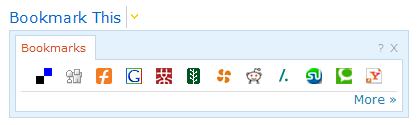
This plugin displays several social bookmarking options in a dropdown. Unlike other social bookmarking displays, this does not cause clutter.

Consider an alternative
Social Dropdown shows warning signs in 2026 — compare the alternatives below before installing. It runs on 30+ sites and was last updated 18 years ago, and scores 24/100 on our health check.
- Small user base (30+ active installs)
- Very few reviews so far
- No update in 17 years
- Only tested up to WordPress 2.5 (latest is 7.1)
How does it stack up?
Side-by-side on installs, updates, ratings & support


Daily downloads
Download spikes usually follow a new release — each site that auto-updates counts as a download.
Rankings
Where Social Dropdown stands todayWordPress.org search rankings
Live position in the plugin search, top 100| Keyword | Position |
|---|---|
| accessibility | >100 |
| Bookmark | >100 |
| post | >100 |
| social bookmark | >100 |
Version adoption
Share of active sites per release.
About Social Dropdown
From the official readme · v2.0.1Description
This plugin displays several social bookmarking options in a dropdown. Unlike other social bookmarking displays, this does not cause clutter.
Whats new in 2.0
Version 2.0 features a new fresh look which is much easier to use and is extremely search engine friendly. Nonetheless, if you do not like the new layout, you can always use the old one via the administration panel. The new layout should go well with most layouts.
The new version also takes into consideration of non-JavaScript users and would downgrade gracefully to allow non-JavaScript users to utilize every other feature (exception of dropdown).
Integration with an external Social Bookmarking API allows your blog users to enjoy all bookmarks that are available even if you have not upgraded your plugin past version 2.0.
Supported Social Bookmarks
-
BlinkBits
-
BlinkList
-
BlogLines
-
BlogMarks
-
Buddymarks
-
BumpZee
-
CiteULike
-
Co.mments
-
Del.icio.us
-
Digg
-
Diigo
-
Facebook
-
Fark
-
Faves
-
Feed Me Links
-
Furl
-
Gravee
-
Google Bookmarks
- Hugg
-
Jeqq
-
Linkagogo
-
Ma.gnolia
-
Mister Wong
-
NetVouz
-
Newsvine
-
OnlyWire
-
Propeller
-
RawSugar
-
Reddit
-
Rojo
-
Simpy
-
Slashdot
-
Sphinn
-
Spurl
-
Squidoo
-
StumbleUpon
-
Taggly
-
Tagtooga
-
TailRank
-
Technorati
-
Windows Live
-
Yahoo MyWebs
In addition, you can customize the order of the bookmarks or choose to remove some of them without editing a file.
If you do not like Dropdowns, this plugin has the ability to show the bookmarks without the dropdown – similar to what other plugins display.
Remember to read the readme file to ensure that you have done what is needed.
Updating
You can check what version the plug-in is at via visiting the Options > Social Dropdown panel.
-
Deactivate the
Social Dropdownplug-in. You may want to back-up your existing plug-in files just in case if there are any errors while updating. -
Replace the files in the
social-dropdowndirectory located in the WordPress plug-ins directory. -
Re-activate the
Social Dropdownplug-in from the administration dashboard.
If you have modified the GenerateAll() function, copy the modified area and set $overrideoptions to true to preserve your changes. $overrideoptions can be found in generatebookmarks.php.
Requirements
-
A working WordPress install
-
Your WordPress theme must contain a call to the
get_header()function -
Your WordPress theme must contain the WordPress loop
Most WordPress installs and templates have these, so you need not worry about these.
To be able to use the dropdown, one must have JavaScript enabled in the browser.
Fortunately, users without JavaScript enabled will see a list of social bookmarks at where the dropdown is.
Customizing
Within socialdropdown.php, these are some areas you can edit to influence how the dropdown appears.
In the GenerateAll() function, you can re-arrange how the items appear, add new items or remove them (after setting $overrideoptions to true). You can already do this using the Options > Social Dropdown panel.
Creating bookmarks
Each social bookmark is generated using the GenerateLink() function, and the URLs used are created using the GenerateURL() function. The parameters are as followed: GenerateLink($type), where $type is the name of the social bookmark (e.g. Digg is represented as ‘digg’).
In order to add a new bookmark, add the following lines of code after an item [i.e. after break;] in the GenerateURL() function. An example is shown:
case '[name of social bookmarking site]':

?>

[URL to social bookmark page]

<?php

break;
In this example, when you call GenerateURL('yahoo'), the link for this item is generated. The link is the direct link to the submitting URL, usually available as an API on the social bookmarking site. Within the URL, there is some PHP code. the_title() represents the post title, while echo get_the_permalink() represents the URL of the post.
Within generatebookmarks.php, find a variable called $all. Add ‘|[your bookmark name here]’ to the end of the string. For example, in the case of Yahoo, if $all contains “google”, then the result will be “google|yahoo”.
Credits
Several images are created or taken from the corresponding social bookmarking sites and edited to suit the plug-in. The dropdown javascript is taken from http://www.dynamicdrive.com/ and modified. The drag-drop library is provided by http://script.aculo.us/.
Installation
By installing the plugin, you agree to Tevine’s policies.
-
Upload the “social-dropdown” (actually, any directory will do) folder into the “/wp-content/plugins/” directory.
-
Login to your WordPress Dashboard Panel and activate the “Social Dropdown” plug-in from the plugins tab. If there are no error messages (e.g. in the options panel or else-where), the plugin is properly installed.
-
Insert
<?php Show_Dropdown(); ?>at where you want the social bookmarks to be displayed. This line of code should be placed within the WordPress loop (i.e. the place where your posts appear). -
You can rearrange, add and remove bookmarks that are displayed via the
Settings > Social Dropdownpanel in WordPress 2.5 and above, or in theOptions > Social Dropdownpanel in earlier versions of WordPress.
Feel free to poke around the internals of the plug-in.
Changelog
- 2.0.1 – Bug fix. Relocated now defunct ApiThis service to Tevine service.
- 2.0.0 – Changed dropdown style, now it is based on WordPress guidelines. The dropdown link is now totally customizeable via CSS, and can even be made to resemble an ordinary link (hence will go well with most page layouts). Administration panel changed to fit WordPress guidelines. A new hover system makes it easier to identify the bookmarks. New external API to ensure that non-JavaScript users will not get to miss out on the full capabilities of the plugin.
- 1.5.0 – Added support for BumpZee, Faves, Hugg, Jeqq, Windows Live. Some changes to the icons used.
- 1.4.9 – Added support for Mister Wong social bookmarking site. Several minor changes. Added uninstallation file.
-
1.4.8 – Bug fixes related to styles. Added Facebook. Thanks to Eric Fehrenbacher for his help.
-
1.4.7 – IMPORTANT FIX. This fix fixes a problem found in linux servers. [Most stable]
-
1.4.6 – Edited file check so that it works on all environments.
-
1.4.5 – Added ability for non-JavaScript users to customize the plugin via admin panel. Plugin now has another mode of customization where bookmarks can be simply enabled and disabled (this mode of customization does not allow rearranging of plugins). The dropdown can also be disabled in this version, making it look similar to other social bookmarking plugins. Fixed version number check. Fixed no link option.
-
1.4.0 – Added 5 bookmarks. The plugin can now be installed into any directory. Some minor changes to Dropdown to make it slightly more customizeable by style.css. Non-JavaScript users will see the same bookmarks normal users view. The link to plugin page now links to a help page to help users new to social bookmarking.
-
1.3.3 – Fixed RawSugar links. Thanks to phprocket for informing the problem.
-
1.3.2 – Fixed path problems.
-
1.3.1 – Added file checks.
-
1.3.0 – Allowed for configuration of bookmarks via
Options > Social Dropdown. [Testing.] -
1.2.2 – Link optimisation. Now allows for the disabling of the link back to the plugin’s homepage.
-
1.2.1 – Link optimisation; now the plugin has little negative impact on the site’s SEO and has reduced link leakage. Fixed the link to point to plugin’s main page. Added customization of styles. Allowed for a customized dropdown “on” state. Added black colored theme.
-
1.2.0 – Link optimisation. Addition of 10 other social bookmarks. Addition of update notification
-
1.1.0 – Bug-fixes in layout which may cause problems to users viewing the plugin without JavaScript. Plugin now validates in W3 validator.
-
1.0.0 – Initial
Screenshots


For developers
Is this your plugin? Show off the numbers.
Add a live badge to your site, docs or GitHub README. It updates on its own — no account needed.
Best Social Dropdown alternatives
All accessibility plugins →





FAQ
Social Dropdown: quick answers
Straight answers, pulled from live WordPress.org data.
Source: WordPress.org
Is Social Dropdown free?
Yes. Social Dropdown is free to download and use from the official WordPress.org plugin directory.
Is Social Dropdown safe to use in 2026?
Social Dropdown shows warning signs in 2026 — compare the alternatives below before installing. It runs on 30+ sites and was last updated 18 years ago, and scores 24/100 on our health check.
How many websites use Social Dropdown?
Social Dropdown is active on 30+ WordPress websites and has been downloaded 28,672 times since it launched in December 2007. It was downloaded 131 times in the last 30 days.
Does Social Dropdown work with WordPress 7.1?
Social Dropdown is officially tested up to WordPress 2.5.1, while the latest release is 7.1.5. It may still work, but try it on a staging site first.
When was Social Dropdown last updated?
The latest version, 2.0.1, was released on January 8, 2009 (18 years ago).
Who makes Social Dropdown?
Social Dropdown is developed and maintained by multippt.
What are the best alternatives to Social Dropdown?
The most popular alternatives to Social Dropdown are Web Accessibility (formally… (500K+ installs), Auto Image Attributes From… (100K+ installs) and Accessibility by UserWay (80K+ installs).
Powered by PageForge
One template and a spreadsheet. A real page for every search.
PageForge turns each row of a CSV into a WordPress page with its own title, URL, SEO fields and schema, built on the layout you already designed. Free on WordPress.org.
- CSV and XLSX, plus Google Sheets on Professional and Enterprise
- Its own title, URL, SEO fields and schema for every page
- Works with the block editor, Elementor, Divi and Avada
- Free on WordPress.org, no credit card