



WP Post's to Social Media
It helps to create personalized, mobile-responsive "Social Share Story Images" from WordPress posts.

Consider an alternative
WP Post's to Social Media shows warning signs in 2026 — compare the alternatives below before installing. Is rated 5/5 and was last updated 1 year ago, and scores 37/100 on our health check.
- Small user base (<10 active installs)
- Very few reviews so far
- No update in over a year
- Only tested up to WordPress 6.8 (latest is 7.1)
How does it stack up?
Side-by-side on installs, updates, ratings & support



Daily downloads
Download spikes usually follow a new release — each site that auto-updates counts as a download.
Rankings
Where WP Post's to Social Media stands todayWordPress.org search rankings
Live position in the plugin search, top 100| Keyword | Position |
|---|---|
| image generator | >100 |
| post to image | >100 |
| Post to Social Media | >100 |
| social image | >100 |
Rating breakdown
★★★★★★★★★★ 5 from 1 reviews
About WP Post's to Social Media
From the official readme · v1.0Description
WordPress post’s to social media(Whatsapp,Facebook,Instagram) share story image generator Plugin. It is a lightweight WordPress plugin that helps you create personalized inbuilt post’s into “Social Share Story Image” in seconds. The admin sets a custom “Social Share Story Image” background, and users can add their name and photo on it, along with it will also merge the post’s featured image, title and description into the final design.
All generated Images are mobile responsive, ensuring they look great on every device. Users can preview their story image and download it instantly.
✨ Key Features
📷 Merge Post’s Featured Image + Title + Description into a banner
👤 User Personalization – add name & upload photo
🎨 Admin Control – set global/custom banner backgrounds
🖼️ Live Preview before download
📱 Responsive Design – works perfectly on mobile
⬇️ Downloadable Image in one click
⚡ Simple & Lightweight – easy setup, no bloat
✅ Use Cases
📲 Social Media Use Cases
-
Instagram 📸
Users can upload the generated image as a Story.
It can be used in Reels as a cover image.
Works for both personal and business pages. -
Facebook 📘
Shareable as a Story.
Perfect for event promotions, festive greetings, or campaigns. -
WhatsApp 💬
The generated image can be directly shared as a Status.
Also can be sent in personal chats or groups to promote events. -
LinkedIn 💼
Users can upload it as a Story.
Businesses can encourage employees to share the branded banner for marketing campaigns. -
Twitter (X)
The image can be uploaded as a Tweet.
Useful for spreading awareness or community participation. -
Snapchat 👻
Users can post the banner as a Snap Story.
Engages friends and promotes events/festivals quickly. -
YouTube ▶️
The image can be used as a thumbnail for YouTube Shorts. -
Telegram 📢
Can be shared in channels or groups as a promotional post.
Works well for large communities.
🔹 Why This Is Useful
In today’s time, Stories are the fastest way to reach people, since they appear on top of every app.
The plugin ensures that any user can create a professional, branded image in seconds from WordPress posts.
These images are not just downloadable but also instantly shareable across all major social platforms.
Admin Features:
– Upload or Set a global default banner “Social Share Story Images” Background templates.
Frontend Features:
– Simple form for users to input their name and upload a photo.
– Live preview.
– Download the final image.
License
This plugin is licensed under the GPLv2 or later.
Installation
-
To get started, go to your WordPress dashboard. Navigate to Plugins, click Add New, Find Plugin using tags like custom banner, post banner by ved or upload the downloaded plugin zip file. Once installed, activate the plugin.
-
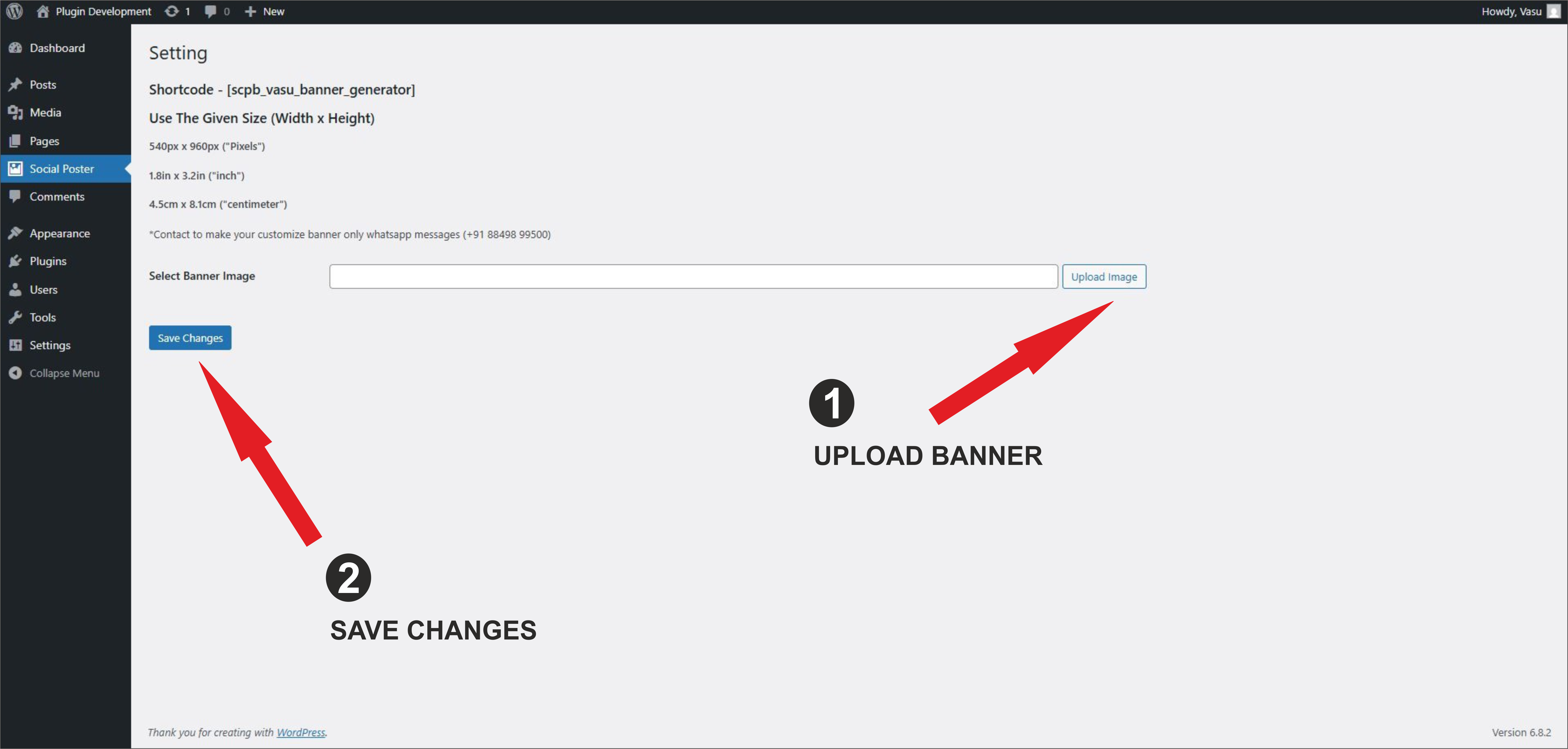
As the site admin, you can upload and set the default “Social Share Story Image” background from the admin menu under social poster section. You will find the section that will show upload option you have to click on that and upload the “Social Share Story Image” background according to the size which is given on the top and save changes.
-
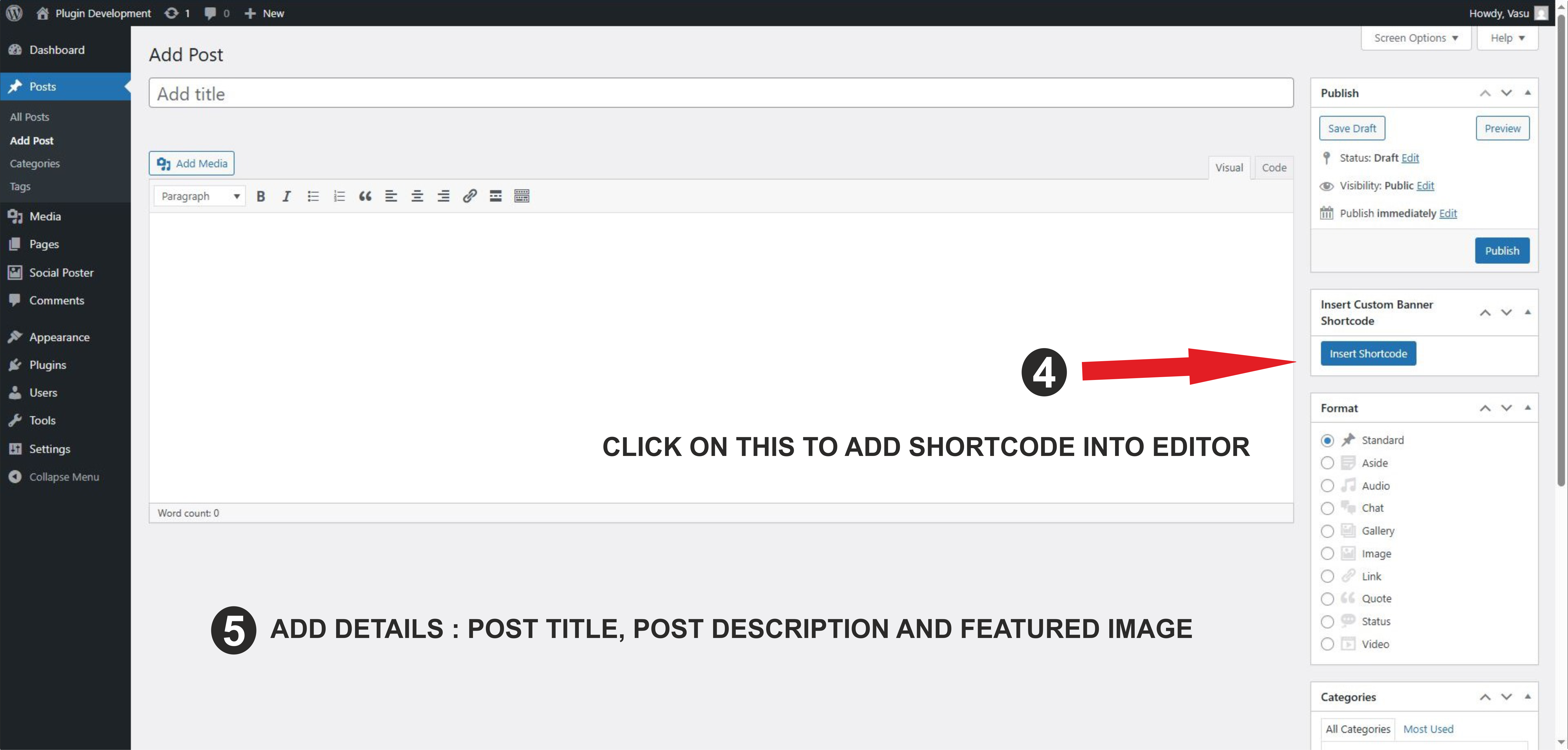
When the admin clicks on Add New Post or edits an existing post, they will see an option to quickly insert the shortcode directly into the post editor. After inserting the shortcode, the admin can continue adding the regular Post Title, Featured Image, and Post Description. These details will automatically connect with the plugin to generate the customized “Social Share Story Image” on the frontend.
-
On the User side, when visiting a post that has the shortcode inserted, the “Social Share Story Image” generator will appear. Here, the user can see the banner background set by the admin along with the post details (Title, Featured Image and description) into it. Users can enter their name, upload a photo, and download a personalized “Social Share Story Image” in one click.
Frequently asked questions
Can I use my own banner templates?
Yes, upload banner images via the admin panel under specific categories.
Can I customize the layout?
Yes, modify style.css and main.js inside the plugin folder or enqueue your own styles.
Is this plugin mobile responsive?
Yes, the plugin is built with Bootstrap and supports responsive layouts.
Changelog
First public release. Includes basic image generation, admin image management, and frontend user interaction.
1.0
- Initial release with full banner customization and download support.
Screenshots




For developers
Is this your plugin? Show off the numbers.
Add a live badge to your site, docs or GitHub README. It updates on its own — no account needed.
Best WP Post's to Social Media alternatives
All image generator plugins →





FAQ
WP Post's to Social Media: quick answers
Straight answers, pulled from live WordPress.org data.
Live data from WordPress.org · checked Sep 28, 2026
Is WP Post's to Social Media free?
Yes. WP Post's to Social Media is free to download and use from the official WordPress.org plugin directory.
Is WP Post's to Social Media safe to use in 2026?
WP Post's to Social Media shows warning signs in 2026 — compare the alternatives below before installing. Is rated 5/5 and was last updated 1 year ago, and scores 37/100 on our health check.
How many websites use WP Post's to Social Media?
WP Post's to Social Media is active on <10 WordPress websites and has been downloaded 536 times since it launched in August 2025. It was downloaded 31 times in the last 30 days.
Does WP Post's to Social Media work with WordPress 7.1?
WP Post's to Social Media is officially tested up to WordPress 6.8.10, while the latest release is 7.1.2. It may still work, but try it on a staging site first.
What PHP version does WP Post's to Social Media need?
WP Post's to Social Media requires PHP 7.4 or higher. Most hosts run PHP 8.x today, so it works on any modern WordPress hosting.
When was WP Post's to Social Media last updated?
The latest version, 1.0, was released on September 2, 2025 (1 year ago).
Who makes WP Post's to Social Media?
WP Post's to Social Media is developed and maintained by Ved Gondaliya.
What are the best alternatives to WP Post's to Social Media?
The most popular alternatives to WP Post's to Social Media are Generate Images (AI) (5K+ installs), Imajinn (200+ installs) and Pin Generator (200+ installs).
Powered by PageForge
Want thousands of pages that rank like these? Build them in an afternoon.
This directory runs on the same engine as PageForge. Turn any spreadsheet, CSV or API into thousands of fast, SEO-ready WordPress pages — with schema, internal links and AI-written copy baked in.
- CSV, Google Sheets & API data sources
- AI content, schema & internal links per page
- Works with Elementor, Gutenberg, Yoast & Rank Math
- Free on WordPress.org — no credit card


