



Imajinn – Magical AI Image Generation
Generate the perfect royalty-free images for your blog in seconds with cutting-edge AI for a fraction of the cost of stock photo sites.

Consider an alternative
Imajinn shows warning signs in 2026 — compare the alternatives below before installing. It runs on 200+ sites, is rated 5/5 and was last updated 2 years ago, and scores 25/100 on our health check.
- Small user base (200+ active installs)
- Very few reviews so far
- No update in over a year
- Only tested up to WordPress 6.7 (latest is 7.1)
How does it stack up?
Side-by-side on installs, updates, ratings & support



Daily downloads
Download spikes usually follow a new release — each site that auto-updates counts as a download.
Rankings
Where Imajinn stands todayWordPress.org search rankings
Live position in the plugin search, top 100| Keyword | Position |
|---|---|
| AI | >100 |
| art | >100 |
| DALLE | #10 |
| image generator | >100 |
| stock photos | #89 |
Version adoption
Share of active sites per release.
Rating breakdown
★★★★★★★★★★ 5 from 3 reviews
About Imajinn – Magical AI Image Generation
From the official readme · v1.5.5Description
Imajinn brings the magic of AI image generation to WordPress
Imajinn is a WordPress plugin that brings the power of AI image generation to your website. Similar to tools like DALL·E 3, Midjourney, and Stable Diffusion, Imajinn lets you generate images for any topic with just your imagination. Just enter a description of what you would like to create, and Imajinn will generate a stunning image for you in seconds.
Running on the latest in AI technology, Imajinn is able to generate images that are indistinguishable from real photos and art. The images are royalty-free, so you can use them on your website without worrying about licensing issues. It’s like having a full-time graphic design assistant on your team that follows your every command. Your only limitation is your imagination.
NEW: Stable Diffusion XL
Now powered by the latest Stable Diffusion XL model, allowing you to create descriptive images with shorter and simpler prompts, and generate words within images. The model is a significant advancement in image generation capabilities, offering enhanced image composition and face generation that results in stunning visuals and realistic aesthetics.
Imajinn AI – Plugin Features
- Generate images with AI – Just type in a prompt and Imajinn will generate a stunning image for you to use on your site.
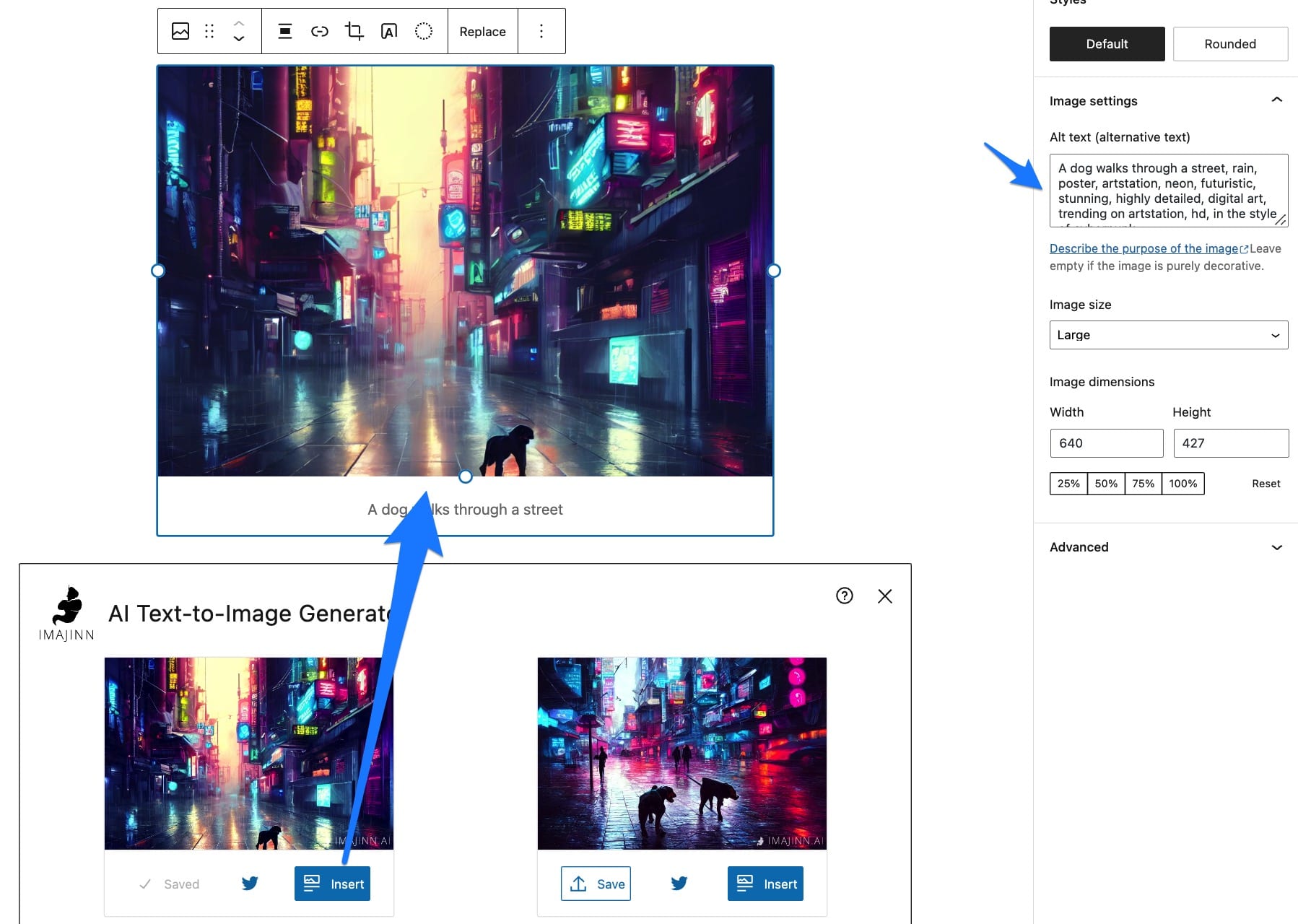
- Gutenberg block – Create images right inside your posts/pages with the Imajinn AI Block.
- Save to library – Upscale and save your favorite images to your WordPress media library for easy access in any theme/plugin.
- Insert images – Insert your high resolution generated images into any post/page as an image block with a single click.
- Style presets – Customize your images with a variety of preset options like art medium, artist style, and more!
- History – Easily view and jump back to previous image generations to modify and customize your prompts.
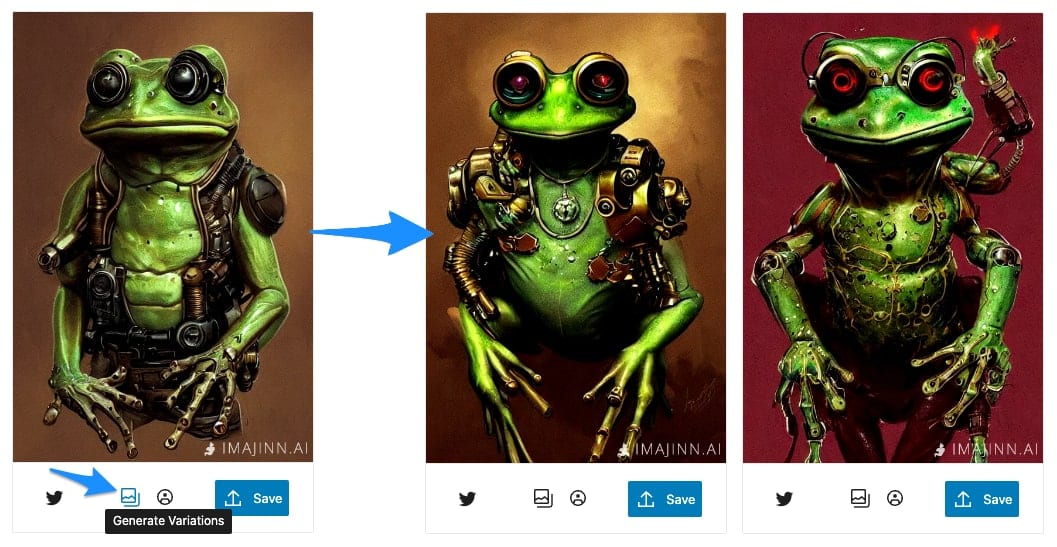
- Create variations – Generate more variations of your favorite images with a similar style and layout.
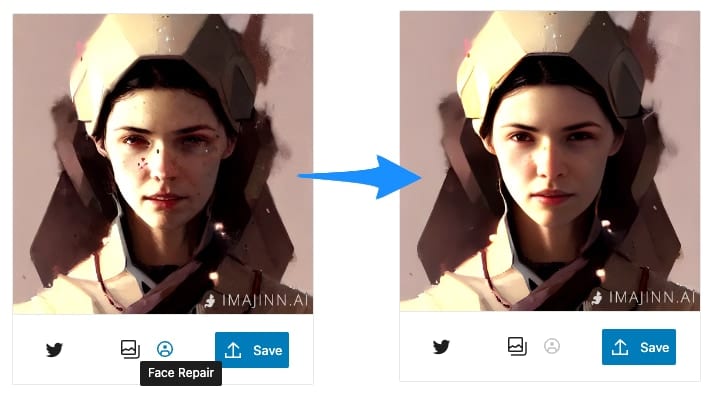
- Face repair – AI-based facial restoration to restore facial details and enhance colors with a good balance of realness and fidelity.
- Touchup (Inpainting) – Customize your images by using a brush to add new details or remove unwanted objects.
- Media page – Generate images outside of the Gutenberg editor for support with any theme builder.
- Easy-connect – No confusing API keys. Simply click to connect
- Powerful cloud servers – Imajinn AI is powered by the most advanced A100 cloud GPUs, so you can generate images with the highest quality and speed right from your WordPress dashboard.
- Royalty-free images – Use the images you generate on your site without worrying about licensing issues.
- Unlimited users – Any WordPress user on any site can use the Imajinn Block to generate images.
- Unlimited sites – You can connect just one site, hundreds, or thousands…no extra license costs.
Sparking the WordPress world’s Imajinn-ation:
★★★★★
“looks impressive for sure!” – WP Weekly
★★★★★
“👏 unreal. These are the kind of cool and creative things WP needs more of.” – Mission Ctrl’s Jamieson Webking
★★★★★
“Just used up all of my image credits for Imajinn and boy was it fun. A really cool plugin, can see quite a few people using this!!!” – Ben @ LayerWP
★★★★★
“When I keep thinking ‘all the cool plugin ideas have already been made’ and then see this. So cool!” – developer, designer, and AshWebStudio founder Derek Ashauer
★★★★★
“VERY impressive…Love the 3:2 option (obvious need but missing from most other AI image tools). Easy, no-fuss install. Great documentation. The array of config options are intuitive, and actually make a big difference in output. And it’s FAST!” – J. Paul Hendricks
Touchup (Inpainting)
Touchup mode allows you to customize and make modifications to an image in a more precise way by allowing you to remove or replace parts of the image with new content generated from your prompt. This is useful for removing unwanted objects like watermarks, signatures, or duplicates. Or you can use it to add new objects to the image, such as a forground item or background. Touchup allows you to create the exact image you want by choosing where each element in the image goes. You can create that complex image you have in mind, even if it is too specific to get right with one initial prompt.
Touchup works by choosing an image as an input, masking an area with the brush that you want to modify, then adjusting your prompt to describe what you want in that area.
Privacy
This plugin does not collect or share data other than your prompts and generated images as needed to run our API service. Read our Privacy Policy for more information.
About Us
Imajinn AI is built and maintained by the team behind Infinite Uploads – a premium cloud storage provider and content delivery network (CDN) for all your WordPress media files. Learn more here:
infiniteuploads.com
Looking to add ChatGPT-powered support or Q/A chatbots trained on your content or documentation to your WordPress site? Check out our new product DocsBot AI! It’s free to try and easy to set up.
Contribute to the plugin’s development on Github!
Enjoy!
Installation
Once you install the plugin, simply insert the “Imajinn AI” Gutenberg block in any post or page editor, or visit the Media->Imajinn AI page. You will be prompted to create a free account or connect to your existing account right in the block, and then you can start generating images right away.
Running an artificial intelligence neural network requires a lot of computing power. To make this possible, we run a cloud service to run the neural network. This means that you need to connect to our service before you can use the plugin. To connect to Imajinn AI, you need to have a user account. You can create one for free with just your valid email address and a password, or if you already have an account, you can log in with your Imajinn AI email and password.
Frequently asked questions
What is it good at generating?
This AI model can create some amazing images with the right guidance. It especially excels at more artistic images such as paintings, drawings, CG, etc. Think stock photos or art. It struggles a bit with photorealistic human faces and body parts, which can appear strangely deformed. This can be avoided by choosing a more artistic style or close-up portrait. Also, if you ask it to generate text the letters are usually mangled or mixed up.
Is the Imajinn AI plugin free?
While the plugin is free and can be used on unlimited sites, it does require an account with our cloud service to power the extremely computation-heavy AI algorithms. You can sign up for an account and receive free image credits to try it out. You can also upgrade to one of our paid plans for more image generation credits, at a fraction of the cost of stock photo sites.
What is the copyright license of images I create?
All generated images that comply with our service usage terms are public domain and are yours to license as you see fit. We retain no rights to them. Because the public domain is not a unified concept across legal jurisdictions, the specific license of generated images is that of the CC0 1.0 Universal Public Domain Dedication.
How many websites can I connect to one cloud account?
Connect an unlimited number of sites to your Imajinn account, and they all will share the same image generation credits budget. We will soon have stats and usage reports for each site in your dashboard.
What restrictions are there?
Our AI has much more relaxed restrictions than ones like DALLE-3. But with great power comes great responsibility, so you must agree to abide by our restrictions for all prompts and generated images: You should not attempt to generate: NSFW, lewd, or sexual material Hateful or violent imagery, such as antisemitic iconography, racist caricatures, misogynistic and misandrist propaganda, etc. Personal information about yourself or any other person. This includes but is not limited to phone numbers, residential addresses, social security numbers, drivers license numbers, account numbers, etc…
Changelog
1.5.5 – 2024-11-09
- Migrate API domain to wp.imajinn.ai
- Remove Prompt Genie
1.5.4 – 2023-10-25
- Fix: Image generation status would not update on some sites with persistent object cache enabled.
1.5.3 – 2023-10-25
- Upgrade to Stable Diffusion XL for 50% more resolution and much higher quality images from shorter prompts.
1.5.2 – 2023-04-14
- Fix: Broken block when invalid json saved in history
1.5.1 – 2023-04-12
- WordPress 6.2 compatibility improvements
- Fix: Broken block when a prompt that filtered all images as NSFW was saved in history
1.5 – 2022-12-13
- Upgrade to Stable Diffusion v1.5+VAE
- 2x faster image generation
- Responsive fixes
- Add prompt style to alt text, and add alt text to saved library images
1.4 – 2022-10-10
- New image zoom previews with keyboard shortcuts
- Prompt style preset improvements
- Getting started guide popover
- Many bug and style fixes
1.3 – 2022-9-24
- Prompt Genie: Summon the genie to use AI to turn your boring prompts into amazingly artistic images.
- Touchup (Inpainting): Customize your images by using a brush to add new details or remove unwanted objects.
- Various other bug fixes and style improvements.
1.2 – 2022-9-16
- New: Generate variations of an image with a similar style and layout.
- New: AI-based facial restoration to restore facial details and enhance colors with a good balance of realness and fidelity.
- Fix: Hide history when plugin is not connected.
1.1 – 2022-9-16
- Save prompt history between sessions for easy reuse and modification.
1.0.1 – 2022-9-15
- Fix missing prompt history in standalone media page
- Optimize size of admin css and js
1.0 – 2022-9-14
- Initial release
Screenshots





For developers
Is this your plugin? Show off the numbers.
Add a live badge to your site, docs or GitHub README. It updates on its own — no account needed.
Best Imajinn alternatives
All AI plugins →





FAQ
Imajinn: quick answers
Straight answers, pulled from live WordPress.org data.
Live data from WordPress.org · checked Sep 28, 2026
Is Imajinn free?
Yes. Imajinn is free to download and use from the official WordPress.org plugin directory.
Is Imajinn safe to use in 2026?
Imajinn shows warning signs in 2026 — compare the alternatives below before installing. It runs on 200+ sites, is rated 5/5 and was last updated 2 years ago, and scores 25/100 on our health check.
How many websites use Imajinn?
Imajinn is active on 200+ WordPress websites and has been downloaded 14,753 times since it launched in September 2022. It was downloaded 92 times in the last 30 days.
Does Imajinn work with WordPress 7.1?
Imajinn is officially tested up to WordPress 6.7.9, while the latest release is 7.1.2. It may still work, but try it on a staging site first.
What PHP version does Imajinn need?
Imajinn requires PHP 7.2 or higher. Most hosts run PHP 8.x today, so it works on any modern WordPress hosting.
When was Imajinn last updated?
The latest version, 1.5.5, was released on November 10, 2024 (2 years ago).
Who makes Imajinn?
Imajinn is developed and maintained by Aaron Edwards.
What are the best alternatives to Imajinn?
The most popular alternatives to Imajinn are Elementor Website Builder (10M+ installs), All in One SEO (2M+ installs) and AI Agent by SiteGround (1M+ installs).
Powered by PageForge
Want thousands of pages that rank like these? Build them in an afternoon.
This directory runs on the same engine as PageForge. Turn any spreadsheet, CSV or API into thousands of fast, SEO-ready WordPress pages — with schema, internal links and AI-written copy baked in.
- CSV, Google Sheets & API data sources
- AI content, schema & internal links per page
- Works with Elementor, Gutenberg, Yoast & Rank Math
- Free on WordPress.org — no credit card


