



AI Chatbot & Semantic Search: ChatGPT Answers From Your Content
Answers your visitors can trust, drawn from YOUR content. Self-hosted AI chatbot + semantic search (RAG), your OpenAI key, not generic ChatGPT.

Solid choice
AI Chatbot & Semantic Search: C… is a solid plugin choice in 2026, with a few things worth checking first. It runs on 100+ sites, is rated 4.3/5 and was last updated 5 days ago, and scores 66/100 on our health check.
- Actively developed — last update 5 days ago
- Tested with the latest WordPress (7.1)
- Momentum — downloads up 149.9% vs the previous 30 days
- Small user base (100+ active installs)
How does it stack up?
Side-by-side on installs, updates, ratings & support



Daily downloads
Download spikes usually follow a new release — each site that auto-updates counts as a download.
Rankings
Where AI Chatbot & Semantic Searc… stands todayWordPress.org search rankings
Live position in the plugin search, top 100| Keyword | Position |
|---|---|
| ai assistant | >100 |
| AI Chatbot | #80 |
| ChatGPT | #50 |
| semantic search | #10 |
| woocommerce | >100 |
Version adoption
Share of active sites per release.
Rating breakdown
★★★★★★★★★★ 4.3 from 6 reviews
About AI Chatbot & Semantic Search: ChatGPT A…
From the official readme · v2.8.14Description
Answers your visitors can trust, drawn only from your own content. SmartSearchWP turns your WordPress site into an AI assistant that replies from YOUR posts and pages, grounded in your data instead of generic ChatGPT answers. It pairs an AI chatbot with a semantic search engine (RAG) that retrieves the right passages from your content before it answers. It runs on your own site, with your own OpenAI key.
Premium: unlock all 10 premium add-ons (WooCommerce, PDF, custom post types & ACF, lead capture, analytics, usage control, prompt override, and more) for €49.99/year. Get SmartSearchWP Premium »
Whether you run an eCommerce store, corporate site, blog, or documentation platform, SmartSearchWP improves engagement, reduces support workload, and enhances content discovery.
What makes SmartSearchWP different
Most AI chatbot plugins simply forward your visitors to OpenAI. SmartSearchWP is built around three ideas:
- Grounded in YOUR content. Answers are retrieved from your own posts and pages using embeddings (RAG), so replies stay on topic and reflect what you actually published, not the open web.
- Self-hosted, your key. The plugin runs on your WordPress install and calls OpenAI with your own API key. Your content and your keys stay under your control, which helps with GDPR compliance.
- Modular, not bloated. A complete free core, extended by dedicated premium add-ons you install only if you need them.
No competing plugin combines all three at once: grounded answers from your own content, running on your own site, with your own key.
What you get
- Fewer repetitive support requests: visitors get instant, content-based answers.
- Better content discovery: semantic search surfaces the right page instead of keyword guesses.
- Answers you can stand behind: responses are drawn from your published content, not invented.
- Full ownership: your site, your OpenAI key, your data.
Core Features (free)
AI Chatbot Integration
Connect your website to OpenAI’s ChatGPT models to provide dynamic, contextual answers based on your own content.
All available ChatGPT models are presented in the plugin settings depending on your API key and OpenAI account. Supported models include Chat models (gpt-4o, gpt-4o-mini, gpt-4.1, etc.), Reasoning models (gpt-5, o3, o4-mini, etc.), and legacy options, each with recommendations, estimated cost levels, and suitability guidance for chatbot use.
Semantic Search Engine
Improve content discovery with AI-driven semantic search instead of simple keyword matching.
Contextual Content Indexing
Index your posts and pages so the chatbot answers from your own content. (Indexing custom post types and ACF fields is available with the premium Custom Type Manager add-on.)
Modular Architecture
Extend functionality through dedicated addons without bloating your core installation.
No request or usage cap is reserved to a paid tier: the free core is complete, and you bring your own OpenAI key.
Premium Add-ons
A premium license unlocks the add-ons that extend what the assistant can read and do:
- WooCommerce Integration (premium addon): use your products, with SKU and price, as a content source.
- PDF (premium addon): add the content of your media-library PDFs to the answers.
- Custom Type Manager (premium addon): index custom post types and ACF fields (the free core indexes posts and pages).
- Prompt Override (premium addon): replace the system prompt to control tone and scope.
- Usage Control (premium addon): restrict access by role, page, device, schedule, or question budget.
- RAG Auto Sync (premium addon): automatically re-index new content (uses your OpenAI key).
- Lead Capture (premium addon): collect visitor emails in-chat with a GDPR form and CSV export.
- Analytics & Insights (premium addon): a KPI dashboard over your chat logs (top questions, charts, CSV, weekly email).
- RAG Debugger (premium addon): test questions and inspect the retrieved contexts.
- Customization (premium addon): adjust the chatbot appearance (colors, position).
Premium add-ons are available with a license at €49.99/year: Get SmartSearchWP Premium »
Who it’s for
- Site owners, agencies, and developers who want answers grounded in their own content.
- Teams that prefer a self-hosted tool using their own OpenAI account rather than a SaaS black box.
- eCommerce, corporate, blog, and documentation sites that want to reduce support load and improve discovery.
Who it’s not for
- Anyone who does not want to use their own OpenAI API key (the plugin needs one to answer).
- Sites looking for a fully managed, hosted chatbot with no setup: SmartSearchWP runs on your server.
- Live human-agent chat: SmartSearchWP answers from your content, it is not a live-chat helpdesk.
Performance & Safety
SmartSearchWP follows WordPress development standards and keeps a clean separation between core functionality and extensions.
- Lightweight architecture
- API-based processing via OpenAI
- No unnecessary front-end bloat
- Full administrative control
- Easy activation and deactivation
SmartSearchWP does not store unnecessary data and allows you to manage and limit API usage efficiently.
Use Cases
- eCommerce stores providing instant product assistance
- Corporate websites reducing support requests
- Blogs with large content libraries improving discoverability
- Technical documentation sites offering intelligent Q&A
- Agencies deploying scalable AI solutions for clients
The chatbot uses OpenAI as a third-party service to generate its answers. You can find more information about OpenAI here and consult their privacy policy.
Optional usage statistics (off by default): if an administrator enables the Usage statistics setting, the plugin may send plugin version, license type (free/premium), counts for five admin-interface events, and a hashed site identifier (SHA-256, not the raw domain) to smartsearchwp.com. No email, IP, API key, chat log, page content, or visitor data is sent. Front-end visitors are never tracked. Unchecking the setting stops sending data and discards the local queue. Details: SmartSearchWP privacy policy.
Installation
- Upload the plugin files to the
/wp-content/plugins/smartsearchwpdirectory, or install the plugin through the WordPress Plugins screen. - Activate the plugin through the ‘Plugins’ screen in WordPress.
- Enter your OpenAI API key in the SmartSearchWP settings panel.
- Configure indexing and chatbot behavior.
- In SmartSearchWP > Summaries, generate embeddings for at least one page or post, then click Activate. The chatbot will not appear on the front end until at least one context is active — without this step, the plugin may be enabled in settings but no content has been selected for the chatbot to use.
- Display the chatbot using the provided interface or shortcode.
Frequently asked questions
Does this AI chatbot answer only from my own content?
SmartSearchWP grounds its answers in the pages and posts you choose to activate on your own site, so replies stay tied to what you actually publish rather than to generic web knowledge. You decide which content is indexed and can update or remove it at any time. Answers are generated by OpenAI from those retrieved snippets, using your own API key.
What makes SmartSearchWP different from hosted AI chatbot plugins?
It runs entirely inside your own WordPress install and connects to OpenAI with your own API key, so there is no third-party SaaS service sitting between your visitors and your site to store your content or conversations, and there is no per-seat pricing. Optional usage statistics are off by default and carry no personal data or visitor tracking (see “Does SmartSearchWP send data off-site?” below).
Does SmartSearchWP slow down my site?
No. Processing is handled through the OpenAI API. The plugin remains lightweight and modular.
Can I control AI responses?
Yes. You can customize prompts, restrict usage, define content sources, and manage behavior precisely.
How are OpenAI API costs managed?
You use your own OpenAI API key and can restrict usage by role, page, or quota limits to control costs.
Is WooCommerce supported?
Yes. With the WooCommerce integration addon, product data can be included in contextual AI responses.
Can I disable the chatbot easily?
Yes. The plugin can be deactivated at any time without affecting your website content.
The chatbot shows “Forbidden” or a raw error page
Some hosts (Wordfence, ModSecurity, OVH CDN Basic, etc.) block POST requests to /wp-json/wdgpt/v1/retrieve-prompt. Since version 2.7.4, SmartSearchWP retries automatically, falls back to admin-ajax.php, and shows a friendly message instead of raw error HTML. If issues persist, whitelist that REST route or exclude it from your CDN/WAF rules.
WooCommerce: search by SKU or product reference
With the WooCommerce Integration addon (1.4.0+) and SmartSearchWP 2.8.0+, the chatbot can match exact product references (SKU, ref_xxx) before semantic search and uses grounded numeric prices in the AI context to reduce wrong amounts (e.g. 83,46€ vs 8346€). Regenerate product embeddings after upgrading so SKU and price are indexed.
How do I activate the bot?
The bot will not appear on your website until you have activated it. To activate the bot, you need to generate and activate the embeddings for the pages and posts you want to use, as well as the general settings. General settings: 1. Go to the SmartSearchWP settings page. 2. Enter your ChatGPT API key. 3. Modify the settings to your needs. 4. Save the settings.
How do I customize the chatbot’s context?
Generate and activate pages: 1. Go to the SmartSearchWP ‘Summaries’ page. 2. Click on the ‘Generate Embeddings’ button under the page or post you want to use. 3. Once their embeddings have been generated, click on the ‘Activate’ button under the page or post you want to use. 4. Repeat steps 2 and 3 for all the pages and posts you want to use.
Does SmartSearchWP send data off-site?
Yes, in two cases: OpenAI (required for answers): questions and retrieved content snippets are sent to OpenAI using your own API key. See OpenAI’s terms. Optional usage statistics (off by default): only if you enable Usage statistics in SmartSearchWP settings. Then the plugin sends a hashed site identifier, plugin version, license type, and five admin event counters to smartsearchwp.com. No personal data, no visitor tracking. See our privacy policy.
Will I see extra notices in wp-admin?
A setup reminder can appear on SmartSearchWP screens only, if the chatbot is not configured yet (missing API key or no active content). It is dismissible, capped, and never shown on the rest of the dashboard. It does not promote premium features.
How do I get help?
Browse our FAQ at https://www.smartsearchwp.com/faq/ for answers about setup, addons, licensing, and technical topics. If you cannot find what you need there, contact us at hello@smartsearchwp.com.
Changelog
Fixes truncated or corrupted text in admin chat logs and PDF/email reports when streaming with Chat Completions (server-side SSE line buffering). Improved sanitization for stored messages.
2.8.14
- Admin labels: contexts menu uses a proper translatable string; add-on names on the Addons screen follow the site language. French and other bundled locales updated. Not a claim that every add-on screen is complete in six languages.
2.8.13
- Review reminder now appears after realistic usage on smaller sites (eligibility threshold lowered). Still admin-only, dismissible, sentiment-routed, and shown only when the chatbot has a configured context and no recent errors. No incentives.
2.8.12
- Add a setup reminder on SmartSearchWP screens only (API key + content). Admin-only, dismissible, capped, no external calls, no premium upsell.
- Optional usage statistics (off by default): hashed site identifier, plugin version, license type, and 5 admin event counters sent to smartsearchwp.com. No personal data, no visitor tracking. Documented in this readme and the privacy policy.
2.8.11
- Security: admin REST permission checks for log purge/export now require the manage_options capability (previously a broken role check could allow unauthenticated access)
- Fix: Error Logs and Chat Logs “Purge Logs” now deletes entries older than the selected period (operator was inverted); nested purge markup cleaned up; admin purge requests send a REST nonce
2.8.10
- Fix: embedding API errors that are not rate limits no longer trigger false “temporary 429 / rate limit” email alerts (logged correctly; emails stay quiet for invalid JSON request bodies)
- Fix: weekly reporting cron is restored more reliably after plugin deactivate/reactivate, and auto-heals when Reporting is ON but the schedule hook is missing
2.8.9
- Addons manager Buy buttons now open the matching add-on page (one Premium license still unlocks all 10 add-ons)
- Quiet reminders on the Addons screen: renew if your license expires soon or has expired (installed features keep working), and a thank-you note after 6 months on the free core
- Reminders are dismissible except the expired-license status; nothing is sent off-site
- If a required runtime file is missing after an incomplete update, the plugin shows an admin notice instead of taking the site down
- More reliable premium add-on install from the Addons screen (download then install from a local zip)
Screenshots
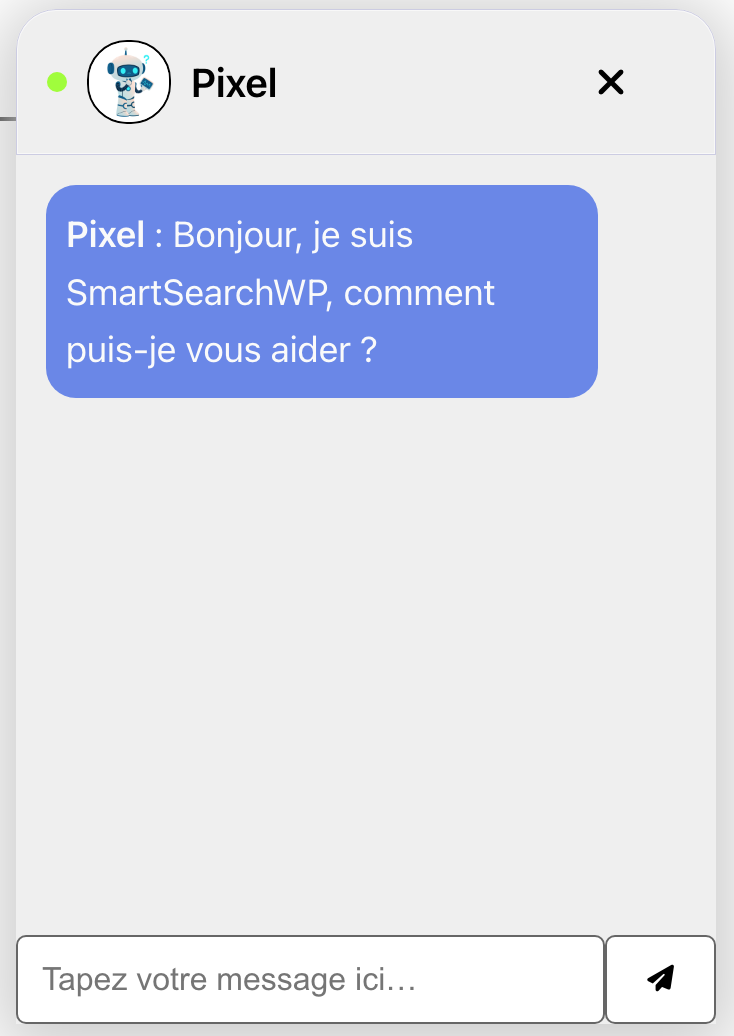
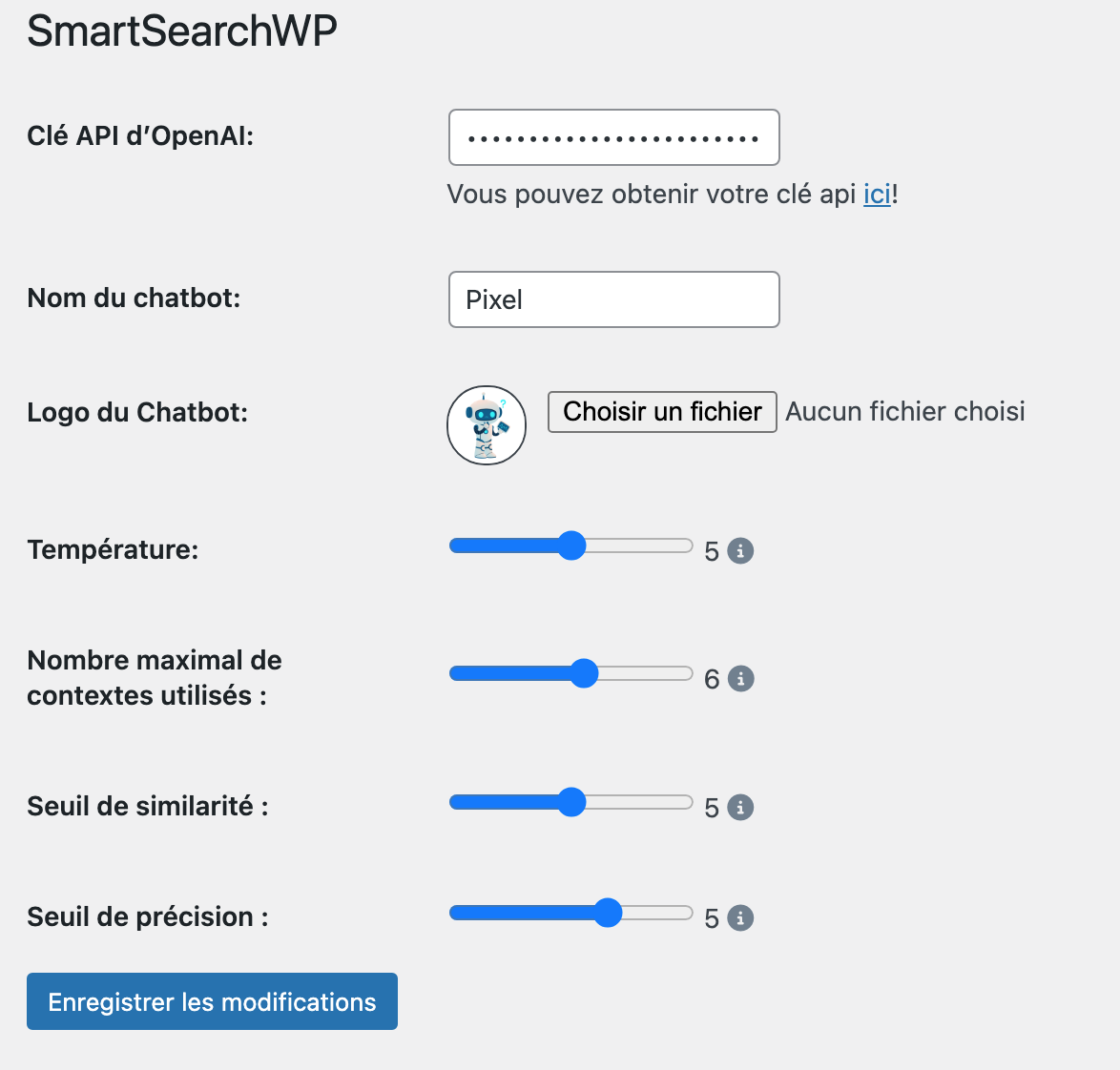


For developers
Is this your plugin? Show off the numbers.
Add a live badge to your site, docs or GitHub README. It updates on its own — no account needed.
Best AI Chatbot & Semantic Search:… alternatives
All ai assistant plugins →



FAQ
AI Chatbot & Semantic Search: ChatG…: quick answers
Straight answers, pulled from live WordPress.org data.
Live data from WordPress.org · checked Sep 28, 2026
Is AI Chatbot & Semantic Search: C… free?
Yes. AI Chatbot & Semantic Search: C… is free to download and use from the official WordPress.org plugin directory.
Is AI Chatbot & Semantic Search: C… safe to use in 2026?
AI Chatbot & Semantic Search: C… is a solid plugin choice in 2026, with a few things worth checking first. It runs on 100+ sites, is rated 4.3/5 and was last updated 5 days ago, and scores 66/100 on our health check.
How many websites use AI Chatbot & Semantic Search: C…?
AI Chatbot & Semantic Search: C… is active on 100+ WordPress websites and has been downloaded 13,170 times since it launched in November 2023. It was downloaded 2,164 times in the last 30 days.
Does AI Chatbot & Semantic Search: C… work with WordPress 7.1?
Yes. The developer has tested AI Chatbot & Semantic Search: C… up to WordPress 7.1.2, the latest release. It requires WordPress 4.7 or newer.
What PHP version does AI Chatbot & Semantic Search: C… need?
AI Chatbot & Semantic Search: C… requires PHP 7.4 or higher. Most hosts run PHP 8.x today, so it works on any modern WordPress hosting.
When was AI Chatbot & Semantic Search: C… last updated?
The latest version, 2.8.14, was released on September 23, 2026 (5 days ago).
Who makes AI Chatbot & Semantic Search: C…?
AI Chatbot & Semantic Search: C… is developed and maintained by webdigit.
What are the best alternatives to AI Chatbot & Semantic Search: C…?
The most popular alternatives to AI Chatbot & Semantic Search: C… are Uncanny Automator (40K+ installs), WPVibe (40K+ installs) and Hyve Lite (7K+ installs).
Powered by PageForge
Want thousands of pages that rank like these? Build them in an afternoon.
This directory runs on the same engine as PageForge. Turn any spreadsheet, CSV or API into thousands of fast, SEO-ready WordPress pages — with schema, internal links and AI-written copy baked in.
- CSV, Google Sheets & API data sources
- AI content, schema & internal links per page
- Works with Elementor, Gutenberg, Yoast & Rank Math
- Free on WordPress.org — no credit card


