


SmartCloud Static Publisher
Reliable static export for WordPress with sitemap-based crawl, browser rendering, asset capture, and S3 + CloudFront deployment.

Solid choice
SmartCloud Static Publisher is a solid plugin choice in 2026, with a few things worth checking first. It runs on 10+ sites and was last updated 3 days ago, and scores 66/100 on our health check.
- Actively developed — last update 3 days ago
- Tested with the latest WordPress (7.1)
- Momentum — downloads up 163.1% vs the previous 30 days
- Small user base (10+ active installs)
- Very few reviews so far
- Needs PHP 8.1 or newer
How does it stack up?
Side-by-side on installs, updates, ratings & support



Daily downloads
Download spikes usually follow a new release — each site that auto-updates counts as a download.
Rankings
Where SmartCloud Static Publisher stands todayWordPress.org search rankings
Live position in the plugin search, top 100| Keyword | Position |
|---|---|
| cloudfront | #60 |
| export | >100 |
| playwright | #9 |
| s3 | >100 |
| static site | #80 |
Version adoption
Share of active sites per release.
About SmartCloud Static Publisher
From the official readme · v1.2.16Description
Static Publisher is a WordPress plugin + Node.js exporter workflow for deterministic static publishing.
Static Publisher is part of the WP Suite product family by Smart Cloud Solutions, Inc. WP Suite keeps WordPress as the CMS and editing layer, while optional connected features can extend selected workflows into modular AWS-backed services for identity, AI, APIs, workflows, protected routes, and static delivery. The free Static Publisher features described here do not require a WP Suite account, subscription, or WP Suite-managed AWS backend; you control any AWS credentials and target infrastructure you configure for publishing.
Project repository and extended documentation:
https://github.com/smartcloudsol/static-publisher
It is designed for setups where WordPress is the editor/origin and production is served from static hosting (for example S3 + CloudFront).
The plugin provides:
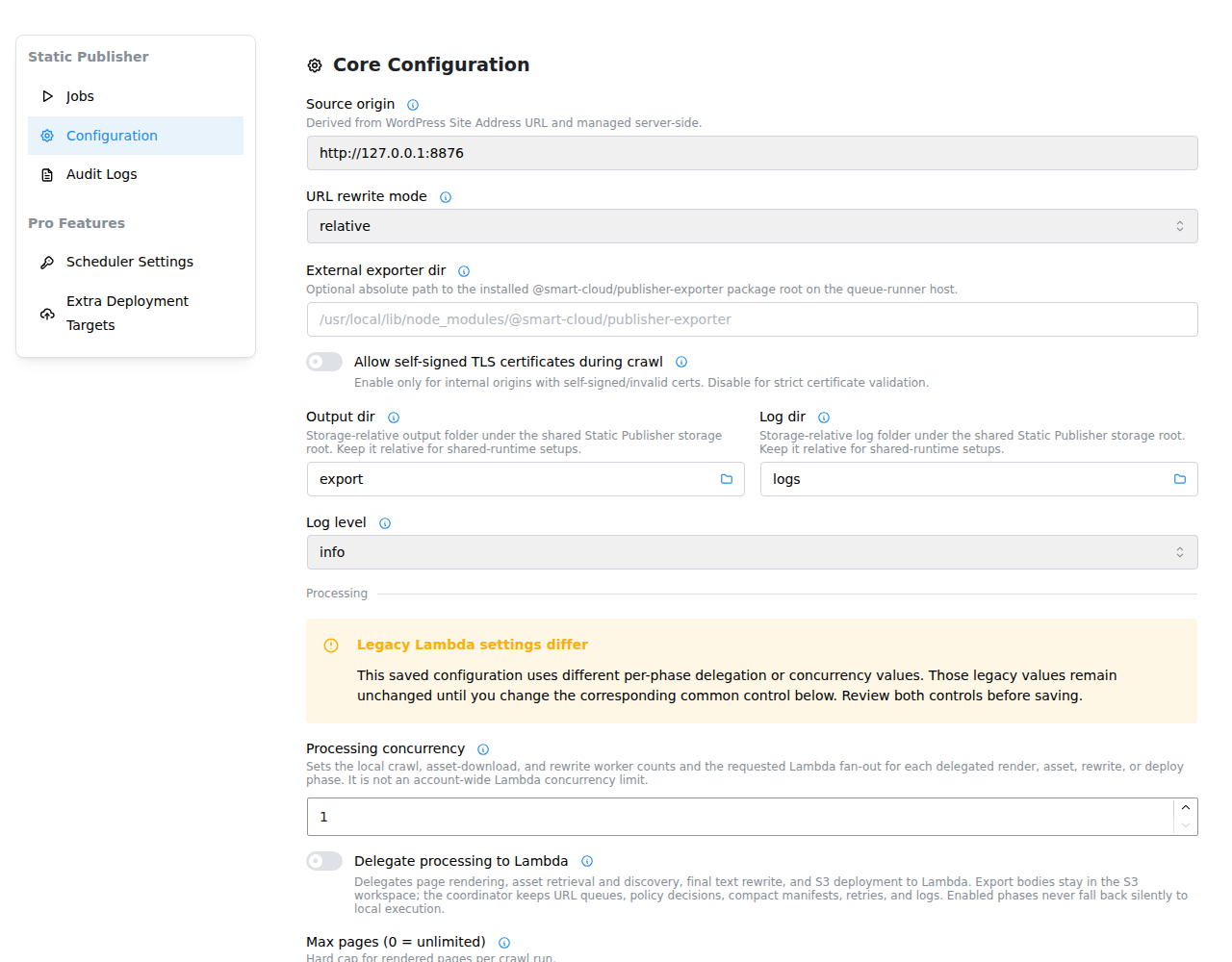
- Admin UI for export configuration
- Runtime config generation in uploads
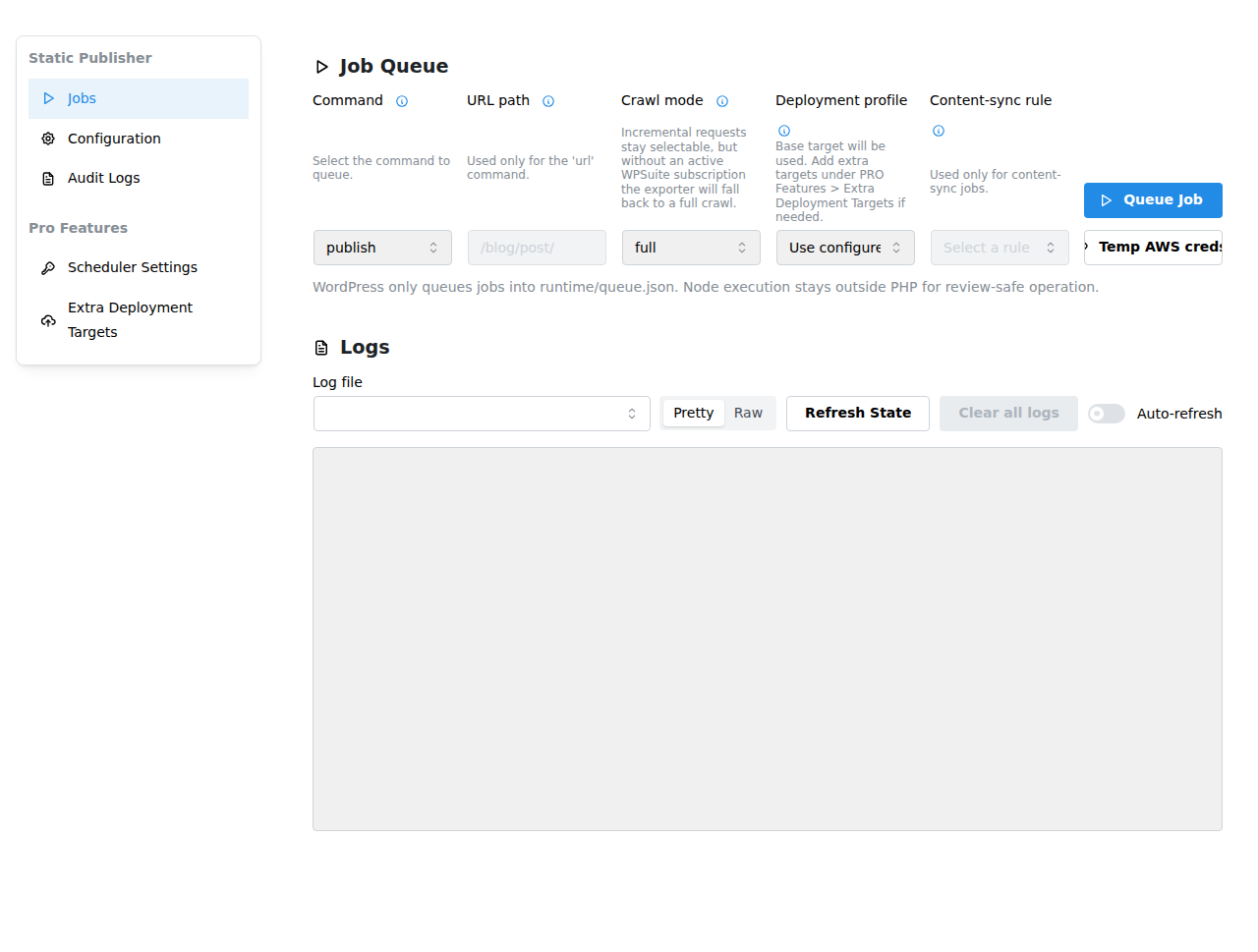
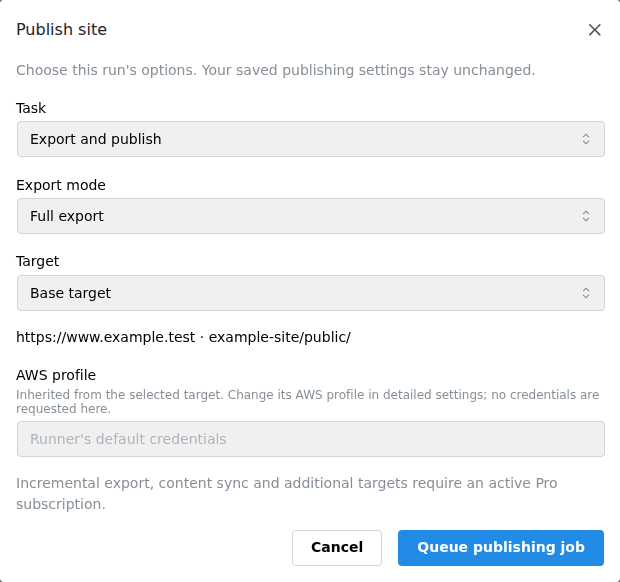
- Job queueing (publish, crawl, deploy, invalidate, retry-timeouts, selected URL lists, targeted content sync)
- Run status and log viewing
The Node.js exporter provides:
- Sitemap-based discovery with ordered Yoast, WordPress core, and conventional fallbacks
- Playwright rendering for JS-heavy pages
- Asset capture from browser requests, parsed sources, and open Shadow DOM trees
- Separate concurrency for page rendering, asset downloads, and final rewrite
- URL rewriting modes (absolute, root-relative, relative)
- Resumable targeted content sync with archive, sitemap, and tombstone reconciliation
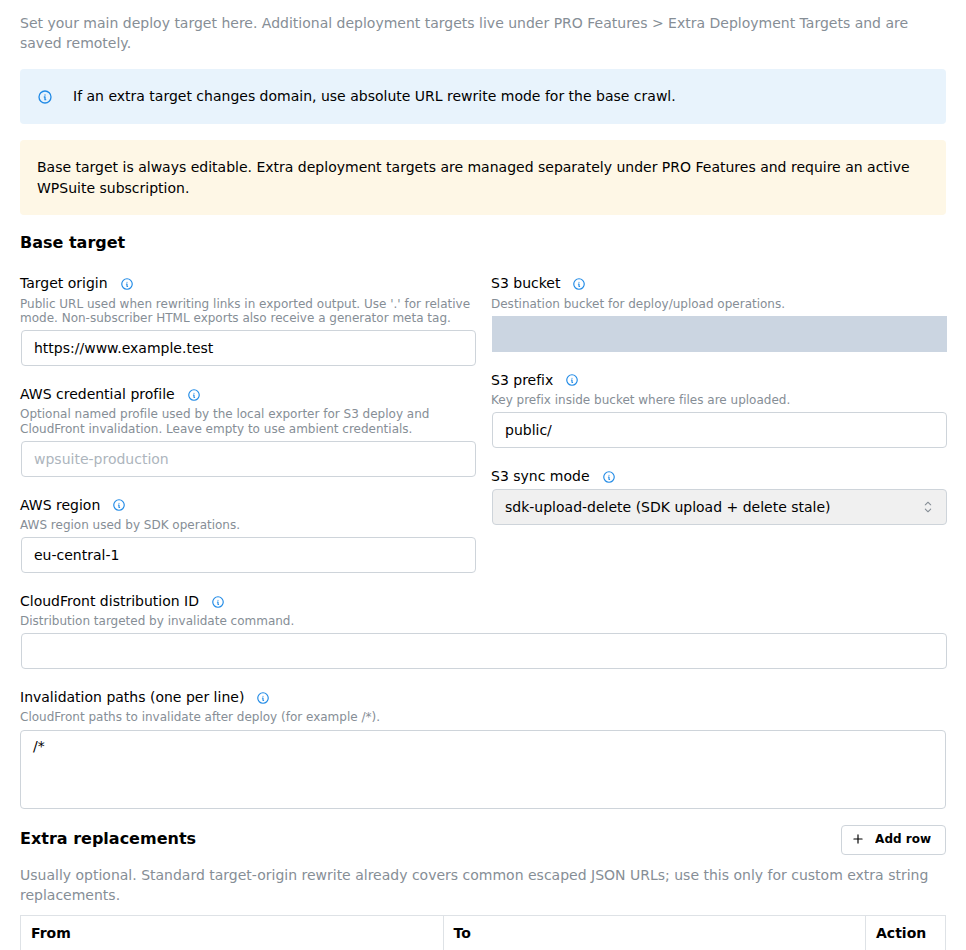
- S3 upload and CloudFront invalidation
- Detailed logging for crawl, deploy, and invalidate
This plugin does not execute shell commands directly from PHP.
Instead, it writes queue/config runtime files that an external Node runner executes.
This shell-first design is intentional: rendered frontend pages can be exported by Playwright/Node while WordPress/PHP remains focused on queueing and configuration.
This plugin is not affiliated with or endorsed by Amazon Web Services or the WordPress Foundation. All trademarks are property of their respective owners.
Usage Notice
SmartCloud Static Publisher does not require an external SaaS account to operate.
The plugin itself only manages configuration and queue state in WordPress.
Actual crawling and deployment are executed by your own Node runtime using this project’s exporter commands. This means:
- You control when and where exports run.
- You control AWS credentials and target infrastructure.
- WordPress/PHP does not proxy deployment traffic.
- The WordPress plugin ZIP does not bundle the Node.js exporter runtime; install
@smart-cloud/publisher-exporterseparately on the machine that processes queued jobs.
Free and Premium Usage Notice
SmartCloud Static Publisher is fully functional in Free mode and does not require a WP Suite account, subscription, trial period, or paid service to perform its core static publishing workflow.
In Free mode, the plugin supports the complete static publishing flow:
- Configure source and target settings in WP Admin.
- Queue and run full
crawl,publish,deploy,invalidate,retry-timeouts, and single-URL jobs. - Export rendered WordPress pages using the separately installed Node.js exporter.
- Capture required assets discovered during browser rendering.
- Rewrite URLs according to the configured rewrite mode.
- Deploy exported files to the configured S3 bucket.
- Create CloudFront invalidations for the configured distribution.
- View current job status and standard run logs.
Free mode includes S3 deployment and CloudFront invalidation. These are not paid-only features.
Audit Logs is also part of the main Static Publisher navigation and is not gated behind a WP Suite subscription.
The plugin package itself manages WordPress-side configuration, queue state, runtime files, and status/log access. Actual crawling and deployment are executed by the separately installed @smart-cloud/publisher-exporter CLI on the user’s own server, workstation, CI runner, or other queue-runner host.
Optional WP Suite Pro features are not required for the plugin to work. They are additional workflow, convenience, and team/enterprise publishing features. Examples may include:
- Incremental crawl / incremental publish and targeted content sync for Professional or Agency subscriptions.
- Scheduled workflows and operational content-sync status.
- Extra Deployment Targets and Scheduler Settings backed by linked WP Suite site configuration.
- Additional team/workspace-oriented configuration features.
Extra Deployment Targets are selected by key at deploy time, while downloaded job configs keep only the base target plus an optional target override id.
These optional Pro features may be visible in the plugin interface as upgrade-only controls, but they are separate from the fully functional free static publishing workflow described above.
When no active WP Suite subscription is connected, SmartCloud Static Publisher remains usable for full static crawl/publish/deploy workflows. There is no time limit, export quota, forced trial expiry, or required payment for the core static publishing functionality.
Server Prerequisites (Node + Playwright)
The exporter requires both Node.js and Playwright browser binaries on the machine that executes queued jobs.
Recommended Node setup is NVM + latest LTS:
curl -fsSL https://raw.githubusercontent.com/nvm-sh/nvm/v0.40.3/install.sh | bash

export NVM_DIR="$HOME/.nvm" && . "$NVM_DIR/nvm.sh" && nvm ls-remote --lts && nvm install --lts && nvm use --lts
Install the standalone exporter CLI package and Chromium browser binary:
npm install -g @smart-cloud/publisher-exporter && publisher-exporter install-browsers
Important:
- If cron runs under the same OS user that installed Node and Playwright, NVM plus the default user-scoped Playwright cache is fine.
- If cron runs as a different or non-login service user such as
www-data, prefer an explicitHOME, aPATHthat already containspublisher-exporterandnode, plus a sharedPLAYWRIGHT_BROWSERS_PATH. - In crontab, prefer absolute paths instead of relying on
$HOMEexpansion inside thePATHvalue. npx playwright installis not a global install; browser binaries are user-scoped by default (usually under~/.cache/ms-playwright).- If multiple users may run jobs, use
PLAYWRIGHT_BROWSERS_PATHto point to a shared browser folder and grant proper permissions. - If the shared browser directory lives under a protected system path, create it once with elevated privileges and make it writable by the same OS user that will run
publisher-exporter install-browsers. The later cron job only needs read/execute access to that directory tree. - For internal/self-signed TLS origins, enable
Allow self-signed TLS certificates during crawlin the admin UI (config key:ignoreHttpsErrors).
If you prefer a shared browser cache for a non-login service user such as www-data, create the shared directory once, hand it to the job user, then install browsers from the CLI package without keeping the browser cache root-owned:
sudo mkdir -p /var/lib/playwright-browsers && sudo chown "$USER":"$USER" /var/lib/playwright-browsers && PLAYWRIGHT_BROWSERS_PATH=/var/lib/playwright-browsers /usr/bin/npx @smart-cloud/publisher-exporter install-browsers<h3>Run A Queued Job From Another Machine</h3>
If the WordPress host cannot run Node, Playwright, or cron, you can replay a queued job from your own shell or CI machine.
- In the Job Queue panel click
Download confignext to the queued job and save the file asqueued-job.json. - Extract the nested
publisherConfigobject topublisher.config.jsonusing one of the commands already included in the downloaded file undermanualExecution.commands. - Install
@smart-cloud/publisher-exporteron that machine first. - Optionally edit
publisher.config.jsonlocally, for example to changeoutputDirto a writable local folder. - Run the exact command from
manualExecution.commands.jobPosixormanualExecution.commands.jobPowerShell. - If you also want to deploy from your own machine, continue with the provided
deploySdkandinvalidateSdkcommands from the samemanualExecution.commandsblock.
Important:
- This is an out-of-band replay of the queued job and does not mark the WordPress queue item as completed automatically.
- If the original queued item should not run later on the server, remove or clean it up in WordPress after your manual replay.
- The WordPress plugin ZIP does not contain the exporter runtime. Install
@smart-cloud/publisher-exporterseparately on the machine that replays the downloaded job.
Shared Runtime Across Two Hosts
SmartCloud Static Publisher can run with WordPress on one machine and the queue runner on another, as long as both machines point to the same shared wp-content/uploads/smartcloud-static-publisher storage.
Example:
- WordPress host sees the storage at
/var/www/site/wp-content/uploads/smartcloud-static-publisher - Queue runner host mounts the same storage at
/mnt/site - Queue runner uses
STATIC_PUBLISHER_RUNTIME_DIR='/mnt/site/runtime'
Recommended rules for this setup:
- Keep
outputDirandlogDirstorage-relative in admin, for exampleexportandlogs, not machine-specific absolute paths. - Use
@storage-rootinpostCrawlCopyMapwhen the source files are already inside the shared publisher storage. - Use
@wp-rootonly when the queue runner host can also access the WordPress tree, and setSTATIC_PUBLISHER_WP_ROOT(orWPSUITE_STATIC_PUBLISHER_WP_ROOT) on that host. @runtimepoints to the shared runtime folder itself.
Example postCrawlCopyMap sources:
@storage-root/shared-assets/@wp-root/wp-content/uploads/smartcloud-static-publisher/
If you inspect the raw queue-runner-heartbeat.json, the runtimeDir and exporterDir values reflect the queue runner host paths. That is expected and does not break WordPress-side queue state handling.
Machine-readable resources
- Plugin manifest: https://wpsuite.io/.well-known/ai-plugin.json
- OpenAPI spec (backend): https://wpsuite.io/.well-known/openapi.yaml
External Services
This plugin/workflow may integrate with the following external services, depending on configuration:
-
Source WordPress origin and allowed asset hosts (required for crawl/export)
- What it is & what it’s used for:
The configured source origin and allowed asset hosts are fetched during crawl/render to collect pages and assets for static export. - What data is sent & when:
Standard HTTP(S) requests from the exporter to source pages/assets. Request data typically includes normal browser request metadata (URL, headers, cookies/session context if your source site requires it). - Where it goes:
sourceOrigin and hostnames listed inallowedAssetHosts.
- What it is & what it’s used for:
-
Amazon S3 (optional; deploy command)
- What it is & what it’s used for:
Object storage target for exported static files. - What data is sent & when:
Exported HTML/assets plus object metadata (content type, cache-control) whendeployruns. - Where it goes / API usage:
AWS S3 APIs via AWS SDK (PutObject,ListObjectsV2,DeleteObjects) to your configured bucket/region. - Links:
- AWS Service Terms: https://aws.amazon.com/service-terms/
- AWS Privacy: https://aws.amazon.com/privacy/
- What it is & what it’s used for:
-
Amazon CloudFront (optional; invalidate command)
- What it is & what it’s used for:
CDN invalidation after deployment. - What data is sent & when:
Invalidation path list and distribution identifier wheninvalidateruns. - Where it goes / API usage:
AWS CloudFront API via AWS SDK (CreateInvalidation) for your configured distribution. - Links:
- AWS Service Terms: https://aws.amazon.com/service-terms/
- AWS Privacy: https://aws.amazon.com/privacy/
- What it is & what it’s used for:
-
WP Suite platform connection (optional; site/workspace linking & shared features)
- When it applies:
When you use WP Admin → SmartCloud → Connect your Site to WP Suite to link this WordPress site to a WP Suite workspace, or to switch/disconnect later. - What it’s used for:
Storing and retrieving Pro feature configuration (e.g., API/chatbot/feature settings) and enabling an admin-side preview experience so you can try Pro features in WP Admin before enabling them on the live site. - What data may be sent:
Minimal account/session data required for authentication, and minimal site/workspace linking data required to associate a WordPress site with a workspace (e.g., site/workspace identifiers and the site’s URL/domain). - Where it goes / how it’s called:
Secure HTTPS requests from the browser to WPSuite.io services (e.g. wpsuite.io and api.wpsuite.io). - Links:
- WPSuite.io Privacy Policy: https://wpsuite.io/privacy-policy
- WPSuite.io Terms of Use: https://wpsuite.io/terms-of-use
- When it applies:
-
Amazon Cognito (optional; authentication for WP Suite Hub and/or protected APIs)
- When it applies:
- When using the WP Suite Hub, users authenticate (sign in / sign up) before creating/selecting a workspace and linking a site.
- If a plugin is configured to access protected endpoints that rely on Cognito, authentication/token flows may also be used for those requests.
- What it’s used for:
User authentication and token-based authorization for subsequent API calls (e.g., to WPSuite.io APIs). - Links:
- AWS Service Terms: https://aws.amazon.com/service-terms/
- AWS Privacy: https://aws.amazon.com/privacy/
- When it applies:
-
Stripe (optional; subscription/purchase flow)
- When it applies: Only when the user opens the optional WP Suite subscription / purchase flow in the shared admin component.
- What it’s used for: Displaying hosted pricing/subscription UI for optional paid features.
- What data may be sent: Browser/session data required by Stripe to render the hosted purchase UI and process the purchase flow.
- Links:
- Terms: https://stripe.com/legal/consumer
- Privacy: https://stripe.com/privacy
Example IAM Role Profiles
Adjust values before use (YOUR_BUCKET, YOUR_PREFIX, YOUR_ACCOUNT_ID, YOUR_DISTRIBUTION_ID).
Command-to-profile mapping:
deploy->deploy-onlyinvalidate->deploy+invalidatepublish->deploy+invalidate
The optional AWS credential profile configured for the active deployment target selects which shared-config identity runs these local calls. It is unrelated to the CLI --profile argument shown elsewhere, which selects a Static Publisher deployment target.
deploy-only policy (S3 only):

{
  "Version": "2012-10-17",
  "Statement": [
    {
      "Sid": "ListOnlyTargetPrefix",
      "Effect": "Allow",
      "Action": ["s3:ListBucket"],
      "Resource": "arn:aws:s3:::YOUR_BUCKET",
      "Condition": {
        "StringLike": {
          "s3:prefix": ["YOUR_PREFIX/*"]
        }
      }
    },
    {
      "Sid": "RWOnlyTargetPrefixObjects",
      "Effect": "Allow",
      "Action": [
        "s3:GetObject",
        "s3:PutObject",
        "s3:DeleteObject",
        "s3:AbortMultipartUpload",
        "s3:ListBucketMultipartUploads",
        "s3:ListMultipartUploadParts"
      ],
      "Resource": "arn:aws:s3:::YOUR_BUCKET/YOUR_PREFIX/*"
    }
  ]
}

deploy+invalidate policy (S3 + CloudFront invalidation):

{
  "Version": "2012-10-17",
  "Statement": [
    {
      "Sid": "ListOnlyTargetPrefix",
      "Effect": "Allow",
      "Action": ["s3:ListBucket"],
      "Resource": "arn:aws:s3:::YOUR_BUCKET",
      "Condition": {
        "StringLike": {
          "s3:prefix": ["YOUR_PREFIX/*"]
        }
      }
    },
    {
      "Sid": "RWOnlyTargetPrefixObjects",
      "Effect": "Allow",
      "Action": [
        "s3:GetObject",
        "s3:PutObject",
        "s3:DeleteObject",
        "s3:AbortMultipartUpload",
        "s3:ListBucketMultipartUploads",
        "s3:ListMultipartUploadParts"
      ],
      "Resource": "arn:aws:s3:::YOUR_BUCKET/YOUR_PREFIX/*"
    },
    {
      "Sid": "InvalidateSpecificDistribution",
      "Effect": "Allow",
      "Action": ["cloudfront:CreateInvalidation"],
      "Resource": "arn:aws:cloudfront::YOUR_ACCOUNT_ID:distribution/YOUR_DISTRIBUTION_ID"
    }
  ]
}<h3>Trademark Notice</h3>
Amazon Web Services, AWS, Amazon S3, and Amazon CloudFront are trademarks of Amazon.com, Inc. or its affiliates.
SmartCloud Static Publisher is an independent project and is not affiliated with, sponsored by, or endorsed by Amazon Web Services or the WordPress Foundation.
Source & Build
Public source code:
The project source is maintained by Smart Cloud Solutions, Inc.
Build and distribution:
SmartCloud Static Publisher is shipped to WordPress.org as a pre-built distribution.
Build steps and development notes are documented in the repository README.
Installation
- Upload the plugin ZIP (or install from the WordPress plugin repository).
- Activate the plugin in WordPress.
- Open WP Admin -> SmartCloud -> Static Publisher.
- Configure source/target settings and queue an export job.
- Run the Node exporter in your environment so queued jobs are processed.
Install @smart-cloud/publisher-exporter separately on the queue-runner host. The plugin package itself does not ship the Node runtime or npm dependencies.
Package docs: https://www.npmjs.com/package/@smart-cloud/publisher-exporter
Direct CLI invocation from cron is the recommended setup.
If you redirect cron stdout/stderr to a file, create that parent directory before enabling cron. Shell redirection will not create missing parent directories for you.
sudo install -d -o <cron-user> -g <cron-user> -m 755 /path/to/wordpress/wp-content/uploads/smartcloud-static-publisher/logs
Run one queued job manually on the runner host:
publisher-exporter queue-runner --runtime-dir /path/to/wordpress/wp-content/uploads/smartcloud-static-publisher/runtime --max-jobs=1
Same host Linux cron example:
SHELL=/bin/bash

HOME=/home/<cron-user>

PATH=/home/<cron-user>/.nvm/versions/node/v24.15.0/bin:/usr/bin:/bin

PLAYWRIGHT_BROWSERS_PATH=/var/lib/playwright-browsers

RUNTIME_PATH=/path/to/wordpress/wp-content/uploads/smartcloud-static-publisher/runtime

LOG_PATH=/path/to/wordpress/wp-content/uploads/smartcloud-static-publisher/logs

* * * * * /usr/bin/flock -n /tmp/static-publisher.cron.lock publisher-exporter queue-runner --runtime-dir "$RUNTIME_PATH" --max-jobs 1 >> "$LOG_PATH/queue-runner-cron.log" 2>&1

17 3 * * * publisher-exporter prune-logs --runtime-dir "$RUNTIME_PATH" --older-than-days 30 >> "$LOG_PATH/prune-logs-cron.log" 2>&1
If you want a stable launcher across Node upgrades under NVM, prefer a small ~/bin/publisher-exporter wrapper over a plain symlink to ~/.nvm/versions/node/vX.Y.Z/bin/publisher-exporter. A plain symlink to the versioned NVM path breaks after upgrades.
Separate hosts with shared mounted storage:
Keep outputDir and logDir storage-relative in admin, for example export and logs, then point the crawler host at its own local mount path of the shared publisher storage.
Example crawler-host cron:
SHELL=/bin/bash

HOME=/home/<runner-user>

PATH=/home/<runner-user>/.nvm/versions/node/v24.15.0/bin:/usr/bin:/bin

PLAYWRIGHT_BROWSERS_PATH=/var/lib/playwright-browsers

RUNTIME_PATH=/mnt/site/runtime

LOG_PATH=/mnt/site/logs

* * * * * /usr/bin/flock -n /tmp/static-publisher.cron.lock publisher-exporter queue-runner --runtime-dir "$RUNTIME_PATH" --max-jobs 1 >> "$LOG_PATH/queue-runner-cron.log" 2>&1
If postCrawlCopyMap also needs to see the WordPress tree from the crawler host, set STATIC_PUBLISHER_WP_ROOT (or WPSUITE_STATIC_PUBLISHER_WP_ROOT) on that host too.
Windows / LocalWP manual run example:
$env:STATIC_PUBLISHER_RUNTIME_DIR='C:\Local Sites\my-site\app\public\wp-content\uploads\smartcloud-static-publisher\runtime'; npx @smart-cloud/publisher-exporter queue-runner --runtime-dir $env:STATIC_PUBLISHER_RUNTIME_DIR --max-jobs=1
Windows / LocalWP scheduled run:
- Create a PowerShell wrapper file, for example
C:\smartcloud-static-publisher\run-queue-runner.ps1. -
Put this into that file:
$env:STATIC_PUBLISHER_RUNTIME_DIR=’C:\Local Sites\my-site\app\public\wp-content\uploads\smartcloud-static-publisher\runtime’; & ‘C:\Program Files\nodejs\npx.cmd’ ‘@smart-cloud/publisher-exporter’ ‘queue-runner’ ‘–runtime-dir’ $env:STATIC_PUBLISHER_RUNTIME_DIR ‘–max-jobs’ ‘1’; exit $LASTEXITCODE
-
In Windows Task Scheduler create a task with a trigger that repeats every 1 minute indefinitely.
- Use
powershell.exeas Program/script and-NoProfile -ExecutionPolicy Bypass -File "C:\smartcloud-static-publisher\run-queue-runner.ps1"as Add arguments.
Changelog
Updates the shared WP Suite Hub for more reliable passkey MFA status and preserves existing authenticator preferences. Republish your static site to apply the updated sign-in experience.
1.2.16
- Review and adopt a publishing destination recommended by a linked cloud deployment.
- Highlight pending deployment recommendations in the WP Suite overview and Tools menu.
1.2.15
- Update the shared WP Suite Hub with WordPress asset enqueueing and translatable validation messages.
1.2.14
- Update the shared WP Suite Hub to 2.7.14 for passkey MFA compatibility.
1.2.13
- Update the shared WP Suite Hub to 2.7.13.
1.2.12
- Update the shared WP Suite Hub.
1.2.11
- Updates the shared WP Suite Hub for more reliable passkey MFA status and preserves existing authenticator preferences. Republish your static site to apply the updated sign-in experience.
Screenshots
For developers
Is this your plugin? Show off the numbers.
Add a live badge to your site, docs or GitHub README. It updates on its own — no account needed.
Best SmartCloud Static Publisher alternatives
All cloudfront plugins →




FAQ
SmartCloud Static Publisher: quick answers
Straight answers, pulled from live WordPress.org data.
Source: WordPress.org
Is SmartCloud Static Publisher free?
Yes. SmartCloud Static Publisher is free to download and use from the official WordPress.org plugin directory.
Is SmartCloud Static Publisher safe to use in 2026?
SmartCloud Static Publisher is a solid plugin choice in 2026, with a few things worth checking first. It runs on 10+ sites and was last updated 3 days ago, and scores 66/100 on our health check.
How many websites use SmartCloud Static Publisher?
SmartCloud Static Publisher is active on 10+ WordPress websites and has been downloaded 2,835 times since it launched in June 2026. It was downloaded 1,084 times in the last 30 days.
Does SmartCloud Static Publisher work with WordPress 7.1?
Yes. The developer has tested SmartCloud Static Publisher up to WordPress 7.1.5, the latest release. It requires WordPress 6.9 or newer.
What PHP version does SmartCloud Static Publisher need?
SmartCloud Static Publisher requires PHP 8.1 or higher. Most hosts run PHP 8.x today, so it works on any modern WordPress hosting.
When was SmartCloud Static Publisher last updated?
The latest version, 1.2.16, was released on November 27, 2026 (3 days ago).
Who makes SmartCloud Static Publisher?
SmartCloud Static Publisher is developed and maintained by Smart Cloud Solutions Inc..
What are the best alternatives to SmartCloud Static Publisher?
The most popular alternatives to SmartCloud Static Publisher are C3 Cloudfront Cache Control… (3K+ installs), WPAdmin AWS CDN (400+ installs) and Enable Visual Mode in Cloud… (200+ installs).
Powered by PageForge
One template and a spreadsheet. A real page for every search.
PageForge turns each row of a CSV into a WordPress page with its own title, URL, SEO fields and schema, built on the layout you already designed. Free on WordPress.org.
- CSV and XLSX, plus Google Sheets on Professional and Enterprise
- Its own title, URL, SEO fields and schema for every page
- Works with the block editor, Elementor, Divi and Avada
- Free on WordPress.org, no credit card