



SiteLock Security – WP Hardening, Login Security & Malware Scans
Free, lightweight WordPress security. Harden your site with login protection & 2FA, see Site Health clearly and run on-demand checks—setup in minutes.

Use with caution
SiteLock Security works, but test it on a staging site before relying on it in 2026. It runs on 1K+ sites, is rated 3.4/5 and was last updated 4 months ago, and scores 61/100 on our health check.
- Mixed reviews — 3.4/5 from 14 ratings
How does it stack up?
Side-by-side on installs, updates, ratings & support



Daily downloads
Download spikes usually follow a new release — each site that auto-updates counts as a download.
Rankings
Where SiteLock Security stands todayWordPress.org search rankings
Live position in the plugin search, top 100| Keyword | Position |
|---|---|
| login security | #58 |
| malware scan | #13 |
| site health | #49 |
| vulnerability scanner | #27 |
| wordpress security | #99 |
Version adoption
Share of active sites per release.
Rating breakdown
★★★★★★★★★★ 3.4 from 14 reviews
About SiteLock Security
From the official readme · v5.1.2Description
🌟 Completely redesigned in Version 5.0 — now even stronger with 2FA in 5.1 🌟
The SiteLock WordPress plugin was recently rebuilt with three goals: make it faster, make it clearer and move the heavy work to the cloud. We built a cloudfirst architecture, modernized UI, expanded security controls and stripped out everything that didn’t need to be there. Our latest 5.1 release builds on that foundation with TwoFactor Authentication (2FA) to strengthen login security and give you tighter control over access.
The big changes:
– 🔒 Enhanced WordPress-specific hardening and login security controls
– ☁️ Cloud-powered scanning architecture for zero performance impact
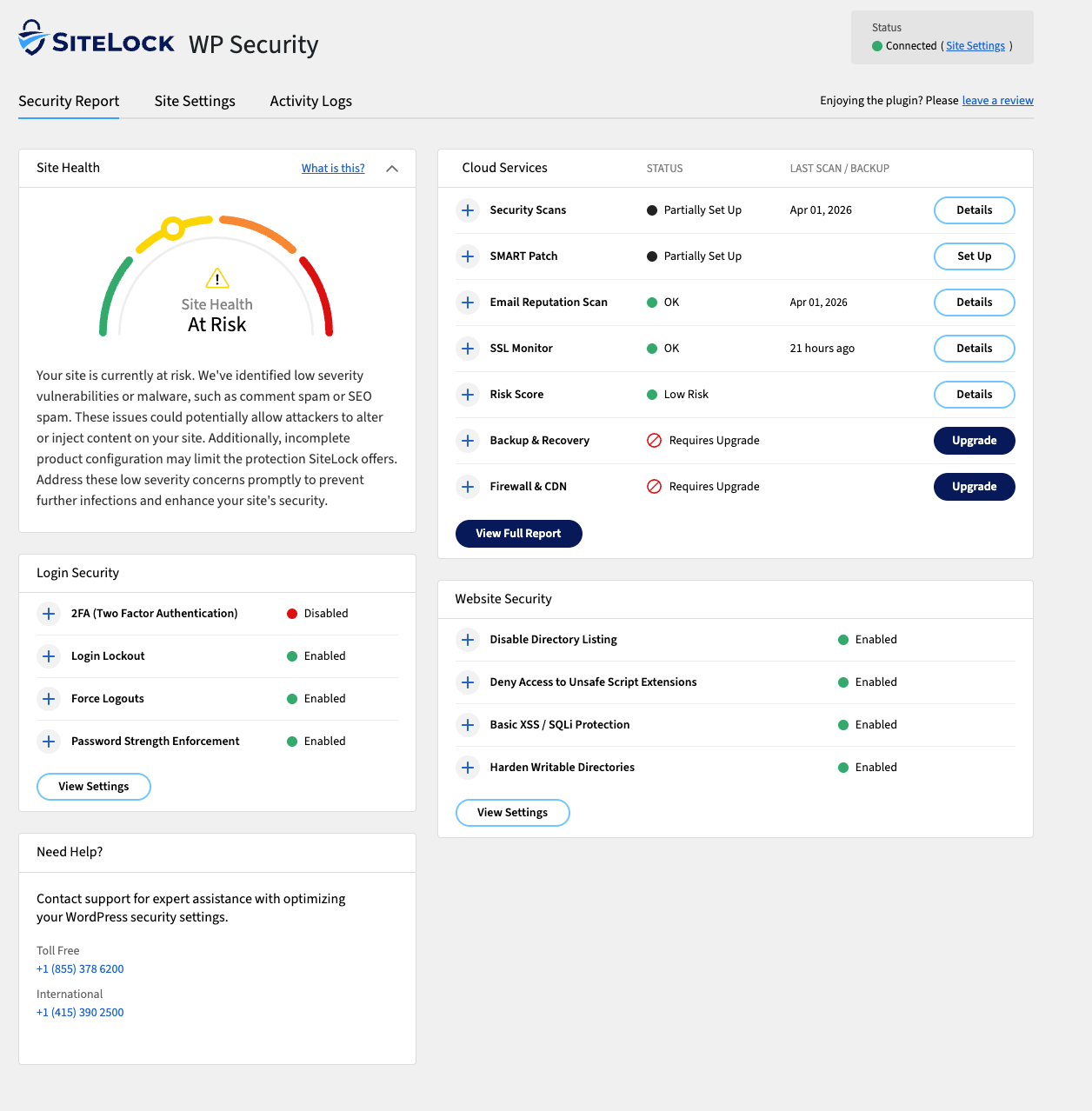
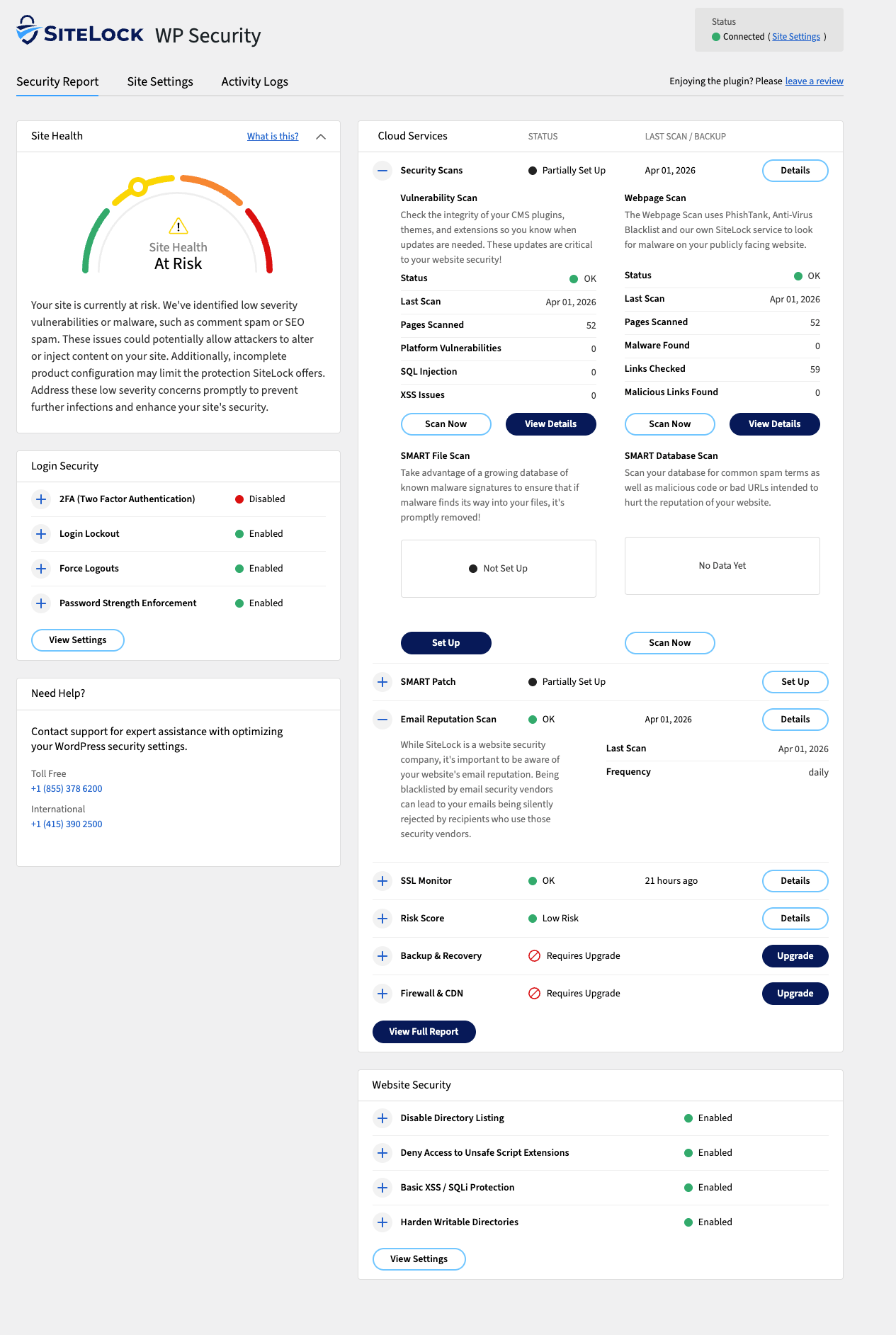
– 🩺 New Site Health interface that shows you what matters in one view
– ⚡ Streamlined controls (fewer clicks to get protected)
– ✨ Modern codebase built for the WordPress you’re actually using today
– 🔢 Two-Factor Authentication (2FA) now available for stronger login protectionIf you used the old plugin: this is a different tool. If you’re new: you’re starting with the cleanest, fastest version of the plugin.
Your website deserves protection that’s simple, fast and built for WordPress. SiteLock WordPress Security focuses on the everyday controls that matter most and helps you establish a secure baseline in minutes — WordPress-specific hardening, login protection with Two-Factor Authentication (2FA) and a clear Site Health dashboard that keeps you in control without slowing your site down. It’s lightweight, action-first protection that complements your host defenses: essential safeguards run inside WordPress while deeper checks happen securely in the SiteLock cloud. Skip heavy on-server scans and alert fatigue — run on-demand checks when you need extra assurance, so you can ship updates with confidence.
Security that grows with you
Our goal is straightforward: maintain a strong baseline with minimal overhead while giving you clear visibility and room to grow as your needs evolve.
And because security is never static, this plugin keeps pace. Two-Factor Authentication (2FA) is now available to strengthen login security with an extra layer of protection.
Commercial plugin
This plugin is free but offers additional paid commercial upgrades or support.
What’s included
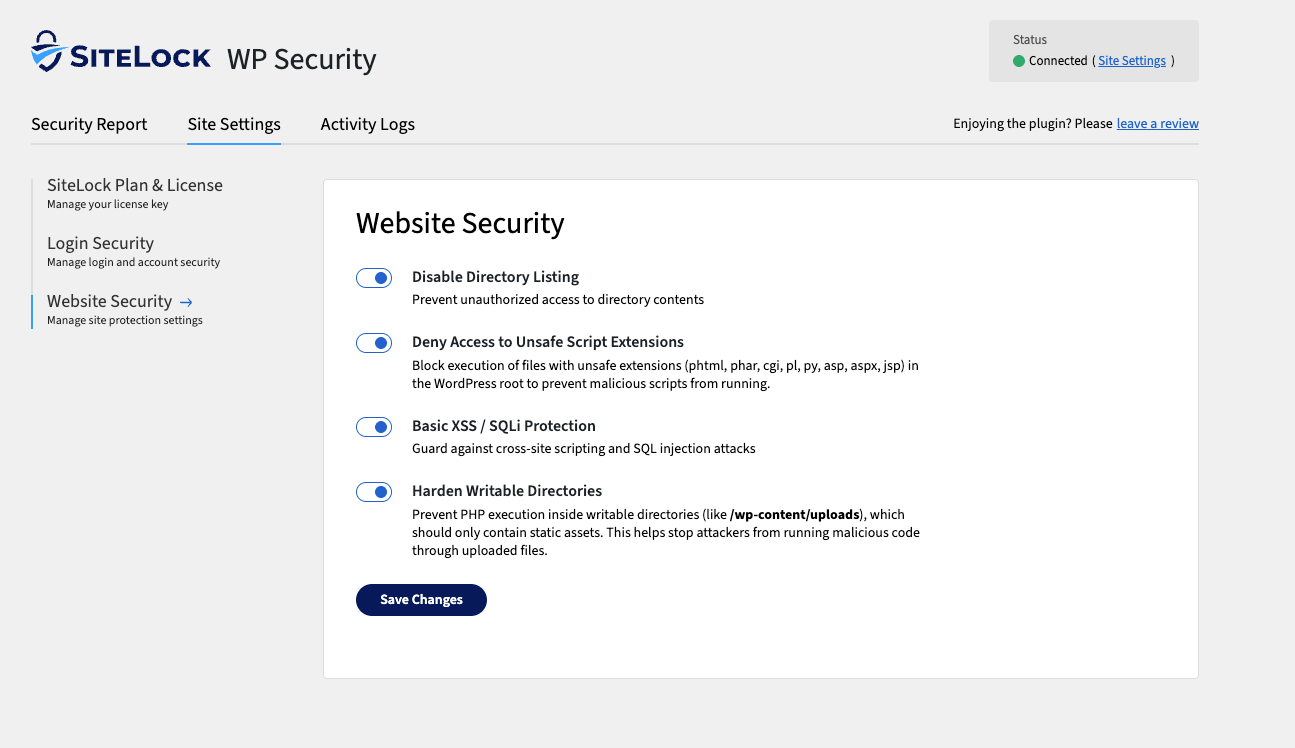
WordPress Hardening: Cut common attack paths in just a few clicks
- Disable directory listing
- Restrict PHP execution in upload folders
- Limit unsafe script types
- Force strong configuration defaults to close risky gaps
All options are toggle-based and reversible — safe to enable, easy to test and lightweight on performance.
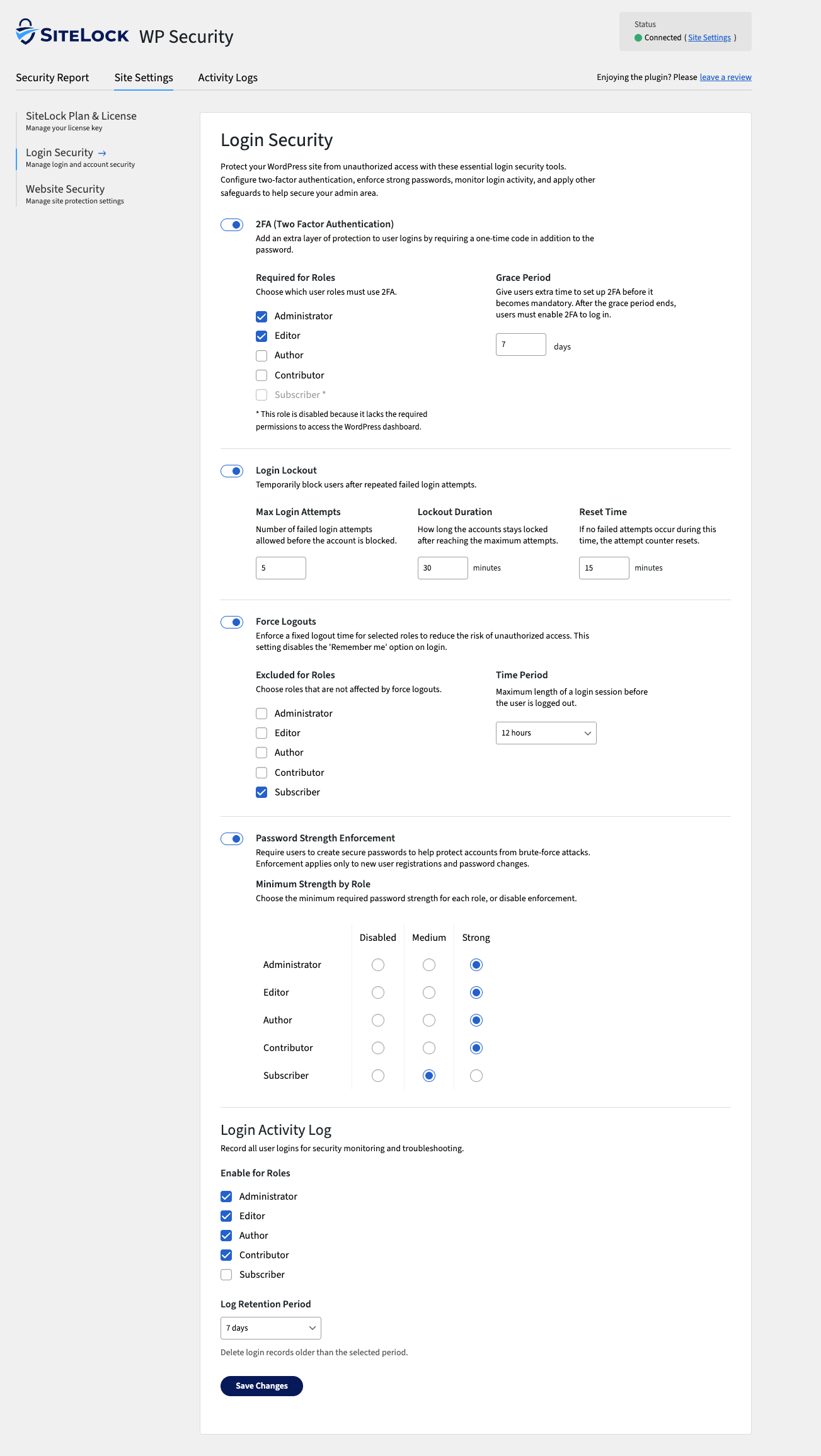
Login Security: Protect what matters most — your access
- Two-Factor Authentication (2FA): Add a second layer of verification to protect admin access
- Brute-force defense: Blocks repeated failed logins and temporarily locks abusive IPs
- Password policy prompts: Encourage stronger credentials without breaking workflows
- Session timeouts: Automatically end idle sessions to prevent account hijacks
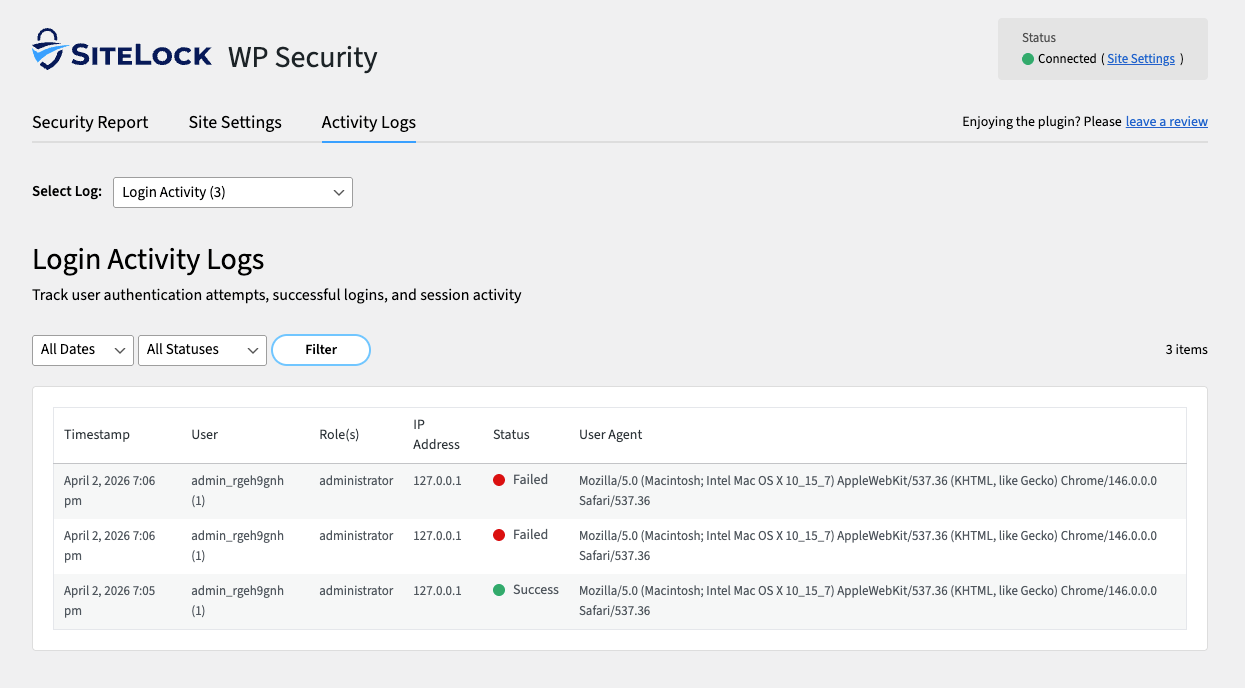
- Activity awareness: View recent logins and admin changes in the Activity Log
Site Health & Cloud Checks: Clarity without noise
- Site Health Dashboard: Surface key signals in one view — WordPress hardening status, last scan timestamp and actionable indicators
- Cloud Checks: Connect your free SiteLock account to enable recurring off-server checks (Webpage Scan, SSL Verification, Email Reputation and more)
- Scan Now: Run on-demand checks after updates or changes for instant assurance — no heavy, always-on local scanners
- Activity Log: Track what’s happening across your WordPress admin. See admin/login events at a glance making it easy to spot anomalies early and keep accountability clear
Why Choose SiteLock WordPress Security?
- Lightweight by design: All high-impact protections, no unnecessary load
- Real visibility: Know your security posture in seconds with Site Health
- Cloud-powered assurance: Checks run off-server, protecting performance
- Flexible setup: Use standalone or connect a SiteLock account for added layers
- Strong login protection: Two-Factor Authentication (2FA) alongside brute-force defense and session controls
- Trusted heritage: From the global leader in SMB website security backed by continuous innovation and research
- Aligned to WordPress: Designed to stay out of your way and keep performance priorities intact
Who It’s For
- Small businesses & startups
- Portfolio & personal brand sites
- WooCommerce shops & small e-commerce
- Agencies & website maintenance services
- Freelance developers & web designers
- Bloggers, creators & publishers
- Community & membership sites
- Nonprofits & educational sites
If you manage a WordPress website, SiteLock gives you confidence and control whether you run one site or hundreds.
Can I Fix an Already-Infected Site with This Plugin?
The plugin focuses on prevention, posture and visibility — not full malware removal. It isn’t designed to fully clean up sites that were infected before it was active.
If your site is already compromised, act quickly, we recommend:
- Restoring from a clean backup if available
- Remove malicious files manually or with professional help
- For urgent assistance, consider SiteLock 911 – Emergency Malware Removal for rapid cleanup
- For ongoing defense, consider choosing a comprehensive SiteLock plan
Don’t Know Where To Start? Try This
Here are common first moves teams take with SiteLock. Order isn’t enforced — choose what fits your site and workflow:
- Enable WordPress hardening that matches your hosting and theme setup
- Turn on Login Security controls: brute-force lockouts, session timeouts, and password-hygiene prompts
- Connect a free SiteLock account, then use Scan Now to run an on-demand check after plugin/theme updates
- Review the Activity Log after major changes to spot unexpected admin/login events quickly
Make one change at a time, validate and roll back any toggle that conflicts with your stack.
Need Help with Setup or Fixes?
- Visit Help Center – WordPress for plugin specific help
- For broader topics explore the SiteLock Help Center
Security
Protecting our customers and systems is a top priority, and we take security very seriously. If you believe you’ve found a security vulnerability in the SiteLock WordPress plugin, please let us know at vuln-reporting@sitelock.com before sharing any details publicly.
Installation
Getting Started
- In Plugins → Add New, search “SiteLock Security”, then Install and Activate
- Open SiteLock from the left menu
- Choose your setup path:
a. Use free baseline protections (no account required) or
b. Connect your SiteLock account (or create one) to enable cloud checks and add broader protections (optional) - Toggle the WordPress hardening and login protections that fit your site
- After you’ve connected a SiteLock account (free tier supported), Scan Now runs an on-demand check and recurring scans run by default to keep your site monitored at all times
Frequently asked questions
Will this slow my site?
No, the plugin is designed to be lightweight. SiteLock security scans run in the SiteLock cloud, so both recurring scans and on-demand checks are processed off-site, keeping the resource impact on your WordPress site minimal. Locally, the plugin applies optional website hardening and login hygiene. These actions are event-driven with negligible impact on typical page loads. Bottom line: cloud-powered scanning plus low-overhead local controls deliver ongoing monitoring with minimal footprint in WordPress.
Does this plugin run constant background scans?
No. The plugin focuses on low-impact protections and on-demand checks you control.
Where do I see results inside WordPress?
The Site Health view shows status at-a-glance. The Cloud Services panel shows your latest cloud scan status and findings. For full history, use your SiteLock dashboard.
Can I use the plugin without a SiteLock account?
Yes, you can use the free plugin features without an account. Core hardening and login security work out of the box. Connect a free SiteLock account to unlock Site Health, Scan Now and recurring Cloud Checks. Paid SiteLock plans add deeper malware and vulnerability scans.
What happens if I disconnect my SiteLock account?
Local protections continue to work. Cloud scans, if configured, will continue to operate but data will not be pulled into the plugin unless they’re connected with a license key.
What’s included in the free SiteLock tier vs paid?
The free plugin includes WordPress Hardening and Login Security. Connect a free SiteLock account to unlock the Site Health view, enable recurring Email Reputation Scan, SSL Monitoring, Webpage and Vulnerability scans + Scan Now on-demand checks. Paid plans add SMART File and SMART Database scans.
Can I safely disable features?
Yes. Every hardening toggle is reversible — disable and retest anytime.
Does this replace my firewall or CDN?
No. This plugin sets your on-site baseline. For active blocking and performance protection, connect a full SiteLock plan to enable the SiteLock Firewall (WAF) and CDN.
What about Two-Factor Authentication (2FA)?
Enhanced protection is here — Two-Factor Authentication (2FA) is now available. It adds an extra verification step on top of our existing login protections and works with authenticator apps like Google Authenticator and Microsoft Authenticator.
Will 2FA be required or optional?
For security, 2FA is required for all accounts. Users have a 7-day enrollment window to complete setup.
What changes does this plugin make that could affect my site?
Nothing changes until you enable a setting. Login features don’t alter your theme or content. Some hardening options intentionally tighten execution rules and may impact edge cases, for example: – Deny Access to Unsafe Script Extensions: blocks execution of unexpected script types (phtml, phar, cgi, pl, py, asp, aspx, jsp). If your site needs one of these, don’t enable this toggle. – Harden Writable Directories: blocks PHP execution in /wp-content/uploads. Plugins/themes that execute PHP there may stop working. Best practice: enable settings gradually, test and revert any toggle that…
What is the Site Health view?
It’s a simple, low-impact status view of key checks.
What is “Scan Now”?
An on-demand check for key items — useful after you update plugins/themes or change configuration. It does not perform heavy on-server scans.
Changelog
5.1.2
Release Date June 16, 2026
- Perf: Faster admin dashboard and backend operations
- Fix: Enhanced login lockout experience with clearer status messaging
- Fix: Improved reliability when saving connection and security settings
5.1.1
Release Date April 7, 2026
- Feature: New SiteLock branding
5.1.0
Release Date February 19, 2026
- Feature: Added new Two-Factor Authentication (2FA) functionality to improve login security
- Fix: Improved license key validation flow
- Fix: Improved WordPress hardening handling to prevent .htaccess update issues
- Fix: Improved report data freshness, including last scan and next scheduled scan date handling
- Fix: Minor UI improvements
- Perf: Reduce database queries and standardize admin enqueue logic
5.0.3
Release Date February 11, 2026
- Security: Improved admin permission checks for restricted functions
5.0.2
Release Date December 12, 2025
- Feature: Queue new cloud scans directly from plugin
- Fix: Support license key activation on subdirectory installs
- Fix: Minor admin UI improvements
- Fix: Improve admin load times
5.0.1
Release Date November 10, 2025
- Security updates.
Screenshots
For developers
Is this your plugin? Show off the numbers.
Add a live badge to your site, docs or GitHub README. It updates on its own — no account needed.
Best SiteLock Security alternatives
All login security plugins →





FAQ
SiteLock Security: quick answers
Straight answers, pulled from live WordPress.org data.
Live data from WordPress.org · checked Oct 7, 2026
Is SiteLock Security free?
Yes. SiteLock Security is free to download and use from the official WordPress.org plugin directory.
Is SiteLock Security safe to use in 2026?
SiteLock Security works, but test it on a staging site before relying on it in 2026. It runs on 1K+ sites, is rated 3.4/5 and was last updated 4 months ago, and scores 61/100 on our health check.
How many websites use SiteLock Security?
SiteLock Security is active on 1K+ WordPress websites and has been downloaded 54,523 times since it launched in May 2013. It was downloaded 535 times in the last 30 days.
Does SiteLock Security work with WordPress 7.1?
SiteLock Security is officially tested up to WordPress 7.0.7, while the latest release is 7.1.3. It may still work, but try it on a staging site first.
What PHP version does SiteLock Security need?
SiteLock Security requires PHP 8.0 or higher. Most hosts run PHP 8.x today, so it works on any modern WordPress hosting.
When was SiteLock Security last updated?
The latest version, 5.1.2, was released on June 23, 2026 (4 months ago).
Who makes SiteLock Security?
SiteLock Security is developed and maintained by SiteLock.
What are the best alternatives to SiteLock Security?
The most popular alternatives to SiteLock Security are Limit Login Attempts Securi… (1M+ installs), All-In-One Security (AIOS) (1M+ installs) and Defender Security (80K+ installs).
Powered by PageForge
Want thousands of pages that rank like these? Build them in an afternoon.
This directory runs on the same engine as PageForge. Turn any spreadsheet, CSV or API into thousands of fast, SEO-ready WordPress pages — with schema, internal links and AI-written copy baked in.
- CSV, Google Sheets & API data sources
- AI content, schema & internal links per page
- Works with Elementor, Gutenberg, Yoast & Rank Math
- Free on WordPress.org — no credit card


